roc-ansi lets a Roc program colour and style what it prints, move the cursor, read key presses and draw simple tables, by writing the ANSI escape sequences a terminal understands for you.
1. What roc-ansi is§
A terminal changes colour, moves its cursor and reports key presses through
short byte sequences called ANSI escape codes. They are easy to get wrong and
unpleasant to read: \u(001b)[38;5;208m means "orange text". roc-ansi is a Roc
package that gives each of them a typed name, so a program says
ANSI.color("hello", { fg: C256(208), bg: Default }) and gets the right bytes.
It is a pure Roc package. It has no platform of its own and works wherever Roc does, with any platform that can write to a terminal.
1.1. What it covers§
| Module | What it is for |
|---|---|
ANSI | The entry point: colour and style text, turn any escape into a string, parse raw key presses, and draw to a screen buffer |
Color, C16, C256, Rgb | The four ways to name a colour: the terminal default, the 16 named colours, the 256-colour palette, and 24-bit RGB |
Style | Bold, faint, italic, underline, strikethrough and inverted text |
Control | Cursor movement, clearing the screen or a line, and scrolling |
Layout, Spacing | Bordered grids and tables, padding and margins |
PieceTable | A piece table, the structure a text editor keeps its buffer in |
1.2. What it looks like§

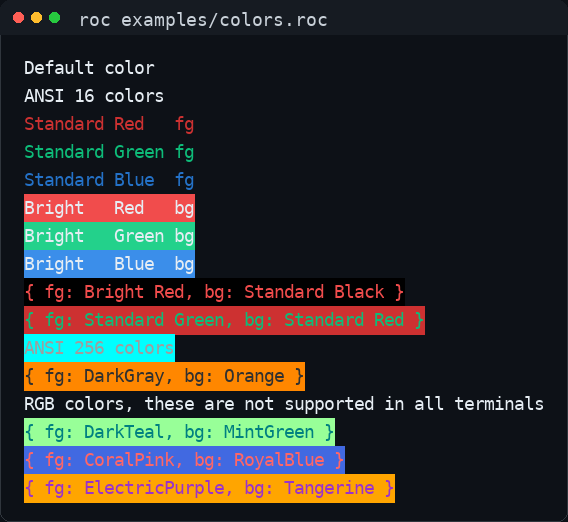
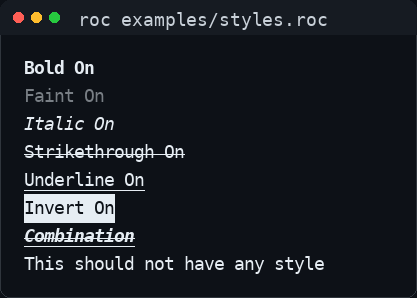
Each picture is the output of one of the programs in Learn from the examples.
1.3. What it does not do§
It does not put the terminal into raw mode or read from standard input. Your platform does that; roc-ansi parses the bytes it hands you.
It does not detect what a terminal supports. A program that must work everywhere should keep to the 16 named colours.
1.4. Compatibility§
Roc has no stable release yet, so a roc-ansi release is built and tested with one nightly compiler, named in its release notes. The latest release is tested against the latest nightly every day, and a failure is fixed by a patch release. Use the latest release with a current nightly.
1.5. Where to ask and report§
Bugs and requests: GitHub issues.
Vulnerabilities: privately, as described in SECURITY.md.
roc-ansi is open source under the Universal Permissive License 1.0.
2. Get started§
This chapter takes you from nothing to a program that prints coloured text. You
need a current Roc nightly
installed as roc.
2.1. Add the package§
A Roc application names its packages in its header, each by the URL of a
release. Save this as hello.roc:
app [main!] {
	ansi: "https://github.com/lukewilliamboswell/roc-ansi/releases/download/0.13.4/BioPdu7WjVhTB2j1HaomKMi8htxsuwqwr79GbXY5nAUf.tar.zst",
}

import ansi.ANSI

main! = |_args| {
	echo!(ANSI.color("hello", { fg: Standard(Green), bg: Default }))
	Ok({})
}
For release 0.13.4:
Examples, each depending on this release
The URL ends in a hash of the package’s contents. Roc checks what it downloads against that hash, so the URL can only ever mean one thing.
2.2. Run it§
roc hello.roc
The word hello is printed in green. ANSI.color wrapped it in the escape
codes that switch the colour on, and a reset that switches it off again.
2.3. Where to go next§
Learn from the examples has a short program for each part of the package.
The API reference linked above lists every function of every module.
2.4. API reference for every version§
Each release keeps its own API reference, so the pages for the version you depend on never change under you.
3. Verify the source bundle§
The release workflow generates supply-chain evidence for the exact Roc source bundle it publishes. Releases before 0.13.3 do not carry this evidence. Keep the bundle and its evidence together when admitting roc-ansi into your own build.
3.1. What the evidence covers§
From 0.13.4, each source bundle has these sidecars:
<bundle>.spdx.json: SPDX 3.0.1.<bundle>.spdx-2.3.json: SPDX 2.3 for compatibility with existing consumers.<bundle>.cdx.json: CycloneDX 1.7, from the same inventory.<bundle>.sbom-manifest.json: Blueprint’s manifest binding the SPDX 3.0.1 and CycloneDX sidecars to subject bytes and inventory.
GitHub stores build-provenance attestations for the tested release files,
including these sidecars. The shared release workflow signs them; the source
is this repository’s main at the release commit. The inventory, archive-member
list, evidence envelope and .sigstore.json bundles are not release assets.
The source inventory is independent of a CPU target. It covers the shipped
first-party modules and their declared UPL-1.0 license. Archive membership and
bytes are checked against the committed package source. Every bundled module
carries the copyright and license notice; the release also supplies LICENSE.
The recipe verifies that Roc reports no external package dependencies and
refuses that claim if the dependency closure changes.
The compiler is a build dependency, identified by its version and actual executable SHA-256. Its native dependency closure is explicitly incomplete; this source inventory does not establish a complete compiler/toolchain inventory or the composition of an executable compiled downstream. The examples, API archive and PDF are separate deliverables with their own provenance; this source SBOM does not describe their contents.
3.2. Verify a release before using it§
Select the bundle filename from the GitHub release. Its Roc content-hash name and its SHA-256 are different identities: use the SHA-256 in the SBOM to check the delivered archive bytes. The shared workflow revision below is the one reviewed for 0.13.4; review a later release’s workflow pin before changing it.
repo=lukewilliamboswell/roc-ansi
version=0.13.4
bundle='<bundle filename from the release>'
commit=$(gh api "repos/$repo/commits/$version" --jq .sha)
automation=2f8bd90acbfba5b1e6e8a50a0ba3c29a7816f25d
signer=lukewilliamboswell/roc-automation/.github/workflows/release-package.yml

gh release download "$version" --repo "$repo" \
  --pattern "$bundle" --pattern "$bundle.spdx-2.3.json" \
  --pattern "$bundle.sbom-manifest.json" \
  --pattern "$bundle.spdx.json" --pattern "$bundle.cdx.json"

for asset in "$bundle" "$bundle.spdx-2.3.json" \
  "$bundle.sbom-manifest.json" "$bundle.spdx.json" "$bundle.cdx.json"; do
  gh attestation verify "$asset" --repo "$repo" \
    --signer-workflow "$signer" --signer-digest "$automation" \
    --source-ref refs/heads/main --source-digest "$commit" \
    --deny-self-hosted-runners || exit 1
done

expected=$(jq -r '.packages[] | select(.SPDXID == "SPDXRef-Subject") | .checksums[] | select(.algorithm == "SHA256") | .checksumValue' "$bundle.spdx-2.3.json")
actual=$(shasum -a 256 "$bundle" | cut -d ' ' -f 1)
test "$actual" = "$expected"
Read the coverage statements as well as verifying signatures. Keep your own admitted copy, expected signer policy and verification results. A signature binds the bytes to the producer; the declared source coverage still needs review.
3.3. Chain into your own inventory§
Preserve roc-ansi’s immutable source location, release version, bundle SHA-256, license and upstream document identity. Import the verified supplier graph, including its coverage gaps. Pin the consumed file by SHA-256 and bind the supplier SBOM to that exact artifact; checking only the SBOM’s own checksum does not bind it to a package. Keep build-only dependencies distinct from included code and from dependencies fetched later.
Blueprint 0.8 accepts a source supplier into source and native inventories,
while preserving its source identity and checking exact supplier hashes and
versions. Native architecture compatibility checks remain strict. The regression
fixture in tests/supply-chain/blueprint-source-import/ covers source-to-source,
source-to-Linux-x86_64 and source-to-Linux-arm64 admission, plus integrity refusals.
Keep source archives as build inputs and describe the resulting executable’s
included code/assets and native closure separately.
4. Learn from the examples§
Each example is a short, complete program that shows one thing, with comments that walk through it. Read them top to bottom, or copy one as a starting point.
| Example | What it shows |
|---|---|
animals.roc | Colouring a few words inside a sentence with ANSI.color |
colors.roc | Every way of naming a colour, from the most portable to the least |
styles.roc | Bold, faint, italic and the other text styles, and how to switch them off |
menu.roc | Combining colours and styles to draw a menu with one highlighted entry |
piece-table.roc | Editing text with a piece table |
4.1. Which copy to use§
The examples exist in two places, and they are not the same.
- The examples for a release
Each release attaches an archive,
roc-ansi-examples-<version>.zip, linked from Add the package. Its examples depend on that release’s package URL and never change. Use these to start a project.- The examples in the repository
These depend on the package beside them,
ansi: "../package/main.roc", so they always match the unreleased code onmain. They may use something no release has yet. Use these when you are changing roc-ansi.
4.2. What the output looks like§
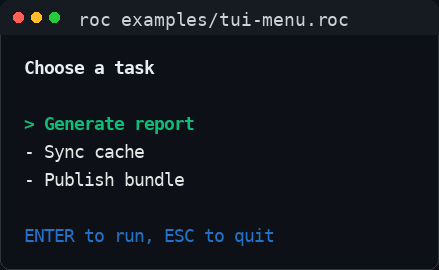
menu.roc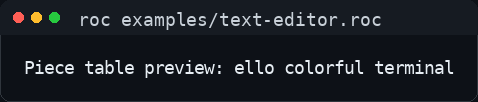
piece-table.rocThe archive also holds spec.json, which records exactly what each example
printed when the release was made.
5. Contribute§
This chapter is for someone changing roc-ansi: what to install, how to run the checks a pull request must pass, and where each kind of test lives.
Use issues for bugs and design discussion, and pull requests for changes. Say what behaviour changes and how you checked it. A bug fix or a new behaviour comes with a test.
5.1. Set up§
You need three things:
The
blueprintcommand from roc-blueprint, at the release named by the platform URL at the top ofBlueprint.roc. Download the binary for your system from that release and check it against the release’sblueprint.sha256, make it executable and put it onPATH.A current Roc nightly on your
PATHasroc.The host tools listed in
ExpectinBlueprint.roc:chmod,gh,git,gzip,realpath,sh,shasum,tar,test,touch,unzipandzip.
Nix is not needed. The file and archive tools supplied by Linux and macOS
work; GNU coreutils is not required. Install GitHub CLI (gh) separately.
Blueprint downloads the pinned tooling compiler and its Roc packages on first
use. Run blueprint update after changing its declarations, and commit the
lock file. A checkout already has the lock it needs.
5.2. Two compilers§
| Command | Chosen by | Used for |
|---|---|---|
roc | You: the latest nightly | Checking, testing, bundling and running the package and its examples |
roc-stable | The release named in Blueprint.roc | Running the scripts under scripts/ |
The package is always tested with the newest compiler, because that is what its
users install. roc-stable exists so the repository’s own tooling keeps
working on the day a nightly breaks something. It never checks or builds the
package, and it only exists inside blueprint run and blueprint shell.
Nothing pins a compiler for the package or the examples. Each script names
roc-stable’s release in its roc header field, so that running one with a
different compiler says why it misbehaves.
The released SBOM utility is a checksum-locked native executable from Blueprint
0.8.0. blueprint run prepare-sbom checks the source and prepares reviewed
composition. The release workflow uses the shared sbom-sidecars action to
generate and check the sidecars; blueprint run sbom-tool exposes the native
tool for local inspection. Blueprint embeds its configuration compiler.
5.3. Run the checks§
blueprint run check      # everything a pull request must pass
blueprint shell          # or enter the environment and run scripts directly
blueprint tasks          # list every task
blueprint run check runs scripts/check_all.roc, which:
Fails if a compiler pin appears outside
scripts/, or a script’s pin differs fromBlueprint.roc.Tests, checks and formats the scripts with
roc-stable.Formats, checks and tests the package with
roc.Builds each fuzz target and replays its committed corpus.
Counts allocations and compares them with
tests/allocations.json.Builds the API documentation site.
The examples, the bundle and the archives are checked by the shared release
workflow that release.yml calls, on every pull request: it runs every example
against the working tree and compares its output with tests/spec.json, then
bundles the package, builds the examples archive and runs the archived
examples, unchanged, against that bundle.
A pull request can fail because a new nightly arrived, with no fault in the
change. Compare with the latest run of the nightly workflow and with main
before treating a failure as yours.
5.4. Where tests live§
| Kind | Where | How to add one |
|---|---|---|
| Unit tests | expect beside the code in package/ | Write an expect in the module. roc test package/main.roc runs them all. |
| Example output | tests/spec.json | Add a case to the example’s entry, then record its output; see Change an example. |
| Properties | fuzz/<name>/main.roc | A roc-fuzz target with a small corpus/; see Search for inputs nobody thought of. |
| Allocations | tests/allocations.json | Add a case and its ceiling; see Keep allocations from creeping up. |
| Script logic | expect in the modules under scripts/src/ | Keep effects out of the module, and add it to the list in check_scripts!. |
5.5. Change an example§
An example’s exact output is recorded, so a change to what it prints must be recorded too:
blueprint run release-package -- test-examples --update
This rewrites tests/spec.json from what the examples print now. Review the diff
like any other change. An example that cannot run for a reason outside
this repository is skipped in the specification with a reason and an issue
link; a skip without both is rejected.
Examples are for users of the package. Keep each one short, about one thing,
and commented for someone reading it with no other context. A test belongs in
package/ or tests/, not in examples/.
5.6. Search for inputs nobody thought of§
fuzz/piece-table states a rule that must hold for every document and index,
and roc-fuzz searches for an
input that breaks it. Every pull request only builds the target and replays its
committed corpus. To search:
roc build --fuzz fuzz/piece-table/main.roc --output=piece-table
./piece-table run fuzz/piece-table/corpus --time=60
When it finds a failure, fix the bug and keep the minimised input as an
ordinary expect in the package.
5.7. Keep allocations from creeping up§
A change can make an in-place update copy a whole list on every call, and
every test still passes. tests/allocations.json records the most allocations
each listed case may make, and the check fails above that.
A count below its ceiling passes, and the check says what to lower the ceiling to. Lower it in the same pull request, so the gain cannot be lost.
Raising a ceiling needs a reason in the pull request. It is not a way to make a red build green.
The counts come from tests/allocations/main.roc, built on the roc-fuzz
platform because its host counts allocations. Nothing is fuzzed there.
5.8. Build this manual§
The manual is the AsciiDoc under docs/, one chapter per file, rendered by the
shared build-docs
action. Every pull request builds it, and the site can be downloaded from the
Documentation workflow run. Blueprint provisions the locked native renderer
named in Blueprint.roc; no container or sibling checkout is needed:
blueprint run install-snippet
blueprint run docs -- --docs-version main
blueprint run serve
The first command writes the parts of the manual that depend on what has been
released into docs/generated/, which needs gh to be authenticated. The
second renders HTML and chapter Markdown into .docs-out/site, and the PDF
into .docs-out/roc-ansi.pdf. The last adds the
API reference for main and serves the site on a free port, or the one named
by SITE_PORT; with FETCH_RELEASE_DOCS=1 it also restores the API reference
of every release.
5.9. Write documentation§
Write for a current user or contributor task. Remove superseded explanations and keep release changes with their release. Follow the shared documentation guidance.
6. Maintain and release§
This chapter is for a maintainer: what each workflow shows, how the tooling is updated, and how a release is made. The repository follows the roc-automation manual, which gives the reasons behind each practice.
6.1. What each workflow shows§
| Workflow | Runs on | What it shows |
|---|---|---|
release.yml | Manual dispatch; pull requests as a dry run | The working tree passes blueprint run check and its examples on the latest nightly, and the exact bundle, examples archive, documentation and SBOM sidecars proposed for publication work |
nightly.yml | Daily | The latest release’s examples archive still works on the latest nightly |
docs.yml | Pull requests, pushes to main, published releases | The manual and site build; main and a final release deploy them |
release.yml is a thin caller of roc-automation’s shared
release workflow
at a full commit SHA. The shared workflow owns the jobs; this repository owns
its package, examples, tests/spec.json, notes and the Blueprint tasks the
workflow calls: check, prepare-sbom, install-snippet and docs-path.
The required status checks are Release / Build and test the source and
Release / Test the release candidate.
The package is pure Roc, so CI uses Linux without Nix. The local setup action
pins the reviewed roc-automation revision and selects Blueprint 0.8.0 from the platform
URL. The shared installer verifies and caches the CLI by release, system and
executable digest. Blueprint embeds its configuration compiler; the separate
roc-stable script compiler remains pinned, and the package nightly floats.
Downloaded utilities and compiler archives use Blueprint’s verified artifact cache, keyed by workflow, job, Blueprint release and lock. Extracted trees are recreated and verified, while Roc package sources have a separate cache. A cold job downloads the locked utilities; a warm job restores and verifies them. Changing the lock invalidates the corresponding cache key. The floating nightly may still need a fresh download when its version changes.
SBOM generation uses the shared sbom-sidecars action. The prepare-sbom
task checks the bundle against the committed source and writes the reviewed
composition; the shared action owns native generation and binding. The local
sbom-tool helper is provisioned through Blueprint’s artifact cache.
The documentation jobs use blueprint-tool to resolve docs-path to the
verified renderer in the store. CI reports executable digest and bytes,
provisioning duration, native rendering time and peak RSS, output file sizes,
and separate preparation and API generation timings. Rendering uses a
precompiled Roc binary rather than an Asciidoctor Docker image. The site’s HTML,
PDF, Markdown and llms.txt come from the same AsciiDoc sources.
nightly.yml delegates to roc-automation’s pinned published-release workflow
on one Linux runner, without Blueprint or Nix prerequisites. Release 0.13.3 is
the first archive with the canonical examples specification required by this
runner. schema_version identifies the JSON format; examples have no separate
version and are captured with the package release. Earlier archives remain
immutable and cannot be tested by this runner.
The shared runner verifies the release asset’s identity, validates its declared bundle dependencies, and preserves stdout and stderr from successful compiler commands. Only complete evidence from every declared runner establishes a compatibility pass. Setup failures, timeouts and missing results cannot close the tracking issue. The shared workflow serializes runs and isolates issue write permissions from example execution.
Dispatch nightly.yml with nightly-tag, release-tag, or both to reproduce a
specific final release/compiler pair. Empty inputs resolve the latest pair.
Exact overrides are diagnostic runs and do not update the tracking issue.
The shared workflow runs only from the default branch; dispatching a PR branch
is not a compatibility test. Inspect selection, per-target diagnostics and the
aggregate result artifacts on the completed run.
6.2. Update the tooling§
Nothing updates the tooling automatically. Each of these is a pull request.
- Refresh the lock
Run
blueprint updateand commitBlueprint.lock.- Change the tooling compiler
Change the tag in
Fetch("roc-stable", Recipes.roc_nightly(...))inBlueprint.rocand therocfield of every script to the same nightly. The check fails until they agree. Runblueprint update roc-stableand fix any script the new compiler breaks.- Upgrade Blueprint
Change the platform URL at the top of
Blueprint.roc, and the pinned shared setup action in.github/actions/setup-blueprint/action.yml. Use a shared revision that records that release’s checksums, or supply reviewedsha256-*overrides in the local action when adopting a release ahead of its registry. Remove overrides when the shared registry covers the release. Runblueprint updateand reviewblueprint lock show --json(format 2) as well as the lock diff.- Update a script dependency
Change its URL in every script header and under
RocPackagesinBlueprint.roc. Task-only Roc bundles are content-addressed and are not recorded in the lock.
6.3. Make a release§
Choose the version.
roc bumpcompares the package with the latest release and says how far the version must move:roc bump --old <latest release bundle URL> package/main.rocWrite the notes in
docs/releases/<version>.adoc, add them to the top ofdocs/releases.adoc, and merge that pull request. Write them for someone deciding whether and how to upgrade. Use{package-url}wherever the release’s bundle URL belongs.Dispatch the Release workflow from
mainwith that version.
The workflow then:
Runs
blueprint run check, then rejects a version that already exists, one with no notes, and one thatroc bump --expectsays understates the change.Runs the examples against the working tree and compares them with
tests/spec.json.Builds the bundle, the examples archive, the documentation archive, the SBOM sidecars and this manual as a PDF, and renders the notes with the real bundle URL and the
rocit used. That record replaces a header pin as the statement of what the release was built and tested with.Tests the examples archive, unchanged, against the bundle, in a job that has no copy of this repository.
Publishes. A separate job, which checks out nothing from this repository and runs none of its code, attests the tested files, creates a draft release at the tested commit, uploads every asset, downloads each back and compares it with the tested file, and only then publishes.
The caller dispatches
docs.ymlfrommainto rebuild and deploy the site, unless the version is a release candidate. An explicit dispatch is needed because a release created withGITHUB_TOKENdoes not trigger workflows.
A release holds:
| Asset | Purpose |
|---|---|
<hash>.tar.zst | The bundle users depend on. Its name is its content hash. |
roc-ansi-examples-<version>.zip | The examples, depending on this bundle, with the output they printed |
roc-ansi-docs-<version>.zip | The API reference for this version, which the site restores |
roc-ansi-<version>.pdf | This manual |
| Bundle SBOM sidecars | Files beside <hash>.tar.zst, with suffixes .spdx.json, .spdx-2.3.json, .cdx.json and .sbom-manifest.json: SPDX 3.0.1/2.3 and CycloneDX 1.7, with the manifest that binds them to the bundle |
LICENSE | Copyright and UPL-1.0 terms, also referenced inside each source module |
Build provenance for every asset is an attestation GitHub stores for the
repository, not a release asset: gh attestation verify <file> --repo lukewilliamboswell/roc-ansi checks a downloaded file against it.
A published release is never changed: if one is wrong, publish a new version.
On a pull request the workflow builds and tests the same things under the
version 0.0.1-dryrun, renders the newest notes, and publishes nothing.
A release candidate, such as 0.14.0-rc1, goes through the same workflow. It
is marked as a prerelease, is never the latest release, and needs its own
notes file.
6.4. How the site is put together§
The site is this manual, rendered by the shared build-docs action, with the
API reference added beside it by blueprint run site:
main/holds fresh API documentation for the working tree.Each release’s API documentation sits under its version, such as
0.13.1/, restored from the archive that release attached. Its address keeps working without its HTML being stored in Git, and generated documentation is never committed.
The manual leads with the latest release: its first program, its API reference
and its examples archive. Those parts are written by
blueprint run install-snippet before the manual is rendered, because a bundle
URL holds a hash nobody can write by hand.
docs.yml builds the site on every pull request and deploys it from main
and after a final release is published, since a release changes which one is
the latest.
7. Release notes§
Choose a published release for its package URL, compiler requirement, examples and upgrade instructions. Release assets are immutable; adopt a newer release to obtain a fix.