Every package and platform repository has the same three workflows. Each answers one question, and none of them changes the repository.
| Workflow | Trigger | What it proves | Token access |
|---|---|---|---|
ci.yml | Pull request; push to the default branch | Scripts pass on roc-stable. The working tree and its examples pass on the latest nightly. A platform’s committed host bindings match that nightly. A Roc package has no ci.yml: its release dry run proves the same things. | contents: read |
release.yml | Manual dispatch; pull request as a dry run | The exact bundle, examples archive and documentation proposed for publication work. A Roc package’s release.yml is a thin caller of the shared release-package.yml. | contents: read. The publish job alone has contents: write, behind a protected environment. |
nightly.yml | Daily schedule; manual dispatch | The latest published release and its examples archive work with the latest nightly. | Test jobs contents: read; the report job issues: write |
Rules that hold in all three:
Every
uses:reference is a full commit SHA.Top-level
permissionsis{}, and each job states what it needs.Checkout sets
persist-credentials: false.A job that runs repository code has no write access. A job with write access runs no repository code.
The nightly tag is resolved once, in the first job, and passed to every other job as the
nightly-taginput ofroc-lang/setup-roc. Matrix jobs never each resolve "latest" for themselves, or one run could test several compilers.Each job calls a
blueprint run <task>and holds no logic of its own.
Workflows beyond these three, such as a documentation site or scheduled fuzzing, are described in Optional workflows.
Risks and controls for release evidence§
A workflow can publish a different source revision or rebuild assets after testing, and a retry can combine files from unrelated attempts. Preserve source and artifact identity across the release. Build and test the selected commit, pass exact files through the run, and let a separately authorized publisher verify the inventory and downloaded asset hashes. Interrupted-publication rules refuse ambiguous replacement. Exercise dry runs and publisher failure transitions. These controls bind the delivered bytes to the selected evidence; they do not prove an independently reproducible build or the trustworthiness of a compiler.
Continuous integration§
ci.yml tests the working tree.
Set up Blueprint and install the latest nightly, as in Use the environment in CI.
Run
blueprint run check.
What runs on every pull request
lists what the check task covers.
Keep routine CI and release dry runs fast: benchmark and fuzz programs build and run their explicit smoke mode, with at most one second of workload execution per target. Compilation has its own budget. Sustained searches and measured benchmarks run only in schedule/manual jobs with explicit event guards; see Heavy runs stay out of pull-request CI.
A Roc package has no ci.yml. The
shared release workflow
runs blueprint run check and the examples on every pull request as part of
its dry run, and its two job names are the required status checks.
A repository whose code can behave differently by target runs it as a matrix, one job per runner, and ends with a single aggregate job that requires every matrix job to have succeeded. The aggregate job’s name is the required status check, so the ruleset does not need editing when the matrix changes.
A platform adds the host-bindings check described in Host bindings. It runs here and nowhere else.
A pull request can fail because a new nightly arrived, with no fault in the
change itself. Compare with the latest nightly.yml run and with the default
branch before treating a failure as a regression in the pull request.
Release§
release.yml builds what a release would contain, tests those exact bytes, and
publishes them once. A maintainer dispatches it from the default branch with a
version. A pull request runs the same build and tests as a dry run and publishes
nothing.
The shared release workflow for a Roc package§
A Roc package keeps no release logic of its own. Its release.yml calls
roc-automation’s .github/workflows/release-package.yml at a full commit SHA:
name: Release

# A pull request builds and tests the release under a version that is never
# published. Dispatch from the default branch with a version to publish it.
on:
  pull_request:
  workflow_dispatch:
    inputs:
      version:
        description: Version to publish, such as 0.1.0 or 0.1.0-rc1; empty runs the dry run
        type: string
        default: ''
      nightly-tag:
        description: Exact Roc nightly for a diagnostic run; empty resolves the latest
        type: string
        default: ''

permissions: {}

jobs:
  Release:
    permissions:
      contents: write
      id-token: write
      attestations: write
    uses: lukewilliamboswell/roc-automation/.github/workflows/release-package.yml@8f73710f90f942f3097821b189bbf341d305cd55
    with:
      version: ${{ inputs.version || '' }}
      nightly-tag: ${{ inputs.nightly-tag || '' }}
      check-task: check-package
The optional numeric build-timeout-minutes input defaults to 30 and accepts
integers from 1 to 360. Set it high enough for the full configured checks and
release assembly, for example 75 for a large parser conformance suite. The
request guard rejects invalid values before candidate execution. A timeout or
failed build prevents testing and publication; raising the limit changes no
checks or token permissions.
The shared workflow runs three jobs. Build and test the source resolves the
latest nightly once, runs the package’s check task, checks version
sufficiency against the latest release, runs the working-tree examples, and
builds the bundle, the examples archive, the API documentation archive and the
notes. Test the release candidate checks out no package source: it downloads
those exact files and runs the archived examples against the bundle over a
loopback address. Publish the release runs only for a dispatched version on
the default branch, in the release environment; it attests the tested files
and hands them to actions/publish-release.
The bundles, the archives, the notes and both example runs are one utility,
release-package, a static executable from
a roc-automation tools release that the repository’s Blueprint fetches by
digest and names as the release-package task. The workflow checks out its
own repository with job.workflow_sha for the shared actions it uses, so the
caller’s SHA fixes the workflow and the lock fixes the utility; the package
compiler is the latest nightly, installed by the workflow. A maintainer runs
the same task locally with that compiler on PATH:
blueprint run release-test -- test-examples               # the working tree's examples against tests/spec.json
blueprint run release-test -- test-examples --update      # record what they print now, as a reviewable diff
blueprint run release-package -- build 0.0.1-dryrun       # the bundles, archives and notes, into dist/
blueprint run release-test -- test-archive                # the archive in dist/ against the bundles in dist/
The inputs are the version, an exact nightly for a diagnostic run, the name of
the Blueprint task that checks the package and one program to run before it for
a prerequisite the runner lacks, an SBOM author with an optional composition
task and supplier-imports record when the release publishes sidecars, and a
manual switch with an optional task that writes generated manual sources
before the PDF is rendered. With the
calling job named Release, the required status checks are
Release / Build and test the source and Release / Test the release candidate.
The caller declares no concurrency group: the shared workflow holds one release
at a time per repository.
A platform keeps a release.yml of its own, described in
A platform’s release workflow.
Adopt the shared workflow in an existing repository§
The move from a copied release workflow is the same in every package so far.
A
checktask inBlueprint.rocthat runs the package’s own checks, and thereleaseandrelease-testenvironments and tasks from the utility’s section, followed byblueprint updatefor the lock. A check that takes longer than a few minutes, such as fuzzing or conformance suites, stays in the repository’s ownci.yml; passcheck-task: ''then, so that the release dry run stays fast.Every example depends on the package by relative path and names no
roccompiler; the release notes record the compiler instead. A.rocfile underexamples/without anappheader is a shared module. An example that prints the clock or anything else that varies takes an argument or input that makes a case deterministic: a skipped case never passes.release-package test-examples --updatewritestests/spec.jsonwith one case per application and records what it prints; review that diff, then add cases.Notes in
docs/releases/<version>.adocopen with= <name> <version>and use{package-url}, plus{<dir>-url}for each further bundle.The thin
release.yml, then delete the scripts and workflow jobs that bundled, archived, tested examples, rendered notes or published, andci.ymlwhencheck-taskruns the checks.SBOM sidecars need
sbom/composition.jsonand an author; a manual PDF needs the roc-docs renderer behind adocs-pathtask. A repository without either leaves those inputs unset and keeps its own documentation workflow.Update the ruleset’s required checks to the two shared job names, and after the first green dry run, a maintainer dispatches the next release.
A platform’s release workflow§
A platform’s host is built with its own toolchain, and its bundle holds that
host for every target, so its release.yml builds them itself and hands the
rest to the same utility, as
A platform release describes.
It has the shape of one builder and a matrix of runners:
Build, on one Linux runner: build the host for every target, then
release-test -- test-examples, the repository’s bundle command with--output-dir build/platform, andrelease-package -- build "$VERSION" --platform-bundle build/platform. Uploaddist/.Test the release candidate, one job per supported system, Windows included: install Blueprint with
actions/setup-blueprintand the nightly the build resolved, downloaddist/, and runrelease-test -- test-archive. Nothing is rebuilt.Publish, as for a package: from the default branch, in the
releaseenvironment, attest the tested files and hand them toactions/publish-release, with no checkout of the platform’s source.
The repository keeps only what is its own: the host build, the target layout,
the linker inputs and the bundle command with its inventory. Its examples,
tests/spec.json and notes follow the package rules, with {platform-url}
for the platform’s URL.
What a release contains§
One immutable GitHub release per version holds:
| Asset | Purpose |
|---|---|
The bundle, under the filename roc bundle emits | What users depend on. The filename ends in its content hash, which is never changed. Several bundles in one release says when the filename also carries a name. |
<name>-examples-<version>.zip | Examples pinned to this release’s bundle, with their expected output. |
<name>-docs-<version>.zip | The generated API reference and site for this version, so the documentation of any release can be restored. |
<name>-<version>.pdf | The manual, where the repository has one. |
| Release notes | An authored account of what changed, with the real bundle URLs and the compiler versions used. |
<asset-name>.spdx.json or <asset-name>.cdx.json | Machine-processable component inventory bound to each deliverable’s digest, with target-specific relationships and declared coverage. See the SBOM contract. |
| Signature/attestation evidence | Authenticated SBOM statements and build provenance, with expected signer, source and subject identities. These establish different evidence. |
Managing releases carefully is a large part of what makes a package dependable. A user meets a release through three things: its version number, its notes, and the URL they paste into a header. Each is handled deliberately.
Choose the version with roc bump§
A version number is a promise about compatibility, and roc bump checks the
promise against the code. It compares the public API of the package with a
previous release and reports the semantic-version bump the difference requires:
patch, minor or major.
# what bump does this change need, and what is the next version?
roc bump --old <previous release bundle URL> package/main.roc

# in release.yml: fail unless the chosen version bumps far enough
roc bump --old <previous release bundle URL> --expect 0.13.0 package/main.roc
Run it before choosing a version, so the number follows from the change and not from habit.
release.ymlruns it with--expectin its validate step, against the latest release for same-major requests, and stops when the requested version understates the change. A breaking change can then never go out as a patch.A requested major greater than the latest final major already satisfies the lower bound for every possible API change. The released
release-packageutility validates both versions and accepts that proof before attempting extraction. It does not compute an API diff in that case. Same-major releases still require a successful comparison, including when extraction fails.This version proof does not establish that the candidate compiles or works. The configured package checks, working-tree examples, exact candidate tests and SBOM checks remain separate release requirements. Malformed or unreadable latest-release metadata cannot authorize the proof.
A repository with several packages runs it once per package root.
It compares only the modules the package header exposes. A change in behavior behind an unchanged signature is still the maintainer’s call, and belongs in the notes.
A package version is independent of any compiler version. A changed package is always a new version. Nothing is ever republished under an existing version.
Write the release notes§
Each release has its notes in docs/releases/<version>.adoc, for example
docs/releases/0.12.0.adoc. They are committed in a pull request before the
release is dispatched, and the workflow refuses to release a version whose
notes file is missing.
The workflow publishes the notes with the release. Keep the manual focused on
the current interface and procedures; link readers to the published releases
for version-specific changes.
The notes are an authored narrative, written for a user deciding whether and how to upgrade. They are not a list of commits or merged pull requests.
Open with what this release is for, in a sentence or two.
Describe what changed in terms of what a user can now do, or must now do differently.
For a breaking change, show the code before and after.
Say what was fixed, naming the visible symptom.
Thank contributors, and link issues where a reader may want the background.
= roc-example 0.12.0

This release adds streaming decoders and removes the deprecated `Table.render`.

== Use this release

[source,roc]
----
app [main!] {
    cli: platform "https://github.com/roc-lang/basic-cli/releases/download/<version>/<hash>.tar.zst",
    example: "{package-url}",
}
----

== Streaming decoders

...
The bundle URL cannot be written by hand, because it contains the content hash of a bundle that does not exist until the release builds it. The notes therefore use a placeholder, and the workflow fills it in:
{package-url}stands for the released bundle’s URL, and{platform-url}for a platform’s. A release with several bundles has one placeholder for each, named after the package, such as{tzdb-url}.After building the bundles,
release.ymlrenders the notes with each placeholder set to the real URL, tag and hash. A placeholder that is left unresolved, or one the notes never use, fails the release.The rendered notes become the body of the GitHub release, followed by a section headed "Compilers" that holds the output of
roc versionandroc-stable version. That record is the statement of what the release was built and tested with; no header pin makes it.A dry run renders the notes too, so a mistake in them fails on the pull request. It renders one file: the notes for the highest version under
docs/releases/, which are the notes of the next release whenever a pull request adds or edits them. It asks nothing of GitHub to choose that file.
The committed file keeps its placeholders. It is never rewritten after the release, and no follow-up pull request is needed.
The order of a release§
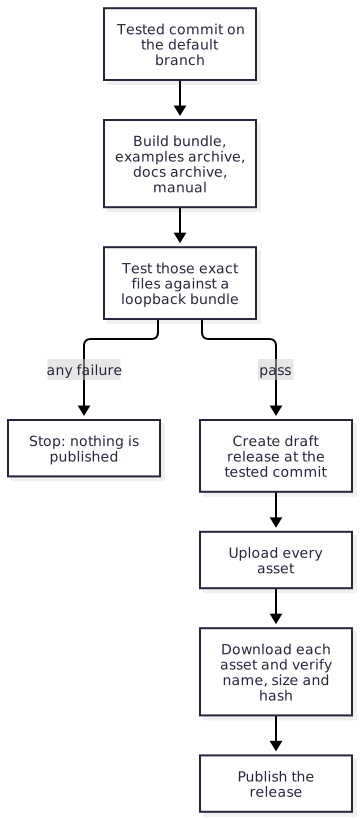
Validate. Require the default branch. Reject a version whose tag or release already exists. Require
docs/releases/<version>.adoc. Check the version withroc bump --expect. Record the event commit and use that SHA in every later job.Check. Run
blueprint run checkon that commit.Build. Build the bundle with the latest nightly, then the examples archive with the real release URL, the documentation archive, and the manual. Generate and locally validate the SBOM sidecars from the resolved build and final artifacts. Render the release notes with the real bundle and SBOM URLs. Upload them as workflow artifacts.
Test. On every supported target, download those artifacts and test them as described in Build and test the exact archive.
Publish. A separate job, with
contents: writeand a protected environment, downloads the tested artifacts. It checks out nothing and runs no repository script. It hands the version, the rendered notes and the asset files toactions/publish-release, which stages a draft at the tested commit, verifies every uploaded asset against the tested file, and then publishes.Update the site. For a final release, rebuild the documentation site so that it points at the new release, and deploy it; see What the site points at. A release candidate does not change the site.
The publish job consumes the artifacts of its own run. It never rebuilds, and
never resolves a moving branch.
SBOM generation and validation belong to the read-only build task and its PR
dry run; actions/sbom-sidecars implements
them with the pinned Blueprint tool, and
actions/fetch-dependency-sboms
chains the suppliers' documents in. The shared publication action does not
implement those steps; it uploads the supplied SBOM files as inert assets and
verifies their transferred bytes. Before attestation, the shared package
workflow also rechecks SBOM subject/sidecar bindings against the transferred
envelope and supported Blueprint manifests, using reviewed controller code and
the build job’s producing attempt. Pass the asset list the sidecar action
returns to the upload, the attestation and the publisher, so a missing sidecar
cannot hide behind a wildcard. Remote advisory rescans run separately from routine PR checks.
Enable immutable releases in the repository, so that a published release cannot gain, lose or replace an asset. Hash checks remain necessary even with immutable hosting.
Several bundles in one release§
A repository that publishes several packages or platforms builds one bundle for each, in the same run, under the same version, and one examples archive whose specification names every bundle URL. The release notes list every bundle URL by name. All of them are tested before any of them is published.
The shared release workflow derives the bundles from the examples: every
package root an example depends on by relative path is bundled, tested and
published, and a package no example exercises is not released. The repository’s
own package is package/main.roc; another is <dir>/package/main.roc, such as
tzdb/package/main.roc. A release with one bundle keeps the bare <hash>.tar.zst
name. With several, the repository’s own package becomes <name>-<hash>.tar.zst
and the other <name>-<dir>-<hash>.tar.zst, and its placeholder in the notes
is {<dir>-url} beside {package-url}. Every tracked file in a package’s
directory goes into its bundle, modules and data alike.
Two bundles under one tag need different names as well as different hashes.
Roc identifies a package by its URL with the version and the content hash
removed. Two files named only <hash>.tar.zst under one tag are therefore one
package with two contents, and Roc refuses the pair as soon as one depends on
the other:
The same package version is being served with two different content hashes
Give each bundle a prefix that names its package and ends in a hyphen, such as
example-tzdb-<hash>.tar.zst. Roc reads the hash as the run of base58
characters at the end of the filename, so the prefix must end in a character
that is not base58, and a hyphen is one. The hash itself is never changed.
At most one bundle in a release may go without a prefix. In a repository that starts with several packages, name every one.
The prefix is part of the package’s identity. Adding, removing or changing it makes a different package as far as Roc is concerned, so choose it before the first release, and treat a change to it as a breaking release.
roc bundlewrites<hash>.tar.zst. The script that builds the release copies that file to its prefixed name, and the prefixed file is what is tested and published.roc bundleresolves the dependencies of the package it bundles. A package that names a sibling by its final release URL is bundled after that sibling, with the sibling’s bundle already in the package cache, because the URL does not exist until the release is published.roc unbundleaccepts only the bare<hash>.tar.zstname. A script that unpacks a prefixed bundle copies it to that name first.
Release candidates§
A release candidate, such as 0.12.0-rc1, is a prerelease published for users
to test before the maintainers commit to the release. It answers the question
the workflows cannot: does this version work in real projects, and is the API
right?
Publish a candidate through
release.ymlwith a prerelease version. It follows every step above and holds the same assets, so what users test is built exactly as the final release will be.Mark it as a prerelease on GitHub. It is never the repository’s latest release.
Announce it where users will see it, and say what feedback is wanted and for how long.
Fix what the feedback finds on the default branch, and publish
-rc2. A candidate is immutable like any other release and is never amended.When a candidate has stood without change, release the final version from the same commit. Its bundle is a new artifact under a new tag, and it goes through the release workflow in full.
Everything that speaks of "the latest release" means the latest release that is
not a prerelease. nightly.yml tests that one, and the documentation site
links to that one. A candidate is found from the releases page and from its
announcement.
Recover an interrupted publication§
If publication stops, inspect exactly what exists before retrying. The publish job’s error says which of these states it left.
A draft and no tag. Nothing is public. The error names the draft, which holds whatever was uploaded before the failure. Look at it to see how far the job got, delete it, and re-run the failed publish job of the same workflow run. That job publishes the files the run already tested. The publish action never adopts a draft it finds, so the draft is deleted first.
A published release. It is immutable and is never repaired. If it is complete, the version is released and nothing is re-run. If it is not, publish a new version.
Unknown. When the answer to the publish request was lost, look at the releases page and treat what is there as one of the two states above.
Changed bytes are always a new version. Do not publish a draft by hand, replace an asset, or rebuild from a moving branch. If the run’s artifacts have expired, delete the draft and dispatch the release again from the default branch. The version was never published, so it is still free, and the new run builds and tests its own files.
Nightly compatibility§
nightly.yml answers one question each day: does the release users download
today still work with today’s compiler? A failure means the package or platform
needs a patch release.
Use the pinned shared workflow in Shared published-release compatibility, rather than maintaining a local copy of selection, test execution and reporting. Compiler-pin updates remain manual work during downstream pull requests and do not belong in this workflow. Warnings from successful compilation stay visible and nonfatal; skipped or incomplete evidence never establishes a passing result.
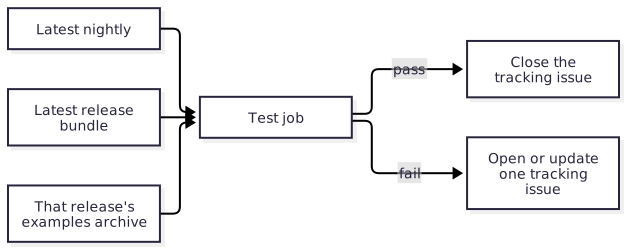
Resolve the latest nightly tag and the latest release once. Accept both as optional dispatch inputs, so a maintainer can re-run a past combination.
Skip prereleases when choosing the latest release.
Download that release’s examples archive and run it unchanged, comparing with the expected output inside the archive. Do not rebind it to the working tree, and do not test the default branch’s examples here: new APIs on the default branch are not evidence about a release.
Use the shared runner to read the archived specification and own every compiler invocation. Default-branch code may only provision native prerequisites in the read-only test job.
Run on every target the release is tested on: the one runner of a Roc package, or the same matrix as
ci.yml.A platform’s host bindings are not checked here. A released host is fixed; what matters is whether its applications still build and run.
The archive is immutable, so a failure is never a reason to change it. The fix is a patch release that works with the new compiler.
Reporting§
A separate job reports the result by calling
actions/nightly-report, which keeps one
tracking issue: opened on the first failure, commented on by each later
failure, and closed by the next pass. The action defines which issue that is and
what each outcome does. The workflow supplies the rest:
Reporting is considered after a failed test too, and holds
issues: writeand nothing else. Only an established success or failure reaches the issue action; unknown evidence leaves the issue alone.It checks out nothing and runs no repository or archive code.
The shared read-only aggregator verifies matching evidence from every matrix target and the current run attempt. It supplies only a constrained outcome, nightly tag and release tag to the report action, never example output.
A failed test-job result alone does not establish incompatibility. Setup, cancellation, missing evidence, skips and timeouts are distinct outcomes and cannot close an issue. A complete pass requires every target’s tests to pass. Manual historical override runs do not modify the latest-pair issue.
A repository with no final release or no canonical examples archive has no compatibility result: selection fails with a diagnostic and does not call the issue action. A missing test is never displayed as a passing nightly.
This workflow never opens a pull request, commits, merges, or publishes.