This manual describes an opinionated approach for managing a Roc package or platform repository: how its tooling is pinned, what its pull-request, release and nightly workflows prove, and what every release contains. roc-automation holds the shared actions that implement the parts every repository needs identically.
Download the standalone PDF manual · View roc-automation on GitHub.
1. How a Roc repository is maintained§
This manual covers the shared tooling, workflow boundaries and evidence needed to build, test and distribute Roc packages and platforms reliably. It explains which concrete risks an opinionated practice addresses, how its controls work, and what the resulting evidence can establish.
Product-specific security design and project governance remain with maintainers. The model supplies reusable automation and integration contracts; it does not establish that a product’s algorithms, native host or dependencies are secure.
1.1. Scope and design principles§
Shared tools own input validation, artifact identities, bounded execution and diagnostics. Workflows own when those tools run, which source and artifacts they receive, and the authority each job holds. Evidence connects the selected inputs, actual execution and published bytes so a maintainer can investigate failures and decide what to do next.
Each chapter explains its relevant failure or attack scenario, guiding principle, specific controls, verification and remaining assumptions. The risk and control reference indexes those explanations. It is a navigation aid, not another specification or a claim that every control has been deployed in every consumer.
Experience and primary technical research inform the choices. A standard can reveal an omitted risk; satisfying a framework is not itself the reason to add a control. Prefer a shared, testable mechanism that addresses an identified failure over a new service, permission or mandatory check with no clear benefit.
1.2. Why a shared baseline helps§
Keeping a Roc project in good shape means juggling several things that move at different speeds. The compiler is still changing, and breaking changes are routine. A bug can sit in the compiler, in a platform, in a dependency, or in the project itself. Releases rarely line up: a package may need a platform release that has not happened, or a fix may be merged long before users can download it. Each repository that solves these problems alone solves them slightly differently, and each difference is something a maintainer has to remember.
A common baseline is the answer this manual offers. It records the practices that have worked across these repositories and the reasons behind them, so that a lesson learnt in one place is applied everywhere. The practices are opinionated, and they are not finished: when experience shows a better way, the baseline changes here first and the repositories follow.
One decision shapes most of the rest. The package or platform always meets the newest compiler, because that is what its users will install. The repository’s own tooling stays on a compiler the maintainer chose and moves only when the maintainer moves it, so that scripts, checks and release steps keep working on the day a new compiler breaks something.
1.3. The model in one page§
| Concern | Practice |
|---|---|
| Package compiler | The latest published Roc nightly. The package, platform and examples carry no pin. |
| Tooling compiler | roc-stable: one release named in Blueprint.roc and repeated in each script’s roc header field, changed by a reviewed pull request. |
| Tools and toolchains | Declared in Blueprint.roc, pinned by Blueprint.lock, identical for contributors and CI. |
| Automation | Released utilities through Blueprint tasks; product-specific Roc scripts under scripts/ run by roc-stable where needed. |
| Repository examples | Depend on the working tree by relative path. |
| Pull requests | Scripts pass on roc-stable; the working tree passes on the latest nightly; a platform’s committed host bindings match what that nightly generates. |
| A release | One immutable release holding the bundle, an examples archive pinned to that bundle, a documentation archive, and the manual where there is one. Every asset is tested as the exact bytes that are published. |
| Nightly | Runs the latest release’s examples archive on one selected nightly. Example failures require compatibility investigation; incomplete execution requires setup repair or rerun. |
| Upkeep | Blueprint, the lock, the tooling compiler, the scripts and a platform’s host bindings are each changed by hand, in a pull request. |
1.4. Three compilers, three jobs§
There are three compiler roles. A consumer of released utilities need not install their implementation compiler; a repository with local source tooling names it explicitly. Each role has one job, and they are never interchangeable.
| Compiler | Selected by | Used for |
|---|---|---|
| Blueprint’s own; it has no command name | The blueprint binary | Evaluating Blueprint.roc |
roc-stable | The release tag named in Blueprint.roc | Running the repository’s automation scripts |
roc, the latest nightly | Nothing: it is whatever roc-lang/nightlies published most recently | Checking, testing, bundling and running the package, the platform and their examples |
A maintainer chooses the second and observes the third. The first is hidden:
blueprint fetches it when needed, as described in
Get blueprint.
Blueprint has a compiler of its own because Blueprint is itself written in Roc.
It has to evaluate Blueprint.roc before any environment exists, so it cannot
take its compiler from the environment that file describes: that would be a
bootstrap problem. Each blueprint release therefore fixes the one compiler it
was built with.
Three compilers is more than anyone wants, and the arrangement is accepted as temporary. It follows from Roc having only nightly builds. Once Roc 0.1 is released, Blueprint and most repository tooling are expected to settle on that release, which leaves two compilers to think about: the released one that tooling runs on, and the nightly that packages are tested against.
roc-stable exists so that repository tooling keeps working when a nightly
breaks something. The package deliberately floats, because the question a
maintainer needs answered is whether the package works with the compiler users
will install today. "Stable" means only that the repository does not move the
tag without review. There is no shared registry of stable versions, and
repositories need not agree.
"Latest nightly" means the most recent release published by roc-lang/nightlies.
This model treats that as the last good build and does not check upstream CI
separately.
CI installs that compiler as roc with the official
roc-lang/setup-roc action, which is
also how it is named on a contributor’s machine. The Blueprint environment
provides roc-stable and no roc, so the two names never collide.
1.5. What each workflow answers§
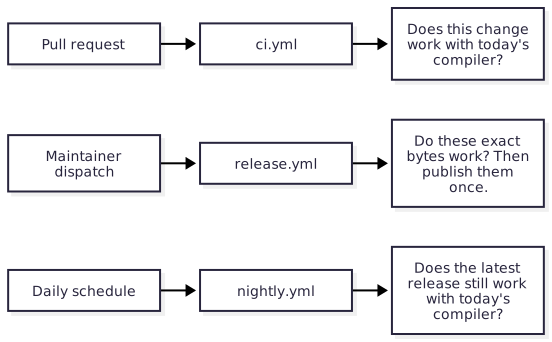
ci.yml tests the working tree. release.yml tests and publishes artifacts.
nightly.yml tests what users already have. Each can fail without the others
being wrong: a new nightly can break ci.yml on an untouched pull request, and
nightly.yml can fail while the default branch is green because the fix has not
been released. The three workflows
describes each in full.
1.6. A Roc package§
Roc packages contain Roc code. Platforms provide the host implementation and may include native libraries.
The one-runner testing profile applies to a package repository when all of these hold:
it publishes a package and has no host or platform code;
it fetches no native build inputs;
none of its code behaves differently from one target to another.
Such a package is expected to work wherever Roc does. A difference between targets is a compiler defect to report upstream, not something the package’s own CI is there to find. It therefore tests on one runner.
| Concern | A Roc package |
|---|---|
| Runners | One. ci.yml, the test job of release.yml and nightly.yml each run on ubuntu-latest only. |
| Required status checks | The job names themselves. With no matrix there is no aggregate job. |
| Examples | Run on a published platform, such as basic-cli, and are tested on the one runner. |
| Chapters that do not apply | Maintain a platform and Publish linker inputs from a pull request: host bindings, native build inputs, rebuild selection and actions/publish-build-inputs. |
Everything else applies unchanged: the two compilers, the Blueprint environment, the Roc scripts, the three workflows, and what a release contains.
The cost is stated here so that it is a decision and not an accident: a compiler defect that appears on one target only is not detected by this package’s CI.
A package leaves this profile as soon as it gains behaviour that can differ by target, for example when it starts a process, interprets file paths, or depends on the width of a pointer. It then adds a runner for each target it claims, and takes on the matrix and the aggregate job described in Continuous integration.
1.7. What is shared and what a repository owns§
Anything two repositories need identically belongs in roc-automation, referenced by full commit SHA. A repository keeps only what knows its own package.
| Lives in roc-automation | Lives in the repository |
|---|---|
actions/setup-blueprint: install Nix and the verified blueprint binary | Blueprint.roc and Blueprint.lock |
actions/nightly-report: keep the nightly tracking issue | The test job of nightly.yml, its matrix and its schedule |
actions/build-docs: render an AsciiDoc manual as a site and PDF | docs/*.adoc |
actions/publish-release: stage a draft release, verify every asset, then publish | What a release contains, and the jobs that build and test it |
actions/publish-build-inputs: publish linker inputs from a pull request | The producer workflow and its build recipe |
The check-settings task: compare a repository’s GitHub settings with this manual | The settings themselves, applied by a maintainer |
| This manual | Thin caller workflows, scripts/, tests and expected output |
Shared actions is the reference for each action.
1.8. What the model does not do§
It does not make package builds reproducible. The package compiler floats by design; only the tooling environment is pinned.
It does not verify upstream compiler quality beyond using a published nightly.
It does not support holding a package on an older compiler line. There are no compiler-compatibility branches: a release works with the compilers named in its notes, and a patch release follows when a newer compiler breaks it.
It does not describe application repositories that publish no package. They can use the environment and script conventions, and have no release or nightly workflow.
2. Pin the tooling environment§
Blueprint.roc declares every tool a contributor and CI need. Blueprint.lock
pins them. Both are committed. The blueprint command from
roc-blueprint realises that
environment, the same way on a contributor’s machine and on every CI runner.
The environment holds the tooling compiler, the tools the scripts call, and the native toolchains a platform host or a test host needs. It does not hold the package compiler, which is never pinned.
Roc packages can use Programs, Fetch and Expect with no Nix source.
Follow the complete Roc package adoption guide. Native
platforms can declare Nix sources for their host toolchains and sandboxed builds.
2.1. Risks and controls for tooling selection§
A contributor and CI can run different tool versions, or a new compiler can break the scripts needed to diagnose the product. Keep tooling identity explicit and separate from the compiler under test. Blueprint recipes and locks select the tooling bytes; local source scripts declare the corresponding compiler. Verify configuration and run the same named tasks locally and in CI. Changing a lock is an admission decision, not a harmless cache refresh. The lock establishes selected identities; it does not establish that the selected upstream code is free of defects.
2.2. Declare the environment§
app [config] { pf: platform "<roc-blueprint release URL>" }

config = [
	Name("roc-example"),
	Packages("nix", From(NixPackages("github:NixOS/nixpkgs/nixos-unstable"))),
	Input("roc", "github:roc-lang/roc-overlay"),
	Environment(
		"dev",
		[
			Overlays(["roc"]),
			Command("roc-stable", "nix#rocpkgs.nightly-<date>-<commit>"),
			RocPackages([
				"https://github.com/roc-lang/basic-cli/releases/download/<version>/<hash>.tar.zst",
				"https://github.com/roc-lang/http/releases/download/<version>/<hash>.tar.zst",
			]),
			Tools(["nix#coreutils", "nix#gh", "nix#git", "nix#unzip", "nix#zip"]),
		],
	),
	Shell("default", [Use("dev")]),
	Task("check", [Use("dev"), Run(["scripts/check_all.roc"])]),
	Task("bundle", [Use("dev"), Run(["scripts/build_bundle.roc"])]),
	Task("test-bundle", [Use("dev"), Run(["scripts/test_bundle.roc"])]),
	Task("package-examples", [Use("dev"), Run(["scripts/package_examples.roc"])]),
	Task("package-docs", [Use("dev"), Run(["scripts/package_docs.roc"])]),
	Task("test-published", [Use("dev"), Run(["scripts/test_published.roc"])]),
]
In this example, Packages declares its Nix package source,
Input declares the flake input and Overlays selects its role in this environment.
Source-qualified names such as nix#gh select the declared package source.
Each setting has one job:
Command("roc-stable", ...)Names the exact nightly release used for tooling. The compiler comes from roc-overlay, which packages recorded nightlies under their release tags.
Commandexposes that one release asroc-stablewithout adding the tool’s own executables, so the environment provides no bareroc.RocPackagesDeclares the content-addressed Roc bundles to prepare before scripts start. For tasks and shells, Blueprint downloads missing bundles and uses
roc unbundleto verify their URL hashes before publishing them into Roc’s package cache; these task-only bundles have no entries inBlueprint.lock. Sandboxed builds instead take their bundles from provider-locked sources. List every bundle, including dependencies of dependencies;roc-stable deps scripts/check_all.rocprints them. Blueprint does not read package headers and cannot add a missing one.ToolsEvery program a script starts, and every toolchain a build needs: for example
pandoc,zig, a Rust toolchain orgo. A tool that a script calls and the environment does not declare is a defect, because CI and contributors then run different versions.TaskA named entry point. CI calls tasks, never script paths, so the workflow and a contributor run the same command.
The two files divide the work. Blueprint.roc states which release is the
tooling compiler and which tools are needed, where a reviewer can read it.
Blueprint.lock pins the overlay revision that supplies that release’s download
URL and hash, package sources, fetched programs and bundle sources used by
sandboxed builds. Task-only bundle identities remain in their committed URLs.
Commit the generated lock after review. Derived files and generated Nix stay in
.blueprint/, which the repository’s .gitignore lists.
2.3. Get blueprint§
Blueprint needs Nix only for Nix-sourced tools and sandboxed builds. For
those environments install Nix first. There are two
ways to get the blueprint command. Whichever you
use, take the same roc-blueprint release as the platform URL in the
repository’s Blueprint.roc header.
2.3.1. With Nix§
Nix can run or install blueprint straight from the release tag, with nothing
to download or verify by hand:
# run it once, without installing
nix run github:lukewilliamboswell/roc-blueprint/<version> -- run check

# or install it into your profile
nix profile install github:lukewilliamboswell/roc-blueprint/<version>
Nix builds the command from tagged source on first use.
2.3.2. As a release binary§
Each roc-blueprint release also attaches prebuilt blueprint-<system> binaries
and a blueprint.sha256 file. Download the one for your system, check it
against the published SHA-256, make it executable and put it on PATH.
CI always uses the release binary, through
actions/setup-blueprint,
which checks it against a reviewed SHA-256 on every run. Nobody builds the CLI
from source in CI.
2.3.3. What the command needs§
The binary needs neither Python nor Roc installed. It embeds its fixed
configuration compiler, the nightly its release notes record. On first use it
installs the embedded archive into its content-addressed store and verifies the
recorded hash before extraction. It reuses verified bytes on later runs and
repairs a damaged archive from its embedded copy. Bootstrapping this compiler
needs no GitHub request; project tools and packages can still need downloads.
A compatible explicit ROC override takes precedence, then a compatible host
roc. An override must match the compiler required by the Blueprint binary.
blueprint compiler-version reports the bundled compiler tag without evaluating
a project, installing a compiler or writing a cache. It describes Blueprint
itself even when a host override is selected. The report does not require the
repository’s roc-stable pin to match: update that pin separately after testing
the scripts that use it.
This compiler is separate from roc-stable for a reason: Blueprint is written
in Roc and must run before the environment it describes exists. See
Three compilers, three jobs.
2.4. Work locally§
A contributor needs blueprint, Nix when their selected tools/builds use it,
and a current nightly installed
as roc, the way Roc is normally installed. Nothing else has to be set up.
blueprint run check      # run a declared task in the pinned environment
blueprint shell          # or enter the environment and run scripts directly
blueprint tasks          # list the declared tasks
blueprint is the outer command. Run it from an ordinary shell: there is no
nix develop step first and no nested shell.
Inside the environment roc-stable is the pinned compiler, and the
contributor’s own roc remains visible for package work.
2.5. Use the environment in CI§
Every job that runs repository scripts sets up Blueprint first, then installs the latest nightly, then calls a task:
Set up the verified
blueprintbinary, requesting Nix when needed, withactions/setup-blueprint.Install the latest nightly as
rocwith the officialroc-lang/setup-rocaction; see Install the nightly compiler.Run
blueprint run <task>.
Choose runners for which the selected release has reviewed binaries in
actions/setup-blueprint/releases.json, and verify that the declared tools also
support those systems. Cross-compiling a host in
the builder job does not establish that it
runs on the target.
The job needs no cache account and no token for this. A Nix cache is an
optimisation a repository may add; a cache that requires id-token: write
widens a test job’s token and must be an explicit choice.
A change to Blueprint.lock changes the tools every build uses. Where a
repository fingerprints native build inputs, Blueprint.lock is one of the
fingerprinted files; see
Keep rebuild selection narrow and complete.
3. Adopt a Roc package without Nix§
A Roc package can run its checks and publish HTML, mirrored Markdown, an
llms.txt discovery index and a PDF using
released executables. Blueprint owns the fixed downloads and their reviewed
lock. The package compiler remains the latest nightly supplied by CI. No local
installer, renderer build or Nix environment is needed for this path.
The working example is in examples/pure-package/. It uses a Blueprint
release, the matching platform URL and a published roc-docs renderer from a
tools release. Upgrade a utility by changing its recipe and reviewing
its new lock entries. The utility release and fixed tooling compiler do not
control which nightly tests the package.
3.1. Risks and controls for utility provisioning§
A cache can return damaged bytes, a task can expose a temporary executable link, or a renderer recipe can accidentally choose the package compiler. Treat provisioning, persistent handoff and product testing as separate contracts. Blueprint rechecks locked downloads; the handoff resolves the executable’s real store path; the floating compiler remains a distinct host input. The cold/warm adoption jobs exercise those boundaries and compare actual executable identities. A cache hit proves only that storage returned an entry. Supported provisioning targets and external runtime programs still need explicit validation.
3.2. Copy the starter§
Copy examples/pure-package/ to the repository root, including .github/ and
.gitignore. Keep its Blueprint configuration and lock together. Replace the
package, example, expected output, notes and manual content, then review and
regenerate the lock when changing tool recipes.
Blueprint.roc
Blueprint.lock
.github/workflows/ci.yml           renders the manual on a pull request
.github/workflows/release.yml      the thin caller of the shared release workflow
.gitignore
package/main.roc
package/Greeting.roc
examples/hello.roc
tests/spec.json
docs/index.adoc
docs/releases/0.1.0.adoc
release.yml is the whole of the repository’s release and pull-request
checking; see
The shared release workflow for a Roc package.
The documentation workflow is:
name: Check package and shared utility
on:
  pull_request:
  workflow_dispatch:
permissions: {}
jobs:
  docs:
    runs-on: ubuntu-24.04
    permissions:
      contents: read
    steps:
      - uses: actions/checkout@3d3c42e5aac5ba805825da76410c181273ba90b1
        with:
          persist-credentials: false
      - uses: lukewilliamboswell/roc-automation/actions/setup-blueprint@1f3bc71102cf2d07c324b6009a41823efd21c9aa
        with:
          cache: 'true'
          cache-workload: docs
      - run: blueprint check
      - run: blueprint run docs
      - uses: actions/upload-artifact@cf430e030ddbb5b0abf93d22962f4752f3646cd9
        with:
          name: manual
          path: .docs-out/
          if-no-files-found: error
  package:
    runs-on: ubuntu-24.04
    permissions:
      contents: read
    steps:
      - uses: actions/checkout@3d3c42e5aac5ba805825da76410c181273ba90b1
        with:
          persist-credentials: false
      - uses: lukewilliamboswell/roc-automation/actions/setup-blueprint@1f3bc71102cf2d07c324b6009a41823efd21c9aa
      - uses: roc-lang/setup-roc@f5a74bf90aa694b43ab4a7cbfdb19273bc6aa697
        with:
          version: nightly-new-compiler
      - run: blueprint run check-package
The documentation job consumes a fixed released executable. The package job uses the current nightly; this single test job needs no matrix-wide moving-tag coordination. Uploading a CI artifact grants no publication authority. The starter’s declared Blueprint targets are Linux and Apple Silicon macOS; its workflow uses Linux. See the producer and interface skeleton when adding another shared operation.
3.3. Declare the utility and tasks§
Copy the example’s structure and choose your package name and PDF filename.
The renderer recipe names one release; {system} selects the release asset
for each declared system. roc-stable is a separately fetched fixed tool.
Bare roc is expected from the host and is never supplied by that recipe.
# Package testing uses the latest nightly supplied by CI as bare `roc`.
# Fixed tooling and released utilities have separate names and locked bytes.
app [config] { pf: platform "https://github.com/lukewilliamboswell/roc-blueprint/releases/download/0.8.0/FbJymjYdCxx9vqMcau7r4tQfeAbnVGqqJoYrLGqPCqKu.tar.zst" }

import pf.Recipes

config = [
	Name("roc-package-example"),
	Systems(["x86_64-linux", "aarch64-linux", "aarch64-darwin"]),
	Environment("docs", [Programs([Fetch("roc-docs", Recipes.file("https://github.com/lukewilliamboswell/roc-automation/releases/download/tools-0.2.0/roc-docs-{system}"))]), Expect(["realpath", "sh"])]),
	Environment("fixed-tools", [Programs([Fetch("roc-stable", Recipes.roc_nightly("nightly-2026-10-18-1df370f"))]), Expect(["realpath", "sh"])]),
	Environment("package", [Expect(["roc"])]),
	# The shared release workflow runs this utility against the `roc` on PATH; a
	# maintainer runs the same task locally, such as `-- test-examples --update`.
	Environment("release", [Programs([Fetch("release-package", Recipes.file("https://github.com/lukewilliamboswell/roc-automation/releases/download/tools-0.5.0/release-package-{system}"))]), Expect(["roc", "git", "gh", "tar", "unzip", "zip", "chmod", "touch", "env"])]),
	Task("release-package", [Use("release"), Run(["release-package"])]),
	Task("docs", [Use("docs"), Run(["roc-docs", "build", "--workspace", ".", "--pdf-filename", "example.pdf"])]),
	Task("docs-path", [Use("docs"), Run(["sh", "-c", "realpath \"$(command -v roc-docs)\""])]),
	Task("tooling-version", [Use("fixed-tools"), Run(["roc-stable", "version"])]),
	Task("tooling-path", [Use("fixed-tools"), Run(["sh", "-c", "realpath \"$(command -v roc-stable)\""])]),
	Task("check-package", [Use("package"), Run(["roc", "test", "package/main.roc"])]),
]
Expect declares sh and realpath, which the handoff tasks use, and the
package compiler, which CI supplies. Blueprint’s own archive/store operations
also use the host’s tar, ln and chmod. GitHub’s supported Linux and macOS
runners supply these. The shared setup and optional diagnostic actions use
Python 3.10 or later on the runner; the renderer executable uses none of these
tools to parse or render documents.
Install the release binary matching the platform URL, following Blueprint’s installation instructions. Then run these commands from the example directory, or from your repository after adopting its files:
blueprint --version
blueprint update
blueprint check
blueprint run docs
blueprint run tooling-version
Review and commit Blueprint.roc and Blueprint.lock. Check every utility URL,
per-system SHA-256, length and newly admitted download host. On an update,
compare the utility’s entries with the upstream release manifest. The setup
action’s full SHA fixes its reviewed Blueprint installer and checksum registry;
it reads the Blueprint release from the platform URL rather than another
workflow version pin.
Blueprint installs its embedded fixed configuration compiler into its
verified store before any Roc CLI is installed globally. No GitHub compiler
bootstrap download is needed. This compiler is separate from the downloaded
renderer and the floating package compiler; the example’s fixed roc-stable
recipe also remains a separate reviewed pin. Roc package bundles occupy Roc’s
package cache and are not covered by the artifact cache below. Task-only
RocPackages bundles are pinned by their URL hashes and verified on initial
unbundling, rather than listed in Blueprint.lock. Existing extracted package
directories are reused without rehashing, as
the compiler trust model explains.
The adoption checks read blueprint lock show --json format 2 and select fetched
programs by name and system to compare actual executable lengths and hashes.
This public report avoids depending on the lock’s internal representation.
3.4. Restore downloads before the first task§
In a read-only build job, call the shared setup action after checkout:
- uses: actions/checkout@3d3c42e5aac5ba805825da76410c181273ba90b1
  with:
    persist-credentials: false
- uses: lukewilliamboswell/roc-automation/actions/setup-blueprint@1f3bc71102cf2d07c324b6009a41823efd21c9aa
  with:
    cache: 'true'
    cache-workload: docs
- run: blueprint run docs
- uses: actions/upload-artifact@cf430e030ddbb5b0abf93d22962f4752f3646cd9
  with:
    name: website-and-manual
    path: .docs-out/site
    if-no-files-found: error
The setup action installs a verified Blueprint binary without Nix by default.
Set install-nix: 'true' when a selected environment takes tools from a Nix
source or a sandboxed native build needs it. Existing configurations must follow
the Blueprint upgrade procedure, including
a full lock update when moving to Lock 2. Retain Nix while selected tools or
sandboxed builds depend on it. The privileged report/publisher actions retain their own reviewed tooling
and do not run this candidate repository configuration.
The cache contains only
${XDG_CACHE_HOME:-$HOME/.cache}/blueprint/v1/artifacts. It is restored before
tasks and saved by the cache action’s post step after a successful job.
It does not include v1/trees, .blueprint/run, compiler build outputs or
Roc’s package cache. Each restored artifact is rehashed by Blueprint before it
is used; its length and identity must match the lock. A damaged artifact and
its derived trees are removed and the release bytes are downloaded again.
An unavailable or mismatching replacement cannot become a usable tool.
An exact cache hit is a transfer optimization, not verification. Restoring it
still transfers cache bytes from GitHub. The Blueprint executable has a separate,
default-on cache keyed by release, system and reviewed digest; restored executable
bytes are rehashed before use. Disable it with cache-binary: false.
binary-cache-hit describes verified executable reuse; cache-hit describes
the artifact store. Neither changes a version pin. Ordinary GitHub branch and pull-request cache
visibility applies: a PR can restore an eligible default-branch cache and its
new cache is scoped to that PR; a failed job does not save a successful cache.
Cache keys include system, Blueprint release, installer/registry identity,
workflow, logical tool set and lock digest. cache-workload is required when
caching is enabled. Give different tool subsets different names, including
matrix variants that fetch different programs. For example, a docs job uses
docs and a tooling-check job uses fixed-tools. Jobs intentionally sharing
the same complete tool set may share that name. GitHub caches are immutable:
a compiler-only job must not claim the key intended to contain the renderer.
A changed lock or installer produces a new key.
The repository’s Blueprint adoption workflow tests cold docs and fixed-tool
jobs, then restores each exact cache on another fresh runner. It compares actual
executables with the lock and checks that warm tasks do not refetch utility or
fixed compiler archives. A Nix sentinel fails any accidental Nix invocation.
See
Blueprint’s store rules
for the detailed verification and rebuilding contract.
3.5. Pass an executable to a shared action§
Running blueprint run docs keeps the renderer’s options in the repository’s
task and needs no executable handoff. For a workflow using actions/build-docs,
use the example’s docs-path task and the shared handoff action:
- id: renderer
  uses: lukewilliamboswell/roc-automation/actions/blueprint-tool@1f3bc71102cf2d07c324b6009a41823efd21c9aa
  with:
    task: docs-path
    label: roc-docs
    measure: 'true'
    output-directory: .docs-out
- uses: lukewilliamboswell/roc-automation/actions/build-docs@1f3bc71102cf2d07c324b6009a41823efd21c9aa
  with:
    renderer-binary: ${{ steps.renderer.outputs.binary }}
    pdf-filename: example.pdf
The task must print exactly one absolute executable path. command -v alone
returns a temporary link removed when the Blueprint step ends. Resolve it with
realpath inside the task, as the example does. The resolved store path and the
optional wrapper remain usable within that job. A new job restores artifact
bytes and runs the task again; it does not restore or reuse the old task link.
The handoff reports the actual executable’s SHA-256, length and provisioning
time. Blueprint’s successful Fetch task supplies lock verification; the
reported label is descriptive and is not another admission pin. The action
exports executable-path for the real file and binary for the optional
measurement wrapper. Renderer options remain task arguments or action inputs;
the handoff does not infer them from the task.
3.6. Measure stages and retain acceptance checks§
Optional measurements record wall time, maximum child-process RSS in KiB, exit status, and output file count/bytes in JSON. Provisioning includes verification and any downloads. The measured renderer command excludes the host Python wrapper’s RSS and output-directory scanning time. If the command starts an API compiler, its children contribute to the reported command cost.
Measure generated-input preparation and API generation as separately labelled
commands when comparing renderer costs. blueprint-tool exports
measure-script for these stages; invoke it with the host Python interpreter:
python3 "$MEASURE_SCRIPT" --label preparation --metrics "$RUNNER_TEMP/preparation.json" -- blueprint run prepare-docs
python3 "$MEASURE_SCRIPT" --label api --metrics "$RUNNER_TEMP/api.json" -- blueprint run api-docs
These task names are repository-defined stages, not built-in Blueprint APIs. Keep browser and independent PDF-reader acceptance outside the measurement. Review stable routes and anchors, exact source blocks, tables, figures, release-specific PDF filenames and API assembly before changing publication. Deploy jobs consume only the accepted site artifact and keep their write tokens separate from all repository tasks.
3.7. Keep the package nightly floating§
The package-check job installs the latest nightly with the official setup action
and then runs blueprint run check-package. It does not fetch a program called
roc from the fixed-tooling environment:
- uses: roc-lang/setup-roc@f5a74bf90aa694b43ab4a7cbfdb19273bc6aa697
  with:
    version: nightly-new-compiler
- run: blueprint run check-package
For multiple package-test jobs, resolve the moving tag once and pass it through, as the nightly workflow describes. Caching fixed tooling and released utilities never delays package-nightly updates. Native platforms can retain Nix toolchains and sandboxed build inputs while using the same released documentation utility and artifact deployment.
4. Share automation through executable utilities§
Use released utilities for common repository operations. Blueprint provisions their reviewed bytes and declares named tasks; the same tasks run locally and in read-only CI. Actions add GitHub inputs, outputs and artifact handling around the shared implementation. Keep product-specific cases and metadata in the consumer repository.
4.1. Risks and controls for shared utility contracts§
Copied automation can drift, and a consumer can combine an executable with an incompatible helper or result parser. Share versioned executable contracts and distribute the complete declared runtime. Blueprint locks the selected artifacts; operation-specific schemas identify inputs and results; exact-artifact tests run the distributed files without a source checkout. Include malformed inputs, missing companions and target behavior in those tests. An executable version does not make every future schema compatible, and cross-compilation alone does not demonstrate native execution support.
4.2. Start from a working consumer§
The consumer walkthrough
owns the copyable examples/pure-package/ starter, its configuration and workflow,
download verification, caching and executable handoff.
The renderer is the worked example; apply the same provisioning pattern to other released utilities. Keep the utility’s implementation compiler separate from the compiler passed to check a product. Consuming a compiled utility does not require adopting its basic-cli or tooling compiler in local source scripts.
4.3. Give each layer one job§
| Layer | Responsibility |
|---|---|
| Blueprint | Select and verify executable/runtime artifacts, provision environments and expose named tasks. |
| Utility | Validate operation-specific data, perform the operation, retain diagnostics and return an explicit result. |
| Action or reusable workflow | Supply GitHub context, map documented inputs and outputs, transport inert artifacts and restrict permissions. |
| Product repository | Declare its paths, cases, release metadata, native prerequisites and product-specific behavior. |
Prefer a Blueprint task that invokes an existing utility. A local Roc script is appropriate when the product needs additional composition or behavior. General command and filesystem helpers remain implementation details unless a concrete in-process consumer justifies a public source API. Do not require consumers to import a shared helper package merely to use an executable operation.
4.4. Structure a utility producer§
Use the existing tools build and release pipeline. For a new operation, this layout separates the executable boundary from pure decisions and contract tests:
tools/<operation>/
  main.roc                 # CLI and effects
  src/Config.roc           # versioned input decoding and validation
  src/Plan.roc             # pure decisions and state transitions
  src/Report.roc           # structured results and human diagnostics
  test_config.roc
  test_plan.roc
  build.roc                # fixed build compiler and explicit targets
  tests/test_cli.py        # tests the distributed executable
  tests/fixtures/          # small valid and invalid inputs
  README.adoc              # CLI, configuration, targets and runtime contract
actions/<operation>/
  action.yml               # GitHub integration
.github/workflows/release-tools.yml
These are responsibility boundaries, not a requirement to relocate established
tools. Reuse tools/roc-policy for repository policy and tools/roc-docs for
documentation. Use the shared published-release compatibility runner for
immutable release suites. Build distinct operations only where their behavior
is not already supplied by an existing tool.
Keep build and executable tests read-only. Test the exact release bytes and companion files on every claimed execution platform without a source checkout, Nix or the utility’s build compiler. Explicit external runtime programs may still be required. The existing publisher receives the tested files as inert bytes; it never runs a candidate utility or consumer Blueprint task.
4.5. Define a small, versioned contract§
For a new checking utility, document its version command, operation arguments, configuration format, output directory and result schema. Use structured argv without shell evaluation. Keep configuration in the existing operation-specific format, such as the examples specification; do not duplicate Blueprint’s provisioning data in a second project manifest.
Checking and updating are distinct operations. A check never rewrites expected output. An update is explicit maintainer work and refuses immutable published suites. No utility changes a compiler pin as a side effect of checking a product.
Keep process status and structured evidence consistent. A useful convention for new checking interfaces is exit 0 for complete success, exit 1 for completed checks with findings, and exit 2 for invalid inputs or incomplete evidence. Document existing tools' actual statuses rather than silently translating them to a new convention. Machine results have a schema version independent of the tool version and record the operation, outcome, completeness, relevant source, compiler and artifact identities, counts and safe relative diagnostic paths. Write a completed result atomically to the requested output directory.
Preserve bounded stdout and stderr on successful as well as failed compiler calls. Warnings remain visible and nonfatal by default. A timeout, cancellation, skip or missing report cannot establish a complete pass. Bound child execution and clean up descendants. Escape workflow commands in console output; raw diagnostic artifacts retain the original bytes. Validate paths and reject unsafe aliases or special files before filesystem effects.
Test malformed inputs and failure transitions as well as successful execution. Use tiny fixtures for warnings, missing tools, wrong identities, timeouts and cleanup. Fuzz and benchmark smoke workloads stay within the one-second budget; sustained campaigns run separately.
4.6. Package the complete runtime§
Prefer a self-contained executable with embedded data when practical. A utility
that needs helpers ships a declared runtime set: executable, helpers, licenses
and their manifest. A per-system archive can keep these files together.
Blueprint’s Archive(url, TarGz, member) recipe selects the executable while
preserving its archive siblings. Lock the archive digest and length, and test
the unpacked runtime as distributed.
Resolve helpers relative to the real executable, following Blueprint’s task link, or accept explicit helper paths. Declare external programs such as Python in the environment. A binary that needs a helper is not self-contained, and a helper version must agree with its executable. Never rely on an undeclared source checkout to provide runtime files.
When an Action needs the executable after a Blueprint task ends, use the shared executable handoff. Return a persistent resolved store path rather than the task’s temporary link. Action code and privileged controllers remain pinned to full reviewed SHAs; candidate tasks and executables run only in jobs without write authority.
5. Lay out the repository§
A consistent layout lets the same checks, scripts and workflows apply to every repository, and lets a maintainer who knows one repository find their way in another.
5.1. Risks and controls for repository source boundaries§
A test can accidentally import a published dependency instead of the changed working tree, while source automation can accidentally depend on the broken product it must diagnose. Make source roles explicit. Product examples use relative working-tree dependencies; source tooling uses independently selected released dependencies and a fixed compiler. Header and source-policy checks verify those conventions, and behavioral tests verify the product itself. Static policy establishes declared structure, not which code paths execute or whether a package is correct.
5.2. The layout§
Blueprint.roc        development environment and named tasks
Blueprint.lock       pinned inputs
package/main.roc     a package; or platform/main.roc for a platform
examples/            applications that depend on the working tree
scripts/*.roc        executable automation entry points
scripts/src/*.roc    modules shared by those scripts
tests/               package-specific cases and expected output
docs/*.adoc          the manual, where the repository has one
A repository that publishes several packages or platforms gives each its own
root directory, such as package/ and tzdb/package/, or platform-web/ and
platform-gui/. Each root is bundled, versioned and released together with the
others in one release; see
Several bundles in one release.
5.3. Where a compiler pin belongs§
The roc: "..." header field appears in exactly one place: the scripts under
scripts/, where it names the same release as roc-stable. Nothing else is
pinned. The package, a platform, the examples and every other Roc application
carry no roc field, and the repository has no .roc-version file and no
.github/roc-nightly.json.
The rule for the package applies to platforms as much as packages. roc check exits with an error
on a warning, and a dependency whose header pins a different nightly produces a
version-mismatch warning. A pinned platform therefore fails every application
that floats, and a package cannot float until every platform its examples use
has dropped the field.
The check script enforces both halves. It fails when a roc field or
.roc-version appears outside scripts/, and it fails when a script’s pin
differs from the tooling compiler; see
Keep the script pins in step.
5.4. Roc applications in the repository§
Every Roc application in the repository depends on the working tree by relative
path. Pull-request CI checks them with the latest nightly compiler. That covers
examples/ and also anything outside it: fuzz targets, benchmarks,
documentation examples, test cases, and a site generator.
app [main!] {
	cli: platform "https://github.com/roc-lang/basic-cli/releases/download/<version>/<hash>.tar.zst",
	ansi: "../package/main.roc",
}
The package is a relative path. Every other dependency, including the platform, is an immutable release URL with its content hash.
These are not what the nightly workflow tests. They change with every pull request and may use APIs that no release has. The nightly workflow runs the examples archive attached to the latest release. In the archive the same example names that release’s exact bundle URL, and nothing else differs:
app [main!] {
	cli: platform "https://github.com/roc-lang/basic-cli/releases/download/<version>/<hash>.tar.zst",
	ansi: "https://github.com/<owner>/roc-ansi/releases/download/<tag>/<hash>.tar.zst",
}
The release workflow writes the second form when it builds the archive; the repository only ever contains the first. See The examples archive.
The single exception is scripts/. A script never depends on the repository’s
own package by relative path, because a script must keep working while the
package is broken.
An example that needs more than one file is a directory: examples/report/
holds main.roc, its sibling modules and any data files it reads. A local
helper package that several examples share sits beside them and is referenced by
relative path.
5.5. Use shared utilities through Blueprint tasks§
Use a released executable for an operation shared across repositories, with its recipe and named task in Blueprint. Local use and CI invoke the same task. The shared utility skeleton shows a working consumer and the producer boundaries. A consumer of a prebuilt tool does not need that tool’s source dependencies or implementation compiler.
Write a local script only for behavior or composition specific to the product. Keep common validation, example execution and release orchestration in their shared utilities rather than copying helper modules between repositories.
5.6. Write product-specific automation as Roc scripts§
A source entry point kept under scripts/ is an executable Roc application:
#!/usr/bin/env roc-stable
app [main!] {
	cli: platform "https://github.com/roc-lang/basic-cli/releases/download/<version>/<hash>.tar.zst",
	roc: "nightly-<date>-<commit>",
}
Start with the
roc-stableshebang and commit the file as executable.Set the
rocheader field to the release thatBlueprint.rocnames asroc-stable.Reference every dependency by immutable release URL with its content hash, and list the same URLs under
RocPackagesinBlueprint.roc.Run package work with
roc, which is the latest nightly in CI and on a contributor’s machine. Never useroc-stableto check, test or bundle the package.Put pure logic in
scripts/src/modules withexpecttests, and run those tests from the check script.Pass arguments after
--, for examplescripts/test_goldens.roc -- --update.Declare every entry point as a
TaskinBlueprint.roc.
Product orchestration scripts are written in Roc. Small platform adapters and
independent test harnesses may use the runtime their documented contract
requires. A script that only wraps one command is replaced by a Blueprint
Task that runs that command directly.
5.6.1. Keep the script pins in step§
A script is written for one compiler and one set of dependencies. Someone who
runs it with a newer roc, instead of through blueprint, may find it broken
for reasons that have nothing to do with their change. The roc field makes
the compiler say so: a compiler other than the one the field names refuses the
file and names the release it targets, which points at the cause before anyone
debugs the script.
The field is useful only while it is true, so one cheap check keeps it true.
The check script reads the tag from the Command("roc-stable", ...) setting in
Blueprint.roc and requires every file under scripts/ that has an app
header to carry exactly that tag in its roc field. It reads text and runs no
compiler, so it costs nothing in pull-request CI.
Two things follow from the compiler enforcing the field:
Format the scripts with
roc-stable fmt.roc fmton another compiler rewrites the field to that compiler’s own release, and the check then fails.The field belongs only on a file that
roc-stableruns. A program underscripts/that the latest nightly builds, or that a compiler the repository itself produces builds, cannot carry it: that compiler would refuse the file. Keep such a program outsidescripts/where that is practical. Where it stays, the check script lists it by path as an exception and requires that it has norocfield at all.
Blueprint.roc remains the authority. The header fields are copies that the
check holds to it, and
Change the tooling compiler
changes them together.
5.6.2. The check script§
One check task owns everything a pull request must pass. It uses shared
checking utilities; a product-specific driver, conventionally
scripts/check_all.roc, can compose additional checks when needed. Its scope
includes the static checks in this chapter,
roc fmt --check and roc-stable fmt --check, the script tests, roc test on the package root, every
example and integration case, a smoke run of each benchmark and fuzz target,
and a dry-run build of what a release would publish.
What runs on every pull request
describes each.
5.7. What is committed§
| Committed | Not committed |
|---|---|
Source, Blueprint.roc, Blueprint.lock | .blueprint/ and anything else blueprint generates |
Expected output and golden files under tests/ | Build output, bundles, archives |
| Generated data the package ships, with the recipe and inputs that produced it | Rendered API documentation and the built site |
| A platform’s generated host bindings | Native binaries, which are released independently and consumed through a content lock; see No binary blobs in the repository |
Generated data that is committed has a script that regenerates it and a check that fails when the committed copy is stale. Rendered documentation is published as a release asset and a Pages deployment, never committed.
5.8. What goes in a bundle§
A bundle holds what a user of the package needs and nothing else: the package’s
Roc modules and any data files they import. Fuzz targets, benchmarks and test
modules stay outside the package root, so that roc bundle on the root produces
the release artifact with no exclusion list.
6. Examples and the examples archive§
Examples are realistic demonstrations of the package for the people who will use it. They are where most new visitors land, and for many they are the first Roc code written against the package that they read. This chapter covers what an example is for, and how the same example is kept correct in two places: the repository, and each release.
6.1. Risks and controls for example identity§
Examples that pass in the working tree can fail after packaging because files are omitted, dependency URLs are rewritten incorrectly, or a warm cache hides which bundle was fetched. Test the consumer-facing archive as an artifact. Stage the declared files, verify that intended dependency substitutions are the only changes, and run the archive against candidate bundles with an empty package cache. Inspect and reject unsafe archive members before extraction. These checks establish the tested archive’s behavior for its recorded cases; they do not make the cases representative of every product feature.
6.2. What an example is for§
The audience of an example is a user of the package who is probably not familiar with it. It is not a contributor.
An example is not a test, a benchmark or a fixture. Those have their own
directories and their own standards. Code that exists to cover an edge case, to
measure something, or to feed another tool does not belong under examples/,
however convenient it is to put it there.
Manage examples with the care their position deserves:
Realistic. Each one solves a problem a user would recognise, with input and output worth looking at.
Focused. Each one demonstrates one thing. Several short examples serve a reader better than one that shows everything.
Documented. Each one carries ample comments that walk the reader through the code: what it is about to do, why it is done that way, and what to change to adapt it. Write them for someone reading top to bottom with no other context.
High quality. An example is copied into real projects. It should be code the maintainers would be content to see copied.
Few. Every example is a promise to keep it working. Add one when it teaches something the others do not.
6.3. Why examples live in two places§
The repository and its releases are rarely in step. Pull requests land continuously; releases happen now and then. At most commits the package in the repository is ahead of the last release.
An example in the repository must work with the package at that same commit, so it may use an API that no release has yet. A user reading it beside the latest release could copy code that does not compile for them. An example published with a release has the opposite property: it works with that release and will never change.
One set of files cannot be both. The repository therefore keeps examples that follow the working tree, and each release publishes a frozen copy of them that names that release.
6.4. Repository examples test the working tree§
Every example names the package by relative path, as described in
Roc applications in the repository.
A platform’s examples name it the same way, pf: platform "../../platform/main.roc",
and run against the host outputs the repository built under platform/.
A pull request that changes the package and breaks an example fails on that pull
request.
Committed examples are never rewritten after a release. No release follow-up pull request exists, and the default branch never names its own release URL.
6.5. Record expected output§
An example that only compiles proves little. Record what each example prints, and compare it on every run. Examples are run by the same driver as the integration tests; see Integration tests.
Keep expected output in
tests/spec.json, in the same suite format the examples archive and the nightly runner use, with the releaseworking-treeand no dependencies: the arguments each example runs with, its standard input, and the exact standard output, standard error and exit code expected.release-package test-examplesruns every example and fails on a difference; the shared release workflow, or a platform’s own release workflow, runs it on every pull request. It needs only the compiler, so it runs on Windows too.release-package test-examples --updaterewrites the expected output, so that an intended change is a reviewed diff.An example that cannot run in CI, such as one needing a display or a console runtime, is still checked and built, and the specification says so explicitly. It is never silently skipped.
6.6. The examples archive§
Each release attaches an examples archive named
<name>-examples-<version>.zip, where <name> is the repository, or the
package when the repository publishes several. It contains:
complete copies of the examples, including sibling modules and data files, in which the package dependency is that release’s bundle URL;
the expected-output specification those examples were tested with; and
a short README naming the release, the bundle URL and how to run an example.
An example is a file examples/<name>.roc, which depends on the package as
../package/main.roc, or a directory examples/<name>/ whose main.roc
depends on it as ../../package/main.roc and whose other files travel with it.
A .roc file under examples/ without an app header is a module the
examples share. An example names at most one platform; one that names none runs
on the compiler’s default platform. Each case runs in its example’s own
directory, as a reader would run it, so an example reads a sibling data file by
relative path; the working tree’s examples run in a scratch copy, so an example
that writes files beside itself leaves the tree as it was. Every file Git
tracks under examples/ is archived, so a build output that is not committed
is never published.
Publish the versioned spec.json and ZIP layout in
Publish the suite contract
so that the same immutable archive is executable by the central nightly runner.
Nothing else in an example changes. The archived examples differ from the repository’s at the tested commit only in the package dependency, and the check script verifies that.
 app [main!] {
 	cli: platform "https://github.com/roc-lang/basic-cli/releases/download/<version>/<hash>.tar.zst",
-	ansi: "../package/main.roc",
+	ansi: "https://github.com/<owner>/roc-ansi/releases/download/<tag>/<hash>.tar.zst",
 }
A user who wants a starter downloads the archive for the release they are installing. The archive is also the fixed input to nightly compatibility, which is why it carries its own expected output: the default branch’s specification describes the default branch, not the release.
Examples of expensive work, such as fuzzing or benchmarking, expose a small, bounded mode suitable for routine checks. Archive cases use that mode to verify the published API and executable behavior; they do not launch sustained searches or produce performance comparisons. Keep campaigns in their own scheduled workflow, outside both PR dry runs and the shared published-release compatibility verdict.
6.7. Build and test the exact archive§
The archive that is tested is the archive that is published. Nothing is rebuilt between the test and the upload.
Build the bundle from the tested commit with
roc bundle. Its filename is its content hash and the release tag is the version being released, so the final URL,.../releases/download/<tag>/<hash>.tar.zst, is known before anything is published. A release with several bundles puts a package name before the hash; see Several bundles in one release.Build the archive with that real release URL in every example.
Serve the bundle from a loopback address.
Run the archived examples with
--replace-dep <release URL> <loopback URL>, whichroc check,roc testandroc buildaccept. The files are unchanged; only the download location differs for the duration of the test.Compare the output with the archived specification.
Publish the same bundle and the same archive.
Run the test with an empty Roc package cache, so that the bundle is fetched and verified and not found from an earlier run.
6.8. Dry runs§
A pull request runs the release steps with a placeholder version and publishes
nothing. Roc rejects 0.0.0 in a package URL, so the placeholder is
0.0.1-dryrun.
6.9. An archive is never reformatted§
An archive is immutable, so it is checked, tested, built and run, and never
passed to roc fmt. A later formatter change would fail the nightly check for a
reason that no patch release can fix.
7. Test in pull-request CI§
Code that only compiles proves little. That is true of examples, and equally of tests, benchmarks, fuzz targets and fixtures. Anything in the repository that is not run goes stale without anyone noticing, and is found broken on the day it is needed.
The rule is that every Roc program in the repository runs in pull-request CI, even if only briefly. This chapter says what runs, how much of it, and how the tests are organised.
Start with expect tests for concrete behavior and integration cases for the
program boundary. Use roc-fuzz alongside them to check rules over generated
inputs, preserve named regressions and measure memory behavior. Pure Roc code
needs both value correctness and allocation properties: returning the right
value does not show whether an update reused storage or copied it. Keep these
checks fast on pull requests, and explore new inputs in separate campaigns.
7.1. Risks and controls for test evidence§
Compilation alone can leave examples or error paths broken, while a long campaign in routine CI can make feedback too slow to use. Keep fast checks meaningful and put sustained searches on their own schedule. Build once, run recorded success and failure cases, and exercise bounded fuzz/benchmark smoke modes. Require expected outputs and exits, report skips explicitly, retain command diagnostics and stop hung child trees. The driver tests these failure states. A smoke pass establishes that the selected workload runs; it does not establish search depth, performance or complete test coverage.
7.2. What runs on every pull request§
| Check | What it runs |
|---|---|
| Formatting | roc fmt --check over the repository’s Roc sources |
| Unit tests | roc test on the package or platform root |
| Examples | Every example, built once and run against its recorded cases |
| Integration tests | The test driver, over its full list of cases |
| Allocation checks | Allocation properties and recorded examples, checked against reviewed ceilings or accepted exact baselines |
| Benchmarks | A smoke run: each benchmark builds and completes a small, bounded iteration |
| Fuzz targets | A smoke run: each target builds, checks its declared examples and replays a small committed corpus |
| Scripts | The expect tests of the modules under scripts/src/ |
The check task runs all of these, so a contributor runs the same set with
blueprint run check before opening a pull request.
7.3. Heavy runs stay out of pull-request CI§
A long fuzzing campaign or a full benchmark run never runs on a pull request, including a release dry run. They run in separate scheduled or manually dispatched jobs, as described in Fuzzing and Benchmarks.
What pull-request CI owes them is a smoke run. A benchmark that has not been built since the API it measures changed will not run on the night it is scheduled. Give each benchmark and fuzz target an explicit smoke mode, with a small input or iteration count and at most one second of workload execution per target. This budget excludes provisioning and compilation; it is not a one-second limit for the whole CI job. Keep the committed smoke corpus small enough to replay within that budget. Build once and reuse the executable across cases.
The smoke mode exercises startup and the real operation or property, then exits normally. A benchmark smoke run checks execution, not performance: it produces no baseline comparison or performance regression verdict. A fuzz smoke run replays known inputs; where the engine itself needs exercising, add a tiny, bounded run without turning the check into a campaign. A passing smoke run makes no claim about sustained search coverage.
Workload bounds and safety deadlines serve different purposes. Set a small iteration/input budget so normal execution completes within the smoke budget, and give the driver a separate hard deadline to stop hangs and child processes. A crash, wrong result or exceeded deadline fails the smoke check; stopping a process at the deadline does not establish success. Preserve compiler and workload diagnostics even on successful commands, with warnings nonfatal by default. Print explicit skips with reasons; skipped work is not passing compatibility evidence.
Keep the long-running task out of blueprint run check and every PR release
dry-run path. Moving it into another job is insufficient if that job still
runs on every pull request: use schedule/manual triggers and explicit event
guards. The routine PR aggregate requires the build and smoke jobs, not a
skipped campaign job.
7.4. Build with --opt=dev§
Build and run with --opt=dev unless there is a reason not to. It compiles
quickly, which is what a test run spends most of its time on, and the checks in
this chapter ask whether the program is correct, not how fast it is.
Use --opt=speed only where the optimised build is the thing under test: a
benchmark’s measured run, a long fuzzing campaign, or a release artifact that
ships optimised. A benchmark’s smoke run in pull-request CI uses --opt=dev
like everything else.
7.5. Unit tests§
Run roc test once, on the root: package/main.roc for a package,
platform/main.roc for a platform. Roc runs the expect tests of every module
the root imports, transitively, so there is no need to list files or to run the
command per module. A module that the root does not reach is either dead code or
missing from the package, and either is worth knowing.
A repository with several roots runs roc test once on each.
7.6. Integration tests§
An integration test runs a built program and looks at what it does: its output, its exit code, the files it writes. Organise these around an external driver and a list of cases, not as one program per test.
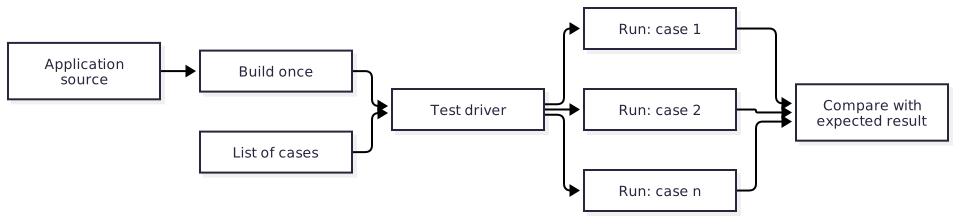
Build once. The driver builds the application a single time and runs the resulting executable for every case. Compiling dominates the cost of a test run, so this is the difference between a suite that takes seconds and one that takes minutes.
Cases are data. Each case names its arguments, its standard input, any files it needs, and the expected output and exit code. Adding a case is adding an entry, not writing a program.
Cover failure as well as success. The same executable is run on the error paths: bad input, missing files, invalid arguments. A case that expects a particular error message and a non-zero exit code is as ordinary as one that expects success.
The driver owns the environment. Because it sits outside the program under test, the driver decides how cases run. It can give each case its own process and working directory, run cases in parallel, set up and tear down what a case needs, and apply a timeout. None of that leaks into the application.
An update mode. The driver accepts
--updateto rewrite expected results, so an intended change in behavior is a reviewed diff.
The driver is a Roc script under scripts/, and the cases live under tests/.
The expected-output specification for examples, described in
Record expected output, is one such
list of cases run by the same driver.
7.7. Skip a broken case, visibly§
Sometimes a case is broken for a reason that cannot be fixed today: a compiler bug, a dependency that has not been released, a platform limitation. Deleting the case loses it, and leaving it failing blocks every pull request. Skip it, and make the skip impossible to forget.
Mark the skip where the case is defined, with a
TODOnote and a link to a GitHub issue that tracks the cause.# TODO: skipped until the compiler handles nested tag unions here. # https://github.com/roc-lang/roc/issues/<number> { name: "nested-tags", skip: Skip("compiler bug, roc-lang/roc#<number>"), ... }A skip always carries a reason. The harness rejects a skip with no note.
The harness prints every skipped case with its note, and counts skips in the summary. Nobody should have to search the source to learn what is not being tested or why.
A skip is temporary. When the linked issue closes, the skip is removed in the pull request that confirms the case passes again.
The same applies outside the harness: an example, benchmark or fuzz target that
is switched off says why, in a TODO with an issue link, at the place it is
switched off.
7.8. Report progress and results§
A harness is read far more often than it is written, usually by someone waiting for it or trying to find out what failed. Its output is part of its job.
Running 20 cases
 [ 1/20] parse-empty-input ............ PASS      12ms
 [ 2/20] parse-nested-lists ........... PASS      48ms
 [ 3/20] render-wide-table ............ FAIL   1_204ms
 [ 4/20] nested-tags .................. SKIP          compiler bug, roc-lang/roc#1234
 ...
 [20/20] rejects-missing-file ......... PASS       9ms

Failed
  render-wide-table: expected exit code 0, got 1
    tests/cases/render-wide-table

Skipped
  nested-tags: compiler bug, roc-lang/roc#1234

Summary: 18 passed, 1 failed, 1 skipped in 10_312ms
Slowest: render-wide-table 1_204ms, build 6_870ms
Show progress as it happens. Print each step with its position, such as
3/20, and its result as soon as it finishes. A run that prints nothing for a minute looks the same as a run that has hung.End with a summary. Report how many cases passed, failed and were skipped, list each failure with enough detail to act on, and list each skip with its note. The summary is what a reader sees first in a CI log, so it stands alone.
Report timing. Give the time of each case, the total, and the slowest steps, including the build.
Use one unit for time. Print every duration in milliseconds, with digit separators and aligned to the right:
12ms,1_204ms,10_000ms. With a single unit the eye compares lengths, and a slow case stands out. A column that mixes850ms,1.2sand2mhides exactly the outlier worth seeing.Use color.
FAILis red,PASSgreen,SKIPyellow. Color is an aid and never the only signal: the word is always printed, and color is turned off when output is not a terminal or whenNO_COLORis set.Exit accurately. Any failure gives a non-zero exit code. Skips alone do not.
7.9. Measure allocations§
Memory behavior is a quality of Roc code in its own right, and it is invisible unless it is measured. A change that keeps a reference alive a little longer can turn an in-place update into a copy of a whole list, on every call. The result is still correct, every test still passes, and the package is now several times slower for its users.
Use roc-fuzz as a test platform for pure package code. Its host measures allocations, reallocations, deallocations, requested bytes and live/peak memory. Test the hot paths and operations users call in a loop, including empty, boundary-sized, uniquely owned and shared inputs.
7.9.1. Allocation properties and exact baselines§
Use two complementary checks:
Properties over inputs. Assert a memory rule inside the target, such as "this operation allocates nothing" or "this update performs at most one allocation or reallocation". The assertion runs for declared examples, replayed inputs and generated inputs. Use
Fuzz.expect_allocs_at_most!for a ceiling, or use a namedFuzz.measure!region and inspect its statistics for a more specific rule. A measurement returns{ value, stats }, so correctness and memory behavior can be checked together.Exact observations for named examples. Declare representative cases with
Fuzz.example({ name, revision, make: || value }), or preserve a witness withFuzz.saved({ name, revision, bytes }). roc-fuzz checks each in a fresh process and compares its allocation observations with an explicitly accepted baseline. Named measurements isolate operations within the property.
These checks have different review rules. A ceiling fails only when the count exceeds the bound; lower it when an improvement should be protected. roc-fuzz’s baselines match exactly, including example inventory, revisions, actual input digests, measurement regions, metric version and statistics. Reductions also require review and explicit acceptance. A compiler improvement should therefore update a baseline deliberately, rather than silently changing what CI accepts. Commit baselines for each supported host and named profile; record the compiler and build options with the evidence.
check verifies examples and accepted baselines without exploration. A missing
entry is reported as unbaselined and permits normal execution; it is not
allocation regression protection. Review the declared inventory and measurements,
run accept explicitly, and commit the resulting baseline before treating
checks as evidence of a protected allocation contract. CI runs check or run,
never accept.
Allocation evidence depends on the measured scope and storage shape. roc-fuzz
measures the property after input generation/decoding and before adapter teardown;
named regions narrow that scope further. Keep aliases alive when testing shared
storage, and observe returned values so the intended operation remains relevant.
A logically equal value can have different capacity, sharing or slices. Preserve
original witness bytes for storage-sensitive failures: reconstructing a value
in an expect test may lose the allocation behavior that exposed the bug.
Counts are a steadier PR signal than wall-clock timings, but they depend on the
compiler, host, build and lifetime of values. Review baseline diffs alongside
correctness results, and use a deliberate failing assertion or changed baseline
to verify that the harness detects a regression. A pass covers the checked
examples and explored inputs; it does not prove an allocation bound for all
inputs. roc-fuzz also supports logical trace rules (Before, Count and
Forbidden) for ordering and event invariants. These are logical observations;
wall-clock performance belongs in the separate benchmark workflow.
7.10. Correctness and memory properties with roc-fuzz§
Use property-based tests for invariants across inputs, especially parsers, encoders, data structures and arithmetic on sizes or indexes. roc-fuzz combines correctness, allocation and trace checks with coverage-guided exploration in a self-contained Roc target. The target imports the package; the shipped package has no dependency on roc-fuzz.
| Part | Role |
|---|---|
| Generator | Produces typed Roc values to try: numbers, strings, lists, records, or shapes built from them |
| Operation | Calls the package code under test |
| Property | Checks value correctness, memory behavior or a logical invariant |
| Examples | Named cases and saved witnesses that run independently of corpus retention |
A pure function needs no external state to recreate. Useful properties include round-trip encoding, formatting idempotence and agreement with a simple reference implementation. Preserve failing input bytes and the target/compiler/build configuration, especially for storage-sensitive memory checks. Coverage guides exploration toward new branches; saved witnesses and named examples preserve regressions independently of the evolving corpus.
7.10.1. What a target looks like§
app [target] {
	fuzz: platform "https://github.com/lukewilliamboswell/roc-fuzz/releases/download/<version>/<hash>.tar.zst",
	pkg: "../../package/main.roc",
}

import fuzz.Fuzz
import pkg.Stack

# After pushing an item, popping must return that item and the original stack.
test : List(U8) -> Fuzz.Outcome
test = |initial| {
	item = 0
	pushed = Stack.push(initial, item)

	match Stack.pop(pushed) {
		Ok({ value, rest }) if value == item and rest == initial => Fuzz.keep
		Ok(_) => crash "pop did not undo push"
		Err(Empty) => crash "the stack was empty after push"
	}
}

target = Fuzz.target_with({
	examples: [
		Fuzz.example({ name: "empty", revision: "1", make: || [] }),
		Fuzz.example({ name: "nonempty", revision: "1", make: || [1, 2, 3] }),
	],
	name: "stack-push-pop",
	generator: Fuzz.list(Fuzz.u8, 8),
	test,
	show: |initial| Str.inspect(initial),
})
The target depends on the working tree by relative path, like every other Roc
application in the repository, and on a roc-fuzz release by URL. It lives
under fuzz/, outside the package root, so it is never bundled. Use the
content-addressed platform URL and compatible compiler documented in the
release notes.
Build once, then use the commands embedded in the executable:
roc build --fuzz fuzz/stack/main.roc --output=stack-fuzz
./stack-fuzz check
# After reviewing the observations, explicitly accept and commit the baseline.
./stack-fuzz accept
./stack-fuzz check
# Local exploration; the default run searches for 60 seconds after checking.
./stack-fuzz run
check runs declared examples and baseline checks without searching. run
checks them before exploring, and skips exploration when those checks fail.
Use run --report-dir=PATH for campaign evidence; the report directory must be
absent or empty. Bare invocation also runs the default workflow, so PR tasks
must select check and bounded replay explicitly rather than accidentally
starting a 60-second search. The default baseline is
<declared-target-name>_baseline.json in the working directory; use
--baseline=PATH and --profile=NAME when needed.
For an allocation-aware target, use an effectful property and
Fuzz.target_with!. For example, popping a stack can check the returned
length while asserting that it performs no allocations or reallocations:
test! : List(U8) => Fuzz.Outcome
test! = |initial| {
	popped = Fuzz.expect_allocs_at_most!(0, || Stack.pop(initial))
	match popped {
		Ok({ value: _, rest }) if rest.len() + 1 == initial.len() => Fuzz.keep
		Err(Empty) if initial.is_empty() => Fuzz.keep
		_ => crash "pop returned the wrong length"
	}
}
Pass test! in place of test to Fuzz.target_with!, keeping the generator,
examples and display function. Replace the measured operation and property
with the package’s actual memory contract. The
roc-fuzz quality guide
explains named measurements, baselines, trace rules and report fields.
7.10.2. How targets are managed§
Review properties when APIs or implementations change. Strengthen invariants and generators as the input domain becomes clearer; add named examples for newly discovered failures.
Write one operation and one property per target, so that a failure says what went wrong.
Add a target when a module has a rule that should hold for all inputs. Every parser and every encode and decode pair should have one.
When roc-fuzz finds a bug, replay and minimise it, fix it, and use
retainto preserve the witness as a namedFuzz.savedexample. Add an ordinaryexpecttest for the value-level regression when useful. Keep original storage-sensitive witnesses even when a smaller logical example is available.Commit a small corpus for each target. Pull-request CI builds every target and checks its named examples and allocation assertions, accepted baselines and bounded corpus replay as its smoke run.
Run the real search on a schedule, as described in Fuzzing.
Validate preconditions for decoded examples as well as generated values; generator bounds express search bias, not input validation. Report attempted, accepted and rejected inputs. Exploration with zero accepted inputs is inconclusive and unsuccessful. Distinguish the outcome from allocation validity, trace-rule results and capture completeness in the evidence.
A weak property finds nothing, and a passing run is not a proof. The roc-fuzz manual covers writing generators and properties, running campaigns, and reading a saved failure.
7.11. Formatting§
Run roc fmt --check in pull-request CI, over every Roc source the package
compiler builds, and roc-stable fmt --check over the scripts, whose roc
field another compiler’s formatter would rewrite. It fails the pull request that introduces unformatted code, which is
the only moment at which fixing it is cheap.
Do not run it in nightly.yml. A new nightly can change the formatter, and a
formatting difference says nothing about whether a release still works. The
check would raise an alarm that no patch release answers. When a new formatter
does change the output, the next pull request sees it, and reformatting is a
small pull request of its own.
8. Check repository source policy§
roc-policy is a precompiled, read-only source-policy utility. It checks
repository conventions that compiler diagnostics, formatting and behavioral
tests do not establish. The tools release builds binaries for x86_64 Linux,
ARM64 Linux and Apple Silicon macOS. The Linux binaries are static musl
executables. Building and testing the implementation happens upstream; source
checking downstream requires no Roc compiler, Python, Git or Nix.
8.1. Risks and controls for source-policy evidence§
A rule can inspect the wrong files, an override can hide a violation, or an incomplete scan can appear successful. Make rule scope and analysis completeness observable. Explicit roots, validated profiles, explained effective configuration and stable findings let maintainers inspect what the checker selected. Malformed configuration and incomplete analysis fail separately from policy findings; fixtures verify exclusions and conflicting settings. A clean source-policy report establishes only the rules actually checked. It is not behavioral test coverage or proof that the product has no security defects.
8.2. Declare policy in Blueprint§
The default authority is repository_policy in Blueprint.roc. Schema 2 composes
shared defaults with repository rules and explicit overrides. The surrounding
file remains normal Roc configuration; add the binding beside its existing
config, without replacing its Blueprint platform declaration:
tooling = { compiler: "nightly-<date>-<commit>" }

repository_policy = {
    schema_version: 2,
    roots: ["package", "examples", "scripts", "docs"],
    exclude: ["**/generated/**"],
    test_roots: ["package"],
    profiles: [{ name: "base", builtin: "roc-package", version: 1 }],
    rules: [
        { id: "project/compiler", kind: CompilerPin, include: ["scripts/**"], value: tooling.compiler },
        { id: "project/no_internal_imports", kind: ForbiddenImport, include: ["package/core/**"], name: "support/Internal" },
        { id: "prose/worth_noting", kind: Phrase, include: ["docs/**"], channels: [Prose], phrase: "it is worth noting" },
    ],
    overrides: [
        {
            rule: "base/spelling",
            reason: "Published ecosystem name",
            changes: { accepted_words: { add: ["rocpkgs"] } },
        },
        {
            rule: "base/public_docs",
            include: ["package/fixtures/**"],
            reason: "Imported fixtures preserve upstream source",
            changes: { level: Off },
        },
        {
            rule: "prose/worth_noting",
            include: ["docs/quotations/**"],
            require_match: False,
            reason: "Quoted source retains its original wording",
            changes: { level: Warning },
        },
    ],
}
An environment may reference the same tooling.compiler when declaring its
compiler. The utility resolves local constants, forward references, record puns
and field access without evaluating Blueprint. It does not prove that arbitrary
Blueprint expressions actually use those facts. Configuration composition is
implemented by the policy resolver, separate from generic constant extraction.
Supported data are literal records, lists, strings, booleans, plain decimal integers and bare tags, plus references, field access and parentheses. Strings support Roc escapes including Unicode scalars. Calls, arithmetic, functions, record updates, interpolation and imported values in the selected dependency graph are rejected. Unrelated functions and imports may remain in the file. The complete file must parse without diagnostics. Duplicate definitions/fields, cycles, unknown fields, irrelevant options and resource-limit violations fail.
The generic constant-data module has no profile loading or policy-specific behavior. It limits each source to 1 MiB, declarations/work to 10,000, depth to 64 and expanded-value accounting to 1 MiB. Policy composition admits at most 32 profiles, 10,000 final rule instances and 10,000 overrides.
8.3. Shared profiles and rule identities§
A rule’s kind selects an implementation. Its required id identifies one
configured policy instance. The diagnostic code identifies the finding category.
For example, two Phrase rules can share diagnostic code text/phrase while
having independently overridable IDs. IDs use slash-separated components of
letters, digits, dots, underscores and hyphens; empty, . and .. components
are invalid. Duplicate IDs fail instead of replacing earlier declarations.
Profiles load in declared order, followed by local rule declarations. Their rule
IDs are namespaced by the profile’s name: rule spelling in profile base
becomes base/spelling. A local rule cannot accidentally replace that ID. Change
its settings through an explicit override instead.
roc-policy list-profiles lists profiles embedded in the binary. The immutable
roc-package version 1 supplies public_docs for package/**/*.roc and
spelling for supported Roc/prose extensions. Both rules are intentionally
optional across repository layouts. Embedded profiles need no sidecar files;
the reviewed binary selects their bytes, and explanations include their SHA-256.
Unknown names and versions fail.
Alternatively, a profile descriptor may contain name, repository-relative
path, definition and the reviewed lowercase 64-character sha256. The file
must define a bounded record such as:
profile = {
    schema_version: 2,
    rules: [
        { id: "spelling", kind: Spelling, channels: [Comments, Prose] },
    ],
}
The loader verifies the exact file bytes before interpreting the chosen binding. A missing file, symlink, unsafe path or mismatched digest fails; no download or external hashing tool is invoked. Profiles contain rules only, without nested profile loading, discovery roots or overrides. Profile paths are anchored at the explicit repository root. This permits independent policy-data releases while keeping profile selection, pins and repository decisions in Blueprint.
Shared profiles are reusable defaults that repository authors may override. Mandatory organizational requirements require an independently trusted CI policy/invocation. Selecting a profile in a repository-controlled Blueprint is not evidence that such external requirements were enforced.
8.4. Ordered overrides§
Overrides target one exact rule ID. Every override requires a nonempty reason;
unknown IDs and unknown or irrelevant changes fail. Without include/exclude,
an override applies repository-wide. With file selectors, it applies to matching
paths. All matching overrides apply in written order, including global overrides:
later scalar values win, without hidden path-specificity precedence.
level is Off, Warning or Error, defaulting to Error. There is no separate
enabled flag. Off suppresses the selected rule. Warnings are reported without
failing by default; set repository max_warnings: 0 to reject any warning, or a
nonnegative number to allow that many. Configuration errors, I/O failures and
incomplete analysis remain exit 2 regardless of rule level.
Collection changes use explicit operations:
changes: {
    accepted_words: { add: ["rocpkgs"], remove: ["oldterm"] },
    channels: { replace: [Comments, Prose] },
    corrections: { add: [{ word: "mispeling", replacement: "misspelling" }] },
}
replace discards inherited values and cannot be combined with add or remove.
add extends sets without duplicates; remove subtracts matching entries.
Vocabulary and correction keys fold ASCII case; paths remain case-sensitive.
Adding a correction replaces the inherited correction with the same normalized
key. Removing a custom correction exposes the bundled correction, if any; use
accepted_words to accept the word instead. Contradictory operations and duplicate
keys in one layer fail. There is no implicit list concatenation or deep merge.
Overrides may change level and the options supported by their rule kind.
Repository-wide overrides may also change rule include/exclude collections
and require_match. File-scoped overrides cannot change rule IDs, kinds, selectors or the
aggregate rule require_match assertion. Discovery roots and profile pins are not patchable through rules.
Rules require an applicable source file by default. An intentionally optional
rule may declare require_match: False, useful in profiles shared across
different layouts. Overrides likewise require a selected target/file by default;
set their require_match: False for intentional future or optional exceptions.
This catches renamed paths and stale exceptions without making every shared rule
mandatory. It checks applicability, not whether an exception suppressed a finding.
8.5. Commands and paths§
roc-policy check --root .
roc-policy check --root . --format json
roc-policy list-profiles
roc-policy explain-config --root .
roc-policy explain-config --root . --path package/Thing.roc
roc-policy manifest --root . > expected-tests.json
roc-policy run-tests --root . --compiler /absolute/path/to/roc
--config selects a file relative to the root and --definition selects a
binding; defaults are Blueprint.roc and repository_policy. All configured
commands use this same authority. manifest and explain-config emit JSON.
Explanation includes profile digests, rule IDs, origins, effective options,
selector decisions and ordered override traces. Without --path it shows global
settings; a path shows effective settings and why rules are selected, excluded
or disabled. It need not open the source file to explain its configuration.
roots and test_roots are exact repository-relative files/directories.
Schema 2 rule and override selectors use root-relative slash-separated globs:
* matches within one component, ? matches one Unicode scalar, and a complete
** component matches zero or more path components. Thus **/*.roc includes
root files and package/** includes the directory and descendants. Literal
patterns match exactly. Dotfiles match normally. Unsupported bracket/brace,
negation and escape syntax, absolute paths, controls and dot segments fail.
Patterns and matched paths are bounded to 4096 bytes and 128 components.
Global exclude prunes discovery before opening sources or descending into
excluded directories. Rule exclusions affect that rule alone. File overrides do
not resurrect globally excluded files. There is no implicit Git ignore behavior,
parent-configuration cascade or dependence on the current directory once the
explicit root is fixed. Global exclusions also apply to test discovery, but do
not bypass explicit configuration/profile reads or their integrity checks.
Discovery is deterministic and overlapping roots are deduplicated. Sources are
.roc, .md, .markdown, .adoc, .txt and .rst; accounting uses only .roc.
Selected sources reject symlinks and special files. Input files are limited to
8 MiB and inventory traversal to 100,000 paths.
Exit 0 means completed checks within the warning allowance, 1 means error-level
findings or too many warnings, and 2 means invalid input or incomplete analysis.
Diagnostic JSON uses schema 2 and includes rule_id, level, origin and trace
alongside the category rule. Text locations use one-based Unicode scalar
columns; JSON retains half-open UTF-8 byte spans.
8.6. Rules§
CompilerPin, NoCompilerPin and Dependency inspect app/package/platform
headers, not lookalike fields in bodies, comments or strings. A required
compiler/dependency rule aimed at an exact entrypoint reports a missing header.
Directory-wide required rules apply only to header-bearing entrypoints, allowing
ordinary helper modules. They fail configuration if no entrypoint is applicable.
A dependency value is an exact decoded string; alternate relative spellings
are distinct values.
ForbiddenImport matches the written path or its dot/slash descendants, ignoring
trivia and preserving aliases' original paths. It does not resolve bindings,
reexports, indirect calls or a complete project dependency graph.
PublicDocs identifies explicit module exposures and filename-based nominal
modules, including nested public associated definitions. It requires nonempty
attached ## documentation, supporting documentation before an annotation or
its definition. Private helpers and local declarations are excluded. Package
uppercase exposure inventories refer to other module files; select those source
files for checking. Unresolved imported/qualified/wildcard public surfaces return
documentation/incomplete, never an assertion that they are documented.
Spelling embeds the pinned typos v1.44.0 correction map (93,861 entries)
through a Roc file import. It requires no dictionary file, download or Rust
toolchain at runtime. This is correction lookup rather than unknown-word
detection; it does not reproduce the typos CLI heuristics or dialect rules.
The exact upstream CSV, MIT notice, provenance and offline verification script
are maintained in tools/roc-policy/vendor/typos. roc-policy --licenses
prints the embedded notice, which is also included among release assets.
channels selects Comments,
Identifiers, Strings and Prose; defaults are comments, identifiers and prose.
Identifiers split snake case, camel case, acronym transitions and digits.
accepted_words exempts word components and accepted_identifiers exempts whole
Roc identifiers, without accepting their components elsewhere. Add corrections
with corrections: [{ word: "mispeling", replacement: "misspelling" }]; entries
replace the same bundled key. Keys must be single words. Case folding is ASCII;
Unicode bytes and source offsets are preserved. String channels inspect raw
string parts rather than evaluating escape sequences.
Phrase requires phrase, optionally replacement, and uses the same channels
as spelling. Exceptions target the particular phrase rule ID. Whole-word matching folds ASCII case and normalizes whitespace
across consecutive comment/documentation lines; internal and surrounding
punctuation must match. Patterns must contain a matchable word. There are no
implicit banned phrases. A policy enforces chosen language conventions, not
inference about authorship or prose quality.
8.7. Test accounting§
manifest discovers static file-level and associated-block expect declarations
under test_roots, defaulting to roots. It emits schema 1 JSON with files,
each containing path, exact source, and tests with byte start and end.
It is a source inventory, with no execution statuses. Inline/local expectations
are valid assertions but are not separate required static tests. A static test
sharing its starting line with another expectation is rejected because the
compiler’s line output cannot distinguish them. Empty selected static inventories
fail explicitly.
run-tests is an optional discovery-driven runner requiring an explicit compiler
path. It invokes roc test <absolute-source-path> --verbose for each inventoried
file, leaving normal compiler caching enabled. Optional test_main names a
relative application file used to resolve package aliases with --main=....
For every static test, exactly one PASS: <absolute-source-path>:<line> record
must be reported. Tests in imported local modules and executed inline assertions
may add records; they do not inflate the selected file’s static count. The total
number of PASS records must also agree with the compiler’s success summary.
Missing or duplicated required locations fail, even when the overall count is
unchanged. A successful-looking output fragment cannot override a failed process.
Normal cached results are accepted. Cache correctness is the compiler’s
responsibility; this utility does not routinely pass --no-cache. Every child
must exit successfully within 60 seconds and uses bounded output capture.
Inventoried sources are checked again after all invocations; changed sources,
ambiguous locations, malformed output and incomplete parses fail. No shell
command is constructed.
This checks compiler-reported source lines, not native test IDs, exact span receipts, code coverage or authenticated execution provenance. It does not prove that a different CI entrypoint selects these tests. It discovers and invokes each selected test-bearing file itself, so large import graphs can cause repeated compiler invocations; normal caching reduces that cost. The adapter is tested against the compiler its tools release records and depends on that compiler’s human-readable verbose output. An incompatible output format fails explicitly.
The runner can execute project code and invoke the compiler’s normal dependency
behavior. Use it in unprivileged jobs. check and manifest require no compiler,
execute no project code, and invoke no external helpers.
8.8. Distribution boundary§
Install a reviewed tools release and verify its content digest before invoking
it. Blueprint can manage the binary through Programs and Fetch, with its
bytes pinned by Blueprint.lock; see
utility provisioning.
Content hashes establish expected bytes, not build provenance.
9. The three workflows§
Every package and platform repository has the same three workflows. Each answers one question, and none of them changes the repository.
| Workflow | Trigger | What it proves | Token access |
|---|---|---|---|
ci.yml | Pull request; push to the default branch | Scripts pass on roc-stable. The working tree and its examples pass on the latest nightly. A platform’s committed host bindings match that nightly. A Roc package has no ci.yml: its release dry run proves the same things. | contents: read |
release.yml | Manual dispatch; pull request as a dry run | The exact bundle, examples archive and documentation proposed for publication work. A Roc package’s release.yml is a thin caller of the shared release-package.yml. | contents: read. The publish job alone has contents: write, behind a protected environment. |
nightly.yml | Daily schedule; manual dispatch | The latest published release and its examples archive work with the latest nightly. | Test jobs contents: read; the report job issues: write |
Rules that hold in all three:
Every
uses:reference is a full commit SHA.Top-level
permissionsis{}, and each job states what it needs.Checkout sets
persist-credentials: false.A job that runs repository code has no write access. A job with write access runs no repository code.
The nightly tag is resolved once, in the first job, and passed to every other job as the
nightly-taginput ofroc-lang/setup-roc. Matrix jobs never each resolve "latest" for themselves, or one run could test several compilers.Each job calls a
blueprint run <task>and holds no logic of its own.
Workflows beyond these three, such as a documentation site or scheduled fuzzing, are described in Optional workflows.
9.1. Risks and controls for release evidence§
A workflow can publish a different source revision or rebuild assets after testing, and a retry can combine files from unrelated attempts. Preserve source and artifact identity across the release. Build and test the selected commit, pass exact files through the run, and let a separately authorized publisher verify the inventory and downloaded asset hashes. Interrupted-publication rules refuse ambiguous replacement. Exercise dry runs and publisher failure transitions. These controls bind the delivered bytes to the selected evidence; they do not prove an independently reproducible build or the trustworthiness of a compiler.
9.2. Continuous integration§
ci.yml tests the working tree.
Set up Blueprint and install the latest nightly, as in Use the environment in CI.
Run
blueprint run check.
What runs on every pull request
lists what the check task covers.
Keep routine CI and release dry runs fast: benchmark and fuzz programs build and run their explicit smoke mode, with at most one second of workload execution per target. Compilation has its own budget. Sustained searches and measured benchmarks run only in schedule/manual jobs with explicit event guards; see Heavy runs stay out of pull-request CI.
A Roc package has no ci.yml. The
shared release workflow
runs blueprint run check and the examples on every pull request as part of
its dry run, and its two job names are the required status checks.
A repository whose code can behave differently by target runs it as a matrix, one job per runner, and ends with a single aggregate job that requires every matrix job to have succeeded. The aggregate job’s name is the required status check, so the ruleset does not need editing when the matrix changes.
A platform adds the host-bindings check described in Host bindings. It runs here and nowhere else.
A pull request can fail because a new nightly arrived, with no fault in the
change itself. Compare with the latest nightly.yml run and with the default
branch before treating a failure as a regression in the pull request.
9.3. Release§
release.yml builds what a release would contain, tests those exact bytes, and
publishes them once. A maintainer dispatches it from the default branch with a
version. A pull request runs the same build and tests as a dry run and publishes
nothing.
9.3.1. The shared release workflow for a Roc package§
A Roc package keeps no release logic of its own. Its release.yml calls
roc-automation’s .github/workflows/release-package.yml at a full commit SHA:
name: Release

# A pull request builds and tests the release under a version that is never
# published. Dispatch from the default branch with a version to publish it.
on:
  pull_request:
  workflow_dispatch:
    inputs:
      version:
        description: Version to publish, such as 0.1.0 or 0.1.0-rc1; empty runs the dry run
        type: string
        default: ''
      nightly-tag:
        description: Exact Roc nightly for a diagnostic run; empty resolves the latest
        type: string
        default: ''

permissions: {}

jobs:
  Release:
    permissions:
      contents: write
      id-token: write
      attestations: write
    uses: lukewilliamboswell/roc-automation/.github/workflows/release-package.yml@8f73710f90f942f3097821b189bbf341d305cd55
    with:
      version: ${{ inputs.version || '' }}
      nightly-tag: ${{ inputs.nightly-tag || '' }}
      check-task: check-package
The optional numeric build-timeout-minutes input defaults to 30 and accepts
integers from 1 to 360. Set it high enough for the full configured checks and
release assembly, for example 75 for a large parser conformance suite. The
request guard rejects invalid values before candidate execution. A timeout or
failed build prevents testing and publication; raising the limit changes no
checks or token permissions.
The shared workflow runs three jobs. Build and test the source resolves the
latest nightly once, runs the package’s check task, checks version
sufficiency against the latest release, runs the working-tree examples, and
builds the bundle, the examples archive, the API documentation archive and the
notes. Test the release candidate checks out no package source: it downloads
those exact files and runs the archived examples against the bundle over a
loopback address. Publish the release runs only for a dispatched version on
the default branch, in the release environment; it attests the tested files
and hands them to actions/publish-release.
The bundles, the archives, the notes and both example runs are one utility,
release-package, a static executable from
a roc-automation tools release that the repository’s Blueprint fetches by
digest and names as the release-package task. The workflow checks out its
own repository with job.workflow_sha for the shared actions it uses, so the
caller’s SHA fixes the workflow and the lock fixes the utility; the package
compiler is the latest nightly, installed by the workflow. A maintainer runs
the same task locally with that compiler on PATH:
blueprint run release-test -- test-examples               # the working tree's examples against tests/spec.json
blueprint run release-test -- test-examples --update      # record what they print now, as a reviewable diff
blueprint run release-package -- build 0.0.1-dryrun       # the bundles, archives and notes, into dist/
blueprint run release-test -- test-archive                # the archive in dist/ against the bundles in dist/
The inputs are the version, an exact nightly for a diagnostic run, the name of
the Blueprint task that checks the package and one program to run before it for
a prerequisite the runner lacks, an SBOM author with an optional composition
task and supplier-imports record when the release publishes sidecars, and a
manual switch with an optional task that writes generated manual sources
before the PDF is rendered. With the
calling job named Release, the required status checks are
Release / Build and test the source and Release / Test the release candidate.
The caller declares no concurrency group: the shared workflow holds one release
at a time per repository.
A platform keeps a release.yml of its own, described in
A platform’s release workflow.
9.3.1.1. Adopt the shared workflow in an existing repository§
The move from a copied release workflow is the same in every package so far.
A
checktask inBlueprint.rocthat runs the package’s own checks, and thereleaseandrelease-testenvironments and tasks from the utility’s section, followed byblueprint updatefor the lock. A check that takes longer than a few minutes, such as fuzzing or conformance suites, stays in the repository’s ownci.yml; passcheck-task: ''then, so that the release dry run stays fast.Every example depends on the package by relative path and names no
roccompiler; the release notes record the compiler instead. A.rocfile underexamples/without anappheader is a shared module. An example that prints the clock or anything else that varies takes an argument or input that makes a case deterministic: a skipped case never passes.release-package test-examples --updatewritestests/spec.jsonwith one case per application and records what it prints; review that diff, then add cases.Notes in
docs/releases/<version>.adocopen with= <name> <version>and use{package-url}, plus{<dir>-url}for each further bundle.The thin
release.yml, then delete the scripts and workflow jobs that bundled, archived, tested examples, rendered notes or published, andci.ymlwhencheck-taskruns the checks.SBOM sidecars need
sbom/composition.jsonand an author; a manual PDF needs the roc-docs renderer behind adocs-pathtask. A repository without either leaves those inputs unset and keeps its own documentation workflow.Update the ruleset’s required checks to the two shared job names, and after the first green dry run, a maintainer dispatches the next release.
9.3.2. A platform’s release workflow§
A platform’s host is built with its own toolchain, and its bundle holds that
host for every target, so its release.yml builds them itself and hands the
rest to the same utility, as
A platform release describes.
It has the shape of one builder and a matrix of runners:
Build, on one Linux runner: build the host for every target, then
release-test -- test-examples, the repository’s bundle command with--output-dir build/platform, andrelease-package -- build "$VERSION" --platform-bundle build/platform. Uploaddist/.Test the release candidate, one job per supported system, Windows included: install Blueprint with
actions/setup-blueprintand the nightly the build resolved, downloaddist/, and runrelease-test -- test-archive. Nothing is rebuilt.Publish, as for a package: from the default branch, in the
releaseenvironment, attest the tested files and hand them toactions/publish-release, with no checkout of the platform’s source.
The repository keeps only what is its own: the host build, the target layout,
the linker inputs and the bundle command with its inventory. Its examples,
tests/spec.json and notes follow the package rules, with {platform-url}
for the platform’s URL.
9.3.3. What a release contains§
One immutable GitHub release per version holds:
| Asset | Purpose |
|---|---|
The bundle, under the filename roc bundle emits | What users depend on. The filename ends in its content hash, which is never changed. Several bundles in one release says when the filename also carries a name. |
<name>-examples-<version>.zip | Examples pinned to this release’s bundle, with their expected output. |
<name>-docs-<version>.zip | The generated API reference and site for this version, so the documentation of any release can be restored. |
<name>-<version>.pdf | The manual, where the repository has one. |
| Release notes | An authored account of what changed, with the real bundle URLs and the compiler versions used. |
<asset-name>.spdx.json or <asset-name>.cdx.json | Machine-processable component inventory bound to each deliverable’s digest, with target-specific relationships and declared coverage. See the SBOM contract. |
| Signature/attestation evidence | Authenticated SBOM statements and build provenance, with expected signer, source and subject identities. These establish different evidence. |
Managing releases carefully is a large part of what makes a package dependable. A user meets a release through three things: its version number, its notes, and the URL they paste into a header. Each is handled deliberately.
9.3.4. Choose the version with roc bump§
A version number is a promise about compatibility, and roc bump checks the
promise against the code. It compares the public API of the package with a
previous release and reports the semantic-version bump the difference requires:
patch, minor or major.
# what bump does this change need, and what is the next version?
roc bump --old <previous release bundle URL> package/main.roc

# in release.yml: fail unless the chosen version bumps far enough
roc bump --old <previous release bundle URL> --expect 0.13.0 package/main.roc
Run it before choosing a version, so the number follows from the change and not from habit.
release.ymlruns it with--expectin its validate step, against the latest release for same-major requests, and stops when the requested version understates the change. A breaking change can then never go out as a patch.A requested major greater than the latest final major already satisfies the lower bound for every possible API change. The released
release-packageutility validates both versions and accepts that proof before attempting extraction. It does not compute an API diff in that case. Same-major releases still require a successful comparison, including when extraction fails.This version proof does not establish that the candidate compiles or works. The configured package checks, working-tree examples, exact candidate tests and SBOM checks remain separate release requirements. Malformed or unreadable latest-release metadata cannot authorize the proof.
A repository with several packages runs it once per package root.
It compares only the modules the package header exposes. A change in behavior behind an unchanged signature is still the maintainer’s call, and belongs in the notes.
A package version is independent of any compiler version. A changed package is always a new version. Nothing is ever republished under an existing version.
9.3.5. Write the release notes§
Each release has its notes in docs/releases/<version>.adoc, for example
docs/releases/0.12.0.adoc. They are committed in a pull request before the
release is dispatched, and the workflow refuses to release a version whose
notes file is missing.
The workflow publishes the notes with the release. Keep the manual focused on
the current interface and procedures; link readers to the published releases
for version-specific changes.
The notes are an authored narrative, written for a user deciding whether and how to upgrade. They are not a list of commits or merged pull requests.
Open with what this release is for, in a sentence or two.
Describe what changed in terms of what a user can now do, or must now do differently.
For a breaking change, show the code before and after.
Say what was fixed, naming the visible symptom.
Thank contributors, and link issues where a reader may want the background.
= roc-example 0.12.0

This release adds streaming decoders and removes the deprecated `Table.render`.

== Use this release

[source,roc]
----
app [main!] {
    cli: platform "https://github.com/roc-lang/basic-cli/releases/download/<version>/<hash>.tar.zst",
    example: "{package-url}",
}
----

== Streaming decoders

...
The bundle URL cannot be written by hand, because it contains the content hash of a bundle that does not exist until the release builds it. The notes therefore use a placeholder, and the workflow fills it in:
{package-url}stands for the released bundle’s URL, and{platform-url}for a platform’s. A release with several bundles has one placeholder for each, named after the package, such as{tzdb-url}.After building the bundles,
release.ymlrenders the notes with each placeholder set to the real URL, tag and hash. A placeholder that is left unresolved, or one the notes never use, fails the release.The rendered notes become the body of the GitHub release, followed by a section headed "Compilers" that holds the output of
roc versionandroc-stable version. That record is the statement of what the release was built and tested with; no header pin makes it.A dry run renders the notes too, so a mistake in them fails on the pull request. It renders one file: the notes for the highest version under
docs/releases/, which are the notes of the next release whenever a pull request adds or edits them. It asks nothing of GitHub to choose that file.
The committed file keeps its placeholders. It is never rewritten after the release, and no follow-up pull request is needed.
9.3.6. The order of a release§
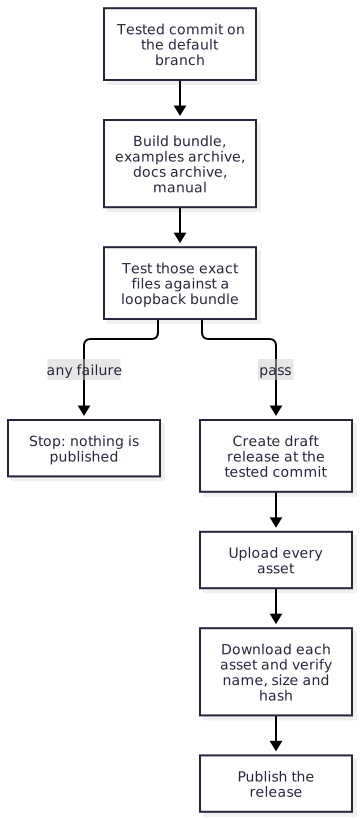
Validate. Require the default branch. Reject a version whose tag or release already exists. Require
docs/releases/<version>.adoc. Check the version withroc bump --expect. Record the event commit and use that SHA in every later job.Check. Run
blueprint run checkon that commit.Build. Build the bundle with the latest nightly, then the examples archive with the real release URL, the documentation archive, and the manual. Generate and locally validate the SBOM sidecars from the resolved build and final artifacts. Render the release notes with the real bundle and SBOM URLs. Upload them as workflow artifacts.
Test. On every supported target, download those artifacts and test them as described in Build and test the exact archive.
Publish. A separate job, with
contents: writeand a protected environment, downloads the tested artifacts. It checks out nothing and runs no repository script. It hands the version, the rendered notes and the asset files toactions/publish-release, which stages a draft at the tested commit, verifies every uploaded asset against the tested file, and then publishes.Update the site. For a final release, rebuild the documentation site so that it points at the new release, and deploy it; see What the site points at. A release candidate does not change the site.
The publish job consumes the artifacts of its own run. It never rebuilds, and
never resolves a moving branch.
SBOM generation and validation belong to the read-only build task and its PR
dry run; actions/sbom-sidecars implements
them with the pinned Blueprint tool, and
actions/fetch-dependency-sboms
chains the suppliers' documents in. The shared publication action does not
implement those steps; it uploads the supplied SBOM files as inert assets and
verifies their transferred bytes. Before attestation, the shared package
workflow also rechecks SBOM subject/sidecar bindings against the transferred
envelope and supported Blueprint manifests, using reviewed controller code and
the build job’s producing attempt. Pass the asset list the sidecar action
returns to the upload, the attestation and the publisher, so a missing sidecar
cannot hide behind a wildcard. Remote advisory rescans run separately from routine PR checks.
Enable immutable releases in the repository, so that a published release cannot gain, lose or replace an asset. Hash checks remain necessary even with immutable hosting.
9.3.7. Several bundles in one release§
A repository that publishes several packages or platforms builds one bundle for each, in the same run, under the same version, and one examples archive whose specification names every bundle URL. The release notes list every bundle URL by name. All of them are tested before any of them is published.
The shared release workflow derives the bundles from the examples: every
package root an example depends on by relative path is bundled, tested and
published, and a package no example exercises is not released. The repository’s
own package is package/main.roc; another is <dir>/package/main.roc, such as
tzdb/package/main.roc. A release with one bundle keeps the bare <hash>.tar.zst
name. With several, the repository’s own package becomes <name>-<hash>.tar.zst
and the other <name>-<dir>-<hash>.tar.zst, and its placeholder in the notes
is {<dir>-url} beside {package-url}. Every tracked file in a package’s
directory goes into its bundle, modules and data alike.
Two bundles under one tag need different names as well as different hashes.
Roc identifies a package by its URL with the version and the content hash
removed. Two files named only <hash>.tar.zst under one tag are therefore one
package with two contents, and Roc refuses the pair as soon as one depends on
the other:
The same package version is being served with two different content hashes
Give each bundle a prefix that names its package and ends in a hyphen, such as
example-tzdb-<hash>.tar.zst. Roc reads the hash as the run of base58
characters at the end of the filename, so the prefix must end in a character
that is not base58, and a hyphen is one. The hash itself is never changed.
At most one bundle in a release may go without a prefix. In a repository that starts with several packages, name every one.
The prefix is part of the package’s identity. Adding, removing or changing it makes a different package as far as Roc is concerned, so choose it before the first release, and treat a change to it as a breaking release.
roc bundlewrites<hash>.tar.zst. The script that builds the release copies that file to its prefixed name, and the prefixed file is what is tested and published.roc bundleresolves the dependencies of the package it bundles. A package that names a sibling by its final release URL is bundled after that sibling, with the sibling’s bundle already in the package cache, because the URL does not exist until the release is published.roc unbundleaccepts only the bare<hash>.tar.zstname. A script that unpacks a prefixed bundle copies it to that name first.
9.3.8. Release candidates§
A release candidate, such as 0.12.0-rc1, is a prerelease published for users
to test before the maintainers commit to the release. It answers the question
the workflows cannot: does this version work in real projects, and is the API
right?
Publish a candidate through
release.ymlwith a prerelease version. It follows every step above and holds the same assets, so what users test is built exactly as the final release will be.Mark it as a prerelease on GitHub. It is never the repository’s latest release.
Announce it where users will see it, and say what feedback is wanted and for how long.
Fix what the feedback finds on the default branch, and publish
-rc2. A candidate is immutable like any other release and is never amended.When a candidate has stood without change, release the final version from the same commit. Its bundle is a new artifact under a new tag, and it goes through the release workflow in full.
Everything that speaks of "the latest release" means the latest release that is
not a prerelease. nightly.yml tests that one, and the documentation site
links to that one. A candidate is found from the releases page and from its
announcement.
9.3.9. Recover an interrupted publication§
If publication stops, inspect exactly what exists before retrying. The publish job’s error says which of these states it left.
A draft and no tag. Nothing is public. The error names the draft, which holds whatever was uploaded before the failure. Look at it to see how far the job got, delete it, and re-run the failed publish job of the same workflow run. That job publishes the files the run already tested. The publish action never adopts a draft it finds, so the draft is deleted first.
A published release. It is immutable and is never repaired. If it is complete, the version is released and nothing is re-run. If it is not, publish a new version.
Unknown. When the answer to the publish request was lost, look at the releases page and treat what is there as one of the two states above.
Changed bytes are always a new version. Do not publish a draft by hand, replace an asset, or rebuild from a moving branch. If the run’s artifacts have expired, delete the draft and dispatch the release again from the default branch. The version was never published, so it is still free, and the new run builds and tests its own files.
9.4. Nightly compatibility§
nightly.yml answers one question each day: does the release users download
today still work with today’s compiler? A failure means the package or platform
needs a patch release.
Use the pinned shared workflow in Shared published-release compatibility, rather than maintaining a local copy of selection, test execution and reporting. Compiler-pin updates remain manual work during downstream pull requests and do not belong in this workflow. Warnings from successful compilation stay visible and nonfatal; skipped or incomplete evidence never establishes a passing result.
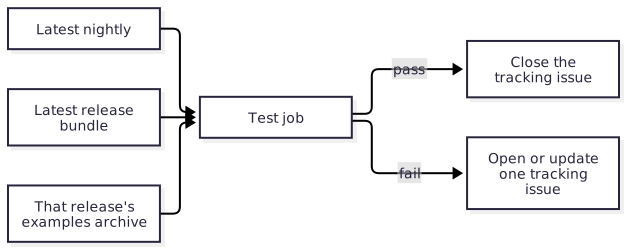
Resolve the latest nightly tag and the latest release once. Accept both as optional dispatch inputs, so a maintainer can re-run a past combination.
Skip prereleases when choosing the latest release.
Download that release’s examples archive and run it unchanged, comparing with the expected output inside the archive. Do not rebind it to the working tree, and do not test the default branch’s examples here: new APIs on the default branch are not evidence about a release.
Use the shared runner to read the archived specification and own every compiler invocation. Default-branch code may only provision native prerequisites in the read-only test job.
Run on every target the release is tested on: the one runner of a Roc package, or the same matrix as
ci.yml.A platform’s host bindings are not checked here. A released host is fixed; what matters is whether its applications still build and run.
The archive is immutable, so a failure is never a reason to change it. The fix is a patch release that works with the new compiler.
9.4.1. Reporting§
A separate job reports the result by calling
actions/nightly-report, which keeps one
tracking issue: opened on the first failure, commented on by each later
failure, and closed by the next pass. The action defines which issue that is and
what each outcome does. The workflow supplies the rest:
Reporting is considered after a failed test too, and holds
issues: writeand nothing else. Only an established success or failure reaches the issue action; unknown evidence leaves the issue alone.It checks out nothing and runs no repository or archive code.
The shared read-only aggregator verifies matching evidence from every matrix target and the current run attempt. It supplies only a constrained outcome, nightly tag and release tag to the report action, never example output.
A failed test-job result alone does not establish incompatibility. Setup, cancellation, missing evidence, skips and timeouts are distinct outcomes and cannot close an issue. A complete pass requires every target’s tests to pass. Manual historical override runs do not modify the latest-pair issue.
A repository with no final release or no canonical examples archive has no compatibility result: selection fails with a diagnostic and does not call the issue action. A missing test is never displayed as a passing nightly.
This workflow never opens a pull request, commits, merges, or publishes.
10. Shared published-release compatibility§
The shared nightly answers one question: does the latest published product
release work with the latest Roc nightly on every supported release target?
Consumers use .github/workflows/nightly-compatibility.yml at a reviewed full
SHA. Their caller supplies the schedule and native prerequisites; the shared
runner owns selection, archive validation, compilation, execution, diagnostics
and reporting.
Compiler-pin changes belong to maintainers during downstream pull-request work. This nightly does not change pins, open upgrade pull requests, merge changes, publish releases or test unreleased development examples.
10.1. Risks and controls for compatibility verdicts§
Independent moving lookups can test different release/compiler pairs, and one passing target can hide another target’s failure or missing result. Resolve the pair once and require complete matching evidence. The shared runner verifies asset identity, runs the immutable suite, and aggregates every declared target for the same run and attempt. Missing or interrupted evidence cannot close the compatibility issue. Launch errors remain setup failures rather than synthetic exit codes that a case could accept; signal termination cannot match an ordinary exit expectation. Header admission checks actual dependency fields, ignoring comments and rejecting compiler constraints or ambiguous syntax. Regression fixtures cover these states and hosted tests exercise native execution. The dashboard is a dated snapshot; a stopped publisher cannot update its colour. A pass covers the declared examples and targets only.
Fuzzing builds may add only the admitted --fuzz switch; archived metadata cannot
replace the compiler, output path or other compiler arguments. Cases with unstable
fuzzer statistics explicitly opt out of stderr comparison while preserving its raw
bytes. Stdout and the normal exit code remain assertions. Signals, timeouts and
output limits cannot satisfy an expected failure code. Regression tests cover these
boundaries, and hosted Linux and Apple Silicon smoke tests exercise a published
fuzzing platform with clean replay, one-second search and an expected exit 77.
10.2. Configure the caller§
Keep one caller for the product release suite. A Roc package uses one Linux runner. A platform names every supported release runner. One archive can cover several bundles through its declared release dependencies.
name: Nightly compatibility
on:
  schedule:
    - cron: '17 13 * * *'
  workflow_dispatch:
    inputs:
      nightly-tag:
        type: string
        default: ''
      release-tag:
        type: string
        default: ''
permissions: {}
jobs:
  compatibility:
    permissions:
      contents: read
      issues: write
    uses: lukewilliamboswell/roc-automation/.github/workflows/nightly-compatibility.yml@REVIEWED_FULL_SHA
    with:
      nightly-tag: ${{ inputs.nightly-tag || '' }}
      release-tag: ${{ inputs.release-tag || '' }}
      runners: '["ubuntu-24.04"]'
The permission ceiling permits the separate report job. Selection, tests and
aggregation reduce it to contents: read; only reporting has issues: write.
No secrets are inherited. The caller runs only on schedule or manual dispatch
on the actual default branch. The shared concurrency group serializes runs, so
an older failure cannot race a newer passing report.
runners accepts a unique, non-empty JSON array drawn from ubuntu-22.04,
ubuntu-24.04, ubuntu-24.04-arm, macos-15, macos-15-intel, macos-26,
windows-2022 and windows-2025. macos-15-intel runs the x64mac target
natively, and the Windows labels run native x64 executables. Name the complete
release matrix: a target no runner executes contributes no evidence, so it is
cross-compiled only. Windows uses the same archive admission, compiler diagnostics,
case deadlines and aggregate evidence contract as Linux and macOS; the runner
adds the native .exe suffix automatically.
Independent internal pins can select an old engine or an installer without the
consumer’s reviewed Blueprint checksums even when current source tests pass.
The shared workflow and its composite action use $/actions/... references,
which GitHub resolves from the containing file’s repository and commit, without
checking out workspace files. The consumer’s one full workflow SHA therefore
fixes selection, execution, aggregation, the installer registry and reporting.
A consumer cannot shadow these actions with files in its checkout. External
actions retain full SHA pins. Source regressions enforce this composition;
hosted consumer tests exercise the real nested installation and archived games.
Unknown Blueprint versions and wrong digests still fail admission. This workflow
targets GitHub.com; self-repository references are unavailable on GitHub Enterprise
Server. A complete native runtime verdict is still required for compatibility.
For native prerequisites, setup-command is a JSON argv array, for example
["blueprint", "run", "nightly-prerequisites"]. It runs from the event commit’s
checkout in the read-only test job; it must provision dependencies, not rebuild
the package or replace archived examples. install-blueprint: true installs the
consumer’s verified Blueprint; install-nix: true explicitly enables Nix for
an environment that needs it. Leave both false for a runner that needs neither.
Toolchain installation precedes the prerequisite command. Windows prerequisites
must use native tools through setup-command, such as a checked-in Python setup
script. Nix is not a Windows prerequisite backend. Requesting either shared
installer on Windows fails explicitly.
For a mixed matrix, keep both installers disabled and let a portable setup script
select the native provisioning steps for each operating system. A prerequisite
failure is a setup failure, never a compatibility pass.
test-environment is a JSON array of public name/value records, for example
[{"name":"DISPLAY","value":":99"}], for a headless native test environment.
Reserved compiler, cache and Actions variables cannot be overridden. Names and
duplicates are checked without regard to case, including Windows Path,
PATHEXT, SystemRoot and COMSPEC. These
values are not secrets. Setup scripts must arrange any display server’s
lifetime and redirected output explicitly; exporting a variable inside the
setup child does not change the runner’s environment.
The action has a fixed 300-second compiler deadline, a 600-second prerequisite
deadline and a default 10-second deadline per example case. case-timeout-ms
can select 1–120000 milliseconds. The matrix job has a 60-minute overall limit.
Each command has a 10 MB capture budget; timeout and output-limit results keep
the partial bytes captured before cancellation and terminate child processes.
On Windows, basic-cli manages the complete child tree in a Windows Job Object;
on Unix, it manages a process group. CI tests that a timed-out example cannot
leave a descendant running, alongside successful compilation and execution with
the real compiler on both supported Windows images.
The compiler and every example run without GH_TOKEN or GITHUB_TOKEN.
10.3. Keep compatibility cases bounded§
The archived cases verify published behavior and expected output. A package that demonstrates fuzzing or benchmarks supplies a small smoke mode for those examples, with at most one second of workload execution per target. That budget excludes compiler checks and builds. The runner’s default ten-second case deadline is a safety limit for ordinary examples, not a recommended fuzzing duration or permission to put a campaign in the suite. An interrupted case is incomplete evidence, even if it ran for its allotted wall time.
Routine PR CI verifies working-tree builds and smoke execution. This shared nightly verifies the published release on the selected compiler. Sustained fuzz searches and statistically meaningful benchmark runs belong in separate schedule/manual jobs, as Fuzzing and Benchmarks describe. Their failures remain visible in their own runs; they neither replace nor alter this runner’s compatibility verdict. In particular, a daily search of Roc builtins can catch upstream regressions without making release examples run a ten-minute campaign.
10.4. Select one immutable pair§
The selection job resolves the latest Roc nightly and the most recently
published final numeric product release, such as 0.13.2 or v1.2.3. It
excludes drafts, prereleases and auxiliary tags such as tools-*, runtime-*
and linker-inputs-*. Release lists are paginated; an incomplete listing is an
error. All targets receive the same selection.json, never separate moving
lookups. Compiler execution verifies the installed version names that nightly.
The selected release must contain exactly one
<package-name>-examples-<release-tag>.zip. package-name defaults to the
repository name. Missing examples on the newest product release are an error,
not permission to silently test an older product release. A repository with no
final release has no compatibility result; its workflow fails selection with
the reason visible in the log and does not modify the compatibility issue.
Selection records the release ID, asset ID, length and GitHub’s SHA-256 digest. Targets download by that asset ID and check length and digest before extracting or executing anything. This binds the tested bytes to that selection; GitHub release metadata is not an independent provenance attestation. Roc verifies the content identities in the archived dependency URLs when fetching bundles.
Manual nightly-tag or release-tag inputs reproduce a historical combination.
A run with either override never opens or closes the issue about the latest
pair. Use report-issue: false for an explicit diagnostic-only caller.
10.5. Publish the suite contract§
Build and test the same archive before publishing it, as
Build and test the exact archive
describes. The canonical ZIP has one root named after its filename without
.zip, ordinary Unix regular files and directories, and these contents:
<package-name>-examples-<release-tag>/
  README.md
  spec.json
  examples/
    main.roc
    ... sibling modules and data ...
Every member stays under that root. Links, traversal, duplicates, encrypted
members, file/directory collisions and ambiguous filenames are rejected before
extraction. The ZIP is at most 50 MB, expands to at most 100 MB, and has at most
10000 members. Member paths use ASCII letters, digits, dots, underscores,
hyphens and directory separators; no empty, . or .. component is allowed.
spec.json is a versioned, explicit test plan. Required case fields remain
explicit even when their value is empty:
{
  "schema_version": 1,
  "release": "1.0.0",
  "dependencies": [
    "https://github.com/owner/package/releases/download/1.0.0/CONTENT_HASH.tar.zst"
  ],
  "apps": [{
    "path": "examples/main.roc",
    "cases": [{
      "name": "default",
      "args": [],
      "stdin": "",
      "stdout": "Hello!\n",
      "stderr": "",
      "exit_code": 0
    }]
  }]
}
release must match the selection. Dependencies are immutable published bundle
URLs belonging to that repository and tag. Each application directly names at
least one declared bundle in its header and has no compiler constraint: it must
be able to meet a newer compiler without editing the archived source. The runner
accepts canonical app [entrypoints] { alias: platform "URL", package: "URL" }
headers, including whitespace and line comments. Dependency URLs in comments or
application bodies do not count; duplicate fields, escaped header strings and
unsupported header syntax fail admission. It never changes an archived file, substitutes the working-tree bundle or runs a
formatter. An empty package cache starts each target’s test.
The suite contains 1–100 unique application paths under examples/, with
1–100 uniquely named cases per application. The runner checks and builds each
application once with the selected compiler, then runs each recorded case and
compares stdout, stderr and exit code exactly. A failed application does not
prevent diagnostics for later applications. Declared cases are the execution
inventory; maintainers review the suite for representative coverage before
publishing it. Passing is not a claim of security compliance or complete API
coverage.
An application may add target, such as wasm32, and run, a JSON argv array
for its runtime. Native applications omit both. A non-native target requires a
runtime command containing {executable}; {suite} names the extracted root.
For example, a Wasm platform can supply
"target":"wasm32", "run":["node","{suite}/runtime/check.mjs","{executable}"].
The runtime helper and fixtures belong to the immutable archive; native setup
installs its tools. The shared runner still owns checking, compilation, timeout,
stdout/stderr capture and exact case comparison. The runtime must exercise the
built artifact and exit after its assertions; merely building a cart or opening
a window does not establish behavioral compatibility.
An application may add build_args: ["--fuzz"] to link a fuzz target. Missing or
empty build_args keeps the ordinary build; every other argument or duplicate is
rejected. These arguments affect roc build only, never roc check. Fuzz builds
use --opt=speed, since fuzz instrumentation requires the LLVM backend; ordinary
examples keep --opt=dev.
A case may add stderr_match: "ignore" for unstable libFuzzer diagnostics, with
stderr: "". Missing stderr_match or "exact" retains exact stderr comparison;
other policies are rejected. Both streams are always captured and displayed, and
stdout and the normal exit code are compared exactly in every mode. Seed replay
also goes through libFuzzer and can print varying diagnostics. A target that must
find a failure records exit_code: 77; a signal or interruption cannot match it.
The working-tree test-examples --update command preserves the selected policy
and leaves ignored stderr empty instead of recording volatile statistics.
A case may add skip: {"reason":"...","issue":"https://github.com/..."}.
The app is still checked and built, and the skip is visible. Any skip prevents
a complete pass and prevents closing the compatibility issue. Prefer a runnable
headless test where possible. A suite with no executed cases is never compatible.
10.6. Preserve diagnostics on happy and unhappy paths§
Compiler stdout and stderr are always displayed, including after exit code 0. Warnings remain nonfatal by default. Successful compilation does not imply that it was warning-free. The runner owns compiler execution instead of delegating it to a driver that might discard captured success output.
Each target artifact, compatibility-<runner>, retains raw stdout and stderr,
command arguments, working directory, process status (normal exit, signal or
I/O error), exit code, signal number, launch-error details, interruption flags and
stdin, public environment, deadlines and expected output for failing cases.
The ZIP inventory is retained too. Console rendering escapes workflow-command
markers, carriage returns and terminal escapes; raw files preserve the original
bytes. Compiler diagnostics and example stderr are separate: expected example
stderr is compared with the case’s specification.
The nightly-compatibility-summary-<attempt> artifact contains summary.json:
the selected identities, per-target results, counts and aggregate verdict. The
job summary links the meaning of the verdict to the diagnostic artifacts.
Artifacts are retained for 14 days. Download useful evidence before retention
expires; the run link and selected versions allow a later manual reproduction.
| Result | Meaning | Follow-up |
|---|---|---|
compatible | Every target ran cases and passed, without skips | No compatibility action; review any compiler warnings |
incompatible | A compiler check/build or recorded example assertion failed | Inspect per-target diagnostics; fix the compiler/package issue and publish a compatible patch release when needed |
setup-failed | Selection, archive validation, prerequisites or target evidence failed | Repair setup or release packaging; rerun all jobs |
test-timeout / output-limit | Execution was interrupted; compatibility is unknown | Inspect partial logs; repair the hang/noise or adjust a justified deadline |
not-tested | Cases were skipped or no complete execution was established | Resolve the documented skips or missing work; rerun all targets |
Test failures keep the workflow red after evidence is uploaded. Reporting a failure does not turn it green. Matrix fail-fast is disabled, so a failing target does not cancel the others. A missing, duplicate, stale-attempt or mismatched result cannot produce a passing aggregate. Rerun all jobs when retrying a matrix; a successful old target is not current-attempt evidence.
Only an established compatibility failure opens or updates the one tracking issue. Only a complete current-attempt pass on every target closes it. Infrastructure failure, cancellation, timeout and skipped cases leave that issue alone. The privileged report job executes only the pinned shared reporting action; it receives outcome and selected tags, never archive diagnostics or repository code.
10.7. Read the downstream dashboard§
The README’s compatibility column reads the fixed verdict gate of the newest
eligible shared workflow, checks its immutable caller still uses the configured
pin, and links to the run. Scheduled runs qualify. A default-branch manual run
also qualifies when its successful shared Track release compatibility job
proves both effective selectors were empty. The pinned job’s guard excludes
historical release/compiler overrides. The dashboard validates its exact name,
shared-workflow origin and run, attempt and source identities, alongside the
verdict; a local lookalike job cannot establish this proof.
The collector scans up to 50 recent runs in API order, skipping historical or otherwise unproven manual runs so they cannot hide an older eligible result. If none qualifies, the result stays unknown. A manual run with reporting disabled, failed reporting or setup failure before a reportable verdict has no selector proof and cannot replace eligible evidence. Empty selectors mean latest when selection ran, subject to the same 48-hour freshness window as scheduled runs.
Verification requires the canonical single-job caller
shown above: one literal job-level uses, optional with and permissions,
and no local jobs, conditional or matrix on that call. Other caller shapes
remain unverified. GitHub must record the exact resolved shared workflow path
and SHA; every verdict job must belong to the same run, attempt and source SHA.
Job and step display names alone cannot establish the origin of a verdict. Each
snapshot marks passes older than 48 hours stale.
This age check runs at publication time: if Documentation stops deploying,
static badges retain their last colour. Check the snapshot date and investigate
publication when it is over 48 hours old before relying on a green result. Development CI,
pin-updater success and weekly floating-input checks are outside this contract.
An adoption or infrastructure message means compatibility has not been verified,
and states the follow-up. Manual historical probes do not replace eligible
results. The independent revision column tells maintainers which automation
SHAs need review and upgrade.
10.8. Run the utility directly§
The source entry point is scripts/release_compatibility.roc, behind
blueprint run release-compatibility -- <phase>. The tools build also produces
static Linux release-compatibility-<system> executables; adoption of a released
binary follows Verify released artifacts. New
artifacts become available only when a maintainer releases the tools.
The phases are select, test and aggregate, using the same RA_* environment
contract as actions/release-compatibility/action.yml. RA_DIRECTORY must be a
new private directory for each invocation. select needs GH_TOKEN,
GITHUB_REPOSITORY, RA_NIGHTLY, RA_RELEASE, RA_PACKAGE and RA_RUNNERS.
test needs RA_SELECTION, RA_RUNNER, the actual RA_COMPILER executable,
RA_SETUP, RA_ENVIRONMENT, RA_CASE_TIMEOUT_MS, RA_PYTHON,
RA_ARCHIVE_HELPER, GITHUB_RUN_ID and
GITHUB_RUN_ATTEMPT. aggregate needs RA_SELECTION, RA_ARTIFACTS,
RA_TEST_RESULT and the same run identity. GITHUB_OUTPUT is an existing output
file; aggregation also writes GITHUB_STEP_SUMMARY.
The utility and action use gh and Python 3.10 or later on Linux, macOS and
Windows. RA_PYTHON names the Python executable and RA_ARCHIVE_HELPER names
the companion release-compatibility-archive.py artifact from the same tools
release as the utility. Verify both files against that release’s admitted
checksums. When running from source, use actions/release-compatibility/archive.py
from the same reviewed commit instead.
The Python standard library verifies SHA-256, inspects ZIP metadata and extracts
regular bytes, avoiding platform-dependent shell archive tools. Archive admission
rejects Windows device names, alternate data streams, trailing dots and
case-insensitive file or parent-directory collisions on every host. No archived
code is imported by the helper. The action builds the utility with its fixed tooling compiler before
installing the selected floating package compiler; consumer Blueprint evaluation
is optional and limited to native prerequisite setup.
11. Optional workflows§
Some repositories need more than the three core workflows. Each addition below
has a fixed name and purpose, so that the same file means the same thing
everywhere. All of them follow the rules in
The three workflows: full-SHA
references, permissions: {} at the top, and no repository code in a job that
can write.
| Workflow | Trigger | Purpose | Token access |
|---|---|---|---|
docs.yml | Push to the default branch; pull request | Build the site and manual; deploy to GitHub Pages from the default branch. | Build contents: read; deploy pages: write, id-token: write |
fuzz.yml | Schedule; manual dispatch | Run fuzz targets for a bounded time and keep reproducers. | contents: read |
bench.yml | Schedule; manual dispatch | Measure performance against a recorded baseline. | contents: read |
codeql.yml, scorecard.yml | Push, pull request, schedule | Static analysis and repository-practice scoring. | As each tool documents |
link-inputs.yml | Pull request touching producer inputs; manual dispatch | Build, test and attest native linker inputs. | contents: read, attestations: write, id-token: write |
publish-link-inputs.yml | Manual dispatch from the default branch | Publish an attested candidate and commit its lock. | See Trusted publisher contract |
11.1. Risks and controls for sustained campaigns§
A separate campaign job can still run on every PR, and a cancelled search can look like a successful time-bounded run. Separate workload intent and evidence. Use explicit schedule/manual event guards, normal bounded search completion, per-input limits and an overall safety timeout. Preserve reproducers and exact compiler/source identities on failure. Check the actual triggers and reproduce a saved failing input. Campaign results describe the selected search; neither their success nor a short PR smoke run substitutes for published-release compatibility or a meaningful benchmark measurement.
11.2. Documentation site§
docs.yml has two jobs.
The build job checks out the repository, builds the site, and uploads it as a
Pages artifact. A repository with an AsciiDoc manual uses
actions/build-docs, which also produces the PDF.
A pull request runs this job, so a broken manual fails review, and the artifact
can be downloaded to preview the change.
The deploy job runs only for the default branch. It has pages: write and
id-token: write, uses the github-pages environment, checks out nothing, and
deploys the artifact the build job produced.
11.2.1. What the site points at§
A visitor to the site is almost always a user, and a user has the latest release. The site therefore leads with the latest release, not with the default branch:
its primary API reference is the
roc docsoutput generated for the latest release, restored from that release’s documentation archive;its examples link is the examples archive attached to the latest release; and
its install snippet names the latest release’s bundle URL.
"Latest" excludes prereleases; see Release candidates.
The site may also carry the default branch’s documentation, under a path and a label that mark it as unreleased, and the documentation of earlier releases, each restored from its own archive. Nothing rendered is committed: the site is assembled at build time from the working tree and from release assets.
A new release changes what "latest" means, so release.yml rebuilds and
deploys the site after it publishes, in a job that holds only the Pages
permissions and deploys an artifact built by a read-only job.
11.3. Fuzzing§
Fuzz targets are written with roc-fuzz; see
Correctness and memory properties with roc-fuzz
for why and how. Named regression examples, memory assertions and accepted
allocation baselines run in fast PR checks. This workflow adds sustained
exploration; roc-fuzz’s default 60-second run is not a PR smoke command.
fuzz.yml runs sustained campaigns on a schedule or manual dispatch. It has no
pull-request trigger, and campaign jobs explicitly accept only those two event
types on the default branch:
if: >-
  (github.event_name == 'schedule' || github.event_name == 'workflow_dispatch') &&
  github.ref == format('refs/heads/{0}', github.event.repository.default_branch)
The same guard is required if a campaign job shares a workflow file with PR
jobs. A separate job or runner alone does not keep expensive work out of PR CI.
Campaign jobs have contents: read, disable persisted checkout credentials and
run no publishing or pin-update controller.
Resolve the latest Roc nightly once and record its exact tag and roc version,
the tested source commit, platform release/digest, target, arguments and duration
in the report. Define whether a budget applies per target or to the complete
campaign; ten minutes per target across dozens of targets is not a ten-minute
job. Bound each input’s time and memory as well as the campaign’s search time,
and leave headroom in the job timeout for building, cleanup and uploading logs.
Use TARGET run CORPUS --report-dir=PATH to check declared examples and exact
baselines before exploration, and write one supervised report. Choose a fresh
report directory for each invocation. Baseline failures skip exploration;
verification never invokes accept. Missing baseline entries are unbaselined,
so review and commit the intended baseline inventory before relying on it.
Restore and save the evolving corpus through the Actions cache, separately from the small committed PR smoke corpus. Cache absence starts a new search; it never excuses a missing target. Preserve crash inputs, raw stdout/stderr and the run metadata as artifacts even when testing fails. Reproduce findings with the saved input, not the random seed alone. A property failure, crash or per-input timeout, allocation assertion or baseline change fails the job. A campaign that reaches its configured search limit normally may pass. Zero accepted exploration inputs are inconclusive and unsuccessful. Job cancellation, missing reports and infrastructure timeouts are incomplete work, never a successful campaign.
ci.yml gives every target a smoke run: it builds the target, checks named
examples and accepted baselines, and replays the small committed corpus within the
one-second workload budget.
That keeps targets building between campaigns. Sustained searches and their
--opt=speed builds stay in the campaign job.
11.3.1. Daily checks of Roc builtins§
roc-fuzz’s builtin targets exercise compiler-provided operations such as list sorting, strings and dictionaries. Run a bounded daily campaign against the latest Roc nightly, for example a ten-minute total search budget distributed across the selected targets. New nightlies can change these operations without any change to roc-fuzz, so a daily campaign can find upstream regressions that PR smoke runs and published examples do not expose.
Keep this as fuzz.yml, with its own status and failure artifacts. It tests
the selected builtin targets and search configuration, while
shared nightly compatibility
tests the immutable published product examples. Neither result substitutes for
the other. Investigate a failure, minimise and preserve its reproducer, and
report an upstream issue when the evidence points to Roc. Compiler-pin changes
remain a separate maintainer decision.
11.4. Benchmarks§
bench.yml measures on a schedule and on request, never on a pull request.
ci.yml gives every benchmark a smoke run, one small iteration built with
--opt=dev and at most one second of workload execution, so that a benchmark
cannot fall behind the API it measures. Smoke timings are not performance
measurements and must not update baselines or fail a performance threshold.
Use the same schedule/manual event and default-branch guard as fuzz.yml.
Measured runs use --opt=speed, documented warmups, samples and runner
conditions. Record source and compiler identities beside the baseline and raw
measurements so a comparison is interpretable. Hosted-runner variance needs an
explicit measurement policy; do not turn timing noise into a PR failure.
For a ceiling-based allocation ratchet, fail when the count exceeds the bound and lower the ceiling when it improves. roc-fuzz’s accepted allocation baselines use exact matching instead, so both increases and reductions need review. See Allocation properties and exact baselines for choosing and maintaining these checks.
11.5. Linker inputs§
Platforms that consume prebuilt native inputs have a producer workflow and a publisher workflow. These are the only route by which native build inputs are released. Maintain a platform explains when a platform needs them, and Publish linker inputs from a pull request specifies both.
12. Maintain a platform§
A platform follows the same model as a package: the same environment, layout, examples archive and three workflows, and no compiler pin in the platform or its examples. This chapter covers what a platform adds, which is a native host. A host brings generated bindings, a target matrix, and build inputs that are too expensive or too sensitive to rebuild on every pull request.
12.1. Risks and controls for native targets§
A cross-compiled host can link but fail on its advertised OS, and stale glue can disagree with the compiler’s ABI. Treat native execution and interface identity as separate evidence. Check generated bindings against the selected nightly, bind native inputs to their source and target, and run the exact bundles on every supported runner. Include a consumer link/run test rather than relying on archive presence. The target matrix establishes those exercised combinations; it does not establish that native host code or FFI behavior is memory-safe or that every downstream application is compatible.
12.2. Host bindings§
A host is compiled against bindings that roc glue generates from
platform/main.roc: a Zig, Rust or C description of the types and entry points
the Roc side expects. The compiler generates them, so a new nightly can change
them when nothing in the repository changed.
The bindings are committed. The host build reads the committed file and never
runs roc glue itself, so a host builds the same way on every runner and a
reviewer sees every change to the interface as a diff.
12.2.1. Check the bindings in pull-request CI§
ci.yml has one job that regenerates the bindings with the latest nightly and
requires the committed file to match:
Obtain the glue specification that belongs to the resolved nightly, from that nightly’s source archive, and verify the archive’s digest.
Run
roc glue <spec> <output directory> platform/main.rocwith the latest nightly.Run
git diff --exit-codeon the committed bindings.
This check runs on pull requests and on pushes to the default branch. It does
not run in nightly.yml: a released host is fixed, and what
nightly compatibility asks is whether
applications still build and run against it.
The job is part of the required aggregate check. When a nightly changes the generated bindings, every open pull request fails this job until the bindings are upgraded. That is intended: the default branch should not accept changes on top of an interface that no longer matches the compiler.
12.2.2. Upgrade the bindings§
Regenerating the bindings is a manual task, because a changed interface usually needs host code to change with it.
Run the bindings script with its update flag, using the latest nightly.
Review the diff. A changed layout or signature needs matching host changes.
Build the host for every target and run the examples.
Open a pull request containing the bindings and any host changes. Merge after
ci.ymlpasses.If the released platform no longer works with the new nightly,
nightly.ymlhas already reported it. Release a new platform version.
12.3. Cross-compile once, run on every target§
A platform advertises a set of targets, and each workflow validates all of them. The usual shape is one builder job that cross-compiles for every target, followed by a matrix of runner jobs that execute the result on each one.
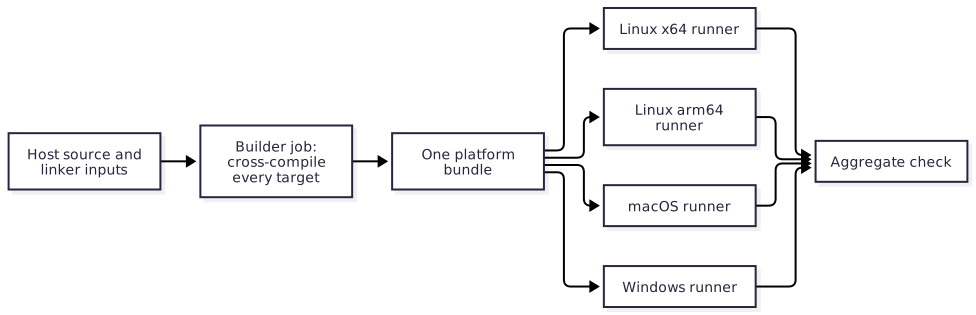
12.3.1. The builder job§
One job, on one runner, cross-compiles the host for every supported target. A single toolchain version then produces every host, and the expensive work happens in one place where its cache is easy to manage.
It assembles the hosts with the locked linker inputs and bundles once, with the repository’s own bundle command. The shared
release-packageutility then runs the examples against the working tree, and itsbuild VERSION --platform-bundle DIRchecks that bundle, names it, and writes the examples archive, documentation and notes beside it.dist/is uploaded as a workflow artifact.Where a target cannot be cross-compiled, because it needs an SDK or a toolchain that exists on one operating system only, that host is built by a job on that system and handed to the builder as an artifact. This is the exception to plan around, not the default.
12.3.2. The runner jobs§
One job per supported target downloads the bundle and runs applications against it. A runner job never rebuilds the host or the bundle, so every target tests the same bytes, and those are the bytes a release publishes.
blueprint run release-test -- test-archiveruns the archived examples, unchanged, against the bundle served from a loopback address with an empty package cache, as a first user would fetch it. Blueprint and the utility run on Windows too, so the Windows runners use the same task.One aggregate job requires every runner job to have passed. Its name is the required status check.
Every target the platform’s
targetssection lists has a runner that executes it:macos-15-intelforx64mac,macos-15forarm64mac,ubuntu-24.04andubuntu-24.04-armfor the Linux targets,windows-2025forx64win. A target without one is cross-compiled only, and the platform’s README says so beside its list of supported targets, so that a user can tell a target that was linked and run from one that only compiled.
The purpose of the matrix is narrow: to show that the host and the linker inputs for each target link and run correctly there. Cross-compilation proves a host compiles for a target; only running on that target proves that it links, starts, and talks to the operating system as expected.
12.3.3. What the runners run§
Run the examples. They exercise the platform through its public API the way an application does, and between them they usually reach enough of the host to show that a target works. They are already written, already have recorded expected output, and are what a user will try first.
Add dedicated tests where the examples leave a gap: a host service no example uses, a code path that differs per operating system, a failure that should be reported in a particular way. Keep them few and aimed at the host, because everything in the matrix runs once per target.
What does not belong in the matrix is anything that does not depend on the target. Unit tests of pure Roc code, formatting and the static checks run once, on one runner.
12.3.4. Runner environments§
State each runner’s runtime needs in the workflow: a display server, a software GPU, an audio sink, a browser. A simulated environment is reported as simulated; it is not evidence about the real one.
An example that can be built but not run on a hosted runner is built and checked, and its expected-output specification records that it is not run.
The native toolchains come from Blueprint.roc, as described in
Declare the environment, so a
contributor and every CI job compile the host with the same versions.
12.4. Several platforms in one repository§
A repository that publishes more than one platform, such as a web platform and a native platform that share an engine, gives each its own root, its own bundle and its own examples archive, as in Several bundles in one release. Sharing an engine does not make two platform APIs or their application roots interchangeable. Give examples separate roots and package URLs even when they share application modules.
12.5. Template repositories§
A template’s examples are the product: they are what a user copies. A template follows the model without exception. Its examples depend on the working tree by relative path, and each release’s examples archive is the starter a user downloads.
12.6. Native build inputs§
Platforms need native builds before Roc can link an application, and native builds are where CI time goes. A maintainer has a limited budget of runner minutes and of patience, and spends it well only by planning what gets built when, and by watching how that changes as the project grows. This section is about building each thing once, reusing it until it changes, and testing and publishing the same bytes.
12.6.1. No binary blobs in the repository§
As a general rule, a platform repository does not commit binaries. A committed library or object file has no visible origin: a reviewer cannot tell what source it came from, what built it, or whether it changed for a reason.
Binaries such as linker inputs are built by their own workflow, independent of ordinary CI, and published as an immutable release that carries:
the archives for every supported target;
a build-provenance attestation for each of them;
the licenses of everything inside; and
an SBOM.
The software supply chain can then be followed and verified end to end: from a source commit, through the workflow run that built it, to the exact bytes a platform links.
Routine use goes through content hashes. The repository commits a lock that names each archive, its release and its SHA-256, and every build verifies the bytes against that lock. A hash check is local and fast, it makes the archives safe to cache, and it needs no network service. The attestation API is reserved for the moments that need it: admitting a new release into the lock, auditing one, or an end user who wants to verify what they downloaded. It is not called on every build. Separate admission from routine use sets out that division.
There are exceptions. A platform may depend on libraries that another project already publishes, for example the prebuilt libraries of a graphics library it wraps. Those may be vendored in the repository, so that builds do not make repeated network calls on someone else’s project. A vendored binary records where it came from: the upstream project, the release, the download URL, its hash and its license. It is the upstream project’s published artifact, unmodified, and never something the repository built and then committed.
12.6.2. Two releases, three build steps§
A platform’s host and its Roc source usually change together and are released together: one platform release holds both. Linker inputs are different. They change rarely, cost the most to build, and are published as their own release.
So there are two kinds of release, and three things that are built:
| What is built | How it is released | In an ordinary pull request |
|---|---|---|
| Linker inputs | Their own immutable release, selected by a content lock | Download the locked archives and verify their hashes. Never rebuild them. |
The host, such as libhost.a | As part of the platform release | Build it in its own job, and skip that job when the host’s fingerprint has not changed. |
| The platform bundle | The platform release: the Roc source with the host and linker inputs | Assemble from the outputs above and test. Bundling compiles nothing native. |
The host is not given a release lifecycle of its own. It is given a job of its own. The point of the separation is that each step can be skipped when its inputs have not changed.
12.6.3. Skip what has not changed§
Compute a content fingerprint of everything that can affect the host: its source, generated bindings, dependency versions, toolchain, target and build options. Use the fingerprint as a cache key.
When the fingerprint matches a cached build, the host job restores it and finishes in seconds. A pull request that touches only Roc source, examples or documentation compiles no native code.
When it does not match, the job builds the host and saves it under the new fingerprint.
Later jobs take the host as an artifact from that job. They do not know or care whether it was built or restored.
Keep rebuild selection narrow and complete says what a fingerprint must include. A cache is storage, not a source of trust: restored bytes come from the same repository’s own earlier job, and anything that crosses a release boundary is verified against a locked hash.
Separate steps and caches pay off beyond runner minutes. A failure points at the step that failed. A contributor without the native toolchain can still work on the Roc side. Review is easier when a pull request shows which step it invalidated.
12.6.4. Watch what CI costs§
Record stage durations and investigate slow routine pull requests. Check for fingerprints that include unrelated files, changing cache keys, duplicated builds and unnecessary matrix jobs. Run the expensive native matrix when its inputs change and before a release; use the cached path for other changes.
libhost.a and host.lib are host outputs, not linker-input release assets.
Operating-system import libraries, runtime libraries, interface stubs and
resource objects required by platform/main.roc are linker inputs, even when
the platform repository holds their generation recipes. Classify by ownership
and invalidation, not by the fact that the final link receives the file.
Choose the smallest lifecycle that fits the project:
| Project shape | Lifecycle |
|---|---|
| Roc package | Bundle source. No native producer. |
| Package with a test-only host | Build the host in a read-only job of ci.yml. It is never published. |
| Platform with a small host and no external inputs | Build the host in its own fingerprinted job, bundle once, test the bundle, then publish those bytes. |
| Platform with expensive external inputs | The same, with the linker inputs released independently and consumed through a reviewed lock. |
An existing binary is not a verified artifact until its build recipe, digest and target coverage are established. An explicit source build remains valid.
12.7. Separate the artifacts by what can invalidate them§
All of these files can eventually reach a linker, but they have different owners and rebuild triggers. Name the categories explicitly in scripts, locks and docs.
| Artifact | What it contains | What requires a new build |
|---|---|---|
Project host and engine outputs, such as libhost.a, libengine.a or a Wasm host library | Compiled project implementation for a target | Relevant source, generated inputs, dependency versions, toolchain, target ABI or build options change |
External linker inputs, such as import libraries, runtime link files and macOS .tbd files | The external libraries or interfaces used by the final application link | Their upstream inputs, target contract, generation recipe or required interface catalog changes |
| Roc platform bundle | Platform API source plus the selected target outputs and linker inputs | Package source or selected input bytes change |
| Application root and companion modules | An application targeting a particular platform API and URL | Application source or selected package URL changes |
A host edit can require new host archives while reusing the existing external linker inputs. Rebuild an engine archive only when its own inputs change; if a producer groups multiple outputs, document that granularity. A new nightly invalidates host outputs only when the compiler contributes to their build identity; a change to the generated bindings is handled as described in Host bindings.
For platforms that package macOS interfaces, review the required catalog before
generating and validating .tbd files. That generation belongs inside the external linker-input
cycle. When released separately, publish the generated files as immutable inputs.
For a static host archive, these files normally serve Roc’s final link rather
than host compilation. A producer that itself links executables or shared libraries
may also consume linker interfaces. Record its actual SDK, headers, interfaces and
native build tools in its identity; do not assume the host build and the linker inputs have no dependencies.
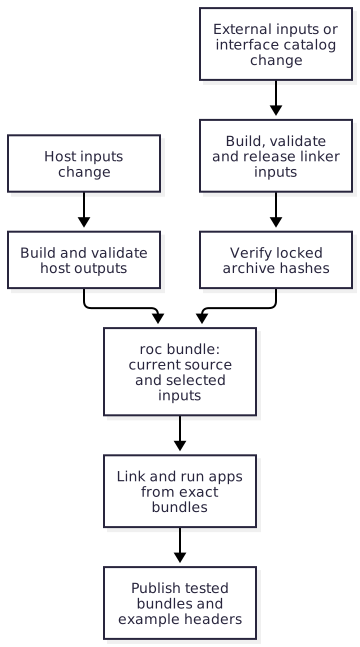
An unresolved symbol during the application link is evidence to investigate. Confirm the library, symbol and supported target before changing the catalog; missing project symbols, mismatched archives and ABI errors can produce similar failures. Do not invent an export or expand the catalog automatically to make a test pass. Producer validation can catch mistakes earlier, but a successful host build alone does not establish that Roc can link the final application.
12.8. Make content identity the ordinary consumer contract§
Commit reviewed lock data with each dependency selection. Include the artifact name, target, exact release location, cryptographic digest such as SHA-256, byte size, and expected archive contents or extraction boundaries. Record available source revision and producer build-input fingerprint separately from the archive digest. The fingerprint answers whether a build can be reused; the digest identifies the exact bytes a consumer accepts. Neither a version label nor a fingerprint alone verifies a downloaded archive.
Recompute freshness fingerprints where the repository owns or vendors the producer inputs, such as its own host source. For external binaries, consumers verify the reviewed selection, digest, target and inventory; they need not fetch upstream source or install its toolchain to recompute the producer’s fingerprint. Recorded producer metadata remains a claim subject to the chosen provenance policy.
Final Roc bundles have a compiler-defined content identity: preserve the hash
that roc bundle puts in the filename, and use one filename in both localhost
and published URLs. Roc uses its
base58-encoded BLAKE3 hash to verify the downloaded bundle. An additional SHA-256
in release metadata is useful but cannot replace that URL hash. See the
Roc bundle implementation
and download contract.
Application users consuming that bundle need no separate native-input fetcher.
Resolve locked artifacts from cache, mirror or release URL and verify size and digest before extraction. Stage the complete declared inventory with bounded sizes and portable regular-file paths; reject aliases, special files and missing runtime or license files. Do not trust an extracted tree merely because its archive verified. Required unavailable or stale inputs fail rather than silently rebuilding or selecting another release.
The reviewed lock authorizes bytes; a checksum from the same mutable download location does not. Follow artifact admission when selecting new inputs. Routine hash checks are local, including cache hits, and need no attestation service. An uncached download still needs a source of bytes.
12.9. Publish provenance without confusing it with integrity§
Publish provenance binding the artifact digest to its producer, workflow and source revision. Verify those expected identities when adopting an input; follow the attestation policy for audit and offline verification. A packaging workflow attests to assembly, not to how a downloaded dependency was compiled. Preserve original producer evidence; neither provenance nor hashes prove reproducible builds or correctness.
Publish dependency releases with unique immutable identities, validated archives, lock data, licenses and available provenance. Enable and verify hosting-service immutability. Stage all assets in a draft, read back the complete inventory and verify the tag before publication. An interrupted draft can resume with identical bytes; changed candidates or incomplete published immutable releases require a new identity. Revalidate starters when their final URLs change.
12.9.1. Publish a pull-request candidate without granting it release authority§
When a linker-input release must precede merge, an unprivileged same-repository PR workflow builds, tests and attests it. A reviewed default-branch publisher verifies the producer run, source, manifest, attestations and final bytes without executing candidate code. It can add only the generated lock in a lease-guarded, GitHub-signed commit. Merging that reviewed lock adopts the branch-built release; do not rebuild or relabel it after merge.
actions/publish-build-inputs implements this boundary. Its wrapper exposes only
a PR number and pins the controller to a full SHA. Component build identities and
input snapshots are inert producer claims preserved in the lock; the publisher
validates their structure, while read-only producer/admission jobs own build
equivalence checks. Source and final-byte admission still apply to the complete
manifest. See
the producer and publisher contract
for schema, recovery, review and merge requirements.
12.10. Choose the correct maintainer path§
Use the smallest lifecycle that corresponds to the changed ownership boundary:
| Change | Required maintainer action |
|---|---|
| Roc source, examples, tests, docs, or an unrelated workflow | Ordinary pull-request validation using the committed host and linker-input locks. No native dependency release. |
| A new nightly breaks the released platform | nightly.yml reports it. Fix the source and release a new platform version. Native inputs are rebuilt only if the compiler contributes to their fingerprint. |
| A new nightly changes the generated host bindings | Upgrade the bindings, with any host change, in one pull request. |
| Host implementation, host dependency, host toolchain, host ABI, or exported project symbol | The host job rebuilds, because its fingerprint changed. The new host ships in the next platform release. Reuse the existing linker inputs unless their own inputs changed. |
| Linker-input source, upstream binary, interface catalog, resource source, generation recipe, target matrix, or toolchain | Build the complete linker-input candidate on a same-repository pull-request branch, then run the trusted publisher and review its signed lock commit. |
Blueprint.lock, where it is part of a build-input fingerprint | The same producer and publisher cycle, in the pull request that changes the lock. |
platform/main.roc linker entries | Check classification first. A new project implementation symbol normally changes the host; a new external library or interface normally changes linker inputs. Validate that every referenced released path exists for every advertised target. |
| Platform release | Require a current linker-input lock, build or restore the host, assemble once, exercise applications on every target, and publish the exact tested bundles. |
For a stale linker-input lock, stage the material change in a same-repository pull request first. An unprivileged producer run at that head can build, test and attest a candidate without publishing. Then dispatch the trusted publisher from the default branch with the pull-request number. It reruns the producer at the exact head, verifies the candidate, publishes the immutable linker-input release, and adds a signed lock-only commit to the pull request. Revalidate the updated pull request against the released lock before merging. A platform bundle is a separate, later release that uses the selected lock. Publish linker inputs from a pull request defines the admission and review checks.
An input fingerprint mismatch must be explicit. For a host, the read-only host job simply builds it, because host source commonly changes with the pull request. For a locked linker-input release, routine validation fails with instructions to run the producer and publisher cycle. It must not bootstrap a replacement as a side effect of a cache miss. An implicit rebuild would substitute unreviewed bytes for the dependency the lock selects, make results depend on whichever runner missed its cache, and hide that the declared dependency is stale.
12.11. Keep routine pull requests ignorant of production§
Routine consumers need only the lock schema, a downloader/cache, digest and archive validation, and the selected extracted files. They do not need a native SDK, linker-input generator, publication token, attestation lookup, or knowledge of how the archives were produced. Keep producer jobs in their own workflow and path scope; do not call them from general CI merely to populate a cache.
Every cache read is untrusted until the archived bytes match the locked size and SHA-256. A cache miss downloads the exact locked release asset. A download failure fails the job. A digest mismatch removes or ignores the bad entry and fails closed; it never selects another release. Extraction and manifest checks happen after the archive hash succeeds and before files become visible to the build.
Derive cache keys from the locked content identity rather than a branch, workflow run, or mutable release label. This prevents unrelated revisions from sharing a slot merely because their human-readable names match and makes identical reviewed bytes reusable across PRs. Still rehash a cache hit: cache keys select storage but do not authenticate its contents, and a poisoned, truncated, or incorrectly restored entry can otherwise bypass the download-time check.
12.12. Preserve reviewed history and authority§
Use merge commits for pull requests whose evidence names exact commits. A merge commit keeps the attested producer commit and the publisher’s signed lock-only commit reachable under their original identities. Squashing manufactures a different commit and discards that correspondence. A maintainer may still tidy an ordinary development branch before review; the automation must not depend on history being rewritten after it has bound evidence to a SHA.
Keep the authorities distinct:
producer and ordinary validation jobs may execute candidate code and are read-only;
the trusted publisher job invokes only its full-SHA-pinned shared action, with release and lock-write permission;
the platform release publisher consumes already selected dependencies and publishes only explicitly dispatched, tested platform bundles.
This split is what makes running candidate build code acceptable: a compromise of that job cannot write a release or a branch. The publisher has powerful credentials, so it accepts only inert declared files and never executes the pull request. Least-privilege permissions reduce what is possible if the pinned action or the hosting account is compromised; they do not make unreviewed code safe to run in that job.
A shared action is tried from a reviewed roc-automation pull request by pinning the caller to that pull request’s full commit SHA. A branch name or abbreviated SHA is never pinned. If review changes the shared implementation, pin the new commit and repeat the trial.
12.13. Keep rebuild selection narrow and complete§
Producers computing reuse identities must include every input that can affect an output:
relevant source paths and contents, generated inputs, dependency locks, build
recipes, tool versions, target configuration and build flags. Record file paths
and modes as needed to distinguish renames, deletions and symlinks. Validate the
permitted source-file kinds. Include relevant environment and SDK identities;
an unpinned runner image or ambient library can change output without a source edit.
Where the toolchain comes from Blueprint, Blueprint.lock is one of those inputs,
so a lock update that changes the toolchain makes the selected outputs stale.
Use a versioned fingerprint recipe and compare the same input definitions.
A whole-commit identity, together with the non-source inputs above, is a conservative
starting point, but causes needless rebuilds for unrelated edits. Narrow the source
selection only after testing the input inventory.
Include the source revision separately for traceability.
Treat workflow triggers and fingerprints as different controls. Path filters decide when to run a producer audit; fingerprints decide whether the selected published outputs still correspond to current inputs. A test-harness edit may justify rerunning an audit without requiring a new dependency release. Trace shared scripts and generated inputs transitively so a narrow filter cannot hide a real build change. For repository-owned inputs, record the published fingerprint in lock data or a digest-bound manifest so a shallow checkout can compare current inputs without fetching an old producer commit. A stale host blocks reuse; PR validation may explicitly build a new candidate in a read-only job without publishing it.
For a narrowed fingerprint, require meaningful checks for both directions: a relevant source, tool pin or build-option change invalidates reuse, while an unrelated example or documentation change preserves it. Check archive digest rejection and target/path confinement. Exercise final linking against reused artifacts; a selector test alone does not
12.14. Keep final release preparation small§
Once the linker inputs are locked and the host job has built or restored the host, the rest of the release needs only the latest nightly to bundle and link applications, the artifact verification step, and the runtime dependencies of its tests. It downloads and hash-verifies the locked linker inputs. SDK generators belong in the linker-input producer; a stale lock sends the maintainer back to that cycle.
Bundle once, then pass those exact archives to the target runners. Each runner serves the applicable bundles on a loopback address and runs the archived examples against them, as in Build and test the exact archive. Validate every advertised target before publication. Check package size limits and target contents early, so that publication does not discover that a bundle cannot carry its advertised hosts.
Keep preparation, validation and publication connected by recorded artifact digests and the exact source SHA. Record archive digests, selected dependency identities, the source revision and the compiler versions in the release notes. The remaining steps are those of every release; see The order of a release.
13. Publish linker inputs from a pull request§
This chapter specifies the operational contract for
actions/publish-build-inputs. Read
Native build inputs first for the ownership,
rebuild, and consumer model. The
trust model is normative
for the publisher’s authority boundaries.
A platform repository can need new linker-input bytes before the change that uses them is mergeable. The producer therefore runs on a same-repository pull-request branch, while publication remains controlled by a workflow dispatched from the trusted default branch. The release belongs to that exact PR commit. It is not a temporary preview and is not rebuilt or promoted after merge.
This resolves a deliberate ordering problem: the material change and its build recipe must be reviewed together, but routine validation cannot consume the new bytes until they have an immutable release and lock. Building on the PR preserves that exact source identity. Dispatching publication from the default branch keeps release credentials and controller selection under already-reviewed policy. A single PR job doing both would allow changed producer code to publish or write its own asserted digest.
13.1. Risks and controls for linker-input publication§
An untrusted producer can supply a successful run or attestation for a different commit, or add an undeclared file to a native-input release. Bind admission to the selected producer and complete artifact inventory. The privileged controller checks run/source identities, manifest targets, sizes, hashes and attestations, then re-downloads published assets before accepting the release and lock. Regression tests cover stale evidence and interrupted publication. Attestation establishes the verified producer’s statement; it does not demonstrate native code correctness or replace consumer-facing link tests.
13.2. Producer contract§
The unprivileged producer workflow builds and tests every supported target from the PR branch. It uploads one flat Actions artifact containing top-level regular files only:
build-input-release.json; andone deterministic archive for every target declared by the manifest.
The manifest is canonical JSON with this envelope:
{
  "schema_version": 1,
  "kind": "link-inputs",
  "source": {
    "repository": "OWNER/PLATFORM",
    "sha": "0123456789abcdef0123456789abcdef01234567",
    "ref": "refs/heads/change-link-inputs",
    "workflow": "OWNER/PLATFORM/.github/workflows/link-inputs.yml",
    "input_fingerprint": "<versioned producer-input identity>"
  },
  "assets": {
    "x64glibc": {
      "asset": "link-inputs-x64glibc.tar",
      "sha256": "<lowercase SHA-256>",
      "size": 1234
    }
  }
}
Use the platform’s complete supported target set rather than publishing a partial replacement under the same contract. The input fingerprint covers every source, recipe, tool pin, generated input, target option, and other value that can affect the archives. It determines whether the selected release is current for the working tree; each asset SHA-256 identifies the exact bytes.
This manifest and its generated lock describe source, target and artifact identities; they are not an SBOM of the native components in those archives. The release SBOM practice is defined in Publish and consume software bills of materials. Bind each target’s SBOM to the final archive digest and distribute it at an authenticated immutable location. Generate and validate the inventory in the read-only producer. The publication contract must explicitly declare every sidecar, its subject and its digest, and verify and attest the complete inert file set. Undeclared files fail admission; SBOM distribution must preserve the same inventory and trust boundaries as the native archives.
The producer must have no release, repository-write, or pull-request-write permission. Generate GitHub build-provenance attestations for the manifest and each target archive. Producer jobs may compile and execute PR code because they do not possess publication authority.
13.3. Trusted publisher contract§
The platform owns a small workflow_dispatch publisher workflow on its default
branch. That workflow uses the actions/publish-build-inputs composite action
from roc-automation at one reviewed full commit SHA and supplies only:
the same-repository pull-request number;
the producer workflow filename;
the candidate Actions artifact name;
the repository-relative lock path; and
the release tag prefix.
Give that job actions: write, attestations: read, contents: write, and
pull-requests: read; set all other permissions to none. A typical caller is:
name: Publish linker inputs

on:
  workflow_dispatch:
    inputs:
      pull-request:
        description: Same-repository material-change PR number
        required: true
        type: string

permissions: {}

jobs:
  publish:
    runs-on: ubuntu-24.04
    permissions:
      actions: write
      attestations: read
      contents: write
      pull-requests: read
    steps:
      - uses: OWNER/roc-automation/actions/publish-build-inputs@REVIEWED_FULL_SHA
        with:
          pull-request: ${{ inputs.pull-request }}
          producer-workflow: link-inputs.yml
          candidate-artifact: link-input-release
          lock-path: link-inputs.lock.json
          release-prefix: linker-inputs
The composite action obtains its controller implementation from that exact
roc-automation revision. Its privileged job does not check out the platform PR,
execute platform scripts, import candidate modules, or source files from the
candidate artifact.
The controller requires a manual dispatch on the live default-branch commit. It resolves the open PR, dispatches the named producer workflow at the exact current PR head, captures the resulting run, and rejects a run whose repository, event, workflow, ref, SHA, or conclusion differs. It validates the artifact’s complete file set, bounded extraction, manifest schema, target set, byte sizes, and hashes. It then verifies every attestation against the expected repository, producer workflow, source ref, and source SHA.
The release tag is the configured prefix followed by -sha256- and the SHA-256
of the exact manifest bytes. The controller creates a draft, uploads the manifest,
generated lock, and declared target archives, verifies their complete names and
sizes, re-downloads every release asset into a clean directory, verifies its
SHA-256 against the candidate, then publishes. Existing mismatched tags or
releases are rejected; an interrupted draft can be resumed only when every
published byte matches the candidate.
Enable immutable releases in the platform repository.
actions/publish-build-inputs is the single supported linker-input publication
contract. Keeping one path matters because archive admission, draft recovery,
attestation verification, immutable publication, and lock adoption are one trust
boundary; parallel publishers would duplicate security-sensitive policy and could
silently diverge.
Finally, the controller creates one lease-guarded, GitHub-signed commit on the PR branch. It modifies only the configured lock path and verifies the resulting signature, file set, parent, and live PR head. Any competing branch update stops publication adoption rather than being overwritten.
The signature establishes the commit creator and integrity; the lock-only shape limits what that privileged identity can change. Neither protection substitutes for the other. The lease prevents the publisher from attaching a valid lock to a newer, unverified PR head or overwriting maintainer work that arrived during the release operation.
13.4. Recover interrupted publication§
The optional producer-run action input selects an existing successful producer
run instead of dispatching another build. The run must be a completed successful
manual dispatch of the configured workflow, from the same repository, branch,
and exact current PR head. Recovery repeats candidate inventory, content, and
attestation verification; it does not reuse a prior admission decision.
Expose producer-run as an optional string in the trusted default-branch caller
and pass it through to the action. Leave it empty for a new build. A moved PR head
requires a new matching producer run.
Draft recovery searches all release-list pages. New drafts use the release ID returned by creation, without requiring immediate visibility in tag or release list projections. Asset downloads use their numeric IDs, so a draft needs no published Git tag. Every recovered asset is downloaded and hashed before the same release ID is published and checked for immutability. Unexpected or partial asset sets fail without replacement or deletion.
13.5. Review and merge the adoption§
The generated lock records the manifest identity, source identity, input fingerprint, release, repository, and every target archive’s filename, SHA-256, and size. Publication and lock creation are one admission transaction, but the lock is not adopted until the updated PR passes its required checks and is merged.
Review the PR as a dependency change:
Confirm that the source changes actually require or intentionally regenerate linker inputs and that the producer-input inventory is complete.
Inspect the producer and publisher run links, exact source SHA, attestations, target coverage, and consumer-facing link tests.
Confirm that the publisher added only the lock and that its commit is verified.
Rerun routine validation on the new PR head. It must consume the release through the lock and must not rebuild linker inputs.
Merge with a merge commit so the exact attested producer commit and signed lock commit remain in history.
Do not rebuild, copy, retag, or promote the release after merge. The merged lock permanently selects the PR-built bytes. If source or build inputs change again, produce a new candidate and content-derived release. Byte-identical recovery may reuse the same content identity; changed bytes require a new identity.
Keeping the PR-built release is what preserves the chain from source SHA through producer tests and attestations to the reviewed lock. Rebuilding on the default branch would create different bytes with different evidence even if the source appeared equivalent, while promotion would add ceremony without strengthening a content-derived identity. Permanent releases consume storage, but avoid ambiguity about which candidate was actually admitted and support later audit or rollback.
Fork pull requests cannot receive the signed lock commit. Move an accepted change to a same-repository branch before publication. Do not grant a fork or PR workflow write credentials as a workaround.
13.6. Routine consumption§
Ordinary pull requests, nightly compatibility runs, local builds, and platform release assembly read the committed lock. They restore or download each selected archive, recompute size and SHA-256 even on a cache hit, validate the archive and manifest, and install it through fresh staging. They do not call the attestation service and do not fall back to a source build when the cache is empty.
A cache key is an optimization derived from the reviewed content identity. The lock, not the cache key or release name, authorizes bytes. A missing archive is a download/cache failure; a stale input fingerprint is a request for an intentional new linker-input release. See Separate admission from routine use for the distinction between admission evidence and routine integrity checks.
14. Manual maintenance tasks§
The package compiler moves by itself, every day. Nothing else does. The tasks in this chapter are the only way the repository’s tooling changes, and each is a pull request a maintainer opens and reviews.
No workflow performs them on a schedule. A pull request opened by a workflow
with the repository’s GITHUB_TOKEN does not start CI, so an automated update
would arrive untested and wait for a maintainer anyway. More to the point, each
of these changes decides which code runs in CI, which is a decision to review
and not a chore to automate.
| Task | Files changed | When |
|---|---|---|
| Update the lock | Blueprint.lock | To take newer tool versions, or to make a newer nightly selectable as roc-stable |
| Change the tooling compiler | Blueprint.roc, the roc field of every script, sometimes Blueprint.lock | When scripts need a newer compiler, or periodically to stay close to current |
| Upgrade Blueprint | Blueprint.roc, Blueprint.lock, and the reviewed setup-action revision | For a new roc-blueprint release |
| Update script dependencies | Script headers, RocPackages in Blueprint.roc, and Blueprint.lock when build sources change | For a new release of a platform or package the scripts use |
| Regenerate host bindings | A platform’s committed bindings | When ci.yml reports that the latest nightly generates different bindings |
14.1. Risks and controls for input upgrades§
An upgrade can change executable code through a URL, digest, transitive input or compiler selection without an obvious change to the product. Treat new identities as reviewed input changes. Update the declared recipe and lock, inspect the resolved artifacts and run the affected tasks before adopting them. Compiler and binding updates remain explicit maintainer work. The resulting checks establish the selected combinations. Matching an upstream revision or passing compatibility tests does not establish that an input is unaffected by known vulnerabilities; advisory analysis uses its own component evidence.
14.2. Update the lock§
Run
blueprint update, orblueprint update <input>to move one input and keep every other pin.Run
blueprint run check.Open a pull request whose only changed file is
Blueprint.lock.Merge after
ci.ymlpasses.
A lock update moves the overlay revision, the package source and tool versions.
It never changes which release is roc-stable, because that tag is written in
Blueprint.roc. It does not change the blueprint binary or the platform URL.
Where the repository fingerprints native build inputs, a lock change can make
those inputs stale. ci.yml reports that, and the fix is a new linker-input
release in the same pull request; see
Choose the correct maintainer path.
14.3. Change the tooling compiler§
Choose a published nightly release.
Change the tag in the
Command("roc-stable", ...)setting ofBlueprint.roc.Change the
rocfield in every script header to the same tag. The check script fails until they all match.If the locked overlay revision predates that release, run
blueprint update rocand commitBlueprint.lockin the same pull request.Fix any script the new compiler breaks in that pull request, so the tag and the scripts move together.
Merge after
ci.ymlpasses.
This is a maintainer’s decision for each repository. Repositories need not agree.
14.4. Upgrade Blueprint§
A release’s blueprint binary must be used with that release’s platform URL.
actions/setup-blueprint reads the release from that URL. Keep that selection
in one place while migrating configuration and locked inputs together:
Choose a roc-blueprint release.
Move the workflows' reference to
actions/setup-blueprintto a revision that records that release, if the current one does not. Dependabot proposes this change;actions/setup-blueprintexplains where the checksums are reviewed.Change the platform URL in the
Blueprint.rocheader.A repository that generates sidecars with
actions/sbom-sidecarsalso needs a revision that records the release’s SBOM tool inactions/setup-blueprint/sbom-tools.json: the app bundle and its compiler, the reviewed SHA-256 of eachblueprint-sbom-<system>binary the release ships, and itsfeatures(members,manifest) as its release notes state them. With binaries recorded the action needs no compiler; otherwise the tool runs on the release’sblueprint compiler-version, so update that fixed compiler recipe with it.Migrate configuration to the release’s supported Spec and run
blueprint check.Run a full
blueprint updatewhen the release changes the lock format, review changed identities against the previous lock and commit the regenerated lock.Remove generated
.blueprint/state when the release requires it.Run the affected named tasks and merge after
ci.ymlpasses.
External tools should read blueprint lock show --json, validate its public
report format and use content_identity and namespaced provider metadata.
Do not parse the internal representation of Blueprint.lock. Consumers of
build reports use build_identity; report and package versions are separate
compatibility contracts. Run cold and warm provisioning checks and exercise
corrupt-cache recovery: a successful lock conversion alone does not demonstrate
that the selected programs execute correctly.
14.5. Update script dependencies§
Change the release URL in each script header that uses the dependency.
Change the same URL under
RocPackagesinBlueprint.roc, and add any new dependencies of that dependency.roc-stable deps scripts/check_all.roclists them.For sandboxed builds using those bundles, run
blueprint update, review the changed source identities and commitBlueprint.lock. Task-only bundles are pinned by their committed URL hashes and do not change the lock.Run the affected tasks and merge after
ci.ymlpasses.
14.6. Regenerate host bindings§
See Upgrade the bindings.
14.7. Maintain released utility downloads§
For Roc packages, Programs and Fetch lock released utilities and fixed
tooling without Nix. Change the utility recipe in Blueprint.roc, run
blueprint update, review per-system URLs, hashes, lengths and download hosts,
and commit the lock. Keep the package compiler floating independently. Native
platforms can retain Nix sources and sandboxed builds for their toolchains.
The shared artifact cache key changes with the lock and installer/registry
identity. Separate logical tool subsets use separate cache-workload values,
so an immutable compiler-only cache cannot claim the docs cache key. Restored
artifacts are rehashed before use and extracted trees/task links are rebuilt;
cache hits do not authenticate executables. Routine use needs no remote
attestation service. Review provenance when adopting a release, following
released artifact verification.
See the complete adoption guide for the tested cold/warm
workflow and persistent executable handoff. The shared setup’s install-nix
option defaults to false; opt in where the selected tools/builds need Nix.
15. Repository settings§
Workflow files do not enforce a process by themselves. The settings in this chapter are part of the model, and a repository has not adopted it until they are in place and have been exercised with a real pull request.
15.1. Risks and controls for settings enforcement§
A workflow file can describe a gate that repository settings do not enforce, or a required check name can refer to no actual job. Verify effective settings and exercise the boundary. The read-only settings checker reports hidden answers as unknown and identifies mismatches; a real PR with a deliberately failing check confirms whether merging is blocked. Check release and Pages environment restrictions separately. An API configuration report does not establish that a reporting channel works, a reviewer acted, or a required test covers the right behavior.
15.2. Actions§
Set the default workflow token to read-only. Each job that needs to write states its own permission.
If the repository restricts which actions may run, allow each shared action at its reviewed full SHA. An allowlist entry without
@...does not match an action reference.Do not enable "Allow GitHub Actions to create and approve pull requests". No workflow in this model opens a pull request.
15.3. Branch rules§
Protect the default branch with a ruleset:
Require a pull request.
Require status checks to pass on the current commit, with the branch up to date. Name the aggregate job of
ci.yml, or its one job in a Roc package, and the build job of therelease.ymldry run.Require signed commits.
Grant no bypass to any bot: neither an app nor a deploy key is on the ruleset’s bypass list.
Verify the rules with a real pull request: a failing check must block the merge, and a check name that no job produces must be noticed before it is relied on. If a required name identifies both a check run and a commit status, GitHub requires both.
Platform repositories that publish linker inputs allow merge commits. The publisher binds its evidence to exact commit SHAs, and a squash would replace them; see Preserve reviewed history and authority.
15.4. Releases§
Enable immutable releases.
Create a
releaseenvironment restricted to the default branch, with a required reviewer where the project has more than one maintainer. The publish job ofrelease.ymlnames it. Restrict it by name: choose "Selected branches and tags" and add the default branch alone. "Protected branches only" is wider, because it admits every branch a ruleset later covers.Protect tags with a ruleset that targets all tags and restricts updates and deletions, so that an existing version tag cannot be moved or deleted.
15.5. Pages§
Set the Pages source to GitHub Actions.
Restrict the
github-pagesenvironment to the default branch, by name as forrelease.
15.6. Dependencies§
Keep a weekly github-actions entry in Dependabot. Shared actions are pinned by
full SHA, and Dependabot proposes each new one as a pull request. Review it like
any other dependency update, and never replace a full SHA with a branch or tag.
15.7. Reporting§
Enable private vulnerability reporting and keep SECURITY.md accurate.
15.8. Confirm the settings§
The check-settings task of roc-automation reads a repository’s settings from
GitHub and reports each line of this chapter as passing or failing. Run it from
a checkout of roc-automation and name the repository:
blueprint run check-settings -- <owner>/<name>
Three answers only a maintainer can give are flags:
--platformThe repository publishes linker inputs. The report notes whether merge commits are allowed.
--reviewer-requiredThe project has more than one maintainer. The
releaseenvironment must have a required reviewer.--no-siteThe repository publishes no site. The Pages lines are left out.
Each failing line is followed by its fix: the settings page to change, or the
gh api command that changes it. A setting that GitHub would not show is
reported as unknown, never as passing. The task exits with an error while any
line fails or is unknown.
It only reads. Every request it makes is a
GET. Applying a setting stays a maintainer’s decision, made on the settings page or by running the printed command.It uses the maintainer’s own
ghlogin, which must be able to administer the repository. GitHub shows a ruleset’s bypass list and the Actions permissions to nobody else. A workflow’s token cannot be granted that access, so the task runs on a maintainer’s machine and not in CI.It shows that the rules exist, not that they are enforced. A real pull request with a failing check is still what shows that the merge is blocked.
It compares the required check names with the jobs that ran on the pull request behind the latest commit on the default branch. It cannot tell whether those are the right jobs to require.
It confirms that
SECURITY.mdexists, not that it is accurate.
16. Adopt the model in a repository§
This chapter is for a maintainer bringing a repository in line with the model. It assumes the earlier chapters. Work from a fresh branch of the remote default branch, and open one pull request per numbered step so that a failure points at one change.
A Roc package follows every step, with one runner in each workflow. The sentences below that begin "A platform" and the acceptance item that begins "For a platform" do not apply to it.
For a Roc package using released utilities and fixed downloaded tooling, start with Adopt a Roc package without Nix. It includes a complete Blueprint recipe, lock review, cache lifecycle and executable handoff.
16.1. Risks and controls for adoption evidence§
Copying a starter can leave stale paths, unrelated task names or missing product cases while producing plausible configuration. Adopt through observable behavior. Run the documented local tasks, a release dry run and the published suite; inspect the resulting files and test the required-check and issue-reporting failure paths. Keep configuration-specific fixes in the adopting repository and common fixes in the shared tool. Adoption evidence establishes the exercised integration, not every feature of the product or every future utility version.
16.2. Steps§
Environment. Add
Blueprint.rocandBlueprint.lockwith the shared utilities and every tool and toolchain the repository uses. Addroc-stableand source dependencies only for tooling the repository itself runs from source. Using the releasedblueprintbinary, confirm that its named tasks run the selected utilities. Remove anyflake.nix,flake.lock,.envrcor other environment definition this replaces, and add.blueprint/to.gitignore.Tasks. Use the shared utility skeleton for common operations. Configure Blueprint tasks rather than copying their implementations. Consolidate overlapping scripts and delete one that only repeats another test. Keep product-specific source tooling in Roc following Write product-specific automation as Roc scripts. Carry each script’s tests across first, as
expecttests or cases the check script runs. Delete the original only when its replacement runs in CI.Pins. Remove
.roc-version,.github/roc-nightly.jsonand everyrocheader field outsidescripts/. Set therocfield of every script to theroc-stabletag. Make the check script enforce both. A platform also commits its generated host bindings and adds the check that regenerates and compares them.Examples. Point every Roc application in the repository at the working tree by relative path. Record expected output. Remove any step that rewrites committed examples after a release.
Release artifacts. Add tasks that build the bundle, the examples archive, the documentation archive and the manual, and a task that tests the archive against a loopback bundle. Generate and locally validate an SPDX or CycloneDX SBOM for each final artifact as described in the SBOM contract, including transitive components and exact subject digests;
actions/sbom-sidecarsandactions/fetch-dependency-sbomsdo this with a reviewedsbom/composition.json. Arrange immutable downstream distribution and authenticated evidence without granting write permissions to jobs executing repository code.Workflows. Replace the repository’s workflows with
ci.yml,release.ymlandnightly.yml, plus any optional workflows it needs. Callactions/setup-blueprintwith no inputs, after the checkout; it installs the release thatBlueprint.rocnames. A repository that tests on Windows or Intel macOS names a roc-blueprint release that publishes a binary for that system, lists the system in itsSystems, and leavesinstall-nixunset in those jobs.Repository settings. Apply Repository settings, update the required check names, and delete branches that earlier automation owned. Confirm the result with the
check-settingstask, as Confirm the settings describes.
16.3. Acceptance§
Record a link for each item in the final pull request.
blueprint run checkpasses locally, using the releasedblueprintbinary and a current nightlyroconPATH.A search finds no
.roc-version, noroc: "header field outsidescripts/, no committed flake files, no rendered documentation, and no Python, bash or PowerShell automation.ci.ymlpasses on the pull request, and its log shows theblueprintchecksum verified beforeblueprint run check.A
release.ymldry run produces every release asset, and the archived examples differ from the repository’s only in the package dependency.The dry run validates each SBOM’s schema, artifact/target digest and relationships, and a query identifies a known transitive component and its source. Documented coverage gaps are reviewed; the release process makes the documents and signature evidence available downstream.
A manual
nightly.ymlrun passes against the latest release.A deliberately failing nightly run opens exactly one tracking issue, a second failure comments on it, and a passing run closes it.
blueprint run check-settings -- <owner>/<name>, run from roc-automation, passes every line for the repository.A real pull request with a failing check is blocked from merging.
For a platform: a deliberate edit to the committed bindings fails
ci.yml.
17. Shared actions§
roc-automation provides the pieces every repository needs identically. Reference each one by full commit SHA, and upgrade that reference through a pull request. A shared change never reaches a repository silently.
- uses: lukewilliamboswell/roc-automation/actions/<name>@REVIEWED_FULL_SHA
17.1. Risks and controls for Action boundaries§
A wrapper can evaluate candidate configuration with write credentials, or silently select different utility bytes from the ones tested upstream. Keep GitHub integration thin and authority explicit. Pin Action/workflow source to reviewed full SHAs, provision declared utilities and companions, and restrict repository tasks to read-only jobs. Privileged controllers consume validated inert inputs instead. Test invalid inputs and native handoff paths. A pinned wrapper fixes its source revision; its external downloads and any allowed consumer configuration retain their own verification and trust requirements.
17.2. actions/setup-blueprint§
Installs the verified blueprint binary that Blueprint.roc names, on x86-64
and arm64 Linux, Apple Silicon and Intel macOS, and x86-64 Windows. Nix is
installed only with install-nix: 'true', which Windows refuses. On Windows
and Intel macOS Blueprint runs without a provider, from fetched programs and
the tools the runner already has; a project that tests on Windows lists
"x86_64-windows" in its Systems. For a complete recipe, lock, cache
and utility handoff, follow the Roc package adoption guide.
The setup action builds nothing.
The executable cache is enabled by default. Its exact identity includes the
Blueprint release, runner system and reviewed SHA-256. Restored bytes are copied
into a private file and rehashed before installation; a verified hit makes no
GitHub Releases request. A version or digest change selects a new cache entry.
cache-binary: false disables this cache. binary-cache-hit reports actual
verified reuse, rather than trusting the cache service’s hit flag.
This is separate from the opt-in cache: true cache of Blueprint’s
v1/artifacts tool/package downloads. The existing cache-hit output describes
that artifact store. Neither cache selects a newer Blueprint automatically:
maintainers change its pin through a PR. Corrupt regular executable bytes are
refetched and verified; symlink or nonregular entries fail closed. GitHub caches
are immutable; delete a corrupt remote executable entry if it causes repeated
safe fallback downloads.
- uses: actions/checkout@REVIEWED_FULL_SHA
  with:
    persist-credentials: false
- uses: lukewilliamboswell/roc-automation/actions/setup-blueprint@REVIEWED_FULL_SHA
- run: blueprint run check
The Blueprint version needs no duplicate input. The action reads the roc-blueprint release from the
platform URL in the checked-out Blueprint.roc, and it records the reviewed
SHA-256 of every binary of each release it installs. Blueprint.roc is
therefore the one place a repository names its Blueprint release, and a
workflow cannot disagree with it.
| Input | Meaning |
|---|---|
install-nix | Defaults to false. Enable for Nix-sourced tools and sandboxed builds. |
cache-binary | Defaults to true. Reuse only executable bytes that match the selected release, system and reviewed digest. |
cache | Defaults to false. Restore/save only Blueprint v1/artifacts bytes. |
cache-workload | Required with caching: a logical tool-set name, distinct for jobs or matrix variants that provision different subsets. |
version | The roc-blueprint release to install. Defaults to the release named by the platform URL in Blueprint.roc at the root of the workspace. Set it only in a job that has no checkout. |
sha256-x86_64-linux | Reviewed SHA-256 of the binary for x86_64 Linux runners. Overrides the recorded value. |
sha256-aarch64-linux | Reviewed SHA-256 of the binary for arm64 Linux runners. Overrides the recorded value. |
sha256-aarch64-darwin | Reviewed SHA-256 of the binary for Apple Silicon macOS runners. Overrides the recorded value. |
sha256-x86_64-darwin | Reviewed SHA-256 of the binary for Intel macOS runners. Overrides the recorded value. |
sha256-x86_64-windows | Reviewed SHA-256 of blueprint-x86_64-windows.exe for x86-64 Windows runners. Overrides the recorded value. |
Outputs are blueprint-path, the absolute path of the installed binary,
system, the release system name chosen for the runner, and version, the
release that was installed. sha256, bytes and install-seconds report the
verified bootstrap executable and its download/verification duration. cache-hit reports an exact cache hit, while
cache-key and artifacts-directory identify the saved download bytes. The
cache action restores before tasks and saves after a successful job. Blueprint
rehashes restored bytes and rebuilds derived trees; hit status is not verification.
The recorded checksums live in actions/setup-blueprint/releases.json, one
entry for each roc-blueprint release, copied from that release’s
blueprint.sha256 file. A new roc-blueprint release is reviewed once, in the
pull request that adds its entry there, and reaches a repository when that
repository moves its reference to the action. The reference is a full commit
SHA, so the recorded checksums are pinned by the same review as the action’s
code.
A release the referenced revision does not record fails the step, unless the
caller supplies a sha256-<system> input for the runner. Use those inputs to
install a release ahead of the action, such as a release candidate. A system for
which no binary is released also fails.
The action downloads the binary for the runner’s system into a private
temporary file, compares its SHA-256 with the reviewed value, and only then
makes it executable and puts it on PATH. A mismatch fails the step and
installs nothing. It takes no token and needs no cache account.
The blueprint binary states
what the checksum does and does not establish.
17.3. actions/blueprint-tool§
Runs a repository Blueprint task that prints one persistent executable path.
Use it in read-only build jobs after setup-blueprint. The task resolves the
step’s temporary PATH link with realpath before it ends; see
the complete handoff example.
task is required. blueprint-binary may select the installed executable;
otherwise the action uses blueprint on PATH. label supplies descriptive
diagnostic text. With measure: 'true', binary names a host-side wrapper
that measures calls, while executable-path names the actual file. The wrapper
preserves arguments and the command’s exit status. output-directory optionally
adds output file counts and sizes. Python is used for this optional host-side
measurement, never for source preparation or rendering.
Outputs include binary, executable-path, actual sha256 and bytes,
provision-seconds, metrics-path and measure-script. The last permits
separate preparation/API measurements. Provisioning includes the repository
task’s verification/download work. Labels and reported digests do not replace
Blueprint’s reviewed lock or authenticate an arbitrary task’s chosen program.
Paths are valid in that job; a new runner restores artifacts and reruns the task.
17.4. Install the nightly compiler§
The package compiler is installed by the official
roc-lang/setup-roc action, not by an
action in this repository. Reference it by full commit SHA like any other.
- uses: roc-lang/setup-roc@REVIEWED_FULL_SHA
  with:
    version: nightly-new-compiler
    nightly-tag: ${{ needs.resolve.outputs.nightly-tag }}
It installs the compiler on PATH as roc. With nightly-tag empty it
installs the latest release of roc-lang/nightlies; with a tag it installs that
release.
A workflow with more than one job resolves the latest tag once, in its first
job, and passes it to every job through nightly-tag, so that one run uses one
compiler:
- id: nightly
  env:
    GH_TOKEN: ${{ github.token }}
  run: echo "tag=$(gh api repos/roc-lang/nightlies/releases/latest --jq .tag_name)" >> "$GITHUB_OUTPUT"
17.5. Actions that run a Roc script§
actions/nightly-report and actions/publish-release are Roc scripts in
roc-automation, scripts/nightly_report.roc and scripts/publish_release.roc,
written as
Write product-specific automation as Roc scripts
describes. Each runs from source in the calling job, from the action’s own copy
of roc-automation at the referenced commit. The action:
installs Nix, with the install action
actions/setup-blueprintuses, at the same full commit SHA;downloads the
blueprintbinary that roc-automation’sBlueprint.rocnames and checks it against its recorded SHA-256, as Theblueprintbinary describes; andruns its task,
blueprint run nightly-reportorblueprint run publish-release, in that copy of roc-automation.
roc-automation’s Blueprint.lock at the referenced commit pins what the task
starts: roc-stable, which runs the script, the platform the script is built
on, the gh CLI, which makes every request to GitHub, and coreutils. The full
SHA in the uses: line therefore fixes the script and everything under it.
Nothing comes from the calling repository: its Blueprint.roc is not read, and
the binary is installed in a directory of the action’s own and is not put on
PATH, so a blueprint the job set up earlier is left as it was.
The script is given the action’s inputs and the token in its environment, never
as arguments. gh reads the token from GH_TOKEN and sends requests to the
GitHub host it is configured for, which is GitHub.com unless the job sets
GH_HOST.
These actions need a runner Blueprint supports, which is x86-64 or arm64 Linux
or Apple Silicon macOS, and python3 for the installer, which GitHub’s hosted
runners provide. On a runner with an empty Nix store, installing Nix and
downloading the environment is most of the job’s time: the environment is about
a gigabyte once unpacked, so allow a minute or two. The script itself finishes
in seconds.
17.6. The release-package utility§
The utility behind the
shared release workflow
is not an action. It is scripts/release_package.roc, built by the tooling
compiler and published as an executable in each tools release, like roc-docs,
for x86-64 and arm64 Linux, Apple Silicon and Intel macOS, and x86-64 Windows. Every
asset is named release-package-<system>, so one recipe serves every system;
Blueprint adds .exe where Windows needs it. A repository’s Blueprint.roc
fetches it by digest and names it as tasks, so the workflow and a maintainer
run the same bytes:
Environment("release", [Programs([Fetch("release-package", Recipes.file("https://github.com/lukewilliamboswell/roc-automation/releases/download/REVIEWED_TOOLS_RELEASE/release-package-{system}"))]), Expect(["roc", "git", "gh", "tar", "unzip", "zip", "chmod", "touch", "env"])]),
Environment("release-test", [Programs([Fetch("release-package", Recipes.file("https://github.com/lukewilliamboswell/roc-automation/releases/download/REVIEWED_TOOLS_RELEASE/release-package-{system}"))]), Expect(["roc"])]),
Task("release-package", [Use("release"), Run(["release-package"])]),
Task("release-test", [Use("release-test"), Run(["release-package"])]),
REVIEWED_TOOLS_RELEASE is the tools-<version> tag the repository reviewed,
as REVIEWED_FULL_SHA is the commit of an action; blueprint update locks its
digests.
blueprint run release-test -- test-examples               # the working tree's examples against tests/spec.json
blueprint run release-test -- test-examples --update      # record what they print now; writes the specification when it is missing
blueprint run release-package -- check-version 0.14.0     # version sufficiency against the latest release; needs gh
blueprint run release-package -- build 0.14.0             # dist/: bundles, examples archive, API docs archive, notes
blueprint run release-test -- test-archive                # the archive in dist/ against the bundles in dist/
build and check-version need Git, gh and the archive tools, and run on
Linux or macOS. test-examples and test-archive start nothing but the
compiler, which is why release-test expects only roc: they run on every
system a repository releases for, Windows included. On Windows the archive is
read by the system’s own %SystemRoot%\System32\tar.exe, by its full path,
because Windows has no unzip and the tar of Git Bash cannot read a ZIP.
17.6.1. A platform release§
A platform repository releases its platform the same way. Its platform root
is platform/main.roc, and its examples name it by relative path,
pf: platform "../../platform/main.roc". The platform is then the primary
bundle: notes write its URL as {platform-url}, roc docs documents it, and a
package at package/main.roc beside it is named <name>-package-<hash>.tar.zst
and written {package-url}. A local platform anywhere else, or a package field
that names platform/main.roc, is refused.
A platform bundle holds what only its repository knows how to make: each
target’s host library and linker inputs, their licences and the bundle’s
inventory. So the repository builds the host and writes the bundle with its own
command, and build takes the directory it wrote:
blueprint run release-test -- test-examples               # the examples against platform/, host outputs included
blueprint run bundle -- --output-dir build/platform       # the repository's own bundle command
blueprint run release-package -- build "$VERSION" --platform-bundle build/platform
blueprint run release-test -- test-archive                # on every system the platform supports
The directory must hold exactly one .tar.zst, and that bundle must hold every
tracked .roc file of platform/; other members are expected. build copies
it into dist/ under its release name and continues as for a package: the
archived examples name platform "<release URL>", and test-archive serves the
bundle from a loopback address in place of that URL. release-package checks
the platform bundle and never runs the command that made it, so the host build
and the bundle’s contents remain the repository’s to review.
The package compiler is the roc on PATH, or RP_COMPILER. RP_REPOSITORY
is the owner/name the bundle URLs name; it defaults to GITHUB_REPOSITORY
and then to the origin remote. RP_DIRECTORY keeps the numbered command
records and output streams of every compiler and example command, the same
files the nightly runner preserves. The tools release names the compiler the
utility was built with; the lock fixes its bytes.
17.7. actions/release-compatibility§
The shared read-only runner owns selection, archive checks, compiler diagnostics
and execution of a versioned published examples suite. The
nightly-compatibility.yml reusable workflow adds the complete target matrix,
evidence aggregation and a separate issue reporter. See
Shared published-release compatibility for the
canonical archive, caller, inputs, diagnostic artifacts and failure handling.
17.8. actions/nightly-report§
Keeps the one tracking issue of a nightly compatibility workflow. It checks out nothing from the calling repository and runs none of its code.
report:
  needs: test
  if: ${{ always() }}
  runs-on: ubuntu-latest
  permissions:
    issues: write
  steps:
    - uses: lukewilliamboswell/roc-automation/actions/nightly-report@REVIEWED_FULL_SHA
      with:
        outcome: ${{ needs.test.outputs.outcome }}
        nightly-tag: ${{ needs.test.outputs.nightly }}
        release-tag: ${{ needs.test.outputs.release }}
| Input | Default | Meaning |
|---|---|---|
outcome | Required | Outcome of the step that ran the examples |
nightly-tag | Required | The Roc nightly the examples ran on, named in the issue text |
release-tag | Required | The release whose examples ran, named in the issue text |
title | The latest release fails on the latest Roc nightly | Exact title of the tracking issue |
token | ${{ github.token }} | Token used to read and write issues |
Outputs are action, which is opened, commented, closed or none, and
issue-number, the issue that action concerned. issue-number is empty when
action is none.
The tracking issue is the open issue whose title equals title exactly and
whose author is a bot account. The action never comments on, closes or reopens
any other issue. An issue with the same title that a person opened is ignored,
as are a pull request and a closed issue.
outcome | What the action does |
|---|---|
success | Comments on the tracking issue and closes it. With no tracking issue open it does nothing, and action is none. |
failure | Comments on the tracking issue. With no tracking issue open it opens one. |
| Anything else | Fails the step with an error and reads or writes no issue. An empty value, skipped and cancelled all mean that the examples did not run to a verdict, which is a setup failure and not evidence about the release. |
The issue body and every comment name the release and the nightly and link to
the workflow run. Tags are limited to 100 letters, digits and ., _, ``,
/, - characters, and a title to 256 characters with no control, format or
private-use characters. A malformed input, or an empty token, fails the step
before any request is made.
The action reads the open issues a page at a time. A listing it cannot read in full, or a record in it that is not an issue record, fails the step: it never opens an issue while it cannot tell whether one exists.
The calling job needs issues: write and no other permission. It has no
checkout step, and it passes the action only the step outcome and the two tags,
never text produced by the examples.
Reporting states what the calling workflow must
provide, and
Actions that run a Roc script
what the action needs of the runner.
17.9. actions/build-docs§
Renders a repository’s AsciiDoc or Markdown sources as an HTML site and a PDF
manual using a precompiled roc-docs binary. It provides a built-in theme,
embedded fonts and Roc syntax highlighting. It can also place
compiler-generated API documentation under site/api, and publish static
chapter Markdown with llms.txt discovery by default. Set markdown: "false"
to publish HTML and PDF without those exports.
Install a reviewed renderer binary for the runner’s architecture before invoking
the action. Pass its path explicitly, set ROC_DOCS_BINARY, or put roc-docs
on PATH. The action does not download or compile a renderer. The tools release
pipeline builds and tests Linux x86-64, Linux ARM64 and macOS ARM64 binaries;
a release must be published before downstream consumers can install those assets
using the complete Blueprint adoption path.
- id: docs
  uses: lukewilliamboswell/roc-automation/actions/build-docs@REVIEWED_FULL_SHA
  with:
    renderer-binary: /path/to/verified/roc-docs
    pdf-filename: my-project.pdf
    docs-version: main
    api-entrypoint: platform/main.roc
- uses: actions/upload-pages-artifact@REVIEWED_FULL_SHA
  with:
    path: ${{ steps.docs.outputs.site-directory }}
| Input | Default | Meaning |
|---|---|---|
docs-directory | docs | Source directory, relative to the repository root |
entrypoint | index.adoc | The manual’s entrypoint, relative to docs-directory |
output-directory | .docs-out | Generated output, relative to the repository root |
pdf-filename | manual.pdf | Filename of the generated PDF |
docs-version | unreleased | Label passed to the sources as the docs-version attribute |
api-entrypoint | empty | Roc package or platform root for the generated API reference |
roc-command | roc | Roc executable used when api-entrypoint is set |
markdown | true | Publish chapter .md files, HTML discovery links and llms.txt; set false to omit them |
site-url | empty | HTTPS publication directory for PDF links, Markdown source links and absolute llms.txt chapter URLs |
renderer-binary | environment or PATH | Path or executable name of the precompiled renderer |
title, author, language | empty | Optional overrides for document metadata |
pdf-image-dpi | 144 | PDF raster resolution limit, from 72 to 300; original website images are retained |
Outputs are site-directory and pdf-path, both absolute paths.
The action needs only the renderer binary and the action runner’s
shell. The binary parses supported AsciiDoc with roc-parser 3.0.0, decodes
PNG assets and renders the publications in Roc. It needs no Python, Docker or Roc
compiler. Generating the optional API reference requires an explicitly supplied
Roc compiler. The same binary can build a repository locally with
roc-docs build --workspace ..
The renderer supports the manual’s documented source subset. Unsupported
constructs fail rather than silently disappearing. Mermaid diagrams render in process from native source blocks into standalone SVG
and PDF vector figures; see
Write for the shared renderer.
The PDF theme has outlines, hierarchical linked contents with printed page
numbers, chapter opening pages and chapter-aware continuation headers. PDF raster images default to a
144 DPI limit at their printed size; pdf-image-dpi adjusts that tradeoff.
Large documents or high resolutions can exceed the PDF package’s bounded
resource budget and fail before publication.
The action uses one shared renderer and built-in theme. It stages the full publication and preserves the previous output if conversion, rendering or API generation fails.
17.10. actions/publish-release§
Publishes one release from files an earlier job built and tested. It stages them in a draft, reads every asset back and compares it with the tested file, and only then publishes. It checks out nothing from the calling repository and runs none of its code.
publish:
  needs: [build, test]
  if: github.event_name == 'workflow_dispatch'
  runs-on: ubuntu-24.04
  environment: release
  permissions:
    contents: write
  steps:
    - uses: actions/download-artifact@REVIEWED_FULL_SHA
      with:
        name: release-candidate
        path: candidate
    - uses: lukewilliamboswell/roc-automation/actions/publish-release@REVIEWED_FULL_SHA
      with:
        version: ${{ needs.build.outputs.release-version }}
        prerelease: ${{ needs.build.outputs.is-prerelease }}
        notes-file: candidate/release-notes.md
        assets: |
          candidate/dist/*
          candidate/docs/*.pdf
The job names the release environment, holds contents: write and nothing
else, and has no checkout step. Its only inputs are the artifact the build job
uploaded and the test jobs verified. What the assets are, how they are built and
tested, and any attestation of them stay in the repository’s earlier jobs.
| Input | Default | Meaning |
|---|---|---|
version | required | The release version, such as 0.12.0 or 0.12.0-rc1 |
prerelease | required | Exactly true or false. It must agree with whether version has a prerelease suffix. |
notes-file | required | Path of the rendered release notes, which become the body of the release |
assets | required | Globs of the tested files, one per line, relative to the workspace |
tag | version | The tag to create: the version, or <name>-<version> in a repository that releases more than one thing |
target | ${{ github.sha }} | Full SHA of the tested commit the tag points at |
token | ${{ github.token }} | A token with contents: write on the repository |
Outputs are release-url, the URL of the published release, and digests, the
path of a listing of the published assets in the format sha256sum writes and
sha256sum --check reads.
The tag is the bare version, without a v. A repository that publishes a
second, independently versioned package gives that package’s releases a name
with the tag input, such as kit-0.1.0. The tag must end with the version,
so the two cannot disagree.
The action does the following, in this order, and stops at the first failure.
Check the inputs. The version, tag, target and
prereleasevalue must be well formed and agree with each other. The notes file must be a non-empty regular file of UTF-8 text.Collect the assets. Every glob must match at least one file. Every match must be a regular, non-empty file and not a symbolic link, and no two may share a filename. Filenames are limited to letters, digits,
.,_and-, because GitHub rewrites other characters and the published name would then differ from the tested one. The SHA-256 of each file is recorded now. The token and the repository name are checked last, so every check that needs no request has passed before the first request is made.Require a new version. The target must be a commit of the repository. The tag must not exist, and no release for it may exist, published or draft.
Create a draft at the target commit, with the notes file as its body.
Upload every asset to the draft.
Verify the draft. It must hold exactly the collected filenames. Each asset is downloaded into a new, empty directory and must equal the tested file in size and SHA-256. A download is cut off one byte past the tested size.
Publish. A prerelease version is published as a prerelease and is not made the latest release. Any other version is published as the latest release.
Confirm. The published release must carry the requested tag and be immutable. The digest listing is written to the job summary.
Nothing is public before the publish step. With immutable releases enabled, publishing a draft is the moment its tag and assets become permanent, which is why every check comes before it. A failure after the draft exists leaves the draft unpublished and the tag uncreated; the error names the draft. Recover an interrupted publication says what to do with it.
The action does not adopt an existing draft, replace an asset, or add to a published release. Once it has created the draft, every request names that draft by its numeric identifier, never by tag. It publishes the notes file as written and does not ask GitHub to generate notes: release notes are authored, as Write the release notes describes.
A glob in assets is a path relative to the workspace. Within one path segment
* matches any run of characters and ? any one character, and neither
matches the dot at the start of a name. . segments are ignored. Nothing else
is a pattern: **, [, a backslash, a .. segment and an absolute path are
each an error, so a glob names only paths under the workspace.
Every request is a gh api call. gh adds the token to requests for the
GitHub host and does not repeat it when GitHub redirects an asset download to
the storage host that serves the bytes. A repository without immutable releases
fails the last step, after the release is published;
Releases lists the setting.
Actions that run a Roc script
states what the action needs of the runner.
17.11. actions/sbom-sidecars§
Generates the SBOM sidecars of an explicit list of release files in the
read-only build job, with the standalone tool of the Blueprint release that
Blueprint.roc names, and checks them before the test jobs and the publisher
see them. It implements the generation sequence of
the SBOM chapter;
the composition stays the repository’s reviewed file.
- id: roc-sbom
  uses: lukewilliamboswell/roc-automation/actions/blueprint-tool@REVIEWED_FULL_SHA
  with:
    task: sbom-roc-path
- id: sidecars
  uses: lukewilliamboswell/roc-automation/actions/sbom-sidecars@REVIEWED_FULL_SHA
  with:
    files: |
      dist/${{ steps.bundle.outputs.name }}
    version: ${{ needs.validate.outputs.version }}
    target: source
    author: 'Organization: Example Ltd'
    roc-binary: ${{ steps.roc-sbom.outputs.executable-path }}
- uses: actions/upload-artifact@REVIEWED_FULL_SHA
  with:
    name: release-candidate
    path: ${{ steps.sidecars.outputs.assets }}
    if-no-files-found: error
| Input | Default | Meaning |
|---|---|---|
files | required | The release files, one relative path per line. A glob character, an absolute path, a .. segment, a symlink, a missing file or a sidecar name fails the step. |
version | required | The release version every listed file belongs to |
target | required | The Blueprint system of the listed files, or source for a source bundle. Call the action once per target. |
author | required | The SPDX agent that authors the documents, Organization: ... or Person: ... |
composition | sbom/composition.json | The reviewed composition |
imports | empty | A file actions/fetch-dependency-sboms wrote, whose imported_documents join the composition before inspect |
url-base | the release download URL | Where the files will be published; each subject URL is this base plus the file name |
namespace-base | the repository’s sbom URL | The namespace is this base, the commit, the file name and revision-<revision> |
revision | 1 | Document revision. A correction of a published SBOM increments it and is published at a new location. |
spdx-2-3 | false | Also write <file>.spdx-2.3.json for consumers that read only SPDX 2 |
archive-members | generate | For source .tar.zst bundles with a tool that lists archive members: generate a component for each member the composition does not account for, or reviewed to require the composition to account for every member itself |
roc-binary | roc | The Roc compiler that runs the tool app bundle, used only when the release records no native tool binary for the runner |
blueprint-binary | blueprint | The installed Blueprint executable |
Outputs are assets, every listed file and its sidecars, one relative path
per line, for the artifact upload, the test jobs, the attestation step’s
subject-path and actions/publish-release; sidecars, the sidecars alone;
digests, a sha256sum-format listing of them; inventory, the inspected
inventory the documents were rendered from; evidence, a
roc-automation-sbom-evidence-v1 envelope; and tool-url, tool-sha256,
compiler, commit and created, which release notes can record.
run-attempt identifies the producing attempt for a later publication-only
retry; it is compared with the envelope rather than the retrying job attempt.
The evidence envelope lists every file and sidecar by name, path, size,
SHA-256, format, target and version, bound to the source repository and
commit and to the producing workflow, run and attempt, with the generator,
the digest of the inventory each subject was bound from, each evidence
manifest the tool wrote, the dependency states and the incomplete coverage
scopes. It is the producer’s handoff to the independent validator and publisher: a transfer
manifest, not a component inventory, and not an authorization. A privileged
job rechecks what it names against the files it receives.
examples/sbom-chain/.github/workflows/release.yml is a complete release
that uses both actions for a bundle and a native executable per system, runs
the exact files, attests every asset including the sidecars, and hands the
explicit asset list to actions/publish-release.
Each subject must be a regular workspace file with a unique name and no
existing sidecars. Versions use a three-part numeric core with optional
dot-separated prerelease identifiers containing ASCII letters, digits and
hyphens. Core numbers and numeric identifiers reject leading zeroes; build
metadata is unsupported. The checkout’s HEAD must equal the event commit.
Creation time comes from that commit, and the namespace includes it.
The platform URL in Blueprint.roc selects a reviewed record in
actions/setup-blueprint/sbom-tools.json. A recorded native tool is downloaded
privately and admitted by SHA-256. Otherwise the app bundle runs with the exact
compiler the record names; its content-addressed URL fixes the bundle bytes.
The members and manifest features determine the checks available from that
selected tool. Unrecorded tools and mismatched compilers fail before generation.
The action stages Spec, Lock and composition in a private directory. Imported
documents are appended; generated unavailable_sboms stubs cannot grant
exemptions. inspect validates the composition offline against the selected
target. A locked dependency needs a bound supplier document or a reviewed
unavailability entry.
For source .tar.zst subjects, tools with members enumerate the produced
archive before inspection. In generate mode, unaccounted members become
components identified by their SHA-256, with unknown supplier and license;
reviewed mode requires the composition to account for every member. ZIPs,
PDFs and other subjects use composition-only inventories.
bind hashes each final subject and writes the requested sidecars without
overwriting files. Tools with manifest also write the subject, sidecar and
inventory bindings to <file>.sbom-manifest.json. check validates document
profiles, exact subject bytes and agreement between formats; manifest checks
also rehash its inventory and files. Optional SPDX 2.3 output is checked beside
the manifest. The summary reports digests, dependency states and incomplete
coverage scopes.
The job requires only contents: read. A native tool needs no compiler; the
app-bundle path needs its fixed compiler and can download dependencies on first
use. Supply that compiler separately through a Fetch recipe and
actions/blueprint-tool, or through
roc-lang/setup-roc in a job that does not also need the package nightly.
What the action establishes is bounded. The tool’s inspect decides what the
composition may claim, and the sidecars bind that claim to the final bytes.
Neither proves the composition is complete: an opaque build step’s output is
an incomplete coverage scope, as
Declare what the inventory covers
requires. The documents are not provenance; the repository’s attestation step
covers them as subjects, as Blueprint’s own release does.
17.12. actions/fetch-dependency-sboms§
Finds the published SBOM of every dependency the Lock pins by file SHA-256 and
records it for inspect to verify. It is the one step of the SBOM chain that
reaches the network, so it holds no write token, runs no repository code and
reads the Lock only through blueprint lock show --json.
- id: suppliers
  uses: lukewilliamboswell/roc-automation/actions/fetch-dependency-sboms@REVIEWED_FULL_SHA
  with:
    target: source
| Input | Default | Meaning |
|---|---|---|
target | required | The Blueprint system the composition describes, or source |
composition | sbom/composition.json | The reviewed composition |
output | sbom/imports.json | The imports file to write. An existing file is the reviewed record the fetch must reproduce. |
contact | the repository’s security policy URL | Whom a recipient asks about a gap in this repository’s documents |
missing | fail | fail or warn when a locked dependency has neither a published SBOM nor a reviewed unavailable_sboms entry |
stale-opt-outs | fail | fail or warn when an unavailable_sboms entry names a dependency whose supplier now publishes a sidecar |
blueprint-binary | blueprint | The installed Blueprint executable |
Outputs are imports, the path of the written file, and the counts fetched,
missing, unbindable and stale.
For each component of the composition whose origin is source:<name> or
program:<name>:<system>:
A component the composition already imports a document for is left alone.
A source pinned by a tree or NAR digest has no file SHA-256, so no supplier SBOM can bind to it. It is reported as unbindable and nothing is fetched; pin the file by its published SHA-256 with
SourceFileto chain it.Otherwise the Lock gives the file’s URL and SHA-256. The action tries
<url>.spdx.json, then<url>.cdx.json, beside each locked URL. Only an HTTPS address without userinfo or query is fetched, a redirect off HTTPS is refused, and a document over 1 MiB, Blueprint’s bound, is refused. A404means the supplier publishes nothing there; any other failure fails the step rather than becoming an opt-out.A found document is identified: the
SpdxDocumentidentifier before#in SPDX 3,documentNamespacein SPDX 2,serialNumberin CycloneDX. What it says it describes is compared with the Lock before anything is recorded: a document about other bytes, another file name or a version the composition does not review fails the step and names the difference.inspectrepeats the comparison later and remains the authority.The entry records
id<component>-sbom, the URL, the document’s SHA-256 and identity, the target the supplier’s document states for its subject, such assourcefor an architecture-independent bundle, the document bytes, the relation, the basis, the contact, and asubjectthat binds it to the component with the Lock’s SHA-256 and the reviewed version. A document that states no target takes the Lock’s system for a program and the inventory’s target for a file; a relabelled import is whatinspectrefuses.When nothing is published, no entry is written. The file carries a ready-to-paste
unavailable_sbomsstub whose reason and contact sayREPLACE, and the step fails with it, unlessmissingiswarn. The maintainer completes the stub in the composition; the action never invents an opt-out, andinspectrefuses a stub pasted as it is.When an
unavailable_sbomsentry names a dependency whose supplier does publish a sidecar, the opt-out is stale: the step fails, unlessstale-opt-outsiswarn, and the document is not recorded until the opt-out is removed.
When the output file already exists, every document it records must be fetched again with the same URL and SHA-256, and a recorded document the supplier no longer publishes fails the step. Changed bytes are never adopted silently; a maintainer reviews the new document and updates the record in a pull request. The job summary lists every dependency as bound, fetched, unavailable with its reviewed reason, unbindable, missing or a stale opt-out.
The file’s digest proves only that the bytes did not change between the review and the build. It does not prove the supplier wrote them: a release asset and its sidecar come from the same host and the same release, so a substituted sidecar would need the same access as a substituted artifact. Verifying the supplier’s attestation of the sidecar belongs to admission, as Verify released artifacts places it, and to the evidence work tracked in roc-automation’s issues; this action does not call an attestation service.
17.13. actions/publish-build-inputs§
Publishes native linker inputs built on a same-repository pull request as an immutable, content-addressed release, and commits only the resulting lock to that pull request. The job that holds release credentials never checks out or runs the pull request’s code.
| Input | Meaning |
|---|---|
pull-request | Number of the same-repository pull request that holds the producer source |
producer-workflow | Filename of the producer workflow to dispatch on that branch |
producer-run | Optional: an existing successful producer run for the current head, used for recovery |
candidate-artifact | Name of the artifact the producer uploads |
lock-path | The only repository path the action may commit |
release-prefix | Prefix of the content-derived release tag |
Publish linker inputs from a pull request specifies the producer, the caller workflow and its permissions, recovery, and review.
18. Verify released artifacts§
Use an immutable content hash as the identity of every released compiler, package, platform, native library, tool, or other binary input consumed by builds and tests. Record that hash in reviewed source, a lock file, or another version-controlled manifest together with the artifact URL and release identity.
18.1. Risks and controls for artifact admission§
A download or cache can substitute bytes, and retrieving a fresh attestation can accidentally become a fallback for a failed reviewed hash. Separate trust admission from storage verification. Review producer evidence when adopting an input, record its identity, and compare every subsequent download/cache hit locally before extraction or execution. Negative tests include mismatched hashes and unsafe archive entries. A valid hash identifies admitted bytes; it does not prove those bytes are benign. Network provenance services have an explicit admission/audit role rather than becoming an ordinary build dependency.
18.2. Separate admission from routine use§
An attestation answers who or which workflow produced an artifact and from which source context. A content hash answers whether the bytes being consumed are the exact bytes that were reviewed. These checks belong at different stages:
Publish: produce the artifact, checksum, provenance attestation, SBOM, and immutable release metadata.
Adopt: review the release, verify its attestation and source identity, test the artifact, admit its subject-bound SBOM, and commit its content hash and URL in a reviewed change.
Consume: download or load the artifact, calculate its hash locally, and compare it with the reviewed pin before extraction or execution.
Reuse: recheck cached bytes against the same pin. A cache is storage, not a source of trust.
Update: repeat admission only when intentionally adopting different bytes.
After adoption, the reviewed hash authorizes the bytes used in ordinary builds. Attestation does not replace that check, and repeating a remote lookup does not strengthen the identity of already pinned bytes. A changed URL or digest requires fresh dependency review.
The SBOM records component composition and relationships; provenance records the producer and build context. Neither replaces the other or the artifact’s content hash. Follow Publish and consume software bills of materials for generation, exact-artifact scope, validation, distribution and corrections. The shared publisher verifies the files it transfers, not the accuracy of an SBOM’s component inventory.
18.3. Routine CI policy§
Routine CI and local builds must not call a remote signing, transparency, or attestation service when a reviewed content hash is available. This avoids making builds depend on service availability, rate limits, authentication, or a network response for evidence already evaluated during adoption.
A routine consumer should:
reject a missing or malformed content hash;
verify a newly downloaded file before moving it into a shared cache;
verify a cached file again before using it;
validate the archive inventory, internal manifests, target metadata, and release identity where those exist;
extract into a temporary directory before replacing working inputs; and
record the URL, release, and content hash in generated provenance without implying that a runtime attestation check occurred.
If the digest does not match, fail without extracting, executing, or installing the artifact. Do not fall back to a floating URL, a newly discovered release, or a remote attestation lookup.
18.4. Appropriate attestation use§
Use an attestation service during release publication, explicit lock adoption, security investigation, periodic provenance audit, or manual verification by a downstream user. Export attestation bundles with releases when practical so that provenance can be checked offline and retained independently of the service.
If policy requires provenance verification on every run despite a reviewed content hash, make that exceptional network dependency explicit and separate it from the ordinary validation path. Document its availability and credential requirements and do not describe it as content-integrity verification.
18.5. Review checklist§
Before adopting a released artifact, record evidence that:
the release and tag are immutable and identify the intended source revision;
the producing workflow and runner policy are acceptable;
the attestation subject digest equals the downloaded artifact digest;
the SBOM describes that exact artifact and target, identifies its component relationships and records any coverage gaps;
the artifact passed its consumer-facing tests;
the reviewed lock contains the exact URL, filename, release, and SHA-256; and
routine CI verifies that SHA-256 without contacting the attestation service.
For a same-repository PR release, merging the reviewed generated lock is the adoption event. Follow the linker-input review and merge procedure.
19. Publish and consume software bills of materials§
An SBOM describes the components and relationships in a specific release. Generate it from resolved inputs and final deliverables, then distribute it with those files. Include shipped first-party, open-source, vendored and proprietary components. A lockfile or checksum list alone does not describe release composition.
19.1. Risks and controls for component evidence§
An inventory can omit components or describe another binary while passing schema validation. Bind claims to exact subjects and preserve uncertainty. Review resolved inputs and composition metadata, validate subject hashes and graph references, and test queries for known transitive and build-only components. Supplier imports must match the locked artifact and reviewed document digest. These checks detect inconsistent records; they do not prove that discovery is complete, a supplier authored the document, or a vulnerability match is exploitable.
19.2. Share generation, validation and publication responsibilities§
The read-only build task owns generation and checking. Blueprint supplies resolved identities and its SBOM tool; the repository supplies deliverables and reviewed metadata for licenses, native libraries, vendored code and composition. A tool selected in an environment is not necessarily contained in its output.
Inspect the resolved specification and lock without provisioning inputs, then bind the inventory to final artifact bytes after the build. Missing information is a declared gap. Do not fetch, rebuild or scan unrelated store trees merely to make an inventory appear complete.
The publisher receives inert files and rechecks their transfer bindings. It never evaluates candidate Blueprint configuration or regenerates an SBOM. Provenance admission and vulnerability analysis have separate purposes; see artifact admission.
19.3. Declare what the inventory covers§
Give each deliverable a subject with its release URL, filename, version, target and final SHA-256. Each subject needs its own component graph, whether documents are separate or combined.
| Deliverable | Scope |
|---|---|
| Roc source bundle | Shipped source, vendored code and transitive package/platform dependencies. Distinguish contained code from dependencies fetched later. |
| Native executable or linker-input archive | Included libraries, static inputs and generated or embedded code. Record externally provided runtime dependencies separately. |
| Examples or documentation archive | Distributed code, scripts, fonts and third-party material, with example dependencies distinguished from sibling binaries. |
| Build and test inputs | Compiler and tooling identities with build/test relationships. Using a tool does not establish that it ships in the output. |
Record generation context, inspected inputs, exclusions and gaps in the machine-processable document. Include transitive components or immutable, hash-bound supplier documents. Unknown information needs a reason and contact; an empty inventory must not stand for failed discovery. A source inventory alone does not establish the composition of an optimized executable.
19.4. Choose an interoperable format§
Use the SPDX or CycloneDX formats supported by the reviewed producer and consumers. The shared sidecar action produces SPDX JSON-LD and CycloneDX JSON, with optional SPDX 2.3 output from the same inventory. Give each document a unique identity, revision, creation time, author and generator identity, separately from its subject’s software version.
Component records need a producer, canonical name, exact version or revision, stable identifier, immutable source/download identity, available artifact hash, license information and explicit relationships. Preserve upstream identities and local patch revisions; do not invent ecosystem identifiers to obtain a vulnerability match. Distinguish containment, runtime dependencies and build/test use. Record incomplete coverage explicitly.
The SPDX package specification and CycloneDX dependency graph describe the corresponding records and relationships.
19.5. Generate and validate during the release build§
Use the same generation task and validation policy for a pull-request dry run and the release:
Build and test the deliverables, then calculate their final hashes.
Generate sidecars for those exact files from resolved inputs and reviewed supplementary metadata. Keep sidecars outside the hashed subject archive.
Check the declared schema and semantics: subjects, targets, hashes, unique identifiers, graph references and coverage against known resolved inputs.
Query a known transitive component and distinguish a build-only tool from shipped code. A syntactically valid document is insufficient evidence.
Transfer the tested files and checked sidecars from the same run. Recheck downloaded bindings before attestation and uploaded bytes before publication.
Pin and cache generators like other tools. Routine checks use local schemas and metadata; advisory queries belong in separate scheduled or manual analysis. Review supplementary metadata with the build recipe instead of editing generated SBOMs by hand.
19.5.1. Generate sidecars and chain suppliers' SBOMs with the shared actions§
Keep sbom/composition.json under review, with a composition per target when
needed. The complete examples/sbom-chain/ release demonstrates source bundles,
native executables and supplier imports.
actions/fetch-dependency-sbomsreads the lock’s public report, fetches supplier sidecars and records their identities and digests insbom/imports.json.actions/sbom-sidecarsruns Blueprint’s admittedinspect,bindandchecktool after final files exist. It combines the specification, lock, composition and imports, then returns the subject, sidecar and manifest paths for testing, attestation and publication.
The action revision fixes reviewed tool records in
actions/setup-blueprint/sbom-tools.json. Blueprint.roc selects a recorded
release. Native tools are admitted by SHA-256; app bundles use a verified content
hash and the recorded compiler. Output manifests must match that tool’s recorded
profile. Run these repository-evaluating actions only in read-only jobs.
Only source .tar.zst bundles enter archive member enumeration. Each member must
be accounted for by the reviewed composition or generated member records.
Other subjects, including ZIP and PDF files, require a reviewed composition and
receive their own final-byte hashes and sidecars.
Commit the imports record so changed supplier documents require review and the release build can reuse known bytes. A scheduled fetch can propose updates. Fetching during a release is supported but adds a network dependency; changed or missing recorded bytes fail rather than being adopted silently.
A locked dependency requires a bound supplier document or a reviewed
unavailable_sboms reason and contact. The fetch action emits incomplete stubs
for maintainers to resolve, reports opt-outs whose suppliers provide sidecars,
and rejects document identities that do not match the locked file. Tree/NAR
digests do not substitute for a file SHA-256. Gaps remain visible in document
coverage and the job summary.
19.5.2. Validate a declared release inventory§
The sidecar action returns a roc-automation-sbom-evidence-v1 envelope with
subject and sidecar names, sizes, hashes, formats and targets, bound to the source
commit, producing run/attempt and per-subject inventory digest. Component graphs
stay in the standard SBOM documents; the envelope is a transfer record.
The shared package workflow transfers this record as dist/sbom-evidence.json
and excludes it from published assets. Before attestation, its reviewed controller
checks the build job’s expected subject/format set, source and producer identity,
and exact downloaded bytes against the envelope and Blueprint manifests. It also
checks optional SPDX 2.3 sidecars. Publication retries use the attempt that
produced the candidate, not the retrying job’s attempt.
The controller reads bounded regular files and rejects duplicate JSON,
noncanonical paths, symlinks, hard-link aliases and inconsistent bindings.
Transfer/tampering tests exercise generated records and retries without a
Blueprint tool or compiler on PATH. This establishes final-byte consistency,
not composition completeness or provenance of producer declarations.
19.5.3. Reuse the existing publication paths§
Pass an explicit asset list to actions/publish-release, including required
sidecars and manifests. Its draft recovery and download/hash checks preserve
the tested bytes. For linker-input releases, follow the versioned
publisher contract.
Keep signing authority separate from generation. An attestation job runs pinned reviewed code on inert files from the selected build run, bound to that run’s source and subjects. It never executes candidate sources. Provenance about an SBOM file and an SBOM statement about software have different subjects; neither establishes the accuracy of the composition claims.
19.6. Distribute and retain the evidence§
Publish <asset-name>.spdx.json or <asset-name>.cdx.json alongside immutable
release assets. Release notes link the subject mapping, formats, scope, gaps
and signature/attestation evidence. Short-lived workflow artifacts are not the
downstream distribution channel.
Retain documents and referenced supplier SBOMs for supported releases. Give authorized recipients sufficient identity and relationship data for restricted components. Public records must exclude credentials and developer paths.
Correct an SBOM at a new immutable document revision bound to the unchanged subject digest. Retain the original and link the correction; do not replace a published asset. Changed software bytes require a new software release.
19.7. Consume and act on the inventory§
At adoption, validate the selected artifact’s SBOM format and subject hash, verify expected provenance, and retain the admitted records with that artifact’s identity. Preserve supplier identities and relationships when incorporating components into your own SBOM.
Query component identifiers, revisions and hashes for supported release targets when investigating an advisory. Maintainers assess matches, patches and actual usage. An absent query result in an incomplete inventory establishes neither component absence nor freedom from vulnerabilities. Product-specific response decisions remain with maintainers.
20. Automation trust model§
This chapter states who may do what in the workflows and shared actions this manual describes, and why each boundary is drawn where it is. It is normative for the shared actions in roc-automation: a change to their behavior or permissions must keep these boundaries and arrive with regression tests for them.
Two rules carry most of the weight:
A job that runs repository or candidate code has no write access.
A job with write access runs only reviewed code at a full commit SHA, and handles candidate output as inert files.
Read-only permissions limit repository authority; they are not a process sandbox or proof that build outputs are benign. Code in a job can read its workspace, use its network access and influence its outputs. Run floating compilers and consumer code on disposable hosted runners without sensitive workload data or publication credentials. Clearing child token variables reduces exposure but does not isolate same-job processes from one another. Reviewed inputs, exact source/artifact binding and consumer-facing tests remain separate controls.
20.1. Risks and controls for execution authority§
A compiler, example or prerequisite script can be malicious or compromised, and generated output can try to cross into a job that can publish or edit issues. Separate execution from authority. Use read-only disposable test jobs, reviewed pinned controllers in write jobs, inert data handoffs and validation of source/run/artifact identities before writes. Security regressions exercise wrong identities and rejected transitions.
20.2. The three workflows§
| Workflow and job | Token access | Runs repository code |
|---|---|---|
ci.yml test | contents: read | Yes, including pull-request code |
release.yml build and test | contents: read | Yes |
release.yml publish | contents: write, behind a protected environment | No: it runs actions/publish-release on artifacts produced by earlier jobs |
Shared release-package.yml build | contents: read | Yes: one prerequisite program the caller names, the package’s check task, its examples and the compiler, beside the release-package utility its lock fixes |
Shared release-package.yml test | contents: read | The repository’s Blueprint, to provision the locked utility; otherwise only the archived examples from the build job’s artifact, against the bundles from the same artifact |
Shared release-package.yml publish | contents: write, id-token: write, attestations: write, behind the release environment | No: roc-automation’s own checkout at the caller’s pinned SHA, actions/attest and actions/publish-release on the build job’s artifact |
release.yml site deploy | pages: write, id-token: write | No: it deploys an artifact built by a read-only job |
nightly.yml test | contents: read | Yes: published examples and optional default-branch native prerequisites |
nightly.yml selection and aggregation | contents: read | No: pinned shared runner and inert release/result metadata |
nightly.yml report | issues: write | No: it runs actions/nightly-report |
The publish job accepts only a manual dispatch on the default branch, uses the event commit throughout, and consumes the artifacts of its own run. It never checks out the repository, so a script changed in the tested commit cannot run with release credentials.
The nightly compatibility workflow has no contents, pull-request, actions or
status write access in any job. It cannot commit, merge, dispatch or publish.
Its report job runs actions/nightly-report from the same immutable commit as
the consumer-pinned reusable workflow, through a $/ self-repository reference,
and checks out nothing. The controller and nested installer use the same
revision; no workspace action can replace them. It receives only the outcome of the examples step, the nightly tag and
the release tag from the test job, never text produced by the examples under
test. It edits a single tracking issue, identified by its exact title and a bot
author. Every workflow in a repository shares the GitHub Actions bot identity,
so that test excludes issues opened by people and does not prove which workflow
opened the issue.
No workflow in the model opens a pull request, approves one, or merges one. Every change to the repository is a maintainer’s pull request under the repository’s own rules.
20.2.1. What the jobs with write access run§
The publish job and the report job hold the tokens that can change a
repository’s releases and issues. Each runs one shared action,
actions/publish-release or actions/nightly-report, and each action is a Roc
script that runs from the action’s own copy of roc-automation, at the full
commit SHA the workflow names. What runs in those two jobs is therefore:
Nix, installed by an install action that the shared action references by full commit SHA; that action fixes the Nix version and downloads its installer from the Nix project over HTTPS;
the
blueprintbinary, for the release that roc-automation’s ownBlueprint.rocnames, admitted by its reviewed SHA-256 as Theblueprintbinary describes;the environment that roc-automation’s
Blueprint.lockpins:roc-stable, which runs the script, theghCLI, which makes every request, and coreutils, which providessha256sum;the content-addressed basic-cli platform and its dependencies, named by the reviewed script headers and
RocPackagesURLs; andthe script and its modules under
scripts/in roc-automation.
The one full SHA in the workflow’s uses: line fixes all of these. The install
action’s SHA, the recorded hashes of the binary, the lock and the script are all
files of that commit. The lock pins provider inputs by revision and content
digest; the task-only Roc bundles are pinned by their URL content hashes. Nix
takes the compiler by the hash its pinned overlay records, and takes the tools
from nixpkgs at the pinned revision, as built by its binary cache, whose
signatures it checks. Blueprint prepares missing task bundles through Roc’s
verified unbundling path, described below.
Neither job checks out the calling repository, and neither action runs any of
its code. The calling repository’s Blueprint.roc, lock and scripts play no
part. The report action reads no file from the job’s workspace. The publish
action reads the notes file and the asset files it is given, which an earlier
job built: it sends the notes as text, and it hashes, uploads and compares the
assets as bytes, and executes none of them.
The token is in the environment of the one step that runs the script, where
gh reads it. It is never a command-line argument and is never printed, and
the scripts check every input before the first request.
Nix does not hold the token. The install action would otherwise write the job’s default token into Nix’s configuration, for Nix to present to GitHub on its own fetches. These two actions clear that setting, and stop before installing anything further if Nix still reports a token. Every input Nix fetches is public and pinned by the lock, so it needs none.
20.3. Compilers§
Blueprint.roc names the release tag used for repository tooling, and
Blueprint.lock pins the overlay by revision and content digest. Changing the
tooling compiler is therefore a reviewed source change. Nix verifies the
compiler archive against the hash the pinned overlay revision records for that
tag. This is content integrity under a reviewed hash, as in
Released artifact verification;
it is not provenance for the upstream compiler build.
Task and shell bundles listed under RocPackages are not provider inputs in
Blueprint.lock. Their committed URLs name the content hash of each bundle.
Blueprint downloads a missing archive and invokes roc unbundle, which rejects
bytes that do not match that hash, before publishing the extracted package into
Roc’s package cache. A bundle a script names but the environment does not list
is fetched and checked by Roc itself. Sandboxed builds cannot download: their
RocPackages sources are provider-locked and materialized into a separate build
package cache.
The
Blueprint’s Roc package contract
distinguishes Roc’s extracted package cache from Blueprint’s verified artifact
store. Blueprint reuses a package directory that already has
main.roc without rehashing that directory. Reuse therefore assumes its contents
have not been modified since verified extraction; the content-addressed URL
does not attest to an existing extracted tree. The shared privileged actions
restore no candidate-produced package cache, run no candidate code and rely on
the disposable runner’s intact local cache. This does not establish integrity
of arbitrary pre-existing package caches on a maintainer’s machine.
The package compiler is the latest published nightly and is not pinned. It is
installed by the official roc-lang/setup-roc action, referenced by full
commit SHA, from a roc-lang/nightlies release over HTTPS. That action does not
check a nightly download against a digest, so the compiler’s integrity rests on
GitHub’s release hosting and the action’s pinned revision. This is accepted
because the nightly only ever runs in jobs that hold no write access. A workflow
resolves the moving release once and passes the tag to every job. Release notes
record the version used.
20.4. The blueprint binary§
actions/setup-blueprint downloads the prebuilt blueprint binary from a
roc-blueprint release. Nix installation is an explicit caller option, through
an action referenced by full commit SHA, for environments/builds that need it. It builds nothing. Before the binary runs, the action checks it against
a reviewed SHA-256 and fails on a mismatch. Routine CI verifies that reviewed
hash locally and does not call an attestation service. The hash establishes
which bytes run; it is not provenance for the roc-blueprint build.
The reviewed hashes are recorded in the action, one set for each roc-blueprint release, and are reviewed in the pull request that adds them. A caller references the action by full commit SHA, so the hashes it trusts are fixed by the same reference as the code that checks them. A caller may supply a hash of its own for its runner, which then takes the place of the recorded one.
A release’s binary must be used with that release’s platform URL in
Blueprint.roc, so the action takes the release from that URL. The file is
candidate content in a pull request, and that is safe: the version it names can
only choose among releases whose hashes are already reviewed. A version the
action does not record, with no hash from the caller, fails the step.
The action accepts only a release version, from its version input or from
Blueprint.roc, and builds the download URL itself, under the roc-blueprint
releases of this project, so neither can redirect the download. The binary is
written to a private temporary file and becomes executable and visible on PATH
only after its hash matches. A mismatch, a release with no reviewed hash for the
runner, or a system with no released binary fails the step and installs nothing.
Blueprint evaluates Blueprint.roc with its own fixed compiler, embedded in
the admitted executable and verified against its recorded SHA-256 before
extraction into the store, or an exactly matching host compiler. No GitHub
compiler download is needed for this bootstrap. The executable digest therefore
also fixes the embedded compiler archive; it does not prove that compiler
is free of defects. This compiler remains separate from fixed repository tooling
and the floating package compiler. Programs/Fetch/Expect environments need
no Nix; environments selecting Nix-sourced tools and sandboxed builds do.
The default executable cache is separate from the artifact store. Its exact key includes release, system and reviewed digest. The installer copies bounded regular bytes into a private file, hashes that copy and exposes an executable only on a match. Corrupt regular bytes cause a fresh verified download; symlink and nonregular cache entries are rejected. A cache hit never replaces hash admission. Cache visibility does not establish provenance, and no moving release lookup is needed to reuse the pinned executable.
Optional artifact caching restores only v1/artifacts, never extracted trees or
temporary task links. Keys separate logical tool subsets and include the lock,
installer/registry identity, Blueprint release, system and workflow. Blueprint
checks restored artifact bytes against their content identity and locked length
before use. Corrupt artifacts and their derived trees are discarded and refetched;
a mismatching download is not usable. Derived trees are rebuilt on a fresh
runner rather than trusted from a cache. GitHub cache-hit status is not admission.
Roc’s package cache is separate and is not included by this action.
actions/blueprint-tool runs a repository task and therefore belongs only in
read-only build jobs. The task resolves a temporary program link before its
lifetime ends; the action reports the actual file identity and can measure calls
through an optional host-side wrapper. It does not independently authenticate a
program merely because a task printed its path. The repository’s reviewed Fetch
recipe and lock, plus Blueprint’s verification during provisioning, supply that
admission. Privileged controllers never evaluate candidate Blueprint files or
consume candidate executable caches.
The setup action takes no token as an input. When requested, the Nix installer
can configure Nix with the job’s default token. The report/publisher actions
retain their explicit token-clearing checks described above. An optional cache
requiring id-token: write must remain an explicit caller choice; the artifact
cache here requires no such token permission. See
the complete Roc package adoption guide.
20.5. SBOM sidecars and supplier documents§
actions/sbom-sidecars and actions/fetch-dependency-sboms evaluate repository
configuration and run only in jobs with contents: read. The action revision
fixes reviewed SBOM tool records; native binaries are admitted by SHA-256 and
app bundles by their content hash and required compiler.
Supplier fetching uses HTTPS with a 1 MiB document bound. A recorded document must retain its digest and describe the locked artifact. Changed or missing bytes fail, and stale opt-outs require review. A document digest establishes which bytes were reviewed, not who authored them.
The shared package publish job rechecks the transferred envelope, Blueprint manifests and sidecar subject identities before attestation. Expected source, run and producing attempt come from workflow context and build outputs; publication retries retain the producer identity. The controller reads bounded regular files and executes no candidate code or Blueprint tool.
Tests transfer generated source/native records and reject wrong identities, changed bytes and unsafe paths. This establishes final-byte consistency, not composition completeness or provenance of producer claims. The SBOM chapter owns generation, coverage and supplier-admission guidance.
20.6. Documentation deployment§
Renderer compilation, source conversion and execution run with contents: read.
The executable cache is keyed by target, compiler, source and dependency/font
pins; restored binaries still undergo native acceptance tests. The deploy job
holds pages: write and id-token: write, runs only on the default branch, and
deploys the uploaded Pages artifact. It checks out no source, executes no
renderer and restores no candidate executable cache. A pull request can build
the site and cannot deploy it.
20.7. Downstream status inventory§
The README’s downstream version inventory is also built in the read-only
Documentation job. scripts/downstream_status.roc makes only GET requests,
reads immutable default-branch workflow and composite-action source as text,
and emits JSON badge data and an escaped HTML report into the Pages artifact.
It executes no downstream code. The daily schedule uses the same separate
deployment job and permissions as other documentation builds. Publication does
not commit to this repository or update a consumer. Unknown API evidence and
incomplete trees never establish that a consumer is current.
Compatibility evidence requires an eligible latest-pair run of the pinned shared nightly workflow. The dashboard verifies its immutable caller revision, aggregate-job origin, complete current-attempt inventory and pass freshness. The dashboard contract defines eligible scheduled/manual runs and stale results.
20.8. Shared release-compatibility runner§
Selection, testing and aggregation have only contents: read. Selection fixes
one release/compiler pair; each target verifies the selected archive’s identity,
size and SHA-256, then rejects unsafe paths, aliases, special files and resource
limit violations before extraction. Archived examples and native prerequisites
run only in the read-only test job. Prerequisites require schedule/manual
execution on the actual default branch and a checkout matching the event SHA.
Checkout credentials are disabled and child token variables are cleared.
The runner bounds child execution and output, cleans up descendants, preserves successful and failed diagnostics, and escapes workflow commands in console output. Tests cover archive admission, interruptions and actual native targets. Allowed compiler switches and suite fields are defined in the suite contract.
Aggregation checks every declared target’s source/compiler identity, counts and
run attempt as inert JSON. A single matrix output cannot establish a complete
pass. Reporting holds only issues: write, checks out nothing and receives a
constrained outcome and selected tags, never archive-generated diagnostic text.
Complete passes can close the issue; known failures can open/update it. Unknown,
missing, skipped or interrupted work cannot close it, and override probes do not
modify the latest-pair tracking issue. The runner has no pin-update, PR, merge,
dispatch, release or deployment authority.
20.9. Linker-input release publisher§
The pull-request linker-input publisher is a separate controller action for inert, fully declared files produced by a caller’s unprivileged build jobs. A privileged consumer workflow invokes the controller at an exact reviewed SHA. Caller source is never checked out, imported, sourced, or executed in its privileged job. Publication requires manual dispatch on the caller’s live default-branch commit. The controller validates the complete regular-file set and content identities, verifies the producer’s attestations, refuses mismatched existing tags/releases, re-downloads and hashes the complete draft asset inventory, and requires immutable-release enforcement after publication. See Trusted publisher contract for the caller contract.
20.10. Released artifact verification§
Consumers use reviewed content hashes as the runtime identity of released binary inputs. Routine CI verifies downloaded and cached bytes locally before extraction or execution. It must not depend on a remote signing, transparency, or attestation service when a reviewed hash is available. Provenance attestations are verified when a new release or lock is adopted, during an explicit audit, or by a downstream verifier. See Verify released artifacts for the complete admission and consumption policy.
21. Write project documentation§
Use this guide when creating or reviewing documentation for a Roc package, platform, application or shared tool. Organize it around the reader’s task and keep claims tied to evidence.
21.1. Risks and controls for documentation claims§
A documented command can drift from its interface, or a status claim can imply stronger evidence than its check provides. Reuse checked examples, build every published format, verify links and rendered content, and review operational evidence for process claims. Keep risks beside the task so qualifications survive copying an example. Rendering checks establish publication integrity; they do not validate every technical assertion or prove that an operator followed the process.
21.2. Give each page one purpose§
Choose the reader’s need before writing. The Diátaxis forms distinguish four useful page shapes:
| Form | Reader need | Shape |
|---|---|---|
| Tutorial | Learn through a first success | A safe, linear path with a visible result |
| How-to guide | Complete a task | Steps that assume relevant knowledge |
| Reference | Look up exact facts | Descriptions organized like the interface |
| Explanation | Understand a design or tradeoff | Connected reasoning that answers why |
Link between these forms. Split a page when its sections serve different readers or outcomes; an option catalogue should not interrupt a first-use guide.
21.3. Define the page before drafting§
Identify the reader, their assumed knowledge, the question the page answers and the result they should reach. Lead with that result, put prerequisites beside the first step, and use copyable examples with observable output.
Introduce unfamiliar concepts through the problem they solve before presenting an API. Explain what the reader supplies, what the tool returns and when it is appropriate. Keep implementation architecture and contributor concerns in their own chapters. Have someone unfamiliar with the feature review the first-use path for undefined terms and unanswered questions.
21.4. Show structure and behavior§
Use a Mermaid diagram when relationships, state changes, trust boundaries or a multi-stage process are harder to explain in prose. Make one point per diagram and place it beside the explanation. Prefer stable concepts to incidental implementation details.
In AsciiDoc, keep the Mermaid source in the document. The renderer produces SVG for the website and vector figures for PDF:
[mermaid]
....
flowchart LR
    Source[Roc target] --> Build[roc build --fuzz]
    Build --> Runner[Self-contained runner]
    Runner --> Corpus[Coverage corpus]
    Runner --> Failure[Reproducing failure]
....
Give diagrams descriptive captions and labels that work in grayscale. Use the
supported Mermaid subsets and limits.
Markdown uses mermaid fences.
Use language-labelled source blocks for commands, configuration, code and output. Keep examples short enough to scan:
[source,roc]
----
target = Fuzz.target({ name: "parser", test, show })
----
Prefer examples that CI exercises. Label intentionally incomplete snippets, separate commands from output, and explain errors without relying on colour.
21.5. Write for the shared renderer§
A manual built by actions/build-docs has one
entrypoint and one file per chapter. The renderer produces a combined website,
chapter pages, static Markdown and a PDF.
Keep chapters directly under
docs/; subdirectories are copied unrendered.Make
index.adoca:doctype: bookwith oneinclude::<chapter>.adoc[leveloffset=+1]per chapter.Open each chapter with a single
= Titlethat names its task or subject.Let IDs follow headings where possible. By default,
== Host bindingsbecomeshost-bindings. Use an explicit[#id]for a public target that must survive rewording.Link chapters with
xref:chapter.adoc#section-id[link text]. Include the section ID so the link works in the book, chapter page and PDF. Keep<<section-id>>references toindex.adoc, where both ends are present.Attributes in
index.adocdo not reach standalone chapter pages. Do not rely on a book-only attribute inside a chapter.Give tables explicit widths, such as
[cols="1,2",options="header"].Use
{docs-version}for the version label supplied by the workflow.Treat renderer warnings, missing includes and malformed blocks as failures.
Ignore
.docs-out/in.gitignore.
The source reference defines the accepted syntax. Build in pull-request CI and deploy from the default branch as Documentation site describes.
21.6. Publication contract§
The renderer owns the theme, navigation, highlighting and validation policy. Repositories supply content, metadata, entrypoints and prepared assets through the CLI or action inputs. The source subset and preparation inventory remain experimental; use the utility reference for their current boundaries.
Build and execute the renderer in read-only jobs. Pin its release and reviewed
binary digest, verify downloaded and cached bytes before execution, and pin
shared actions to full SHAs. actions/build-docs consumes a supplied executable;
its provisioning and admission belong to the caller.
Sources and assets are inert data. Includes stay local, the renderer fetches no
remote images, and Mermaid parsing/layout runs under resource limits. Generated
SVG contains escaped text, reviewed embedded fonts and renderer-owned geometry.
Output is staged so a parse, resource or collision failure preserves the
previous publication. Tests exercise these refusals without external renderers
on PATH; maintainers still review diagram meaning and page fitting.
Keep API generation, release-snippet generation and interactive example builds as explicit tasks. Only the optional API stage requires a caller-supplied compiler; ordinary rendering needs no compiler or external rendering runtime.
21.7. One manual, several audiences§
Order the manual from first use through everyday tasks and reference to contributing and maintenance. Introduce each audience’s starting point in the entrypoint. Keep setup, architecture and maintainer procedures in their own chapters, with links where another reader needs them.
21.8. Keep documentation current§
Every paragraph must help a current user or contributor complete a task, look up a contract or understand a relevant design choice. Remove a paragraph if deleting it would leave those readers equally able to use and maintain the project.
Delete superseded instructions and implementation chronology; Git history keeps them available. Put investigation notes and pending work in issues, and release-specific changes in the published release. Keep compatibility guidance only while a supported reader needs it. Preserve public anchors without adding prose about their age or retention.
Revise the owning section when behavior changes instead of appending a status note. Link to one authoritative explanation rather than repeating it across chapters. Apply the same review to READMEs and contributor guides.
21.9. Keep the README short§
The README is the front door. State the problem and audience, show a small example or screenshot, and link to the manual, releases and minimal setup. Move task instructions into the relevant manual chapter rather than growing a second manual in the README.
CONTRIBUTING.md points to the contributing chapter. SECURITY.md gives the
private reporting channel. Keep license and third-party notices in their
required locations and link to them.
21.10. Cover the public project experience§
Check the connected path a user follows, including:
purpose, supported scope and obtaining a verified release;
a first working example with expected output;
normal tasks and recovery from common failures;
public commands, inputs, outputs, configuration, formats and APIs;
supported platforms and practical limitations;
feedback, bug reports, contribution and private security reporting; and
release changes, licenses and applicable third-party notices.
Keep task and reference guidance in the manual. Link to release records and root notices instead of reproducing them.
21.11. Publish static Markdown for retrieval§
The build publishes static Markdown and an llms.txt chapter index by default.
Each HTML chapter links to its Markdown equivalent. These are ordinary files
served with the same Pages artifact; use --markdown false or the action input
markdown: "false" to omit them. The
utility reference describes routing and options.
Generate reader formats together so an export cannot silently lag behind the website. Markdown uses the admitted HTML-backend tree, preserves canonical anchors and source content, and rewrites chapter links. Unsupported content or output collisions fail publication. Verify code bytes, headings, tables, images, chapter coverage and discovery links against the source inventory. Markdown does not preserve HTML styling or PDF pagination; discovery metadata does not establish the accuracy of an agent’s answer.
21.12. Review each change§
Before merging documentation:
verify links, commands, examples and expected results;
build every published format, including optional API pages;
inspect typography, highlighted code, diagrams and tables in HTML and PDF;
check narrow-screen navigation, light/dark modes and PDF pagination;
place limitations and destructive steps before the action they qualify; and
remove superseded material and paragraphs without a current reader purpose.
The Diátaxis framework and DITA topic guidance provide the content-shape principles used here.
22. Build documentation with roc-docs§
This reference is for maintainers building a project’s website, static Markdown
and searchable PDF from AsciiDoc or Markdown. Supply a released roc-docs
executable and the source tree; ordinary builds need no compiler, external
renderer, host fonts or network. Optional Roc API generation requires a
caller-supplied compiler.
Use the authoring guide to structure a manual. The commands and source profile below describe the utility interface. Renderer contributors should use Maintain the documentation renderer.
22.1. Build a manual§
roc-docs build --workspace . --docs-directory docs --entrypoint index.adoc \
  --output-directory .docs-out --pdf-filename project.pdf --docs-version 1.2
The website is .docs-out/site/; the PDF is available both there and at
.docs-out/project.pdf. --title, --author and --language override document
metadata. --pdf-image-dpi accepts 72 through 300, default 144. The shared action
invokes this native command directly and preserves its site/PDF outputs.
The build publishes one static .md file per rendered
manual or chapter HTML page, including index.md, plus a versioned llms.txt
chapter index. Each rendered manual or chapter HTML page links visibly to its Markdown equivalent and declares rel="alternate"
(text/markdown) and rel="describedby" (llms.txt). These are ordinary static
files, suitable for GitHub Pages without content negotiation.
Markdown publication defaults to true in the CLI and shared action. Use
--markdown false or markdown: "false" to omit Markdown and its index. --site-url makes index and HTML-source links absolute under the
publication directory; chapter and asset links remain relative.
--api-entrypoint and --roc-command add API documentation as a separate,
explicitly requested compiler invocation.
For authoring conventions, use Write for the shared renderer. For release verification and the build/deploy boundary, use the native documentation contract. The build-docs action reference describes the wrapper’s inputs.
Repository input/output paths stay within --workspace. Source trees reject
symlinks and special files. Sources, includes, decompression and assets have
resource limits. A complete build is staged before replacing previous output;
a failed render leaves the previous site intact. Stale .roc-docs-stage or
.roc-docs-backup directories require inspection before retrying.
22.2. Source formats and links§
AsciiDoc supports local chapter includes with level offsets, HTML/PDF backend conditionals, attributes, headings and explicit IDs, ordinary and description lists, sidebars, admonitions, captions, links, cross-references, source blocks, header PSV tables, local PNGs and native Mermaid. Use simple PSV tables with explicit columns; continued cells may contain subsequent separators. Spans, cell styles and nested cell blocks reject. Unsupported block contexts, passthrough and custom source substitution or indent modes reject.
Every top-level source file in the entrypoint’s format retains its .html route. An AsciiDoc entrypoint’s
include tree supplies the combined PDF; cross-references are rewritten for the
site pages and PDF destinations. Native Markdown makes every top-level .md
file a website page, but the PDF uses only the selected entrypoint. Markdown
includes and automatic cross-file PDF link rewriting are not implemented. Use
absolute URLs or destinations present in that PDF entrypoint.
Markdown publication uses the HTML-backend prepared pages, retaining website-only
content and rewriting chapter links to .md. It emits explicit canonical heading
anchors and preserves code, tables, image descriptions and other supported content;
unsupported export nodes fail the build. The export keeps table content but
does not reproduce column weights, HTML styling or PDF pagination.
llms.txt is a discovery convention, not a guarantee that any
specific agent automatically fetches or follows it.
Supported rendering blocks include headings, paragraphs, fenced source, ordinary lists, tables, quotes and thematic breaks. Raw HTML and unsupported rendering nodes reject explicitly. PDF quotes, sidebars and admonitions use splittable callouts; rich lists retain attached source, figures and tables. The PDF uses exact destination page references and chapter-aware running headers. PDF table column weights and custom themes are unsupported; the theme is built in. The supported source profile is a subset of Asciidoctor.
The printed PDF contents has linked entries with bold chapter titles and three levels of heading ancestry. Page numbers share the content area’s right edge; subsections use dotted leaders. A leading heading matching the book title is omitted. Wrapped titles retain their indentation, with the number beside the final title line. Printed numbers resolve to final physical destination pages; leaders are decoration and do not enter extracted text.
Use --site-url https://example.com/project/ (or the action’s site-url input)
for PDF links to website-only chapters, API routes and downloads. The utility
keeps manual chapter references internal and preserves other download filenames.
Local listing includes can select tag=name, a positive single lines=N, or a
closed inclusive lines=N..M range, optionally with indent=0, from checked files
inside the workspace. A tag and line selector cannot be combined; malformed,
empty or out-of-bounds selections reject. Consumers still compile/test their examples separately.
Chapter includes are bounded local .adoc or .md files; listing
includes may read checked source and .expected files within the workspace.
Missing tags, escaping paths, output overlap and ambiguous chapter provenance reject.
HTML and PDF share the same language-aware source highlighter and original UTF-8 lexical ranges. They highlight Roc and YAML through roc-parser’s source tokenizers, and shell, JSON and diff through small lexical adapters. Unknown languages retain preformatted text. The highlighter accepts incomplete snippets and does not require type checking. AsciiDoc LF source blocks retain their original bytes. Native Markdown follows the upstream CommonMark line-ending normalization before code highlighting; PDF source layout owns wrapping, tabs and page continuation.
The bundled fonts have finite glyph coverage; unsupported glyphs reject.
AsciiDoc generated IDs honor effective idprefix and idseparator attributes,
including empty or multi-character separators and deterministic duplicate suffixes.
Defaults remain an empty prefix and a hyphen separator; explicit IDs remain exact
within their chapter. Included chapters retain their source-qualified link targets.
Headings may use an explicit trailing Markdown {#stable-id}. Duplicate explicit
IDs fail; repeated implicit labels acquire numeric suffixes. HTML links allow
HTTP(S), mailto, local fragments and safe relative paths. PDF links require
absolute URLs or internal destinations. Executable URL schemes and controls
reject. Neither renderer fetches linked content.
22.3. Website presentation§
HTML uses the pinned roc-font defaults: Inter for body text and navigation,
Merriweather Bold for headings, and upright Fira Code for inline code and
listings. The site supplies all ten bundled static faces and the three family
SIL OFL notices as local assets. Prose uses genuine bold and italic styles;
code remains upright. PDF uses the corresponding bundled faces.
HTML supports light/dark colour schemes.
HTML uses a nested persistent desktop contents sidebar and a collapsible,
single-column mobile contents list. It honors AsciiDoc sectnums and
toclevels (1–6), adds heading permalinks and duplicate-heading
aliases. Without JavaScript the contents remain expanded and usable.
22.4. Images and diagrams§
Prepare JPEG, GIF, WebP and general SVG assets as supported PNGs before building. Animations need a static print image and a link to the separate animation. The utility does not fetch remote images or invoke converters.
The native PNG reader supports non-interlaced eight-bit RGB/RGBA, checks chunk CRCs, zlib framing, Adler32 and exact decompressed length, and bounds DEFLATE output before appending it. Alpha is composited onto white for PDF. Indexed, interlaced, other bit-depth PNGs and unsupported critical chunks reject.
HTML retains original PNG bytes; native diagrams reference standalone SVGs
directly. PDF fits figures to the A4 body and applies
bounded, deterministic box averaging at --pdf-image-dpi, never upscaling small
originals. A large manual at higher resolution can exceed the PDF resource
budget and reject before publication. Reduce PDF
resolution or source image dimensions rather than dropping figures.
Mermaid renders in process from AsciiDoc [mermaid] blocks and Markdown
mermaid fences, including blocks inside lists and quotes. The pinned
roc-graph-layout 0.3.0-rc3 package supports its flowchart, sequence, entity
relationship, class and state subsets. Unsupported features fail with the source
path, diagram ordinal and upstream diagnostic; they are never silently omitted.
AsciiDoc figure captions and nearby explanations are preserved.
Each exact body is rendered once per build. Standalone SVGs appear at
images/diagram-<source-sha256>.svg in HTML and exported Markdown; PDF uses
ordered vector paths and searchable labels. SVGs embed the necessary full static
Inter faces and complete OFL notice, so reading them requires no installed fonts. The source hash covers
the parsed body, including its final LF. AsciiDoc’s parser may normalize source
whitespace; Markdown follows CommonMark normalization.
Limits are 64 KiB per source, 256 graph elements, 1,024 relationships/events/member rows, nesting 32 and 256 unique diagrams per build, checked before layout. Empty, nonfinite and oversized drawings reject. The aggregate asset budget is 128 MiB. The library supports a subset of Mermaid, and Inter’s glyph coverage bounds portable labels; use supported text and inspect styled members in both outputs. Authored SVG validation remains separate from generated SVG serialization.
22.5. Inspect preparation or render Markdown§
prepare exposes intermediate Markdown, assets and an experimental schema-3
inventory for inspection. It has the same repository/metadata options as
build, requires a new output directory, and does not require a Python adapter:
roc-docs prepare --workspace . --docs-directory docs --entrypoint index.adoc \
  --output-directory .docs-prepared --docs-version 1.2
The standalone renderer remains useful for individual Markdown documents:
roc-docs render manual.md new-output --title 'Project manual' \
  --author 'Contributors' --version 1.2 --language en-AU \
  --pdf-filename project.pdf --image images/example.png example.png
--image HREF PNG_PATH decodes PNG directly.
--asset HREF PNG_PATH RGB_PATH WIDTH HEIGHT accepts prepared RGB data.
--html-only and --pdf-only select an output format. This command
requires a new output directory, prepares both requested formats first and
publishes through a sibling staging directory.
23. Contribute to roc-automation§
This chapter is for someone changing roc-automation itself: its manual or its shared actions. It assumes the rest of the manual.
23.1. Propose a change§
Use issues for bug reports and design discussion, and pull requests for
changes. Explain the affected behavior, the change, and how it was validated.
Report vulnerabilities privately, as SECURITY.md describes. Commits are
signed, and changes reach the default branch through pull requests.
23.2. Change the manual§
The sources are the AsciiDoc files under docs/.
Write for the shared renderer
lists the conventions they follow.
Build the site, PDF and static Markdown locally with a precompiled renderer:
/path/to/roc-docs build --workspace . --pdf-filename roc-automation.pdf --docs-version 3
The output is written to .docs-out/. The Documentation workflow runs the
same build on every pull request and deploys from the default branch. Upstream
CI builds and caches the renderer; downstream consumers supply the released
binary. To develop the renderer itself, follow
Maintain the documentation renderer
for its compiler, dependencies, architecture and verification procedures.
The action uses the shared renderer and built-in theme. Python is used by the
independent test harness; rendering does not invoke it.
Apply the editorial review to the affected chapter, README and contributor guide. Delete material without a current reader purpose instead of moving it to an archive chapter.
23.3. Explain the risk and control where they apply§
For a change to automation behavior, a workflow boundary or an evidence claim, update the relevant chapter’s risk-and-control narrative. State a concrete failure or attack scenario, the guiding principle, the mechanism that addresses it, the test or observation that verifies it, and the assumptions that remain. Name the affected source, compiler, artifact, target or authority when it matters. Explain a tradeoff in terms of that risk rather than a framework score.
Use connected prose beside the operational guidance. Do not add a generic security checklist to every task or duplicate command reference material. Keep the explanation specific to the chapter. Update the reference mapping when a risk or control moves, gains another owner chapter or changes its verification. The reference links to the authoritative narrative instead of maintaining a second copy of its rules.
Review failures as well as the happy path. Useful regressions demonstrate that wrong identities, stale or incomplete evidence, unsafe paths and interrupted execution cannot become a pass or privileged operation. A configuration check establishes configuration; runtime and operational claims need corresponding execution or observation. Describe intended practice without asserting that an unimplemented utility already provides it.
23.4. Investigate before expanding the model§
Further investigations use a scoped agent task whose outputs are a concrete proposal and a GitHub issue, creating or updating the appropriate issue rather than duplicating it. Give the agent a realistic scenario to investigate, the affected boundary, primary sources to consult, and existing behavior to inspect. Ask it to assess applicability, failure modes, cost, alternatives and residual assumptions, with proposed changes and acceptance evidence. Separate verified findings from hypotheses. Keep private vulnerability details in the private reporting channel.
Maintainers review the result before turning it into normative guidance or implementation. Investigation findings and implementation gaps stay in issues; the manual records the chosen practice and rationale. Do not create framework requirements, governance policy or product-specific security promises as an incidental outcome of an automation investigation.
23.5. Change a shared action§
Read the trust model first. It is normative: a change to an action’s behavior or permissions keeps those boundaries and arrives with regression tests for them. Controller implementation references live beside their source, separate from the consumer manual.
actions/nightly-report and actions/publish-release are Roc scripts,
scripts/nightly_report.roc and scripts/publish_release.roc, and their tests
are expect tests that blueprint run check runs;
Change an action that is a Roc script
says how they are built and tested. The documentation action invokes the native
renderer through its shell wrapper. Other controllers and the independent test
harnesses use Python. Python 3.10 or later and the standard library are sufficient
for their tests:
python3 -m unittest discover -s tests -v
Add regression tests for fixes and tests for new behavior, especially for stale commit or run evidence, branch ownership, permissions and malformed input.
Keep each token permission on the job that needs it.
Never execute candidate code in a job that can write.
Pin external actions and workflows to full commit SHAs. Use
$/actions/NAMEfor actions in this repository, inheriting the containing workflow or action’s immutable revision without resolving against the caller workspace.Use the standard library unless an additional runtime dependency has an explicit justification.
Review dependency changes and address actionable static-analysis findings.
23.6. Change a script§
The repository’s own automation is Roc scripts under scripts/, written as
Write product-specific automation as Roc scripts
describes. With blueprint installed as
Get blueprint describes:
blueprint run check
It runs the expect tests of the modules under scripts/src/, checks each
script with roc-stable, checks their formatting, and holds every script’s
roc field to the release Blueprint.roc names. CI runs the same task.
scripts/check_settings.roc must stay read-only. Its one request function
states the GET method, and what it decides from GitHub’s answers is pure
logic in scripts/src/Settings.roc. A change to a check arrives with expect
tests for the passing and the failing answer, and a setting that cannot be read
is reported as unknown. CI does not run it against a repository, because that
needs administration access; see
Confirm the settings.
23.6.1. Change an action that is a Roc script§
scripts/nightly_report.roc and scripts/publish_release.roc run with write
tokens, so they are held to
What the jobs with write access run
and to the rules for every shared action.
Every decision is in a module without effects: scripts/src/NightlyReport.roc,
scripts/src/PublishRelease.roc, and scripts/src/GitHub.roc for the gh
invocation and the checks the two share. A module checks the inputs into a
plan, and then decides one step at a time: given the answer to the last
request, it names the next request or the end. The script only carries each
request to gh, or to the runner’s disk, and brings the answer back.
A change to a validation rule, to the order of the requests, to what a failure leaves behind or to an error message arrives with an
expecttest. The tests drive the same step functions against a pretend repository and compare the whole sequence of requests, so none of them reaches GitHub.Keep the method of every request stated in
GitHub.args, and the token out of every plan, argument and message.ghreads it fromGH_TOKEN.A local check comes before the first request. In
PublishReleasethe local steps and the requests are different types, so a step that reads GitHub cannot be placed among the local checks.The privileged actions invoke the sibling installer directly with their own repository root as
GITHUB_WORKSPACE. Preserve this isolation: the consumer’s Blueprint must never configure the privileged report or publication tools.
To run a script by hand, give it the environment the action gives it: the
inputs as INPUT_*, the token as GH_TOKEN, and the runner’s GITHUB_*
variables. A pass with a title that no issue has only lists issues:
GH_TOKEN="$(gh auth token)" GITHUB_REPOSITORY=<owner>/<name> \
  GITHUB_SERVER_URL=https://github.com GITHUB_RUN_ID=1 GITHUB_OUTPUT=/tmp/outputs \
  INPUT_OUTCOME=success INPUT_NIGHTLY_TAG=probe INPUT_RELEASE_TAG=0.0.0 \
  INPUT_TITLE='nightly-report probe, never opened' \
  blueprint run nightly-report
ci.yml runs actions/nightly-report itself with those inputs, in a job whose
token can only read issues. No job there holds a token that can write issues or
releases, so the requests that write are covered by the expect tests and not
by a run against GitHub.
23.7. Release the tools§
The tools release includes the action programs, roc-policy, roc-docs and
the published-release compatibility runner. Release tools defines each tool’s
build targets and native acceptance matrix. To build the Linux action programs
locally:
blueprint run build-tools
This writes dist/<tool>-<system> for x86_64-linux and aarch64-linux.
Other utilities use their own build entrypoints; see their maintenance references.
The workflow publishes under tools-<version> after read-only build jobs and
native tests of the exact artifacts. Tests run without a checkout, Nix or build
compiler, using the complete distributed runtime and declared external helpers.
The dispatch-only publisher receives those files as inert bytes through
actions/publish-release.
A pull request builds and tests as a dry run. Before dispatching a release,
commit its notes as docs/releases/tools-<version>.md; remove the source notes
when the published release owns them.
23.8. Release a shared action§
Repositories reference an action by full commit SHA and adopt a new one through a Dependabot or maintainer pull request. Nothing updates them automatically.
Shared workflows and composite actions reference sibling actions with GitHub’s
$/ syntax. The consumer’s full workflow SHA fixes the complete shared
implementation, including the installer and its checksum registry. Change the
action, workflow and tests together; there is no separate internal pin to bump.
External dependencies still require reviewed full SHAs. This composition targets
GitHub.com; $/ is not supported on GitHub Enterprise Server.
Use a unique version tag for a published release, record any assigned vulnerability identifiers for fixes, and never move an existing tag.
24. Maintain the documentation renderer§
Use this chapter when changing tools/roc-docs/, its dependencies or output
adapters. The utility reference
owns the supported source and presentation contract.
24.1. Build and test the executable§
Use compiler nightly-2026-10-28-bad769b. Package URLs in the app headers pin
the renderer dependencies. Keep Roc commands sharing a package cache sequential.
The build driver uses --opt=interpreter and produces --opt=speed executables;
compilation requires substantially more memory than rendering.
export ROC=/absolute/path/to/roc
"$ROC" fmt --check tools/roc-docs
python3 tools/roc-docs/tests/run_roc_tests.py
"$ROC" --opt=interpreter tools/roc-docs/build.roc -- x86_64-linux
export ROC_DOCS_BINARY="$PWD/dist/roc-docs-x86_64-linux"
python3 tools/roc-docs/tests/test_cli.py
python3 tools/roc-docs/tests/test_build.py
Select x86_64-linux, aarch64-linux or aarch64-darwin for the build host.
The harness requires successful test/build summaries. It accepts only the
pinned dependencies' allowlisted unreachable-code warnings; local warnings,
other diagnostics and failed tests reject.
The native tests run the renderer with external tools unavailable on PATH.
Poppler on the test host independently checks PDF text, destinations, tags and
colours. These checks do not establish PDF/A or PDF/UA conformance.
24.2. Review the complete publication§
Build the manual as the contributor guide describes, then run the browser audit with Node 22.4+ and Chrome on the test host:
node tools/roc-docs/tests/check_html_browser.mjs .docs-out/site /tmp/roc-docs-screenshots
ROC_DOCS_BINARY must name the renderer under review. Set CHROME if Chrome
is not in its default location. The audit checks every page’s links, images,
source bytes and highlighting, then navigation, overflow and actual font styles
at desktop/mobile widths in light/dark modes.
Inspect the complete PDF as contact sheets and representative pages at readable
resolution. Review contents, headings, prose styles, long code, tables, callouts,
diagrams and chapter transitions for clipping, overlap and awkward pagination.
The Documentation workflow retains the manual and typography PDFs, page rasters
and browser screenshots in docs-browser-review.
24.3. Keep module responsibilities distinct§
RepositoryBuild.rocloads bounded workspace files and stages publication.SourceIncludes.rocselects local listing bytes;Preparation.rocadapts the pinned parser into HTML trees and Markdown for PDF.Html.rocandsite.cssown website layout;Renderer.rocowns PDF adaptation, theme and font registration.SyntaxHighlight.rocremains independent of both.ImageAssets.roc,Png.rocandSvg.rocadmit images.DiagramAdapter.rocbounds and lays out Mermaid,DiagramSvg.rocserializes generated SVG, andVectorDrawing.rocadapts its geometry for PDF.
Keep generated diagram serialization separate from authored SVG validation. No source is executed and includes cannot fetch network content. Preserve listing whitespace and provenance; reject ambiguous source recovery, unsafe paths, delimiter injection and selections outside the documented profile.
prepare exposes intermediate Markdown, assets and an experimental inventory
for inspection. It is not an input protocol for the shared build action.
The inventory records source hashes, page routes, listing selections and
distinct vector/raster image identities.
24.4. Update fonts and dependencies§
Use roc-font’s public face, byte and license accessors for measurement,
embedding and generated assets. The package pin is the font identity; do not
prepare derivatives or copy font files into the repository. Keep attribution
in generated assets, SVG metadata and --licenses, with source notices in
THIRD_PARTY_LICENSES.md and vendor/.
When changing a font or parser pin, check glyph coverage, text extraction, style selection, source whitespace and links across all outputs. PDF missing glyphs must reject before publication. Review the entire manual visually; compilation and small fixtures cannot establish that an authored book reads correctly.
24.5. Verify independently§
The Python reference adapter and inventory verifier under tests/ check source
bytes, anchors, links, tables, images and Markdown exports. Keep expected-output
fixtures independent of the native implementation, including scoped heading
attributes, duplicate IDs and listing selections. Independent PDF readers check
extracted characters, destinations, colours and vector geometry.
Exercise malformed input, resource limits, unsafe paths and output collisions; failures must preserve the previous publication. Keep native CLI/action tests and exact distributed-artifact tests on every supported execution platform.
25. Risk and control reference§
Follow these links for each risk’s controls, verification and residual assumptions. Each chapter owns its guidance; this index adds no requirements.
25.1. Find the relevant explanation§
- Executed code crosses into publication authority
Execution boundaries, Action wrappers and effective settings.
- Storage or an upgrade substitutes executable bytes
Artifact admission, provisioning, tool selection and upgrades.
- Tested source or assets differ from the delivered release
Release evidence, example archives and native-input publication.
- Source roles or native targets are confused
- Partial, stale or unrelated results appear successful
- A test hangs, hides diagnostics or substitutes smoke for deeper testing
- Utility copies, companions or interfaces drift
- Composition records omit components or bind the wrong artifact
- Documentation or an assessment overstates the checks
Documentation claims, retrievable formats, diagram rendering and maintaining explanations.