
Everyone who works on a project needs the same tools at the same versions: each contributor on their own machine, and the CI service that tests every change. A release needs a build that someone else can repeat. A reviewer needs a record of what was used, written so that a person can read it.
Without that, each machine drifts. One laptop has a newer compiler than another, CI has a third, and a test passes on one and fails on the next. A tool changes version and nobody notices until something breaks. When a release goes wrong, nobody can say what it was built with.
Blueprint solves this with two files that a project commits, and one command,
blueprint, that carries them out.
What Blueprint gives you§
One typed file,
Blueprint.roc, that says where every tool comes from. A tool is downloaded from a URL, installed by a package provider, or expected to be on the machine already. Roc checks the file as you write it: a task that names an environment that does not exist is an error before anything runs.A reviewed
Blueprint.lockthat pins exactly what was chosen. It holds the fingerprint of every download and the exact revision of every package source. Onlyblueprint updatechanges it, and you review that change like any other.The same environment on a laptop and in CI. On Linux and macOS, a shell or a task gets the same pinned tools on every machine. On Windows, tasks run with the same downloaded programs.
Tasks and workflows that run your own scripts. Your scripts keep the work of compiling, testing and releasing. Blueprint runs them with the right tools, one at a time or as an ordered workflow.
Builds whose inputs are declared. A build lists the files and sources it reads, so
blueprint explain buildcan say what changed since its last successful build on that machine.blueprint build --rebuildbuilds it again and fails if the output differs.No dependence on one package ecosystem. Nix is the provider that ships, and
blueprintstarts it only for what a project takes from Nix. Downloads, Roc packages and the tools a machine is expected to have are handled by Blueprint itself, with no provider installed.
A small Blueprint.roc, line by line§
Blueprint.roc is a short program in the Roc language. You do not need to
know Roc to read or write one: it is a list of settings. This one gives a
project one environment with a Roc compiler and git, a shell, and one task:
app [config] { pf: platform "<the platform URL of a release>" }

import pf.Recipes

config = [
	Name("my-project"),
	Environment("dev", [
		Programs([Fetch("roc-stable", Recipes.roc_nightly("nightly-2026-10-28-bad769b"))]),
		Expect(["git"]),
	]),
	Shell("default", [Use("dev")]),
	Task("check", [Use("dev"), Run(["roc-stable", "scripts/check.roc"])]),
]
app [config] { pf: platform "..." }The file is a Roc program built on the roc-blueprint platform. The URL names a release of that platform. Get started has the current one.
import pf.RecipesRecipes say where a program is downloaded from on each system. The platform provides some, and you can write your own.
Name("my-project")The project’s name.
Environment("dev", [...])A named set of tools, here called
dev. Everything inside the brackets is whatdevhas.Programs([Fetch("roc-stable", ...)])Download the Roc compiler of this nightly release and call it
roc-stable.blueprint updaterecords a fingerprint of each download inBlueprint.lock, and every later use is checked against it.Expect(["git"])The machine must already have
git. Blueprint checks that it is there. It does not install it or pin its version.Shell("default", [Use("dev")])blueprint shellopens your own shell with the tools ofdevfirst onPATH.Task("check", [Use("dev"), Run([...])])blueprint run checkruns exactly this command indev: your scriptscripts/check.roc, with the downloaded compiler.
Nothing in this file needs Nix. Four commands put it to work:
blueprint check        # is Blueprint.roc valid?
blueprint update       # download, fingerprint and write Blueprint.lock
blueprint run check    # run the task in dev
blueprint shell        # open a shell in dev
How it works at a glance§
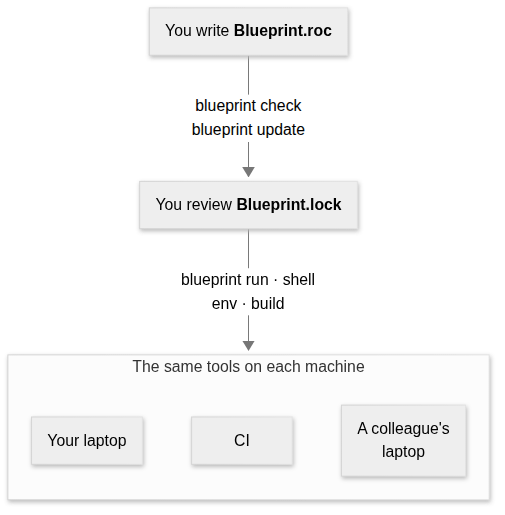
You write
Blueprint.roc. It says what each environment has and where each tool comes from.blueprint checkchecks the file and needs no lock.blueprint updateis the one command that decides anything: it records the fingerprint of every download for every system the project lists, pins each package source, and writes all of it toBlueprint.lock. You review that file and commit it.blueprint run,shell,envandbuildfollow the lock. They fetch what it names, check every download against it before use, and stop when the lock no longer matchesBlueprint.roc.
Because every machine reads the same two committed files, every machine gets the same pinned tools. Only the tools you expect of the machine can differ.
Who does what§
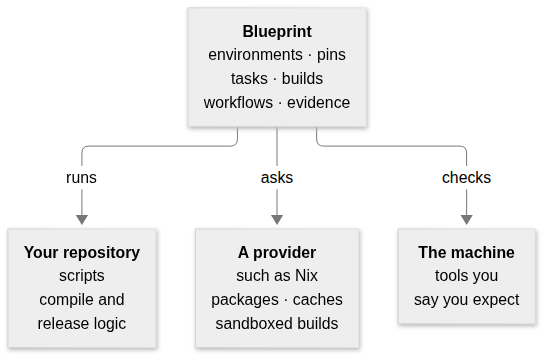
- Your repository
Keeps the work: the scripts that compile, test, package and release. Blueprint runs them and never replaces them. Adding a build runs the same script with declared inputs; it does not move its logic into Blueprint.
- Blueprint
Decides which tools each command runs with, pins them in the lock, runs tasks, builds and workflows, and records what a build used.
- A provider
Supplies packages, runs builds in a sandbox, and keeps its own cache. Nix is the provider that ships. Blueprint asks it only for what
Blueprint.roctakes from it.- The machine
Supplies the tools you say it already has. Blueprint checks that they are there before it runs anything.
What each person gets§
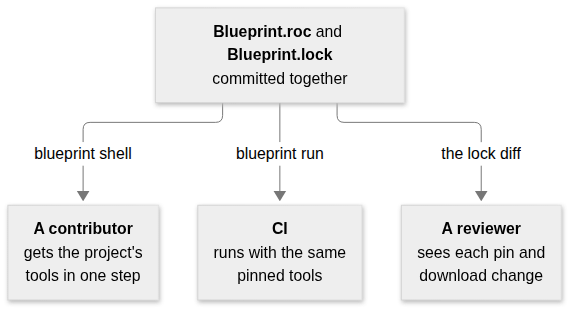
- A contributor
Installs
blueprint, runsblueprint shell, and has the project’s tools at the versions in the lock. If the machine lacks a tool the project expects, one message names it.- CI
Runs the same tasks with the same pins.
blueprint requirementssays whether a job needs Nix at all, so a job that does not can skip installing it.- A reviewer
Reads a change to
Blueprint.locklike any other diff: each new version, each download’s fingerprint and the hosts that served it.blueprint updatealso names any download host the lock did not name before.
The words this manual uses§
The rest of the manual uses a few words in an exact sense. Each row gives the
everyday meaning first, then the word, with the setting that writes it in
Blueprint.roc where there is one.
| What it means | The word |
|---|---|
A named set of tools that a command runs with, such as dev. | Environment (Environment) |
| A named collection of packages to install tools from, such as one revision of Nixpkgs. | Package source (Packages) |
A program installed from a package source, written with the source’s name, as "nix#zig" is zig from the source nix. | Tool (Tools) |
| One program downloaded from a URL and checked against a recorded fingerprint. | Fetched program (Fetch) |
| A program the machine must already have. Blueprint looks for it by name and installs nothing. | Expected tool (Expect) |
One exact command, run in an environment by blueprint run. | Task (Task) |
Your own interactive shell, with an environment’s tools first on PATH. | Shell (Shell) |
| A command that produces a file or directory from declared inputs, in a sandbox. | Build (Build) |
| A list of tasks and builds that run in order and stop at the first failure. | Workflow (Workflow) |
| A fingerprint of a file’s exact bytes, such as its SHA-256. Any change to the file changes it. | Digest |
| The exact version chosen for a download or a package source. | Pin |
The committed file Blueprint.lock, which records every pin and digest. Only blueprint update changes it. | Lock |
| A per-user folder that keeps downloads, checks them before every use, and can be deleted at any time. | Store |
| A package ecosystem that Blueprint asks for tools and builds. Nix is the one that ships. | Provider |
The part of a provider that chooses versions and records them in the lock, during blueprint update. | Resolver |
The part of a provider that runs a build and states what it guarantees, such as a sandbox with no network. A build chooses one with Execute. | Executor (Executor) |
The list of changes that entering an environment makes: the folders put first on PATH and the variables set. A shell, CI or an editor can apply it, and blueprint env prints it. | Activation |
The checked, complete description that Blueprint.roc produces, which is what blueprint reads. blueprint spec prints it. | Spec |
The architecture chapter defines these terms exactly, with the stages they pass through.
Where to go next§
- You want to try it
Get started installs
blueprintand runs a first project.- You are writing or changing a configuration
Write Blueprint.roc describes every setting.
- You want builds and ordered workflows
Build artifacts and run workflows covers sandboxed builds, their inputs and explanations.
- You need a command or an environment variable
Run blueprint lists every command.
- Your machine or CI has no Nix
Work without a provider says what a project can do with Blueprint alone.
- You learn best from a complete project
The examples are four projects to copy and run.
- You are writing a provider or judging a design change
Understand the architecture gives the model, the goals and the rules that keep Blueprint independent of any one ecosystem.
- You want to change roc-blueprint itself
Contribute explains the repository and its tests.
Where it runs§
| System | Tasks, shells, downloads and expected tools | Tools from Nix | Sandboxed builds |
|---|---|---|---|
| x86_64 Linux | Yes | Yes | Yes |
| arm64 Linux | Yes | Yes | No |
| Apple Silicon macOS | Yes | Yes | No |
| Intel macOS | Tasks only | No | No |
| x86_64 Windows | Tasks only | No | No |
Each release has a blueprint binary for each of these systems. It carries
the Roc compiler that reads Blueprint.roc, so you do not need Roc
installed. It needs Nix, with flakes enabled,
only for tools from Nix and for builds. On Linux and macOS it uses tar,
ln and chmod to unpack and link downloads. On any other system it stops
with a message naming the supported systems.
On Intel macOS, tasks use downloaded programs, expected tools and Roc packages, without Nix: current nixpkgs no longer builds for that system. See Intel macOS.
On Windows, tasks use downloaded programs and expected tools, without Nix. A
task names its script’s interpreter, because Windows does not use the #!
line at the top of a script. CI checks Windows Server; Windows 10 and 11 desktops have
not been checked. See Windows.
Systems in Blueprint.roc lists the systems a project is for, so that the
lock holds a digest for each. Listing a system does not make it supported.
What it does not do§
It does not compile, test or package your project. Your scripts do that, and Blueprint runs them.
It does not install, pin or ask the version of an expected tool. It looks for the name on
PATH.It does not sandbox tasks, or the Roc program that reads
Blueprint.roc. Only a build runs in a sandbox, through Nix on x86_64 Linux. A build’s sandbox has none of the machine’s tools.It does not find what a script reads by itself. A build declares its inputs.
It has no provider other than Nix, and does not choose one for you or translate package names between ecosystems. A Guix package source can be written, but
blueprintrefuses to resolve or use it.It keeps no cache of build results of its own. The provider does that.
A fetched program is one file, or one file inside an archive that is unpacked whole.
It runs workflow steps one at a time, in order.