> Documentation version: main. [HTML page](https://lukewilliamboswell.github.io/roc-blueprint/overview.html)
# What Blueprint is

Everyone who works on a project needs the same tools at the same versions:
each contributor on their own machine, and the CI service that tests every
change. A release needs a build that someone else can repeat. A reviewer
needs a record of what was used, written so that a person can read it.
Without that, each machine drifts. One laptop has a newer compiler than
another, CI has a third, and a test passes on one and fails on the next. A
tool changes version and nobody notices until something breaks. When a
release goes wrong, nobody can say what it was built with.
Blueprint solves this with two files that a project commits, and one command,
` blueprint `, that carries them out.
## What Blueprint gives you
- **One typed file, ` Blueprint.roc `, that says where every tool comes from.**
A tool is downloaded from a URL, installed by a package provider, or
expected to be on the machine already. Roc checks the file as you write it:
a task that names an environment that does not exist is an error before
anything runs.
- **A reviewed ` Blueprint.lock ` that pins exactly what was chosen.** It holds
the fingerprint of every download and the exact revision of every package
source. Only ` blueprint update ` changes it, and you review that change
like any other.
- **The same environment on a laptop and in CI.** On Linux and macOS, a shell
or a task gets the same pinned tools on every machine. On Windows, tasks
run with the same downloaded programs.
- **Tasks and workflows that run your own scripts.** Your scripts keep the
work of compiling, testing and releasing. Blueprint runs them with the
right tools, one at a time or as an ordered workflow.
- **Builds whose inputs are declared.** A build lists the files and sources it
reads, so ` blueprint explain build ` can say what changed since its last
successful build on that machine. ` blueprint build --rebuild ` builds it
again and fails if the output differs.
- **No dependence on one package ecosystem.** Nix is the provider that ships,
and ` blueprint ` starts it only for what a project takes from Nix.
Downloads, Roc packages and the tools a machine is expected to have are
handled by Blueprint itself, with no provider installed.
## A small Blueprint.roc, line by line
` Blueprint.roc ` is a short program in the Roc language. You do not need to
know Roc to read or write one: it is a list of settings. This one gives a
project one environment with a Roc compiler and ` git `, a shell, and one task:
``` roc
app [config] { pf: platform "" }
import pf.Recipes
config = [
Name("my-project"),
Environment("dev", [
Programs([Fetch("roc-stable", Recipes.roc_nightly("nightly-2026-10-28-bad769b"))]),
Expect(["git"]),
]),
Shell("default", [Use("dev")]),
Task("check", [Use("dev"), Run(["roc-stable", "scripts/check.roc"])]),
]
```
- **` app [config] { pf: platform "..." } `**: The file is a Roc program built on the roc-blueprint platform. The URL names
a release of that platform.
[Get started](getting-started.md#write-a-first-blueprint-roc) has the
current one.
- **` import pf.Recipes `**: Recipes say where a program is downloaded from on each system.
The platform provides some, and you can write your own.
- **` Name("my-project") `**: The project’s name.
- **` Environment("dev", [...]) `**: A named set of tools, here called ` dev `. Everything inside the brackets is
what ` dev ` has.
- **` Programs([Fetch("roc-stable", ...)]) `**: Download the Roc compiler of this nightly release and call it ` roc-stable `.
` blueprint update ` records a fingerprint of each download in
` Blueprint.lock `, and every later use is checked against it.
- **` Expect(["git"]) `**: The machine must already have ` git `. Blueprint checks that it is there. It
does not install it or pin its version.
- **` Shell("default", [Use("dev")]) `**: ` blueprint shell ` opens your own shell with the tools of ` dev ` first on
` PATH `.
- **` Task("check", [Use("dev"), Run([...])]) `**: ` blueprint run check ` runs exactly this command in ` dev `: your script
` scripts/check.roc `, with the downloaded compiler.
Nothing in this file needs Nix. Four commands put it to work:
``` sh
blueprint check # is Blueprint.roc valid?
blueprint update # download, fingerprint and write Blueprint.lock
blueprint run check # run the task in dev
blueprint shell # open a shell in dev
```
## How it works at a glance
**From Blueprint.roc to the same tools on each machine**
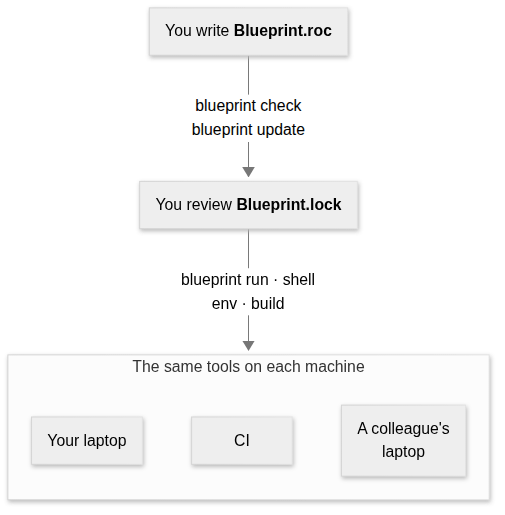
1. You write ` Blueprint.roc `. It says what each environment has and where
each tool comes from.
2. ` blueprint check ` checks the file and needs no lock. ` blueprint update ` is
the one command that decides anything: it records the fingerprint of every
download for every system the project lists, pins each package source,
and writes all of it to ` Blueprint.lock `. You review that file and commit it.
3. ` blueprint run `, ` shell `, ` env ` and ` build ` follow the lock. They fetch what
it names, check every download against it before use, and stop when the
lock no longer matches ` Blueprint.roc `.
Because every machine reads the same two committed files, every machine gets
the same pinned tools. Only the tools you expect of the machine can differ.
### Who does what
**What each part is responsible for**
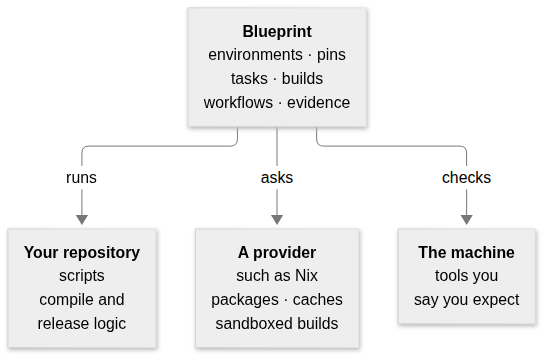
- **Your repository**: Keeps the work: the scripts that compile, test, package and release.
Blueprint runs them and never replaces them. Adding a build runs the same
script with declared inputs; it does not move its logic into Blueprint.
- **Blueprint**: Decides which tools each command runs with, pins them in the lock, runs
tasks, builds and workflows, and records what a build used.
- **A provider**: Supplies packages, runs builds in a sandbox, and keeps its own cache. Nix is
the provider that ships. Blueprint asks it only for what ` Blueprint.roc `
takes from it.
- **The machine**: Supplies the tools you say it already has. Blueprint checks that they are
there before it runs anything.
### What each person gets
**What the committed files give each reader**
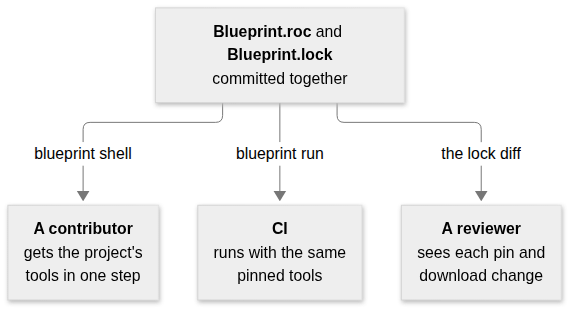
- **A contributor**: Installs ` blueprint `, runs ` blueprint shell `, and has the project’s tools at
the versions in the lock. If the machine lacks a tool the project expects,
one message names it.
- **CI**: Runs the same tasks with the same pins. ` blueprint requirements ` says
whether a job needs Nix at all, so a job that does not can skip installing
it.
- **A reviewer**: Reads a change to ` Blueprint.lock ` like any other diff: each new version,
each download’s fingerprint and the hosts that served it. ` blueprint update `
also names any download host the lock did not name before.
## The words this manual uses
The rest of the manual uses a few words in an exact sense. Each row gives the
everyday meaning first, then the word, with the setting that writes it in
` Blueprint.roc ` where there is one.
| What it means | The word |
| --- | --- |
| A named set of tools that a command runs with, such as ` dev `. | **Environment** (` Environment `) |
| A named collection of packages to install tools from, such as one revision of Nixpkgs. | **Package source** (` Packages `) |
| A program installed from a package source, written with the source’s name, as ` "nix#zig" ` is ` zig ` from the source ` nix `. | **Tool** (` Tools `) |
| One program downloaded from a URL and checked against a recorded fingerprint. | **Fetched program** (` Fetch `) |
| A program the machine must already have. Blueprint looks for it by name and installs nothing. | **Expected tool** (` Expect `) |
| One exact command, run in an environment by ` blueprint run `. | **Task** (` Task `) |
| Your own interactive shell, with an environment’s tools first on ` PATH `. | **Shell** (` Shell `) |
| A command that produces a file or directory from declared inputs, in a sandbox. | **Build** (` Build `) |
| A list of tasks and builds that run in order and stop at the first failure. | **Workflow** (` Workflow `) |
| A fingerprint of a file’s exact bytes, such as its SHA-256. Any change to the file changes it. | **Digest** |
| The exact version chosen for a download or a package source. | **Pin** |
| The committed file ` Blueprint.lock `, which records every pin and digest. Only ` blueprint update ` changes it. | **Lock** |
| A per-user folder that keeps downloads, checks them before every use, and can be deleted at any time. | **Store** |
| A package ecosystem that Blueprint asks for tools and builds. Nix is the one that ships. | **Provider** |
| The part of a provider that chooses versions and records them in the lock, during ` blueprint update `. | **Resolver** |
| The part of a provider that runs a build and states what it guarantees, such as a sandbox with no network. A build chooses one with ` Execute `. | **Executor** (` Executor `) |
| The list of changes that entering an environment makes: the folders put first on ` PATH ` and the variables set. A shell, CI or an editor can apply it, and ` blueprint env ` prints it. | **Activation** |
| The checked, complete description that ` Blueprint.roc ` produces, which is what ` blueprint ` reads. ` blueprint spec ` prints it. | **Spec** |
[The architecture chapter](architecture.md#terms) defines these terms
exactly, with the stages they pass through.
## Where to go next
- **You want to try it**: [Get started](getting-started.md#install-blueprint) installs
` blueprint ` and runs a first project.
- **You are writing or changing a configuration**: [Write Blueprint.roc](configuration.md#top-level-settings) describes
every setting.
- **You want builds and ordered workflows**: [Build artifacts and run workflows](builds.md#declare-a-build) covers
sandboxed builds, their inputs and explanations.
- **You need a command or an environment variable**: [Run blueprint](commands.md#run-blueprint) lists every command.
- **Your machine or CI has no Nix**: [Work without a provider](no-provider.md#a-project-that-never-starts-a-provider)
says what a project can do with Blueprint alone.
- **You learn best from a complete project**: [The examples](examples.md#run-an-example) are four projects to copy
and run.
- **You are writing a provider or judging a design change**: [Understand the architecture](architecture.md#goals) gives the model,
the goals and the rules that keep Blueprint independent of any one
ecosystem.
- **You want to change roc-blueprint itself**: [Contribute](contributing.md#find-your-way-around) explains the
repository and its tests.
## Where it runs
| System | Tasks, shells, downloads and expected tools | Tools from Nix | Sandboxed builds |
| --- | --- | --- | --- |
| x86\_64 Linux | Yes | Yes | Yes |
| arm64 Linux | Yes | Yes | No |
| Apple Silicon macOS | Yes | Yes | No |
| Intel macOS | Tasks only | No | No |
| x86\_64 Windows | Tasks only | No | No |
Each release has a ` blueprint ` binary for each of these systems. It carries
the Roc compiler that reads ` Blueprint.roc `, so you do not need Roc
installed. It needs [Nix](https://nixos.org/download), with flakes enabled,
only for tools from Nix and for builds. On Linux and macOS it uses ` tar `,
` ln ` and ` chmod ` to unpack and link downloads. On any other system it stops
with a message naming the supported systems.
On Intel macOS, tasks use downloaded programs, expected tools and Roc packages,
without Nix: current nixpkgs no longer builds for that system. See
[Intel macOS](no-provider.md#intel-macos).
On Windows, tasks use downloaded programs and expected tools, without Nix. A
task names its script’s interpreter, because Windows does not use the ` #! `
line at the top of a script. CI checks Windows Server; Windows 10 and 11 desktops have
not been checked. See [Windows](no-provider.md#windows).
` Systems ` in ` Blueprint.roc ` lists the systems a project is for, so that the
lock holds a digest for each. Listing a system does not make it supported.
## What it does not do
- It does not compile, test or package your project. Your scripts do that,
and Blueprint runs them.
- It does not install, pin or ask the version of an expected tool. It looks
for the name on ` PATH `.
- It does not sandbox tasks, or the Roc program that reads ` Blueprint.roc `.
Only a build runs in a sandbox, through Nix on x86\_64 Linux. A build’s
sandbox has none of the machine’s tools.
- It does not find what a script reads by itself. A build declares its
inputs.
- It has no provider other than Nix, and does not choose one for you or
translate package names between ecosystems. A Guix package source can be
written, but ` blueprint ` refuses to resolve or use it.
- It keeps no cache of build results of its own. The provider does that.
- A fetched program is one file, or one file inside an archive that is
unpacked whole.
- It runs workflow steps one at a time, in order.