1. roc-parser: A manual for parsing text and data in Roc§
Parse text and data in Roc. roc-parser gives you small parsers that combine into larger ones, and ready-made parsers for CSV, YAML, XML, JSON, Markdown and HTTP/1.1 built from the same pieces.
Browse the API reference · Download this manual as a PDF.
1.1. Choose a path§
- New to roc-parser
Read What roc-parser is, then Getting started, then Your first parser.
- Parsing a format roc-parser already supports
Go to its guide: Read CSV data, Read YAML configuration and frontmatter, Read XML documents, Read and write JSON, Markdown or HTTP messages.
- Writing your own parser
Read Combinators by task, Parse a format of your own and Report parse errors.
- Looking something up
Modules, Conformance, Performance, Compatibility and Glossary.
- Not sure whether you need a parser
- Contributing to roc-parser
Start with Contributing to roc-parser.
- Curious where the design comes from
2. Start here§
2.1. What roc-parser is§
roc-parser turns text into typed Roc values. You give it a string, such as the contents of a CSV file, a YAML configuration, or an HTTP request, and it gives back either a Roc value you can use directly or an error that says what was wrong with the input.
It is written in pure Roc, so it works with any platform, and it comes in two layers:
Ready-made parsers for common formats. You call one function and get a document tree, or, for CSV and YAML, your own record type: the compiler infers the type from your annotation and decodes straight into it.
The small building blocks those parsers are made from, called parser combinators. You use them to read a format of your own, from a one-line
key=valuesetting to a complete file format.
This manual is for Roc programmers. You do not need to know anything about parsing theory.
2.1.1. The problem it solves§
Most programs start by reading text that someone else wrote. Splitting a line on commas, or matching it with a regular expression, works until the input contains a quoted comma, a missing field, or a value of the wrong kind. Then the code either crashes, silently produces wrong data, or grows a pile of special cases.
A parser describes the shape of valid input once, as a Roc value, and checks every input against it. With roc-parser:
The result is typed. A CSV row becomes
{ name : Str, moons : U64 }, not a list of strings you still have to convert.Runtime parsing returns invalid input as an
Errvalue. The ready-made parsers follow their published specifications, including the awkward corners, and report where the problem is.Checked quotations and imported constants turn invalid source into compiler errors, with configurable checks and typed decoding.
A parser is built from smaller parsers, so each piece can be tested on its own with
expect.
Compared with a regular expression, a combinator parser is longer to write for a one-off match, but it can describe nested structure (a regular expression cannot match balanced brackets), it produces a value rather than a list of captured substrings, and it reads as ordinary Roc code.
2.1.2. What a first success looks like§
This program decodes a CSV file with a header row into typed records and prints them. Getting started walks through it.
import cli.Stdout
import parser.CSV

Planet : { name : Str, moons : U64 }

input =
	\\name,moons
	\\Mercury,0
	\\Earth,1
	\\Mars,2

planets : Str -> Try(List(Planet), [InvalidCsv(CSV.Error), MissingRequiredField(Str)])
planets = |text| CSV.parse(text)

describe : Str -> Str
describe = |text| {
	match planets(text) {
		Ok(rows) => Str.join_with(rows.map(|p| "${p.name}: ${p.moons.to_str()} ${if (p.moons == 1) "moon" else "moons"}"), "\n")
		Err(InvalidCsv(error)) => "line ${error.line.to_str()}: ${error.message}"
		Err(MissingRequiredField(name)) => "no ${name} column"
	}
}

main! = |_args| {
	Stdout.line!(describe(input))
}
Output:
Mercury: 0 moons
Earth: 1 moon
Mars: 2 moons
2.1.3. Supported formats§
Each module follows a published specification. Where a module implements only part of one, its chapter says which part, and input outside that part is rejected with an error rather than misread.
| Module | Reads | Specification |
|---|---|---|
CSV | Comma-separated rows decoded into your own record type | RFC 4180, with the usual relaxations (any line ending, rows of different lengths) |
Yaml | Configuration files and Markdown frontmatter, as a tree or your own record type | A documented subset of YAML 1.2: one document, no anchors, aliases or tags |
Xml | A whole XML document as a tree | XML 1.0 (Fifth Edition) well-formedness, without document type declarations or namespaces |
JsonValue | A JSON document of any shape as a lossless tree, and JSON written back out | RFC 8259, with opt-in relaxations (comments, trailing commas, a byte order mark, NaN and Infinity) and opt-in checks (size limits, the top-level shape, I-JSON numbers) |
Markdown | A Markdown document as a syntax tree | CommonMark 0.31.2 with GitHub Flavored Markdown tables, task lists and strikethrough |
HTTP | One HTTP/1.x request or response | RFC 9112 message syntax and RFC 9110 field syntax |
Parser, Utf8 | Anything you describe with combinators | Not applicable |
The format chapters describe each module’s exact behaviour. The API reference lists every public function.
2.1.4. How the pieces fit together§
A combinator is a function that takes parsers and returns a new parser. The
Utf8 module provides parsers for the smallest pieces of text, such as one
byte, a digit, or an exact word. The Parser module combines them: one after
another, one of several alternatives, repeated, or with the result
transformed. Each format module also exposes its parser as a Parser value,
so your own parsers and the library’s can be mixed.
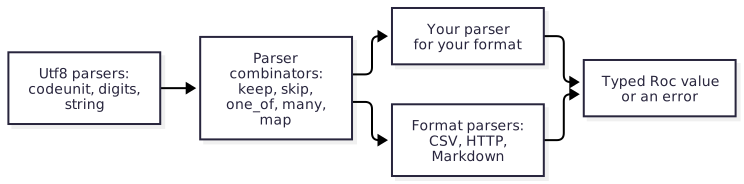
Your first parser teaches the combinators by building a small parser one step at a time.
2.1.5. When to choose something else§
roc-parser fits programs that read text formats of moderate size completely into memory and want typed results with clear errors. Consider something else when:
You need full YAML, with anchors, aliases, tags or several documents in one stream, or XML with document type declarations, namespaces or schema validation. These modules reject such input on purpose.
You need to parse a stream incrementally as it arrives, such as a very large log file or a network connection. Every parser here works on a complete input held in memory.
You want to render Markdown to HTML, or serialize values back to text in a format other than JSON. Only
JsonValuewrites its format back out.You want to decode JSON straight into your own record type. Roc’s builtin
Jsondoes that;JsonValueis for JSON whose shape a record cannot describe (see Read and write JSON).You need TOML, JSON5, or another format this package does not include. You can write it with the combinators, but a dedicated package may already exist.
2.1.6. Stability§
roc-parser tracks recent nightly builds of the Roc compiler. Because Roc is still changing, the package’s API may change between releases. Each release names the compiler build it was tested with, and the release notes describe any changes you need to make when upgrading.
2.2. Getting started§
In this chapter you add roc-parser to a Roc app and use it to read three lines
of CSV into typed records. At the end the app prints one line per record. You
need a terminal, an internet connection, and a little Roc: how to write a
function, a record, and a match.
2.2.1. Before you start§
You need:
The Roc compiler, as a recent nightly build. Roc is still changing, so each roc-parser release is tested with one specific nightly, which its release notes name. Download that build from the Roc nightlies page and put the
rocexecutable on yourPATH.A platform for your app. The examples in this manual use basic-cli 0.26.0, which provides
main!and printing to the terminal. roc-parser itself is pure Roc and works with any platform.
Check the compiler:
roc version
It prints the name of the nightly build, which should match the one in the release notes:
Roc compiler version nightly-<date>-<commit>
2.2.2. Add the package§
A Roc app names each package it uses by URL in its header. The compiler downloads the package the first time it builds the app and checks it against the hash in the URL.
Open the roc-parser releases page and choose the newest release.
Under Assets, find the file ending in
.tar.zstand copy its link.Put that link in your app’s header under a short name. This manual uses
parser.
Create a file named main.roc with this header, replacing the parser URL
with the one you copied:
app [main!] {
	cli: platform "https://github.com/roc-lang/basic-cli/releases/download/0.26.0/GddgvsGjiNXrHFW6au5i5dUDbTs8FinQdrgE2Gqmw53t.tar.zst",
	parser: "https://github.com/lukewilliamboswell/roc-parser/releases/download/<version>/<hash>.tar.zst",
}
The examples in this manual are tested against the package source in the
repository, so their headers say parser: "../../package/main.roc" instead.
Everything else in them is the same.
For complete programs to start from, download
roc-parser-examples-<version>.zip from the same release. Its apps are already
pinned to that release; unzip it and follow the README.md inside, which runs
them with roc <name>.roc from its examples/ directory.
2.2.3. Read CSV into records§
Add the rest of the program below the header:
import cli.Stdout
import parser.CSV

Planet : { name : Str, moons : U64 }

input =
	\\name,moons
	\\Mercury,0
	\\Earth,1
	\\Mars,2

planets : Str -> Try(List(Planet), [InvalidCsv(CSV.Error), MissingRequiredField(Str)])
planets = |text| CSV.parse(text)

describe : Str -> Str
describe = |text| {
	match planets(text) {
		Ok(rows) => Str.join_with(rows.map(|p| "${p.name}: ${p.moons.to_str()} ${if (p.moons == 1) "moon" else "moons"}"), "\n")
		Err(InvalidCsv(error)) => "line ${error.line.to_str()}: ${error.message}"
		Err(MissingRequiredField(name)) => "no ${name} column"
	}
}

main! = |_args| {
	Stdout.line!(describe(input))
}
Run it:
roc main.roc
Output:
Mercury: 0 moons
Earth: 1 moon
Mars: 2 moons
The first run takes longer while the compiler downloads the platform and the package.
2.2.4. What the program does§
import parser.CSV makes the CSV module from the package named parser
available.
Planet is the record type each row becomes. The first line of the input is
a header row, and each field of Planet reads the column with the same name.
planets calls CSV.parse, which splits the text into rows and decodes each
row into a record. CSV.parse does not take the row type as an argument: the
compiler infers it from the type annotation on planets, and finds the
decoding code through the static dispatch method parser_for, which every
record type has. Change the annotation and the same call decodes a different
record.
The result is Ok with a list of Planet records, or Err with one of two
tags:
InvalidCsv(error)when the text is not valid CSV or a cell does not fit its field.errorsays which record and field failed, where it starts in the text, and why.MissingRequiredField(name)when the header has no column for a field. The compiler adds this tag to the error type of every type-directed decoder, so the annotation must name it.
describe handles all three cases with a match. Nothing is printed until
every row has been read successfully.
To see the error path, change Mars,2 to Mars,two and run the program
again. It prints a message that names line 4 and quotes two. Rename the moons
column and it prints no moons column. Report parse errors shows how to report every
kind of failure, and Read CSV data shows optional columns, empty cells and
hand-built row parsers that match columns by position.
2.2.5. Next steps§
Your first parser teaches the building blocks by writing a parser for a small settings format.
The format chapters show how to read CSV, YAML, XML, JSON, Markdown and HTTP, and how to write JSON back out.
Parse a format of your own shows how to build and test a parser for a format of your own.
2.3. Choosing how to read your input§
Roc gives you four ways to turn text into values, and roc-parser provides two of them. This chapter helps you pick one before you write any code. In short:
Decode into your own type when the input is a standard format and you already know the shape you want. The record type is the specification, and there is almost no code to write.
Read a document tree with one of roc-parser’s format modules when you do not know the shape in advance, or you need what a record would throw away.
Build a parser with combinators when the format is your own, or you need control over exactly what is accepted and what the errors say.
Use no parser at all when a
Strfunction does the job, or when the input is too large or too hot for any of these.
The examples come from
choosing-approaches.roc;
every expect in it passes.
2.3.1. Decode into your own type§
Roc has type-directed decoding built in. A format (such as the builtin
Json) knows how to read strings, numbers, lists and records. Your type
knows which of those it is made of. The compiler combines the two, so the
annotation alone decides what is accepted:
# (a) Type-directed decoding: the record type is the whole specification.
Service : { name : Str, port : U64 }

decode_service : Str -> Try(Service, [InvalidJson(Str), MissingRequiredField(Str)])
decode_service = |json| Json.parse(json)

expect decode_service("{\"name\": \"web\", \"port\": 8080}") == Ok({ name: "web", port: 8080 })
expect decode_service("{\"name\": \"web\"}") == Err(MissingRequiredField("port"))
The parsers chapter of the language reference describes
the mechanism. Every type has a parser_for method, which the compiler
derives for records, lists and tuples, and a format is a type module whose
methods read one value at a time. Static dispatch joins the two. A field of type Try(_, [Missing]) is
optional, a missing required field is reported by name, and when the parser
is a top-level constant it is assembled at compile time.
Choose this when:
the input is a format with a
parser_forimplementation, andthe mapping from the format to your type is the obvious one: object keys are field names, arrays are lists, and so on.
The builtin Json is such a format, for JSON whose shape you know in
advance. For dynamic JSON, whose keys are not Roc identifiers or whose arrays
mix shapes, or that must keep member order and every digit of its numbers,
read a document tree with roc-parser’s JsonValue instead (see Read and write JSON).
roc-parser’s CSV and Yaml modules are formats for this mechanism.
CSV.parse reads a file with a header row into a list of records, matching
columns to fields by name, and Yaml.decode reads a document into a record.
Neither takes the type as an argument: the annotation chooses it. A required
field with no column or key fails with MissingRequiredField(name), a tag
the compiler adds to the error type, so the annotation names it alongside
the format’s own error:
# roc-parser's CSV and Yaml modules are formats for the same mechanism.
Planet : { name : Str, moons : U64, rings : Try(Bool, [Missing]) }

planets : Str -> Try(List(Planet), [InvalidCsv(CSV.Error), MissingRequiredField(Str)])
planets = |text| CSV.parse(text)

expect planets("name,moons\nMars,2\n") == Ok([{ name: "Mars", moons: 2, rings: Err(Missing) }])
expect planets("name\nMars\n") == Err(MissingRequiredField("moons"))

service : Str -> Try(Service, [InvalidYaml(Yaml.Error), MissingRequiredField(Str)])
service = |text| Yaml.decode(text)

expect service("name: web\nport: 8080\n") == Ok({ name: "web", port: 8080 })
expect service("name: web\n") == Err(MissingRequiredField("port"))
Its limits come from the same design. The format decides the representation,
so you cannot ask it to accept yes as a boolean or to read a date in your
own layout. Where a wrong value is depends on the format: CSV.parse reports
the record, field, line and column, and Yaml.decode the line and column. And the type must be known when you compile.
2.3.2. Read a document tree§
roc-parser’s Yaml, Xml, JsonValue and Markdown modules read a whole
document into a tree that mirrors the format, and HTTP reads a message into
a record of its parts. You then walk the tree with pattern matching, or with
the tree methods such as get_path and as_i64 on a Yaml or JsonValue
value and attribute and children_named on an Xml.Node:
# (b) A ready-made format parser: read the whole tree, then decide what to
# do with each key, whatever keys the file happens to contain.
top_level_keys : Str -> Try(List(Str), [NotAMapping, InvalidYaml(Yaml.Error)])
top_level_keys = |text| {
	match Yaml.parse_str(text)? {
		Mapping(entries) => Ok(entries.map(|entry| entry.key))
		_ => Err(NotAMapping)
	}
}

expect top_level_keys("name: web\nport: 8080\nextra: [1, 2]") == Ok(["name", "port", "extra"])

# The tree methods follow a path without a match per level.
port_of : Str -> Try(I64, [Missing, WrongType, InvalidYaml(Yaml.Error)])
port_of = |text| Yaml.parse_str(text)?.get_path(["server", "port"])?.as_i64()

expect port_of("server:\n  port: 8080\n") == Ok(8080)
expect port_of("server: {}\n") == Err(Missing)
Choose this when:
the shape is not known in advance: any key may appear, keys vary between files, or you are writing a tool that works on every document, such as a linter or a converter;
you need what a record type cannot hold: the order of mapping keys, the exact text of a JSON number, the mix of text and child elements in XML, or the block structure of a Markdown document;
you want a precise error with a line and column from a parser that follows the format’s specification, and you check the content yourself afterwards. The format modules drop comments, so a tool that must preserve them needs a parser of its own.
The cost is code: you write the walk, and a missing or mistyped key is something you check, not something the type system checks for you. The format chapters (Read YAML configuration and frontmatter, Read XML documents, Read and write JSON, Markdown and HTTP messages) show helper functions that keep the walk short.
2.3.3. Build a parser with combinators§
When no format module reads your input, write a parser from the Parser and
Utf8 combinators. A parser is a value made of smaller parsers, so the
code has the shape of the grammar:
# (c) A parser of your own: a legacy "host:port" line, where the port must
# be digits and the grammar is yours to define.
Endpoint : { host : Str, port : U64 }

endpoint : Parser(Utf8.Bytes, Endpoint)
endpoint =
	Parser.const(|host| |port| { host, port })
		.keep(Parser.chomp_while(|b| b != ':').map(Str.from_utf8_lossy))
		.skip(Utf8.codeunit(':'))
		.keep(Utf8.digits)

expect Utf8.parse_str(endpoint, "example.com:443") == Ok({ host: "example.com", port: 443 })
expect Utf8.parse_str(endpoint, "example.com:https").is_err()
Choose this when:
the format is your own or a legacy one: a log line, a configuration dialect, a wire protocol, or a small language such as a query or a template;
the grammar is defined by more than a record shape: alternatives, nesting, repetition with separators, or a part whose length is given earlier in the input;
you want to reject invalid values while parsing, so that a port of
70000or a date of2026-02-30fails at the right place with your own message;you want to read only the start of the input and keep the rest, such as one message from a buffer that holds several (
Utf8.parse_str_partial).
Combinators are also how you extend a format module. CSV.record and
CSV.field are combinators, every format module has a parser value to
embed, and you can mix Utf8 parsers into any parser of your own. A
combinator parser’s failure is the furthest failure, with a byte offset. Your first parser teaches the method and Parse a format of your own
applies it to a real format.
2.3.4. Use no parser at all§
Parser combinators are not always the right tool, and roc-parser’s own format modules show where the line falls.
- The input has no structure worth a grammar
One separator, no quoting and no nesting is a job for
Str.split_on,Str.trimand friends. A parser would be longer and no clearer:# (d) No parser at all: one separator and no nesting is a job for `Str`. fields : Str -> List(Str) fields = |line| line.split_on("\t") expect fields("a\tb\tc") == ["a", "b", "c"]- The input is very large or arrives as a stream
Every parser in this package reads a complete input held in memory, and the result holds copies of the text it read. For a multi-gigabyte log or a network connection, read and process one record at a time with a hand-written loop over the bytes, or use a streaming library.
- The parser is on a hot path
Each combinator adds a function call and an intermediate
Try. That is cheap for configuration files and messages, but Add a format module records that the CSV, XML, HTTP and Markdown modules moved their document-level parsing to byte scanners with an explicit stack, to stay linear and avoid deep recursion; the JSON module was written that way from the start. Do the same when profiling shows the parser matters. Performance compares the built-in parsers with Go, Rust and Python libraries.- The grammar is ambiguous or left-recursive
Combinators take the first alternative that succeeds and cannot handle a rule that starts with itself, such as
expr = expr "-" term. A large grammar written for a parser generator, such as an existing yacc or ANTLR grammar, is often better served by a generator, which checks the grammar for conflicts before any input is read. Where the design comes from explains these limits.
2.3.5. Decision table§
| You need | Decode into a type | Document tree | Combinators | No parser |
|---|---|---|---|---|
| A standard format (CSV, YAML) into known records, with little code | Best | Possible | Possible | No |
| Any keys or structure, discovered at run time | No | Best | Possible | No |
| Mapping key order or XML mixed content kept | No | Yes | Yes | No |
| Line and column in errors | Yes for CSV and Yaml | Yes | A byte offset | No |
| Your own or a legacy format, a protocol or a small language | No | No | Best | If trivial |
| Values validated while parsing, with your own messages | No | Afterwards | Best | By hand |
| Read one message and keep the rest | No | HTTP.parse_request returns the rest | Yes | By hand |
| Very large or streaming input, or a hot path | No | No | No | Best |
| Ambiguous or left-recursive grammar | No | No | No | Use a parser generator |
2.3.6. Decision flow§
The same choice as a sequence of questions:
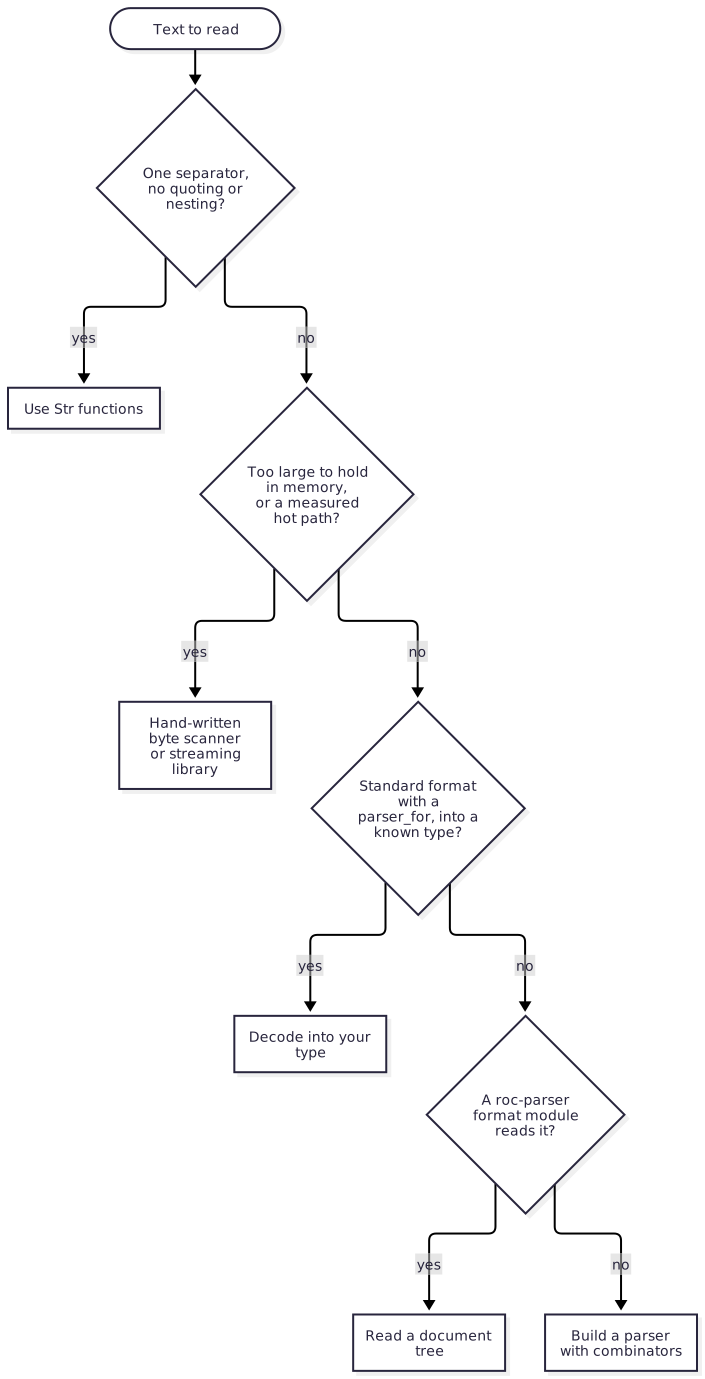
The questions are ordered from least code to most. You can also combine answers: read a Markdown file as a tree, read its frontmatter as a YAML tree, and parse one custom field inside it with a combinator.
2.4. Your first parser§
In this tutorial you write a parser for a small settings format, one line per setting:
name="demo"
port=8080
debug=true
By the end you have a parser that turns that text into a list of typed records, and you know how to read its errors. Along the way you meet the combinators that every parser in this package is built from.
You need the setup from Getting started. Each step is a complete program
in the repository’s docs/examples directory; the step’s heading names the
file. Run a step with roc <file> and its tests with roc test <file>.
2.4.1. Step 1: read a key§
A key is one or more lowercase letters or underscores. Start with a parser
for one such byte, repeat it, and turn the bytes into a Str:
is_key_byte : U8 -> Bool
is_key_byte = |b| (b >= 'a' and b <= 'z') or b == '_'

key : Parser(Utf8.Bytes, Str)
key =
	Utf8.codeunit_satisfies(is_key_byte)
		.one_or_more()
		.map(Str.from_utf8_lossy)
Three ideas appear here:
A
Parser(Utf8.Bytes, Str)reads from UTF-8 bytes (Utf8.BytesisList(U8)) and produces aStr. Every parser has an input type and a result type.Utf8.codeunit_satisfies(is_key_byte)reads one byte ifis_key_byteaccepts it, and fails otherwise..one_or_more()repeats a parser until it fails and collects the results in a list..map(f)transforms the result with an ordinary function; hereStr.from_utf8_lossyturns the bytes into aStr.
Utf8.parse_str runs a parser on a whole string. These tests pass:
expect Utf8.parse_str(key, "name") == Ok("name")
expect Utf8.parse_str(key, "Name").is_err()
The second fails because N is not a lowercase letter, so not even one key
byte can be read.
2.4.2. Step 2: read a whole setting§
A setting is a key, an =, and a value. For now, the value is everything up
to the end of the line:
value : Parser(Utf8.Bytes, Str)
value =
	Parser.chomp_while(|b| b != '\n')
		.map(Str.from_utf8_lossy)

Entry : { key : Str, value : Str }

entry : Parser(Utf8.Bytes, Entry)
entry =
	Parser.const(|k| |v| { key: k, value: v })
		.keep(key)
		.skip(Utf8.codeunit('='))
		.keep(value)
This is the pattern for reading things in sequence:
Parser.const(f)is a parser that reads nothing and producesf, the function that builds the result.ftakes its arguments one at a time (|k| |v| ...), because they arrive one at a time..keep(p)runspnext and passes its result to the function..skip(p)runspnext and throws its result away. The=must be there, but you do not need it in the record.
Parser.chomp_while(pred) reads bytes while pred accepts them. It always
succeeds, even when it reads nothing, which is why "empty=" gives an empty
value:
expect Utf8.parse_str(entry, "name=roc") == Ok({ key: "name", value: "roc" })
expect Utf8.parse_str(entry, "empty=") == Ok({ key: "empty", value: "" })
Running the step prints:
Ok({ key: "name", value: "roc" })
2.4.3. Step 3: choose between kinds of value§
A value is a number, true or false, or text in double quotes. Write one
parser for each kind, then try them in order with Parser.one_of:
Value : [Number(U64), Flag(Bool), Text(Str)]

number : Parser(Utf8.Bytes, Value)
number = Utf8.digits.map(|n| Number(n))

flag : Parser(Utf8.Bytes, Value)
flag =
	Parser.one_of([
		Parser.const(Flag(Bool.True)).skip(Utf8.string("true")),
		Parser.const(Flag(Bool.False)).skip(Utf8.string("false")),
	])

text : Parser(Utf8.Bytes, Value)
text =
	Parser.chomp_while(|b| b != '"')
		.map(|bytes| Text(Str.from_utf8_lossy(bytes)))
		.between(Utf8.codeunit('"'), Utf8.codeunit('"'))

value : Parser(Utf8.Bytes, Value)
value = Parser.one_of([number, flag, text])
Parser.one_of tries each parser on the same input and returns the first
success. If one fails part-way through, the next one starts again from the
beginning, so text does not see input already examined by number or
flag.
Utf8.digits reads a whole number as a U64, and Utf8.string("true")
reads exactly that text. .between(open, close) reads open, the parser,
and close, and keeps only the middle result.
expect Utf8.parse_str(value, "8080") == Ok(Number(8080))
expect Utf8.parse_str(value, "true") == Ok(Flag(Bool.True))
expect Utf8.parse_str(value, "\"hello world\"") == Ok(Text("hello world"))
expect Utf8.parse_str(value, "maybe").is_err()
The entry parser from step 2 now uses this value. Running the step prints:
Ok({ key: "port", value: Number(8080) })
2.4.4. Step 4: read every line, and read the errors§
A settings file is entries separated by line breaks. sep_by reads that
shape and drops the separators:
config : Parser(Utf8.Bytes, List(Entry))
config = entry.sep_by(Utf8.codeunit('\n'))
expect
	Utf8.parse_str(config, "port=8080\ndebug=true")
		== Ok([{ key: "port", value: Number(8080) }, { key: "debug", value: Flag(Bool.True) }])
Utf8.parse_str returns one of three results, and a real program should
handle each:
report : Str -> Str
report = |source| {
	match Utf8.parse_str(config, source) {
		Ok(entries) => "parsed ${entries.len().to_str()} entries"
		Err(ParseError({ message, offset })) => "failed at byte ${offset.to_str()}: ${message}"
	}
}

report_entry : Str -> Str
report_entry = |source| {
	match Utf8.parse_str(entry, source) {
		Ok(_) => "parsed one entry"
		Err(ParseError({ message, offset })) => "failed at byte ${offset.to_str()}: ${message}"
	}
}

main! = |_args| {
	Stdout.line!(report("name=\"demo\"\nport=8080\ndebug=true"))?
	Stdout.line!(report("name=\"demo\"\nport=eighty"))?
	Stdout.line!(report("name=\"demo\"\n"))?
	Stdout.line!(report_entry("port=eighty"))
}
Output:
parsed 3 entries
failed at byte 17: expected char `"`
failed at byte 12: expected a codeunit satisfying a condition, but input was empty.
failed at byte 5: expected char `"`
Each line of output shows one outcome:
The whole input matched:
Ok.port=eightyis not a valid entry, sosep_bystopped after the first entry and did not reach the end of the input.parse_strreports the furthest failure instead: none of the value parsers acceptedeighty, at byte 17.The trailing line break is a separator with no entry after it, so the parse fails at the end of the input, where a key was expected. Real files often end with a line break; Parse a format of your own shows one way to accept it.
Parsing a single bad entry directly gives the same failure, at byte 5.
The second line is worth remembering. A repetition such as sep_by or many
stops at the first element it cannot read, but that element’s failure is
kept, so a mistake in the middle of a file is reported where it is.
Report parse errors explains how to get better messages.
2.4.5. What you have learned§
A parser has an input type and a result type, and
Utf8.parse_strruns one on a whole string.Parser.const(f).keep(a).skip(b).keep(c)reads things in sequence..map(f)transforms a result;Parser.one_ofchooses between alternatives;one_or_more,manyandsep_byrepeat.A parse ends in
Okor aParseErrorwith a message and a byteoffset.
Combinators by task covers the remaining combinators and the rules for alternatives and repetition in more depth.
3. Guides§
3.1. Read CSV data§
This chapter shows how to turn comma-separated text into Roc values: as
records chosen by the type you ask for, as tuples when the file has no
header, as raw fields, and with hand-built record parsers when a column needs
custom handling. It also shows how to tell the user which row was wrong. It
is for Roc programmers who have added parser to their app’s dependencies.
Every example on this page comes from
docs/examples/csv-guide.roc, which
CI runs, and imports parser.CSV, parser.Parser and parser.Utf8.
3.1.1. Decode rows into records§
When the first row names the columns, CSV.parse decodes every other row
into the record type you annotate. Each field reads the column whose header
is exactly its name, so the column order does not matter:
Product : { name : Str, quantity : U64, price : Dec }

products : Str -> Try(List(Product), [InvalidCsv(CSV.Error), MissingRequiredField(Str)])
products = |text| CSV.parse(text)
print_products! : Str => Try({}, _)
print_products! = |text| {
	match products(text) {
		Ok(found) =>
			for p in found {
				Stdout.line!("${p.name}: ${p.quantity.to_str()} at ${p.price.to_str()}")?
			}

		Err(InvalidCsv({ line, column, message, record: _, field: _ })) =>
			Stdout.line!("line ${line.to_str()}, column ${column.to_str()}: ${message}")?

		Err(MissingRequiredField(name)) =>
			Stdout.line!("no column named ${name}")?
	}
	Ok({})
}
Running it on a good file, on a file without a quantity column, and on a
file whose second data row is short:
print_products!("name,price,quantity\nbolt,0.15,250\nnut,.05,+40\n")?
print_products!("name,price\nbolt,0.15\n")?
print_products!("name,price,quantity\nbolt,0.15,250\nnut,0.05\n")?
bolt: 250 at 0.15
nut: 40 at 0.05
no column named quantity
line 3, column 1: the record has 2 fields, fewer than the 3 columns
MissingRequiredField(name) is not declared by CSV.parse: the compiler adds
it to the error type of any decoder whose record has required fields, so
include it in your annotation. Columns that no field names are ignored, and
when two columns share a name the last one wins.
A cell decodes according to its field’s type:
| Type | Accepted cell text |
|---|---|
Str | Any text, kept exactly, including leading and trailing spaces. |
Bool | true or false in any letter case. |
U8 … U128, I8 … I128 | ASCII digits with an optional leading `` (or - for signed types) that fit in the type. Spaces, _ and 0x prefixes are rejected. |
Dec | An optional sign, digits and an optional fraction: 1.50, -2, .5. |
F32, F64 | An optional sign, then inf, infinity or nan in any letter case, or a decimal number with an optional fraction and exponent: 12, 1.5, .5, 5., 1e-3, 2.5E+10. Values too large become infinity and values too small become zero. |
| Tags without payloads | The tag name, such as Active. |
These match Rust’s from_str for each number type. A field that is a
record, a tuple or a tag with a payload fails with an InvalidCsv error
when it is decoded; a field that is a list or a dictionary is a compile-time
error, because a CSV cell cannot hold one.
3.1.1.1. Optional columns, empty cells and header spelling§
A field of type Try(a, [Missing]) is Err(Missing) when the file has no
such column. A field of type Try(a, [Null]) is Err(Null) when its cell is
empty. CSV.parse_normalized matches header names after trimming spaces,
lowercasing ASCII letters and turning runs of spaces, - and _ into one
_, so First Name, first-name and FIRST_NAME all fill first_name:
Contact : {
	name : Str,
	email : Try(Str, [Missing]),
	age : Try(U64, [Null]),
	status : [Active, Inactive],
}

contacts : Str -> Try(List(Contact), [InvalidCsv(CSV.Error), MissingRequiredField(Str)])
contacts = |text| CSV.parse_normalized(text)

describe_contact : Contact -> Str
describe_contact = |{ name, email, age, status }| {
	email_text =
		match email {
			Ok(address) => address
			Err(Missing) => "no email column"
		}
	age_text =
		match age {
			Ok(years) => years.to_str()
			Err(Null) => "age not given"
		}
	status_text =
		match status {
			Active => "active"
			Inactive => "inactive"
		}
	"${name} (${email_text}, ${age_text}, ${status_text})"
}
For "Name,Age,Status\nAda,36,Active\nAlan,,Inactive\n" this prints:
Ada (no email column, 36, active)
Alan (no email column, age not given, inactive)
3.1.1.2. Row width and blank lines§
Blank lines are skipped. Every other row must have exactly as many fields as
the header: a shorter row and a longer row are both an InvalidCsv error
naming the row, so that a misplaced comma cannot shift values into the wrong
columns. A header with no data rows, and empty input, decode to an empty list.
3.1.2. Files without a header§
CSV.parse_headerless decodes every row into a tuple, one element per
column, with the same cell rules. Every row must have as many fields as the
tuple has elements:
points : Str -> Try(List((Str, F64, F64)), [InvalidCsv(CSV.Error)])
points = |text| CSV.parse_headerless(text)
Ok([("home", -33.87, 151.21), ("work", -33.86, 151.2)])
3.1.3. Read every field as raw bytes§
Use CSV.parse_records when the columns vary or you want to inspect rows
yourself. It returns one CSV.Record, a List(List(U8)), per row:
raw_records : Str -> Str
raw_records = |text| {
	match CSV.parse_records(text) {
		Ok(records) =>
			Str.join_with(records.map(|fields| Str.join_with(fields.map(Str.from_utf8_lossy), " | ")), "\n")

		Err(InvalidCsv({ message, line, column, record: _, field: _ })) =>
			"not valid CSV at ${line.to_str()}:${column.to_str()}: ${message}"
	}
}
Given a header row, a quoted field containing "" and ,, and a row whose
last field is empty:
Stdout.line!(raw_records("name,note\r\nwidget,\"says \"\"hi\"\", twice\"\nempty,"))?
name | note
widget | says "hi", twice
empty |
CSV.split_header separates the first record as column names:
column_names : Str -> Str
column_names = |text| {
	match CSV.parse_records(text) {
		Ok(records) => {
			{ header, rows } = CSV.split_header(records)
			"${Str.join_with(header, ", ")}; ${rows.len().to_str()} rows"
		}

		Err(_) => "not valid CSV"
	}
}
sku, count; 2 rows
CSV.parser is the same reader as a Parser(Utf8.Bytes, List(CSV.Record)),
for use inside larger parsers. It accepts any bytes.
3.1.4. Hand-built record parsers§
When a column needs custom handling, such as a list stored in one cell,
describe one row with CSV.record, giving it a function that takes one
argument per column, then add one .keep(CSV.field(...)) per column in
order. A field parser is any Parser(Utf8.Bytes, a); CSV.string,
CSV.u64 and CSV.f64 read cells with the rules above:
Movie : { title : Str, year : U64, cast : List(Str) }

cast : Parser(Utf8.Bytes, List(Str))
cast = CSV.string.map(|text| Str.split_on(text, ";"))

movie : Parser(CSV.Record, Movie)
movie =
	CSV.record(|title| |year| |actors| { title, year, cast: actors })
		.keep(CSV.field(CSV.string))
		.keep(CSV.field(CSV.u64))
		.keep(CSV.field(cast))
Run it on text with CSV.parse_with, or on records you already have with
CSV.decode. Columns are matched by position, and the record parser must
read every field in the row: a row with more fields than .keep calls fails,
and so does a row with fewer.
3.1.5. Report which row failed§
Every function stops at the first problem and returns InvalidCsv(error).
The CSV.Error record says where the problem is:
| Field | Meaning |
|---|---|
record, field | The one-based record and field numbers. Records count every record of the input, including the header row and blank lines. |
line, column | The one-based line and byte column where the field (or, when the field does not exist, the record) starts. They are 0 from CSV.decode, which does not see the text. |
message | What is wrong. It quotes at most a short excerpt of the field, so it is safe to show for any input. |
describe : Str -> Str
describe = |text| {
	match CSV.parse_with(movie, text) {
		Ok(movies) => "${movies.len().to_str()} movies"
		Err(InvalidCsv({ record, field, line, column, message })) =>
			"record ${record.to_str()}, field ${field.to_str()} (line ${line.to_str()}, column ${column.to_str()}): ${message}"
	}
}
Stdout.line!(describe("Airplane!,1980,Robert Hays;Julie Hagerty"))?
Stdout.line!(describe("Airplane!,1980,Robert Hays\nCaddyshack,soon,Bill Murray"))?
Stdout.line!(describe("Airplane!,1980,Robert Hays,extra"))?
1 movies
record 2, field 2 (line 2, column 12): expected a U64, found `soon`
record 1, field 4 (line 1, column 28): the record has 4 fields, but the parser read only 3
3.1.6. Which CSV files are accepted§
The dialect is RFC 4180 with the relaxations that Python’s csv module (in
strict mode) and Rust’s csv crate also accept:
Fields are separated by
,. Records end with CRLF, LF or a lone CR, and the line break after the last record is optional.An unquoted field is any run of bytes other than
,, CR and LF. A"inside an unquoted field is an ordinary character.A field that starts with
"is quoted. It may contain,, CR and LF, and""stands for one". The closing quote must be followed by,, a line break or the end of input; an unterminated quoted field is an error.Spaces and tabs are kept as part of the field.
Empty input has no records. A blank line in the middle of the input is a record with one empty field.
Rows may have different numbers of fields (the typed decoders then check the width).
Stdout.line!(raw_records("size,6\" pipe\rcount,"))?
Stdout.line!(raw_records("bolt,\"250"))?
Stdout.line!("empty input: ${Str.inspect(CSV.parse_records(""))}")?
size | 6" pipe
count |
not valid CSV at 1:6: unterminated quoted field
empty input: Ok([])
3.1.7. Limitations§
The separator is always
,. Tab- or semicolon-separated files are not supported.A UTF-8 byte order mark is not removed; it becomes part of the first field.
The whole input is parsed before decoding starts, so very large files are held in memory.
For every function and type in the module, see the CSV API reference.
3.1.8. Performance§
Reading every field as a string runs at 120–150 MB/s on an Apple M2, from
a 1.6 KB export to a 1 MiB file: on par with Rust’s csv crate, about 2.3
times slower than Go’s encoding/csv and nearly twice as fast as Python’s C
csv module. Delimiters and quotes are found 16 bytes at a time with SIMD,
and fields without doubled quotes are slices of the input.
The parser is a byte scanner and stays linear on very wide rows and long runs
of escaped quotes. Decoding typed columns adds the cost of each conversion.
The whole file and every field are held in memory: about 12 MiB of peak
memory for a 1 MiB file. See Performance for the method and caveats.
3.2. Read YAML configuration and frontmatter§
This chapter shows how to read a YAML configuration file or the frontmatter
at the top of a Markdown post into a Roc value, pull settings out of it, and
report mistakes with a line and column. It is for Roc programmers who have
added parser to their app’s dependencies and know the YAML they want to
read.
The parser handles the YAML that configuration files and frontmatter use in practice, and rejects the rest with an error instead of guessing. If your files use anchors, tags or several documents in one file, read what is rejected first.
The decoding examples come from
docs/examples/yaml-guide.roc;
the source-highlighting example comes from
docs/examples/yaml-source-guide.roc.
CI checks, tests and runs both against the package beside this manual.
Both import parser.Yaml.
3.2.1. Decode a document into a record§
Yaml.decode reads a document straight into your own Roc type. You do not
pass the type: it is inferred from how the result is used, usually from a
type annotation. This configuration, held in a Roc multi-line string (each
\\ starts one line of the file):
config_text =
	\\# deployment settings
	\\name: web
	\\replicas: 3
	\\debug: false
	\\ports: [80, 443]
	\\owners:
	\\  - name: Ada
	\\    email: ada@example.com
	\\  - name: Grace
is read by:
Owner : { name : Str, email : Try(Str, [Missing]) }

Config : {
	name : Str,
	replicas : U8,
	debug : Bool,
	ports : List(U16),
	owners : List(Owner),
}

## The record type tells `Yaml.decode` what to expect.
load_config : Str -> Try(Config, [InvalidYaml(Yaml.Error), MissingRequiredField(Str)])
load_config = |text| Yaml.decode(text)

summarize : Str -> Try(Str, [InvalidYaml(Yaml.Error), MissingRequiredField(Str)])
summarize = |text| {
	config = load_config(text)?
	owner_names = config.owners.map(|owner| owner.name)

	Ok("${config.name}: ${config.replicas.to_str()} replicas, owners ${Str.join_with(owner_names, " and ")}")
}
summarize(config_text) returns:
web: 3 replicas, owners Ada and Grace
The rules that map YAML onto Roc types:
A mapping decodes into a record, matching keys to field names, or into a
DictwithStror integer keys. Keys the record does not have are skipped.A sequence decodes into a
List, or into a tuple when it has exactly as many items as the tuple.A plain (unquoted) scalar is resolved for the type that reads it, with the YAML 1.2 core schema (see how plain values are typed). A
Strfield takes any scalar except a null, soversion: 1.10gives"1.10"rather than a float; aU8field takes0x1F; aBoolfield takestrueorFALSE, but not the string"true".A tag union without payloads, such as
[Debug, Info], takes the tag’s name.A null (
~,nullor an empty value) decodes as an empty list, dict or record, and asErr(Null)in aTry(_, [Null])field.A
Try(_, [Missing])field isErr(Missing)when its key is absent, likeemailfor Grace above.
A value of the wrong shape or out of range fails with InvalidYaml at that
value’s line and column, the same error invalid YAML gives. A required field
whose key is absent fails with MissingRequiredField(name). Your code does
not declare that tag: the compiler adds it to the error type of every decoder
of a record with required fields, so name it in the annotation:
Stdout.line!(Str.inspect(load_config("name: web\nreplicas: 300\n")))?
Stdout.line!(Str.inspect(load_config("name: web\nreplicas: 3\ndebug: no\n")))?
Stdout.line!(Str.inspect(load_config("name: web\nreplicas: 3\ndebug: false\nports: []\n")))?
Err(InvalidYaml({ column: 11, line: 2, message: "integer `300` is outside the range of U8" }))
Err(InvalidYaml({ column: 8, line: 3, message: "expected a boolean, found `no`" }))
Err(MissingRequiredField("owners"))
3.2.1.1. Other key spellings and unknown keys§
Yaml.decoder builds a decoder with other conventions. keys says how YAML
spells Roc’s snake_case field names: SnakeCase (as written), KebabCase
(user-id) or CamelCase (userId). unknown_keys: Reject turns a key the
record does not have into an InvalidYaml error, which catches typos in
hand-written configuration:
decode_strict = Yaml.decoder({ keys: KebabCase, unknown_keys: Reject })

load : Str -> Try({ user_id : U64 }, [InvalidYaml(Yaml.Error), MissingRequiredField(Str)])
load = |text| decode_strict(text)
Build the decoder once, as a top-level constant, and call it for each
document. To write your own generic function over decodable types, require
a.Yaml.Parseable(errors) in its where clause, the way Yaml.decode does.
3.2.2. Explore a document as a tree§
When the shape is not known in advance, Yaml.parse_str returns a Yaml
tree:
Yaml := [
    Null,
    Bool(Bool),
    Int(I64),
    Float(F64),
    Text(Str),
    Sequence(List(Yaml)),
    Mapping(List({ key : Str, value : Yaml })),
]
A mapping keeps its entries in source order. get looks up a key, at an
index, and get_path follows several of them, using decimal strings such as
"0" for sequence indexes. Each returns Err(Missing) when there is nothing
there. as_str, as_i64, as_bool and as_list unwrap one variant or
return Err(WrongType):
## Explore a document without a record type.
first_owner : Str -> Try(Str, [InvalidYaml(Yaml.Error), Missing, WrongType])
first_owner = |text| {
	config = Yaml.parse_str(text)?
	name = config.get_path(["owners", "0", "name"])?
	name.as_str()
}
For config_text, and then for "owners: []":
Ok("Ada")
Err(Missing)
Empty input, or a document holding only comments, parses as Null. To
combine YAML with other parsers, Yaml.parser is a Parser(Utf8.Bytes, Yaml)
that reads the rest of its input; its ParseError offset is the byte offset
of the error’s line and column.
3.2.3. Read Markdown frontmatter§
Frontmatter is a YAML document between two --- lines at the start of a
Markdown file. Split the text at the closing --- and parse the first part.
The parser accepts the opening --- (and a closing ...) as document
markers, so you do not need to strip them:
## Split a Markdown file into its YAML frontmatter and body.
frontmatter : Str -> Try({ meta : Yaml, body : Str }, [NoFrontmatter, InvalidYaml(Yaml.Error)])
frontmatter = |markdown| {
	match Str.split_on(markdown, "\n---\n") {
		[header, .. as rest] if Str.starts_with(header, "---\n") =>
			Ok({ meta: Yaml.parse_str(header)?, body: Str.join_with(rest, "\n---\n") })

		_ => Err(NoFrontmatter)
	}
}
For "---\ntitle: Hello\ntags: [roc, yaml]\n---\n# Hello\n", printing
Yaml.to_inspect(meta) and then the body gives:
Mapping([{ key: "title", value: Text("Hello") }, { key: "tags", value: Sequence([Text("roc"), Text("yaml")]) }])
# Hello
Yaml.decode works on the same text when you know the frontmatter’s fields.
3.2.4. How plain values are typed§
In a Yaml tree, an unquoted value is resolved with the YAML 1.2 core
schema. Anything that matches none of these forms is Text:
| Written as | Becomes |
|---|---|
~, null, Null, NULL, or nothing | Null |
true, True, TRUE, false, False, FALSE | Bool |
Decimal digits with an optional sign; unsigned 0x hexadecimal or 0o octal | Int (an I64; a value outside its range is an error) |
Decimal with a fraction or exponent; .inf, -.inf, .nan in the three letter cases | Float |
show!("[~, null, true, FALSE, 42, -7, 0x1F, 0o17, 1.5, 6.02e23, .inf, -.Inf, .nan, 1.2.3, 1_000, 'true', 2026-10-01]")
Sequence([Null, Null, Bool(True), Bool(False), Int(42), Int(-7), Int(31), Int(15), Float(1.5), Float(6.02e23), Float(inf), Float(-inf), Float(nan), Text("1.2.3"), Text("1_000"), Text("true"), Text("2026-10-01")])
The last four values show what stays text: a version number such as 1.2.3,
a number with _ separators, anything in quotes, and dates (YAML 1.2 has no
timestamp type). tRUE and 0X1 are text too, because the core schema
allows only the spellings in the table. In a tree, quote a value whenever it
must stay text; Yaml.decode reads any non-null plain scalar into a Str
field as written.
Yaml.to_inspect prints a tree in Roc notation, escaping line breaks, tabs
and other control characters so each value stays on one line.
3.2.5. Write multi-line text§
Use a block scalar for text that spans lines. | (literal) keeps line
breaks; > (folded) joins lines with spaces and keeps a blank line as a
paragraph break. A chomping indicator controls the final line break: none
keeps one, - removes it, and `` keeps every trailing blank line. A digit
sets the content indentation, so the text can start with spaces:
show!(
	\\literal: |
	\\  line one
	\\  line two
	\\folded: >
	\\  joined
	\\  into one line
	\\
	\\  new paragraph
	\\stripped: |-
	\\  no final newline
	\\kept: |+
	\\  trailing blank lines kept
	\\
	\\indented: |2
	\\    starts with two spaces
)
Mapping([{ key: "literal", value: Text("line one\nline two\n") }, { key: "folded", value: Text("joined into one line\nnew paragraph\n") }, { key: "stripped", value: Text("no final newline") }, { key: "kept", value: Text("trailing blank lines kept\n\n") }, { key: "indented", value: Text(" starts with two spaces") }])
3.2.6. Write lists§
A sequence item may start with a mapping on the same line as its -
(compact), may hold another sequence the same way, and may sit at the same
indentation as its parent key (indentless):
show!(
	\\steps:
	\\- run: build
	\\  name: compile
	\\- - nested
	\\  - compact
)
Mapping([{ key: "steps", value: Sequence([Mapping([{ key: "run", value: Text("build") }, { key: "name", value: Text("compile") }]), Sequence([Text("nested"), Text("compact")])]) }])
Short lists and mappings can also use flow style on one line, as in
ports: [80, 443] or labels: { tier: web }.
3.2.7. Quote strings§
A single-quoted string has no escapes except '' for one quote. A
double-quoted string supports every YAML 1.2 escape, including \t, \n,
\xXX, \uXXXX and \UXXXXXXXX. A # inside quotes is text; outside quotes
and after a space it starts a comment:
show!(
	\\single: 'it''s # not a comment'
	\\plain: text # this is a comment
)
show!(
	"double: \"tab\\there, \\u00e9, \\x41\"",
)
Mapping([{ key: "single", value: Text("it's # not a comment") }, { key: "plain", value: Text("text") }])
Mapping([{ key: "double", value: Text("tab\there, é, A") }])
3.2.8. Highlight the original source§
Use Yaml.tokenize_str(text) when you need to display YAML as written.
Unlike a decoded tree, its result retains whitespace, comments, quotes,
line endings and punctuation. Yaml.tokenize_bytes(bytes) also accepts
arbitrary bytes, including invalid UTF-8. Both return this shape:
{
    source : List(U8),
    tokens : List(Yaml.Token),
    diagnostics : List(Yaml.Diagnostic),
    status : [Complete, Recovered, Limited],
}
Each token has kind, start, end, role and scalar fields. start
and end are U64 byte offsets into source, with start included and
end excluded. They are byte coordinates, not character indexes: a UTF-8
é occupies two bytes and CRLF occupies two bytes. Nonempty tokens cover
the entire input in order without gaps or overlap; empty input has no
tokens. There is no synthetic end-of-file token. Concatenating the slices
reproduces the input byte for byte, including malformed bytes.
The scanner distinguishes these token kinds:
| Source | Kinds |
|---|---|
| Trivia | Whitespace, Comment |
| Scalar text | PlainScalar, SingleQuotedScalar, DoubleQuotedScalar |
| Block scalars | BlockScalarHeader, BlockScalarContent |
| Block punctuation | MappingValue, SequenceEntry, ExplicitKey |
| Flow punctuation | FlowSequenceStart, FlowSequenceEnd, FlowMappingStart, FlowMappingEnd, FlowEntry |
| Names and stream markers | Anchor, Alias, Tag, Directive, DocumentStart, DocumentEnd |
| Recovery | Invalid |
role is Key, Value or Other. scalar is Text, Boolean, Null
or Number; it describes lexical spelling without constructing a semantic
value or imposing the tree parser’s integer range. Quoted and block scalar
contents stay text. Plain scalars follow YAML 1.2 spelling: on is text,
false is boolean, and null is null. A mapping key’s role takes precedence
for highlighting, so on: and true: both get PropertyName.
Yaml.highlight_category(token) maps a token to Trivia, CommentText,
PropertyName, StringText, NumericLiteral, BooleanLiteral,
NullLiteral, Symbol, Name, TypeName or InvalidText. Use these
categories as theme keys in either HTML or PDF output. The helper returns
no rendered markup; your output writer copies the original slices and
escapes or encodes them for its own output format.
This example uses CRLF and non-ASCII text, a workflow key, a URL fragment, and a shell script in a block scalar:
workflow = "# CI\r\non: [push]\r\nname: 'Check café'\r\nurl: https://example.com/manual#setup\r\ncontinue-on-error: false\r\nrun: |-\r\n  # Shell text, not a YAML comment\r\n  echo ok\r\n"

# Each piece retains bytes from the original source, including whitespace.
# Both an HTML writer and a PDF writer can consume these same pieces.
source_pieces = |tokenized| tokenized.tokens.map(
	|token| {
		category: Yaml.highlight_category(token),
		bytes: tokenized.source.sublist({ start: token.start, len: token.end - token.start }),
	},
)

copy_source = |tokenized| source_pieces(tokenized).fold([], |bytes, piece| bytes.concat(piece.bytes))
Passing each piece to an output writer keeps the same category and byte
range in both renderers. copy_source is a minimal sink that discards the
theme and joins the original bytes; a production writer can stream each
slice directly. Inspecting a few categories:
tokenized = Yaml.tokenize_str(workflow)
Stdout.line!("preserved: ${Str.inspect(copy_source(tokenized) == workflow.to_utf8())}")?
for token in tokenized.tokens {
	bytes = tokenized.source.sublist({ start: token.start, len: token.end - token.start })
	if bytes == "on".to_utf8() or bytes == "false".to_utf8() or bytes == "https://example.com/manual#setup".to_utf8() {
		Stdout.line!("${Str.from_utf8(bytes) ?? ""}: ${Str.inspect(Yaml.highlight_category(token))}")?
	}
}
preserved: True
on: PropertyName
https://example.com/manual#setup: StringText
false: BooleanLiteral
# starts a comment only in a YAML comment position. Quoted #, a URL’s
#setup fragment, and the shell comment inside run: |- stay scalar
content. Literal |, folded >, and chomping or indentation indicators
remain in their original spelling. GitHub Actions ${{ ... }} expressions
remain YAML scalar text; an application can add expression colouring as a
second overlay within the returned spans.
3.2.8.1. Recovery and semantic validation§
Tokenization does not require successful decoding. It recognizes anchors,
aliases, tags and stream markers even where the semantic parser rejects
them. Complete means the lexical scan completed without a diagnosed
problem; it does not establish that the YAML is semantically valid.
Duplicate keys and unsupported decoding features still need a semantic
check when you intend to load configuration.
Each diagnostic has a code and half-open start/end byte coordinates.
Codes are UnclosedQuote, InvalidEscape, UnclosedCollection,
UnexpectedDelimiter, InvalidIndentation, InvalidBlockHeader,
InvalidCharacter, InvalidUtf8 and ResourceLimit. Recovered reports
lexical problems while keeping usable tokens and all original bytes.
Limited reports more than 256 simultaneously open flow collections.
The scanner emits an Invalid token covering the remaining input and a
ResourceLimit diagnostic, so callers can display those bytes unchanged.
This lexical limit is separate from semantic decoding’s 100-level nesting
limit. An unclosed quoted scalar retains the bytes through end of input as
one quoted token and reports UnclosedQuote. Invalid escapes stay inside
the quoted token with diagnostics. Unmatched closing flow delimiters remain
punctuation tokens; unclosed collections report their opening spans through
end of input. These recovery choices keep a broken example displayable;
they do not repair it or supply a valid semantic value.
# Tokenization succeeds as a source operation even when decoding cannot.
broken = Yaml.tokenize_str("name: \"unfinished")

invalid_utf8 = Yaml.tokenize_bytes([0xFF, 0x0D, 0x0A])

expect copy_source(broken) == broken.source
expect !broken.diagnostics.is_empty()
expect copy_source(invalid_utf8) == [0xFF, 0x0D, 0x0A]
expect !invalid_utf8.diagnostics.is_empty()
If a renderer cannot use a token’s category, it can always copy its source
slice with the default text style. Keep source as bytes when exact
preservation matters: converting invalid UTF-8 to a string with replacement
characters changes those bytes. A text output format may instead show a
replacement glyph while retaining the original byte coordinates for
reporting diagnostics.
3.2.9. What semantic decoding rejects§
The following are outside the supported subset. Each one is an
InvalidYaml error, never a silently different value:
anchors (
&name), aliases (*name) and tags (!!str);directives (
%YAML) and complex keys (? key);more than one document in a file;
a flow collection (
[...]or{...}) that continues onto another line;a quoted or plain string that continues onto another line (use a block scalar instead);
tabs used for indentation;
duplicate keys in one mapping;
nesting deeper than 100 levels, counting flow collections;
in a
Yamltree, integers outside theI64range (decode them into a wider type such asU64,I128orStrinstead);control characters other than tab and line breaks.
Mapping keys are kept as their source text, not resolved like values. 1 and
01 are different keys, and true is the string key "true".
3.2.10. Show where an error is§
InvalidYaml carries a Yaml.Error record: a one-based line and column
and a message. Columns count bytes from the start of the line:
report : Str -> Str
report = |text| {
	match Yaml.parse_str(text) {
		Ok(value) => Yaml.to_inspect(value)
		Err(InvalidYaml({ line, column, message })) => "line ${line.to_str()}, column ${column.to_str()}: ${message}"
	}
}
Stdout.line!(report("server:\n\tport: 80"))?
Stdout.line!(report("base: &defaults\n  port: 80"))?
Stdout.line!(report("one: 1\n---\ntwo: 2"))?
Stdout.line!(report("name: a\nname: b"))?
Stdout.line!(report("list: [1,\n  2]"))?
Stdout.line!(report("1: one\n01: zero-one"))?
line 2, column 1: tabs may not be used for YAML indentation
line 1, column 7: anchors, aliases, and tags are not supported by this YAML subset
line 2, column 1: multiple YAML documents are not supported
line 2, column 1: duplicate mapping key `name`
line 1, column 7: unterminated flow collection
Mapping([{ key: "1", value: Text("one") }, { key: "01", value: Text("zero-one") }])
For the full module interface, see the Yaml API reference.
3.2.11. Performance§
Parsing takes time linear in the size of the document, at about 51–55 MB/s on an Apple M2 from 4 KiB to 1 MiB: a 4 KiB configuration in under 0.1 ms and a 1 MiB one in about 20 ms. That is about as fast as yaml-rust2 (Rust), 1.6 times faster than serde_yaml, 2.6 times faster than Go’s yaml.v3 and seven times faster than PyYAML with libyaml. Nesting is limited to 100 levels. Decoding into a record builds the same document first, then walks it once. See Performance for the measurements and the comparison with other libraries.
3.3. Read XML documents§
This chapter shows how to parse an XML document into a tree, find elements,
attributes and text in it, and report malformed input with a line and column.
It is for Roc programmers who have added parser to their app’s dependencies
and need data out of XML such as feeds, SVG files or configuration.
The parser checks that a document is well-formed according to XML 1.0 and
gives you the tree after the usual XML clean-up: references replaced by their
text, line endings normalised, comments dropped. It does not validate against
a schema or DTD, and it rejects documents that contain a <!DOCTYPE>; see
what is not supported before using it on documents from
other tools.
Every example on this page comes from
docs/examples/xml-guide.roc, which
CI runs, and imports parser.Xml.
3.3.1. Parse a document and find elements§
Xml.parse_str takes the whole document and returns an Xml record with
the document’s root element and its declaration. Each node in the tree
is one of:
Node := [
    Element({ name : Str, attributes : List(Attribute), children : List(Node) }),
    Text(Str),
]
An Element holds its name, its attributes in source order, and its
children. There is no query language, but Xml.Node has four helpers for
the common lookups, and you can pattern match on the tree for anything else:
node.name()isOk(name)for an element andErr(NotAnElement)for text.node.attribute(name)is the attribute’s value, orErr(Missing).node.children_named(name)lists the direct child elements with that name.node.text()joins all text inside the node, like the DOM’stextContent.
describe_entry : Xml.Node -> Str
describe_entry = |entry| {
	id = entry.attribute("id") ?? "?"
	titles = Str.join_with(entry.children_named("title").map(|title| title.text()), "")

	"entry ${id}: ${titles}"
}
Given this document:
feed_text =
\\<?xml version="1.0" encoding="UTF-8"?>
\\<feed lang="en">
\\ <!-- newest first -->
\\ <entry id="2"><title>Fish & Chips</title></entry>
\\ <entry id="1"><title><![CDATA[<Hello>]]> 😀</title></entry>
\\</feed>
parse it and describe each entry element under the root:
match Xml.parse_str(text) {
	Ok(xml) =>
		for entry in xml.root.children_named("entry") {
			# Keep the displayed output portable across documentation fonts.
			Stdout.line!(describe_entry(entry).replace_each("\u(1F600)", "\\u(1F600)"))?
		}

	Err(InvalidXml(problem)) => Stdout.line!("invalid XML: ${problem.message}")?
}
entry 2: Fish & Chips
entry 1: <Hello> \u(1F600)
The whitespace between elements is kept as Text nodes; children_named
skips them because it only returns elements. &, the CDATA section and the
character reference 😀 have already been turned into ordinary text.
3.3.2. What the tree contains§
The tree is what an XML processor reports, not the literal source:
The five predefined entities
<>&'"and decimal (A) or hexadecimal (B) character references are replaced by their characters, in text and in attribute values.CDATA sections become text, and adjacent text, including text on both sides of a comment, is merged into one
Textnode.Line endings (
\r\nand lone\r) become\n.In attribute values, tabs and line breaks become spaces.
Comments and processing instructions are checked and then dropped.
The XML declaration is available as
declaration:Ok({ version, encoding })orErr(Missing). The version is a record such as{ major: 1, minor: 0 }, and the encoding isErr(Missing)when the declaration does not name one.
This document has every one of these in a single element:
print_tree!("<p class='a\tb'>x < y AB\r\n<![CDATA[<raw>]]><!-- gone -->z<br/></p>")?
Printing the root with Str.inspect gives:
Element({ attributes: [{ name: "class", value: "a b" }], children: [Text("x < y AB
<raw>z"), Element({ attributes: [], children: [], name: "br" })], name: "p" })
3.3.3. Report malformed input§
When a document is not well-formed, Xml.parse_str returns
InvalidXml({ line, column, message }). Lines and columns are one-based, and
columns count UTF-8 bytes, so a column after non-ASCII text is larger than the
number of characters a user sees.
check : Str -> Str
check = |text| {
	match Xml.parse_str(text) {
		Ok(_) => "well-formed"
		Err(InvalidXml({ line, column, message })) => "${line.to_str()}:${column.to_str()}: ${message}"
	}
}
Stdout.line!(check("<a>\n <b>\n</a>"))?
Stdout.line!(check("<a> </a>"))?
Stdout.line!(check("<a x='1' x='2'/>"))?
Stdout.line!(check("<a/><b/>"))?
Stdout.line!(check("<!DOCTYPE html><html/>"))?
3:1: end tag </a> does not match start tag <b>
1:4: undeclared entity
1:10: duplicate attribute x
1:5: unexpected content after the root element
1:1: document type declarations are not supported
If you are combining XML with other parsers, Xml.parser is the same
parser as a Parser(Utf8.Bytes, Xml). It leaves any input after the document
for the next parser. Its failures are ParseError({ message, offset }), with
the same message as Xml.parse_str and the byte offset of the problem.
3.3.4. What is not supported§
These limits are by design:
- Document type declarations
A
<!DOCTYPE ...>is rejected. As a result only the five predefined entities exist, and any other reference, such as , is an error. Replace HTML entities with character references ( ) before parsing.- Namespaces
Names are kept exactly as written.
svg:pathis an element named"svg:path", andxmlnsdeclarations are ordinary attributes; prefixes are not resolved to URIs.- Declared encodings
The input is a Roc
Str, which is already UTF-8. Anencoding="..."in the declaration is reported indeclarationbut not used. Convert other encodings to UTF-8 before parsing.- Validation
Only well-formedness is checked. Required elements, attribute types and schemas are not.
For the full module interface, see the Xml API reference.
3.3.5. Performance§
Xml.parse_str builds the tree at about 120–135 MB/s on an Apple M2, and the
rate stays flat from 4 KiB to 1 MiB documents: the parser is linear in the
input size. On the generated documents that is about 2.2 times as fast as
Go’s encoding/xml, and 1.4–2 times slower than Rust’s quick-xml and
roxmltree. Character data and attribute values are found 16 bytes at a time
with SIMD, the input is validated as UTF-8 once, and names, text and
attribute values with nothing to unescape are slices of the input string,
so they keep the input alive.
Elements are parsed with an explicit stack, so 5,000 levels of nesting are
safe, and duplicate-attribute checks are linear: an element with 5,000
attributes parses 19 times faster than with the Rust libraries. See
Performance for the measurements and caveats.
3.4. Read and write JSON§
This chapter shows how to read a JSON document into a value whose shape you
do not have to know in advance, walk it, report mistakes with a line and
column, choose how strict to be, and write a value back out. It is for Roc
programmers who have added parser to their app’s dependencies and need to
handle JSON that a record type cannot describe: software bills of materials,
JSON Schema files, configuration with comments, or data that must pass
through unchanged.
By default the parser is strict: it accepts only the JSON of RFC 8259, and also rejects repeated keys and nesting deeper than 128 levels. Options relax it for common variants, such as comments, trailing commas and a byte order mark, and add checks, such as size limits and I-JSON numbers. It reads complete documents held in memory; see what is not supported.
Every example on this page comes from
docs/examples/json-guide.roc,
which CI checks and runs, and imports parser.JsonValue.
3.4.1. The builtin Json or JsonValue§
Roc auto-imports a builtin module named Json. It decodes a document
straight into a record, list or other type that you name in an annotation,
in the way Choosing how to read your input describes. Use it when you know the
shape of the document and a Roc type can hold all of it.
Use JsonValue when a record type cannot describe the document, or would
lose part of it:
keys that are not Roc identifiers, such as JSON-LD’s
@contextor CycloneDX’sbom-ref;arrays whose items differ in shape, such as a licence that is either an SPDX id or an SPDX expression;
documents of any shape, such as JSON Schema files, or a tool that works on every document;
data that must pass through unchanged: the order of members, every digit of a number, and a definite answer for repeated keys.
The module is called JsonValue because the builtin already has the name
Json: import parser.Json would leave the alias unbound. Its error tag is
InvalidJsonValue for the same reason. The builtin reports invalid input as
InvalidJson with a Str, and one tag cannot carry two payload types, so
the different name lets one function use ? on both modules.
3.4.2. Parse a document and walk it§
JsonValue.parse_str reads a whole document and returns a JsonValue, or
InvalidJsonValue with the position of the first problem. A JsonValue is one
of:
JsonValue := [
    Null,
    Bool(Bool),
    Number(Str),
    String(Str),
    Array(List(JsonValue)),
    Object(List({ key : Str, value : JsonValue })),
]
An Object keeps its members in source order. A Number holds the
number’s text exactly as written; Numbers keep their text explains why and how to
convert it. JsonValue has methods for the common lookups:
get(key)is the value of the first member namedkey,at(index)the item at a zero-based index, andget_path(path)follows a list of keys and indexes, with indexes written as decimal strings such as"0". Each returnsErr(Missing)when there is nothing there.keys()lists an object’s keys in order, and is empty for anything else.as_str,as_bool,as_listandas_objectunwrap one variant or returnErr(WrongType).as_i64,as_u64andas_decconvert a number.
This CycloneDX bill of materials gives each component’s licence either as an
SPDX id or as an expression, and names its components with a bom-ref key
that no Roc record field could have:
sbom_text =
	\\{
	\\  "bomFormat": "CycloneDX",
	\\  "specVersion": "1.6",
	\\  "components": [
	\\    {
	\\      "bom-ref": "pkg:roc/parser@2.1.0",
	\\      "name": "roc-parser",
	\\      "version": "2.1.0",
	\\      "licenses": [{ "license": { "id": "UPL-1.0" } }]
	\\    },
	\\    {
	\\      "bom-ref": "pkg:roc/unicode@4.3.0",
	\\      "name": "unicode",
	\\      "version": "4.3.0",
	\\      "licenses": [{ "expression": "UPL-1.0 OR MIT" }]
	\\    }
	\\  ]
	\\}
These functions list the components with their licences, trying both shapes:
## A component's licence: an SPDX id, or an SPDX expression.
licence : JsonValue -> Str
licence = |component| {
	match component.get_path(["licenses", "0", "license", "id"]) {
		Ok(String(id)) => id
		_ =>
			match component.get_path(["licenses", "0", "expression"]) {
				Ok(String(expression)) => expression
				_ => "no licence"
			}
	}
}

## One line per component of a CycloneDX document.
components : Str -> Try(List(Str), [InvalidJsonValue(JsonValue.Error), Missing, WrongType])
components = |text| {
	bom = JsonValue.parse_str(text)?
	found = bom.get("components")?
	list = found.as_list()?
	Ok(
		list.map(
			|component| {
				name = component.get("name") ?? Null
				version = component.get("version") ?? Null
				"${name.as_str() ?? "?"} ${version.as_str() ?? "?"}: ${licence(component)}"
			},
		),
	)
}
print_components!(sbom_text)?
Stdout.line!(Str.inspect(JsonValue.parse_str(sbom_text).map_ok(JsonValue.keys)))?
roc-parser 2.1.0: UPL-1.0
unicode 4.3.0: UPL-1.0 OR MIT
Ok(["bomFormat", "specVersion", "components"])
get_path uses each key as it is written, so a key that contains /, .
or ~ needs no escaping. A segment applied to an array must be a decimal
index without a sign or leading zeros, as in a JSON Pointer.
For anything the methods do not cover, match on the variants. This function collects every string in a document with the keys and indexes that lead to it:
## Every string in a value, with the keys and indexes that lead to it.
strings : JsonValue, Str -> List(Str)
strings = |value, path| {
	match value {
		String(text) => ["${path} = ${text}"]
		Array(items) => {
			var $found = []
			var $index = 0.U64
			for item in items {
				$found = $found.concat(strings(item, "${path}/${$index.to_str()}"))
				$index = $index + 1
			}
			$found
		}

		Object(members) => {
			var $found = []
			for member in members {
				$found = $found.concat(strings(member.value, "${path}/${member.key}"))
			}
			$found
		}

		Null | Bool(_) | Number(_) => []
	}
}
Keeping only the lines that mention bom-ref prints:
/components/0/bom-ref = pkg:roc/parser@2.1.0
/components/1/bom-ref = pkg:roc/unicode@4.3.0
3.4.3. Show where an error is§
InvalidJsonValue carries a JsonValue.Error record: a one-based line and
column and a message. Columns count bytes from the start of the line, and
a line ends at LF, CR or CRLF. The position is the start of the problem: the
first character of a bad number or literal, the comma before a closing
bracket, the slash of a comment, or the opening quote of a repeated key.
report : Str -> Str
report = |text| {
	match JsonValue.parse_str(text) {
		Ok(_) => "valid"
		Err(InvalidJsonValue({ line, column, message })) => "${line.to_str()}:${column.to_str()}: ${message}"
	}
}
Stdout.line!(report("{\n  \"name\": \"web\",\n  \"port\": 08080\n}"))?
Stdout.line!(report("[\"café\", tru]"))?
Stdout.line!(report("{\"name\": 'web'}"))?
Stdout.line!(report("[1, 2,]"))?
Stdout.line!(report("// settings\n{}"))?
Stdout.line!(report("{\"a\": 1} {\"b\": 2}"))?
Stdout.line!(report("\"\\ud800\""))?
3:11: leading zeros are not allowed in numbers
1:11: invalid literal: expected true, false or null
1:10: expected a JSON value
1:6: trailing comma is not allowed
1:1: comments are not allowed
1:10: unexpected content after the JSON value
1:2: unpaired surrogate in \u escape
The second error is at column 11 although tru is the tenth character,
because é is two bytes in UTF-8. JSON has no single-quoted strings and no
comments, and a document holds exactly one value, so text after the first
value is an error rather than a second document; Combine with other parsers shows how to
read several values. The last input is a \u escape for half of a UTF-16
surrogate pair, with no other half. RFC 8259 leaves such escapes to the
implementation. A Roc Str cannot hold one, so JsonValue rejects it
unless you ask for U+FFFD instead (see Choose how strict to be).
3.4.4. Numbers keep their text§
JSON does not limit the size or precision of numbers, and parsers disagree
about what 18446744073709551616 or 0.1000000000000000055511151231257827
means: many turn every number into a 64-bit float and lose digits.
JsonValue does not decide for you. A Number holds the text from the
input, so a number read and written back keeps every digit, its sign and
the spelling of its exponent. Convert it when you need arithmetic:
as_i64andas_u64accept only JSON integers, without a fraction or an exponent:1.0and1e3areErr(WrongType), and an integer outside the type’s range isErr(OutOfRange).-0is zero.as_decconverts any JSON number, with or without a fraction or an exponent, that fits aDec. A number outside theDecrange, or one that needs more than 18 decimal places, isErr(OutOfRange).For a floating-point value, pass the text to
F64.from_str, which rounds it to anF64.
## How each accessor reads a number's text.
convert : JsonValue -> Str
convert = |value| {
	text =
		match value {
			Number(lexeme) => lexeme
			_ => "not a number"
		}
	"${text}: as_i64 ${Str.inspect(value.as_i64())}, as_u64 ${Str.inspect(value.as_u64())}, as_dec ${Str.inspect(value.as_dec())}"
}
for text in ["42", "-0", "1.50", "1e3", "18446744073709551616", "1e400"] {
	Stdout.line!(convert(JsonValue.parse_str(text) ?? Null))?
}
Stdout.line!(Str.inspect(JsonValue.parse_str("1.50") == JsonValue.parse_str("1.5")))?
Stdout.line!(Str.inspect(F64.from_str("1.50")))?
42: as_i64 Ok(42), as_u64 Ok(42), as_dec Ok(42.0)
-0: as_i64 Ok(0), as_u64 Ok(0), as_dec Ok(0.0)
1.50: as_i64 Err(WrongType), as_u64 Err(WrongType), as_dec Ok(1.5)
1e3: as_i64 Err(WrongType), as_u64 Err(WrongType), as_dec Ok(1000.0)
18446744073709551616: as_i64 Err(OutOfRange), as_u64 Err(OutOfRange), as_dec Ok(18446744073709551616.0)
1e400: as_i64 Err(WrongType), as_u64 Err(WrongType), as_dec Err(OutOfRange)
False
Ok(1.5)
Because values compare by their text, 1.50 and 1.5 are different
JsonValue values, as the last line but one shows. Convert both with
as_dec to compare them as numbers.
3.4.5. Repeated keys§
RFC 8259 says that the names within an object should be unique, and leaves
open what a repeated name means. Readers differ: most keep the last value,
some keep the first, and some reject the document. Two programs can then
read different data from the same file, so by default JsonValue rejects a
repeated key. Keys are compared after their escapes are decoded, so
"extension" and "\u0065xtension" are the same key.
The duplicates option chooses what a repeated key means:
RejectThe default. Any repeated key is an error, reported at the repeated key.
CollapseIdenticalKeep one member when every copy has an equal value, and report an error when the values differ. Values are compared as
JsonValuevalues: numbers by their text and objects member by member in order, so1and1.0, or the same members in another order, differ.KeepFirstKeep the first member and ignore later copies.
KeepLastKeep the first member’s position with the last copy’s value, as JavaScript’s
JSON.parseand Python’sjson.loadsdo.
## Read `text` with each duplicate mode, and write what each one kept.
modes : Str -> List(Str)
modes = |text| {
	options : List((Str, JsonValue.Options))
	options = [
		("Reject", {}),
		("CollapseIdentical", { duplicates: CollapseIdentical }),
		("KeepFirst", { duplicates: KeepFirst }),
		("KeepLast", { duplicates: KeepLast }),
	]
	options.map(
		|(name, chosen)| {
			match JsonValue.parse_with(text, chosen) {
				Ok(value) => "${name}: ${JsonValue.to_str(value) ?? "?"}"
				Err(InvalidJsonValue({ line, column, message })) => "${name}: ${line.to_str()}:${column.to_str()}: ${message}"
			}
		},
	)
}
print_lines!(modes("{\"id\": 1, \"name\": \"web\", \"id\": 2}"))?
print_lines!(modes("{\"extension\": {\"a\": 1}, \"\\u0065xtension\": {\"a\": 1}}"))?
Reject: 1:26: duplicate key "id"
CollapseIdentical: 1:26: duplicate key "id" with a different value
KeepFirst: {"id":1,"name":"web"}
KeepLast: {"id":2,"name":"web"}
Reject: 1:25: duplicate key "extension"
CollapseIdentical: {"extension":{"a":1}}
KeepFirst: {"extension":{"a":1}}
KeepLast: {"extension":{"a":1}}
CollapseIdentical exists for documents that repeat a key by mistake
without changing its meaning. The published
SPDX 3.0.1 JSON schema
is one: it defines extension and prop_Element_extension twice in the
same object, with equal values each time. Strict parsing rejects it;
CollapseIdentical reads it and would still report a copy with a different
value. The conformance review reads the pinned schema this way (see
JSON).
3.4.6. Choose how strict to be§
JsonValue.parse_with(text, options) takes a JsonValue.Options record
whose fields all have defaults, so you pass only the fields you change.
parse_str(text) is parse_with(text, {}): strict RFC 8259, no repeated
keys, and at most 128 levels of nesting. A limit or check that fails is
reported as an InvalidJsonValue error at the offending value, like any other
error.
| Field | Default | Effect |
|---|---|---|
max_bytes | no limit | The most bytes in the supplied input, including surrounding whitespace and any BOM. Checked before constructing a value. The parser combinator applies this limit to its entire supplied buffer, including any unconsumed suffix. |
max_depth | 128 | The most arrays and objects nested inside each other. A document that is a single number or string has depth 0. |
max_items | no limit | The most items in one array or members in one object, counted as written, before repeated keys are handled. |
max_string_bytes | no limit | The most UTF-8 bytes in one string or key, after its escapes are decoded. |
max_number_digits | no limit | The most characters in one number, counting the sign, the decimal point and the exponent. |
| Field | Default | Effect |
|---|---|---|
comments | False | Accept // line comments and /* */ block comments wherever whitespace may appear. Comments are not kept. |
trailing_commas | False | Accept a comma after the last item of an array or the last member of an object. |
bom | False | Skip a byte order mark (U+FEFF) at the very start of the document. |
non_finite | False | Accept NaN, Infinity and -Infinity, kept as Number text. |
control_characters | False | Accept unescaped characters U+0000 to U+001F, such as a tab, inside strings and keys. |
lone_surrogates | Reject | With Replace, a \u escape for half of a surrogate pair becomes U+FFFD instead of an error. A complete pair is always decoded. |
| Field | Default | Effect |
|---|---|---|
duplicates | Reject | What a repeated key means; see Repeated keys. |
top_level | Any | ObjectOrArray or Object requires the document to be that shape. |
interoperable_numbers | False | Refuse numbers that an IEEE 754 double cannot hold, as I-JSON (RFC 7493) requires: integers whose magnitude exceeds 2^53 - 1, more than 17 significant digits, and values that overflow or that underflow to zero. |
The parser keeps its nesting on an explicit stack, so a higher max_depth
cannot overflow the call stack while parsing. Other operations do recurse
over a value: comparing values with == or CollapseIdentical, hashing,
and Str.inspect. The writer refuses more than 128 levels. Raise the limit
only as far as your documents need.
3.4.6.1. Read JSON with comments§
Configuration files such as tsconfig.json and editor settings use JSON
with comments and trailing commas, often called JSONC:
tsconfig_text =
	\\{
	\\  // Compiler options for the example project.
	\\  "compilerOptions": {
	\\    "target": "ES2022", /* modern output */
	\\    "strict": true,
	\\  },
	\\  "include": ["src/**/*.ts",],
	\\}

## JSON with comments, as in `tsconfig.json` and editor settings.
read_jsonc : Str -> Try(JsonValue, [InvalidJsonValue(JsonValue.Error)])
read_jsonc = |text| JsonValue.parse_with(text, { comments: True, trailing_commas: True })
Reading tsconfig_text with read_jsonc, and then strictly with
parse_str, and writing the first result with to_str:
{"compilerOptions":{"target":"ES2022","strict":true},"include":["src/**/*.ts"]}
2:3: comments are not allowed
/* inside a string, as in "src/**/*.ts", is text, not a comment. An
unterminated block comment is reported where it opens. These two options
do not make the parser read JSON5; see What is not supported.
3.4.6.2. Read files with a byte order mark§
Some Windows editors start a UTF-8 file with a byte order mark. parse_str
rejects it, at line 1, column 1. bom: True skips it, and only at the start
of the document. This reader also requires the document to be an object, as
a configuration file must be:
## A configuration file that may start with a byte order mark, as files
## saved by some Windows editors do, and must hold an object.
read_config : Str -> Try(JsonValue, [InvalidJsonValue(JsonValue.Error)])
read_config = |text| JsonValue.parse_with(text, { bom: True, top_level: Object })
show!(read_config("\u(FEFF){\"port\": 8080}"))?
show!(JsonValue.parse_str("\u(FEFF){\"port\": 8080}"))?
show!(read_config("[8080]"))?
{"port":8080}
1:1: byte order mark is not allowed
1:1: top-level value must be an object
3.4.6.3. Read NaN and Infinity§
Python’s json.dumps writes NaN, Infinity and -Infinity for floats
that JSON cannot express, unless it is told not to. non_finite: True reads
them as Number text. They are not numbers that as_dec, as_i64 or
as_u64 can convert, and the writer refuses them, so what to_str writes is
always strict JSON:
## Read metrics written by Python's `json.dumps`, which writes `NaN` and
## `Infinity` for floats that JSON cannot express.
print_loss! : Str => Try({}, _)
print_loss! = |text| {
	match JsonValue.parse_with(text, { non_finite: True }) {
		Ok(metrics) => {
			loss = metrics.get("loss") ?? Null
			Stdout.line!(Str.inspect(loss))?
			Stdout.line!(Str.inspect(loss.as_dec()))?
			Stdout.line!(Str.inspect(JsonValue.to_str(metrics)))?
		}

		Err(_) => Stdout.line!("invalid JSON")?
	}
	Ok({})
}
For {"loss": NaN, "best": -Infinity} this prints:
Number("NaN")
Err(OutOfRange)
Err(InvalidNumber("NaN"))
3.4.6.4. Limit untrusted input§
A document from the network can be built to make a reader do too much work or hold too much memory. Set limits that suit your documents, require the top-level shape you expect, and keep repeated keys rejected:
## Options for documents from an untrusted source.
untrusted : JsonValue.Options
untrusted = {
	max_depth: 32,
	max_items: 1000,
	max_string_bytes: 4096,
	max_number_digits: 40,
	top_level: Object,
	interoperable_numbers: True,
}
show!(JsonValue.parse_with("{\"ids\": [1, 2, 3]}", untrusted))?
show!(JsonValue.parse_with("{\"id\": 9007199254740993}", untrusted))?
show!(JsonValue.parse_with("{\"a\": \"${Str.repeat("x", 5000)}\"}", untrusted))?
show!(JsonValue.parse_with("[1, 2, 3]", untrusted))?
{"ids":[1,2,3]}
1:8: number 9007199254740993 is not interoperable: it is an integer beyond 2^53-1 in magnitude
1:7: string exceeds the limit of 4096 bytes
1:1: top-level value must be an object
9007199254740993 is a valid JSON number, but a JavaScript program would
read it as 9007199254740992; interoperable_numbers refuses it so that
every reader agrees. The options do not limit the size of the whole document:
check Str.count_utf8_bytes before parsing if you need to.
3.4.7. Write JSON§
JsonValue.to_str writes a value as compact JSON, and
JsonValue.to_str_with takes JsonValue.WriteOptions:
indentgreater than zero puts each item and member on its own line, indented by that many spaces per level, with a space after each:. Empty arrays and objects are written[]and{}.sort_keys: Truewrites the members of every object in the byte order of their keys, which is Unicode code point order. Otherwise members keep their order.
Set max_bytes in WriteOptions to bound the exact UTF-8 output size,
including escaped strings, keys and indentation. It defaults to no limit.
The writer checks the size before allocating its output and returns
TooLarge(max_bytes) if the budget would be exceeded. It adds no final
newline: reserve one byte from your budget if the calling protocol appends one.
expect JsonValue.parse_with("null", { max_bytes: 4 }) == Ok(Null)
expect JsonValue.to_str_with(String("é"), { max_bytes: 4 }) == Ok("\"é\"")
expect JsonValue.to_str_with(String("é"), { max_bytes: 3 }) == Err(TooLarge(3))
For example, a downstream SBOM tool can use a 16 MiB budget for both parsing and writing while keeping its own depth and component limits. Number text is preserved, so large identifiers and precise decimal values do not pass through floating point.
Numbers are written as their text. In strings, only the quote, the backslash
and control characters are escaped: \b, \f, \n, \r and \t for
those characters and \u00XX (lowercase) for the rest. Other characters,
including / and non-ASCII text, are written as they are. The output is
byte for byte what Python’s
json.dumps(value, ensure_ascii=False, sort_keys=..., indent=...) writes, with
the separators (",", ":") when compact and (",", ": ") when indented, for
the same number text; the conformance review checks this.
release : JsonValue
release = Object([
	{ key: "name", value: String("roc-parser \"JSON\" café") },
	{ key: "version", value: String("2.2.0") },
	{ key: "sizes", value: Array([Number("1.50"), Number("2E3")]) },
	{ key: "draft", value: Bool(False) },
	{ key: "assets", value: Object([]) },
])
Stdout.line!(JsonValue.to_str(release) ?? "not writable")?
Stdout.line!(JsonValue.to_str_with(release, { indent: 2, sort_keys: True }) ?? "not writable")?
Stdout.line!(Str.inspect(JsonValue.to_str(Array([Number("0x10")]))))?
Stdout.line!(Str.inspect(JsonValue.to_str(Object([{ key: "a", value: Null }, { key: "a", value: Null }]))))?
{"name":"roc-parser \"JSON\" café","version":"2.2.0","sizes":[1.50,2E3],"draft":false,"assets":{}}
{
  "assets": {},
  "draft": false,
  "name": "roc-parser \"JSON\" café",
  "sizes": [
    1.50,
    2E3
  ],
  "version": "2.2.0"
}
Err(InvalidNumber("0x10"))
Err(DuplicateKey("a"))
A value built in your code can hold something that JSON cannot express, and the writer refuses it rather than write text that would read back as something else:
InvalidNumber(text)A
Numberwhose text is not a JSON number, such as0x10,+1,1.or text with spaces around it, includingNaNandInfinity.DuplicateKey(key)A key repeated in one object.
TooDeepMore than 128 levels of nesting.
TooLarge(max_bytes)The serialized output would exceed the byte budget.
So what the writer returns always reads back with parse_str as the value
you wrote, or, with sort_keys, as its sorted copy. It does not keep the
input’s layout: comments, whitespace and the spelling of escapes are gone,
so "\u00e9" is written "é".
3.4.8. Check JSON during compilation§
Annotate a string literal with the JsonValue type, and the compiler calls
JsonValue.from_quote on it while compiling your program. The literal must
be strict JSON; anything else is a compiler error, and the constant needs no
parsing at run time:
lock : JsonValue
lock =
	\\{"name": "app",
	\\ "checksum": 340282366920938463463374607431768211455,
	\\ "greeting": "caf\\u00e9 \\ud83d\\ude00"}
In a Roc string literal a backslash starts a Roc escape, in multi-line
strings too, so write each backslash of a JSON escape twice: JSON’s
\u00e9 is \\u00e9, and \n is \\n. A single \u00e9 is a compiler
error, because Roc’s own escape is written \u(E9); a single \n puts a
real line break inside the JSON string, which strict JSON rejects.
For a file, import its text as a Str and require a checked conversion in a
top-level declaration, as Parse and validate during compilation describes:
import "assets/json-guide-settings.jsonc" as settings_text : Str

settings : JsonValue
settings = Literal.require(
	JsonValue.validate({
		source: settings_text,
		name: "json-guide-settings.jsonc",
		options: { comments: True, trailing_commas: True },
	}),
)
JsonValue.validate takes source, a name used in errors (default
"<literal>"), and options, the same JsonValue.Options that
parse_with takes (default {}). JSON has no separate lint checks: its
extra checks are these options. There is no validate_as; to decode JSON
into a record, use the builtin Json.
Stdout.line!(Str.inspect(lock.get("checksum")))?
# Display the non-BMP scalar as an escape while keeping its decoded value.
Stdout.line!(Str.inspect(lock.get("greeting")).replace_each("\u(1F600)", "\\u(1F600)"))?
Stdout.line!(Str.inspect(settings.get_path(["files.exclude", "**/.roc-parser-tmp"])))?
Stdout.line!(Str.inspect(JsonValue.validate({ source: "{\"a\": [1,]}", name: "list.json" })))?
Ok(Number("340282366920938463463374607431768211455"))
Ok(String("café \u(1F600)"))
Ok(Bool(True))
Err(BadQuotedBytes("list.json:1:9: JSON: trailing comma is not allowed"))
The last line shows the message a failed check gives, which the compiler reports with the name, line and column.
3.4.9. Combine with other parsers§
JsonValue.parser is a Parser(Utf8.Bytes, JsonValue) for use with the
combinators. It reads the whitespace before a value, one strict JSON value,
and the whitespace after it, and leaves the rest of the input for the next
parser. JsonValue.parser_with(options) takes the same options as
parse_with. Failures are ParseError({ message, offset }), with the same
message as parse_str and the byte offset of the problem.
JSON Lines (newline-delimited JSON) logs hold one value per line, which
Parser.many reads:
## Every value of a JSON Lines (newline-delimited JSON) log.
json_lines : Str -> Try(List(JsonValue), [ParseError({ message : Str, offset : U64 })])
json_lines = |text| Utf8.parse_str(Parser.many(JsonValue.parser), text)
Stdout.line!(Str.inspect(json_lines("{\"event\": \"start\"}\n{\"event\": \"stop\"}\n")))?
Stdout.line!(Str.inspect(json_lines("{\"event\": \"start\"}\n{\"event\": }\n")))?
Ok([Object([{ key: "event", value: String("start") }]), Object([{ key: "event", value: String("stop") }])])
Err(ParseError({ message: "expected a JSON value", offset: 29 }))
Because each value takes the whitespace after it, this reader also accepts several values on one line; it does not check that each value has a line of its own.
3.4.10. What is not supported§
These limits are by design:
- Streaming
The parser reads a complete document held in memory and returns a tree; there is no event or token interface. Numbers, and strings without escapes, share the input’s memory instead of being copied, so a value keeps the whole input alive while any part of it is in use.
- JSON5
Only the relaxations listed in Choose how strict to be are available. Single-quoted strings, unquoted keys, hexadecimal numbers, leading or trailing decimal points, a leading ``, and line breaks escaped inside strings are always errors.
- Type-directed decoding
There is no
JsonValue.decodeorvalidate_as. To decode JSON into your own record type, use the builtinJson.- Other encodings
The input is UTF-8.
JsonValue.parser, which takes bytes, rejects a value that contains bytes that are not UTF-8. Convert UTF-16 and UTF-32 documents first.- Queries and schemas
get_pathtakes a list of keys and indexes, not a JSON Pointer string, and there is no JSONPath or JSON Schema validation.- Preserved layout
Comments, whitespace and the spelling of escapes are dropped, and the writer has no option to escape non-ASCII text.
For the full module interface, see the JsonValue API reference.
3.4.11. Performance§
The parser scans the input bytes once, keeping its nesting on an explicit
stack as the XML parser does, so deep nesting cannot overflow the call stack.
Repeated keys are found by comparing keys in objects of up to 16 members and
with a hash table in larger ones. The module’s tests parse an object with
20,000 members and an array of 100,000 numbers, and the fuzz targets run with
a time limit per input, to catch quadratic behaviour. Number text, and
strings without escapes, are slices of the input string rather than copies.
The benchmark harness compares JsonValue.parse_str with serde_json, Go’s
encoding/json and Python’s json; see Benchmarks and
Compare equivalent work.
3.5. Markdown§
This chapter shows how to turn Markdown text into a tree of Roc values and how to walk that tree to produce your own output, such as HTML or a table of contents. It is a set of how-to guides for readers who already know basic Roc and have added roc-parser to an app. By the end you can parse a document, read its blocks and inline content, pull out YAML frontmatter, and write a renderer.
The Markdown module follows CommonMark 0.31.2 plus the GitHub Flavored
Markdown (GFM) extensions for tables, task list items, strikethrough and
extended autolinks. It also reads a leading --- frontmatter block.
3.5.1. Parse a document into blocks§
Parse a whole document with Markdown.parse_str. It returns a
List(Markdown): one value per top-level block, in document order.
Markdown has no syntax errors. Every input is a valid document, so
Markdown.parse_str returns the blocks directly rather than a Try; text that
looks like broken syntax becomes ordinary paragraph text. To use the document
parser inside your own combinators, Markdown.parser is the same parser as a
Parser(Utf8.Bytes, List(Markdown)).
The following app parses a document that uses each kind of block and prints
each block with Str.inspect, which shows what the parser produced.
source =
	\\# Shopping
	\\
	\\Buy these *today*:
	\\
	\\- [x] apples
	\\- [ ] pears
	\\
	\\> Quoted
	\\
	\\```roc
	\\main = 1
	\\```
	\\
	\\| Item | Qty |
	\\| :--- | --: |
	\\| pear | 2 |
	\\
	\\***
	\\
	\\<div>raw</div>

main! = |_args| {
	blocks = Markdown.parse_str(source)
	for block in blocks {
		Stdout.line!(Str.inspect(block))?
	}
	loose_list!()
}
A list in which no items are separated by blank lines is tight; otherwise it
is loose. The loose field records this, which matters when you render
HTML: a tight list normally shows its item paragraphs without <p> tags.
Ordered lists keep their starting number:
loose_list! = || {
	blocks = Markdown.parse_str("3. first\n\n4. second\n")
	for block in blocks {
		Stdout.line!(Str.inspect(block))?
	}
	Ok({})
}
Output:
Heading({ level: One, content: [Text("Shopping")] })
Paragraph([Text("Buy these "), Emphasis([Text("today")]), Text(":")])
ListBlock({ kind: Unordered, loose: False, items: [{ blocks: [Paragraph([Text("apples")])], task: Checked }, { blocks: [Paragraph([Text("pears")])], task: Unchecked }] })
Blockquote([Paragraph([Text("Quoted")])])
Code({ info: "roc", pre: "main = 1
" })
Table({ header: [[Text("Item")], [Text("Qty")]], align: [Left, Right], rows: [[[Text("pear")], [Text("2")]]] })
ThematicBreak
HtmlBlock("<div>raw</div>
")
ListBlock({ kind: Ordered({ start: 3 }), loose: True, items: [{ blocks: [Paragraph([Text("first")])], task: NoTask }, { blocks: [Paragraph([Text("second")])], task: NoTask }] })
The block variants are:
| Variant | Contents |
|---|---|
Heading({ level, content }) | An ATX (#) or Setext (underlined) heading. level is One to Six; level.to_str() gives "1" to "6". |
Paragraph(inlines) | A paragraph’s inline content. |
Blockquote(blocks) | The blocks inside a > quote. |
ListBlock({ kind, loose, items }) | kind is Unordered or Ordered({ start }). Each item has blocks and a task of NoTask, Unchecked ([ ]) or Checked ([x] or [X]). Item text is always wrapped in Paragraph, even in a tight list. |
Code({ info, pre }) | A fenced or indented code block. info is the info string after the opening fence (empty for indented code); pre is the literal content, ending in a newline. |
ThematicBreak | A ***, --- or ___ line. |
Table({ header, align, rows }) | A GFM table. Each cell is a List(Inline). align holds one Default, Left, Center or Right per column. |
HtmlBlock(raw) | Raw HTML, including its trailing newline, exactly as written. |
Frontmatter(raw) | The raw text of a leading frontmatter block; only ever the first block. See Read frontmatter. |
Block quotes and lists nest at most 1,000 levels deep. Deeper > and list
markers are read as paragraph text. Emphasis, strikethrough, links and images
also nest at most 1,000 levels deep (counted separately); the delimiters and
brackets of deeper ones are read as text. Code that walks the tree
recursively therefore cannot run out of stack on hostile input.
The syntax tree types support == and hashing, so blocks and inlines can be
Dict keys and Set elements.
Link reference definitions ([label]: /url) do not appear in the tree. The
parser resolves them into the links that use them.
3.5.2. Parse inline content§
Inline content is the text inside a paragraph, heading or table cell. When you
already have a single line or fragment, such as a title from a database, parse
it directly with Markdown.parse_inlines, which returns a List(Inline).
Markdown.inline_parser is the same parser for use in combinators.
show_inlines! = |text| {
	inlines = Markdown.parse_inlines(text)
	for inline in inlines {
		Stdout.line!(Str.inspect(inline))?
	}
	Ok({})
}
show_inlines!("*em* **strong** ~~gone~~ `x + 1`")?
show_inlines!("[Roc](https://roc-lang.org \"Home\") and ")?
show_inlines!("<https://example.com> www.example.com me@example.com")?
show_inlines!("one\ntwo \nthree")?
Output:
Emphasis([Text("em")])
Text(" ")
Strong([Text("strong")])
Text(" ")
Strikethrough([Text("gone")])
Text(" ")
InlineCode("x + 1")
Link({ label: [Text("Roc")], target: { href: "https://roc-lang.org", title: Ok("Home") } })
Text(" and ")
Image({ alt: [Text("a cat")], target: { href: "cat.png", title: Err(Missing) } })
Link({ label: [Text("https://example.com")], target: { href: "https://example.com", title: Err(Missing) } })
Text(" ")
Link({ label: [Text("www.example.com")], target: { href: "http://www.example.com", title: Err(Missing) } })
Text(" ")
Link({ label: [Text("me@example.com")], target: { href: "mailto:me@example.com", title: Err(Missing) } })
Text("one
two")
HardBreak
Text("three")
The output shows these rules:
**and__produceStrong,*and_produceEmphasis, and~or~~produceStrikethrough.Autolinks in angle brackets and GFM extended autolinks (
www.,http://,https://and email addresses written as plain text) become ordinaryLinkvalues. The parser addshttp://towww.links andmailto:to email links.A soft line break, a plain newline inside a paragraph, stays as
"\n"insideText. A hard line break, two trailing spaces or a backslash before the newline, becomesHardBreak.Backslash escapes and entity references such as
&are decoded, soTextholds the characters the reader sees, not the source.Inline HTML such as
<b>becomesHtmlInline(raw).A link’s
targetis{ href, title }, wheretitleisOk(text)orErr(Missing).
3.5.2.1. Reference links need the whole document§
A reference link such as [the guide][guide] points to a definition elsewhere
in the document. Markdown.parse_inlines sees only the fragment you give it,
so it cannot resolve the reference and leaves the brackets as text. Parse the
whole document with Markdown.parse_str instead:
document =
	\\See [the guide][guide] and ![logo][].
	\\
	\\[guide]: https://example.com/guide "The guide"
	\\[logo]: /logo.png
blocks = Markdown.parse_str(document)
for block in blocks {
	Stdout.line!(Str.inspect(block))?
}
Output:
Paragraph([Text("See "), Link({ label: [Text("the guide")], target: { href: "https://example.com/guide", title: Ok("The guide") } }), Text(" and "), Image({ alt: [Text("logo")], target: { href: "/logo.png", title: Err(Missing) } }), Text(".")])
Reference labels match case-insensitively using Unicode case folding, so
[Straße] matches a definition labelled [STRASSE].
3.5.3. Read frontmatter§
Many static-site tools put metadata at the top of a Markdown file between two
--- lines. When the document’s first line is exactly --- and a later line
is exactly ---, Markdown.parse_str returns the lines between them as the
first block, Frontmatter(raw), and parses the rest as Markdown.
Markdown.frontmatter(blocks) returns that text, or Err(Missing) when the
document has none. The parser does not interpret the text. Pass it to the YAML
parser (see Read YAML configuration and frontmatter) to read the fields:
post =
	\\---
	\\title: Hello
	\\draft: false
	\\---
	\\# Hello
	\\
	\\First post.

main! = |_args| show!(post)

show! = |text| {
	blocks = Markdown.parse_str(text)
	match Markdown.frontmatter(blocks) {
		Ok(raw) => {
			Stdout.line!("raw: ${Str.inspect(raw)}")?
			meta = Yaml.parse_str(raw)?
			Stdout.line!("meta: ${meta.to_inspect()}")?
			# The frontmatter is the first block.
			Stdout.line!("body blocks: ${(blocks.len() - 1).to_str()}")?
		}

		Err(Missing) => Stdout.line!("no frontmatter")?
	}
	Ok({})
}
Output:
raw: "title: Hello
draft: false
"
meta: Mapping([{ key: "title", value: Text("Hello") }, { key: "draft", value: Bool(False) }])
body blocks: 2
Without a closing --- line, the opening --- is ordinary Markdown: a
thematic break, or a Setext heading underline.
3.5.4. Walk the tree to produce output§
To produce output, write two functions: one that matches each block variant and one that matches each inline variant. Each function calls the other for nested content. This section builds a small HTML renderer and a table-of-contents extractor for the following release notes:
blocks = Markdown.parse_str(source)
Stdout.write!(render_blocks(blocks))?
Stdout.line!("--- contents ---")?
for line in table_of_contents(blocks) {
	Stdout.line!(line)?
}
Escape the characters that are significant in HTML:
escape : Str -> Str
escape = |text| {
text
.replace_each("&", "&")
.replace_each("<", "<")
.replace_each(">", ">")
.replace_each("\"", """)
}
Render inline content:
render_inlines : List(Markdown.Inline) -> Str
render_inlines = |inlines| {
	var $out = ""
	for inline in inlines {
		$out = $out.concat(render_inline(inline))
	}
	$out
}

render_inline : Markdown.Inline -> Str
render_inline = |inline| {
	match inline {
		Text(text) => escape(text)
		Strong(children) => "<strong>${render_inlines(children)}</strong>"
		Emphasis(children) => "<em>${render_inlines(children)}</em>"
		Strikethrough(children) => "<del>${render_inlines(children)}</del>"
		InlineCode(code) => "<code>${escape(code)}</code>"
		Link({ label, target }) => "<a href=\"${escape(target.href)}\"${title_attr(target.title)}>${render_inlines(label)}</a>"
		Image({ alt, target }) => "<img src=\"${escape(target.href)}\" alt=\"${escape(plain_text(alt))}\"${title_attr(target.title)} />"
		HardBreak => "<br />\n"
		# Raw HTML passes through unchanged; see the warning above.
		HtmlInline(raw) => raw
	}
}

title_attr : Try(Str, [Missing]) -> Str
title_attr = |title| {
	match title {
		Ok(text) => " title=\"${escape(text)}\""
		Err(Missing) => ""
	}
}
Render blocks. A tight list item is rendered without its <p> wrapper:
render_blocks : List(Markdown) -> Str
render_blocks = |blocks| {
	var $out = ""
	for block in blocks {
		$out = $out.concat(render_block(block))
	}
	$out
}

render_block : Markdown -> Str
render_block = |block| {
	match block {
		Heading({ level, content }) => {
			n = level.to_str()
			"<h${n}>${render_inlines(content)}</h${n}>\n"
		}

		Paragraph(inlines) => "<p>${render_inlines(inlines)}</p>\n"
		Blockquote(children) => "<blockquote>\n${render_blocks(children)}</blockquote>\n"
		ListBlock({ kind, loose, items }) => {
			tag =
				match kind {
					Unordered => "ul"
					Ordered(_) => "ol"
				}
			var $body = ""
			for item in items {
				# A tight list shows its paragraphs without <p> tags.
				inner =
					match item.blocks {
						[Paragraph(inlines)] if !loose => render_inlines(inlines)
						_ => render_blocks(item.blocks).trim()
					}
				$body = $body.concat("<li>${inner}</li>\n")
			}
			"<${tag}>\n${$body}</${tag}>\n"
		}

		Code({ pre, .. }) => "<pre><code>${escape(pre)}</code></pre>\n"
		ThematicBreak => "<hr />\n"
		HtmlBlock(raw) => raw
		# Tables, frontmatter and the remaining variants are left out of this sketch.
		_ => ""
	}
}
A table of contents only needs headings and their plain text:
plain_text : List(Markdown.Inline) -> Str
plain_text = |inlines| {
	var $out = ""
	for inline in inlines {
		piece =
			match inline {
				Text(text) => text
				InlineCode(code) => code
				Strong(children) | Emphasis(children) | Strikethrough(children) => plain_text(children)
				Link({ label, .. }) => plain_text(label)
				Image({ alt, .. }) => plain_text(alt)
				HardBreak => " "
				HtmlInline(_) => ""
			}
		$out = $out.concat(piece)
	}
	$out
}

table_of_contents : List(Markdown) -> List(Str)
table_of_contents = |blocks| {
	var $lines = []
	for block in blocks {
		match block {
			Heading({ level, content }) => {
				indent =
					match level {
						One => ""
						Two => "  "
						_ => "    "
					}
				$lines = $lines.append("${indent}- ${plain_text(content)}")
			}

			_ => {}
		}
	}
	$lines
}
Output:
<h1>Release notes</h1>
<p>Version <strong>2</strong> is out. Read the <a href="/changes" title="All changes">changelog</a>.</p>
<h2>Fixed</h2>
<ul>
<li>Faster <code>parse</code></li>
<li>Safer <b>HTML</b> & entities</li>
</ul>
<h2>Known issues</h2>
<p>None.</p>
--- contents ---
- Release notes
- Fixed
- Known issues
A complete renderer would also handle Table, use Code’s info for a
language- class, and pass Ordered({ start }) through as the start
attribute.
3.5.5. Conformance and limitations§
Block and inline parsing follow CommonMark 0.31.2, including tabs, container continuation, lazy continuation lines, all seven kinds of HTML block, entity and numeric character references, and the delimiter-run algorithm for emphasis.
Left- and right-flanking delimiter runs use the Unicode definitions of whitespace and punctuation. Reference labels use Unicode case folding. Both come from the
roc-lang/unicodepackage, which roc-parser depends on.GFM additions follow cmark-gfm: tables, task list items, strikethrough and extended autolinks. The GFM disallowed raw HTML (tagfilter) extension is not applied; raw HTML is returned unchanged.
Line endings may be LF, CRLF or a lone CR. A U+0000 character becomes U+FFFD, as CommonMark requires.
The tree is a syntax tree, not HTML. CommonMark’s conformance examples are written as HTML, so a renderer you write decides details such as tight-list paragraphs and attribute escaping.
Frontmatter is a convention outside both specifications. Only the
---/---form at the very start of the document is recognised.Block quotes and lists nest at most 1,000 levels deep, and so do emphasis, strikethrough, links and images; deeper markers, delimiters and brackets are text. CommonMark sets no limit, so a document nested more deeply than that parses differently from the specification.
The API reference lists every type and function in the module.
3.5.6. Performance§
Markdown.parse_str parses about 30 MB/s on an Apple M2, building the block
tree and every inline: a typical README in about 0.15 ms and a 1 MiB document
in about 32 ms. That is about 2.7 times slower than goldmark (Go) and comrak
(Rust), 7 times slower than pulldown-cmark, and 10 times faster than
markdown-it-py. Parsing stays linear
on runs of unmatched emphasis and brackets and on deeply nested block quotes
and lists. See Performance for the measurements and caveats.
3.6. Reading AsciiDoc§
AsciiDoc parses an in-memory string into a document title and typed blocks,
and renders embedded HTML. Paragraphs retain their inline source. Parsing
normalizes line endings to LF. Like Asciidoctor, it removes trailing ASCII
whitespace from each line of AsciiDoc source: the document and any included
.adoc, .asciidoc, .asc, .ad or .txt file. Lines from any other
included file, such as code or program output, keep their trailing
whitespace wherever they land, and directives in them, such as ifdef:: or
include::, are ordinary text.
3.6.1. Parsing and rendering§
parse_str uses the default attributes and leaves includes as links.
parse_with accepts initial attributes and an explicit map of virtual include
sources as a list of {path, source} records. Set expand_includes: True
explicitly; the default is False. Includes never read files or the network.
The parser supports nested includes, line and tag selectors, conditionals, attribute definitions and
include level offsets. render converts a parsed document to embedded HTML;
render_inline applies inline substitutions to a string and attributes.
For example, supply a virtual chapter using these options:
options = {
    ..AsciiDoc.default_options,
    includes: [{ path: "chapter.adoc", source: "Chapter text" }],
    expand_includes: True,
}
Listing, source, literal and verse blocks and paragraphs honour tabsize as
Asciidoctor does. With the block’s own tabsize attribute or, when it has
none, the document’s, each tab expands to the next multiple of that many
columns, counting each character as one column. Zero, a negative number or
text that isn’t a number expands nothing. An indented literal paragraph and
passthrough content keep their tabs. A block’s indent applies after the
expansion.
Block forms include sections, paragraphs, lists and description lists, listing
and literal blocks, compound blocks, admonitions, tables, media and block
metadata. Rendering handles inline formatting, macros, substitutions, cross
references, section IDs, numbering, tables of contents, captions and footnotes.
Rich blocks retain context, style, ID, attributes and nested blocks alongside
the simpler paragraph, section, listing and literal variants.
Rich.attrs uses an immutable AsciiDoc.Attributes scope. Parsed nodes share
their document attribute snapshot and keep local metadata separately, preserving
attribute order, duplicates and empty values without copying the document
bindings into each node. render_inline_attributes(text, node.attrs) renders
against that scope. The existing render_inline(text, bindings) accepts a
plain list for independent inline input.
Use materialize_attributes(node.attrs) when a flat list is required for
serialization or editing; this explicitly enumerates the ordered bindings.
Parsed source updates share balanced name indexes; materializing an updated
scope sorts its bindings by their retained insertion positions, taking
O(N log N) work at this explicit boundary. Unchanged seed scopes reuse their
already ordered immutable bindings.
For a manually constructed block, use attrs: AsciiDoc.attributes(bindings).
To replace bindings, materialize and edit the list, then construct a new scope
with AsciiDoc.attributes; the original snapshot remains unchanged.
Input is bounded to 256 KiB, expanded input to 1 MiB and structural nesting to 64 levels. Virtual includes default to a maximum depth of 16. Invalid input or resource-limit failures return a message, one-based line and zero-based UTF-8 byte offset. An initial UTF-8 byte order mark is ignored.
source = "= Guide\n\nIntroduction\n\n== Getting started\n\nHello\n"

describe : Str -> Str
describe = |text| {
	match AsciiDoc.parse_str(text) {
		Ok(document) => "${document.title}: ${document.blocks.len().to_str()} top-level blocks"
		Err(Unsupported(error)) => "Unsupported on line ${error.line.to_str()}: ${error.message}"
		Err(InvalidAsciiDoc(error)) => "Invalid on line ${error.line.to_str()}: ${error.message}"
	}
}

main! = |_| Stdout.line!(describe(source))
This complete example prints:
Guide: 2 top-level blocks
3.6.2. Reusing include selection§
A tool that expands some includes itself, for example to record where each
listing came from, can call select_include instead of reimplementing the
selection rules. It takes the included source and the directive’s attribute
list, such as lines=1..4, tag=example,indent=0 or tags=**;!hidden. It
returns the selected text, the source line number of each selected line,
and a list of problems. include:: expansion calls the same code, so the two
agree.
Selection is Asciidoctor 2.0.23’s, as lenient as it is. A missing tag
selects nothing. lines=4abc selects line 4. A reversed range selects
nothing, so lines=4..2 on its own selects every line. lines= overrides
tag= and tags= whenever it is present, even with an empty value. Tags
nest, and indent=0 removes leading tabs as well as spaces, one character
each.
Three problems are Asciidoctor’s own warnings: MissingTag, UnclosedTag
and UnmatchedEnd. The other two, InvalidLines and EmptySelection, flag
selections that Asciidoctor makes without a warning. A strict caller rejects
any problem, and a lenient caller ignores them. The API reference for
AsciiDoc.IncludeProblem defines each one.
select_include reads its source as Asciidoctor reads an included file that
isn’t AsciiDoc, such as code for a listing. When include:: expands an
AsciiDoc file, it first removes trailing whitespace from each line, as
Asciidoctor does, so a line of only spaces doesn’t count toward indent=.
In a document that sets tabsize, indent= first expands tabs. For such a
document, call select_include_with(source, attributes, { tabsize: 4 })
with the document’s tab size. Asciidoctor ignores a tabsize= in the
directive’s own attribute list, and so do both functions.
This example selects from a small Rust file:
fn greet(name: &str) {
    // tag::body[]
    let message = format!("Hello, {name}!");
    println!("{message}");
    // end::body[]
}
## Explain a problem, as a strict documentation build would.
describe : AsciiDoc.IncludeProblem -> Str
describe = |problem| {
	match problem {
		MissingTag(name) => "tag '${name}' never opens"
		UnclosedTag(name) => "tag '${name}' is not closed"
		UnmatchedEnd(name) => "end of '${name}' matches no open tag"
		InvalidLines(entry) => "lines entry '${entry}' is invalid"
		EmptySelection => "nothing is selected"
	}
}

## Select like `include::greet.rs[attributes]`, rejecting any problem.
strict : Str -> Str
strict = |attributes| {
	selection = AsciiDoc.select_include(greet_rs, attributes)
	if selection.problems.is_empty() {
		"${attributes} selects lines ${Str.inspect(selection.lines)}:\n${selection.text}"
	} else {
		"${attributes} is rejected: ${Str.join_with(selection.problems.map(describe), "; ")}"
	}
}

main! = |_| {
	for attributes in ["lines=3..4", "tag=body,indent=0", "tag=bdy", "lines=4..3"] {
		Stdout.line!(strict(attributes))?
	}
	Ok({})
}
It prints:
lines=3..4 selects lines [3, 4]:
    let message = format!("Hello, {name}!");
    println!("{message}");
tag=body,indent=0 selects lines [3, 4]:
let message = format!("Hello, {name}!");
println!("{message}");
tag=bdy is rejected: tag 'bdy' never opens; nothing is selected
lines=4..3 is rejected: lines entry '4..3' is invalid
The review fixtures in scripts/asciidoc/include-selection-fixtures.json
compare these selections with Asciidoctor’s, including the inputs behind each
problem.
3.6.3. Oracle coverage and implementation coverage§
The development oracle pins Ruby Asciidoctor to version 2.0.23 and verifies the gem’s SHA-256 before installing it. Its JSON protocol exposes a structural projection, richer block metadata, rendered HTML and warnings. The structural projection flattens Asciidoctor’s preamble wrapper and retains raw block source. It deliberately does not claim an inline semantic tree.
Authored fixtures assert reference behavior independently of the Roc parser. Strict review checks both the structural projection and rendered HTML against the pinned oracle. HTML comparison ignores layout indentation while retaining attributes, inline text and significant whitespace. Reference-accepted inputs that the implementation rejects fail the strict gate.
The oracle runs without ambient file or network access. Tests can supply a bounded virtual include map; the oracle applies its own include processing, including line and tag selectors, to those sources. Repository chapters are also checked individually, with unresolved includes left as links.
3.6.4. Reproduce the checks§
Use the latest Roc nightly, plus Ruby and Python:
python3 scripts/asciidoc/setup_oracle.py
mkdir -p .roc-parser-tmp/asciidoc
$ROC build --no-cache --opt=speed scripts/asciidoc/probe.roc --output=.roc-parser-tmp/asciidoc/probe
python3 scripts/review_asciidoc.py check --require-complete --compare-html --probe .roc-parser-tmp/asciidoc/probe --generated 200 --mutations 200 --corpus docs
python3 scripts/run_fuzz.py smoke asciidoc-raw asciidoc-structured
The review writes machine-readable evidence and retains failing inputs for
replay under .roc-parser-tmp/asciidoc/. Use --oracle-only to validate the
reference fixtures without a Roc probe. The native raw target checks crashes,
error locations and LF/CRLF agreement; the structured target builds expected
block trees independently from its input choices.
3.6.5. Local performance checks§
For fast local iteration, reuse the Ruby side of an existing saved run:
python3 scripts/check_asciidoc_performance_cached.py \
  --baseline /path/to/saved/results.json \
  --roc "$ROC" \
  --replay path/to/small-cases.json --output /tmp/asciidoc-cached-dev-1
When no binary is supplied, the command builds optimized native code with the
pinned --roc compiler. To reuse an existing build, pass --candidate-binary
with its genuine matching build receipt. The saved report SHA is always
recorded; --baseline-sha256 optionally pins an expected value.
The cached runner starts only that native worker. It checks fresh projection and
DOM against the saved Ruby correctness hashes before and after timing, using the
complete request (including ordered attributes and virtual includes) and mode.
It defaults to quick 5 ms / three-sample native batches. --id ID can select a
saved case without writing a replay file; repeat it for several IDs.
Treat ratios as rough internal guidance: large gains and geometric scaling
warnings matter more than small near-parity differences. Saved Ruby sample
quality, original failures, machine descriptions and reference code hashes remain
visible; noisy or short historical samples receive warnings. New requests or
changed semantics require a refresh. Noisy native samples remain visible too.
Native requests time out after 10 seconds by default (--timeout overrides
this). The first worker error is saved and stops the run; unprocessed inputs
remain explicit. Include several sizes of each geometric family in a replay to
inspect scaling; isolated maximum-size cases cannot establish growth.
Refresh with the existing fresh check_asciidoc_performance.py --replay ...
command. Cached runs never claim fresh paired Oracle timing qualification and do
not overwrite saved reports. This is an optional local development shortcut; it
does not add CI jobs or change parser behavior.
Fresh reference measurements are available when refreshing the cache or investigating a meaningful slowdown:
The performance harness builds optimized native code and compares parsing and parsing plus HTML rendering with the same pinned Asciidoctor. Its default ceiling is 1.0 times the oracle duration for each input. Persistent workers keep IPC, JSON serialization, warmup and correctness checks outside timed batches.
python3 scripts/check_asciidoc_performance.py --roc "$ROC" --deadline-seconds 10800
The fresh campaign generates 2,000 seeded documents plus 500 raw mutations,
runs the authored fixtures, and tests geometric sizes from 32 to 1,024 for
paragraphs, sections, footnotes, cross references, lists, tables, attributes
and delimiters. Footnotes (including table cells), named references, growing
counter state (including formatted paragraphs and underscored names) and chained
attribute definitions also run at 2,048 and 4,096 entries. Conditional presence
and value tests exercise repeated lookups in a growing attribute environment.
Explicit attribute substitutions, attribute passthroughs and explicit macro
footnotes also run through 4,096 entries to exercise growing state in fallback
substitution paths.
Counter and set state mixed with immediate quoted passes, math and ordinary
URLs also runs through 4,096 entries to catch repeated attribute materialization.
Static header attributes mixed with URL paragraphs, URL list items, listing
blocks, formatted section titles and AsciiDoc table cells check shared snapshot
copies and repeated option lookups through 4,096 entries. The table-cell family
explicitly disables headers and starts cell contents immediately after |. Static
attribute environments with repeated and distinct image targets also run
through 4,096 blocks to guard media option lookup and attribute sharing.
Repeated source definitions followed by URLs or text, varied-name unset/readd
cycles and many tiny tables currently use the bounded audit sizes 128, 256 and
512. Additional bounded families keep counters or set values live while
unrelated source definitions change, including an explicit counter reset.
A separate bounded family resets every live counter through a source definition
and increments it again, then probes both endpoint counters. Alternating
counter paragraphs and simple Body. paragraphs exercise transitions between
Rich and ordinary parsed nodes while dynamic names grow, retaining counter,
body and final-value predicates at the same bounded sizes. Ordered Options
variants supply a same-value standard attribute or change and restore that
attribute. Both retain ordered requests and the same HTML predicates to check
initialization and baseline tracking across scope transitions.
These families guard revision history, dynamic-state reconciliation and shared
table scopes. The fixed performance-guards.json corpus appends 248 retained
inputs after all historical inputs: standard-scope controls, small and ordered
Options boundaries, and larger counter-reset and section-title cases. Title
variants include ordinary and escaped quoted passes, role-prefixed passthroughs,
explicit links, angle-wrapped HTTP/HTTPS links and literal angle prefixes,
through 4,096 entries. These are strict performance targets,
including retained failures; their presence does not claim passing timings.
The extended guards exercise missing and newline-rejected literal closers,
shared quote-role closers, Unicode role prefixes, malformed title macros and
listing callouts through 4,096 entries. Callout cases include missing >,
Unicode HTML-like text, many numbered callouts on separate lines or one line,
and a growing placeholder-prefix collision. Two default-substitution families
retain normal HTML-comment callouts and escaped numeric callouts through 4,096
entries. Their fixed sources keep cached comparisons reproducible. These
remain local scaling inputs and do not expand the two-case CI smoke.
Larger counter-preview, colliding
attribute-name and alternating Options inputs retain the exact requests that
exposed repeated copying and rescanning.
Source-scaled fixed guards above 512 load only when the largest requested size
is at least 1,024. A bounded campaign retains the other 134 fixed guards. Use
--sizes 128 256 512 for a bounded local scaling campaign, or --replay with a
retained exact-source case to isolate a measured failure. Stateful pass previews mixed with unrelated sets
check work that can otherwise be discarded before shared-state evaluation.
Positional mail subjects and bodies exercise protected-tag restoration with
growing counter state.
Table footnotes also run at 8,192 entries to check footer scaling.
Nested containers use depths from 2 to 32. Scaling checks
flag growth above the configured exponent. Reports record source hashes,
compiler, machine, samples and replay commands. Failing inputs and scaling
pairs are retained under .roc-parser-tmp/asciidoc-performance/.
Replay cases may supply an ordered attributes list of {name, value} string
records to exercise AsciiDoc.Options.attributes. Nonempty options are included
in request fingerprints and retained replay cases; absent and empty options use
the original request format and fingerprints. Entries keep their order and
last duplicate wins. The pinned Ruby worker applies these as soft initial
attributes, permitting subsequent document definitions to override them as the
Roc parser does. Supplied values override the worker’s fixed initial attributes.
Use ordinary lowercase attribute names for cross-engine parity; Asciidoctor’s
API also interprets special attribute-name suffixes and normalizes names.
Scaling uses source UTF-8 byte length by default. Replay cases whose growing
input is an ordered Options list or include map can set
"scaling_input": "request". This measures the canonical compact UTF-8 JSON
of source, includes, expansion mode and nonempty ordered attributes. Case IDs,
measurement modes, iteration counts and warmup counts do not contribute to size.
The flag changes only the scaling metric; worker requests and their fingerprints
stay the same. Reports record the chosen basis and both measured input sizes.
A family cannot mix source and request metrics, and cases cannot supply an
arbitrary numeric size. The speed ceiling and scaling exponent stay unchanged.
Use --seed to explore another deterministic campaign, --corpus for local
documents, and --replay to repeat a retained failure. --smoke runs two tiny
correctness and protocol cases without asserting timing; CI runs this smoke
check. The full timing gate is intended for a quiet local machine.
For a stronger measurement of a retained input, use:
python3 scripts/check_asciidoc_performance.py --roc "$ROC" --replay path/to/cases.json --window-ms 50 --samples 7 --stable-all --progress
The standalone attribute-alias replay retains nine long stored values and late syntax-rejection inputs that exposed slow fallback scanning. It keeps their original ordered caller attributes and sources. Run it locally with a fresh output directory:
python3 scripts/check_asciidoc_performance.py --roc "$ROC" --replay scripts/asciidoc/performance-attribute-alias-controls.json --modes parse render --window-ms 150 --samples 15 --stable-all --batch-policy per-engine --max-ratio 1.0 --max-scaling-exponent 1.3 --output .roc-parser-tmp/asciidoc-alias-controls-attempt1
These are individual timing controls with no geometric scaling claim. They do not change the normal guard inventory or the two-case CI smoke check.
Document models are generated in Python. Each input then runs through both
engines for fresh correctness checks, calibration, warmup and timing samples.
The timing window is a minimum duration; it does not cap a single operation.
A Ruby parse that takes seconds still runs in full for warmup and each sample.
Use --progress to see the active case, engine and measurement phase.
The default per-response wall budget is 180 seconds, allowing slow oracle
warmup, calibration and fresh projection/HTML checks outside the timed interval.
This response budget does not change the 1.0 times speed ceiling or sampling.
The default full-campaign deadline remains 7,200 seconds; the command above
allows 10,800 seconds for the expanded local corpus. Every request retains its
fresh correctness checks.
The Ruby worker releases request-local correctness documents, projections, responses and include-source maps after each reply, including error replies. It clears the thread-local include map at the same boundary. This cleanup runs outside the elapsed interval; it prevents a prior correctness graph from remaining live during the next timed request. It does not force garbage collection inside measured operations.
The default --batch-policy per-engine calibrates an independent operation
count for each engine. Every elapsed batch is divided by that engine’s count;
full-duration measurements retain the requested minimum window for both
engines, the requested sample count and alternating engine order. Fresh projection and HTML checks run before and after every case/mode
measurement. Version 1 workers also return full output for each response;
version 2 positive replies contain verified counts, checksum and elapsed time.
Duration or noise refinement increases only affected engine counts within the
existing attempt and iteration limits. Reports use schema version 2 and record
both counts for every attempt; retained replay commands preserve the policy.
Use --batch-policy common to reproduce the historical shared-count policy.
Independent counts avoid repeating a slow oracle operation just because the
native engine needs a larger batch. This reduces incidental oracle GC and
rare-event averaging compared with longer shared-count batches; it is a new
sampling policy, not a claim of identical statistical confidence. Historical
reports remain unchanged and identify their original driver and policy.
Add --progress to flush the current case, mode, calibration engine and
sample/attempt counts to stderr before each worker request. Completion and
qualification messages identify long oracle responses without changing timed
worker loops. The flag is opt-in and retained by replay commands.
The performance workers use reply protocol version 2. For every case and mode,
the driver requests fresh full projection and HTML output before and after
measurement, compares both engines and each engine’s before/after output, and
checks the pinned oracle identity. Each zero-iteration reply also reports the
metric from one separate fresh operation. Positive-iteration replies contain
counts, checksum and elapsed time, avoiding an additional untimed conversion
for each calibration or sample response. Every timed operation and warmup still
constructs a fresh document; the driver requires its engine’s exact checksum
(iterations + warmup) * operation_checksum.
A compact timing reply is accepted only inside the matching checked input,
mode and worker-instance context, which expires on error or restart. Version 1
workers remain supported with their full per-response output comparisons.
Reports retain before/after proof digests and raw timing attempts; correctness
failures also retain full replies under the output’s correctness/ directory.
Input fingerprints and retained replay sources are unchanged. This protocol
does not reduce samples, duration windows, coverage or performance thresholds.
The two-case CI smoke exercises the same correctness boundaries and compact
protocol without asserting speed.
3.7. HTTP messages§
This chapter shows how to parse raw HTTP/1.x bytes into Roc records: a request or response line, its header fields, and its body. It is a set of how-to guides for readers who know basic Roc and are handling bytes from a socket, a test fixture or a capture file. By the end you can read requests and responses, decode chunked bodies, split pipelined messages, embed the parsers in a larger grammar, and know which inputs the parser refuses and why.
The HTTP module follows the message syntax of RFC 9112 and the field syntax
of RFC 9110. It parses messages; it does not open connections or send
anything.
3.7.1. Parse a request§
Parse a request with HTTP.parse_request. It takes the raw bytes as a
List(U8) (use Str.to_utf8 for a Str) and returns the request and the
rest of the bytes after it:
request_text = "POST /notes HTTP/1.1\r\nHost: example.com\r\nContent-Type: text/plain\r\nContent-Length: 5\r\n\r\nhello"

{ request, rest: _ } = HTTP.parse_request(request_text.to_utf8())?
Stdout.line!("method: ${method_name(request.method)}")?
Stdout.line!("target: ${request.target}")?
Stdout.line!("version: ${request.version.major.to_str()}.${request.version.minor.to_str()}")?
Stdout.line!("body: ${Str.from_utf8(request.body) ?? "<binary>"}")?
Output:
method: POST
target: /notes
version: 1.1
body: hello
A request is a record with these fields:
method: aMethod, one ofGet,Head,Post,Put,Delete,Connect,Options,TraceorPatch, orExtension(name)for any other method token, such asPURGE. Method names are case-sensitive, sogetisExtension("get").target: the request target exactly as sent, such as/notes?id=1.version: aVersion,{ major, minor }.headers: aList(Header)in the order received, where eachHeaderis{ name, value }.body: the body bytes as aList(U8).
Turning a Method back into its name covers every case with one
Extension branch:
## A method as it appears on the request line.
method_name : HTTP.Method -> Str
method_name = |method| {
	match method {
		Get => "GET"
		Head => "HEAD"
		Post => "POST"
		Put => "PUT"
		Delete => "DELETE"
		Connect => "CONNECT"
		Options => "OPTIONS"
		Trace => "TRACE"
		Patch => "PATCH"
		Extension(name) => name
	}
}
purge = HTTP.parse_request("PURGE /cache/a HTTP/1.1\r\nHost: example.com\r\n\r\n".to_utf8())?
Stdout.line!("method: ${Str.inspect(purge.request.method)}")?
Output:
method: Extension("PURGE")
3.7.1.1. Read header fields§
Look a field up with HTTP.header, which compares names case-insensitively
(HTTP field names are) and returns the first match, or Err(Missing):
content_type = HTTP.header(request.headers, "content-type") ?? "none"
accept = HTTP.header(request.headers, "Accept") ?? "none"
Stdout.line!("content type: ${content_type}, accept: ${accept}")?
Output:
content type: text/plain, accept: none
Header names keep the case they were sent in. Values have surrounding spaces
and tabs removed. A field that appears more than once appears in headers
once per occurrence, so walk headers yourself to see every value.
3.7.2. Parse a response§
Parse a response with HTTP.parse_response. status_code is a U16 and
reason is the reason phrase, which may be empty:
response_text = "HTTP/1.1 404 Not Found\r\nContent-Length: 9\r\n\r\nNot here."

{ response, rest: _ } = HTTP.parse_response(response_text.to_utf8())?
Stdout.line!("status: ${response.status_code.to_str()} ${response.reason}")?
Stdout.line!("body: ${Str.from_utf8(response.body) ?? "<binary>"}")?
Output:
status: 404 Not Found
body: Not here.
3.7.3. Understand how the body is found§
The headers decide where the body ends (RFC 9112 section 6.3). The parser applies these rules in order:
A response with a
1xx,204or304status has no body.Transfer-Encoding: chunkedmeans the body is a series of chunks, which the parser decodes into onebody.Content-Length: nmeans the body is exactlynbytes. If the input has fewer, parsing fails.With neither field, a request has no body, and a response’s body runs to the end of the input, because the server marks the end by closing the connection.
3.7.3.1. Decode a chunked body§
Chunk extensions (;name=value after a chunk size) and trailer fields (fields
after the final 0 chunk) are checked for valid syntax and then discarded.
Only the decoded content is kept.
chunked_text = "HTTP/1.1 200 OK\r\nTransfer-Encoding: chunked\r\n\r\n4\r\nWiki\r\n6;note=x\r\npedia \r\n0\r\nExpires: never\r\n\r\n"

chunked = HTTP.parse_response(chunked_text.to_utf8())?
Stdout.line!("decoded body: ${Str.from_utf8(chunked.response.body) ?? "<binary>"}")?
Output:
decoded body: Wikipedia
3.7.4. Read pipelined messages§
A client may send several requests on one connection without waiting for
responses. HTTP.parse_request consumes exactly one message and returns the
bytes that follow it as rest; parse rest again for the next message. To
read a whole buffer of requests at once, use HTTP.parse_requests, which
fails unless the buffer ends exactly at the end of a request:
pipelined = "GET /a HTTP/1.1\r\nHost: example.com\r\n\r\nGET /b HTTP/1.1\r\nHost: example.com\r\n\r\n".to_utf8()

first = HTTP.parse_request(pipelined)?
second = HTTP.parse_request(first.rest)?
Stdout.line!("first: ${first.request.target}, second: ${second.request.target}, left over: ${second.rest.len().to_str()} bytes")?

all = HTTP.parse_requests(pipelined)?
Stdout.line!("targets: ${Str.join_with(all.map(|r| r.target), ", ")}")?
Output:
first: /a, second: /b, left over: 0 bytes
targets: /a, /b
A response with no framing fields reads to the end of the input, so it is always the last message in a buffer.
3.7.5. Use the parsers inside a larger grammar§
HTTP.request and HTTP.response are the same parsers as a
Parser(Utf8.Bytes, _), for when a message is one part of a larger format. They
leave the bytes after the message for the next parser:
## A capture file: a one-line label, then the raw request.
capture : Parser(Utf8.Bytes, { label : Str, request : HTTP.Request })
capture =
	Parser.const(|label| |request| { label, request })
		.keep(Parser.chomp_while(|byte| byte != '\n').map(|bytes| Str.from_utf8_lossy(bytes)))
		.skip(Utf8.codeunit('\n'))
		.keep(HTTP.request)
saved = Utf8.parse_str(capture, "health check\nGET /health HTTP/1.1\r\nHost: example.com\r\n\r\n")?
Stdout.line!("${saved.label}: ${saved.request.target}")?
Output:
health check: /health
They fail with ParseError({ message, offset }). The message starts with
invalid HTTP request: or invalid HTTP response:, and the offset is where
the problem is, counted from the start of the whole input.
3.7.6. Rejected messages and request smuggling§
Request smuggling happens when two programs, such as a proxy and your server, disagree about where one message ends and the next begins. An attacker can then hide a second request inside the first one’s body. To avoid this, the parser rejects any message whose framing it would otherwise have to guess.
The parser rejects a message that has any of the following:
Both
Transfer-EncodingandContent-Length.More than one
Content-Lengthvalue, unless every value is identical, or a value that is not plain decimal digits (for example+4), or a value with more than 19 significant digits.Any transfer coding other than exactly one
chunked, such aschunked, gzip,gzip, orchunkedgiven twice.Transfer-Encodingin an HTTP/1.0 message.Whitespace between a field name and its colon, as in
Transfer-Encoding :.Obsolete line folding (a field line that starts with a space or tab).
A line ending other than CRLF: a bare CR or a bare LF anywhere in the head or in chunk framing.
Control characters in a field value or reason phrase, or a field value that is not valid UTF-8.
In an HTTP/1.1 request, a missing
Hostfield; in any request, more than oneHostfield.A malformed chunk size, such as
5with a trailing space, or one with more than 15 significant hexadecimal digits.
The status line has rules of its own: the status code is exactly three digits
and at least 100, and the space before the reason phrase may be left out
when the phrase is empty.
parse_request and parse_response fail with InvalidHttp(Error), where an
Error is { offset, message }: the message says which rule was broken and
the offset is the byte where the problem is. A framing error points at the
start of the field line responsible; a missing Host field is reported at
offset 0, the start of the message.
smuggled = "POST / HTTP/1.1\r\nHost: example.com\r\nContent-Length: 3\r\nTransfer-Encoding: chunked\r\n\r\n0\r\n\r\n"

match HTTP.parse_request(smuggled.to_utf8()) {
	Ok(_) => Stdout.line!("accepted")?
	Err(InvalidHttp({ offset, message })) => Stdout.line!("rejected at byte ${offset.to_str()}: ${message}")?
}
Output:
rejected at byte 55: both Transfer-Encoding and Content-Length
The fuzz/http-smuggling.roc fuzz target generates messages built from these
constructs and checks that each one is rejected; see
the fuzzing guide.
3.7.7. Out of scope§
Bodies of responses to
HEADandCONNECT, which need the request; see Understand how the body is found.Chunk extensions and trailer fields, which are validated and dropped.
Content codings such as gzip, and any
Transfer-Encodingother thanchunked, which is rejected rather than decoded.HTTP/2 and HTTP/3, which are binary protocols.
Size limits and timeouts, which the caller must enforce.
The API reference lists the HTTP types and parsers.
3.7.8. Performance§
A typical request or response head parses in 1.5–2 µs on an Apple M2, as
fast as Go’s net/http and about 3 times slower than Rust’s httparse, which
checks less (see Compare equivalent work). Line ends, tokens and field
values are checked 16 bytes at a time with SIMD. A
Content-Length body is returned without copying, so body size barely
affects the time; a chunked body is assembled once, in linear time even with
thousands of one-byte chunks (20,000 of them in 0.7 ms). See Performance
for the measurements.
3.8. Parsing Roc source§
This chapter is for authors of highlighters and source analysis tools. RocSyntax
parses Roc source and returns source tokens, a syntax tree and diagnostics.
The implementation is pure Roc; the compiler reference worker is
development tooling and is not a dependency of applications using the module.
Legacy Rust compiler syntax is outside its scope.
The syntax tree represents expressions, interpolated and multiline strings, typed literals, binding patterns, declarations, control flow, records, nominal construction, imports, type annotations and declarations, constraints and associated items. Module, hosted, app, package and platform headers retain their exposures, dependencies and target configuration. The compatibility section identifies the changing compiler grammar used for validation.
3.8.1. Parse and inspect tokens§
This complete example prints the parse status and the byte ranges of numeric tokens. The documentation check compiles and runs it against the package source.
main! = |_args| {
	parsed = RocSyntax.parse_str("answer = 1 + 2 * 3\n")
	Stdout.line!("status: ${Str.inspect(parsed.status)}")?
	Stdout.line!("diagnostics: ${parsed.diagnostics.len().to_str()}")?
	for token in parsed.tokens {
		if token.kind == Number {
			text = Str.from_utf8(parsed.source.sublist({ start: token.start, len: token.end - token.start })) ?? ""
			Stdout.line!("number ${text} at bytes ${token.start.to_str()}..${token.end.to_str()}")?
		}
	}
	Ok({})
}
Output:
status: Complete
diagnostics: 0
number 1 at bytes 9..10
number 2 at bytes 13..14
number 3 at bytes 17..18
3.8.2. Source locations and trees§
Tokens retain half-open UTF-8 byte spans: start includes the first byte and
end points immediately after the token. Comments and whitespace remain in the
token stream, so tooling can preserve the exact source even when it is incomplete.
Keep the original source alongside the result when resolving spans.
The tree uses node indices and a separate child-index buffer. Follow a node’s child range through that buffer to visit its children; do not assume adjacent nodes are siblings. This representation supports large inputs without allocating a separate recursive container for every syntax construct.
Byte offsets are not character columns. An editor adapter must convert positions to the coordinate convention requested by its client. Build a line-start index once when converting many locations in the same source.
3.8.3. Highlighting and lint rules§
A highlighter can start from tokens for comments, keywords, strings, literals and punctuation. Syntax structure adds context for declarations, calls and expressions. Preserved tokens continue to be useful when a node is malformed.
Use RocSyntax.tokenize_str or tokenize_bytes when only lexical highlighting is
needed. They return source-backed tokens and diagnostics without constructing a
tree. RocSyntax.highlight_category(token.kind) maps each token to a presentation
category without allocating strings or choosing theme colors.
The runnable examples/roc-syntax.roc demonstrates both entry points and ships
in the examples archive, where it is also checked against the bundled package.
Lint rules can traverse the tree and report diagnostics at source spans. Grouping and operator precedence are represented structurally. Rules that need binding or type information must add scope analysis or use compiler information; parsing alone does not establish that a program typechecks.
Check the parse status and diagnostics before applying a rule that assumes a
complete tree. Recovery returns partial structure for malformed input. Nesting
at the configured limit, or a document above the token limit, returns Limited;
tokens remain available for highlighting. Code completion and highlighting
should tolerate partial results.
3.8.4. Compatibility and validation§
The syntax reference is compiler commit
f7bef6b38f23797eb34b291ced98af71ea37dd3b from upstream main. The implementation compiler is not
pinned: CI builds and tests the package with the latest Roc nightly, and each validation
run records the nightly it used. This identifies a changing language implementation,
rather than a stable language specification. Updating the syntax reference is a
separate maintenance decision.
The differential corpus records individual syntax rules and their coverage. For
accepted input every compiler AST node must have a candidate node of the
corresponding kind with the same byte span, apart from the leading . the
compiler keeps in a name’s token and the arrow it keeps in front of a call.
Raw fuzzing checks source preservation and structural invariants; structured
generation checks independently constructed syntax. roc-syntax-spans holds any
source to span invariants that need no reference: in a complete parse a node
covers whole tokens and both halves of each delimiter pair, and in any parse
children keep to their own bytes. roc-syntax-span-model writes files while
noting each node’s exact span, including around comments and newlines inside
delimiters, and the validation run reviews its corpus against the compiler.
Performance runs use optimized builds and measure scaling as documents grow.
3.8.5. Run the feedback loop§
Install the latest Roc nightly, Zig 0.17.0 and Python 3, or let blueprint run roc-syntax provide Zig (Contributing to roc-parser). From the repository root, run:
ROC=/path/to/roc ZIG=/path/to/zig python3 scripts/check_roc_syntax.py
The command checks the package, builds the pinned compiler oracle and optimized
Roc probe, checks the live protocol, compares curated cases plus 1,000 independently
generated files, blocks, annotations and expressions, checks dedicated type,
platform and adversarial grammar fixtures,
compares acceptance across the complete pinned snapshot corpus, and compares tokens
and normalized trees for every compiler-accepted input. It checks editor recovery,
runs both fuzz smoke campaigns, compares mutated inputs with the compiler oracle,
and checks performance scaling.
It rebuilds candidate probes and records source and executable hashes. Its
validation.json, step logs, differential failures and performance results live
under .roc-parser-tmp/roc-syntax-validation/.
The first oracle build fetches the pinned compiler Git objects when no sibling
compiler repository is available. --roc-source /path/to/roc selects an existing
Git repository; its working files are ignored. Build caches stay under the
validation output directory. Compiler backend libraries are not required.
Use --generated 10000 --mutation-runs 10000 --fuzz-runs 10000 for a larger campaign. Add --allocations
to collect allocation/reallocation call counts. For performance comparisons, save
the first run’s performance.json and pass it as --baseline /path/to/before.json
on a later run on the same machine and compiler. An allocation call count does
not measure bytes copied or peak memory; inspect timing growth too.
For the local per-input speed ratchet against the actual compiler parser, add
--reference-performance full. Both workers parse the same immutable source
repeatedly in optimized builds; startup, JSON transport and tree projection are
outside the timed region. Reports contain per-input medians, samples and ratios,
and retain failing inputs for replay. The target ceiling is
--max-reference-ratio 1.5. Every input in the full comparison meets it on the
development machine; the ratchet reports any input that regresses past it.
See the measurement protocol and replay commands.
CI uses only --reference-performance smoke: two tiny inputs with a short
measurement window and no speed-ratio assertion. On Linux the scaling check
records the comment family but does not assert its ratio: the basic-cli host’s
musl allocator can unmap and remap a page on every parse at some sizes, which
hides the parser’s own scaling
(basic-cli#530). The full comparative ratchet is
a local development tool. Deep synthetic operator chains explicitly report
partial depth-limited structural eligibility checks; ordinary conformance gates
continue to require complete normalized tree comparisons.
Pull requests use seed 1 for reproducible differential generation. Scheduled
and manual exploration use the GitHub run ID as a fresh reproducible seed;
--seed RUN_ID reproduces that run locally. Reports retain complete source,
models, commands and failures in the syntax validation artifact for 14 days.
Promote minimized failures into committed fixtures before that artifact expires.
Fresh seeds explore additional combinations; they do not prove grammar coverage.
Scheduled exploration runs 10,000 generated cases and 10,000 mutations, restores
the raw fuzz corpus and runs a fresh smoke campaign before oracle comparisons.
Generated models include headers, imports, type declarations, constraints and
statement sequences. Six arithmetic operators use only the parentheses needed
to preserve the independently constructed model. Use --expression-depth,
--pattern-depth, --type-depth and --statements to tune bounded generation;
reports record those budgets. See
the model families and remaining omissions.
The editor recovery gate checks damaged files with healthy declarations before and after each edit, including UTF-8 comments and headers. Surviving declarations must retain their exact byte spans and independently specified trees. Diagnostics must stay inside the damaged region. Compiler rejection confirms that an edit is malformed; compiler recovery layout is not used as the candidate’s expected tree. These contracts cover specific edit classes rather than promising recovery from every possible incomplete program.
The oracle mutation lane edits accepted seeds from all four fixture sets and the complete upstream corpus. Every mutation must agree on acceptance; accepted mutations must also agree on tokens, normalized trees and node spans. The lane additionally compares unchanged UTF-8 inputs harvested from the raw fuzz corpus when present. Inputs that are not valid UTF-8 are compared too, and exclusions are counted explicitly. Mutation provenance records exact byte edits, seeds and original source so each failure can be replayed without the original corpus. See mutation campaign commands and limits.
To import the larger upstream source corpus, run:
python3 scripts/import_roc_syntax_snapshots.py --roc-source /path/to/roc
The importer reads the pinned commit’s immutable snapshot blobs and records
source hashes, parse modes and skipped snapshot kinds. This is an exploratory
coverage corpus, including invalid and historical examples. It is not a list of
programs the current compiler promises to accept. Feed the generated fixtures to
scripts/review_roc_syntax.py with the built probe and oracle commands. Every
disagreement remains available for inspection; unknown projections and unsupported
syntax must not be presented as structural agreement.
For each parser improvement, add a curated case for the relevant rule, check its normalized structure against the reference, extend the independent generator where useful, and rerun scaling when the parser’s traversal or allocation changes. Preserve minimized fuzz failures as source fixtures so the check survives corpus and generator changes.
3.9. Combinators by task§
This chapter is for readers who have finished Your first parser and are
writing a parser of their own. It groups the combinators in the Parser and
Utf8 modules by the job they do, and explains the three rules that most
often surprise people: how alternatives backtrack, when repetition stops,
and why parsers read bytes rather than characters. The API reference
has the exact signature of every function.
The examples come from
combinators-behaviour.roc;
every expect in them passes.
3.9.1. Running a parser§
| Function | Use it to |
|---|---|
Utf8.parse_str(p, str) | Parse a whole Str. Returns Ok(value) or Err(ParseError({ message, offset })), where offset is the byte offset of the furthest failure. Input left over is a failure too. |
Utf8.parse_bytes(p, bytes) | The same for a List(U8). |
Utf8.parse_str_partial(p, str), Utf8.parse_bytes_partial(p, bytes) | Parse the start of the input and return { value, rest }, where rest is what is left. Use these to read one message from a stream that holds several. |
Parser.parse(p, input), Parser.run(p, input) | Run a parser whose input is not text, such as the CSV.Record that record parsers read. Call them as methods: p.parse(input). |
3.9.2. Reading text§
All of these read from Utf8.Bytes, which is List(U8).
| Parser | Reads |
|---|---|
Utf8.codeunit(b) | Exactly the byte b, such as Utf8.codeunit('='). |
Utf8.codeunit_satisfies(pred) | One byte that pred accepts. |
Utf8.any_codeunit | Any one byte. |
Utf8.string(s), Utf8.utf8(bytes) | Exactly the given text, returned as a Str or as bytes. |
Utf8.digit, Utf8.digits | One ASCII digit, or a run of them, as a U64. digits fails on a number too large for a U64. |
Parser.chomp_while(pred) | Bytes while pred accepts them. Always succeeds, possibly reading nothing. |
Parser.chomp_until(b) | Bytes up to, but not including, the byte b. Fails if b never appears. |
Utf8.rest_str, Utf8.rest | All remaining input, as a Str (failing if it is not valid UTF-8) or as bytes. |
3.9.3. Sequencing and transforming§
Start a sequence with a value such as Parser.const(|a| |b| ...).
| Combinator | Does |
|---|---|
Parser.const(v) | Reads nothing and produces v, which can be a function that receives the results of subsequent keep calls. |
p.keep(q) | Runs q after p and passes its result to the function p produced. |
p.skip(q) | Runs q after p and discards q’s result. |
p.map(f), Parser.map2, Parser.map3 | Transforms one, two or three results with an ordinary function. |
p.between(open, close) | Reads open, p, close and keeps only p’s result. |
p.ignore() | Keeps the input p reads but replaces its result with {}. |
p.flatten() | Turns a parser producing Try(a, Str) into one producing a, where Err(msg) becomes a parse failure with that message. |
flatten is how you validate a value while parsing. Here a number above
65535 is rejected with a message of your choosing:
# Validate a value and turn a rejection into a parse failure.
port : Parser(Utf8.Bytes, U64)
port =
	Utf8.digits
		.map(
			|n| if n <= 65535 {
				Ok(n)
			} else {
				Err("port ${n.to_str()} is out of range")
			},
		)
		.flatten()

expect Utf8.parse_str(port, "8080") == Ok(8080)
expect Utf8.parse_str(port, "70000") == Err(ParseError({ message: "port 70000 is out of range", offset: 0 }))
3.9.4. Alternatives and optional parts§
| Combinator | Does |
|---|---|
Parser.one_of(list) | Tries each parser in order; the first success wins. On failure, reports the last parser’s message. |
Parser.one_of(list), Parser.alt(p, q) | The same for any input type. On failure, joins all the messages with "or". |
Parser.maybe(p) | Produces Ok(value) if p succeeds, or Err(Missing) without reading anything if it fails. |
Parser.fail(message) | Always fails with message. Useful as the last alternative. |
# An optional leading sign, then digits.
signed : Parser(Utf8.Bytes, I64)
signed =
	Parser.const(
		|sign| |n| {
			match sign {
				Ok(_) => -(n.to_i64_wrap())
				Err(Missing) => n.to_i64_wrap()
			}
		},
	)
		.keep(Parser.maybe(Utf8.codeunit('-')))
		.keep(Utf8.digits)

expect Utf8.parse_str(signed, "-42") == Ok(-42)
expect Utf8.parse_str(signed, "42") == Ok(42)
3.9.4.1. Alternatives always backtrack§
When an alternative fails, the next one starts from the same position the
first one started from, however much input the failed one had examined.
There is no "commit" point, so you never need a try wrapper as in some
other parser libraries:
# Both alternatives start with "ab". When the first fails at "d", the
# second starts again from the beginning of the same input.
abc_or_abd : Parser(Utf8.Bytes, Str)
abc_or_abd = Parser.one_of([Utf8.string("abc"), Utf8.string("abd")])

expect Utf8.parse_str(abc_or_abd, "abd") == Ok("abd")
The cost is that the first success wins, even when a later alternative would have read more. Put longer or more specific alternatives first:
# The first alternative that succeeds wins, even if a later one would
# consume more input. Put the longer keyword first.
keyword_short_first : Parser(Utf8.Bytes, Str)
keyword_short_first = Parser.one_of([Utf8.string("in"), Utf8.string("int")])

keyword_long_first : Parser(Utf8.Bytes, Str)
keyword_long_first = Parser.one_of([Utf8.string("int"), Utf8.string("in")])

expect Utf8.parse_str_partial(keyword_short_first, "int").map_ok(|r| r.rest) == Ok("t")
expect Utf8.parse_str(keyword_long_first, "int") == Ok("int")
With the short keyword first, "int" reads as "in" and leaves t behind.
Backtracking also means a failure deep inside one alternative is replaced by the failures of the ones after it. If error messages matter, keep the alternatives distinct from their first byte, so that only one of them gets far.
3.9.5. Repetition§
| Combinator | Produces |
|---|---|
Parser.many(p) | Zero or more results of p. |
Parser.one_or_more(p) | One or more results; fails if the first p fails. |
p.sep_by(sep) | Zero or more results of p separated by sep. The separators are dropped. |
p.sep_by_one_or_more(sep) | The same, requiring at least one. |
These combinators require the input type to support ==, which every input
type in this package does. They use it to enforce the next rule.
3.9.5.1. Repetition stops when an element makes no progress§
Repetition ends at the first element that fails, or that succeeds without
reading any input. Without the second condition, repeating a parser that can
succeed on empty input, such as chomp_while or maybe(p), would loop
forever:
# chomp_while always succeeds, possibly consuming nothing. `many` stops at
# the first element that makes no progress instead of looping forever.
runs : Parser(Utf8.Bytes, List(List(U8)))
runs = Parser.many(Parser.chomp_while(|b| b == 'a'))

expect Utf8.parse_str_partial(runs, "aab").map_ok(|r| r.rest) == Ok("b")
3.9.5.2. A failed element ends the repetition, not the parse§
When an element fails part-way through, repetition ends before that element and leaves its input unread. The repetition itself succeeds:
# A repeated element that fails part-way is not an error for `many`:
# repetition ends before that element, and its input is left unconsumed.
pair : Parser(Utf8.Bytes, U64)
pair = Utf8.digits.skip(Utf8.codeunit(';'))

expect Utf8.parse_str_partial(Parser.many(pair), "1;2;3x").map_ok(|r| r.rest) == Ok("3x")
The failure of the element that stopped the repetition is kept, though. So
when you parse a whole input with Utf8.parse_str, a bad element in the
middle of a list is reported by its own failure message and offset.
Report parse errors shows how to turn that into a useful message.
3.9.6. Recursive structures§
A parser for a nested format refers to itself. Make it a function, because
only functions can refer to themselves, and wrap the call in Parser.lazy so
that it is built only when it is needed:
# A tree is a number or a bracketed, comma-separated list of trees: [1,[2,3]]
Tree := [Leaf(U64), Node(List(Tree))]

tree : {} -> Parser(Utf8.Bytes, Tree)
tree = |{}|
	Parser.one_of([
		Utf8.digits.map(|n| Leaf(n)),
		Parser.lazy(|_| tree({}))
			.sep_by(Utf8.codeunit(','))
			.between(Utf8.codeunit('['), Utf8.codeunit(']'))
			.map(|children| Node(children)),
	])

leaves : Tree -> U64
leaves = |t| {
	match t {
		Leaf(_) => 1
		Node(children) => children.fold(0, |sum, child| sum + leaves(child))
	}
}

expect Utf8.parse_str(tree({}), "[1,[2,3],[]]").map_ok(leaves) == Ok(3)
Two top-level parsers can refer to each other in the same way. One lazy in
the cycle is enough: here expr uses term directly, and term reaches back
to expr through lazy:
# A sum of two terms, where a term is a number or a bracketed sum: 1+(2+3)
term : Parser(Utf8.Bytes, U64)
term =
	Utf8.digits
		.alt(Parser.lazy(|_| expr).between(Utf8.codeunit('('), Utf8.codeunit(')')))

expr : Parser(Utf8.Bytes, U64)
expr =
	Parser.const(|x| |y| x + y)
		.keep(term)
		.skip(Utf8.codeunit('+'))
		.keep(term)

expect Utf8.parse_str(expr, "1+(2+3)") == Ok(6)
Without any lazy, the compiler rejects the pair: only functions can be
recursive, and each parser is a value.
3.9.7. Bytes, not characters§
The Utf8 parsers read UTF-8 code units, which are bytes. An ASCII
character is one byte, but other characters take two to four. é, for
example, is the two bytes 0xC3 0xA9:
# Parsers read UTF-8 code units (bytes), not characters. "é" is two bytes.
expect Utf8.parse_str_partial(Utf8.any_codeunit, "é").map_ok(|r| r.value) == Ok(0xC3)
expect Utf8.parse_str(Utf8.string("é"), "é") == Ok("é")
This has three consequences:
Utf8.stringandUtf8.codeunitwork for any text, because they compare exact bytes.codeunit_satisfiesandchomp_whilesee one byte at a time. A predicate such as "is a letter" written for ASCII never matches the bytes ofé. A predicate such as|b| b != '"'is safe, because no byte of a multi-byte character is below 128.Str.from_utf8_lossyreplaces bytes that are not valid UTF-8 with U+FFFD. That cannot happen for a slice of a validStrcut at ASCII bytes, as in this manual’s examples. If your parser can stop in the middle of a character and you need to know, convert withStr.from_utf8and handle its error instead.
3.9.8. Parsers over other input§
Parser(input, a) works for any input type, not only bytes. The CSV
module’s record parsers read a CSV.Record, a list of fields, and
CSV.field(p) runs a byte parser p on one field. To write a primitive
parser for your own input type, use Parser.custom with a
function from input to Ok({ value, rest }) or
Err(ParseError({ message, offset })).
3.10. Parse a format of your own§
This guide shows how to turn a line-based text format into typed Roc values, with tests for each part and error messages that name the line at fault. It assumes you know the combinators from Your first parser.
The running example is an application log with one entry per line:
08:00 INFO started
12:30 WARN disk almost full
The finished program is custom-format-log.roc.
3.10.1. 1. Write down the result types§
Decide what a caller should get back before writing any parser. Use tags for fixed sets of words and records for groups of fields:
Level : [Info, Warn, Error]

Time : { hour : U64, minute : U64 }

Entry : { time : Time, level : Level, message : Str }
3.10.2. 2. Write one parser per part§
Give each part of the line its own parser, named after what it reads. Small parsers are easier to test, and their names make the larger parser read like the format’s description:
two_digits : Parser(Utf8.Bytes, U64)
two_digits =
	Parser.const(|tens| |ones| tens * 10 + ones)
		.keep(Utf8.digit)
		.keep(Utf8.digit)

time : Parser(Utf8.Bytes, Time)
time =
	Parser.const(|hour| |minute| { hour, minute })
		.keep(two_digits)
		.skip(Utf8.codeunit(':'))
		.keep(two_digits)
		.map(
			|t| if t.hour < 24 and t.minute < 60 {
				Ok(t)
			} else {
				Err("no such time")
			},
		)
		.flatten()

level : Parser(Utf8.Bytes, Level)
level =
	Parser.one_of([
		Parser.const(Info).skip(Utf8.string("INFO")),
		Parser.const(Warn).skip(Utf8.string("WARN")),
		Parser.const(Error).skip(Utf8.string("ERROR")),
	])

message : Parser(Utf8.Bytes, Str)
message = Utf8.rest_str
Notes on the choices made here:
timechecks its value with.map(...).flatten(). A rule that the syntax cannot express, such as "hours are below 24", belongs here, so that bad values never reach the rest of your program.levellists whole words. If two words shared a prefix, the longer one would have to come first; see Combinators by task.messagetakes the rest of the input. That is correct only because step 4 hands the parser one line at a time.
3.10.3. 3. Combine the parts§
entry : Parser(Utf8.Bytes, Entry)
entry =
	Parser.const(|t| |l| |m| { time: t, level: l, message: m })
		.keep(time)
		.skip(Utf8.codeunit(' '))
		.keep(level)
		.skip(Utf8.codeunit(' '))
		.keep(message)
3.10.4. 4. Test each parser§
Put expect tests next to the parsers, covering at least one accepted and one
rejected input for each:
expect Utf8.parse_str(time, "09:05") == Ok({ hour: 9, minute: 5 })
expect Utf8.parse_str(time, "24:00") == Err(ParseError({ message: "no such time", offset: 0 }))
expect Utf8.parse_str(level, "WARN") == Ok(Warn)

expect
	Utf8.parse_str(entry, "12:30 WARN disk almost full")
		== Ok({ time: { hour: 12, minute: 30 }, level: Warn, message: "disk almost full" })

expect Utf8.parse_str(entry, "12:30 DEBUG hello").is_err()
Run them:
roc test custom-format-log.roc
The compiler reports how many tests passed. A failing test prints the
expression and the values on each side of ==.
3.10.5. 5. Split the input into records yourself§
For a format with one record per line, split the text into lines and parse
each line separately, rather than describing the whole file with sep_by.
You get three benefits:
You know the line number of every failure.
The failure is reported against the line, not as a byte offset into the whole file.
Blank lines and a final line break are easy to allow.
Problem : { line : U64, reason : Str }

parse_log : Str -> Try(List(Entry), Problem)
parse_log = |text| {
	var $entries = []
	var $number = 0
	for line in text.split_on("\n") {
		$number = $number + 1
		match Utf8.parse_str(entry, line) {
			_ if line.is_empty() => {}
			Ok(e) => {
				$entries = $entries.append(e)
			}
			Err(ParseError({ message: reason, offset: _ })) => return Err({ line: $number, reason })
		}
	}
	Ok($entries)
}
This splits on \n only. If your files can come from Windows, also strip a
trailing \r from each line.
3.10.6. 6. Use it§
level_name : Level -> Str
level_name = |l| {
	match l {
		Info => "info"
		Warn => "warning"
		Error => "error"
	}
}

summary : Str -> Str
summary = |text| {
	match parse_log(text) {
		Ok(entries) =>
			Str.join_with(entries.map(|e| "${level_name(e.level)} at ${e.time.hour.to_str()}h: ${e.message}"), "\n")
		Err({ line, reason }) => "line ${line.to_str()}: ${reason}"
	}
}

main! = |_args| {
	Stdout.line!(summary("08:00 INFO started\n12:30 WARN disk almost full\n"))?
	Stdout.line!(summary("08:00 INFO started\n\n25:00 ERROR late\n"))
}
Run the program:
roc custom-format-log.roc
Output:
info at 8h: started
warning at 12h: disk almost full
line 3: no such time
The second log has a blank second line, which is skipped, and a time that does not exist on the third line, which is reported with that line number.
3.10.7. When the format is not line-based§
If records can span lines, as in a nested or bracketed format, you cannot split the input first. Describe the whole input with one parser instead:
Use
sep_byormanyfor lists, andParser.lazyfor nesting, as in Combinators by task.Use
Utf8.parse_str_partialto read one record at a time when you need to know where each record starts.Expect a bad record in the middle to be reported by its own failure, with a byte
offsetthat Report parse errors turns into a line and column.
3.11. Report parse errors§
This guide shows what each module returns when its input is invalid, and how
to turn that into a message a person can act on. The format parsers report
invalid input as an Err value rather than crashing, and the repository’s
fuzz tests check that they do.
The examples come from errors-report.roc, whose complete output is checked in as errors-report.expected.
3.11.1. Summary§
Every format type module reports invalid input with one tag named after the
module, carrying a record with a message and the most precise location the
format has. Combinator runners report the furthest failure.
| Function | Error | What it tells you |
|---|---|---|
Yaml.parse_str, Yaml.decode | InvalidYaml({ line, column, message }) | Where the problem is and what it is. Columns count bytes. |
Xml.parse_str | InvalidXml({ line, column, message }) | Where the problem is and what it is. Columns count bytes. |
JsonValue.parse_str, JsonValue.parse_with | InvalidJsonValue({ line, column, message }) | Where the problem is and what it is, including a limit or check that an option enabled. Columns count bytes. |
JsonValue.to_str, JsonValue.to_str_with | InvalidNumber(text), DuplicateKey(key), TooDeep | Why a value built in code cannot be written as JSON. |
CSV.parse, CSV.parse_with, CSV.parse_records | InvalidCsv({ record, field, line, column, message }) | The record and field that failed, where they start in the text, and why: bad CSV syntax, a field your parser rejected, or a row of the wrong width. |
CSV.parse, Yaml.decode | MissingRequiredField(name) | A record field that is not a Try(_, [Missing]) had no column or key. |
HTTP.parse_request, HTTP.parse_response, HTTP.parse_requests | InvalidHttp({ offset, message }) | Why the message was rejected, and the byte offset of the problem. |
Markdown.parse_str | None | Every input is a Markdown document, so parsing cannot fail. |
Your own parsers, run with Utf8.parse_str or Parser.parse | ParseError({ message, offset }) | The furthest failure, or unexpected input where input was left over, with its byte offset. |
All of these are open tag unions, so ? passes them through a function such
as main! that returns other errors too, without map_err. That includes
Roc’s builtin Json, whose InvalidJson carries a Str: JsonValue names
its tag InvalidJsonValue, so the two never collide (see The builtin Json or JsonValue).
3.11.2. YAML, XML and JSON: show the location§
All three report one-based line and column numbers. Print them in the
file:line:column: message form that editors and terminals recognise, so a
user can jump straight to the problem:
yaml_message : Str, Str -> Str
yaml_message = |file_name, source| {
	match Yaml.parse_str(source) {
		Ok(_) => "${file_name}: ok"
		Err(InvalidYaml({ line, column, message })) =>
			"${file_name}:${line.to_str()}:${column.to_str()}: ${message}"
	}
}

xml_message : Str, Str -> Str
xml_message = |file_name, source| {
	match Xml.parse_str(source) {
		Ok(_) => "${file_name}: ok"
		Err(InvalidXml({ line, column, message })) =>
			"${file_name}:${line.to_str()}:${column.to_str()}: ${message}"
	}
}

json_message : Str, Str -> Str
json_message = |file_name, source| {
	match JsonValue.parse_str(source) {
		Ok(_) => "${file_name}: ok"
		Err(InvalidJsonValue({ line, column, message })) =>
			"${file_name}:${line.to_str()}:${column.to_str()}: ${message}"
	}
}
For the inputs "name: demo\nport: [8080\n",
"<feed>\n <entry></feed>" and "{\n \"port\": 8080,\n}" these print:
config.yaml:2:7: unterminated flow collection
feed.xml:2:10: end tag </feed> does not match start tag <entry>
package.json:2:15: trailing comma is not allowed
YAML input outside the supported subset, such as an anchor or a tag, is
reported the same way, with a message that names the feature. Tell users
which subset you accept so that the message makes sense to them. JSON
reports the limits and checks you enable with JsonValue.parse_with, such as
the nesting limit or a repeated key, the same way too.
3.11.3. CSV: report the record and field§
Every CSV failure is InvalidCsv with the same record, whether the text is
not valid CSV, a field does not match your parser, or a row has the wrong
number of fields. The record and field numbers are one-based and suit a
spreadsheet user; line and column point into the text, where the field
starts:
Row : { name : Str, count : U64 }

row : Parser(CSV.Record, Row)
row =
	CSV.record(|name| |count| { name, count })
		.keep(CSV.field(CSV.string))
		.keep(CSV.field(CSV.u64))

csv_message : Str -> Str
csv_message = |source| {
	match CSV.parse_with(row, source) {
		Ok(rows) => "${rows.len().to_str()} rows"
		Err(InvalidCsv({ line, column, record, field, message })) =>
			"line ${line.to_str()}, column ${column.to_str()} (record ${record.to_str()}, field ${field.to_str()}): ${message}"
	}
}
For an unterminated quote (pears,"2), a non-number in a number column
(pears,many), and a row with an extra column (apples,3,red), these print:
line 2, column 7 (record 2, field 2): unterminated quoted field
line 2, column 7 (record 2, field 2): expected a U64, found `many`
line 1, column 10 (record 1, field 3): the record has 3 fields, but the parser read only 2
The messages quote a short excerpt of the field, so a huge or binary field
cannot flood a log. CSV.parse reports the same InvalidCsv errors, and
adds MissingRequiredField(name) when the header has no column for a
required record field (see Read CSV data).
3.11.4. HTTP: reject the message§
The HTTP parsers reject anything ambiguous, because a server and a proxy that
disagree about where a message ends can be exploited. Treat every
InvalidHttp error as a 400 Bad Request and close the connection; do not try
to repair the message.
http_message : Str -> Str
http_message = |source| {
	match HTTP.parse_request(source.to_utf8()) {
		Ok({ request, rest: _ }) => "request for ${request.target}"
		Err(InvalidHttp({ message, offset })) => "400 Bad Request (byte ${offset.to_str()}): ${message}"
	}
}
For an HTTP/1.1 request without a Host field this prints:
400 Bad Request (byte 0): an HTTP/1.1 request needs a Host field
The message is meant for your logs. It may quote the client’s input, so think before sending it back in a response.
HTTP.parse_request returns the bytes after the message as rest, which
is the next pipelined message, if any. HTTP.parse_requests reads a whole
pipeline and fails if it does not end exactly at the end of a message.
3.11.5. Your own parsers: say where and what§
Utf8.parse_str returns the furthest failure: the one that read furthest
into the input, even when a repetition stopped at it or an alternative
recovered from it (see Combinators by task). Its offset is a byte offset. Three
habits give users better messages:
Validate values with
.map(...).flatten()and a message written for the user, such as"no such time", instead of relying on the generic failure from a low-level parser.For line-based formats, parse line by line and report the line number, as Parse a format of your own does.
For other formats, turn the
offsetinto a position: count the line breaks before it to get a line number, and show the input from there as context.
Keep the raw failure message for logs and tests. It describes the parser, not the user’s input, so it is rarely the best thing to show a user on its own.
3.12. Parse and validate during compilation§
Compile-time parsing and useful validation are enduring design goals for every format in roc-parser. A quoted document or an adjacent imported file should become a ready-to-use Roc value, with invalid input explained during compilation. The same pure parser supports runtime input; checked conversions add configurable checks without changing the ordinary parsing APIs.
3.12.1. Quoted documents§
Annotate a quotation with its target type. Roc calls that type’s from_quote
method during compilation. A malformed document, a failed decoding, or an
enabled lint returns Err(BadQuotedBytes(message)), which Roc reports as a
compiler error. Successful quotations become parsed constants.
Person : { name : Str, age : U8 }

people : CSV.Decoded(Person)
people =
	\\name,age
	\\Ada,36

table : CSV
table =
	\\name,age
	\\Ada,36
people.value holds typed records; table.records holds the raw CSV fields as
bytes, including the header. Raw CSV does not assume its first row is a header.
| Quotation type | Access to the parsed result |
|---|---|
Yaml | The document tree itself |
Yaml.Decoded(a) | .value, decoded as a |
CSV | .records, raw CSV records |
CSV.Decoded(row) | .value, a list of decoded rows |
Xml | The document’s .root and .declaration |
JsonValue | The JSON value itself |
Markdown.Document | .blocks, a list of Markdown blocks |
AsciiDoc | .title and .blocks |
HTTP.RequestLiteral, HTTP.ResponseLiteral | .value, the request or response |
RocSyntax | .source, .tokens, .nodes, and the other parsed fields |
YAML’s supported subset and XML’s well-formedness rules apply to quotations too.
XML quotations do not validate an XSD or process namespaces. Roc source quotations
check supported syntax, not names or types. HTTP quotations contain exactly one
complete message, with the CRLF line endings its grammar requires. JSON quotations
are strict RFC 8259 and reject repeated keys. Roc processes backslash escapes in
multi-line strings too, so write a JSON escape such as \u00e9 with a doubled
backslash, \\u00e9.
3.12.2. Adjacent files§
Keep the dedicated file extension for editor highlighting. Import the file as
Str, then require a checked conversion in a top-level declaration:
import "assets/compile-time-settings.yaml" as settings_text : Str

Config : { name : Str, port : U16 }

config : Config
config = Literal.require(
	Yaml.validate_as({
		source: settings_text,
		name: "compile-time-settings.yaml",
		unknown_keys: Reject,
	}),
)
The imported file is read and the constant is parsed during compilation. The
compiled program needs neither the file nor a runtime parser call for that
constant. Roc file imports accept Str or List(U8); they do not invoke a custom
type’s from_quote method directly.
Literal.require unwraps a successful checked conversion and fails with its
message otherwise. Use it for demanded top-level constants. With dynamic input,
keep the validator’s Try result and handle its error: a failing require call
that executes at runtime crashes at runtime. Uninstantiated generic code is not
a promise that its dependent quotations have been checked.
3.12.3. Props and extra checks§
Validators take a props record. source is required; name defaults to
"<literal>". Other fields have defaults, so callers supply only overrides:
answer = Literal.require(
	Yaml.validate({
		source: "answer: yes",
		lints: { legacy_booleans: False },
	}),
)
This accepts the YAML string yes deliberately. Without the override, the
legacy-boolean check suggests quoting it or using true or false.
Each format has validate; YAML and CSV also have validate_as for type-directed
decoding. JSON has validate but no validate_as; decode JSON into records with
Roc’s builtin Json. HTTP uses validate_request and validate_response. These
functions return the natural parsed value in Try(_, [BadQuotedBytes(Str)]), so
they can also be called from a custom type’s from_quote method.
The initial extra checks are enabled by default. Set an individual Boolean to
False to accept that construct. Invalid syntax, type mismatches, unsupported
features, and resource limits remain errors regardless of lint settings.
| Format | Lint field | Rejects |
|---|---|---|
| YAML | legacy_booleans | Unquoted yes, no, on, or off scalar values, ignoring case |
| CSV | duplicate_headers, empty_headers | Duplicate or empty names when a header mode is selected |
| XML | non_utf8_declaration | A non-UTF-8 declaration in already-decoded text |
| Markdown | unclosed_fences | A code fence closed implicitly rather than by a closing marker |
| AsciiDoc | unexpanded_includes | An active include directive left unexpanded |
| HTTP | repeated_content_length | Repeated identical Content-Length values |
| Roc source | placeholders | Placeholder ... expressions |
JSON has no lint fields. Its props take options, the same
JsonValue.Options record that JsonValue.parse_with takes, so JSONC, a byte
order mark, a duplicate-key policy such as CollapseIdentical, size limits and
I-JSON numbers are chosen the same way at compile time as at run time (see
Choose how strict to be).
Markdown’s ordinary parser accepts every string. Its fence check is an additional policy, not a claim that CommonMark requires closing fences. Checks use parsed context, so quoted strings, comments, escaped directives, and code are handled according to their format.
YAML typed props support keys (SnakeCase, KebabCase, or CamelCase) and
unknown_keys (Skip or Reject), defaulting to SnakeCase and Skip.
CSV props support header: Absent, Exact, or Normalized: raw validation
defaults to Absent, typed validation to Exact. Normalized header checks use
normalized names. Raw results retain the original header fields.
AsciiDoc props expose explicit include sources and attributes, a depth limit of
16, and expand_includes: False by default. Validation never discovers or reads
include files itself.
3.12.4. Simple, useful errors§
An error names the source and format, gives an available line and byte column, and explains the first problem. For example:
settings.yaml:2:7: YAML: unterminated flow collection
CSV errors also identify the record and field. Missing required fields are named even when there is no source coordinate. Syntax is checked before extra checks, and extra checks before decoding. Checks report the first relevant source location. These messages are a starting point that can improve without changing how callers select validation policy.
3.12.5. Your own quotation type§
Utf8.parse_quote adapts a combinator parser, requiring complete consumption and
retaining its furthest-error location:
Count := { value : U64 }.{
	from_quote : Str -> Try(Count, [BadQuotedBytes(Str)])
	from_quote = |source| Utf8.parse_quote({ parser: Utf8.digits, source }).map_ok(|value| Count.{ value })
}

count : Count
count = "42"
For a format-specific application type, return a configured validate_as result
from from_quote. This is also the place to add pure domain checks, returning a
useful BadQuotedBytes explanation when they fail.
The complete example is checked, tested, and run in CI. Each format’s quotation and imported-file rejection contracts are checked by the compiler tests.
4. Reference§
4.1. Modules§
This chapter is a map of the package for readers who know some Roc and want to find the right module and entry point for an input format. It says what each module is for, which types and functions you start from, and how the modules fit together. The API reference has the full signature and documentation of every type and function, generated from the source.
4.1.1. The modules at a glance§
The package exposes eleven modules: parser building blocks, checked constant helpers, and parsers for data formats and Roc source.
| Module | Use it to | Start from |
|---|---|---|
AsciiDoc | Parse and preprocess AsciiDoc, preserve source blocks and render embedded HTML | AsciiDoc.parse_str |
Parser | Combine small parsers into larger ones, for any input type | Parser.const, keep, skip, map, one_of, many, sep_by |
Utf8 | Parse text: match bytes, strings and digits, and run a parser on a Str | Utf8.parse_str, string, codeunit, digits |
Literal | Require a checked imported constant, or format a quotation error | Literal.require, Literal.error |
CSV | Read comma-separated values, raw or decoded into your own record type | CSV.parse, CSV.parse_with, CSV.parse_records |
HTTP | Read one HTTP/1.1 request or response message, including its body | HTTP.parse_request, HTTP.parse_response, HTTP.header |
JsonValue | Read JSON of any shape as a lossless tree, and write it back out | JsonValue.parse_str, JsonValue.parse_with, JsonValue.get_path, JsonValue.to_str |
Markdown | Turn CommonMark and GitHub Flavored Markdown into a syntax tree | Markdown.parse_str, Markdown.parse_inlines |
Xml | Check that an XML document is well-formed and read it as a tree | Xml.parse_str, Xml.Node.attribute, Xml.Node.children_named |
Yaml | Read a YAML configuration file or Markdown frontmatter | Yaml.decode, Yaml.parse_str, Yaml.get_path |
RocSyntax | Preserve Roc source tokens and build a syntax tree for highlighting and analysis | RocSyntax.parse_str, RocSyntax.parse_bytes |
4.1.2. How the modules fit together§
A Parser(input, a) is a value that describes how to read an a from the
start of an input. Running it returns the value and the input it did not
consume, or a ParseError with a message and an offset. Parser provides the combinators that
build parsers from parsers; Utf8 provides the parsers that read text, with
Utf8.Bytes (a List(U8)) as the input type.
Each format type module follows the same conventions:
parse_str(or, for CSV,parse) reads a whole document and returnsOk(value)or an error tag named after the module:InvalidCsv,InvalidHttp,InvalidJsonValue,InvalidXmlorInvalidYaml. The tag carries a record with amessageand the most precise location the format has. Markdown has no syntax errors, soMarkdown.parse_strreturns the tree directly.parser(and, for HTTP,requestandresponse) is the same parser as aParser(Utf8.Bytes, ...)value, for embedding in a larger parser. Its failures areParseError({ message, offset }).JsonValue.parser_withtakes the same options asJsonValue.parse_with.CSV.parseandYaml.decodedecode straight into your own record type through the static dispatch methodparser_for; the compiler infers the type from how you use the result.Optional values are
Try(a, [Missing]).
Checked quotations use from_quote. Each format also
offers configurable validation through defaulted props records; use
Literal.require at top level to turn a checked imported file into a constant.
RocSyntax returns a tolerant parse result directly, with diagnostics and an
explicit coverage status. It retains tokens even when source is incomplete.
See Parsing Roc source for its source-location conventions and tooling use.
The following program demonstrates format and combinator entry points. It is
docs/examples/reference-modules.roc in the repository, and CI runs it.
# Parser and Utf8: build a parser from combinators, run it on a Str.
pair : Parser(Utf8.Bytes, (U64, U64))
pair = Parser.const(|a| |b| (a, b)).keep(Utf8.digits).skip(Utf8.codeunit(',')).keep(Utf8.digits)

# CSV: decode each row into a record type the compiler infers from use.
people : Str -> Try(List({ name : Str, age : U64 }), [InvalidCsv(CSV.Error), MissingRequiredField(Str)])
people = |text| CSV.parse(text)

# HTTP: parse one message; bytes after it are left for the next message.
http_target : Str -> Str
http_target = |text| {
	match HTTP.parse_request(text.to_utf8()) {
		Ok({ request, rest: _ }) => request.target
		Err(InvalidHttp(e)) => "invalid request at byte ${e.offset.to_str()}"
	}
}

# Xml and Yaml: whole-document functions that report line and column.
xml_root : Str -> Str
xml_root = |text| {
	match Xml.parse_str(text) {
		Ok(doc) => Str.inspect(doc.root)
		Err(InvalidXml(e)) => "${e.line.to_str()}:${e.column.to_str()}: ${e.message}"
	}
}

yaml_value : Str -> Str
yaml_value = |text| {
	match Yaml.parse_str(text) {
		Ok(value) => value.to_inspect()
		Err(InvalidYaml(e)) => "${e.line.to_str()}:${e.column.to_str()}: ${e.message}"
	}
}

# Yaml can also decode straight into a record.
config : Str -> Try({ title : Str, draft : Bool }, [InvalidYaml(Yaml.Error), MissingRequiredField(Str)])
config = |text| Yaml.decode(text)

# JsonValue: a lossless tree; numbers keep their text, and it writes JSON too.
json_sorted : Str -> Str
json_sorted = |text| {
	match JsonValue.parse_str(text) {
		Ok(value) => JsonValue.to_str_with(value, { sort_keys: True }) ?? "not writable"
		Err(InvalidJsonValue(e)) => "${e.line.to_str()}:${e.column.to_str()}: ${e.message}"
	}
}

# Markdown: parsing never fails, so `parse_str` returns the blocks directly.
markdown_blocks : Str -> Str
markdown_blocks = |text| Str.join_with(Markdown.parse_str(text).map(Str.inspect), "\n")
Running it prints one line per call (the Markdown result prints two lines, one per block):
Ok((3, 4))
Ok([{ age: 36, name: "Ada" }, { age: 41, name: "Alan" }])
/index.html
Element({ attributes: [{ name: "lang", value: "en" }], children: [Text("hi")], name: "greeting" })
1:7: end tag </a> does not match start tag <b>
Mapping([{ key: "title", value: Text("Notes") }, { key: "draft", value: Bool(False) }])
Ok({ draft: False, title: "Notes" })
{"name":"web","version":2.10}
Heading({ level: One, content: [Text("Title")] })
Paragraph([Text("Some "), Emphasis([Text("text")]), Text(".")])
4.1.3. Parser§
Parser is the combinator library. Use it when you are writing a parser for a
format this package does not cover, or extending one of the format parsers.
Parser(input, a)is an opaque nominal type, andParseResult(input, a),Try({ value, rest }, [ParseError({ message, offset })]), is what one step of parsing returns.Build values with
constand feed it parsed arguments withkeep; read and discard syntax withskip.Choose between alternatives with
altandone_of. Each alternative starts from the same input, so a failed alternative never consumes anything.Repeat with
many,one_or_more,sep_byandsep_by_one_or_more. Repetition stops when an element fails or consumes nothing.Convert results with
map,map2,map3andflatten, and choose the next parser from a value withand_then.maybemakes a parser optional, returningTry(a, [Missing]).Run a parser with
parse(whole input) orrun(leaving the rest). For text, prefer theUtf8functions below.customturns your own function into a parser when no combinator fits;lazydefers building a parser for recursive grammars.
4.1.4. Utf8§
Utf8 holds the text parsers and the functions that run a parser on text.
Utf8.parse_strruns a parser on a wholeStrand reports leftover text as aParseError.parse_str_partial,parse_bytesandparse_bytes_partialcover partial input and byte input.codeunit,codeunit_satisfies,any_codeunit,utf8andstringmatch bytes and literal text.digitanddigitsread unsigned decimal numbers.restandrest_strconsume the rest of the input.
The parsers work on bytes, not characters: codeunit('é') is not possible,
because é is two bytes in UTF-8. Use string("é") instead.
4.1.5. CSV§
CSV reads RFC 4180 comma-separated values; the module documentation lists the
exact dialect.
CSV.parsedecodes a file with a header row into a list of records. Each record field reads the column with the same name, aTry(a, [Missing])field is optional, and a required field without a column fails withMissingRequiredField(name).CSV.parse_normalizedmatches headers such asFirst Nametofirst_name, andCSV.parse_headerlessdecodes rows into tuples.CSV.parse_withmatches columns by position instead, with a record parser you build fromCSV.record,CSV.fieldand.keep(...). Field parsersCSV.string,CSV.u64andCSV.f64are provided, and anyParser(Utf8.Bytes, a)works.CSV.parse_recordsreturns the raw records, each aCSV.Record(aList(List(U8))), when rows differ in shape or you want to inspect them first.CSV.split_headerseparates the header row, andCSV.decoderuns a record parser over them later.
Every failure is InvalidCsv with the record, field, line and column.
4.1.6. HTTP§
HTTP reads one HTTP/1.1 (or HTTP/1.0) message: start line, header fields and
body.
HTTP.parse_requestandHTTP.parse_responsetake bytes and return the message and therest, which is the next pipelined message, if any.HTTP.parse_requestsreads a whole pipeline. Failures areInvalidHttp({ offset, message }).RequestandResponseare records.Headeris{ name, value }, andHTTP.header(headers, name)looks a field up case-insensitively.Methodhas a tag for each standard method andExtension(name)for any other token;Versionis{ major, minor }.HTTP.requestandHTTP.responseare the same parsers for embedding.
The parser decodes chunked bodies and rejects any message whose length is ambiguous, which is what protects a proxy from request smuggling. It does not open connections, send messages, or know which request a response answers; see Conformance for what that means for HEAD and CONNECT.
4.1.7. JsonValue§
JsonValue reads RFC 8259 JSON into a tree that keeps what a record type
would lose: member order, the exact text of every number, and keys that are
not Roc identifiers. Use Roc’s builtin Json instead to decode JSON
straight into a record.
JsonValue.parse_strreads one strict document and returns aJsonValue(Null,Bool,Number,String,ArrayorObject), orInvalidJsonValue({ line, column, message }). Repeated keys are rejected.JsonValue.parse_withtakes aJsonValue.Optionsrecord with defaulted fields: limits (max_depth, 128 by default,max_items,max_string_bytes,max_number_digits), relaxations (comments,trailing_commas,bom,non_finite,control_characters,lone_surrogates) and checks (duplicates,top_level,interoperable_numbers).The methods
get,at,get_path,keys,as_str,as_bool,as_listandas_objectwalk the tree;as_i64,as_u64andas_decconvert a number’s text.JsonValue.to_strandJsonValue.to_str_with(indent,sort_keys) write a value back out, and refuse values JSON cannot express.JsonValue.parserandJsonValue.parser_withare the same parser for embedding.
There is no streaming interface, no JSON5 beyond the listed relaxations, and no type-directed decoding. See Read and write JSON.
4.1.8. Markdown§
Markdown turns CommonMark 0.31.2 text, with the GitHub Flavored Markdown
tables, task lists, strikethrough and extended autolinks, into a tree of
Markdown blocks and Markdown.Inline nodes.
Markdown.parse_strparses a whole document intoList(Markdown). Markdown has no syntax errors, so it accepts every input.Markdown.parse_inlinesparses inline content only, such as a single line of text.A leading block between
---lines becomes aFrontmatter(text)block;Markdown.frontmatter(blocks)returns its text, which you can pass toYaml.decodeorYaml.parse_str.Markdown.parserandMarkdown.inline_parserare the same parsers for embedding.Str.inspectprints a tree for tests and debugging, and every tree type hasis_eqandto_hash.
The module does not render HTML; walk the tree to produce your own output. Raw HTML and link destinations pass through unfiltered, so sanitize them before you render untrusted input (see Markdown).
4.1.9. Xml§
Xml checks XML 1.0 well-formedness and returns the document as a tree of
Xml.Node values (Element({ name, attributes, children }) and Text).
Xml.parse_strreturns anXmlrecord with thedeclaration : Try(Declaration, [Missing])and therootelement, orInvalidXml({ line, column, message }).The node methods
name,attribute,children_namedandtextread the tree:root.attribute("href")isTry(Str, [Missing]).Xml.parseris the same parser for use inside a larger parser.
Documents with a <!DOCTYPE> declaration are rejected, namespaces are not
interpreted, and comments and processing instructions are checked and then
dropped.
4.1.10. Yaml§
Yaml reads a practical subset of YAML 1.2 aimed at configuration files and
Markdown frontmatter.
Yaml.decodereads a document straight into your own record, list, dict or tuple type.Try(a, [Missing])fields are optional, and a missing required key fails withMissingRequiredField(name).Yaml.decodertakes options for kebab-case or camelCase keys and for rejecting unknown keys.Yaml.parse_strreturns aYamltree (Null,Bool,Int,Float,Text,SequenceorMapping). The methodsget,at,get_path,as_str,as_i64,as_boolandas_listwalk it.Both fail with
InvalidYaml({ line, column, message }).Yaml.parseris the tree parser for embedding.
Anchors, aliases, tags, directives, complex keys, multi-line flow collections, multi-line plain or quoted scalars and multi-document streams are rejected rather than misread. Nesting is limited to 100 levels.
4.1.11. Choosing between modules§
| If your input is | Use |
|---|---|
| A small text format of your own, such as a command or a log line | Parser with Utf8 |
| A spreadsheet export or other comma-separated data | CSV |
| Raw bytes of an HTTP/1.1 message from a socket or a capture | HTTP |
| Documentation, notes or a README | Markdown |
| A configuration file, or the frontmatter of a Markdown file | Yaml |
| An XML document without a document type declaration, such as SVG or a feed | Xml |
| JSON whose shape you know, decoded into a record | Roc’s builtin Json |
| JSON of any shape, JSON with comments, or JSON that must be written back unchanged | JsonValue |
| TOML, or YAML that uses anchors or several documents | Another package: these modules do not support them |
Conformance lists, for each format, the specification it follows, how that is checked, and the known gaps.
4.2. Conformance§
This chapter is for readers deciding whether a format parser is accurate enough for their input, and for contributors who need to reproduce the numbers. For each format it names the specification the parser follows, the reference implementation (the oracle) its results are compared with, the results last measured, and the known gaps.
4.2.1. How conformance is checked§
Each format has a review script in scripts/ that feeds a fixed set of inputs
to a small Roc program (the probe) and to a pinned reference implementation,
normalises both results and compares them. The inputs come from the format’s
official test suite where one exists, plus hand-written cases in
scripts/<format>/cases.json.
Every case where the library and the oracle disagree on purpose is listed in a
known-failures.json file with its reason. A review fails when a case
disagrees and is not listed, or when a listed case starts to agree (the list is
stale). The scripts never update the list themselves.
Where the oracle is itself wrong, the script records an oracle disagreement and uses the specification’s expected result instead; these cases are reported but are not failures.
The AsciiDoc parser has a separate development harness:
scripts/review_asciidoc.py. It pins Asciidoctor 2.0.23 and checks independently
authored semantic assertions, a normalized block-source projection and embedded
HTML. CI uses --require-complete --compare-html: reference-accepted parser
rejections, projection differences and HTML differences fail. Generated models,
reproducible mutations and repository document harvesting extend the authored
cases. Reports retain original inputs, source hashes and failing reproducers.
The separate local performance harness compares optimized native parsing and
rendering with the same oracle and checks geometric scaling.
4.2.2. Results§
Run the reviews below for the source and compiler you intend to use. Reports identify accepted inputs, known divergences, unexpected failures and crashes. A passing finite corpus establishes agreement for those inputs and policies; it does not establish complete implementation of a specification. The per-format sections explain supported behavior and intentional differences.
4.2.3. Reproducing the results§
The review scripts need Python 3, the pinned oracles, and a Roc compiler. Set
ROC to the compiler you want to test with; CI uses the latest Roc nightly (see
Compatibility). scripts/check_conformance.roc -- installs
every oracle into one environment and runs the reviews CI runs. To run them by
hand, install each oracle into its own virtual environment under
.roc-parser-tmp/, which git ignores:
export ROC=/path/to/roc
python3 -m venv .roc-parser-tmp/venv-yaml
.roc-parser-tmp/venv-yaml/bin/pip install --no-deps -r scripts/yaml/requirements.txt
python3 -m venv .roc-parser-tmp/venv-http
.roc-parser-tmp/venv-http/bin/pip install --no-deps -r scripts/http/requirements.txt
python3 -m venv .roc-parser-tmp/venv-md
.roc-parser-tmp/venv-md/bin/pip install --no-deps -r scripts/markdown/requirements.txt
Then run one command per format. CSV, XML and JSON need only the standard
library. The XML script downloads the W3C suite on first use and checks its
SHA-256; the JSON script downloads its five pinned documents the same way
(--no-documents skips them).
python3 scripts/review_csv.py
python3 scripts/review_xml.py check --baseline scripts/xml/known-failures.json
python3 scripts/review_json.py check --baseline scripts/json/known-failures.json
.roc-parser-tmp/venv-http/bin/python scripts/review_http.py
.roc-parser-tmp/venv-md/bin/python scripts/review_markdown.py check
.roc-parser-tmp/venv-md/bin/python scripts/review_markdown_blocks.py check --baseline scripts/markdown/blocks/known-failures.json
.roc-parser-tmp/venv-yaml/bin/python scripts/review_yaml.py check --baseline scripts/yaml/known-failures.json
Each script prints a summary, such as the following for HTTP:
134 cases, 22 known divergences, 0 failures, 0 crashes, 0 stale (h11 0.16.0)
The XML, YAML, JSON and Markdown block scripts also write a JSON report, with
every case’s expected and actual result, under .roc-parser-tmp/. The JSON
script writes .roc-parser-tmp/json-review/check.json.
4.2.4. CSV§
The parser follows RFC 4180 with the relaxations most CSV readers share: LF and lone CR line breaks as well as CRLF, an optional final line break, rows of different lengths, and any UTF-8 in unquoted fields. The CSV module documentation lists the dialect exactly.
scripts/review_csv.py compares the raw records with Python’s csv.reader
in strict mode, on the fixed cases and 2000 random inputs from a fixed seed.
Known differences, by design:
A blank line is a record with one empty field, as RFC 4180’s grammar says. Python returns an empty row; the script accounts for this.
A byte order mark is not removed; it becomes part of the first field.
There is no heading-row support, no other delimiter or quote character, and no whitespace trimming.
4.2.5. HTTP§
The parser follows the message syntax of RFC 9112 and the field syntax of RFC 9110. It is a message parser: it reads bytes that are already in memory and does not manage connections.
scripts/review_http.py compares the verdict, start line, fields, decoded body
and leftover bytes with h11. Most of the 22 listed divergences are places where
RFC 9112 allows a parser to reject something and this one does, as llhttp does
by default while h11 accepts it: line folding, bare LF line endings, control
characters in field values, Transfer-Encoding in an HTTP/1.0 message, and a
message with both Transfer-Encoding and Content-Length. Rejecting these is
what prevents request smuggling. The others are by design:
Methods are a closed tag union (
Method), so methods outside it, and lowercase method names, are rejected.Field values are
Str, so field values that are not valid UTF-8 are rejected.A
101response the client did not ask for is returned like any other message; h11 rejects it because it tracks the connection.
Limitations:
A response with neither
Content-LengthnorTransfer-Encodingtakes the rest of the input as its body.The parser cannot see the request a response answers, so responses to
HEADand 2xx responses toCONNECTmust have their framing fields removed, or a status that implies no body, before parsing.
4.2.6. JSON§
The parser follows RFC 8259. By default it is strict and also rejects repeated keys; options add relaxations and checks (see Choose how strict to be).
scripts/review_json.py compares the probe with Python’s standard json
module, configured so that it models JsonValue.Options:
numbers stay as their text (
parse_intandparse_floatreturn it), so values compare exactly;object_pairs_hookkeeps member order and applies the duplicate mode to keys compared after unescaping;parse_constantacceptsNaNandInfinityonly withnon_finite, andstrictfollowscontrol_characters;lone
\usurrogates, whichjsondecodes without complaint, are found afterwards and rejected or replaced;the byte order mark, comments, trailing commas,
top_level, the size and nesting limits and I-JSON numbers are checked by the script itself.
Every accepted value is also written compact, with indent: 2 and with
sort_keys: True, and compared byte for byte with what json.dumps writes.
Rejections are compared as verdicts, and an error’s line and column must lie
inside the input. Each case also checks that JsonValue.parser_with agrees
with JsonValue.parse_with.
The inputs are:
397 hand-written cases in
scripts/json/cases.json, covering each rule, and each option at and past its boundary;the 318 parsing cases of JSONTestSuite at revision
1ef36fa01286573e846ac449e8683f8833c5b26a, vendored with its MIT licence asscripts/json/suite.json: 95 that must be accepted, 188 that must be rejected, and 35 whose result the suite leaves to the implementation;five real documents, fetched by URL and pinned by SHA-256: the SPDX 3.0.1, SPDX 2.3 and CycloneDX 1.7 JSON schemas, a Syft 1.54.1 SBOM and a Trivy 0.76.0 CycloneDX SBOM. The SPDX 3.0.1 schema repeats two keys with equal values, so it is read with
duplicates: CollapseIdentical.
All 720 cases pass, with no known failures and no oracle disagreements.
The 35 implementation-defined suite cases are recorded, never counted as
failures. 10 are accepted: numbers too large or too small for a double,
whose text is kept. 25 are rejected: 10 lone or malformed surrogate escapes,
which a Roc Str cannot hold (lone_surrogates: Replace reads them as
U+FFFD); 13 inputs that are not UTF-8, such as UTF-16, ISO-8859-1, overlong
sequences and encoded surrogates; a byte order mark, which bom: True
accepts; and 500 nested arrays, past the default 128-level limit.
Two suite cases are policy deviations. y_object_duplicated_key and
y_object_duplicated_key_and_value are valid RFC 8259 text, but strict
parsing rejects a repeated key on purpose. The review checks them with
duplicates: KeepLast, which is how Python reads them, and lists them under
policy_deviations in its report.
Limitations: the input must be UTF-8, the relaxations stop well short of JSON5, and there is no streaming interface. The JsonValue module documentation lists every option.
4.2.7. Markdown§
The parser follows CommonMark 0.31.2 with the GitHub Flavored Markdown
extensions for tables, task list items, strikethrough and extended autolinks.
It also reads a frontmatter block between --- lines at the start of a
document.
Two scripts check it:
scripts/review_markdown.pychecks inline parsing against the spec examples (compared as HTML), the GFM extension examples, and hand-written cases compared with cmark-gfm’s syntax tree. Of its 399 entries it runs the 389 whose expected output consists only of paragraphs, so that block structure cannot affect the result. Itscorpusmode compares fuzzing inputs with cmark-gfm and asks markdown-it-py 4.0.0, which implements CommonMark 0.31.2, to settle disagreements where cmark-gfm follows an older spec version.scripts/review_markdown_blocks.pychecks the whole document, every CommonMark spec example plus extra block cases, as a tree.
All 76 known failures of the block check are differences of representation or of the oracle, not wrong structure:
69 cases contain a soft line break. The library keeps it as
\ninside theTextnode, while the comparison expects a space, which is how HTML renders it.5 cases are bare URLs and email addresses that the library turns into links by the GFM extended autolink rules, which the oracle configuration does not enable.
2 cases (spec examples 28 and 354) are ones where the spec and cmark-gfm, which follows an older spec version, disagree.
The known-failures file does not yet give each entry its reason; the grouping above comes from comparing the expected and actual trees.
Markdown has no syntax errors, so every input produces a document.
4.2.8. XML§
The parser checks well-formedness as defined by XML 1.0 (Fifth Edition) for documents without a document type declaration. It does not validate.
scripts/review_xml.py compares verdicts and trees with expat and selects the
W3C conformance cases inside the supported subset: UTF-8 text, XML 1.0, no
<!DOCTYPE>. The two known failures are:
decl/version-2: expat acceptsversion="2.0", but the specification requires1.followed by digits, so rejecting it is correct.xmlconf/hst-lhs-007: the input is already decoded text, so a declared encoding cannot contradict the byte order mark, and the parser does not report it.
The 11 oracle disagreements are cases where expat uses older name-character tables than the Fifth Edition; the suite’s verdict is used.
Limitations: document type declarations and therefore all entities other than
the five predefined ones are rejected, namespaces are not processed, the input
must be a Str (already decoded), and comments and processing instructions are
dropped from the tree.
4.2.9. YAML§
The parser implements a subset of YAML 1.2 for configuration files and frontmatter, and resolves plain scalars with the core schema.
scripts/review_yaml.py runs every yaml-test-suite case and the hand-written
cases, and compares the value with ruamel.yaml’s pure-Python parser. Of the
803 cases:
595 produce the same value or the same rejection as the oracle.
206 are valid YAML that the parser rejects because it uses a feature outside the subset. The largest groups are anchors, aliases and tags (47), multi-document streams (32), multi-line flow collections (29), multi-line quoted scalars (30) and complex mapping keys (19).
2 differ by design because mapping keys are their source text:
true: onehas the key"true", not a Boolean, so1and01are different keys rather than duplicates.
Two of the 206 rejections, limits/flow-depth-100 and limits/flow-depth-512,
come from the 100-level nesting limit, which now also applies to flow
collections; scripts/yaml/known-failures.json records them with that reason.
The 58 oracle disagreements are cases where ruamel.yaml differs
from the test suite’s expected result; the suite wins.
Limitations: besides the features above, integers must fit in I64, tabs may
not be used for indentation, and nesting deeper than 100 levels is rejected.
The Yaml module documentation describes the subset.
4.2.10. Property testing§
Conformance checks compare chosen inputs with an oracle. Alongside them, every
parser runs under coverage-guided property tests built with roc-fuzz, which
generate inputs, including malformed and pathological ones, and check
properties such as: the parser never crashes or hangs, rendering a value and
parsing it again gives the same value, and results agree with a simple model.
The review scripts can also compare a fuzzing corpus with the oracles. CI runs a short
campaign for every target on each pull request and a longer one every night.
Property testing describes the targets and how to run
them.
4.3. Compatibility§
This chapter is for readers choosing a release, upgrading, or matching a Roc compiler to the package. It states which compiler each release is built for, what a version number promises, where the package runs, and what changed in 2.0.0.
4.3.1. Roc compiler§
Roc has no stable release yet, and its compiler changes the language and standard library often. roc-parser follows the latest nightly rather than pinning one:
Every change to
mainis tested with the latest Roc nightly of the day: the package, its tests, the examples, the property tests, the conformance reviews and the benchmarks.Each release is built and tested with the latest nightly of its release day, and its notes name that compiler under "Compilers".
Every day, the latest release’s published examples are checked, built and run with the latest nightly, so a compiler change that breaks the release is found and fixed with a patch release. This starts with the first release after 2.0.0, which is the first to publish what its examples print.
Use the latest nightly with the latest release. If a newer nightly breaks a release you depend on, the nightly its notes name under "Compilers" is known to work; the release notes also say when a migration changed the package’s API.
roc version
4.3.2. Version numbers§
Releases follow semantic versioning:
A patch release (such as 1.0.2) fixes bugs without changing the API.
A minor release (such as 1.2.0) adds API without removing or changing it.
A major release (such as 2.0.0) may remove or change API, or change what an existing function accepts or returns.
For a parser, which inputs it accepts and the values it produces matter as much as its type signatures. Read the release notes for behaviour changes even when the API is unchanged.
Roc packages are fetched by URL, so a release is a bundle URL whose name is the hash of its content. Copy it from the GitHub releases page; each release also publishes an SBOM and signed provenance.
4.3.3. Platforms§
The package is plain Roc with no platform-specific code: it does no input or output, so it works with any Roc platform, on any system where that platform and the Roc compiler run. CI builds and tests it on Linux x86-64, and the conformance results in Conformance were measured on macOS with Apple silicon.
4.3.4. Dependencies§
The package depends on one other package:
| Package | Version | Used for |
|---|---|---|
| roc-lang/unicode | 4.3.0 | Unicode case folding, general categories and scalar handling in the Markdown module |
package/main.roc names its release URL. Roc fetches it when it fetches
roc-parser, so applications need not add it themselves.
4.3.5. The builtin Json module§
Roc auto-imports a builtin module named Json, which decodes JSON into
records. roc-parser’s JSON module is therefore named JsonValue: an
import parser.Json would leave the alias unbound. For the same reason its
errors use the tag InvalidJsonValue: the builtin reports invalid input as
InvalidJson with a Str, and keeping the tags apart lets one function pass
errors from both on with ? (see The builtin Json or JsonValue).
4.3.6. Changes in 2.0.0 at a glance§
Version 2.0.0 changes the API of every module and reworks every format parser to follow its specification, checked against a reference implementation (see Conformance). Code written for 1.x does not compile without changes, and many inputs now parse differently. The 2.0.0 release notes start with an upgrade guide that maps each old name to its replacement. In summary:
| Module | What changed |
|---|---|
Parser, Utf8 | The text parsers live in the Utf8 module. Runners report the furthest failure as ParseError({ message, offset }), and partial runners return { value, rest }. maybe returns Try(a, [Missing]). Several functions were renamed or removed, and many and sep_by stop when an element consumes no input instead of looping forever. |
CSV | CSV.parse decodes rows into records by header name. CSV.Record replaces the opaque record types, and every failure is InvalidCsv({ record, field, line, column, message }). Parses RFC 4180, with an optional final line break, lone CR line breaks and any UTF-8 in fields. |
HTTP | parse_request, parse_response and parse_requests take bytes and fail with InvalidHttp({ offset, message }). Headers are { name, value } records with a case-insensitive HTTP.header lookup, Version is now { major, minor }, and Method gains Extension(name). Parses HTTP/1.1 per RFC 9112 and rejects messages with ambiguous framing. |
Markdown | Markdown.parse_str and parse_inlines return the tree directly, and the legacy single-construct parsers, the placeholder variant and the debug printers are gone. Rebuilt on the CommonMark 0.31.2 parsing strategy, with GFM tables, task lists, strikethrough and extended autolinks. Adds the roc-lang/unicode dependency. |
Xml | Xml.parse_str reports InvalidXml({ line, column, message }), Xml.parser embeds the parser, elements are records, and optional parts of the declaration are Try(_, [Missing]). Checks XML 1.0 well-formedness and rejects documents with a document type declaration. |
Yaml | Yaml.decode reads a document into a record. Text scalars are Text, errors are InvalidYaml, and helpers such as get_path and as_str walk the tree. Resolves plain scalars with the YAML 1.2 core schema and rejects unsupported features, such as anchors, instead of misreading them. |
4.4. Performance§
Use this chapter to assess memory, bound untrusted input and choose what to measure. Throughput depends on the compiler, document shape and result your application needs. See Benchmarks for reproducible comparisons.
4.4.1. Summary§
Measure the package release and compiler you will deploy, using representative inputs and increasing sizes. Keep elapsed time, allocation traffic and resident memory separate. Benchmark reports record their source and toolchain identities; old measurements do not establish the performance of a current nightly.
4.4.2. Choose an appropriate workload§
roc-parser is a pure-Roc package that returns typed values and structured errors. Every parser needs the complete input in memory. It has no streaming or event interface, so measure carefully when parsing is a high-volume bottleneck or inputs approach your application’s memory limit.
A parser returning a full tree does different work from a tokenizer returning borrowed events. Compare the representation and validation your caller actually needs, rather than selecting a library from a single throughput ratio.
4.4.3. Bound work on untrusted input§
The format parsers use byte scanners, explicit state and bounded nesting. Per-input deadlines in the property tests detect excessive work; a bounded search does not prove a complexity bound for every input.
YAML rejects nesting deeper than 100 levels across block and flow collections. Nested flow collections can rescan their contents, so depth matters as well as byte length.
XML uses an explicit element stack rather than native call-stack recursion.
JSON uses an explicit stack and rejects nesting deeper than 128 levels by default.
JsonValue.Optionsalso limits items, string bytes and number length. Large objects use a hash table to detect repeated keys.HTTP rejects ambiguous message framing; see HTTP messages.
CSV and Markdown scan bytes with explicit state. Test deeply nested Markdown containers, long whitespace runs and unmatched delimiters when changing them.
Recursive custom combinators still use the call stack. Impose a nesting limit for untrusted recursive formats and test the limit and the first rejected input.
4.4.4. Memory behaviour§
The complete input and parsed values contribute to peak memory. Allocation traffic also depends on how many fields, nodes and decoded strings are created; byte length alone does not describe the workload.
Text without escapes can share the input: XML text and attributes, YAML scalars
and keys, JSON strings and number text, and HTTP field values use slices where
possible. Rewritten escapes, entities and block scalars need new bytes. A
Content-Length body shares input memory; a chunked body is assembled.
A small retained slice can keep a large input alive. Copy values deliberately when the caller must release the original document. Measure retained memory separately from cumulative requested bytes and process RSS.
4.4.5. Compare equivalent work§
Benchmark drivers read input before the timed loop, consume the result and record failures. Review their source when comparing libraries:
A tree builder, tokenizer and borrowed-event reader return different results.
Parsers differ in accepted syntax, duplicate-key policy and validation.
JSON libraries differ in member ordering and preservation of number spelling.
Typed scalar decoding adds work beyond splitting raw CSV fields.
UTF-8 validation, copying and ownership must use equivalent boundaries.
Runtime startup and memory overhead need a separate measurement from steady parsing. Python modules may delegate parsing to native libraries.
Count only inputs accepted under the comparison’s declared policy. Report rejections and resource limits separately from successful timings.
4.4.6. Costs to measure§
Building an owned result tree allocates and later frees lists, strings and records. Sharing introduces reference-count work. Repeated conversion or reconstruction of text can add copies even when the parser’s scanner is linear.
Profile the deployed compiler and backend before naming a cause. Keep a minimal control that distinguishes scanning, decoding and result construction. Changes to compiler ownership analysis can alter allocation costs without changing the high-level Roc source.
4.4.7. Byte scanning and slices§
Utf8.ByteClass describes a set of bytes. Utf8.find_any, Utf8.skip_class,
Utf8.find_line_end and Utf8.span_class examine runs with U8x16, then handle
remaining bytes with a scalar loop. Build reusable classes outside hot loops.
The gain depends on the distance between matches and the amount of result
construction after each match.
The parsers track byte offsets and return slices where possible. Converting
bytes with Str.from_utf8 validates UTF-8; XML can instead cut names and text
from an already validated string with boundary-checked byte slices. Sharing
avoids copies but retains the original allocation while a slice is reachable.
4.4.8. Tips for your own parsers§
Build with
--opt=speedbefore measuring production throughput.Prefer run scanners such as
Parser.chomp_while,Parser.chomp_untilandUtf8.ByteClassto one combinator call and append per byte.Keep backtracking shallow.
Parser.one_ofandParser.altretry from the same position; dispatch on a leading keyword or punctuation when practical.Build error messages on the failure path, rather than rebuilding them inside successful loops.
Avoid converting literals to byte lists or rebuilding lookup lists in a loop.
Slice complete runs and convert text once per value the caller keeps.
Separate outer record/line scanning from combinators for smaller pieces; see Choosing how to read your input.
Measure increasing sizes and adversarial orders. Time or requested bytes that grow faster than the input need investigation even if allocation counts look linear. The drivers in
bench/roc/provide reproducible starting points.
4.5. Glossary§
The words this manual uses with a specific meaning, in alphabetical order. Terms that belong to one format name the format in parentheses.
4.5.1. Backtracking§
Returning to an earlier position in the input to try another alternative
after one fails. Parser.alt and one_of always backtrack: each alternative
starts from the input the first one was given, however much the failed one
read.
4.5.2. Chomping (YAML)§
How a block scalar (| or >) treats the line breaks at its end. Clip (the
default) keeps one, strip (-) keeps none, and keep (``) keeps them all.
Unrelated to Parser.chomp_while and chomp_until, which consume input while
or until a condition holds.
4.5.3. Combinator§
A function that builds a parser from other parsers, such as keep, skip,
many or one_of. A parser for a whole format is built by combining small
ones. See Modules.
4.5.4. Consumption§
The part of the input a parser has read when it succeeds. The rest is passed
to the next parser. A parser that succeeds without consuming anything makes
no progress; many and sep_by stop repeating when an element makes no
progress, so they cannot loop forever.
4.5.5. Core schema (YAML)§
The YAML 1.2 rules that decide what an unquoted (plain) scalar means: null
and ~ are null, true and false are Booleans, and numbers such as 12,
0o14, 0xC, 1.5 and .inf are integers or floats. Anything else is a
string. Quoted scalars are always strings.
4.5.6. Flanking (CommonMark)§
The rule that decides whether a run of * or _ can open or close emphasis.
A run is left-flanking when it is not followed by whitespace and, if it is
followed by punctuation, is preceded by whitespace or punctuation;
right-flanking is the mirror image. So *foo* is emphasis but * foo * is
not.
4.5.7. Format§
In type-directed decoding, a type whose methods (parse_str,
parse_record_field, parse_list_start and so on) read one value at a time
from the input. CSV.Format and Yaml.Format are formats; you use them
through CSV.parse and Yaml.decode and never name them. See
parser_for.
4.5.8. Framing (HTTP)§
How the receiver finds where a message body ends: by Transfer-Encoding: chunked, by Content-Length, or, for a response with neither, by the end of
the connection. See smuggling.
4.5.9. Furthest failure§
Of all the failures seen while parsing, the one that read furthest into the
input, including failures that an alternative or a repetition recovered
from. The runners report it as ParseError({ message, offset }), so the
error points at the bad element and not at the input left over after it.
4.5.10. I-JSON§
The Internet JSON profile of RFC 7493:
JSON restricted so that every reader gets the same data. Among other rules,
numbers should fit an IEEE 754 double and keys must be unique.
JsonValue.parse_with checks its number rule with interoperable_numbers: True, and rejects repeated keys by default. See Choose how strict to be.
4.5.11. Input§
The data a parser reads, given by the first type parameter of
Parser(input, a). For text it is Utf8.Bytes, a list of UTF-8 bytes; for CSV
record decoding it is a CSV.Record, a list of fields.
4.5.12. JSONC§
JSON with comments: JSON that also allows // and /* */ comments and, in
most tools, trailing commas, as in tsconfig.json and editor settings.
JsonValue.parse_with reads it with comments: True and
trailing_commas: True. It is not JSON5. See Choose how strict to be.
4.5.13. Known failure§
A conformance case where the library and the oracle disagree on purpose,
listed with its reason in a known-failures.json file. See
Conformance.
4.5.14. Method§
A function that belongs to a type, defined in the .{ } block after the type
declaration and called with a dot on a value: parser.keep(field) calls
Parser.keep(parser, field). This manual writes calls in that method-call
style. The compiler finds the method from the value’s type, which is
static dispatch.
4.5.15. Opaque nominal type§
A nominal type declared with ::, whose backing representation is hidden
outside its module, so values can only be built and read through its
methods. Parser(input, a) is one. A nominal type declared with :=, such
as Yaml, JsonValue or Markdown, shows its tags, so you can match on them.
4.5.16. Oracle§
A trusted reference implementation whose results a test compares with the
library’s, such as Python’s csv module for CSV or expat for XML. When the
oracle is itself wrong, the specification decides. See
Conformance.
4.5.17. Parseable§
A where-clause alias, row.Parseable(errs), that CSV.parse and the other
decoding functions use to say "a type that this format can decode" without
naming the format’s internal state type. You rarely write it yourself.
4.5.18. Parser§
A value of type Parser(input, a): a description of how to read an a from
the start of an input. Running it returns the value and the unconsumed input,
or a ParseError with a message and an offset.
4.5.19. parser_for§
The method the compiler derives for records, tuples, lists and the builtin
scalar types, which reads a value of that type with a given
format. It is how CSV.parse and Yaml.decode decode
into the type your annotation names. A field of type Try(a, [Missing]) is
optional; a required field that is absent fails with
MissingRequiredField(name), which the compiler adds to the error type.
4.5.20. Parsing incomplete§
The parser succeeded but did not consume the whole input. Functions such as
Utf8.parse_str, which expect to read everything, report it as a
ParseError at the furthest failure, or as unexpected input at the
leftover.
4.5.21. Progress§
See consumption.
4.5.22. Property test§
A test that generates many inputs and checks a rule that must hold for every
one of them, such as "the parser never crashes" or "parsing a rendered value
gives back the value". This package runs its property tests with coverage
guidance from the roc-fuzz library. See Property testing.
4.5.23. Request smuggling (HTTP)§
An attack in which two programs that read the same bytes, such as a proxy and a server, disagree on where one message ends. The attacker hides a second request inside the first one’s body. A parser prevents it by rejecting any message whose framing could be read two ways.
4.5.24. Soft line break (CommonMark)§
A line break inside a paragraph that is not a hard break. HTML renders it as a
space; this library keeps it as \n in the Text node.
4.5.25. Static dispatch§
Choosing which function a method call runs from the type of the value, at
compile time. It is how value.to_inspect() finds the Yaml version for a
Yaml value, and how CSV.parse finds the parser_for of your row type.
4.5.26. Try§
Roc’s builtin type for a result that may fail: Try(ok, err) is Ok(value)
or Err(problem). Every fallible function in this package returns one. An
optional value is Try(a, [Missing]).
4.5.27. Type module§
A module named after the one type it defines, with that type’s methods in
the .{ } block of its declaration. Parser, Yaml, Xml, JsonValue and
Markdown are type modules. Utf8, CSV and HTTP define their type as
[], an empty tag union, because they group functions and nested types
rather than values of their own.
4.5.28. Well-formed (XML)§
Following the syntax rules of XML 1.0: one root element, properly nested and matching tags, quoted and unique attributes, and only declared entities. Well-formedness says nothing about which elements are allowed; that is validity, which needs a schema or DTD and which this package does not check.
4.5.29. Where clause§
The part of a type annotation that lists the methods a type variable must
have, such as where [input.len : input -> U64] on Parser.many, which needs
only the length of its input to detect progress.
5. Contributing§
5.1. Contributing to roc-parser§
This chapter is for people who want to change roc-parser: fix a bug, improve a format parser, or improve this manual. It assumes you can read Roc and use Git and Python 3. When you finish it you will have a working checkout, know which checks CI runs, and know what a pull request needs before it can be merged.
Related chapters: Property tests and conformance reviews explains the fuzz targets and conformance reviews, Add a format module walks through adding a new format module, and Compiler, releases, settings and security reports covers the compiler, releases and repository settings.
5.1.1. Report a problem or propose a change§
Report bugs and propose changes in the roc-parser issue tracker.
For a parsing bug, include the roc-parser release or commit, the output of
roc version, and the smallest input that shows the problem. For a change to a
public API or to the syntax a format accepts, open an issue first so the shape
can be agreed before you write the code.
Do not report a suspected vulnerability in a public issue. Follow the private process in the security policy instead.
5.1.2. Development setup§
Install:
the latest Roc nightly from roc-lang/nightlies, on your
PATHasroc;Python 3, for the independent parser test and reference harnesses;
the
blueprintbinary of roc-blueprint 0.11.0, which runs the same named tasks as CI;opensslandjq, for the source inventory and attestation checks.
roc-parser does not pin a compiler. CI tests every change with the latest nightly, which it resolves at the start of each run, so install a new nightly when one is published. Check the one you have:
roc version
Output, with the date and commit of your nightly:
Roc compiler version nightly-2026-10-21-5349569
Download blueprint for your system from the release and check it against the
release’s blueprint.sha256 before you run it. For an Apple silicon Mac:
gh release download 0.11.0 --repo lukewilliamboswell/roc-blueprint --pattern blueprint-aarch64-darwin --pattern blueprint.sha256
shasum -a 256 --check --ignore-missing blueprint.sha256
chmod +x blueprint-aarch64-darwin
mv blueprint-aarch64-darwin ~/.local/bin/blueprint
Blueprint.roc declares the tasks and what each needs. blueprint downloads
the tools it pins in Blueprint.lock, such as Zig for the RocSyntax oracle, and
expects the others, such as roc, python3, ruby and docker, on your
PATH; blueprint requirements lists them. Only the benchmark environment
needs Nix (Reproducible environment with Blueprint).
The scripts find the compiler through the ROC environment variable and fall
back to roc on PATH. Leave ROC unset when you run blueprint, which reads
it to choose the compiler that evaluates Blueprint.roc itself.
5.1.3. Repository map§
| Path | Purpose |
|---|---|
package/ | The library: Parser, Utf8, and one module per format |
examples/ | Small apps that use the package source (../package/main.roc); releases attach them pinned to the bundle URL |
fuzz/ | Property-test targets, seed inputs and dictionaries (Property tests and conformance reviews) |
scripts/ | Roc orchestration, independent Python oracle harnesses, and documentation and release-inventory helpers |
scripts/<format>/ | Conformance probe, cases and known-failures baseline for each format |
scripts/tests/ | Unit tests for the scripts, including the repository policy |
tests/spec.json | What each example prints, checked on every pull request and shipped with each release’s examples |
docs/ | This manual, in AsciiDoc |
docs/releases/ | Release notes, one AsciiDoc file per release |
Blueprint.roc, Blueprint.lock | The development environments and the named tasks CI runs |
5.1.4. Run the tests§
Each module carries its tests as expect blocks next to the code. Run them
all through the package:
roc test package/main.roc
Output:
All (253) tests passed in 535.8 ms.
The number grows as tests are added.
5.1.4.1. Run what CI runs§
blueprint run check runs everything a pull request must pass, the same way
the check job of ci.yml does. It takes a quarter of an hour or more on a
laptop; its scratch files and evidence go under .roc-parser-tmp/:
blueprint run check
It runs scripts/check_all.roc, which works through these sections in order and
stops at the first failure. Name sections to run only those, for example
blueprint run check -- fuzz conformance, and list them with
blueprint run check -- --list:
| Section | What it runs |
|---|---|
scripts | The fixed tooling compiler version, Roc orchestration tests, checks and formatting, and the independent Python harness tests including repository policy |
package | scripts/test_package.roc: roc check, roc fmt --check and roc test on the package, the compile-time literal checks and roc docs; then a release dry run, which bundles the package, builds the examples archive with the bundle’s release URL, and checks, builds and runs every case of its spec.json against that bundle served on a loopback address |
examples | Every example in examples/ against the working tree, compared with the output recorded in tests/spec.json |
docs | The manual’s Roc examples and the API reference audit (Build the documentation) |
fuzz | Builds every fuzz target and runs 2,000 inputs from its seeds (Property tests and conformance reviews) |
conformance | The fast conformance checks of every format against its reference implementation (Conformance) |
asciidoc | AsciiDoc against the pinned Asciidoctor, and a smoke run of its performance harness |
roc-syntax | RocSyntax against the compiler’s own parser, built with Zig, including recovery, mutations and the performance protocol |
bench | A smoke run of the roc-parser benchmark drivers (Benchmarks) |
The longer runs are scheduled: fuzz.yml runs ten-minute campaigns of every
fuzz target and every conformance review each night, and bench.yml runs the
full benchmark comparison each week.
When you change what an example prints, record the new output and review the diff:
blueprint run examples -- --update
5.1.4.2. Repository policy§
scripts/tests/test_repository_policy.py enforces these rules. A pull request
that breaks one fails CI:
Roc orchestration entry points under
scripts/use executableroc-stableshebangs, immutable platform URLs, Blueprint tasks and the compiler tag declared in Blueprint. Only tooling is pinned; probes and package applications use the current nightly. Independent Python harnesses live underscripts/. No shell scripts (*.sh) are allowed.Every
uses:in a workflow names an action by its full 40-character commit SHA, not a tag or branch. Local actions (./...) are exempt.Every roc-automation action and workflow is used at the one reviewed revision (Compiler and nightly), every workflow sets
permissions: {}at the top and grants each job what it needs, and nothing pins the package compiler.Workflows do not use the
pull_request_targetorworkflow_runtriggers, and do not contain multi-linerun: |orrun: >blocks. Put the logic in a script underscripts/, give it a task inBlueprint.roc, and callblueprint run <task>on one line.
scripts/tests/test_run_fuzz.py also requires every fuzz/*.roc target to be
registered in scripts/run_fuzz.py, and the campaign matrix in fuzz.yml to
match that registry; scripts/tests/test_check.py does the same for the
conformance reviews in scripts/src/HarnessPlan.roc.
5.1.5. Build the documentation§
The manual is AsciiDoc under docs/. The docs task uses the shared native
roc-docs renderer to build the HTML manual and searchable PDF, generates the
API reference, and packages the combined site:
blueprint run docs
The site and release archives are under .docs-out/release/. To stamp a
release version, pass -- --release-version V. The renderer and its fonts,
source highlighting and diagram support are downloaded through Blueprint
and checked against Blueprint.lock.
The API reference is generated from the doc comments in package/ with
roc docs. Build it, or check that it builds without writing anything:
blueprint run api-docs -- --version unreleased
blueprint run api-docs -- --check
Code examples in the manual are compiled and run, so a changed API breaks the build rather than silently leaving a stale example:
blueprint run doc-examples
The docs section of blueprint run check runs the examples and the API
check. Every pull request also builds the manual, HTML and PDF, in the dry run
of the Release workflow; download the release-site artifact of that run to
preview it.
When you write a chapter, follow the shared documentation guide: give each page one purpose (tutorial, how-to, reference or explanation), name the reader and the outcome at the top, label commands and their output separately, and put any warning before the step it applies to.
5.1.6. Before you open a pull request§
Format changed Roc files with
roc fmt path/to/file.roc, using the latest nightly.Add or update
expecttests for the accepted input, the rejected input and the boundary cases of the behaviour you changed.When you change parser behaviour, run that format’s conformance review and, if the change touches a fuzzed path, a smoke run of its targets (Property tests and conformance reviews). If a fuzz target or review found the bug, add the input as a regression.
Fix the cause of a failure. Do not add a gate, a skip or a known-failures entry to make a check pass unless the input is genuinely outside what the module supports, and say why in the entry.
Update the doc comments, the manual and the release notes in
docs/releases/unreleased.adocwhen a public API or the accepted syntax changes. Create that file if no change since the last release has.Keep the change focused: no unrelated formatting or refactoring, and no generated files or local build output (
.roc-parser-tmp/,.roc-fuzz/).Sign your commits. The
mainbranch requires verified signatures; see GitHub’s guide to signing commits to set up an SSH or GPG key.
Pull requests need passing CI: check, which runs blueprint run check, and
Build the release, the dry run of the Release workflow, as well as codeql.
A new Roc nightly can break check without any fault in your change; see
Compiler and nightly. Human review is encouraged; answer review comments
before asking for another review after a substantial change.
5.1.7. License§
By contributing, you agree that your contribution is licensed under the Universal Permissive License v1.0.
5.1.8. Write documentation§
Write for a current user or contributor task. Remove superseded explanations and keep release changes with their release. Follow the shared documentation guidance.
5.2. Property tests and conformance reviews§
This chapter is for contributors who change a parser and need to know whether
the change is correct. The first half explains how roc-parser checks its
parsers beyond the expect tests: property tests driven by a fuzzer, and
reviews against a mature reference implementation. The second half is a set of
how-to sections: run the targets, reproduce and minimise a failure, turn it
into a regression, and update a conformance baseline.
It assumes the setup in Contributing to roc-parser, including the latest Roc nightly, which CI uses too. Every command below uses that compiler:
export ROC=/path/to/roc_nightly/roc
5.2.1. Why property tests§
An expect test checks one input that somebody thought of. Parsers fail on the
inputs nobody thought of: a carriage return on its own, a quote in the middle
of a field, 100,000 nested brackets. A property test states something that must
hold for every input, and a fuzzer searches for an input where it does not.
The fuzzer is roc-fuzz, a Roc platform that embeds libFuzzer. It is coverage guided: it keeps inputs that reach new code and mutates them further, so it finds deep paths far faster than random input would. The targets are library quality tests, not a security programme, and they run on every pull request and nightly in CI.
A failing property is a bug in the parser, or occasionally in the property. Either way the outcome is a fix: see Fix the cause, do not gate it.
5.2.2. Three kinds of target§
Each file fuzz/<target>.roc is one roc-fuzz app. They come in three kinds,
which differ in what the fuzzer’s bytes mean and therefore in what the target
can check.
Raw targets (xml-raw, yaml-raw, yaml-source, json-raw, json-options,
csv-raw, http-raw, markdown-inline, markdown-document,
string-primitives):: The bytes are the input document,
often invalid UTF-8. Nothing is known about the expected result, so the target
checks properties that hold for any document: the parser does not crash or
hang, an error points inside the input, LF/CRLF/CR line endings give the same
result, appending a final line break changes nothing, and the result survives
re-serialisation. These are called metamorphic relations: they relate two
runs of the parser instead of comparing one run with a known answer. Many raw
targets also switch to a pathological generator (deep nesting, thousands of
attributes, long delimiter runs) when the input starts with a marker byte, so
that the per-input --timeout catches quadratic behaviour.
The yaml-source target checks the highlighting API separately from semantic
parsing: token spans partition every original byte, diagnostics stay in range,
key categories agree with roles, and repeated tokenization is deterministic.
It reuses the YAML seed corpus and dictionary. Run a short check with
python3 scripts/run_fuzz.py smoke yaml-source, or explore more locally with
python3 scripts/run_fuzz.py campaign yaml-source --seconds 600.
Structured targets (csv-roundtrip, csv-decode, xml-roundtrip,
xml-malformed, yaml-roundtrip, yaml-block, json-roundtrip,
http-roundtrip, http-smuggling, markdown-inline-ast, markdown-blocks,
markdown-refdefs, parser-combinators):: The bytes are choices. A generator reads them to
build a value (a table, an XML tree, an HTTP message, a Markdown syntax tree)
and a way to write it down, and builds the expected parse alongside the text
from the specification, never by calling the parser. The target then requires
the parser to return exactly that value. Mutating generators such as
xml-malformed and http-smuggling instead inject one known violation into a
valid document and require the parser to reject it. parser-combinators
builds a random combinator expression and compares the real parser with a
small reference interpreter of the documented semantics.
- Seeded targets (
csv,xml,yaml,http-request,http-response) The original targets read a string through roc-fuzz’s
Fuzz.strgenerator. They start from reviewable seeds infuzz/seeds/<name>.json, which the runner encodes forFuzz.strat run time, and use the token lists infuzz/dictionaries/to mutate towards real syntax. Seed strings are limited to 255 UTF-8 bytes by that encoding.
Raw targets also take seeds and a dictionary, written as plain text. Structured targets start from an empty corpus, because their bytes are not text.
The three JSON targets divide the work this way:
json-rawreads the bytes with the default, strict options. Besides the checks every raw target makes,JsonValue.parsermust agree withparse_str, an accepted value must write out (compact, indented and sorted) as text that reads back the same, and wrapping the input as[x]or{"k":x}must give the wrapped value. Inputs starting with0xFFbuild limit boundaries, large objects with a repeated key, and unclosed nesting. It starts fromfuzz/seeds/json.jsonwithfuzz/dictionaries/json.dict.json-optionsuses its first two bytes to choose aJsonValue.Optionsset, and checks that the options behave monotonically: adding a relaxation never rejects or changes a value that was accepted without it, and adding a check never accepts anything new. Its seeds infuzz/seeds/json-options.jsonstart with those two bytes.json-roundtripgenerates a value, a set of options and a way to write the value, with relaxed syntax only where the options allow it, and requires the exact value, the exact compact and indented writer output, and the exact column of a repeated key.
5.2.3. Oracles§
A property test can only be as good as its expected answer. Structured targets build that answer from the specification, but a generator can share a misunderstanding with the parser. So each format is also compared with a mature, independent implementation, its oracle, pinned to an exact version:
| Format | Oracle | Specification and suite |
|---|---|---|
| CSV | Python’s csv module in strict mode | RFC 4180, plus the documented dialect |
| XML | expat (Python’s pyexpat) | XML 1.0 5th edition, W3C XML Conformance Test Suite 2013-09-23 |
| YAML | ruamel.yaml | YAML 1.2, the yaml-test-suite |
| JSON | Python’s json module, with the parse options modelled in review_json.py | RFC 8259, JSONTestSuite, and pinned SPDX, CycloneDX, Syft and Trivy documents |
| HTTP | h11 | RFC 9112 and RFC 9110; cases pin where RFC 9112 is stricter than h11 |
| Markdown | cmark-gfm 0.29.0.gfm.13 (via cmarkgfm), with markdown-it-py to adjudicate | CommonMark 0.31.2 spec examples and GFM extensions |
Oracles have bugs too. When roc-parser and the oracle disagree, the review reports it, and a person decides which one the specification supports. Known oracle quirks are named in the review scripts and in the baselines, with the section of the specification that settles them.
5.2.4. Run the property tests§
AsciiDoc adds asciidoc-raw for byte-input robustness and error locations,
and asciidoc-structured for independently constructed block trees.
Its broader oracle fixtures, generated corpus and mutation exploration are
described in Reading AsciiDoc. Inline source agreement alone does not establish
agreement on Asciidoctor substitutions or rendered HTML.
Run every target for a short, iteration-bounded smoke test. This is what the
fuzz section of blueprint run check runs on a pull request; it builds up to
four targets at once (--jobs) before running them in turn:
python3 scripts/run_fuzz.py smoke all
Run one or more targets by name, and lower the iteration count for a quick check while you work:
python3 scripts/run_fuzz.py smoke csv --runs 200
The last lines of the output are the target’s summary and its report:
csv: passed; baseline not_checked; examples 0; exploration passed (attempted 200, accepted 200, rejected 0)
Report: .roc-fuzz/reports/934809-521896414/report.json
Run a longer, time-bounded campaign on the target closest to your change. The
scheduled fuzz.yml workflow runs a 600-second campaign for every target each
night, on the latest Roc nightly:
python3 scripts/run_fuzz.py campaign markdown-inline-ast --seconds 600
--max-input-size, --timeout and --memory-limit override a target’s
registered bounds, and --no-build reuses the binary from the last run.
The runner keeps everything under .roc-parser-tmp/fuzz/:
bin/<target>: the built target;corpus/<target>/: the working corpus, which grows across runs;runs/<target>/: runner metadata, and the inputs of any failure.
5.2.5. Reproduce and minimise a failure§
A failing run prints the crash message and the paths of its report and of the
saved input, original-input.bin. In CI,
the fuzz-failure-<target> artifact holds the binary, the corpus and the run
directory. Use the same target name for every step.
Show the input as the target decodes it. For a structured target this is the generated document and its expected value:
python3 scripts/run_fuzz.py show csv-roundtrip INPUT --no-buildReplay it to confirm that it still fails:
python3 scripts/run_fuzz.py replay csv-roundtrip INPUT --no-buildMinimise it into a smaller input that fails the same way:
python3 scripts/run_fuzz.py minimize csv-roundtrip INPUT OUTPUT --no-build
INPUT can be any file, including one from the corpus. Showing a corpus entry
of the seeded csv target prints the string it decodes to:
python3 scripts/run_fuzz.py show csv .roc-parser-tmp/fuzz/corpus/csv/13d7ab0a19cc0856931196f0e8bac548e045234b --no-build
Output (the last line):
"a"
Each command writes a report under a .roc-fuzz/ directory, which Git ignores.
5.2.6. Add a regression§
Once you understand the minimised input:
Write the smallest
expectin the module that fails for the same reason, and fix the parser until it passes. Theexpectis the regression; it runs in every build.For a seeded or raw target, add the readable input to
fuzz/seeds/<name>.jsonso the fuzzer starts near the bug in future runs.If the generator of a structured target avoided the input’s shape, remove that restriction so the target covers it from now on.
Keep the raw minimised input and the target binary outside the repository when exact reproduction of a historical failure matters.
5.2.7. Fix the cause, do not gate it§
When a property fails, change the parser, not the test. Do not add a condition to a target that skips the failing shape, a known-gaps flag, or a baseline entry, to make CI green. A gate hides the bug from every later run, and the fuzzer will not tell you when it comes back.
There are two legitimate exceptions, and both need a written reason:
the input is outside the subset the module documents as supported (for example a DOCTYPE in XML, or multi-line flow collections in YAML); and
the oracle is wrong and the specification says so.
Several gates that once existed were removed by fixing the parser, which is how the targets found the CSV final-record bug, the YAML block scalar chomping bugs and the quadratic Markdown inline cases.
5.2.8. Run a conformance review§
Each format has a review script that runs a small probe app,
scripts/<format>/probe.roc, which prints the parser’s result as JSON, and
compares it with the oracle. Install the pinned oracle into a virtual
environment first:
python3 -m venv .venv
.venv/bin/python -m pip install --no-deps -r scripts/yaml/requirements.txt
scripts/http/, scripts/markdown/ and scripts/yaml/ each have a
requirements.txt with every dependency pinned, so --no-deps installs
exactly the reviewed versions; CSV, XML and JSON use the Python standard
library. Then run the same checks as the Conformance jobs of the scheduled
fuzz.yml workflow. scripts/check_conformance.roc -- does all of this in
one environment: with no arguments it runs the fast checks that every pull
request runs, and all adds the robustness campaigns:
.venv/bin/python scripts/review_yaml.py check --baseline scripts/yaml/known-failures.json
.venv/bin/python scripts/review_yaml.py campaign --smoke
python3 scripts/review_xml.py check --baseline scripts/xml/known-failures.json
python3 scripts/review_json.py check --baseline scripts/json/known-failures.json
python3 scripts/review_json.py campaign --smoke
python3 scripts/review_csv.py
.venv/bin/python scripts/review_http.py
The campaign commands are robustness campaigns. review_json.py campaign
gives 60% of its time budget to libFuzzer runs of the three JSON targets,
whose raw targets also start from every short case and suite input. It gives
the rest to a seeded differential loop that generates documents and option
sets, mutates them, and compares the probe with the oracle. It writes a report, and a reproducer
for each kind of disagreement, under .roc-parser-tmp/json-review/campaign/.
--smoke runs a short, iteration-bounded version, as CI does; for a longer
local run, pass a budget and a seed, and replay a reproducer once you have a
fix:
python3 scripts/review_json.py campaign --seconds 1800 --seed 94
python3 scripts/review_json.py replay .roc-parser-tmp/json-review/campaign/reproducers/FILE.json
The CSV review runs the hand-written cases, 2000 seeded random inputs and,
with --corpus DIR, a fuzz corpus. Its last line summarises the run:
cases=2035 unexpected=0 known=0 fixed_known=0
The Markdown reviews compare against the CommonMark spec examples and cmark-gfm:
.venv/bin/python -m pip install --no-deps -r scripts/markdown/requirements.txt
.venv/bin/python scripts/review_markdown.py check
.venv/bin/python scripts/review_markdown_blocks.py check --baseline scripts/markdown/blocks/known-failures.json
Several scripts can also check a structured target’s generator against the
oracle, which is how a generator’s own mistakes are caught: review_xml.py corpus <target> <corpus>, review_json.py corpus <target> <corpus>,
review_http.py --corpus DIR --fuzz-show BINARY,
review_markdown.py generated BINARY CORPUS and
review_markdown_blocks.py crosscheck BINARY CORPUS.
5.2.9. Known-failures baselines§
Each format keeps a baseline at scripts/<format>/known-failures.json (for
Markdown blocks, scripts/markdown/blocks/known-failures.json): the
cases where roc-parser and the oracle are allowed to disagree. Every entry
carries a reason, of one of these kinds:
the input is valid but outside the documented subset;
the oracle is wrong, citing the specification (for example, expat does not check
VersionNum); ora documented design decision (for example, YAML mapping keys are their source text).
A review fails when a case disagrees and is not in the baseline, and reports
any baseline entry that now passes as stale. When your change makes a known
failure pass, remove the entry. When it introduces a new disagreement, fix the
parser; add an entry only for one of the reasons above. review_yaml.py,
review_json.py and review_markdown_blocks.py can rewrite the baseline with
--record-known-failures PATH; review the diff entry by entry before you
commit it.
5.2.10. OpenSSF Scorecard§
The OpenSSF Scorecard Fuzzing check detects OSS-Fuzz, ClusterFuzzLite and a few language-specific frameworks, but not Roc targets. A low Fuzzing score is a detection gap, not evidence that these campaigns did not run.
5.3. Add a format module§
This how-to is for contributors who want to add a ready-made parser for a new
text format, alongside CSV, Xml, Yaml, JsonValue, Markdown and
HTTP. It assumes Contributing to roc-parser and Property tests and conformance reviews, and that you have
opened an issue to agree that the format belongs in the package. When you
finish, the new module has the same evidence behind it as the existing ones:
tests, a review against a mature implementation, property tests in CI,
benchmarks, and a chapter in this manual.
The steps use a hypothetical format called Toml as the example. Follow them
in order: each step relies on the one before.
5.3.1. 1. Decide what you support§
Write down, before any code, which specification and version the module
follows, and which parts of it the module supports. Every existing module
supports a documented subset and rejects the rest with an error, rather than
misreading it. For example Xml rejects a DOCTYPE, and Yaml rejects
multi-line flow collections. A rejected input is a clear limit; a misread one
is a bug that nobody notices.
Pick the oracle now too: a widely used implementation that you can pin to an
exact version and call from Python, such as tomllib for TOML. The oracles of
the existing formats are listed in Property tests and conformance reviews.
5.3.2. 2. Create the module§
Add
package/Toml.roc. Start it with a##doc comment that names the specification, lists what is supported and what is rejected, and describes the error type. This comment becomes the module’s page in the API reference.Give every exposed value a
##doc comment with its purpose and, where it helps, a shortexpectexample.Expose the module in
package/main.rocand name it in that file’s doc comment.roc test package/main.roc, whichscripts/test_package.rocruns, then runs its tests with the rest.Check that the name does not clash with a builtin module that Roc imports automatically. Roc has a builtin
Json, soimport parser.Jsonwould leave the alias unbound; that is why the JSON module isJsonValue.Make it a type module and follow the conventions of the existing ones:
Toml.parse_str : Str -> Try(Toml, [InvalidToml(Toml.Error)]), whereToml.Erroris a record with amessageand the most precise location the format has (lineandcolumnfor a text format);Toml.parser : Parser(Utf8.Bytes, Toml)for callers who compose parsers, failing withParseError({ message, offset });Try(a, [Missing])for every optional value, and methods in the.{ }block, called in method-call style in examples;fallible parsing and validation functions return errors on every input; explicit constant assertions such as
Literal.requireare documented separately.
If records are a natural target, also implement a format for type-directed decoding, as
CSV.FormatandYaml.Formatdo, and exposeToml.decodewith aParseablewhere-clause alias. The parsers chapter of the Roc language reference lists the methods a format provides.
Prefer a scanner over the input bytes for document-level parsing, with an
explicit stack for nesting. The combinator style is convenient for small
grammars, but every rewritten module (CSV, XML, HTTP, Markdown) moved to
scanners to stay linear in the input size and to avoid deep recursion, and
JsonValue was written as one from the start.
If the format has common variants, or callers need checks beyond the
specification, give the module a parse_with that takes a nominal options
record with defaulted fields, as JsonValue.Options does. Make the defaults
the strict specification, and make each relaxation and each extra check a
field that is off by default, so parse_str(text) is parse_with(text, {})
and nobody gets a relaxation they did not ask for. Keep each option’s code at
one check site, test every field at and past its boundary, and pass the same
record through the validation props, so that compile-time and run-time
checks agree.
Compile-time parsing is an enduring requirement for format modules. Make the
document type nominal and implement from_quote by delegating to a checked
validate function returning Try(Toml, [BadQuotedBytes(Str)]). Use a nominal
props record with defaulted fields for the source name, format options, and
configurable extra checks. Add validate_as when type-directed decoding is
supported. Keep ordinary parsing acceptance unchanged. See
Parse and validate during compilation for the quotation and imported-file contract.
5.3.3. 3. Write the tests§
Put expect tests next to the code they cover. For every rule, test an input
that is accepted, one that is rejected, and the boundary between them. Add a
test for each limit you chose in step 1.
Add compiler fixtures for valid and invalid quotations and imported text,
including default checks and overrides, to scripts/literals/cases.json, and
add import parser.Toml to the app header that app_source in
scripts/check_literals.py writes. The script checks rejection by both
roc check and roc build, and verifies the intended error message rather
than accepting any compiler failure.
Run the package tests:
$ROC test package/Toml.roc
$ROC test package/main.roc
5.3.4. 4. Add a probe and a review script§
A conformance review runs the same inputs through your module and the oracle
and compares the results. It needs three pieces under scripts/toml/, modelled
on scripts/csv/, the smallest of the existing reviews:
probe.rocA basic-cli app that reads one document on standard input and prints one JSON line: the parsed value or an error. Use the public API only.
cases.jsonHand-written cases with a
nameand aninput, one for each rule and each known edge case. Add the specification’s own examples or test suite if there is one, pinned by URL and SHA-256 asscripts/review_xml.pydoes for the W3C suite, or vendored as described below.known-failures.jsonThe baseline. It starts empty; every entry added later needs a reason (see Property tests and conformance reviews).
Then add scripts/review_toml.py. It builds the probe with $ROC (falling
back to roc on PATH), runs every case through the probe and the oracle,
converts both results to the same shape, and exits non-zero on any
disagreement that is not in the baseline. Report baseline entries that now
pass as stale. If the oracle is a third-party package, pin it, and all of its
dependencies, in scripts/toml/requirements.txt so that
pip install --no-deps -r installs exactly the reviewed versions.
To vendor a third-party test suite instead of downloading it, convert it to
one file, such as scripts/toml/suite.json, that records the upstream
repository and revision in a source object, and commit the suite’s licence
beside it. scripts/yaml/suite.json with YAML-TEST-SUITE-LICENSE, and
scripts/json/suite.json with JSONTESTSUITE-LICENSE, are the models. Check
that the licence allows redistribution, and give the script a command that
regenerates the file from a checkout, like review_json.py vendor-suite.
Where the suite says an input is valid but your module rejects it by design,
label the case a policy deviation with its reason, as review_json.py does
for repeated keys, rather than hiding it.
Run it, fix the parser until it passes, and add a unit test under
scripts/tests/ for any logic in the script that is not a direct call to the
oracle.
5.3.5. 5. Add property-test targets§
Add at least two targets under fuzz/, as described in Property tests and conformance reviews:
toml-raw.rocRaw bytes. Check that the parser never crashes, that errors point inside the input, and the metamorphic relations that hold for the format, such as line-ending equivalence. Bound pathological shapes with the runner’s
--timeout.toml-roundtrip.rocA structured generator. Build a value and a way of writing it from the bytes, build the expected result from the specification without calling the parser, and require the parser to return exactly that value.
Check the generator against the oracle on a corpus before you trust it: add a
corpus mode to the review script, like review_xml.py corpus.
Then add a robustness campaign to the review script: a campaign command,
like review_yaml.py campaign and review_json.py campaign. It spends part
of a time budget on libFuzzer runs of your targets and the rest on a seeded
differential loop that generates and mutates documents, runs each through the
probe and the oracle, and writes a report and a reproducer for every kind of
disagreement under .roc-parser-tmp/. Give it --smoke for a short,
iteration-bounded run in CI, --seconds and --seed for local runs, and a
replay command for a saved reproducer.
5.3.6. 6. Register the targets§
Add each target to
TARGETSinscripts/run_fuzz.py, with its seed encoding (rawfor raw bytes, none for a structured target), seeds, dictionary, input size and timeout.Add reviewable seeds in
fuzz/seeds/toml.jsonand syntax tokens infuzz/dictionaries/toml.dictfor the raw target.Add each target to the
targetmatrix of thefuzzjob in.github/workflows/fuzz.yml, in the same order as inTARGETS, whichTARGET_ORDERinscripts/run_fuzz.pyfollows. Register the review inreviewsinscripts/src/HarnessPlan.roc, with its command andrequirementsfile, and the campaign’s--smokerun as a second, scheduled entry, asjsonandjson-robustnessdo; then add both to thereviewmatrix of theconformancejob infuzz.yml, in the same order.
scripts/tests/test_run_fuzz.py fails if a fuzz/*.roc file is not
registered, or if the workflow matrix lists the targets differently, or in a
different order, from the registry; scripts/tests/test_check.py does the same
for the reviews. Every pull request runs the new targets and the fast review
through blueprint run check. Check the registries and run the new targets:
python3 -m unittest discover -s scripts/tests -p "test_*.py"
python3 scripts/run_fuzz.py smoke toml-raw toml-roundtrip
5.3.7. 7. Add a benchmark§
Follow "Add a benchmark" in Benchmarks: add bench/roc/toml.roc, which
calls the public entry point through Bench.run!, a branch in
bench/roc/alloc.roc, a deterministic generator and pathological entries in
scripts/bench.py, a frozen sample, and at least one comparator per language,
pinned exactly. scripts/tests/test_bench.py fails until the format has all
of them. Check that the pathological documents scale linearly; the allocation
counts from --allocations are a steadier signal than the timings:
python3 scripts/bench.py --quick --formats toml
python3 -m unittest discover -s scripts/tests -p "test_bench.py"
5.3.8. 8. Document the module§
Add a chapter
docs/toml.adocthat shows how to parse a document, how to handle errors, and what is and is not supported. Include it from the manual’s index withleveloffset=+1, like the other format chapters.Make every code example in the chapter a complete program that
scripts/check_doc_examples.roccompiles and runs, so it cannot drift from the API.Add the module wherever the manual lists the formats: the format table in
README.md, the lists indocs/index.adoc, andmodules.adoc,overview.adoc,errors.adoc,compile-time-parsing.adoc,conformance.adoc,property-testing.adocandperformance.adoc.Add the module to the release notes for the next version in
docs/releases/.
Build and check the documentation:
blueprint run api-docs
blueprint run doc-examples
blueprint run docs
5.3.9. Checklist§
[ ] Supported subset and oracle written down in the module doc comment
[ ] Module exposed in
package/main.rocand named in its doc comment, with a name that no builtin module uses[ ] Strict defaults, with relaxations and extra checks in a defaulted options record
[ ]
expecttests for accepted, rejected and boundary inputs[ ] Compile-time fixtures in
scripts/literals/cases.json, and the import inapp_sourceinscripts/check_literals.py[ ] Probe, cases, review script and empty baseline under
scripts/[ ] Any vendored test suite recorded with its revision and licence
[ ] Raw and structured fuzz targets, registered in
run_fuzz.pyand infuzz.ymlin the same order[ ] A robustness
campaignin the review script, with its--smokerun registered insrc/HarnessPlan.rocand theconformancematrix[ ] A benchmark driver, generator, samples and comparators
[ ] Chapter with tested examples, the format added to every list of formats, and a release notes entry
5.4. Benchmarks§
This chapter is for contributors who want to measure a change, add a benchmark or reproduce the figures in Performance. It covers the harness, the corpora, the comparison programs, the environments the benchmarks run in, and how to read a report.
5.4.1. Run the benchmarks§
You need a recent Roc nightly; the report records which one. Go, Rust (cargo) and Python 3 are optional: a missing toolchain is skipped and named in the report.
$ export ROC=~/roc_nightly-macos_apple_silicon-2026-10-21-5349569/roc
$ python3 scripts/bench.py --quick             # about two minutes
$ python3 scripts/bench.py --allocations       # the full comparison
--quick measures each format’s samples, its small generated document and one
pathological document, with three short batches. Use it to check that nothing
is broken, not to compare numbers. The full run takes about half an hour on a
laptop.
Narrow a run with these options:
--formats csv,xmlOnly these formats.
--langs roc,goOnly these implementations (
roc,rust,go,python).--only large,sample-svgOnly documents with these names or kinds (
sample,small,medium,large,pathological).--label beforeWrite the report to
.roc-parser-tmp/bench/before/, so two runs can be compared side by side.--repetitions,--target-ms,--timeoutBatch count, approximate batch duration and the time limit for one batch.
--corpus-onlyWrite the corpus and its manifest, then stop.
To compare two revisions of the parser, check each one out in turn and run the
harness with a different --label; the report records the commit and whether
the tree was dirty.
5.4.2. How a measurement works§
Every implementation, in Roc or in another language, is a small program that follows one protocol. It reads a document from standard input, starts a monotonic clock (Roc’s is the UTC clock, so batches must be long), parses the document a given number of times, stops the clock, and prints one JSON line:
{"iterations":120,"elapsed_ns":20414000,"successes":120,"checksum":43811}
Process start-up, reading the input and printing are outside the timed region. Each parse builds the implementation’s in-memory result and then folds over it into the checksum, so the work cannot be optimised away and every implementation pays for the structure it returns.
For each document and implementation, scripts/bench.py:
runs one parse to estimate its cost, and picks the number of parses per batch so a batch takes about
--target-ms(200 ms, or 20 ms with--quick);runs one warmup batch and discards it;
runs
--repetitionsbatches (7, or 3 with--quick), each in a fresh process;records the median time per parse, the minimum, maximum, standard deviation and spread (
(max - min) / median), throughput in MB/s (1,000,000 bytes per second, from the median), and the peak resident set size of the batch processes;with
--allocations, replays the document once throughbench/roc/alloc.roc, a diagnostic built withroc build --fuzz, and records how many times the Roc parser calledroc_allocfor it, using the target’smeasurecommand.
Peak RSS is the whole process, so it includes the language runtime: about 1.5 MiB for Roc and Rust, 12–20 MiB for Go and Python, before any document is read. Compare it within a language or across document sizes, not as an absolute cost of a parser.
5.4.3. Corpora§
The corpus is generated by build_corpus in
scripts/bench.py every run. Each generated
document uses a random number generator seeded from its own name, so the
bytes, and the SHA-256 recorded for each one in the report, are identical on
every machine and run. Changing a generator changes the hashes, which marks
results as not comparable with earlier ones.
Each format has five kinds of document:
sampleSmall real-world-shaped files in
bench/corpus/samples/: a CSV order export, this repository’s fuzz workflow (YAML), a design-tool-style SVG, a CycloneDX 1.6 software bill of materials (JSON), this repository’s README, and an HTTP browser request and JSON API response (kept inHTTP_SAMPLESso their CRLFs survive). They are frozen copies; do not update them.small,medium,largeGenerated documents of about 4 KiB, 64 KiB and 1 MiB in the shape of typical data: CSV rows with quoted fields and embedded newlines, YAML service configuration with flow collections and block scalars, an XML catalogue with attributes and entities, a CycloneDX-style JSON bill of materials whose components carry licences, nested properties, integers beyond 64 bits, long decimals and escaped or non-ASCII strings, a Markdown document with headings, lists, code, quotes and tables, and HTTP
POSTrequests with a JSON body and chunked HTML responses.pathologicalInputs that stress one mechanism: very wide CSV rows and long runs of escaped quotes, YAML nesting at the 100-level limit and long flow sequences, deeply nested XML and thousands of attributes, JSON arrays nested to the 128-level limit, a 200,000-number array, objects with 20,000 keys or 20,000 empty-array members, strings full of escapes or surrogate pairs and a 100,000-digit number, unclosed Markdown emphasis and nested brackets, and HTTP messages with many headers or thousands of one-byte chunks. Several of these were super-linear before the fuzzing work described in Bound work on untrusted input.
The corpus and a manifest.json with every document’s size and hash are
written to .roc-parser-tmp/bench/<label>/corpus/, so you can feed a
document to a driver by hand:
$ .roc-parser-tmp/bench/full/bin/roc-yaml 100 < .roc-parser-tmp/bench/full/corpus/yaml/generated-medium.yaml
5.4.4. Roc drivers§
bench/roc/ holds one driver per format, each a few
lines calling the format’s public entry point: CSV.parse_with with
Parser.many(CSV.field(CSV.string)), Yaml.parse_str, Xml.parse_str,
JsonValue.parse_str, Markdown.parse_str, and HTTP.parse_request or
HTTP.parse_response. The timing loop is shared in
bench/roc/Bench.roc. The harness builds each driver with
roc build --opt=speed; never benchmark roc dev or an unoptimised build,
which is many times slower.
When an entry point is renamed, only the call in that format’s driver (and the
matching line in alloc.roc) changes.
5.4.5. Comparison programs§
| Language | Where | Libraries, pinned by |
|---|---|---|
| Rust | bench/compare/rust/ | csv, yaml-rust2, serde_yaml, quick-xml, roxmltree, serde_json, pulldown-cmark, comrak and httparse, pinned exactly in Cargo.toml and Cargo.lock; built with cargo build --release --locked, thin LTO and one codegen unit. |
| Go | bench/compare/go/ | encoding/csv, gopkg.in/yaml.v3, encoding/xml, encoding/json, goldmark and net/http, pinned by go.mod and go.sum. |
| Python | scripts/bench_python.py and bench/compare/python/requirements.txt | csv, PyYAML (pure Python and libyaml), xml.etree, json, markdown-it-py and h11. The program is under scripts/ because repository policy keeps every Python file there. The harness installs the pins into a virtual environment in ~/.cache/roc-parser/bench-venv (outside the checkout, for the same reason); pass --python to use another interpreter. |
Each program builds the same kind of in-memory structure as roc-parser:
CSV: every field copied into an owned string, rows into lists.
YAML: the library’s generic value tree, walked once.
XML: a tree of elements, attributes and text. roxmltree and ElementTree build one; for quick-xml and encoding/xml, which are streaming tokenizers, the program builds an owned tree from the events.
JSON: the library’s generic value tree, walked once. serde_json is built with
preserve_orderandarbitrary_precision, so likeJsonValueit keeps member order and every digit of a number (it does rewrite an exponent such as1E5as1e+5). It is also built withunbounded_depth, because its own limit stops one level short of the 128-level document. encoding/json decodes intointerface{}withUseNumber, which keeps number text but puts members in unordered maps. Python’sjson.loadsconverts numbers tointandfloat; the program lifts CPython’s 4,300-digit limit on integer conversion so the 100,000-digit number is measured. None of them rejects a repeated key: the last value wins.Markdown: comrak and goldmark build an AST. pulldown-cmark and markdown-it-py produce a flat event or token list, which is collected and, for pulldown-cmark, copied into owned events.
HTTP: the request line or status line, headers and the body, decoded from
Content-Lengthor chunked framing and copied. httparse only parses the head, so the program frames the body itself with httparse’s chunk-size parser.
These choices, and where they still differ, are listed in Compare equivalent work. Read them before quoting a ratio.
To add a comparator, add a function to the language’s program, register its
name in COMPARATORS in scripts/bench.py with a one-line description of what
it measures, pin the library, and run --quick --langs <lang> to check that it
accepts the samples.
5.4.6. Add a benchmark§
A document: add a generator branch or a pathological entry in
scripts/bench.py, or a frozen file tobench/corpus/samples/with a licence that allows it, noted in that folder’s README. Keep generated documents deterministic: draw randomness only from therngpassed in.A format: add
bench/roc/<format>.roccalling the public entry point throughBench.run!, a branch inalloc.roc, a generator and samples, and at least one comparator per language.
scripts/tests/test_bench.py checks that the corpus is deterministic, that
every format has every kind of document, and that each format has a driver
and comparators; run it with python3 -m unittest discover -s scripts/tests.
5.4.7. Read a report§
Each run writes three things to .roc-parser-tmp/bench/<label>/:
results.jsonMetadata (date, machine and CPU, OS, Roc, Go, Rust and Python versions, every crate, module and package version, the commit and whether the tree was dirty, the corpus manifest with hashes, and what each implementation measures), one record per document and implementation, and the comparison table.
report.mdThe same as Markdown tables.
logs/Build output and allocation diagnostics.
The comparison table gives, per format and library, the geometric mean over the non-pathological documents that both implementations accepted of the ratio of median times. "roc-parser is 3x slower" means the library parsed those documents three times as fast. Pathological documents are left out of the mean because they measure worst cases, which differ by design between parsers; read them individually.
In the per-document table, check these before trusting a number:
Result:
rejectedmeans the implementation refused the document (for example ElementTree’s nesting limit, or a strictness difference). A rejection is often much faster than a parse, so the times are not comparable.Spread: above about 10%, the machine was busy or the batch too short; rerun on an idle machine or raise
--target-ms.Corpus hashes and versions: two reports can be compared only when their corpus hashes match and only the variable under test changed.
5.4.8. Continuous integration§
.github/workflows/bench.yml runs the
full comparison with --allocations, through Blueprint
(Reproducible environment with Blueprint), on ubuntu-latest every Monday and on
demand (Actions → Benchmarks → Run workflow), with the latest Roc nightly. It
publishes report.md as the job summary and uploads the reports as the
bench-<run id> artifact for 90 days. GitHub’s shared runners vary by a few
tens of percent between runs, so compare ratios within one run rather than
absolute times across runs.
Every pull request runs --quick --langs roc --fail-on-error as the bench
section of blueprint run check (see Contributing to roc-parser). It fails only when a
Roc driver does not build, crashes, or exceeds its 60-second batch limit, which
catches a parser that has turned quadratic without gating on noisy timings.
5.4.9. Reproducible environment with Blueprint§
Blueprint.roc at the repository root describes the
bench environment for
roc-blueprint 0.6.0: Go,
Rust (cargo and rustc), Python and Git from Nix, at the nixpkgs revision the
committed Blueprint.lock records, and Roc from your machine. It declares
x86_64-linux (CI) and aarch64-darwin (Apple silicon Macs), and needs Nix
with flakes enabled. Install the blueprint binary as Contributing to roc-parser
describes, put the latest Roc nightly on PATH as roc, and run:
$ blueprint run bench-quick              # small corpus
$ blueprint run bench                    # full comparison, with --allocations
$ blueprint run bench -- --only csv      # extra arguments go to scripts/bench.py
$ blueprint shell bench                  # every toolchain on PATH
$ blueprint update                       # refresh Blueprint.lock
The first run downloads the toolchains; later runs start in a few seconds.
Generated files go to .blueprint/, which is not committed. Leave ROC unset
when you run blueprint: Blueprint reads ROC to choose the compiler that
evaluates Blueprint.roc itself.
Compiler. Roc is not pinned. The tasks use roc from your PATH, which in CI
is the latest nightly, so a benchmark run measures the compiler the package is
tested with that day. The report names it.
Go, Rust and Python follow the nixpkgs revision in Blueprint.lock. Library
versions are pinned by Cargo.lock, go.sum and requirements.txt as above,
so a Blueprint run and a plain run measure the same library code. The Python
packages go into one virtual environment per interpreter, under
~/.cache/roc-parser/.
Provenance. The bench and bench-quick tasks pass --blueprint to
scripts/bench.py. The report’s Environment line, and
metadata.environment in results.json, then record the SHA-256 of
Blueprint.lock and the nixpkgs revision it pins; a run without the flag says
outside blueprint. Both record the path of each toolchain, so you can check
that it came from /nix/store.
CI. The benchmark workflow installs Blueprint and Nix with roc-automation’s
setup-blueprint action and runs blueprint run bench, so CI and a Mac use the
same pins.
Without Nix, install the toolchains yourself and run scripts/bench.py as
shown in Benchmarks; the report records every version either way.
5.4.10. Profile one workload§
For a closer look at one parser, build its driver with debug information and sample it. On macOS, samply works on the optimised binaries:
$ "$ROC" build --opt=speed --debug bench/roc/yaml.roc --output=.roc-parser-tmp/yaml-prof
$ samply record .roc-parser-tmp/yaml-prof 1000 < .roc-parser-tmp/bench/full/corpus/yaml/generated-medium.yaml
Some Roc functions keep hashed linker names even with --debug; nm -n maps
recorded offsets back to symbols.
scripts/bench_yaml.py is an older, YAML-only harness kept for comparing two
revisions of the YAML parser with --replace-dep
(--parser-root <checkout>/package) on the YAML microbenchmark fixtures, and
for its allocation counter, fuzz/yaml-alloc.roc. Its reports go to
.roc-parser-tmp/yaml-bench/<label>/.
5.4.11. Roc syntax reference runtime comparison§
Run scripts/compare_roc_syntax_performance.py locally to compare the pure Roc
parser with the pinned compiler parser on each identical input. Build the oracle
with scripts/roc_syntax/build_oracle.py --optimize ReleaseFast first, then pass
its executable through --oracle-command and the ordinary Roc syntax correctness
worker through --probe-command. The comparison builds its own Roc driver using
--opt=speed; --candidate-binary explicitly reuses an existing optimized driver
and marks its build provenance unverified in the report.
python3 scripts/compare_roc_syntax_performance.py \
  --roc /path/to/roc \
  --probe-command '/path/to/roc scripts/roc_syntax/probe.roc' \
  --oracle-command .roc-parser-tmp/syntax-oracle/install/bin/roc-syntax-oracle
The default local run covers 33 geometric and document inputs. Repeat
--fixtures path.json to include selected curated or extracted corpora, retaining
each mode. Every input must first agree on acceptance and complete consumption;
accepted inputs must also agree on their normalized tree. The oracle bounds
its projection depth at 256; documented depth cutoffs match the corresponding
candidate subtree and are counted explicitly in the report. Those inputs are
labelled partial_depth_limited, not complete structural validation; this
local timing eligibility rule does not relax the ordinary grammar gates. Unknown grammar
variants remain errors. Timing excludes
JSON, source encoding, startup and I/O. Each parser repeatedly tokenizes, parses,
and releases its result while observing only constant-time result counts.
Neither parser performs a full AST traversal inside this timing lane; the
existing geometric benchmark remains separate.
Batches calibrate to at least 20 milliseconds, warm up, and collect five samples.
Reports retain every sample, source hash, build receipt, median ratio and a
conservative ratio lower bound (fastest Roc sample / slowest reference sample).
A one-microsecond reference floor avoids division by zero and exaggerated tiny
input ratios. The default --max-reference-ratio 1.5 requires runtime within 1.5 times
the optimized reference on every input. Exceeding its lower-bound ratio returns a
nonzero exit and saves the exact request and timings under failures/ for replay.
On 19 October 2026 all 33 inputs passed the 1.5 lower-bound ratio on a loaded
host (load average about 11). Medians on that host still exceeded 1.5 for some
adjacent-statement and unclosed inputs, so compare retired instructions when the
host is busy: those families run 1.1 to 1.35 times the reference’s instructions.
Use --replay failures/<hash>-<mode>.json to time a saved input again.
--smoke selects only two tiny inputs and one one-millisecond sample, checks the
protocol and correctness, and disables ratio assertions. This is the intended CI
freshness check. Broad runtime ratchets remain an explicit local activity because
shared CI timing is noisy. The smoke also permits a verified ReleaseSafe
oracle; a full ratio comparison requires a ReleaseFast build receipt matching
the binary hash and immutable compiler revision.
5.5. Compiler, releases, settings and security reports§
This chapter is for maintainers with write access to the repository. It covers which Roc compiler the repository uses, how a release is cut and what it publishes, the repository settings the workflows rely on, and how security reports are handled. It assumes Contributing to roc-parser.
roc-parser follows the roc-automation model for Roc packages, with the deviations listed in Repository tooling. The model’s manual, at the revision this repository uses, explains the reasons behind each rule: the three workflows, optional workflows and repository settings.
5.5.1. Compiler and nightly§
Roc has no stable release yet, and roc-parser does not pin a nightly. Every
workflow resolves the latest release of
roc-lang/nightlies once per run and
passes that tag to roc-lang/setup-roc, so every job of a run uses the same
compiler, and every run uses the newest one:
ci.ymltests the working tree on the latest nightly. A pull request can therefore fail because a new nightly arrived, with no fault in the change. Compare with the latest run onmainand the latestnightly.ymlrun before treating such a failure as a regression in the pull request, and fix the package for the new compiler in its own pull request.release.ymlbuilds and tests a release with the latest nightly, and the release notes name it under "Compilers".fuzz.ymlandbench.ymlrun their campaigns on the latest nightly and record its version with their results.
There is no compiler pin file and no automated update controller: the
compiler moves by itself every day, and nothing else in the repository changes
because of it. No Roc file in the repository carries a roc header field.
5.5.1.1. Nightly compatibility§
nightly.yml calls roc-automation’s shared
nightly compatibility
workflow every day at 13:17 UTC. It downloads the examples archive of the latest
final release, checks, builds and runs every case of its spec.json on the
latest nightly, and keeps one tracking issue: opened by the first failure,
commented on by later ones, closed by the next pass. A failure means the
published release needs a patch release that works with the new compiler.
A run can be dispatched by hand with a nightly-tag and a release-tag to
reproduce a past combination; such a run never opens or closes the issue.
5.5.1.2. The tools that do not move§
These change only through a pull request a maintainer reviews:
roc-automation. Every roc-automation action and reusable workflow is used at the reviewed revision
8454f8ed9acc026c85e31e87b132dfeeaf9f1b81(tools-0.10.0), andscripts/tests/test_repository_policy.pyfails if a workflow names another. Dependabot proposes new revisions; move every reference together, and update the Actions allowlist in Repository settings with them.Blueprint.
Blueprint.rocnames its roc-blueprint release, 0.11.0, by its platform URL, andactions/setup-blueprintinstalls the binary of that release after checking its SHA-256. To upgrade, follow Manual maintenance tasks.Blueprint.lock.
blueprint updaterefreshes it: the nixpkgs revision that supplies Go, Rust and Python to the benchmarks, and the digests of Zig 0.17.0, which builds the RocSyntax oracle. The benchmark environment takes tools from Nix, so the update needs Nix. Review the new digests and download hosts it prints, and commit the lock alone.Oracles. Each conformance oracle is pinned by its requirements file or checksum under
scripts/, and the RocSyntax oracle by the compiler commit inscripts/roc_syntax/build_oracle.py.
5.5.2. Repository tooling§
The check, package, bundle, documentation-example and release drivers are
executable Roc scripts under scripts/, run with the fixed roc-stable
compiler fetched by Blueprint. Package commands use the separate roc on
PATH. The released release-package utility from tools-0.10.0 builds the
bundle, examples archive, API archive and notes, and tests archived examples
against the exact bundle. The shared release workflow composes it with the
manual and the bundle’s SBOM. These local commands publish nothing.
Independent Python, Ruby and Zig oracle harnesses compare parser behavior.
scripts/automation-policy.json lists every runtime exception and each probe
or compiler fixture that must use the floating nightly. The policy check rejects
unlisted files, stale exceptions, tooling pin drift and workflow pin drift.
The shared working-tree and archive checks both use tests/spec.json.
The manual builds as HTML and PDF with roc-docs from tools-0.10.0. Blueprint
fetches the native binary and checks its digest against Blueprint.lock. Use
the documentation commands in Contributing to roc-parser to reproduce the build.
Write upcoming release changes in docs/releases/unreleased.adoc; rename that
file to the chosen version when preparing its release record.
5.5.3. Release a new version§
Releases follow semantic versioning: a release that changes the result of a public function on any input, or removes or changes a public signature, is a major release.
5.5.3.1. Before you start§
Confirm that
mainis green:CI, and theReleasedry run of the last pull request.Choose the version with
roc bump, which compares the public API with the latest release and says how far the version must move:roc bump --old https://github.com/lukewilliamboswell/roc-parser/releases/download/<latest>/<hash>.tar.zst package/main.rocThe shared release gate accepts a requested major greater than the latest final major before API extraction: every possible API change fits that bump. For a same-major release, it runs
roc bump --expect <version>and stops if the comparison fails or understates the change. Compilation, the full package checks and exact release-candidate tests remain required for every release. The build allows 75 minutes so the full checks complete before assembly.Write the release notes as
docs/releases/<version>.adoc, usually by renamingdocs/releases/unreleased.adoc, and link them fromdocs/releases/index.adoc. Put the upgrade impact first. Show how to depend on the release with the placeholder{package-url}, which the workflow replaces with the bundle’s URL; notes that do not use it are refused. Use headings, paragraphs, lists,[source]blocks, simple tables and links: the notes become the GitHub release description as Markdown, and other markup is refused.Merge the notes through a normal pull request. Its
Releasedry run renders the notes of the highest version underdocs/releases/, which are these.
5.5.3.2. Run the release§
Run the Release workflow
(release.yml) from the Actions tab on
main, with version set to the new version, for example 2.1.0, or
2.1.0-rc.4 for a release candidate. The pinned roc-automation
release-package.yml workflow validates the version, runs the checks, builds
the package and tests the unchanged release candidate. It owns SBOM validation,
attestations and publication. Its publishing jobs run no repository code.
The sbom-composition task accounts for package source files and the reviewed
Unicode inputs in scripts/release/dependencies.json. It checks archive
members against checkout SHA-256 digests; the shared tools validate the graph
and bind the sidecars to the actual bundle.
Every pull request runs the shared release workflow with 0.0.1-dryrun and
publishes nothing. A separate read-only job builds the manual and unmodified
compiler API documentation using the release’s resolved nightly. A final
release deploys that site to GitHub Pages.
5.5.3.3. What a release contains§
| Asset | Contents |
|---|---|
<hash>.tar.zst | The package bundle that users name in their app header. |
roc-parser-examples-<version>.zip | The examples, with their parser dependency pinned to the bundle’s URL and nothing else changed, a README, and spec.json: what each example prints, from tests/spec.json, in the form roc-automation’s nightly compatibility runner reads. |
roc-parser-docs-<version>.zip | The unmodified roc docs API reference, under the version directory. The manual is a separate PDF asset; GitHub Pages serves the manual and API reference together for the latest final release. |
roc-parser-<version>.pdf | The manual as one PDF. |
<hash>.tar.zst.spdx.json, <hash>.tar.zst.spdx-2.3.json, <hash>.tar.zst.cdx.json | The source inventory in SPDX 3.0.1, SPDX 2.3 and CycloneDX 1.7 formats, bound to the bundle’s SHA-256 and accounting for its source and dependencies. |
<hash>.tar.zst.sbom-manifest.json | The manifest binding the bundle and its SPDX 3.0.1 and CycloneDX sidecars by SHA-256. |
LICENSE | The package license. |
GitHub stores build-provenance attestations for the release assets.
Nothing in the repository changes after a release. The examples in
examples/ always use the package source (parser: "../package/main.roc");
only the archive attached to the release points them at its URL.
5.5.3.4. After the release§
Check the release page: the notes, with the bundle URL and the compilers, and every asset above.
Verify the provenance of the bundle you downloaded:
gh attestation verify <hash>.tar.zst --repo lukewilliamboswell/roc-parser

# Download the attestation for offline use.
gh attestation download <hash>.tar.zst --repo lukewilliamboswell/roc-parser
For a final release, open the published manual and API reference and check that they show the new version, and dispatch
Nightly compatibilityto test the new release on the latest nightly.
If publication stops part way, follow Recover an interrupted publication. Never publish a draft by hand or replace an asset; changed bytes are a new version.
5.5.4. Repository settings§
The workflows rely on these settings, which a maintainer applies on GitHub;
roc-automation’s check-settings task, run from a checkout of roc-automation,
reports which are in place:
Required status checks. The
CIruleset onmainrequirescheckandcodeql, plusRelease / Build and test the source,Release / Test the release candidateandBuild the documentation sitefrom the release dry run.The
releaseenvironment is limited tomainby name ("Selected branches and tags", withmainalone), rather than "Protected branches only".A tag ruleset targets all tags and restricts updates and deletions, so that a version tag can never move.
"Allow GitHub Actions to create and approve pull requests" is off. No workflow opens a pull request.
Actions permissions allow this owner’s actions and reusable workflows, GitHub-authored actions and the configured external exceptions. GitHub requires action SHA pins; the repository policy also checks full SHA pins for reusable workflows. Review the immutable shared sources when updating those pins.
5.5.5. Security reports§
The policy is in SECURITY.md: security fixes are made
for main and the latest release, and reports arrive privately through GitHub
private vulnerability reporting, never in public issues.
When a report arrives:
Acknowledge it within 7 calendar days and give an initial assessment within 14.
Reproduce it with the reporter’s input. If it is a crash, hang or excessive resource use, add the input to the matching fuzz target’s seeds or the module’s tests in the private fix branch, as described in Property tests and conformance reviews.
Prepare the fix in the private security advisory’s temporary fork, and agree a disclosure date with the reporter. The target is coordinated disclosure within 90 days.
Release the fix as a new version, then publish the advisory, crediting the reporter if they agree.
6. Background§
6.1. Where the design comes from§
roc-parser is not a new idea. Parser combinators have been studied and used
for fifty years, and almost every choice in the Parser and Utf8 modules
repeats, adapts or deliberately declines something from that history. This
chapter traces those ideas to their sources, so you can see why the library
behaves as it does and where it differs from the libraries you may already
know. It assumes you have read Your first parser; you do not need it to
use the package.
The examples come from
background-lineage.roc; every
expect in it passes.
6.1.1. A parser is a function§
The founding idea is that a parser is an ordinary function: it takes the input, reads something from the front of it, and returns what it read together with the input that is left. Because parsers are values, functions that take parsers and return new parsers (the combinators) can express sequencing, choice and repetition directly, so the parser has the shape of the grammar it reads.
William Burge described such a set of combinators in his 1975 book Recursive Programming Techniques. Philip Wadler’s 1985 paper "How to replace failure by a list of successes" showed how a lazy functional language can represent a parser’s possible outcomes as a list: an empty list is failure, and several elements are the several ways the input could be read. Graham Hutton’s 1992 paper "Higher-order functions for parsing" turned these ideas into a complete, teachable library and became the standard reference.
roc-parser keeps the function and drops the list. A Parser(input, a) wraps
a function from input to a Try holding either the value and the rest of
the input, { value, rest }, or a ParseError with a message and an offset.
Parser.custom takes such a function directly, so you can always step
outside the combinators, and Parser.run runs a parser and returns the same
shape:
# A parser is a function from input to a result and the rest of the input.
# `custom` wraps such a function directly.
take : U64 -> Parser(Utf8.Bytes, Utf8.Bytes)
take = |n|
	Parser.custom(
		|input|
			if input.len() >= n {
				Ok({ value: input.take_first(n), rest: input.drop_first(n) })
			} else {
				Err(ParseError({ message: "expected ${n.to_str()} more bytes", offset: 0 }))
			},
	)

# Monadic style: the next parser depends on a value already read. Here a
# length prefix says how many bytes follow.
length_prefix : Parser(Utf8.Bytes, U64)
length_prefix = Utf8.digits.skip(Utf8.codeunit(':'))

counted : Parser(Utf8.Bytes, Str)
counted = length_prefix.and_then(take).map(Str.from_utf8_lossy)

expect Utf8.parse_str(counted, "3:abc") == Ok("abc")
expect Utf8.parse_str(counted, "3:ab").is_err()
A parser returns one result, not a list. Wadler’s list of successes allows ambiguous grammars, where one input has several readings, but the formats this package reads are designed to have exactly one reading. A single result is cheaper, and it gives one clear place to put an error.
6.1.2. Sequencing: monads and applicatives§
Running one parser and then another needs a way to combine their results.
Hutton and Erik Meijer’s "Monadic parser combinators" (1996) and the shorter
"Monadic parsing in Haskell" (1998) observed that parsers form a monad: the
sequencing operation, usually called bind or and_then, passes the value
from the first parser to a function that chooses the second. That is what
counted above does with and_then: the length it reads decides how many
bytes the next parser takes.
Most of a grammar does not need that power. In "Applicative programming with effects" (2008), Conor McBride and Ross Paterson named the weaker applicative interface: a pure value lifted into the parser, and a way to apply a parser of functions to a parser of arguments. Their paper points to parsing as a case where monads are more than you need, citing S. Doaitse Swierstra and Luc Duponcheel’s 1996 combinators, whose structure is known before any input is read. Applicative parsers cannot make the grammar depend on earlier values, and in return they read as a description of the input.
Parser.const with keep and skip is exactly that applicative interface,
with the names Evan Czaplicki’s
elm/parser gave its
pipeline operators: |= keeps a result and |. ignores one. You list the
pieces of the input in order, and the curried constructor receives the ones
you keep:
# Applicative style: a constructor function, then one `keep` per field and
# one `skip` per piece of punctuation. No step depends on an earlier value.
Point : { x : U64, y : U64 }

point : Parser(Utf8.Bytes, Point)
point =
	Parser.const(|x| |y| { x, y })
		.skip(Utf8.codeunit('('))
		.keep(Utf8.digits)
		.skip(Utf8.codeunit(','))
		.keep(Utf8.digits)
		.skip(Utf8.codeunit(')'))

expect Utf8.parse_str(point, "(3,4)") == Ok({ x: 3, y: 4 })
roc-parser builds map and keep on this same application step, and also
offers the monadic and_then method for the cases that need it, such as
counted. Prefer keep and skip when the grammar allows: a parser that
uses only them can be read top to bottom as a description of its input.
6.1.3. Choice and backtracking§
A choice between alternatives must decide what happens when the first one fails after reading part of the input. The libraries in this lineage give three answers.
- Full backtracking
The next alternative starts again from the original input. Wadler’s lists and Hutton’s combinators work this way, and so does Bryan O’Sullivan’s attoparsec, which keeps the whole input so that it can backtrack arbitrarily.
- Committed choice
Daan Leijen and Erik Meijer’s Parsec (2001) tries the second alternative only if the first failed without consuming input. Their paper gives two reasons: naive backtracking holds on to the input and leaks space, and when the first alternative has already read part of the input, its failure is usually the error worth reporting. When you do want to backtrack, you wrap the first alternative in
try. Elm’s parser takes the same default for the same reason, withbacktrackablein place oftry; its README uses the input[ 1, 23zm5, 3 ], where the useful error is at thez, not at the[.- Ordered choice
Bryan Ford’s parsing expression grammars (PEGs, 2004) define choice as prioritized:
A / BtriesA, and triesBfrom the same position only ifAfails. OnceAsucceeds,Bis never considered, even if the rest of the parse then fails.
roc-parser’s Parser.alt and Parser.one_of are PEG ordered choice. A
failed alternative is always retried from the original input, so there is no
try, and the first success wins:
# Ordered choice, as in a PEG: the first alternative that succeeds wins, and
# a failed alternative is retried from the same input.
sign : Parser(Utf8.Bytes, [Plus, Minus, PlusPlus])
sign =
	Parser.one_of([
		Parser.const(PlusPlus).skip(Utf8.string("++")),
		Parser.const(Plus).skip(Utf8.string("+")),
		Parser.const(Minus).skip(Utf8.string("-")),
	])

expect Utf8.parse_str(sign, "++") == Ok(PlusPlus)
expect Utf8.parse_str(sign, "-") == Ok(Minus)
The trade-offs follow from the history. Without a commit point, you never
have to decide where to put try, and a grammar reads the same as its PEG.
The costs are the ones Parsec was designed to avoid: a grammar whose
alternatives share long prefixes re-reads them, and without help a failure
deep inside an early alternative would be replaced by the failures of the
later ones. The furthest-failure rule described below provides that help,
and Combinators by task shows how to order alternatives so that re-reading rarely
matters.
6.1.4. Repetition that always ends§
PEG repetition is greedy: e* matches as many e as it can and never gives
any back. Parser.many, one_or_more and sep_by behave the same way, which
is why a failed element ends the repetition rather than the parse.
Repeating a parser that can succeed without reading anything, such as
chomp_while or maybe(p), would loop forever. Parsec refuses at run time,
with the error "combinator 'many' is applied to a parser that accepts an
empty string". roc-parser instead stops the repetition at the first element
that makes no progress, and returns what it has collected. The check compares
input lengths, so it costs O(1) per element and needs only the len method
from the input type, which the where clause on many states. A Roc program
should not crash on its input, so a well-defined result is better than an
error that only appears for some inputs.
6.1.5. Error reporting§
The early papers say little about errors. Parsec made them a design goal: on failure it reports the position and the set of things that would have been accepted there. Mark Karpov’s megaparsec, a fork of Parsec, keeps that and, when it merges the errors of two branches, prefers the one that got further into the input. Elm’s parser adds context: a parser can say "I am reading a list", so the error can name what was being read and not just the row and column, which the Elm compiler uses for its error messages.
roc-parser adopts megaparsec’s rule. Parsers track the furthest failure,
the failure that read furthest into the input, and every runner reports it
as ParseError({ message, offset }), where offset is a byte offset. A
repetition that stops at a bad element remembers that element’s failure, so
if the parse then fails, the error points at the bad element rather than at
the input left over after the repetition:
# Furthest failure: `many` stops at the bad second point, but the error the
# runner reports is that point's own failure, at the byte where it happened.
points : Parser(Utf8.Bytes, List(Point))
points = Parser.many(point)

expect Utf8.parse_str(points, "(1,2)(3,x)") == Err(ParseError({ message: "Not a digit", offset: 8 }))
The alternative that got furthest is almost always the one the author of the
input meant, so this recovers most of the precision of committed choice while
keeping ordered choice. ParseError is an open tag union, so ? passes it
through a function that returns other errors too.
The format modules go further on their own: Yaml and Xml report line
and column, CSV the record and field, and HTTP the byte offset, each in an
error tag named after the format. Report parse errors shows how to present them.
6.1.6. Bytes, not characters§
Haskell’s early combinator libraries read lists of characters. The libraries
built for speed read bytes: attoparsec has a ByteString interface, and
Geoffroy Couprie’s nom for Rust describes itself as
"byte-oriented" and "zero-copy". The Roc language reference gives the same
advice for Roc: in
the strings chapter of the language reference, it
recommends working in UTF-8 bytes when implementing a parser.
So the input type of the text parsers, Utf8.Bytes, is List(U8), and
'a' is a byte. Every format in this
package is defined over ASCII delimiters, which in UTF-8 are single bytes that
never appear inside a multi-byte character, so reading bytes is both correct
and fast. Text is turned back into Str only once a whole field has been
read.
6.1.7. Recursion and laziness§
A grammar for nested data refers to itself: a list contains values, and a
value can be a list. In Haskell this costs nothing, because laziness delays
building a parser until it is used. Roc evaluates eagerly, so a parser that
refers to itself would be built forever. Parser.lazy takes a function that
builds the parser and calls it only when the parser runs, exactly as
elm/parser’s lazy : (() -> Parser a) -> Parser a does for eager Elm.
Combinators by task shows it in use.
Left recursion, where a rule starts with itself (expr = expr "-" term), is
a different problem. A top-down parser calls the rule again before reading
anything and never stops. Ford’s PEG paper notes that left recursion is not
available in PEGs. Research has since shown how to support it in combinators,
for example Richard Frost, Rahmatullah Hafiz and Paul Callaghan’s 2008
"Parser combinators for ambiguous left-recursive grammars", and Joshua
Barretto’s chumsky for Rust offers left recursion
and memoization as opt-in features. roc-parser supports neither. Write the
repetition explicitly instead: a term followed by many of "-" term.
6.1.8. Packrat parsing and performance§
Backtracking can re-run the same parser at the same position many times, and in the worst case the time grows exponentially with the input. Ford’s packrat parsing (2002) fixes this by memoizing every rule’s result at every position, which guarantees linear time at the cost of memory proportional to the input times the number of rules.
roc-parser does not memoize. For the formats it targets, careful ordering of alternatives keeps backtracking shallow, and memoization would cost memory on every input to protect against grammars that are rare in practice. Where speed matters most, the package goes further: Add a format module explains that the CSV, XML, HTTP and Markdown modules moved their document-level parsing from combinators to byte scanners with an explicit stack, to stay linear in the input size and avoid deep recursion. Combinators remain the interface for composing them and for writing your own parsers.
6.1.9. Combinators and parser generators§
The other tradition is the parser generator. Stephen C. Johnson’s yacc (1975) reads a grammar file and generates an LALR(1) parser; Terence Parr’s ANTLR (described by Parr and Russell Quong in 1995) generates LL(k) parsers, with its later versions using more powerful strategies. A generator analyses the whole grammar before any input is read, so it can report ambiguities and conflicts at build time, it accepts left-recursive rules, and the parsers it generates are fast.
Combinators trade that analysis for being ordinary code. The grammar is
written in the host language, can be tested piece by piece with expect,
uses the host’s types, and needs no build step. You can add a combinator of
your own whenever the grammar needs one, such as a parser whose next step
depends on a value already read. Choosing how to read your input covers when that
trade is worth making.
6.1.10. Testing against the specification§
The newest layer in this lineage is testing. Koen Claessen and John Hughes’s QuickCheck (2000) introduced property-based testing: state a property that should hold for every input, and let the tool generate inputs to try to break it. roc-parser’s quality process follows that approach. Fuzz targets check properties such as "parsing never crashes", and review scripts compare every format with a mature independent implementation, its oracle, on generated and conformance-suite inputs. Property tests and conformance reviews describes the process.
6.1.11. How roc-parser compares§
| Idea | Source | roc-parser |
|---|---|---|
| Parser as a function returning the rest of the input | Burge 1975, Wadler 1985, Hutton 1992 | Yes, with one result instead of a list of successes |
| Applicative sequencing | Swierstra and Duponcheel 1996, McBride and Paterson 2008, elm/parser | const, keep and skip |
| Monadic sequencing | Hutton and Meijer 1996 and 1998 | and_then, and custom for anything else |
| Choice | Parsec 2001 (committed, with try); Ford 2004 (ordered) | Ordered choice that always backtracks; no try |
| Repetition of empty-matching parsers | Parsec raises an error | Stops at the first element that makes no progress |
| Error reporting | Parsec, megaparsec (longest match), elm/parser (context) | Furthest failure with a byte offset; line and column in the formats |
| Input type | attoparsec, nom (bytes) | UTF-8 bytes, as the Roc language reference recommends |
| Memoization, left recursion | Ford 2002; Frost, Hafiz and Callaghan 2008; chumsky | Not supported; write repetition explicitly |
| Quality | Claessen and Hughes 2000 | Fuzzing, property tests and oracle comparisons |
6.1.12. Further reading§
- Burge, W. H. (1975). Recursive Programming Techniques. Addison-Wesley. Open Library record
The first published set of parsing combinators, in a book about programming with recursion and higher-order functions. Out of print.
- Wadler, P. (1985). How to replace failure by a list of successes. Functional Programming Languages and Computer Architecture, LNCS 201, 113–128. doi:10.1007/3-540-15975-4_33
Represents failure and backtracking with lazy lists of results; the technique behind the first functional parser libraries.
- Hutton, G. (1992). Higher-order functions for parsing. Journal of Functional Programming, 2(3), 323–343. doi:10.1017/S0956796800000411
The classic introduction to combinator parsing, building sequencing, choice and repetition from a handful of primitives.
- Hutton, G., and Meijer, E. (1996). Monadic parser combinators. Technical report NOTTCS-TR-96-4, University of Nottingham. PDF on Graham Hutton’s site
A long tutorial that recasts combinator parsing in monadic style; its introduction surveys the earlier work.
- Hutton, G., and Meijer, E. (1998). Monadic parsing in Haskell. Journal of Functional Programming, 8(4), 437–444. doi:10.1017/S0956796898003050
The short, widely taught version of the same ideas.
- Swierstra, S. D., and Duponcheel, L. (1996). Deterministic, error-correcting combinator parsers. Advanced Functional Programming, LNCS 1129, 184–207. doi:10.1007/3-540-61628-4_7
Non-monadic combinators whose fixed structure allows analysis and error correction; the early example of applicative parsing.
- Leijen, D., and Meijer, E. (2001). Parsec: Direct style monadic parser combinators for the real world. Technical report UU-CS-2001-27, Utrecht University. Microsoft Research publication page
Committed choice,
try, and error messages that name the position and the expected input. The library is on Hackage as parsec.- McBride, C., and Paterson, R. (2008). Applicative programming with effects. Journal of Functional Programming, 18(1), 1–13. doi:10.1017/S0956796807006326
Defines applicative functors and names parsing as a case that needs less than a monad; the theory behind
keepandskip.- Ford, B. (2002). Packrat parsing: simple, powerful, lazy, linear time. Proceedings of the Seventh ACM SIGPLAN International Conference on Functional Programming (ICFP), 36–47. doi:10.1145/581478.581483
Memoizes a backtracking parser to guarantee linear time.
- Ford, B. (2004). Parsing expression grammars: a recognition-based syntactic foundation. Proceedings of the 31st ACM SIGPLAN-SIGACT Symposium on Principles of Programming Languages (POPL), 111–122. doi:10.1145/964001.964011
Prioritized choice and greedy repetition as a grammar formalism; the closest formal model of roc-parser’s
one_ofandmany.- Frost, R. A., Hafiz, R., and Callaghan, P. (2008). Parser combinators for ambiguous left-recursive grammars. Practical Aspects of Declarative Languages (PADL), LNCS 4902, 167–181. doi:10.1007/978-3-540-77442-6_12
One way to support left recursion in combinators, the feature roc-parser leaves out.
- Claessen, K., and Hughes, J. (2000). QuickCheck: a lightweight tool for random testing of Haskell programs. Proceedings of the Fifth ACM SIGPLAN International Conference on Functional Programming (ICFP), 268–279. doi:10.1145/351240.351266
Property-based testing, the basis of this package’s fuzz and property tests.
- Johnson, S. C. (1975). Yacc: Yet Another Compiler-Compiler. Bell Laboratories. Online copy
The parser generator that set the pattern for grammar files compiled to LALR(1) tables.
- Parr, T. J., and Quong, R. W. (1995). ANTLR: A predicated-LL(k) parser generator. Software: Practice and Experience, 25(7), 789–810. doi:10.1002/spe.4380250705
The first journal description of ANTLR, a widely used LL parser generator.
- Libraries
elm/parser by Evan Czaplicki: parser pipelines (
|=and|.), no backtracking by default, and context in error messages. Roc is, in the words of its FAQ, "a direct descendant of Elm".megaparsec: Parsec’s successor, with typed errors and longest-match error merging.
attoparsec: fast parsing of bytes and text with arbitrary backtracking and incremental input.
nom, winnow (a fork of nom) and chumsky: Rust combinator libraries. nom is byte-oriented and zero-copy, winnow is a fork of nom that keeps the fundamentals in one crate, and chumsky focuses on error recovery.
7. Release notes§
7.1. Published releases§
Use the published release records for package URLs, compiler requirements and upgrade instructions. Choose a final release for normal use; preview releases may change their APIs.
Read the 4.0.0 upgrade notes for JSON byte limits, writer error handling and Roc syntax span changes.
7.1.1. Release candidates§
A release marked prerelease is a preview. Read that release’s notes and keep its package and examples together when testing it.