roc-graph-layout computes deterministic node positions, edge routes and drawing bounds for Roc programs. Your application supplies the graph and the actual sizes of its nodes; the package does not choose fonts, measure labels or render the result.
Download this guide as a PDF · API reference · View roc-graph-layout on GitHub.
Graph geometry, ready for your renderer§
roc-graph-layout computes deterministic node positions, edge routes, and drawing bounds. Your application supplies the graph and the actual sizes of its nodes; the package does not choose fonts, measure labels, or render the result.
See a build pipeline arranged into directed stages by Layered layout.
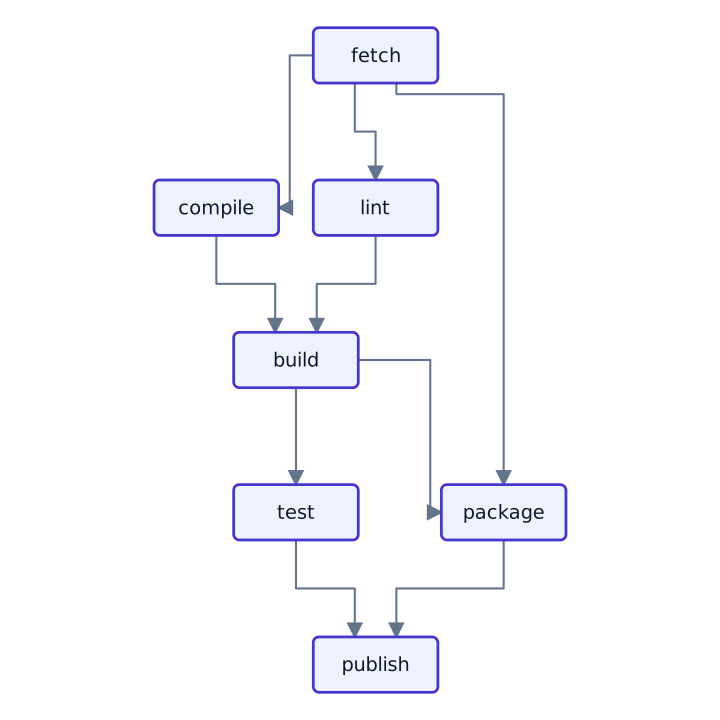
Read the API reference for every layout family, its settings, and the geometry it returns.
Start with the structure you know§
A directed pipeline or dependency graph: start with Layered.
An existing hierarchy: use Tree.
A general network: explore Graph layouts.
Domain-specific alignment and separation rules: use Constrained.
Nested groups: use Compound.
Read Choosing a layout for the differences, or browse the versioned API reference for complete inputs and settings.
Read the result§
Positions are node centers and follow the input node order. Edge routes follow the input edge order. A route can be a straight line, a polyline, or a chain of cubic curves. Use the returned bounds to frame the drawing rather than assuming all coordinates are positive.
For repeated solves of unchanged input and preparation settings, the prepared APIs let you retain reusable work. Prepare again when the graph changes.
Draw Mermaid text§
The separate Mermaid package reads text, measures labels in Inter, computes geometry and returns a picture or standalone SVG. The layout package remains usable on its own with caller-supplied node sizes.
| Declaration | Supported content |
|---|---|
flowchart or graph | Nodes, groups, labelled connections, cycles, directions and style classes. |
sequenceDiagram | Participants and actors, messages and replies, notes, activations and nested interaction blocks. |
erDiagram | Entities, attribute rows, keys and comments, identifying and non-identifying relationships, and cardinalities. |
classDiagram | Classes, attributes, methods, annotations, multiplicities and distinct relationship markers. |
stateDiagram or stateDiagram-v2 | States, initial/final markers, transitions, composite states, choice/fork/join markers and notes. |
Mermaid.svg(source) selects the diagram family from its declaration.
Mermaid.draw(source) returns the same drawing as paths and text for a custom
vector renderer. Each family also exposes parse for inspecting its
source-ordered model. Unknown or unsupported syntax returns problems rather
than a partially interpreted drawing. The family API documentation lists
its supported syntax and limitations; this is not full Mermaid compatibility.
Choose appearance without repeating defaults§
Import mermaid.Mermaid and mermaid.Theme, then supply only the properties
you want to change:
options = Mermaid.Options.{
    theme: Theme.Options.{ font_size: 16, max_label_width: 180 },
}
svg = Mermaid.svg_with(source, options)
The defaults follow pinned Mermaid 12.2.0: white flowchart/state nodes,
coloured actor/table palettes, dark outlines and subtle shadows. The shared
14px font base preserves family proportions, including 16px sequence messages.
Colours, outlines, padding, corner radius and shadows can be overridden.
wrapping: FamilyDefault follows the diagram role; Wrap uses
max_label_width, and NoWrap keeps explicit source line breaks only.
corners likewise selects family defaults, rounded or square nodes. An empty
node_palette uses the family palette; a one-entry list selects flat colours.
Sequence line/note/control colours use message_colors; transition and
relationship backings use transition_label_background. Flowchart label
backings use label_background and label_background_opacity.
Sizing happens before placement with the selected typography. Source styles are interpreted where supported; raw declarations remain in the parsed model, including reference renderer quirks documented by each family. Arbitrary CSS and alternate font families are not interpreted.
Invalid numeric theme properties are reported together. Display SVG with
Inter available so visible text matches the measured advances. The package
provides Mermaid.font_licence for distributions that include the font data.
Choosing a layout§
Choose by what the connections mean, not just by the shape you want to draw.
Directed flows: Layered§
Use Layered for pipelines, dependencies, and process diagrams. Direction, node gap, and layer gap control the reading direction and spacing. Cycles are supported. The exact crossing-reduction option has an effort limit and reports whether it proved optimality; "exact" does not mean unlimited search.
Hierarchies: Tree§
Use Tree when your input already describes a hierarchy. The level-by-level layout emphasizes depth; the radial layout places the root at the center. Do not turn an arbitrary network into a tree by silently dropping connections.
General networks: Graph§
Circular places nodes on a ring, seating neighbors together.
Force uses a seeded simulation to expose organic clusters.
Stress makes drawn distances track graph distances.
Radial emphasizes distance in hops from a selected root.
Keep seeds and settings fixed when comparing graph edits. Iteration limits bound simulation work; more iterations are not a substitute for choosing the right meaning for the input.
Domain rules and nested groups§
Constrained combines stress layout with axis separation, alignment, and containment bands. Compound arranges nested groups from their completed child boxes and routes connections across group boundaries.
Geometry after placement§
Pack, Overlap, and Route are placement-independent passes. Metrics lets you compare crossings, bends, stress, separation violations, and displacement. Consult the API reference for each pass’s contract before composing it with a layout.
Read the API reference or return to the introduction.