roc-blueprint gives everyone who works on a project, and its CI, the same
tools at the same versions. A project describes its tools, the commands that
use them, its builds and its workflows in one typed file, Blueprint.roc,
and commits a reviewed Blueprint.lock that pins exactly what was chosen.
The blueprint command carries both out on Linux and macOS, runs tasks on
Windows, and starts Nix only for what a project takes from Nix.
Download this manual as a PDF · Platform API reference · View roc-blueprint on GitHub.
1. What Blueprint is§

Everyone who works on a project needs the same tools at the same versions: each contributor on their own machine, and the CI service that tests every change. A release needs a build that someone else can repeat. A reviewer needs a record of what was used, written so that a person can read it.
Without that, each machine drifts. One laptop has a newer compiler than another, CI has a third, and a test passes on one and fails on the next. A tool changes version and nobody notices until something breaks. When a release goes wrong, nobody can say what it was built with.
Blueprint solves this with two files that a project commits, and one command,
blueprint, that carries them out.
1.1. What Blueprint gives you§
One typed file,
Blueprint.roc, that says where every tool comes from. A tool is downloaded from a URL, installed by a package provider, or expected to be on the machine already. Roc checks the file as you write it: a task that names an environment that does not exist is an error before anything runs.A reviewed
Blueprint.lockthat pins exactly what was chosen. It holds the fingerprint of every download and the exact revision of every package source. Onlyblueprint updatechanges it, and you review that change like any other.The same environment on a laptop and in CI. On Linux and macOS, a shell or a task gets the same pinned tools on every machine. On Windows, tasks run with the same downloaded programs.
Tasks and workflows that run your own scripts. Your scripts keep the work of compiling, testing and releasing. Blueprint runs them with the right tools, one at a time or as an ordered workflow.
Builds whose inputs are declared. A build lists the files and sources it reads, so
blueprint explain buildcan say what changed since its last successful build on that machine.blueprint build --rebuildbuilds it again and fails if the output differs.No dependence on one package ecosystem. Nix is the provider that ships, and
blueprintstarts it only for what a project takes from Nix. Downloads, Roc packages and the tools a machine is expected to have are handled by Blueprint itself, with no provider installed.
1.2. A small Blueprint.roc, line by line§
Blueprint.roc is a short program in the Roc language. You do not need to
know Roc to read or write one: it is a list of settings. This one gives a
project one environment with a Roc compiler and git, a shell, and one task:
app [config] { pf: platform "<the platform URL of a release>" }

import pf.Recipes

config = [
	Name("my-project"),
	Environment("dev", [
		Programs([Fetch("roc-stable", Recipes.roc_nightly("nightly-2026-10-28-bad769b"))]),
		Expect(["git"]),
	]),
	Shell("default", [Use("dev")]),
	Task("check", [Use("dev"), Run(["roc-stable", "scripts/check.roc"])]),
]
app [config] { pf: platform "..." }The file is a Roc program built on the roc-blueprint platform. The URL names a release of that platform. Get started has the current one.
import pf.RecipesRecipes say where a program is downloaded from on each system. The platform provides some, and you can write your own.
Name("my-project")The project’s name.
Environment("dev", [...])A named set of tools, here called
dev. Everything inside the brackets is whatdevhas.Programs([Fetch("roc-stable", ...)])Download the Roc compiler of this nightly release and call it
roc-stable.blueprint updaterecords a fingerprint of each download inBlueprint.lock, and every later use is checked against it.Expect(["git"])The machine must already have
git. Blueprint checks that it is there. It does not install it or pin its version.Shell("default", [Use("dev")])blueprint shellopens your own shell with the tools ofdevfirst onPATH.Task("check", [Use("dev"), Run([...])])blueprint run checkruns exactly this command indev: your scriptscripts/check.roc, with the downloaded compiler.
Nothing in this file needs Nix. Four commands put it to work:
blueprint check        # is Blueprint.roc valid?
blueprint update       # download, fingerprint and write Blueprint.lock
blueprint run check    # run the task in dev
blueprint shell        # open a shell in dev
1.3. How it works at a glance§
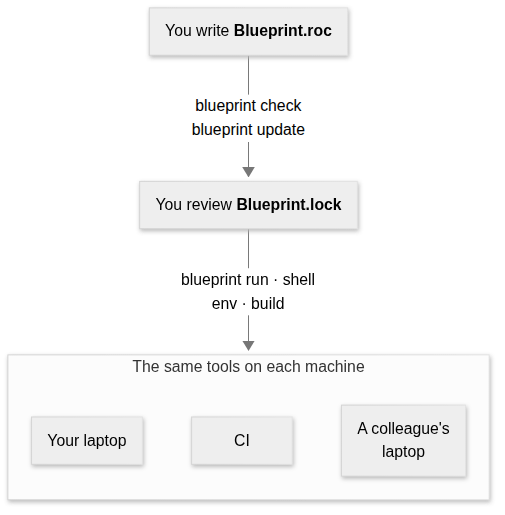
You write
Blueprint.roc. It says what each environment has and where each tool comes from.blueprint checkchecks the file and needs no lock.blueprint updateis the one command that decides anything: it records the fingerprint of every download for every system the project lists, pins each package source, and writes all of it toBlueprint.lock. You review that file and commit it.blueprint run,shell,envandbuildfollow the lock. They fetch what it names, check every download against it before use, and stop when the lock no longer matchesBlueprint.roc.
Because every machine reads the same two committed files, every machine gets the same pinned tools. Only the tools you expect of the machine can differ.
1.3.1. Who does what§
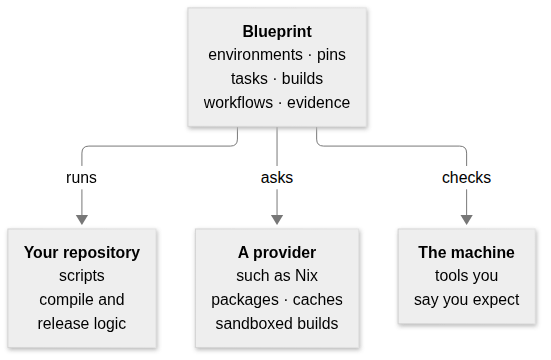
- Your repository
Keeps the work: the scripts that compile, test, package and release. Blueprint runs them and never replaces them. Adding a build runs the same script with declared inputs; it does not move its logic into Blueprint.
- Blueprint
Decides which tools each command runs with, pins them in the lock, runs tasks, builds and workflows, and records what a build used.
- A provider
Supplies packages, runs builds in a sandbox, and keeps its own cache. Nix is the provider that ships. Blueprint asks it only for what
Blueprint.roctakes from it.- The machine
Supplies the tools you say it already has. Blueprint checks that they are there before it runs anything.
1.3.2. What each person gets§
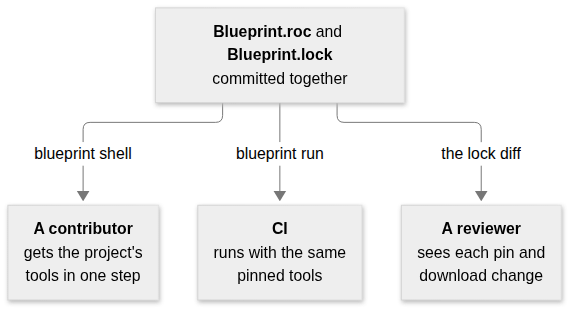
- A contributor
Installs
blueprint, runsblueprint shell, and has the project’s tools at the versions in the lock. If the machine lacks a tool the project expects, one message names it.- CI
Runs the same tasks with the same pins.
blueprint requirementssays whether a job needs Nix at all, so a job that does not can skip installing it.- A reviewer
Reads a change to
Blueprint.locklike any other diff: each new version, each download’s fingerprint and the hosts that served it.blueprint updatealso names any download host the lock did not name before.
1.4. The words this manual uses§
The rest of the manual uses a few words in an exact sense. Each row gives the
everyday meaning first, then the word, with the setting that writes it in
Blueprint.roc where there is one.
| What it means | The word |
|---|---|
A named set of tools that a command runs with, such as dev. | Environment (Environment) |
| A named collection of packages to install tools from, such as one revision of Nixpkgs. | Package source (Packages) |
A program installed from a package source, written with the source’s name, as "nix#zig" is zig from the source nix. | Tool (Tools) |
| One program downloaded from a URL and checked against a recorded fingerprint. | Fetched program (Fetch) |
| A program the machine must already have. Blueprint looks for it by name and installs nothing. | Expected tool (Expect) |
One exact command, run in an environment by blueprint run. | Task (Task) |
Your own interactive shell, with an environment’s tools first on PATH. | Shell (Shell) |
| A command that produces a file or directory from declared inputs, in a sandbox. | Build (Build) |
| A list of tasks and builds that run in order and stop at the first failure. | Workflow (Workflow) |
| A fingerprint of a file’s exact bytes, such as its SHA-256. Any change to the file changes it. | Digest |
| The exact version chosen for a download or a package source. | Pin |
The committed file Blueprint.lock, which records every pin and digest. Only blueprint update changes it. | Lock |
| A per-user folder that keeps downloads, checks them before every use, and can be deleted at any time. | Store |
| A package ecosystem that Blueprint asks for tools and builds. Nix is the one that ships. | Provider |
The part of a provider that chooses versions and records them in the lock, during blueprint update. | Resolver |
The part of a provider that runs a build and states what it guarantees, such as a sandbox with no network. A build chooses one with Execute. | Executor (Executor) |
The list of changes that entering an environment makes: the folders put first on PATH and the variables set. A shell, CI or an editor can apply it, and blueprint env prints it. | Activation |
The checked, complete description that Blueprint.roc produces, which is what blueprint reads. blueprint spec prints it. | Spec |
The architecture chapter defines these terms exactly, with the stages they pass through.
1.5. Where to go next§
- You want to try it
Get started installs
blueprintand runs a first project.- You are writing or changing a configuration
Write Blueprint.roc describes every setting.
- You want builds and ordered workflows
Build artifacts and run workflows covers sandboxed builds, their inputs and explanations.
- You need a command or an environment variable
Run blueprint lists every command.
- Your machine or CI has no Nix
Work without a provider says what a project can do with Blueprint alone.
- You learn best from a complete project
The examples are four projects to copy and run.
- You are writing a provider or judging a design change
Understand the architecture gives the model, the goals and the rules that keep Blueprint independent of any one ecosystem.
- You want to change roc-blueprint itself
Contribute explains the repository and its tests.
1.6. Where it runs§
| System | Tasks, shells, downloads and expected tools | Tools from Nix | Sandboxed builds |
|---|---|---|---|
| x86_64 Linux | Yes | Yes | Yes |
| arm64 Linux | Yes | Yes | No |
| Apple Silicon macOS | Yes | Yes | No |
| Intel macOS | Tasks only | No | No |
| x86_64 Windows | Tasks only | No | No |
Each release has a blueprint binary for each of these systems. It carries
the Roc compiler that reads Blueprint.roc, so you do not need Roc
installed. It needs Nix, with flakes enabled,
only for tools from Nix and for builds. On Linux and macOS it uses tar,
ln and chmod to unpack and link downloads. On any other system it stops
with a message naming the supported systems.
On Intel macOS, tasks use downloaded programs, expected tools and Roc packages, without Nix: current nixpkgs no longer builds for that system. See Intel macOS.
On Windows, tasks use downloaded programs and expected tools, without Nix. A
task names its script’s interpreter, because Windows does not use the #!
line at the top of a script. CI checks Windows Server; Windows 10 and 11 desktops have
not been checked. See Windows.
Systems in Blueprint.roc lists the systems a project is for, so that the
lock holds a digest for each. Listing a system does not make it supported.
1.7. What it does not do§
It does not compile, test or package your project. Your scripts do that, and Blueprint runs them.
It does not install, pin or ask the version of an expected tool. It looks for the name on
PATH.It does not sandbox tasks, or the Roc program that reads
Blueprint.roc. Only a build runs in a sandbox, through Nix on x86_64 Linux. A build’s sandbox has none of the machine’s tools.It does not find what a script reads by itself. A build declares its inputs.
It has no provider other than Nix, and does not choose one for you or translate package names between ecosystems. A Guix package source can be written, but
blueprintrefuses to resolve or use it.It keeps no cache of build results of its own. The provider does that.
A fetched program is one file, or one file inside an archive that is unpacked whole.
It runs workflow steps one at a time, in order.
2. Get started§
What Blueprint is showed what a
Blueprint.roc says. This chapter makes one work on your machine. It
installs blueprint, writes a first Blueprint.roc that needs nothing but
the binary, locks its download, runs a task in the environment it
describes, and then adds a tool from Nix.
2.1. Install blueprint§
Each release attaches a blueprint binary for x86_64 Linux,
arm64 Linux and Apple Silicon macOS, named blueprint-x86_64-linux,
blueprint-aarch64-linux and blueprint-aarch64-darwin, with their SHA-256
sums in blueprint.sha256. Download the one for your system from the
latest release, check it and put it on your PATH:
sha256sum --check --ignore-missing blueprint.sha256
install -m 755 blueprint-x86_64-linux ~/.local/bin/blueprint
That is all the first project below needs. Nix
with flakes enabled is needed for the tools a project takes from a Nix
package source and for its sandboxed builds, and for nothing else:
blueprint requirements says which of a project’s tasks need it. Where Nix
is installed, the same version also runs from the flake:
nix run github:lukewilliamboswell/roc-blueprint/<version> -- --help
nix profile install github:lukewilliamboswell/roc-blueprint/<version>
In GitHub Actions, the
setup-blueprint
action installs Nix and a release’s binary and checks its sum.
Loading a configuration runs one exact Roc nightly. The binary uses a roc on
PATH when it is that nightly, and otherwise downloads it from its release,
checks it against a digest the binary records, and keeps it in its store of
downloads. Set ROC to choose the executable yourself; it must be that same
nightly.
2.2. Write a first Blueprint.roc§
Put this in Blueprint.roc at the root of your repository. The platform URL
is the latest release’s:
app [config] { pf: platform "https://github.com/lukewilliamboswell/roc-blueprint/releases/download/0.11.0/EuSPs8vc71qJNFg29YzegvVRL1bR9pKqUYDHFiSCPTQ1.tar.zst" }

import pf.Recipes

config = [
	Name("my-project"),
	Environment("dev", [
		Programs([Fetch("roc-stable", Recipes.roc_nightly("nightly-2026-10-28-bad769b"))]),
		Expect(["git"]),
	]),
	Shell("default", [Use("dev")]),
	Task("version", [Use("dev"), Run(["roc-stable", "version"])]),
	Task("status", [Use("dev"), Run(["git", "status", "--short"])]),
]
Use each release’s blueprint binary with that release’s platform URL. The
two are built and tested together.
The file declares one environment, dev. It has two commands:
roc-stableis fetched:Recipes.roc_nightlysays where that Roc nightly is downloaded from on each system, andBlueprint.lockwill hold the digest of each download.gitis expected: the machine must already have it.blueprintchecks for it and installs nothing.
Each task names its environment and an exact argument list.
2.3. Lock the downloads and run something§
blueprint check          # validate Blueprint.roc; needs no lock
blueprint update         # record every download's digest in Blueprint.lock
blueprint run version    # run the task's command in dev
blueprint shell          # enter dev: your own shell, with roc-stable on PATH
blueprint requirements   # what each task needs of the machine
blueprint --help         # list this project's shells and tasks
blueprint update is the only command that decides anything: it downloads
the compiler for your system, hashes it, and writes the digest for every
system to Blueprint.lock. Every other command uses that file and fails if
it no longer matches Blueprint.roc. blueprint run then downloads nothing:
the compiler is kept in a per-user store and checked against the lock on
every use.
None of this starts Nix, and blueprint requirements says so:
system x86_64-linux
providers: none
task version [dev]: programs roc-stable; expects git
task status [dev]: programs roc-stable; expects git
2.4. Add a tool from Nix§
A tool that should be installed, rather than fetched as one program or
expected of the machine, comes from a Nix package source. Declare the source,
and write each tool with the source’s name. Inside config:
Packages("nix", From(NixPackages("github:NixOS/nixpkgs/nixos-unstable"))),
Environment("native", [Tools(["nix#zig", "nix#pkg-config"])]),
Task("zig-version", [Use("native"), Run(["zig", "version"])]),
To give native the fetched compiler and git as well, start its settings
with Extend("dev").
The project now declares something Nix resolves, so blueprint update needs
Nix: it pins the source’s revision in the same Blueprint.lock. After that,
only what uses the source starts Nix. blueprint run zig-version does;
blueprint run version still does not, on a machine with Nix or without.
blueprint update nix moves that one source and keeps every other pin and
digest.
2.5. Commit the lock, not the generated files§
Commit Blueprint.roc and Blueprint.lock. The lock is the authority: a
versioned S-expression listing each download with its digest and each pinned
source with its revision.
blueprint keeps what it generates under .blueprint/ and writes a
.gitignore there, so that directory never reaches a commit. If your
repository already tracks .blueprint/, untrack it once:
git rm -r --cached .blueprint
2.6. Where to go next§
Write Blueprint.roc describes every setting.
Work without a provider says where downloads are kept and what a project without Nix can do.
Build artifacts and run workflows covers sandboxed builds.
The examples are complete projects, attached to each release with that release’s platform URL.
3. Write Blueprint.roc§
Blueprint.roc is a Roc application on the roc-blueprint platform. It
provides config, a list of settings:
app [config] { pf: platform "<the platform URL of a release>" }

import pf.Recipes

config = [
	Name("my-project"),
	Environment("dev", [
		Programs([Fetch("roc-stable", Recipes.roc_nightly("nightly-2026-10-28-bad769b"))]),
		Expect(["git"]),
	]),
	Shell("default", [Use("dev")]),
	Task("check", [Use("dev"), Run(["roc-stable", "check", "main.roc"])]),
]
An environment gets what it has from three places, and each is written differently: a program that is downloaded (Fetch a program), a tool the machine already has (Expect a tool on the machine), and a tool a package source installs (Choose where tools come from).
Get started has a complete file with the current URL.
3.1. Top-level settings§
| Setting | Meaning |
|---|---|
Name(Str) | Project name. Required, once. |
Systems(List(System)) | The systems the project is for, each <arch>-<os> of a known architecture (x86_64, aarch64, riscv64, i686, armv7l, powerpc64le) and operating system (linux, darwin, windows, freebsd). Defaults to x86_64 and aarch64 on Linux and macOS; an empty list is invalid. Every fetched program is resolved for each of them. |
Packages(InputName, From(Provider)) | A package source and the set it is: NixPackages(FlakeRef) or GuixPackages(Str). Every source is declared; none is implied, and a project that takes no tool from a package source declares none. |
Input(InputName, FlakeRef) | A flake input the Nix resolver fetches: an overlay when an environment lists it in Overlays, otherwise a plain input for Raw data. It is not a tool source. |
Resolver(Str, List(InputName)) | Assigns sources, inputs and overlays that are not package sources to a provider. Input, Overlay and Source declarations, and the Roc bundle sources RocPackages adds (each named roc-<bundle file name without .tar.zst>, see Lock the Roc packages scripts use), belong to Nix without one; write Resolver only to assign one of them to another provider. Package sources already identify their provider; core SourceFile needs no resolver. |
Executor(InputName, ExecutorProvider) | Named build executor that builds select with Execute. Nix(source) builds with Nix, taking its bootstrap package set from the declared Packages source source. Adapter(provider, source) names another provider’s executor; source is its bootstrap package source, or "" when it needs none. blueprint check asks the provider to validate each executor and refuses a Nix executor with an empty bootstrap source. |
Environment(EnvName, List(EnvironmentSetting)) | Named tools and scoped overlays, optionally inherited. |
Shell(EnvName, List(ShellSetting)) | Named alias with exactly one Use(environment). blueprint shell selects alias "default". |
Task(TaskName, List(TaskSetting)) | Named argv command with exactly one Use(environment) and one Run(argv). No shell alias is required. |
Source(InputName, FlakeRef) | Locked non-flake input, e.g. Source("assets", "path:./assets"). |
SourceFile(InputName, Url, Str) | Original file pinned by its published SHA-256 (64 lowercase hexadecimal characters). Inputs exposes the unchanged file. See original file sources. |
Build(InputName, List(BuildSetting)) | Managed artifact with required Execute(executor), Use, exact argv Run and relative Output; optional Files, Inputs and Needs. |
Workflow(WorkflowName, List(WorkflowStep)) | Ordered RunTask(name, extra_argv), BuildArtifact(name) and RunWorkflow(name) steps. |
Raw(backend, target, Val) | Provider-specific data; see Pass data to the provider. |
Custom(kind, name, Val) | Extension data. The current CLI rejects unsupported extensions. |
3.2. Environment settings§
Inside an Environment, Tools and Overlays occur at most once, ToolsFor
occurs at most once per System, Command occurs at most once per command
name, ToolWith occurs at most once per tool, and RocPackages, Programs
and Expect occur at most once each:
| Setting | Meaning |
|---|---|
Tools(List(Tool)) | Tools a package source installs, each written "<source>#<name>": "nix#git" is git from the source declared as nix. A Nix name is an attribute path; quote a segment that contains dots, as in "nix#zigpkgs.\"0.16.0\"". |
ToolsFor(System, List(Tool)) | Add tools only for a declared target System. Each System occurs at most once per Environment. |
Command(Str, Tool) | Expose one tool’s main program under another command name, without adding the tool’s own executables. |
ToolWith(Tool, List((Str, Val))) | A tool built with options its package takes; see Configure a tool. |
RocPackages(List(Str)) | Released Roc bundle URLs to have in place before anything runs, so Roc programs in the environment resolve them without downloading; see Lock the Roc packages scripts use. |
Programs(List(Program)) | The programs the environment has on PATH that are downloaded, each a Fetch(ProgramName, recipe); see Fetch a program. |
Expect(List(ProgramName)) | Programs the machine must already have on PATH; see Expect a tool on the machine. |
Overlays(List(InputName)) | Ordered inputs applied to this environment’s package set as overlays. |
Extend(EnvName) | Inherit one environment’s tools, overlays, commands, configured tools, Roc packages, programs and expected tools before appending this environment’s selections. |
Inheritance deduplicates by first occurrence, parent first. Omitted or empty
Tools/ToolsFor/Overlays lists do not clear inherited values. A standalone environment
has no overlays unless selected. Run must contain a nonempty executable;
arguments remain separate strings, including extra CLI arguments after --.
There is no In setting or implicit task environment. One name is only one
of a program, an expected tool and a Command in an environment, including
what it inherits.
3.3. Fetch a program§
A program that is published as a file or an archive is fetched: downloaded
from a URL Blueprint.roc gives, checked against a digest in
Blueprint.lock, and put on the PATH of the environments that list it. No
package source is involved and Nix is not started.
Environment("dev", [
	Programs([
		Fetch("roc-stable", Recipes.roc_nightly("nightly-2026-10-28-bad769b")),
		Fetch("blueprint", Recipes.file("https://github.com/lukewilliamboswell/roc-blueprint/releases/download/0.5.0/blueprint-{system}")),
	]),
]),
Fetch(name, recipe) is a command name and a recipe: a function from a
system to where the program is downloaded from on that system. The
environment gains the command name. A recipe downloads nothing. It is
asked once for each of the project’s Systems while Blueprint.roc is
checked, and its answers are what blueprint works from. The Recipes
module is the platform’s; import it with import pf.Recipes.
3.3.1. What a recipe answers§
| Answer | Meaning |
|---|---|
File(url) | The program is that one file. It is made executable. |
Archive(url, format, member) | An archive in the format TarGz, TarXz or Zip, with the program at the path member inside it. The archive is unpacked whole, and the command is a link to the program where it lies, so it finds what the archive put beside it. |
Mirrored(download, urls) | A File or an Archive with alternate URLs for the same bytes, tried in order after its own. Blueprint.lock holds one digest for all of them, so an alternate need not be trusted. |
Unavailable | The program does not exist for that system. This is an error only where a task on that system needs it; a program unavailable on every declared system is refused when Blueprint.roc is checked. |
A recipe that cannot answer at all, for a version it does not know, stops
with crash and a message; the compiler reports it with the recipe’s file
and line.
3.3.2. The recipes the platform provides§
Recipes.file(template)A program that is one file at a URL which names the system.
{system}in the template stands for the system asked about, such asx86_64-linux, and{arch}and{os}for its two parts. No other placeholder is accepted, and none may stand in the host name. The program is taken to exist for every declared system: when its publisher has no file for one of them,blueprint updatefails on that file and says so. State it by listing the systems the project supports inSystems, or write a recipe that answersUnavailable.Recipes.roc_nightly(tag)The Roc compiler of one release of roc-lang/nightlies, by its tag,
nightly-YYYY-MM-DD-<commit>. It answers for x86_64 and arm64 Linux, Apple Silicon and Intel macOS and x86_64 Windows, andUnavailablefor any other system. Fetched asroc-stable, it is the compiler a script that starts#!/usr/bin/env roc-stableruns on.
3.3.3. Write a recipe§
A recipe is an ordinary function, so a project writes its own for a program whose downloads do not follow one pattern:
app [config] { pf: platform "<the platform URL of a release>" }

import pf.Config
import pf.Recipes
import pf.System

config = [
	Name("my-project"),
	Systems(["x86_64-linux", "aarch64-linux", "aarch64-darwin"]),
	Environment("dev", [
		Programs([
			Fetch("roc-stable", Recipes.roc_nightly("nightly-2026-10-28-bad769b")),
			Fetch("wasm-tools", wasm_tools),
		]),
	]),
	Task("validate", [Use("dev"), Run(["wasm-tools", "validate", "app.wasm"])]),
]

wasm_tools : System -> Config.Download
wasm_tools = |system| {
	base = "https://github.com/bytecodealliance/wasm-tools/releases/download/v1.240.0"
	match system {
		"x86_64-linux" => Archive("${base}/wasm-tools-1.240.0-x86_64-linux.tar.gz", TarGz, "wasm-tools-1.240.0-x86_64-linux/wasm-tools")
		"aarch64-linux" => Archive("${base}/wasm-tools-1.240.0-aarch64-linux.tar.gz", TarGz, "wasm-tools-1.240.0-aarch64-linux/wasm-tools")
		"aarch64-darwin" =>
			Mirrored(
				Archive("${base}/wasm-tools-1.240.0-aarch64-macos.tar.gz", TarGz, "wasm-tools-1.240.0-aarch64-macos/wasm-tools"),
				["https://mirror.example.net/wasm-tools-1.240.0-aarch64-macos.tar.gz"],
			)

		_ => Unavailable
	}
}
Give a recipe of more than a line its type, System -> Config.Download, as
here: a mistake in it is then reported on its own line. A recipe written
inline, as Fetch("tool", |system| ...), is checked just the same, and the
compiler may report a mistake in it against the platform’s file with the
line and column of the literal in words.
A System is not text. To write it into a URL, convert it:
Environment("dev", [
	Programs([Fetch("tool", |system| File("https://example.org/releases/1.0/tool-${system.to_str()}"))]),
]),
With ${system} alone the compiler reports a type mismatch of
from_interpolation on Url, at the first line of the file and not at the
recipe. Recipes.file avoids the interpolation altogether:
Environment("dev", [
	Programs([Fetch("tool", |system| File("https://example.org/releases/1.0/tool-${system}"))]),
]),
3.3.4. Share a program between environments§
Fetch is written inside Programs, so a program cannot be listed without
being declared. An environment that extends another inherits its programs.
Two environments that do not extend one another share a program through an
ordinary binding:
app [config] { pf: platform "<the platform URL of a release>" }

import pf.Recipes

roc_stable = Fetch("roc-stable", Recipes.roc_nightly("nightly-2026-10-28-bad769b"))

config = [
	Name("my-project"),
	Environment("scripts", [Programs([roc_stable]), Expect(["git"])]),
	Environment("release", [Programs([roc_stable]), Expect(["gh"])]),
	Environment("ci", [Extend("scripts")]),
]
One name always means the same downloads. Two Fetch values with one name
whose recipes answer differently for a declared system are refused as two different programs are named roc-stable.
3.3.5. What is checked, and when§
roc check, in an editor or on the command line: Each text, as what it is where it is written: a system is <arch>-<os> of a known architecture and operating system, in a match pattern and beside == too; a URL is https://<host>/<path> with no credentials, query or fragment; the path of a program in an archive is relative and not a URL, so the two cannot change places; a nightly tag has its form; a template has only its three placeholders. Then the whole configuration: a program name is a plain file name, one name is only one of a program, an expected tool and a Command in an environment, no URL is listed twice for one download, and every program exists for at least one declared system.
blueprint update: That every download exists, by downloading it or by taking the digest its release publishes; and, where both are to be had, that they agree. See What update needs and records.
blueprint run, shell and workflow: That Blueprint.lock holds the program for this system under the URLs Blueprint.roc now gives; that every expected tool is on PATH; then that the download has the recorded length and SHA-256, on every use; that an archive holds nothing that leaves the directory it is unpacked in; and that the program is in it.
A program whose URLs changed since the lock was written is stale by itself:
the message names it, and blueprint update <name> resolves it alone.
3.4. Expect a tool on the machine§
Some tools are better taken from the machine than installed: git, which
every developer and CI runner has, or gh, which must be the one that is
logged in. Expect declares them:
Environment("dev", [
	Expect(["git", "gh"]),
]),
Before a task or shell of that environment starts, and before anything is
downloaded for it, blueprint looks for each name on PATH. One message
names everything that is missing:
blueprint: this machine lacks what the task needs, and blueprint installs none of it:
  gh: environment dev expects it on PATH (Expect)
An expected tool is not installed, not put on PATH and not pinned, and no
version is asked of it: the environment runs with whichever one the machine
has. Where a version matters, fetch the program or take it from a package
source instead, or have a task check tool --version. blueprint requirements lists what a project’s tasks expect, so a CI job can install
it first.
A sandboxed build has nothing of the machine, so an environment a build uses
may not have Expect or Programs.
3.5. Choose where tools come from§
A tool that a package source installs is written "<source>#<name>", for a
source declared with Packages:
Packages("nix", From(NixPackages("github:NixOS/nixpkgs/nixos-unstable"))),
Packages("stable", From(NixPackages("github:NixOS/nixpkgs/nixos-24.05"))),
Environment("dev", [Tools(["nix#git", "stable#jq"])]),
The source’s name is the project’s choice; nix and stable mean nothing to
blueprint. The source is always written, in Tools, ToolsFor, Command
and ToolWith alike, and there is no default. "git" alone is refused
where it is written:
"git" names no package source. Write "<source>#git" for a declared source, as
in Packages("nix", From(NixPackages("github:NixOS/nixpkgs/nixos-unstable")))
and "nix#git"; or, if git is already on the machine, list it in Expect.
A tool that names a source the project does not declare is refused with the
sources it does declare, as unknown source: nix; Blueprint.roc declares stable. A project whose environments have no such tool declares no source,
and Nix is not started for it.
Nix is started only for an environment that has a tool from a Nix source.
An environment Nix must build although it has no tool of its own, such as
the sandbox of a build whose environment is empty, is built with the
bootstrap source of the Nix executor that the project’s builds select (the
first by name when they select several). When no build selects one, it is
built with the first Nix source declared, in the order of Blueprint.roc.
The bash that nix develop runs a shell or task with comes from the first
Nix source the generated flake declares.
The core does not autodetect a provider or translate package names. Guix
source intent and pure capability validation exist, but there is no Guix
renderer or executor.
An incompatible requested environment fails; it never retries another provider.
Missing native packages and unavailable target packages fail in Nix rather than
being silently filtered out. Nix tools applicable to unsupported targets fail
before file writes or provider execution. Systems remains authoritative for
fetched programs: a mixed project can include Windows alongside Unix when its
Windows environments need no Nix tools. Scope Unix tools with ToolsFor;
unscoped tools, commands and configured tools apply to every declared system.
Inherited system scopes are preserved. An unused Nix source does not require
Nix outputs for Windows.
Full rendering checks all used environments and their applicable systems.
Selected tasks and shells check the requested system and environment closure;
unrelated systems do not invalidate a supported Unix operation. Sandboxed
build outputs cover only x86_64-linux, the existing executor target. Explicit
build requests elsewhere fail before provisioning or execution.
Create and update locks requiring Nix resolution on a supported Unix host. Windows consumes that same committed lock for provider-free tasks without Nix; Windows updates requiring Nix remain unsupported.
3.6. Add tools for one system§
For a shell shared by Linux and macOS, put common tools in Tools and declare
platform libraries explicitly:
Environment("dev", [
	Tools(["nix#git", "nix#python3"]),
	ToolsFor("x86_64-linux", ["nix#wayland", "nix#alsa-lib"]),
]),
ToolsFor is provider-neutral Spec intent. It applies to inherited environments,
shells, tasks and builds on that System; undeclared systems and duplicate
declarations are rejected during evaluation.
3.7. Give a tool another command name§
Command exposes one tool of a package source under another command name,
without adding the tool’s own executables. It keeps a pinned tool beside
another of the same name: a second Python, say, for scripts that must not
follow the project’s own:
Packages("nix", From(NixPackages("github:NixOS/nixpkgs/nixos-unstable"))),
Packages("stable", From(NixPackages("github:NixOS/nixpkgs/nixos-24.05"))),
Environment("dev", [
	Tools(["nix#python3"]),
	Command("python-stable", "stable#python3"),
]),
The environment gains python-stable beside the python3 of nix. The
command runs the tool’s main program as its package declares it; a package
that declares none fails in Nix. Command names are plain file names. An
extending environment inherits commands and replaces one by declaring the
same name.
A Command is a tool of a package source, so its environment starts Nix. A
program that is published as a download needs neither: Fetch names its
command itself. A Roc compiler for scripts is written
Fetch("roc-stable", Recipes.roc_nightly(tag)), as in Fetch a program;
Command("roc-stable", "nix#rocpkgs.<tag>") with the roc-overlay selects
the same compiler through Nix, for an environment a sandboxed build uses.
3.8. Configure a tool§
Some packages are built to order. A Rust toolchain from rust-overlay comes
with the host’s standard library only; the targets it can compile for and
its extra components are options of the package. ToolWith names the tool
and those options:
Input("rust", "github:oxalica/rust-overlay"),
Input("zig", "github:mitchellh/zig-overlay"),
Environment("host", [
	Overlays(["rust", "zig"]),
	Tools(["nix#zigpkgs.\"0.16.0\""]),
	ToolWith("nix#rust-bin.stable.\"1.95.0\".default", [
		("targets", List([Str("x86_64-unknown-linux-musl"), Str("aarch64-unknown-linux-musl")])),
		("extensions", List([Str("rust-src")])),
	]),
]),
The environment gains cargo and rustc from Rust 1.95.0 with both musl
targets and the standard library’s source. Zig needs no options: zig-overlay
names each release as an attribute, which Tools selects.
The options are the names and values the package’s own override takes,
written as Val data: strings, integers, booleans, lists and attribute
sets. They are passed as data and are never an expression, so they select
among what the package offers and cannot say how to build it. A package
that takes no options, or not the ones named, fails in Nix.
A tool is either plain or configured in an environment, not both. An extending environment inherits configured tools; configuring an inherited tool replaces all of its options. Three things are not supported:
options on a
ToolsFororCommandtool;rust-overlay’s
fromRustupToolchainFile, which reads a file of the project: the generated flake does not see the project’s files;configured tools from a Guix source.
3.9. Pin an exact version of a tool§
A tool’s version is whatever its source holds at the pinned revision.
Blueprint.roc names the tool, not its version, so to hold one tool at an
exact version, give it a package source of its own, pinned to a nixpkgs
revision that ships that version. For CPython 3.14.3:
Packages("py", From(NixPackages("github:NixOS/nixpkgs/<revision>"))),
Environment("dev", [Tools(["nix#git", "py#python314"])]),
<revision> is a full nixpkgs commit whose python314 is 3.14.3. To find
one, look at the history of the package’s file in nixpkgs, or evaluate a
candidate:
nix eval --raw github:NixOS/nixpkgs/<revision>#python314.version
How the source is written decides whether the version can move:
A source that names a revision, as above, never moves.
blueprint updateresolves it to the same commit every time. Change the version by editing the revision.A source that names a branch, such as
github:NixOS/nixpkgs/nixos-25.05, is moved byblueprint updateand byblueprint update py, and takes whatever version the branch then has.blueprint update nixleaves it alone.
Nothing in Blueprint.roc states the version, so nothing fails if it changes.
If a version matters, assert it where the tool is used, for example by having
the project’s check task run python3.14 --version and compare.
An overlay that publishes each version under its own attribute needs no second source: select the attribute, quoting a segment that contains dots.
Input("zig", "github:mitchellh/zig-overlay"),
Environment("dev", [Overlays(["zig"]), Tools(["nix#zigpkgs.\"0.16.0\""])]),
3.10. Lock the Roc packages scripts use§
A Roc script names its platform and packages by release URL, and Roc downloads
them on first use. RocPackages names those bundles for an environment
instead, so Blueprint has them in place before its scripts start, and they
run at all in a sandboxed build, which has no network:
Environment("scripts", [
	Programs([Fetch("roc-stable", Recipes.roc_nightly("nightly-2026-10-28-bad769b"))]),
	RocPackages([
		"https://github.com/roc-lang/basic-cli/releases/download/0.26.0-rc2/Gj3zVDr3qrQa6aTh7Z1zgUfe9NeBE6R76T5ho3xrc8af.tar.zst",
		"https://github.com/roc-lang/http/releases/download/1.0.0/6ZUwqYhCS8PU9Mo6MF7oV82ET2o7KYb57CLKDq4cq4sS.tar.zst",
	]),
]),
Task("release", [Use("scripts"), Run(["scripts/release.roc"])]),
Each URL must be https:// and end in <hash>.tar.zst. The hash is that of
the bundle’s bytes, so the URL itself says what the download must be.
List every bundle, including dependencies of dependencies. basic-cli above
depends on http, so both are listed. roc deps <file> prints the URLs a
program depends on. Blueprint does not read package headers, so it cannot add a
missing one for you. A bundle that is not listed is downloaded by Roc as usual
in a shell or task, and fails to resolve in a sandboxed build.
3.10.1. What the lock pins§
For a shell or a task, nothing: blueprint downloads a missing bundle itself
and has the compiler unpack it with roc unbundle, which fails unless the
bytes are those the name is the hash of. That check is the pin, and it needs
no Nix and no entry in Blueprint.lock. A project whose Roc packages are
used by tasks and shells alone has none of them in its lock.
A sandboxed build cannot download. The bundles of an environment that a build
runs in, or that it extends, are therefore fetched by Nix as well:
blueprint update records those in Blueprint.lock like any other source,
each named roc-<hash> and owned by Nix without a Resolver, and Nix checks
the bytes against that pin. An environment a build uses takes
its compiler from a Nix source, since the Nix executor does not support downloaded programs in managed builds:
Packages("nix", From(NixPackages("github:NixOS/nixpkgs/nixos-unstable"))),
Executor("native", Nix("nix")),
Input("roc", "github:roc-lang/roc-overlay/a9b461cd4df73ccb69a79a2bc7f58ab60e715619"),
Environment("build-scripts", [
	Overlays(["roc"]),
	Command("roc-stable", "nix#rocpkgs.nightly-2026-10-27-de79a0f"),
	RocPackages([
		"https://github.com/roc-lang/basic-cli/releases/download/0.26.0-rc2/Gj3zVDr3qrQa6aTh7Z1zgUfe9NeBE6R76T5ho3xrc8af.tar.zst",
		"https://github.com/roc-lang/http/releases/download/1.0.0/6ZUwqYhCS8PU9Mo6MF7oV82ET2o7KYb57CLKDq4cq4sS.tar.zst",
	]),
]),
Build("notes", [Execute("native"), Use("build-scripts"), Run(["roc-stable", "scripts/notes.roc"]), Output("notes.txt")]),
The overlay is pinned to a revision that records this nightly. Keep the overlay revision and compiler version in step when changing the compiler.
An extending environment inherits its parent’s bundles.
3.10.2. What is written, and where§
blueprint shellandblueprint runpublish the environment’s bundles into Roc’s own package cache before entering it: the directoryroc/packagesunder$XDG_CACHE_HOME, or under~/.cachewhen that is unset. Each bundle becomes the directory<hash>there, the files the compiler unpacked from the download, which is where Roc looks before downloading. A<hash>directory that already has amain.rocis never touched, whether Roc downloaded it or an earlier run published it; one without amain.rocis incomplete and is replaced, as Roc itself would. The copy is made in a temporary directory beside it, namedblueprint-<hash>.<random>.tmp, and renamed into place, so another Roc process never sees half a package. Nothing else is written, and nothing is downloaded or written when every bundle is already there or the environment has no Roc packages. If the cache is deleted, the next run downloads and publishes again.blueprint builddoes not use that cache. The build gets a package cache of its own inside its build directory, holding only its environment’s bundles, andXDG_CACHE_HOMEpoints the build’s command at it.
A build sees only the tools its environment declares, so a build that runs Roc
needs a Roc tool, such as the roc-stable command above.
3.11. Compose settings from modules§
Use ordinary Roc lists and functions for composition, not a plugin registry.
ProjectTasks.roc returns
List(Config.Setting); its app
concatenates those settings into config. Imports do not install tools or add
runtime operations to the CLI.
3.12. Pass data to the provider§
The Nix provider accepts attribute data at two targets:
Raw("nix", "shell:default", Attrs([
	("shellHook", Str("echo ready")),
	("RUST_LOG", Str("debug")),
])),
Raw("nix", "flake", Attrs([("formatter", Str("nixpkgs-fmt"))])),
shell:<alias>adds attributes to that alias’smkShellcall, not other aliases or tasks using the same environment.flakeadds attributes to flake outputs.
Values are Str, Int, Bool, List([...]) and Attrs([(name, value), ...]).
They are data, not Nix expressions. Duplicate attributes and overrides of
managed packages/devShells are rejected. Raw for other providers is ignored.
4. Build artifacts and run workflows§
A Task runs a repository-owned command in its environment. Use a Build
when the command produces an artifact whose inputs, dependencies, execution
capabilities and output should be managed explicitly. Keep compilation and
packaging logic in the script; Blueprint supplies the declared inputs and asks
the executor to obtain the result. A Workflow orders tasks and builds.
The shipped sandboxed executor uses Nix on x86_64 Linux.
4.1. Declare a build§
Inside config, with a Nix package source named nix,
scripts/build.roc in the project and the build-scripts environment of
Lock the Roc packages scripts use:
Source("assets", "path:./assets"),
Executor("native", Nix("nix")),
Build("app", [
	Execute("native"),
	Use("build-scripts"),
	Inputs(["assets"]),
	Run(["roc-stable", "scripts/build.roc"]),
	Output("dist/app"),
]),
Executor("native", Nix("nix")) declares an executor named native that
builds with Nix and takes its bootstrap package set from the source nix;
Execute("native") selects it. A Source belongs to Nix without a
Resolver.
Run is any argv; nothing about a build requires Roc. Roc takes the first
-- of its arguments for itself, so pass a script its own arguments after
one: Run(["roc-stable", "scripts/build.roc", "--", "--release"]).
4.2. What a build sees and produces§
Run blueprint update, then blueprint build app. The printed store path is
resolved by Nix and contains exactly the declared file or directory. Missing
outputs fail. Needs(["library"]) adds build dependencies; cycles fail during
configuration validation. Sources live under $BLUEPRINT_INPUTS/<name> and
needed artifacts under $BLUEPRINT_ARTIFACTS/<name>, both read-only and separate
from the writable project copy.
Each build snapshots current project files, including untracked/task-generated
files, excluding VCS metadata, caller-generated roots, authority and all local
input trees. Blueprint makes that copy itself, as
Select a build’s project files
describes, and a file is executable in a build only when its owner may execute
it. Changing a locked local source requires explicit update. Initial
source/output policy rejects symlinks and special files. Only local x86_64 Linux
sandboxed execution is verified; tasks/config compilation are not sandboxed.
A build’s PATH holds exactly the tools its environment takes from its
package sources, and nothing of the machine: no sh, cp, mkdir or
python3 unless the environment’s Tools name bash, coreutils or
python3. A command that is not there fails with build command not found,
or inside the build’s own script when that script calls one. A build does not
see the variables Nix’s stdenv exports either. A tool may give what it runs
more than the build was given: the Roc compiler’s package puts coreutils and
a C compiler on the PATH of a script it runs. Expected host tools cannot be supplied inside this sandbox. Tool origins are
checked against the selected executor’s capabilities before effects; support
for a fetched program must be established by that executor rather than inferred
from a task’s ability to run it.
A versioned standalone runner executes builds using only the locked package
set. Its bytes are independent of the Blueprint CLI executable. Caller namespace
identities are mounted as an authorization witness at execution time, outside
the derivation; they do not change the derivation identity. Both mount and
network namespaces must differ from the caller before the runner creates a
workspace or starts the command. A missing mount, disabled sandbox, invalid
witness or shared namespace fails closed. Builds run locally on x86_64 Linux;
remote Nix builders are disabled for this isolation contract.
See the complete runnable example,
real build fixture.
4.3. Original files with published hashes§
SourceFile(name, url, sha256) declares an original upstream file, such as a
release archive whose publisher supplies a flat SHA-256. The hash is exactly
64 lowercase hexadecimal characters. The URL follows the same public HTTPS
rules as fetched programs. Use Inputs([name]) on a build: the unchanged file
is available at $BLUEPRINT_INPUTS/<name>. An archive is never unpacked
implicitly; name the unpacker in the environment’s Tools and run it in the
producer script when needed. Source(name, ref) continues to supply a locked source
tree, including archives that Nix unpacks and pins by their NAR hash.
blueprint update fetches and verifies the original bytes against the declared
published hash before committing a pin. blueprint update NAME can select the
file alone. The authority is a sources entry in Blueprint.lock with
provider = "file", the original URL in ref, and its flat
sha256:<hex> in digest. There is no additional source lock. URL, name,
hash, addition or removal changes require explicit update.
Ordinary builds and generation use the committed digest. They hash cached
bytes on every use, fetch a missing file from its locked URL, and repair a
corrupt cache by fetching and verifying it again. Wrong upstream bytes fail;
ordinary fetches never change the lock. A verified cached file works offline.
The source enters Nix as a locked path: Blueprint measures the verified
cached file with nix hash path, and the flake reads it with
builtins.fetchTree, which checks that NAR hash, then checks the flat
SHA-256 again. Its store identity is independent of the caller’s cache
location, and the recipe sees the original archive bytes. Unrelated files
that no selected build uses are not fetched.
blueprint lock show --json NAME reports digestKind: "file" and the original
flatSha256 separately from tree identities, with empty metadata: {}. A NAR
hash is not a publisher’s hash of an archive; do not compare them as if they
were the same digest. Build provenance includes the selected file source’s
name, original URL and flat digest alongside the other locked sources used.
4.4. Order tasks and builds in a workflow§
Inside config, referring to existing tasks and builds:
Workflow("ci", [RunTask("check", ["--verbose"]), BuildArtifact("app"), RunWorkflow("verify")]),
Workflow("verify", [RunTask("version", [])]),
blueprint workflow ci plans the complete dependency/capability/layout/lock
closure before executing any task. Steps run in order and stop on the first
failure. Repeated explicit tasks and builds repeat; every build snapshots current
project files and rebuilds its dependency graph from that snapshot. Nix may reuse
unchanged inputs, but Blueprint never caches artifact results across tasks.
Locked sources are verified again; task edits to them require explicit update.
Cycles and excessive depth/expansion fail during configuration validation.
See the real workflow fixture.
4.5. Select a build’s project files§
Files(["scripts/producer.sh", "dependencies/shared"]) on a Build selects
only those project files and directory trees for that build. Paths are relative
to the project root; absolute paths, . and .. components are refused.
A selected path must exist. The usual generated-root, authority, VCS and locked
local-source exclusions still apply. Omit Files to retain the whole-project
snapshot; Files([]) gives the command an empty writable workspace.
Blueprint applies the selection itself, once for each build it prepares. It
copies the selected files into snapshots/<build> in the workspace, emptied
first, keeping each name’s bytes and whether the owner may execute each file,
and refuses a symlink or special file among them; excluded entries are never
inspected. The Nix executor measures that copy with nix hash path and
records where it is and its NAR hash in project-<build>.json beside the
flake. The flake reads the copy with builtins.fetchTree, locked to that
hash, so evaluation is pure and the flake never reads the project itself.
Nix has the copy in its store once the build is prepared, so Blueprint
removes it when the build ends, however it ends, and removes any copy an
interrupted run left before it stages anything.
Give each component its own single-output build with its own Files list.
The builds share their locked package sets and any identical selected trees in
the Nix store; an unrelated application edit does not change their snapshots.
4.6. Reach a tool’s libraries§
BLUEPRINT_TOOLS is a read-only directory of complete package roots. A plain
or configured tool nix#glibc is at $BLUEPRINT_TOOLS/nix#glibc, so a producer
can use $BLUEPRINT_TOOLS/nix#glibc/lib/ld-linux-x86-64.so.2 without guessing a
store path. A Command("cc", "nix#clang") exposes its underlying package root
at $BLUEPRINT_TOOLS/cc. These paths do not add tools to PATH, enable
network access or opt into stdenv setup. Quote paths as usual in a shell.
4.7. Check reproducibility and record provenance§
blueprint build NAME --rebuild asks Nix to rebuild the existing derivation
and compare its output. Nix fails when the output differs. Build it once
before asking for this check; a missing prior output is not a reproducibility
comparison. Run this for each component in CI.
blueprint build NAME --json prints one typed result as JSON and keeps progress
on stderr. Both flags may be combined. Build result schema version 2 contains:
schema_version:2.nameandsystem: requested build and execution system.provider: selected executor provider, currently"nix".build_identity: opaque identity of the fully prepared build; compare it together withprovider.metadata: typed provider-namespaced details. Nix exposes its exact derivation undermetadata.nix.derivation.outputs: returned output names and locations.sources: selected authoritative source entries for the build closure.snapshot_digest: the digest of the captured input snapshot the build used, the same valueplanandexplainreport. The result does not contain the snapshot itself;planandexplainprint it with--json, and the local build record keeps it.
Reject unsupported schema versions and tolerate additive fields. Output locations are not general content checksums. The provider owns cache reuse; a successful build alone does not prove it was a cache hit.
4.8. Plan a build and explain changes§
blueprint plan build NAME shows the selected files, dependencies, executor and
capabilities without preparing the provider recipe. Add --prepare to capture
selected inputs and obtain the exact build_identity. Preparation may fetch
pinned inputs and write caches, but does not change pins or execute the requested
build or dependency builds. Nix preparation disables import-from-derivation.
blueprint explain build NAME compares the declared/captured input evidence
with the last successful local build. Add --prepare to compare the exact
current and previous build identities as well. Missing or incompatible baseline
evidence is reported as unavailable, not unchanged. Relevant direct and
transitive changes are named. A changed build identity means the request
changed; it does not mean the output bytes differ.
Both commands first ask the executor’s provider to validate the executor
declaration, as blueprint check does.
An unprepared plan has prepared: false and no exact build identity. It cannot
establish that a cached artifact corresponds to the current request.
Use narrow Files selections to avoid unrelated project changes affecting a
build. The default whole-project snapshot intentionally includes every eligible
project file. Pinned dependencies, tools, options, commands and declared build
dependencies also participate in preparation. Scripts must declare what they
need: Blueprint cannot infer dependencies hidden in arbitrary commands.
4.8.1. The plan and explain JSON§
Both commands accept --json and print one JSON object, the same typed value
their human output renders. plan and explain compute the same object;
explain differs only in its human output, which lists the changes. The
object’s schema_version is 1, independent of build result schema version 2.
Reject unsupported schema versions and tolerate additive fields.
| Field | Meaning |
|---|---|
schema_version | 1. |
name | The requested build. |
system | The execution system. |
provider | The selected executor’s provider, currently "nix". |
prepared | true with --prepare, otherwise false. |
build_identity | The exact prepared build identity, compared together with provider. Empty when prepared is false. |
outputs | The prepared outputs, each { name, path }. Empty when prepared is false. |
required_capabilities | What this request needs: builds; build-files when a build in the closure selects Files; dependency-builds when one has Needs; prepare when prepared. |
provider_capabilities | The capabilities the executor’s provider advertises; see Capabilities and guarantees. |
supported_guarantees | The guarantees a successful build by that provider gives. |
snapshot_digest | sha256:<hex> of the snapshot’s S-expression encoding. A build result reports the same value. |
snapshot | The captured inputs: name, system, provider and nodes, one node per build in the closure. |
baseline | "available" when the last successful local build record was read and compared, otherwise "unavailable". |
baseline_reason | Why the baseline is unavailable, such as no successful local build record. Empty when it is available. |
build_identity_status | "unchanged" or "changed" against the recorded build identity. "unavailable" when not prepared or when the baseline is unavailable. |
changes | What differs from the baseline, each { build, dependency_path, kind, name }. Empty when the baseline is unavailable. |
Each snapshot.nodes entry describes one build:
| Field | Meaning |
|---|---|
name | The build. |
selected_files | true when the build selects its project files with Files, false for the whole-project snapshot. |
command | Its exact argv. |
environment | Its environment. |
executor | The name of its executor. |
output | Its declared output path. |
dependencies | The builds it Needs. |
declarations | An S-expression of the declarations that shape it: the build; its environment with that environment’s tools, commands, configured tools, programs, expected tools and Roc packages; the package sources it uses; Raw data for its executor’s provider; its executor; and its Files selection. |
files | Each captured project file and directory, { path, digest }, sorted by path. The digest is Blueprint’s tree digest of that one entry: its kind, path, executable bit and, for a file, its contents. |
inputs | Each locked input the build uses, { name, provider, content_identity }, sorted by name. A fetched program has provider "blueprint" and its sha256:<hex>. |
Each change names the build it concerns, the dependency_path from the
requested build to that build (such as ["app", "library"]), its kind and
the name of what changed:
kind | Meaning; name is |
|---|---|
dependency-added | A build joined the closure; the build. |
dependency-removed | A build left the closure; the build. Its path is the one it had in the baseline. |
dependencies-changed | The build’s Needs changed; the build. |
declaration-changed | Its command, environment, executor, output, file-selection mode or declarations changed; the build. |
file-changed | A captured file or directory is new or its digest changed; its path. |
file-removed | A captured file or directory is no longer captured; its path. |
input-changed | A locked input is new, or its provider or content identity changed; the input. |
input-removed | A locked input is no longer used; the input. |
4.8.2. Capabilities and guarantees§
A capability is an operation an executor supports. blueprint build requires
builds and prepare, and checked-rebuild with --rebuild; an executor
without one is refused before any effect.
| Capability | Meaning |
|---|---|
builds | Run managed builds. |
build-files | Capture only the project files a build selects with Files. |
dependency-builds | Build what a build Needs and supply those artifacts to it. |
prepare | Obtain the exact build identity without executing the build. |
checked-rebuild | Rebuild an existing output and compare the result, for --rebuild. |
A guarantee is what a successful build by that executor establishes. Listing one in a plan does not mean that planning ran or checked a sandbox.
| Guarantee | Meaning |
|---|---|
captured-declared-inputs | The command sees the captured project files and declared locked inputs, not the live working tree. |
sandboxed-filesystem | The command runs in a mount namespace separate from the caller’s, with its inputs read-only. |
sandboxed-network | The command runs in a network namespace separate from the caller’s. |
checked-rebuild-comparison | A checked rebuild fails when the rebuilt output differs from the existing one. |
The Nix executor advertises all five capabilities and all four guarantees.
4.8.3. The local baseline§
A successful, validated build atomically advances its versioned local baseline
at .blueprint/build-records/<system>/<name>.scm. Failed execution, planning and
explanation preserve that baseline. Saving the record is best-effort: when it
cannot be written, for example because it would exceed the 8 MiB bound, the
build still succeeds, a warning goes to stderr and the baseline does not
advance to that build. With no earlier record, explain reports the baseline
as unavailable.
These S-expression records are operational evidence, not executable plans or dependency authority; do not commit them. Deleting them removes the comparison baseline, not the provider’s cached artifacts. Arbitrary historical-record comparison is not part of this interface.
4.9. Capture selected reproduction evidence§
The Nix executor supplies a read-only JSON file at
$BLUEPRINT_INPUTS/blueprint-input-evidence. Its native format 1 records selected
package revisions and NAR hashes, original-file SHA-256 pins, other source
tree paths, dependency artifact paths, Roc package paths, the store path of
the build’s locked copy of its selected project files and tool roots. This is
provider-native reproduction material, not another provider-neutral report API
or a complete lock export.
A prepared plan, explain or build measures each build’s selected files in
that same copy, after Blueprint hashed it for Nix, rather than in the project
again, so the evidence is exactly what Nix received even if the project
changes meanwhile. An unprepared plan makes no copy and measures the project.
A producer can ship selected files and its producer module alongside this material. A dedicated configuration using the recorded package revision/NAR hash can prepare the same build request without depending on unrelated project pins. Mutable references, the whole Lock and the final build identity do not participate in this evidence input. Final identity and artifact SHA-256 belong in external result or release evidence, avoiding a build identity that depends on itself.
4.10. Override packages in a producer§
Input("producer-overrides", "path:./producer-overrides") may name a local
flake with an overlays.default output. Select it with
Overlays(["producer-overrides"]) in the producer’s environment. For example,
that flake can define:
{
  outputs = { self }: {
    overlays.default = final: prev: {
      meson = prev.meson.overrideAttrs (old: {
        version = "1.12.0";
        src = prev.fetchurl {
          url = "https://github.com/mesonbuild/meson/releases/download/1.12.0/meson-1.12.0.tar.gz";
          # Replace with the checksum published for this exact upstream archive.
          hash = "sha256-<published-base64-sha256>";
        };
        # Apply a specific patch here when the upstream test change needs one.
      });
    };
  };
}
The checksum is an intentional placeholder; fill it before building. Blueprint
locks the local flake’s tree and refuses edits until blueprint update.
The override applies to builds whose environment selects that overlay. The
artifact example
declares two single-output builds selecting their producer directory and sharing
the same pinned package environment.
5. Run blueprint§
Run project commands in the directory containing Blueprint.roc, or set
BLUEPRINT_ROOT. compiler-version and store verify work in any directory.
lock show needs only a committed lock, and works even when Blueprint.roc is
absent or invalid.
| Command | Meaning |
|---|---|
blueprint / blueprint gen | Generate the Nix files under .blueprint/ from the lock. A project with no Nix package source has none, and nothing is generated |
blueprint shell [NAME] | Enter the environment of the shell alias NAME (default default): through nix develop when it has a tool from a Nix source, and otherwise in the caller’s own shell |
blueprint run TASK [-- ARGS...] | Run the task’s argv in its environment, with the extra arguments appended |
blueprint env NAME, with --json, --github-path or --github-env | Print what entering the shell NAME exports, as shell lines to eval, a JSON report, or the lines a GitHub Actions step appends; nothing is entered |
blueprint build NAME | Prepare and obtain an artifact plus declared dependencies through its selected executor; print its output path |
blueprint plan build NAME [--prepare] [--json] | Inspect the build request; optionally prepare its exact provider build identity without executing builds |
blueprint explain build NAME [--prepare] [--json] | Explain changes against the last successful local build; optionally compare exact prepared build identities |
blueprint workflow NAME | Execute an ordered task/build workflow, stopping on failure |
blueprint tasks | List tasks and their environments |
blueprint update | Write Blueprint.lock: the digest of every fetched program on every declared system, and the pins of package sources, inputs and build sources. See What update needs and records |
blueprint update NAME... | Update only the named package sources, inputs, build sources and fetched programs, keeping everything else of a lock that is current for Blueprint.roc. Local path: inputs are read again either way. A named program is resolved again whether or not its URLs changed |
blueprint requirements [--json] [TASK...] | Say what the named tasks need, or every task: a provider, fetched programs, tools of the machine. See What tasks need |
blueprint lock show [--json] [NAME...] | Read committed pins and per-entry content identities without evaluating the project. See Inspect committed pins |
blueprint store verify [--repair] [--json] | Unpack every archive in the store of downloads again and compare each tree and its record with it, without a project or a download; exit 1 when anything differs. --repair makes what differs again. See Verify the store |
blueprint check | Run the compiler check and validate all shell/task/build environments and executor declarations without requiring a lock |
blueprint spec / blueprint flake | Print the Spec or the generated flake |
blueprint compiler-version | Print the exact Roc release tag bundled with this Blueprint binary, for automation |
blueprint --help | Project help; subcommand help lists tasks, aliases and builds |
5.1. Align an automation compiler§
blueprint compiler-version prints one release tag and a newline, with no
labels or colour. It reports this binary’s pinned compiler even when ROC
or PATH selects another executable. It works offline without a project,
configuration evaluation, compiler installation or cache writes. Native smoke
tests run the actual bundled roc version and require it to match this tag
on every released system.
A CI check or commit hook can compare an installed automation compiler:
test "$(roc-stable version)" = \
  "Roc compiler version $(blueprint compiler-version)"
A project can also compare its committed compiler pin with the reported tag before installing tools. Keep upgrades explicit: align that pin when the project’s automation is ready for the new compiler.
When a project fetches the same nightly with Recipes.roc_nightly, it can
reuse the compiler archive Blueprint installed in its store. Matching tags
does not make an independently installed roc-stable, such as a Nix package,
reuse Blueprint’s cached executable.
5.2. Use an environment from another program§
blueprint env NAME describes the shell NAME as data instead of entering
it: the directory of fetched programs the core puts first on PATH, and what
the provider’s shell would export, obtained by asking the provider for its
shell as data (Nix answers with nix print-dev-env). Nothing runs in the
environment. The directory of programs is kept at
.blueprint/env/NAME/bin, rebuilt on every call, so what was printed stays
valid until the next blueprint update.
eval "$(blueprint env dev)"              # this shell
blueprint env dev --github-path >> "$GITHUB_PATH"
blueprint env dev --github-env >> "$GITHUB_ENV"
blueprint env dev --json                 # for an editor or agent
The shell rendering single-quotes every value and prepends to the caller’s
own PATH. The JSON report has format 1, path entries { directory, origin } first on the search path first, and variables { name, value, origin }; origin names what supplies each, such as blueprint for fetched
programs or nix. A provider’s shell variables that describe its own process,
such as HOME and PWD, are not exported.
5.3. What a run does, in order§
blueprint run, shell, workflow and build share the following
validation and execution boundary:
Read
Blueprint.rocwith the Roc compiler, and refuse what the configuration alone rules out, such as a task that does not exist or a program its recipe says is unavailable on this system.Read
Blueprint.lockand require that it matchesBlueprint.roc.Plan every step of the request. All problems are reported together: a program the lock does not hold, one whose URLs changed, a build this machine cannot run.
Look on
PATHfor every program the steps need of the machine: the tools their environmentsExpect, andnixwhen a step has a tool from a Nix source or is a build. Everything missing is named in one message.Make every fetched program ready in the store, downloading what is not there and checking each against the lock.
Run the steps. Each gets its Roc packages published and its fetched programs first on
PATH.
Nothing is downloaded, generated or run for a request that fails an earlier
check. Work without a provider
describes the store and the PATH of a step.
5.4. What each command validates§
Provider capability checks follow the requested environment closure; unrelated
valid provider declarations do not block selected operations. Whole-project
structural validation and required-feature checks still apply. Full rendering
(gen, update, check, flake) checks every shell, task and build
environment that Nix builds; one with no tool from a Nix source is entered
without Nix and is left out of the flake.
5.5. The lock and generated files§
Commit
Blueprint.rocand the authority (defaultBlueprint.lock, a versioned S-expression listing each fetched program with its digest and each pinned source with its revision and digest); generated state (default.blueprint/) is not committed:blueprintwrites a.gitignorethere that ignores everything in it.Normal
gen,shell,run,buildandworkflowrequire a lock that matchesBlueprint.rocand never rewrite it. A lock that does not match says what changed, and one in a format thisblueprintdoes not read is refused; both nameblueprint update.A fetched program is stale by itself. When its URLs in
Blueprint.rocare not those in the lock, only requests that use it fail, andblueprint update <name>resolves it alone.nix developtakes the bash it runs a shell or task with from a flake input namednixpkgs, so the generated flake gives that name to the first Nix package source declared and that bash is pinned byBlueprint.locklike every tool, unless the project declares an input namednixpkgsitself.
5.6. What tasks need§
blueprint requirements reads Blueprint.roc and nothing else: not PATH,
not the store and not Blueprint.lock. It answers before anything is
installed or resolved, and gives the same answer on every machine. The system
is BLUEPRINT_TARGET, or the one it runs on.
$ blueprint requirements
system x86_64-linux
providers: nix
task check [dev]: programs roc-stable; expects gh, git; roc packages 2
task host [zig]: provider nix (nix#zigpkgs."0.16.0"); programs roc-stable; expects gh, git; roc packages 2
With --json the report is one JSON object for a program to read:
{"format":1,"system":"x86_64-linux","providers":["nix"],"expects":["gh","git"],"tasks":[
 {"name":"check","environment":"dev","providers":[],"tools":[],"programs":["roc-stable"],"unavailable":[],"expects":["gh","git"],"roc_packages":2},
 {"name":"host","environment":"zig","providers":["nix"],"tools":["nix#zigpkgs.\"0.16.0\""],"programs":["roc-stable"],"unavailable":[],"expects":["gh","git"],"roc_packages":2}]}
| Field | Meaning |
|---|---|
format | The number of this shape, 1. Every field below is always present. A change a reader of format 1 could misread gets another number. |
system | The system the report is for. |
providers | The providers that must be on the machine to run the reported tasks on that system, each once. "nix" is there exactly when one of those tasks has, in its environment on that system, a tool from a Nix package source. A Nix source that is declared and that no reported task uses does not put it there. Neither does a shell, a build or blueprint update: they are not tasks. Build execution requirements follow the selected executor, and an update needs Nix only for declarations it owns. |
expects | The programs those tasks expect the machine to have already, each once. |
tasks | One object for each task, in the order asked, or in the order of Blueprint.roc when none is named. |
tasks[].providers, tasks[].tools | The providers that task needs, by the same rule, and the tools they supply, as Blueprint.roc writes them. |
tasks[].programs, tasks[].unavailable | The programs its environment fetches on that system, and those it lists that do not exist there. A task with an unavailable program cannot run on that system. |
tasks[].expects, tasks[].roc_packages | The programs the task expects of the machine, and how many Roc packages its environment has. |
A task that is not declared is an error, and nothing is printed for the
others. To install Nix only where it is needed, test whether providers
holds "nix" for the tasks a job runs:
blueprint requirements --json check | jq -e '.providers | index("nix")'
5.7. Inspect committed pins§
blueprint lock show reads only Blueprint.lock. It does not evaluate
Blueprint.roc, check freshness against declarations, invoke Roc or Nix,
access the network, or write generated files or caches. BLUEPRINT_ROOT and
BLUEPRINT_LOCK select the project directory and lock path as usual; other
workspace, target and compiler settings have no effect. It reports committed
authority even when a working configuration has changed. Run blueprint gen
when you need the ordinary freshness checks.
The stable S-expression lock remains the authority and is directly readable
through core.Lock. The optional JSON projection gives Python, jq, Nix and
other consumers public provider-qualified identities, digest kinds and native
metadata without decoding private provider hints. See
Choose the authority or its public projection
for when to use each interface and the projection’s compatibility boundary.
Names select package sources, inputs, overlays, build sources, or fetched programs. With no names, every entry is included. A program name selects all its systems. Unknown names, unreadable locks, unsupported lock major versions and inconsistent provider pins fail with nonzero status and no report on stdout. Diagnostics go to stderr. Output order follows the lock; use the per-entry identity when fingerprinting a dependency, rather than the output bytes or whole lock.
--json emits one JSON object followed by a newline. Its format is 2,
independent of the lock’s own format. Every field listed here is present; a
change a reader of format 2 could misread gets another number. Readers should
check format, accept extra fields and treat ordering as insignificant.
{
  "format": 2,
  "sources": {
    "nix": {
      "name": "nix",
      "provider": "nix",
      "ref": "github:NixOS/nixpkgs/nixos-unstable",
      "rev": "4975466d324710c576dc11ad614684e6bd8cad8e",
      "digest": "sha256:c49f97e2106d39c00518139ee6700cc8c51e17d7e82419883aedcd8c1a81c9c5",
      "digestKind": "tree",
      "flatSha256": null,
      "content_identity": "sha256:c49f97e2106d39c00518139ee6700cc8c51e17d7e82419883aedcd8c1a81c9c5",
      "metadata": {
        "nix": {
          "fetchTree": {
            "type": "github",
            "owner": "NixOS",
            "repo": "nixpkgs",
            "rev": "4975466d324710c576dc11ad614684e6bd8cad8e",
            "narHash": "sha256-xJ+X4hBtOcAFGBOe5nAMyMUeF9foJBmIOu3NjBqBycU=",
            "lastModified": 1790185690
          }
        }
      }
    }
  },
  "fetched": []
}
| Field | Meaning |
|---|---|
sources | Object keyed by the declared source name, covering package sources, inputs, overlays and build sources. |
sources.NAME.name, provider, ref, rev, digest | The source fields recorded in the lock. rev is empty when absent. digest is the existing provider content digest; prefer content_identity for fingerprinting because aliases may have an empty recorded digest. |
sources.NAME.content_identity | Per-entry pinned content identity, opaque outside the named provider. Compare identities together with provider; unknown providers retain their recorded digest. For Nix and core file sources the identity is sha256:<hex>. Nix remote entries use the decoded NAR hash, local entries the recorded Blueprint tree digest, and follows entries their resolved target’s identity. It is independent of names, mutable reference spelling, tasks, other entries, provider graph node names, and lock format minor versions. Unrelated updates and adding/removing tasks cannot change it. For trees it identifies the full source tree, including when a flake selects a subdirectory within that tree. For SourceFile, it identifies the unchanged original file bytes. |
sources.NAME.digestKind, flatSha256 | digestKind is "file", "tree", or "unknown". Providers establish the kind; an unrecognized provider is never assumed to describe a tree. flatSha256 is the original file hash as 64 lowercase hexadecimal characters for core SourceFile entries, and null for all other sources. Core file sources have provider: "file", their URL in ref, an empty rev, and empty metadata; their content identity is the original-file digest. |
sources.NAME.metadata | All adapter-supplied typed metadata, namespaced by provider name. Consumers may use only fields whose provider-specific contract they understand. Unknown provider entries retain their recorded identity and have empty metadata. Duplicate metadata keys are refused, including nested keys. |
sources.NAME.metadata.nix.fetchTree | For a remote Nix tree source, the exact locked fetch attributes, with string type, owner/repo or url, optional rev and numeric lastModified, narHash, and any applicable locked fetch flags or host metadata. No registry resolution or defaults are inserted. The flake-only dir selection is omitted because it is not a builtins.fetchTree argument. It is omitted for local paths; other providers define their own metadata. Local paths require a project location and Blueprint’s tree verification. |
fetched | Array of program entries. Each has string name, system, sha256, content_identity, array of string urls, integer size (download bytes), string obtained (computed, published, both, or unstated), array of string served and string witness. served lists the hosts that served the bytes blueprint update hashed, after any redirect, sorted; it is empty when nothing was downloaded, as for a digest that was only published. witness is the address a published digest was read from, such as the GitHub releases API address of the release, and is empty when the digest was only computed. content_identity is sha256: followed by the download hash. URL or provenance changes do not change byte identity. |
An external producer can save a named pin without parsing Blueprint’s lock:
blueprint lock show --json nix > locked-input.json
A Nix expression can consume that JSON directly:
let
  locked = builtins.fromJSON (builtins.readFile ./locked-input.json);
  pin = assert locked.format == 2; locked.sources.nix;
  nixpkgs = builtins.fetchTree pin.metadata.nix.fetchTree;
in import nixpkgs.outPath { }
The inspector itself is offline; evaluating builtins.fetchTree may fetch the
source if Nix does not already have it. Use sources.nix.content_identity as the
producer’s input fingerprint so an unrelated roc-stable update does not
invalidate the producer’s artifacts.
5.8. Verify the store§
Every use of a fetched program checks the store of downloads first: its archive is hashed again and compared with the SHA-256 it is named by, and its tree is hashed again and compared with the record written beside it when it was unpacked. An archive that differs is downloaded again, and a tree that differs is made again from its archive. That check guarantees a tree is what its record says. It cannot see a tree and its record changed together, so that they agree: nothing in it compares the tree with what its archive unpacks to.
blueprint store verify makes that comparison, at the cost of unpacking every
archive again. It hashes each archive in the store; for each tree with a
record, it unpacks the archive afresh into a scratch directory beside the
trees, never inside one, compares the tree and its record with that
extraction, and removes the scratch directory. It reads the store and nothing
else: not Blueprint.roc, the lock, a compiler or the network. It changes
nothing.
$ blueprint store verify
intact /home/me/.cache/blueprint/v1/artifacts/sha256/<a>
tree differs /home/me/.cache/blueprint/v1/trees/sha256/<a>.tar.gz: it and its record agree, but it holds sha256:<x>, and its archive unpacks to sha256:<y>
intact /home/me/.cache/blueprint/v1/artifacts/sha256/<b>
intact /home/me/.cache/blueprint/v1/trees/sha256/<b>.file
store /home/me/.cache/blueprint: 4 checked, 3 intact, 1 tree differs
blueprint: the store is not intact; `blueprint store verify --repair` makes what differs again from its archive
Each archive is followed by its trees, in the order of their digests. A
finding is intact; archive damaged, when an archive is not its SHA-256;
tree differs or record differs, from the fresh extraction; no record,
for a tree with none; or no archive, for a tree whose archive is missing or
damaged, which nothing can verify without a download. The status is 0 when
every finding is intact, and 1 otherwise.
--repair then makes the store what it should be, and prints a repaired
line for each change. A tree that differs, or has no record, is replaced by
its fresh extraction, with a record; a record that differs is written again.
A damaged archive is removed, and so is a tree with no archive, for the next
use to download the archive and make the tree from it. Nothing is downloaded,
and the status still says what was found: run verify again to see a clean
store.
--json prints one JSON object for a program to read: format 1, store,
findings as { item, verdict, detail } with verdict one of intact,
archive_damaged, tree_differs, record_differs, no_record and
no_archive, counts of each verdict, and repaired as { item, action }.
The JSON is presentation: the records in the store remain S-expressions.
5.9. What update needs and records§
blueprint update is the command that explicitly selects dependency pins. It
writes the whole lock or nothing.
Pure Roc consumers can import the official core.LockSnapshot module from
this release’s existing core bundle. See
Consume lock inspection in pure Roc
for typed parsing, lookups, metadata and the offline schema/profile.
5.9.1. Without Nix, and with it§
blueprint update starts Nix only when Blueprint.roc declares something Nix
resolves: a Nix package source, an input or overlay, or a build source,
including the bundle of a Roc package that a build uses. It looks for nix
before doing anything else and says why it needs it:
blueprint: this machine lacks what blueprint update needs, and blueprint installs none of it:
  nix: Blueprint.roc declares the Nix source nix, which Nix resolves
A project that declares none of these is updated with no Nix on the machine.
In a project that does, the pins Nix resolves and the digests of fetched
programs share the one lock, and blueprint update PROGRAM..., naming
fetched programs alone, asks Nix for nothing: it needs a lock that is already
current for everything else. A name that is neither an input nor a program is
an error that lists both kinds.
5.9.2. The digests of fetched programs§
For each fetched program and each declared system, the lock holds the URLs the program is declared with, the SHA-256 and the length of the download, and how the digest was obtained:
obtained | Meaning |
|---|---|
Computed | blueprint update downloaded the bytes and hashed them. Nothing else was to be had. |
Published | The release that serves the download reports this digest, and the bytes were not downloaded. A run on that system checks its download against it. |
Both | It hashed the bytes, and the release reports the same digest and length. |
A reviewer of a lock change reads these: Computed alone rests on the one
download blueprint update made, and Published on what the publisher’s
release says.
An entry whose URLs are unchanged is kept, and nothing is asked or downloaded
for it; a program named on the command line is resolved again regardless.
Otherwise the download for the system the update runs on is fetched and
hashed, and is kept in the store for the run that follows. A program that is
the very download blueprint fetched as its own compiler, as a
Recipes.roc_nightly of that nightly is, is hashed from the store and not
fetched a second time.
When the first URL is a GitHub release asset,
https://github.com/<owner>/<repo>/releases/download/<tag>/<asset>, the
release is asked once what it publishes. A digest computed here that differs
from the published one stops the update, and nothing is written. For another
system the published digest is recorded and nothing is downloaded; an asset
with no published digest, or a URL that is not a release asset, is downloaded
and hashed instead.
5.9.3. When the release cannot be asked§
The question to GitHub carries no token, and GitHub answers 60 such requests
an hour from one address. A question that is refused, that cannot be put, or
whose answer does not describe a release does not stop the update:
blueprint update says so once for the release, downloads and hashes that
release’s assets for every system, and records each as Computed. A digest
that is published and differs from the computed one always stops it. A run
never asks GitHub anything.
blueprint: could not ask for the digests roc-lang/nightlies publishes for its release nightly-2026-10-28-bad769b: HTTP 403 from https://api.github.com/repos/roc-lang/nightlies/releases/tags/nightly-2026-10-28-bad769b (1 attempt). GitHub answers 60 such requests an hour from one address when no token is sent, and blueprint sends none. The digests of its downloads are computed by downloading each of them instead, and Blueprint.lock records them as computed
Such an update downloads the program for every declared system, where one that is answered downloads it for this machine alone.
5.9.4. New download hosts§
For each download it hashed, the lock records the hosts that served the
bytes, after any redirect, beside the URLs Blueprint.roc declares. Before
it writes the lock, blueprint update prints every download host the new
lock names and the lock before it did not, one to a line, and says whether a
URL in Blueprint.roc declares it or a redirect led there:
Blueprint.lock will name download hosts it did not name before:
  github.com, declared in Blueprint.roc
  release-assets.githubusercontent.com, reached by a redirect
It prints nothing when there is none. A new host in a lock update is worth a
reviewer’s look, and one reached by a redirect is named by no line of
Blueprint.roc. The list comes before the lock is written, so an update that
then fails to write it has still said what it would have named.
5.10. Environment variables§
BLUEPRINT_ROOTnames the directory containingBlueprint.roc(default: the current directory).BLUEPRINT_WORKSPACE,BLUEPRINT_GENERATED_ROOT,BLUEPRINT_LOCKchoose caller paths; relative values resolve against the selected project root, not the invocation directory. Out-of-tree generated roots are supported.BLUEPRINT_TARGETselects the declared execution system (default: this machine’s System), not a separate artifact target.ROCselects the compiler that readsBlueprint.roc, which must be the nightlyblueprintwas built for; unset, a matchingroconPATHis used, or the nightly is downloaded into the store.XDG_CACHE_HOMEnames the directory that holds the store of downloads,blueprint/, and Roc’s package cache,roc/packages(default:.cacheinHOME).SHELLnames the programblueprint shellstarts for an environment with no tool from a Nix source (default:/bin/sh).PATHis where expected tools,nix,tar,lnandchmodare found.
No variable selects a provider or turns Nix on or off: Blueprint.roc alone
decides what a request needs. No request blueprint makes carries a token or
any other credential, and it reads none from the environment.
6. Consume lock inspection in pure Roc§
The official LockSnapshot module in roc-blueprint-core reads format-2
blueprint lock show --json output. It performs no I/O, evaluates no project,
runs no provider and reads no Store. A decoded snapshot is operational
inspection data, separate from authoritative Lock, build provenance and SBOMs.
It does not establish freshness, authenticate its producer or verify downloaded
bytes. Missing entries may reflect a selected-name export, not absence from
an entire project.
6.1. Choose the authority or its public projection§
Blueprint.lock has a stable, versioned S-expression schema. It remains the
committed authority, and pure Roc tools can read it directly with core.Lock
when raw program pins and recorded source revisions or digests are enough.
The optional JSON projection serves tools with native JSON support, such as
Python, jq and Nix, and gives consumers in different languages the same public
inspection semantics. Blueprint interprets its private provider hints and
normalizes followed source references into provider-qualified content
identities, explicit digest kinds and inert native fetch metadata. A consumer
can use those fields without reimplementing the lock reader and each provider’s
private representation. Roc tools can choose LockSnapshot when they need
that projected view or share exports with tools in other languages.
The JSON report has its own narrow versioned compatibility contract. It is a read-only operational view: selected exports may omit entries, and readers cannot reconstruct authoritative lock state, establish freshness or infer release composition from it. SBOM and provenance contracts remain separate.
6.2. Import the existing core package§
Use the exact roc-blueprint-core-<content-hash>.tar.zst URL from the selected
Blueprint release. The configuration platform’s separate bundle is unnecessary:
a consumer chooses its own platform for its outer I/O. For example, an app
header can declare this package dependency:
core: "https://github.com/lukewilliamboswell/roc-blueprint/releases/download/0.7.0/roc-blueprint-core-<content-hash>.tar.zst",
Replace the placeholder with the published asset’s complete name. The version and Roc bundle hash pin immutable source. Preparing the package cache and compiling the consumer may download dependencies; the pure functions do not. The library does not install or invoke the Blueprint executable.
This release’s consumer is tested with the compiler named by
blueprint compiler-version, nightly-2026-10-28-bad769b, and the repository’s
script compiler, nightly-2026-10-13-b17d287. Pin the chosen compiler in the
outer app/toolchain. Matching the Blueprint compiler version does not share
its embedded executable automatically. Native compiled consumers need no Roc
or Nix just to decode a report.
6.3. Run the checked consumer§
From a Blueprint checkout, with the pinned product compiler available as
roc (see Build and test), build the example and export an existing
project’s committed lock:
mkdir -p .cache/lock-snapshot
roc build fixtures/lock-snapshot/main.roc --output=.cache/lock-snapshot/consumer
BLUEPRINT_ROOT=/absolute/path/to/project blueprint lock show --json > lock-export.json
.cache/lock-snapshot/consumer lock-export.json > lock-roundtrip.json
roc test fixtures/lock-snapshot/pure.roc
Replace the project path with a project that already has Blueprint.lock.
The export reads that authority without evaluating the project or fetching.
The consumer accepts one file argument, validates and re-encodes its snapshot,
and writes JSON to stdout; invalid input exits unsuccessfully. It is a
round-trip example, not a pin-check command. With no arguments it emits
illustrative test data, not information about the current project.
Checks.roc contains the practical pure helpers and checked expectations:
the test command verifies a matching roc-stable SHA-256, a missing-system
mismatch, unchanged source identity, changed provider identity and inert
metadata extraction. An application can pass its parsed report and its own
expected pin to those same helpers, keeping file reads and exit policy outside
them. The
example README
shows how to copy the consumer into a downstream project and replace its
checkout dependency with the published content-addressed core URL.
6.4. Keep effects at the edge§
An outer application runs blueprint lock show --json NAME, checks its exit
status and bounded stdout, or reads a saved export, then passes the text to
LockSnapshot.parse_json. These examples are pure:
import core.LockSnapshot

pin_matches : LockSnapshot, Str, Str, Str -> Bool
pin_matches = |snapshot, name, system, expected| {
    LockSnapshot.fetched_program(snapshot, name, system)
        .map_ok(|entry| entry.sha256 == expected) ?? False
}

same_source : LockSnapshot, LockSnapshot, Str -> Try(Bool, [MissingSource(Str)])
same_source = |before, after, name| {
    left = LockSnapshot.source(before, name)?
    right = LockSnapshot.source(after, name)?
    Ok(LockSnapshot.source_content_identity(left) == LockSnapshot.source_content_identity(right))
}
A source content identity is { provider, value }. The value is opaque outside that
provider: it need not be a SHA-256 or a path. A fetched program is selected
by both name and system; its identity is the original download’s SHA-256.
same_source compares only the selected content identity. It does not infer
which builds or shipped artifacts are affected by a change.
A fetched entry also says where its digest came from. obtained is how it
was obtained; served lists the hosts that served the bytes the update
hashed, after any redirect, and is empty when nothing was downloaded;
witness is the address a published digest was read from, and is empty when
the digest was only computed. They are what a reviewer reads, not identity:
neither changes sha256 or content_identity, and neither is checked again
when a program is downloaded.
Source.digest_kind is File, Tree, or Unknown(originalText); even future
kind strings remain unknown to a reader that does not understand them.
flat_sha256 is Present(hash) for Core-owned SourceFile entries and
Absent otherwise. Tree/NAR identities never become archive hashes.
The recorded ref, rev and digest are retained separately.
Native metadata is inert JsonData. It retains objects, arrays, strings,
booleans, null and exact JSON number lexemes, including numbers outside I64
and decimal/exponent forms. It performs no floating-point conversion. A
Nix-aware consumer can check entry.provider == "nix", get the "nix"
namespace with JsonData.field(entry.metadata, "nix"), and then get
"fetchTree". That only extracts data; an outer Nix evaluation may fetch.
Unknown providers require no concrete adapter merely to read their exports.
The complete checked example is fixtures/lock-snapshot/Checks.roc; its
main.roc owns file reads/stdout. Release bundling tests the unchanged pure
example against the actual core archive in independent empty package caches
with both compiler pins.
6.5. Compatibility, errors and validation§
parse_json returns InvalidJson(message), LimitExceeded(message),
UnsupportedFormat(number) or InvalidReport(message). It validates a
supported numeric format before that version’s field shapes, so a valid
future-format document is not mistaken for a malformed format-2 report.
source and fetched_program return typed missing-entry errors.
Readers accept additive fields at every report record. Unrecognized ordinary
fields are ignored; native metadata and unrecognized digest-kind/obtained
strings are retained. to_json writes the known model and retained metadata;
it does not promise to relay unknown top-level extensions byte-for-byte.
A changed meaning requires another report format. Bundle/API versions,
report format, Lock format and compiler version are distinct contracts.
The UTF-8 document is limited to 8 MiB, depth 128 (root at zero), and 4096
entries in any object/array. Encoding checks these bounds before allocating
output, includes the emitted newline in the byte limit and validates manual
constructions too. Canonical escaping may expand a bounded input, so encoding
a successfully decoded value can still return LimitExceeded when its output
would exceed 8 MiB. Duplicate decoded keys, including escaped aliases, invalid
Unicode, trailing input, mismatched source names and duplicate program/system
pairs fail. The format and size fields use unsigned base-10 integer
lexemes; size must fit U64. Declared flat/program hashes must agree with their
identities. Every fetched entry has served, an array of nonempty host
strings, and witness, a string. Generic native numeric lexemes remain
lossless and are never
executed as source text.
The existing core bundle includes lock-snapshot-v2.schema.json, also
published with the tagged source.
The local JSON Schema describes structure and additive-field compatibility.
The runtime profile additionally checks duplicate keys, resource bounds,
lexical integers and cross-field identity equality, which standard JSON Schema
alone cannot express. scripts/test_lock_snapshot.roc checks both in Roc
without core.LockSnapshot: it evaluates the vendored schema file itself,
refusing any keyword or pattern it does not implement, then the profile, and
requires a native build of the consumer in fixtures/lock-snapshot to reach
the same verdict on valid and rejected documents. Schemas and external
references are never downloaded by the library or the check.
6.6. When reading the authority directly is enough§
core.Lock.parse remains the supported pure S-expression reader for committed
Blueprint.lock. Use it when the raw fetched-program pins or recorded source
revisions/digests suffice. It does not need a CLI subprocess or JSON export.
The snapshot additionally exposes provider-projected identities and public
native metadata without asking a consumer to decode private lock hints.
There is no conversion from a snapshot back into authoritative Lock state:
selection may omit entries, and intent/private hints are deliberately absent.
7. Describe a delivered artifact with an SBOM§
When you ship a file to someone, they may ask what is inside it. Blueprint can answer with a software bill of materials (SBOM) for each file you deliver. This chapter starts with what an SBOM is and how to publish one. The later sections are the reference for each input, rule and format.
7.1. What an SBOM is§
An SBOM is a list of the parts that make up one piece of software, and how they relate. CISA calls it "a nested inventory, a list of ingredients that make up software components". It is a machine-readable file, so tools can search it and compare it with other data.
These terms appear throughout this chapter:
- SBOM
A machine-readable inventory of one delivered file: what it contains, what it was built with, and who supplied each part.
- Subject
The delivered file the SBOM describes, such as one executable or one source archive. Blueprint writes one SBOM per subject.
- Component
One part listed in the SBOM, such as a library, a package source or a compiler. Each has a name, a version, a supplier and a license.
- Dependency
A relationship between two components. In Blueprint,
containsmeans the code ships inside the other component.dependsOnmeans it is needed but not inside. Abuildscope means it was only used to make the file, like a compiler.- License expression
The license of a component, written in the SPDX license expression syntax, for example
MITorApache-2.0 OR MIT. Identifiers come from the SPDX License List. Terms that are not on that list use aLicenseRef-name and a link to the terms.- purl
A Package URL: a standard identifier for a package in its ecosystem, such as
pkg:cargo/serde@1.0.0. It is defined in ECMA-427. Vulnerability databases and scanners use it to look a component up.- Hash or digest
A fingerprint of exact bytes, here SHA-256. Change one byte and the digest changes. The SBOM records the digest of the delivered file, so a recipient can check that the SBOM belongs to the file they have.
- VEX
Vulnerability Exploitability eXchange. CISA defines a VEX document as "a form of a security advisory that indicates whether a product or products are affected" by a known vulnerability. A VEX statement is separate from the SBOM. Blueprint does not write VEX documents.
7.1.1. Why customers and regulators ask for one§
Security. When a new vulnerability is announced in a library, the people who run your software need to know whether they are affected. With an SBOM they can check without asking you, and keep checking as new advisories appear.
License compliance. Licenses travel with code. An SBOM lists each component’s license so a legal team can review it.
Procurement and regulation. Customers may ask for an SBOM before they buy or deploy your software. Some markets also regulate it. For example, the EU Cyber Resilience Act (Regulation (EU) 2024/2847) applies to products with digital elements made available in the EU, wherever they were made, and includes SBOM obligations from 11 December 2027. Whether any such rule applies to you depends on where and how you supply your software; check with your legal team rather than relying on this page. CISA and international partners publish the 2026 Minimum Elements for an SBOM, which says what a useful SBOM contains.
This page is a guide, not legal advice. Check your own obligations.
7.2. SPDX and CycloneDX§
There are two widely used SBOM formats. CISA’s 2026 minimum elements name both and recommend supporting all widely used formats. Blueprint writes both, from the same inventory.
| Aspect | SPDX | CycloneDX |
|---|---|---|
| Steward | An open project hosted by the Linux Foundation | OWASP, standardized by Ecma International Technical Committee 54 (TC54) |
| International standard | ISO/IEC 5962:2021, which is SPDX 2.2.1 | ECMA-424; its 2nd edition (December 2025) is CycloneDX 1.7 |
| Stated purpose | "An open standard for communicating software bill of material information", covering provenance, license and security data | "Advanced supply chain capabilities for cyber risk reduction" |
| Versions Blueprint writes | 3.0.1, and 2.3 for older readers | 1.7 |
| Vulnerability status (VEX) | SPDX 3.0.1’s Security model has VEX relationship classes | VEX is a listed CycloneDX capability |
| Typical consumers | License compliance and legal review; scanners that read SPDX JSON, such as Trivy | Security tooling such as Dependency-Track, which consumes CycloneDX; Trivy also reads CycloneDX JSON |
Blueprint writes these sidecar files next to each delivered file:
| Sidecar | Contents |
|---|---|
<asset-name>.spdx.json | SPDX 3.0.1 JSON-LD. The primary statement. |
<asset-name>.cdx.json | CycloneDX 1.7 JSON. |
<asset-name>.spdx-2.3.json | SPDX 2.3 JSON, for consumers that read only SPDX 2. |
Each sidecar names the final filename, version, target and SHA-256 of its
subject. In SPDX 3.0.1 the document’s root software_Sbom names that subject
package as its root element. In SPDX 2.3 a DESCRIBES relationship does. In
CycloneDX it is the metadata.component.
7.2.1. Which should I send?§
By default, send both SPDX 3.0.1 and CycloneDX. This is what
bindwrites when you give it no output path. Each recipient can read the format their tools understand.Add SPDX 2.3 only when a recipient’s tools cannot read SPDX 3 yet. It states the same graph as the other two.
If a recipient asks for one format, send that one. All three come from one inventory, so none says more or less about what ships.
Do not edit one rendering by hand. Change the inventory and bind again, so every format stays the same.
7.2.2. What each format can say§
All three files are rendered from one inventory, so they share the same identities, relationships, coverage and subject. Each format spells them differently, and CycloneDX cannot spell all of them in its standard fields.
| Information | SPDX 3.0.1 | SPDX 2.3 | CycloneDX 1.7 |
|---|---|---|---|
| Delivered file, its version and SHA-256 | Root software_Package with a Hash | Package named by DESCRIBES, with a checksum | metadata.component with hashes |
| Component identity | NAMESPACE#name; purl as software_packageUrl | SPDXRef-name; purl as an external reference | bom-ref and purl; the full identity as a blueprint:identity property |
| Archive or file SHA-256 | verifiedUsing | checksums | hashes |
| Supplier | suppliedBy an agent | supplier | supplier (organization) or authors (person) |
Declared license, including NOASSERTION and NONE | hasDeclaredLicense, with named individuals for both | licenseDeclared | licenses expression; NOASSERTION is omitted and NONE is a blueprint:license property |
Shipped code (contains) | contains | CONTAINS | nested components, and scope required |
| Build, test and development tools | dependsOn with a lifecycle scope | BUILD_DEPENDENCY_OF and its siblings | a dependency, and scope excluded |
generates, patchedBy, hasVariant, copiedTo, other | the same relationship types | GENERATES, PATCH_FOR, VARIANT_OF, COPY_OF, OTHER | blueprint:relationship properties only |
| Coverage, input dispositions and reasons | an Annotation | an OTHER annotation | a blueprint:evidence property |
Where CycloneDX loses meaning:
A dependency is not containment. Nested
componentsstate containment; CycloneDXdependenciesstate only actualdependsOnrelationships. Readscopeto tell shipped code from tools:requiredis reached through shipped or run-time edges,excludedis only a build, test or development dependency, andoptionalis anything else, such as an unresolved resolution candidate.Scope belongs to a component, not to an edge. A component that is a build tool for one part and shipped by another is
required. The per-edge scopes are in theblueprint:relationshipproperties.Some relationship types have no CycloneDX field. They stay only in
blueprint:properties, which standard CycloneDX tools ignore.
Nothing is changed silently. Blueprint reads its own CycloneDX back from the
blueprint: properties, and the tool’s check refuses a BOM whose
standard containment, dependencies or scopes disagree with them, or whose graph differs
from the SPDX renderings of the same document. The checks compare
identities, relationships, coverage and subjects, not bytes.
What no format claims:
A tree or NAR digest of a source is its identity, not the SHA-256 of an archive or file. It appears in the component’s identity, never as a hash.
A Lock alone does not establish what an artifact contains. Composition comes from the reviewed composition, and unknown parts are recorded as
incompletecoverage rather than left out.blueprint lock show --jsonreports committed pins for scripts. It is not an SBOM, and it does not show that a build happened or what it contains.
7.3. From a project to published sidecars§
This walkthrough uses the standalone reporting tool, so it works in any
project. Replace <tool> with the immutable tool URL from the Blueprint
release notes (see Use the released standalone tool). The example
publishes an x86_64 Linux executable called my-app.
Build the final file. Build the exact file you will deliver, for example into
dist/my-app. Do not change it after this point. Any change, even a rebuild with a new timestamp, needs a new SBOM.Export the evaluated Spec and the Lock. The tool reads them, not
Blueprint.roc. Runblueprint updatefirst if the Lock is not current.mkdir -p sbom blueprint spec > sbom/Spec cp Blueprint.lock sbom/LockWrite the reviewed composition.
sbom/composition.jsonsays what ships in the file, and why. You write it, and someone who knows the code reviews it. A minimal example, with one shipped library and the compiler that built the file:{ "profile": "blueprint-spdx-3.0-v2", "components": [ {"id": "parser", "name": "example-parser", "version": "2.4.1", "producer": "Organization: Example Upstream", "license": "MIT", "license_url": "", "identity": "pkg:cargo/example-parser@2.4.1", "download": "https://example.org/example-parser-2.4.1.tar.gz", "sha256": "<sha256 of that archive>", "modified": "", "target": "x86_64-linux", "origin": "reviewed"}, {"id": "compiler", "name": "<compiler name>", "version": "<exact version>", "producer": "Organization: <its supplier>", "license": "<its license expression>", "license_url": "", "identity": "<stable URL of that release>", "download": "<its download URL>", "sha256": "<its sha256>", "modified": "", "target": "x86_64-linux", "origin": "reviewed"} ], "relationships": [ {"from": "Subject", "to": "parser", "relation": "contains", "scope": "", "basis": "Statically linked into my-app"}, {"from": "Subject", "to": "compiler", "relation": "dependsOn", "scope": "build", "basis": "Compiles my-app; not shipped"} ], "coverage": [ {"scope": "native-closure", "status": "incomplete", "reason": "System libraries linked by the toolchain are not yet listed", "contact": "https://example.org/security"} ], "inputs": [], "imported_documents": [], "unavailable_sboms": [] }inputsneeds one entry for every input your Spec and Lock know about, including ones that do not ship. Names have the formsource:NAME,program:NAME:SYSTEM,tool:SOURCE#NAME,roc-package:NAME,build-source:NAME,task:NAMEandbuild:NAME. Give each acomponentit became, or an emptycomponentand areasonit is excluded. A component can take its version, identity, download and digest from the Lock instead: see Inspect without executing a provider.Inspect. This checks the composition against the Spec and Lock and writes the inventory. It runs nothing and downloads nothing.
roc run <tool> -- inspect sbom/Spec sbom/Lock sbom/composition.json x86_64-linux sbom/inventory.jsonA refusal names the rule that failed, such as
known input omitted or unknown/duplicate input disposition.Describe the subject and the document.
sbom/subject.jsonnames the file. Leavesha256empty andbindcomputes it.sbom/context.jsonidentifies this SBOM document.{"filename": "my-app", "version": "1.2.0", "target": "x86_64-linux", "sha256": "", "url": "https://example.org/releases/1.2.0/my-app"}{"namespace": "https://example.org/sbom/my-app/1.2.0/x86_64-linux/revision-1", "revision": "1", "created": "2026-10-21T00:00:00Z", "author": "Organization: Example Ltd", "generator": "Tool: blueprint-sbom-0.7.0"}Bind the final bytes. This hashes
dist/my-appand writesdist/my-app.spdx.jsonanddist/my-app.cdx.jsonbeside it. It never overwrites an existing file. Add the SPDX 2.3 rendering only if a recipient needs it.roc run <tool> -- bind sbom/inventory.json sbom/subject.json sbom/context.json dist/my-app roc run <tool> -- bind sbom/inventory.json sbom/subject.json sbom/context.json dist/my-app dist/my-app.spdx-2.3.json --spdx-2.3Check.
checkholds each sidecar to its format’s specification and the profile. With--artifactsit confirms each describes the actual file, with--inventorythat it matches the inventory, and it requires the renderings of one document to state the same graph:roc run <tool> -- check --inventory sbom/inventory.json --artifacts dist dist/my-app.spdx.json dist/my-app.cdx.jsonPublish beside the artifact. Upload the sidecars to the same place as the file, under the file’s name plus the format suffix:
my-app,my-app.spdx.json,my-app.cdx.json. Publish them at the same time as the file, at an immutable location. Keepcomposition.jsonunder review in your repository, so the next release starts from it.
7.4. Check the quality before you publish§
An SBOM is only useful if it is accurate. Before you publish, check:
The digest is the final file’s. Bind after the last build, signing or packaging step. A recipient compares the SHA-256 with the file they downloaded.
One SBOM per delivered file. Each executable, per target, and each source archive gets its own sidecars. Never reuse one file’s SBOM for another.
Every component has an exact version. Not a range, and not "latest".
Suppliers are named. Use
Organization: ...orPerson: .... UseNOASSERTIONonly when you do not know.Licenses are real expressions.
NOASSERTIONmeans you made no determination, or chose not to say.NONEmeans the component has no license information at all. Neither means "no restrictions". For custom terms, use aLicenseRef-name with alicense_url.Package URLs are present where they exist. Scanners match vulnerabilities by purl. Use the component’s real purl as its
identity.Your dependencies bring their suppliers' SBOMs. Pin each dependency file by its SHA-256 and import its supplier’s SBOM, bound to it. Where a supplier publishes none, list it in
unavailable_sbomswith the reason;inspectrefuses an inventory that does neither. See Chain SBOMs across your dependencies.Build tools are build dependencies, not shipped code. A compiler is
dependsOnwith scopebuild. It is nevercontains.Gaps are stated, not hidden. If you do not know part of the inventory, add an
incompletecoverage entry with a reason and a contact. A recipient reads a missing component as "not present". Useverified-emptyonly when you checked and found nothing.Corrections get a new revision and namespace. Never replace a published SBOM in place. Publish a corrected one with a new
revisionand a namespace ending in that revision.All formats come from one inventory. Bind every format from the same inventory, subject and context. Do not edit a rendering by hand.
7.5. What recipients do with the files§
Security teams load the SBOM into a vulnerability scanner or a supply-chain platform. It matches components, usually by purl, against vulnerability advisories. When a new advisory appears, they can check it without asking you.
Legal and compliance teams read the licenses and the
LicenseRef-terms to decide whether the software can be used or redistributed.Procurement teams and regulators keep the SBOM with the product’s records, and may ask for it again later.
Anyone can compare the SBOM’s SHA-256 with the file they have, to be sure the SBOM describes it.
Publishers and signers that rehash every asset before signing read the evidence manifest beside the sidecars,
<artifact>.sbom-manifest.json, for the mapping they would otherwise reconstruct by hand: the subject’s name, version, target, SHA-256 and size, each sidecar’s name, format, SHA-256 and size, and the SHA-256 of the inventory they were bound from.check --manifestconfirms that mapping against the files (see Bind the final bytes separately).
7.5.1. What an SBOM does not prove§
It is not a vulnerability verdict. Listing a component with a known vulnerability does not mean your product is exploitable. That is what a VEX statement says, and Blueprint does not write one.
It is not build provenance. It says what the file contains, not who built it, on which machine, or from which commit. Provenance and signed attestations are separate records.
It is only as complete as its coverage. Blueprint states what was reviewed and what is unknown. Valid SPDX or CycloneDX alone says nothing about whether the list is complete.
It does not prove an opaque tool’s output. If a build step does not disclose what it links in, the SBOM cannot know. Record that as an
incompletecoverage gap.
The rest of this chapter is reference material.
7.5.2. What about build and development environments?§
An SBOM describes the file you deliver. Your build and development environments matter to your supply chain too, but they answer different questions, and mixing them into a delivered file’s SBOM makes it worse.
Tools that built the file appear only where they shaped it: the compiler
and the pinned sources of the build environment are dependsOn with scope
build (CycloneDX scope excluded), never contains. A recipient then knows
which toolchain produced the bytes without reading it as shipped code. What
the toolchain copies into the file is different: a statically linked library,
or a runtime the linker adds, ships, so it is contains.
Everything else your environments provide is a known input that needs a
disposition. Every tool, task and build your Spec declares, a linter or test
runner in a development shell included, must be listed in inputs, with the
component it became or a reason it is excluded, such as "development only;
does not reach the file". Nothing vanishes silently, and nothing that does
not ship is listed as if it did. Listing every development tool as a
component would make scanners report vulnerabilities in software your users
never receive.
How the file was built is provenance, not composition. A build attestation (such as SLSA provenance, or the GitHub attestation Blueprint’s own releases carry) records which workflow, inputs and environment produced which bytes. Publish it beside the SBOM; neither replaces the other.
The full toolchain closure — every package in the build environment, and
what each of those contains — is usually more than a composition lists. Say
so with an incomplete coverage scope, as Blueprint’s own release SBOMs do
for their native and compiler closure. Where a tool can describe that closure
as an SBOM of its own, it can be imported as an unbound document (see
Import your suppliers' SBOMs).
An SBOM of a development environment itself, such as for an internal audit of the tools developers and CI run, is a separate document about that environment. Keep it out of the SBOMs you deliver.
7.6. Assign the knowledge to its owner§
Blueprint collects resolved identities and build relationships and emits the
standard document. A repository reviews which components its recipes ship,
their licenses, vendored changes and native dependencies. Installed tools
and Needs describe availability and build order; neither proves that code
is contained in a deliverable.
roc-automation orchestrates the release build and owns independent release policy validation, attestation, publication, retention and later advisory correlation. Blueprint’s offline conformance tests validate its own adapter and declared coverage. They do not replace the shared release-policy validator. An SBOM is a composition statement; provenance and vulnerability verdicts are separate records.
7.7. Use the released standalone tool§
Each release ships the reporting tool in two forms: a native binary per
system, blueprint-sbom-<system>, beside the blueprint binaries, and
roc-blueprint-sbom-<content-hash>.tar.zst, a supported Roc app bundle
containing the same wrapper and filesystem boundary used here.
The binary is the recommended way for CI to run the tool. A job downloads
blueprint-sbom-<system> from the release (blueprint-sbom-x86_64-linux,
blueprint-sbom-aarch64-linux, blueprint-sbom-aarch64-darwin or
blueprint-sbom-x86_64-windows.exe), verifies it against the line of that
name in the release’s blueprint.sha256, and runs it. It needs no Roc
compiler and compiles nothing: the core and the native platform host are
compiled in, and nothing is fetched at run time. Pin the release and the
reviewed digest in automation, as roc-automation’s setup-blueprint action
does for the CLI; the binary’s own sidecars and the release attestation cover
it (see Blueprint's own release evidence).
curl -fsSLO https://github.com/lukewilliamboswell/roc-blueprint/releases/download/<version>/blueprint-sbom-x86_64-linux
curl -fsSLO https://github.com/lukewilliamboswell/roc-blueprint/releases/download/<version>/blueprint.sha256
sha256sum --ignore-missing -c blueprint.sha256
chmod +x blueprint-sbom-x86_64-linux
./blueprint-sbom-x86_64-linux inspect Spec Blueprint.lock composition.json x86_64-linux inventory.json
./blueprint-sbom-x86_64-linux members dist/my-package.tar.zst members.json
./blueprint-sbom-x86_64-linux inspect Spec Blueprint.lock composition.json source inventory.json --members members.json
./blueprint-sbom-x86_64-linux bind inventory.json subject.json context.json dist/my-binary
./blueprint-sbom-x86_64-linux bind inventory.json subject.json context.json dist/my-binary dist/my-binary.spdx-2.3.json --spdx-2.3
./blueprint-sbom-x86_64-linux check --inventory inventory.json --artifacts dist dist/my-binary.spdx.json dist/my-binary.cdx.json dist/my-binary.spdx-2.3.json
./blueprint-sbom-x86_64-linux check --manifest dist/my-binary.sbom-manifest.json --inventory inventory.json --artifacts dist
The first bind writes dist/my-binary.spdx.json, dist/my-binary.cdx.json
and the evidence manifest dist/my-binary.sbom-manifest.json; the second
adds the SPDX 2.3 rendering, and the first check checks all three. The
second check holds the manifest to the files it lists, and checks those
sidecars. See Bind the final bytes separately. members and
inspect --members inventory a source archive from its own contents; see
Inventory a source bundle from its archive. They need only a tar that
reads zstd on PATH.
The app bundle is the alternative for a machine that has the matching Roc
compiler and wants the tool as source. The release notes link to its exact
immutable URL. Pin that URL in automation: its release version and Roc
content hash identify the source bytes. The compiler pin matches
blueprint compiler-version for that release. The same commands take the
form roc run <immutable-tool-bundle-url> -- inspect .... A matching Roc
compiler prepares the immutable core and native platform dependencies in its
package cache before execution; materialize those dependencies before taking
a release job offline. The source app’s own sidecar distinguishes its
contained wrapper/I/O source from the core/platform/compiler dependencies
fetched separately.
In either form no Blueprint project is required; even an unrelated invalid
Blueprint.roc in the working directory is ignored. Supply the already
evaluated Spec and Lock paths explicitly. The report itself performs no
resolution, provider execution or network request.
7.8. Inspect without executing a provider§
The pure core.Sbom.inspect(spec, lock, target, composition) function consumes
an already evaluated Spec and committed Lock. It never evaluates a project,
opens a Store, runs Nix, downloads a package, updates a pin or builds a file.
The existing optional extension seam accepts
Custom("sbom-v1", subjectName, Str(compositionJson));
Sbom.from_spec(spec, subjectName) reads that declaration. A separate reviewed
JSON file can supply the same Sbom.Composition value.
When developing Blueprint itself, the repository entry point runs the same code as the published app bundle:
nix develop -c scripts/sbom.roc inspect Spec Blueprint.lock composition.json x86_64-linux inventory.json
Spec is the evaluated S-expression, rather than Blueprint.roc. The JSON
composition contains these fields:
profile:blueprint-spdx-3.0-v2.components: reviewed component records with unique local identifiers (letters, digits,-and.), canonicalname, SPDXproducer(Organization: ...,Person: ..., orNOASSERTION),license,license_url,modified,targetandorigin. An identifiernamebecomesNAMESPACE#namein SPDX 3.0.1 andSPDXRef-namein SPDX 2.3.relationships: records withfrom,to, an SPDX 3.0.1relation, a lifecyclescope(""for none) and reviewedbasis.Subjectnames the final deliverable.coverage: records withscope,component,aspect,status,reasonandcontact.componentnamesSubjector a declared component;aspectisassembly(direct contained membership) ordependencies(direct dependency closure). Status iscomplete,verified-empty,incomplete,unknown, orexcluded. Reasons and contacts remain evidence in every format.inputs: one reviewed disposition for every known input, withinput,componentandreason. An empty component means an explained exclusion.imported_documents: verified upstream graphs, or an empty list.unavailable_sboms: one record for each locked dependency whose supplier publishes no SBOM, withcomponent,reasonandcontact. Every other locked dependency needs a supplier SBOM inimported_documents, bound to it: see Chain SBOMs across your dependencies.
Coverage is a reviewed assertion about exactly one component and aspect. It
never cascades to contained children or transitive dependencies. For example,
a complete shipped-source assembly does not claim the compiler’s dependencies
are known. Use verified-empty only after reviewing an aspect and finding no
relationships; inspection rejects it when matching relationships exist. Use
unknown for an unexamined closure and incomplete for a known partial graph.
Conflicting statuses for the same address are rejected.
CycloneDX writes addressed claims as standard compositions, using
assemblies or dependencies references. Complete and verified-empty map to
complete, incomplete to incomplete, and unknown/excluded to unknown.
A dependency entry is emitted when known outgoing dependencies exist, or a
complete/verified-empty dependency claim examines that component. Unknown
leaves remain absent; known incoming build dependencies remain present.
Thus an empty examined leaf and an unknown closure differ in standard fields.
SPDX preserves these assertions in its evidence annotations; the cross-format
checker compares that evidence and validates CycloneDX’s standard assertions.
Supplier imports preserve addressed assertions with namespaced component
references and retain the separate conservative import coverage gap.
For legacy unaddressed declarations, add component: "" and aspect: "" to
preserve the original scope, status, reason and contact as evidence only.
These declarations emit no standard completeness claim and never justify an
empty dependency leaf. To migrate to addressed completeness, review the facts
and supply an explicit component and aspect. Blueprint does not infer an
address by interpreting a scope name or reason. Partially addressed or dangling
records produce diagnostics identifying the required fields.
A component’s origin is reviewed, source:<locked-name>, or
program:<locked-name>:<system>. Locked origins populate version,
identity, download, sha256 and, for a program, target from the Lock when
the corresponding field is empty. Supplied pin-derived values must agree.
A component’s target is source for an architecture-independent archive,
the system its native code was built for, or empty when it states nothing;
see Import your suppliers' SBOMs for what each may enter.
A source revision is the version where available; otherwise its documented
content identity is used. A fetched program with no reviewed upstream version
uses sha256-<digest> as a byte identity, without inventing a release version.
Changing a Lock pin updates the inventory without duplicating that pin in the
composition. Tree/NAR identities never become archive checksums. A file
source’s sha256:<hex> pin is the flat digest of its original file bytes.
For a reviewed origin, supply exact version, stable identity, immutable
download and available sha256; unavailable license data is NOASSERTION.
Actual Package URLs become SPDX package-manager external references. Other
identities use documented source/revision URLs or organization-owned URNs.
Keep upstream correlation in modified when a vendor revision or patch changes
its own identity. Custom/proprietary terms use a LicenseRef-... expression
and an accessible license_url; they remain in the inventory.
contains records shipped code and dependsOn external dependencies. A
lifecycle scope of build, test, development or runtime on
dependsOn distinguishes tooling roles: the subject dependsOn its compiler
with scope build. generates, patchedBy, hasVariant and copiedTo are
also available. A known resolution candidate whose target/features or role
remain unresolved uses other with an explicit basis, rather than asserting a
runtime edge. Each relationship has one SPDX 2.3 spelling, so both renderings
state the same graph:
| SPDX 3.0.1 composition | SPDX 2.3 |
|---|---|
A contains B | A CONTAINS B |
A dependsOn B | A DEPENDS_ON B |
A dependsOn B, scope build | B BUILD_DEPENDENCY_OF A |
A dependsOn B, scope test | B TEST_DEPENDENCY_OF A |
A dependsOn B, scope development | B DEV_DEPENDENCY_OF A |
A dependsOn B, scope runtime | B RUNTIME_DEPENDENCY_OF A |
A generates B | A GENERATES B |
A patchedBy B | B PATCH_FOR A |
A hasVariant B | B VARIANT_OF A |
A copiedTo B | B COPY_OF A |
A other B | A OTHER B |
All components must connect to the subject. Duplicate identities, disconnected or dangling graphs, conflicting pins and unexplained known-input omissions are rejected.
Every known locked source, selected target’s fetched program, tool, Roc
package, build source, task and build needs a disposition. Sources and tools
unrelated to this particular artifact can be excluded with a reason. Opaque
argv cannot establish composition. Use incomplete coverage for an undisclosed
native/provider/task closure and name its scope, reason and contact.
verified-empty explicitly records reviewed absence; an unknown closure is
never represented as verified absence. complete and excluded are also
available for individually justified scopes. Schema validity alone says
nothing about the completeness of the underlying software inventory.
7.9. Import your suppliers' SBOMs§
You cannot review every dependency yourself. When a supplier publishes an SBOM for something you consume, Blueprint can check it and fold it into your own inventory, so your SBOM covers that supplier’s components too.
An imported_documents entry supplies id, url, sha256, namespace,
target, document, relation, basis, contact and subject. document
holds the supplier’s SBOM bytes as a string, and relation is an SPDX 3.0.1
composition relationship. The document’s SHA-256 and identity must match the
entry: the namespace of an SPDX document, or the serialNumber of a CycloneDX
BOM. Reporting never fetches the URL or runs anything in the document. Use an
immutable release URL and keep the exact verified bytes for your recipients.
| Supplier’s format | What Blueprint reads |
|---|---|
| SPDX 3.0.1 JSON-LD | Packages, their relationships and declared licenses. The document’s root element, a software_Sbom root, or a describes relationship names the subject. |
| SPDX 2.3 and 2.2 JSON | Packages and their relationships. DESCRIBES, DESCRIBED_BY or documentDescribes names the subject. |
| CycloneDX 1.4 to 1.7 JSON | metadata.component is the subject. components, nested ones as contains, and dependencies as dependsOn. |
Each document is checked against its format’s schema first. Blueprint then
reads what its package graph can hold and counts what it leaves out: files,
snippets, relationships to them or into other documents, relationship types
with no composition meaning, and CycloneDX sections that are not composition,
such as vulnerabilities and services. Those counts go into the import’s
coverage, which is always incomplete, so a recipient can see exactly what a
supplier said that your SBOM does not carry. Nothing is dropped silently.
Some values a supplier writes cannot be published as they are. Blueprint replaces them and records the original in the component’s notes:
A missing name or version becomes
NOASSERTION.A download location that is not a plain HTTPS URL, such as
registry+https://...orgit+ssh://..., becomesNOASSERTION.A license that is not an SPDX expression, or is named only in text, becomes
NOASSERTION. ALicenseRef-with no terms location keepsNOASSERTIONas its location.A package URL without a version, or one another imported package already uses, gives way to an identity in the supplier’s document.
An import that would publish an absolute developer path or a credential is refused, with the imported component named.
Imported identifiers are prefixed with the entry’s id, so they cannot
collide with yours, and every imported component keeps the supplier’s
document identity and SHA-256 in its notes. CycloneDX bom-refs that are not
valid identifiers are mapped to ones that are, with a short hash so distinct
references stay distinct. CycloneDX states no build or test scope for a
dependency, so imported CycloneDX dependencies carry none. A component a
CycloneDX BOM lists but relates to nothing is related to its subject as
other, which claims no containment.
subject contains component, filename, version and sha256. To bind
the supplier’s SBOM to what you actually consumed, set component to the
declaration of that archive or program. Its resolved Lock digest, version and
target must then match the supplier’s described subject, and a copiedTo
relationship records the match. This lets a reviewed upstream graph stand in
for a duplicated dependency inventory while the Lock stays the authority for
the bytes you consumed. An empty component imports an unbound statement:
coverage says the subject is not bound to a resolved artifact and its claims
are unverified. An unbound subject may state no SHA-256, as a supplier’s SBOM
of a source tree often does; a bound one must.
The entry’s target is what the supplier’s document says of its subject:
source for an architecture-independent archive, or the system its native
code was built for. A source import, and a source component, belong in
an inventory of any target, because each consumer’s compiler builds a source
archive for the consumer’s own target: a Roc package bundle a Linux
executable was built from keeps its source identity in that executable’s
x86_64-linux inventory, and is never relabelled as native code. A native
import or component must have the inventory’s target, so an aarch64-linux
library cannot enter an x86_64-linux inventory. A source inventory, such
as a platform bundle that carries a linker member for each of its targets,
admits either. The relationship still says what the archive is to the
subject: a build-scoped dependsOn from the subject to a source archive
states that the archive went into compilation, not that its files, which
may include the fonts, data and notices its modules import, ship unchanged
in the executable. Nor does importing a source SBOM establish the
executable’s native closure; state what remains unknown in coverage.
The importer is tested against what Syft and Trivy write, in both CycloneDX and
SPDX (tests/sbom/fixtures/upstream/), and the sbom-read fuzz target requires
that every document Blueprint can read also imports.
Inputs are limited to 1 MiB, JSON nesting to 64 levels, imports to 16, components to 4,096 and relationships to 16,384. Licenses and exceptions are checked against the pinned SPDX License List 3.26.0 and expression grammar.
7.10. Inventory a source bundle from its archive§
A source bundle’s inventory comes from the archive the bundler produced, not
from the list of files you asked it to pack. roc bundle follows
import "file" as x : Str (or List(U8)) and packs those files even when
they are not command arguments, so a font, a lookup table or a licence
notice that a module imports is in the shipped archive whether or not
anyone named it. The explicit arguments choose what to bundle; the archive
is the proof of what was bundled.
members lists a produced .tar.zst member by member. It runs the system
tar, which must read zstd, lists the archive, refuses a member that is a
symbolic or hard link, a device or a fifo, or whose name has a .. part or a
leading /, and only then extracts the members into a fresh private
temporary directory, hashes each one and deletes the directory. Nothing is
executed from the archive, and no Blueprint project or Nix is needed.
roc bundle main.roc --output-dir dist
roc run <tool> -- members dist/<hash>.tar.zst sbom/members.json
The listing names the archive, its SHA-256 and each member’s name, size and SHA-256 in archive order:
{"archive": "<hash>.tar.zst", "sha256": "<the archive's SHA-256>",
 "members": [
   {"name": "main.roc", "size": 139, "sha256": "<its SHA-256>"},
   {"name": "Example.roc", "size": 41, "sha256": "<its SHA-256>"},
   {"name": "LICENSE", "size": 8, "sha256": "<its SHA-256>"},
   {"name": "message.txt", "size": 6, "sha256": "<its SHA-256>"}]}
Pass it to inspect with --members, for a source target:
roc run <tool> -- inspect sbom/Spec sbom/Lock sbom/composition.json source sbom/inventory.json --members sbom/members.json
inspect then refuses a composition that does not account for every member.
A member is accounted for by a component whose sha256 is the member’s, or
by an input disposition named archive-member:NAME:SHA256 with a reason, for
example a notice file that is not code. The refusal names each member that
has neither. The usual way to account for them is to generate one component
per member and a contains relationship from the bundle’s component to each,
as Sbom.archive_members in blueprint-core does and as Blueprint’s own
release does: the member’s name, sha256-<digest> as its version and
urn:blueprint:archive-member:<name>:<digest> as its identity, with
NOASSERTION for the supplier, download and license. A reviewer replaces a
generated component with a fuller one, naming the licence of a bundled
third-party asset, as long as it states the same SHA-256. A member no
component states is a known input, so its disposition is exported in the
sidecar’s evidence like any other input’s. Without --members, nothing
checks the archive against the composition.
7.11. Chain SBOMs across your dependencies§
When every project publishes an SBOM beside each release file and every consumer imports the SBOMs of what it consumes, the SBOMs chain. A platform’s SBOM includes the SBOMs of the packages it uses, and an app’s includes the platform’s. Every link is checked by digest, so the SBOM you publish covers your whole supply chain, and what nobody published is stated as a gap rather than missing. Nothing in this is specific to one kind of dependency: a Roc package bundle, a C library tarball and a downloaded tool work the same way.
Publish beside the file. Publish FILE.spdx.json and FILE.cdx.json next
to each release file at the same URL, as bind writes them by default. A
consumer can then find a dependency’s SBOM from the dependency’s own URL.
Pin the file you consume by its SHA-256. A supplier’s SBOM describes a file
by its SHA-256, so bind it to a dependency pinned the same way: a
SourceFile(name, url, sha256) (see
Original files with published hashes)
or a fetched program. A source pinned by a tree or NAR digest cannot be bound,
because that digest is not the file’s SHA-256.
Declare it from the pin, and import its SBOM bound to it. For example, a
platform that uses a package published as
https://example.org/releases/1.2.0/dep-abc.tar.zst:
{
  "components": [
    {"id": "dep", "name": "dep-abc.tar.zst", "version": "1.2.0",
     "producer": "Organization: Example", "license": "MIT", "license_url": "",
     "identity": "", "download": "", "sha256": "", "modified": "",
     "target": "source", "origin": "source:dep"}
  ],
  "relationships": [
    {"from": "Subject", "to": "dep", "relation": "dependsOn", "scope": "build",
     "basis": "Imported by the platform's Roc modules"}
  ],
  "imported_documents": [
    {"id": "dep-sbom", "url": "https://example.org/releases/1.2.0/dep-abc.tar.zst.spdx.json",
     "sha256": "<SHA-256 of that SBOM file>", "namespace": "<its namespace>",
     "target": "source", "document": "<the SBOM file's contents>",
     "relation": "dependsOn", "basis": "Supplier's published SBOM",
     "contact": "https://example.org/security",
     "subject": {"component": "dep", "filename": "dep-abc.tar.zst",
                 "version": "1.2.0", "sha256": "<the bundle's SHA-256>"}}
  ],
  "unavailable_sboms": []
}
The source:dep origin takes the download location and SHA-256 from the
Lock, so the composition never repeats a pin. The reviewed version is the
release the supplier’s SBOM names, and the source target is what the
supplier’s SBOM says of the bundle, whichever target your own inventory is
for. inspect then requires the SBOM’s described file to have exactly the
locked SHA-256, that version and that target, and records a copiedTo
relationship from the supplier’s subject to your component. The supplier’s
components and relationships join your inventory under the dep-sbom-
prefix, so your SBOM states what the package contains without you
inventorying it again. Because the supplier’s SBOM already holds whatever it
imported, the chain is transitive.
Requiring SBOMs is the default. inspect refuses an inventory in which a
locked dependency, a component with a source: or program: origin, has
neither a bound supplier SBOM nor an unavailable_sboms entry. The message
names the dependency and what to add. When a supplier publishes no SBOM,
say so:
"unavailable_sboms": [
  {"component": "dep", "reason": "The supplier publishes no SBOM for 1.2.0",
   "contact": "https://example.org/security"}
]
Each entry becomes an incomplete coverage scope, sbom:dep, in every
rendering, so a recipient can see which dependencies were not covered by
their supplier and whom to ask. An unbound import does not count: its claims
are unverified, so the dependency still needs a bound SBOM or an entry.
Fetch outside Blueprint. Blueprint never downloads while it reports. Fetch
each dependency’s SBOM in your build or release automation, and put its bytes
and SHA-256 in the import entry; inspect verifies them. Shared CI, such as
roc-automation’s workflows, can find a dependency’s SBOM from its URL by the
naming convention above.
7.12. Bind the final bytes separately§
Sbom.render, Sbom.render_spdx2 and Sbom.render_cyclonedx, each taking
(inventory, subject, context), are pure. A separate native command reads and
hashes a regular final file in 64 KiB chunks:
nix develop -c scripts/sbom.roc bind inventory.json subject.json context.json dist/my-binary
Without an output path, bind writes ARTIFACT.spdx.json (SPDX 3.0.1),
ARTIFACT.cdx.json (CycloneDX 1.7) and ARTIFACT.sbom-manifest.json, the
evidence manifest listing both, beside the artifact. It renders all three
before writing any, so an inventory, subject or context that one format
refuses leaves no file behind. To write a single document to a path of your
choice, name it, with a flag for a format other than SPDX 3.0.1, and
--manifest for the manifest of that one sidecar, which must sit beside it:
nix develop -c scripts/sbom.roc bind inventory.json subject.json context.json dist/my-binary out/my-binary.spdx.json
nix develop -c scripts/sbom.roc bind inventory.json subject.json context.json dist/my-binary out/my-binary.spdx-2.3.json --spdx-2.3
nix develop -c scripts/sbom.roc bind inventory.json subject.json context.json dist/my-binary out/my-binary.cdx.json --cyclonedx --manifest out/my-binary.sbom-manifest.json
Bind every format from the same inventory, subject and context: they are then
renderings of one document, and check requires them to agree (see Read the CycloneDX rendering).
7.12.1. The evidence manifest§
A publisher that rehashes every asset before signing needs, per release
file, the subject’s SHA-256, size, version and target, each sidecar’s name,
SHA-256 and size, the digest of the inventory they came from, and the
generator. bind has all of these when it writes the sidecars, so it states
them once, in one JSON document rendered from the shared types:
{"profile":"blueprint-spdx-3.0-v2",
 "subject":{"filename":"my-binary","version":"1.0.0","target":"x86_64-linux","sha256":"<sha256>","size":1234},
 "inventory_sha256":"<sha256 of inventory.json>",
 "context":{"namespace":"https://example.org/sbom/my-binary/revision-1","revision":"1","created":"2026-10-21T00:00:00Z","generator":"Tool: blueprint-sbom-0.7.0"},
 "sidecars":[{"filename":"my-binary.cdx.json","format":"cyclonedx-1.7","sha256":"<sha256>","size":5678},
             {"filename":"my-binary.spdx.json","format":"spdx-3.0.1","sha256":"<sha256>","size":6789}]}
The manifest is evidence about files, not a fourth rendering of the SBOM: it
holds no package, and nothing in it is read as composition. Files are named
by name alone, resolved beside the manifest (the sidecars) or in the artifact
directory (the subject); it never holds a path, an absolute developer path or
a credential, and bind refuses to write one that would. The text is one
line with a fixed key order and the sidecars by name, so the same evidence is
the same bytes. The formats are spdx-3.0.1, spdx-2.3 and
cyclonedx-1.7; the inventory digest is the SHA-256 of the inventory file as
bind read it.
check --manifest holds a manifest to the files it names and checks the
sidecars it lists as documents, so no document need be named:
nix develop -c scripts/sbom.roc check --manifest dist/my-binary.sbom-manifest.json --artifacts dist --inventory inventory.json
It rehashes the subject in --artifacts (or beside the manifest), each
listed sidecar beside the manifest, and the inventory, and refuses a manifest
of another profile, a subject whose digest or size differs, a sidecar whose
digest or size differs or that is absent, an inventory digest that differs
from --inventory, or any file named with a path separator. Each listed
sidecar must also describe the manifest’s subject, in the listed format, and
passes the same profile, subject, inventory and one-graph checks as any
named document. Without --inventory the inventory digest is recorded but
not measured.
subject.json contains filename, version, target, sha256 and url.
An empty SHA-256 asks the binder to compute it; a supplied digest must match.
context.json contains namespace, revision, created, author and
generator. Use a UTC ISO 8601 timestamp, an SPDX person/organization author,
a Tool: name-version generator, and a unique HTTPS namespace ending in
revision-<revision>. Identical context and inputs produce identical bytes
with stable ordering. A correction changes the document revision and namespace,
while retaining the unchanged software digest at a new immutable location.
In CycloneDX the namespace determines the BOM’s serialNumber (a UUID URN
derived from it) and the revision its version.
Metadata inputs and final subjects must be regular files. Sidecars and
manifests use exclusive creation, in every format: an existing file, symlink,
hardlink or ../ alias is rejected, preserving all inputs. Generate into a
fresh staging directory.
Metadata reads are bounded before parsing; credentials and absolute developer
paths are rejected. Generation needs no publication credentials or advisory
service. Ordinary task outputs and sandboxed build outputs use this same
binding operation.
7.13. Read the CycloneDX rendering§
The CycloneDX BOM has bomFormat CycloneDX and specVersion 1.7. Its
metadata.component is the subject with its reviewed kind, final
SHA-256 and distribution URL. metadata.timestamp, metadata.tools, and
metadata.authors or metadata.manufacturer carry the context’s creation
time, generator and author. Each inventory component carries its reviewed
kind (file, application or library), and its bom-ref is its local
identifier. Unknown kinds use the documented adapter fallback below. Each
component has:
name,versionand a SHA-256hashesentry;supplierfor anOrganization:producer, orauthorsfor aPerson:producer (none forNOASSERTION);a
licensesexpression, omitted when the license isNOASSERTIONorNONE;purlfrompackage_url, or from a legacypkg:identity;typed
vcsorsource-distributionreferences fromsource_refs, adistributionreference for its download, and alicensereference for thelicense_urlof aLicenseRef-...expression.
license_url is supported only for LicenseRef-... terms; leave it empty
for standard SPDX licenses. Subject and component declarations using the
same LicenseRef must name the same terms URL.
CycloneDX has no relationship types, so a component’s scope summarizes its
role for the subject:
scope | When |
|---|---|
required | The subject reaches the component through contains, or through dependsOn with no scope or scope runtime, directly or transitively. |
excluded | Otherwise, the component is the target of a dependsOn with scope build, test or development, such as the compiler that built the subject. |
optional | Anything else, for example a component reached only through an unresolved other candidate or a patchedBy, generates or hasVariant edge. |
Containment is the standard component assembly tree: components contained by
Subject are nested under metadata.component.components; their children
nest recursively in their components. Components with no containment parent
appear in the BOM’s top-level components. Each bom-ref occurs once. The
writer rejects containment cycles, a contained subject, children with multiple
distinct parents, and chains deeper than 24 parents, with a diagnostic; it
never substitutes dependency edges or duplicate identifiers. SPDX can still
represent shared containment graphs.
The dependencies section lists actual dependsOn targets. Containment alone
does not create a dependency. The full graph travels losslessly in
blueprint: properties: each
relationship, with its scope and basis, is a blueprint:relationship
property of the BOM; each component carries blueprint:identity,
blueprint:origin, blueprint:target and blueprint:modifications; the
metadata carries blueprint:namespace, blueprint:evidence and the
blueprint:cyclonedx-profile marker standard-containment-v1.
A consumer that reads only standard CycloneDX sees what ships, what was only
used to build it, and what remains unresolved. A consumer that needs the exact
relationships, coverage gaps or evidence reads the properties or the SPDX
rendering.
Sbom.read_cyclonedx reads a BOM that Blueprint rendered back to the same
package graph as Sbom.read gives for its SPDX renderings, after validating
it against CycloneDX 1.7 and checking that its nested containment,
dependencies and scopes are what its relationships state; Sbom.read uses it for such BOMs. Other
CycloneDX BOMs, such as a supplier’s, are read by their standard fields (see
Import your suppliers' SBOMs), and what those cannot carry is
counted in the import’s coverage.
Blueprint’s legacy 0.8.0 CycloneDX profile has no
blueprint:cyclonedx-profile marker. The reader continues to accept that
profile only with flat components and the legacy dependency union of
contains and dependsOn, checked against its properties. Its standard
fields cannot distinguish archive membership from dependencies; use the SPDX
sidecar or regenerate it with 0.9.0. New renderings always use the marked
profile and reject disagreement between nesting and properties. Unknown or
repeated profile markers are rejected. Importing a supplier’s ordinary
CycloneDX BOM continues to read nesting as contains and dependencies as
dependsOn, without Blueprint extensions.
7.14. Blueprint’s own release evidence§
The read-only release build runs scripts/release_sbom.roc VERSION after the
four CLI executables, the four standalone tool executables, both
library/platform source bundles and the standalone tool app bundle exist. Its
generation
time comes from the selected source commit, not the wall clock. The extended
command VERSION CREATED SOURCE_COMMIT DOCUMENT_REVISION supplies an explicit
context for reproducible local checks or corrections.
The recipe observes actual CLI imports, the embedded compiler table,
compiler-version, link-inputs.lock.json and the build environment’s
flake.lock. Changed imports/compiler/native producer require a reviewed
composition update. Every observed input receives an exported disposition;
no empty project Lock substitutes for release-input knowledge.
The compiler used to build Blueprint is a build input. The target compiler
archive imported into its executable is a separate contained component with
its own archive SHA-256. A source bundle does not contain that compiler, and
neither does a standalone tool executable: its sidecar names the wrapper,
I/O module and core modules compiled in, and the basic-cli host linked, with
the embedded-archive input of its target explicitly excluded.
Each source bundle, the core, the platform and the standalone tool, is
inventoried from the archive in dist/, as
Inventory a source bundle from its archive describes: every member is a
component stated by its own SHA-256, contained by the bundle’s source
component, so a file a module imports is listed whether or not
scripts/bundle.roc named it. The platform source bundle records each
declared target linker member with its own SHA-256, separately from the
original input archive, as the same component the archive listing yields,
and includes known musl/Zig and Windows startup inputs and depends on the
sibling core bundle fetched later by Roc. scripts/check_sbom.roc --release-root refuses a source bundle sidecar that omits a member of its
archive.
The native CLI inventory preserves the pinned basic-cli Cargo graph and a
known SQLite native relationship; reviewed provenance lives in sbom/upstream/.
Unclassified Cargo feature/target/build candidates are explicit other edges;
they do not claim all resolved crates ship in every target. Unknown license
and optimized native/compiler closure scopes retain explicit gaps.
Every release subject has all three sidecars, .spdx.json, .spdx-2.3.json
and .cdx.json, and the evidence manifest .sbom-manifest.json that lists
them with the subject by digest and size (see The evidence manifest).
The inventory each was bound from is written beside them in dist/ as
<subject>.inventory.json for the check, and is not published.
scripts/check_sbom.roc runs the same checks as the tool’s check, plus
checks against this repository’s release authorities, offline before the
release job gathers the sidecars and manifests into the same tested and
attested asset set: each document must be valid SPDX or CycloneDX of its
version, meet the profile, describe the actual artifact bytes, account for
the release’s observed inputs, and state the same package graph as every
other rendering of the same document (the same namespace); the manifest
found beside it, or named with --manifest, must be what the subject, the
sidecars and that inventory file hash to, and each document must describe
the manifest’s subject. Conformance is Roc throughout: core.Spdx3,
core.Spdx2 and core.CycloneDx hold the classes or objects, properties, cardinalities,
enumerations and references of each format, and the test suite holds them to
the published SPDX 3.0.1 JSON schema, the SPDX 2.3.1 schema and the CycloneDX
1.7 schema, vendored in tests/sbom/schema/ and pinned by SHA-256. It
adds no publication permission. Examples/documentation archives are not
covered by the first own-release recipe; consumers must not infer their
composition from a sibling executable’s SBOM.
7.15. Exercise the stable consumer contract§
tests/sbom/fixtures/ contains native Linux and ARM64 instances, a source
bundle, a verified imported graph, a source supplier imported into a native
consumer, and distinct empty/unknown coverage records,
each as SPDX 3.0.1 (.spdx.json), SPDX 2.3 (.spdx-2.3.json) and CycloneDX
1.7 (.cdx.json).
The matching evaluated Spec/Lock, composition, inventory, subject and context
are under fixtures/input/, and the source supplier import’s, with one
composition per refusal and expected.json naming each outcome, under
fixtures/source-import/. They let roc-automation test an independent
consumer without depending on Blueprint’s implementation.
fixtures/CONTRACT.md states, for every case, its inputs, its expected
outputs or exact refusal, and what it proves. The suite writes the inputs
and the contract from the same values it asserts and fails when a committed
file differs, so none can drift from the cases.
nix develop -c roc-stable test scripts/test_sbom.roc
nix develop -c scripts/check_sbom.roc tests/sbom/fixtures/*.spdx.json tests/sbom/fixtures/*.spdx-2.3.json tests/sbom/fixtures/*.cdx.json
Each release publishes the set as roc-blueprint-sbom-fixtures-<version>.zip,
covered by the release’s checksums, sidecars and attestation like every other
asset, and holding exactly the files the suite asserts. A consumer runs the
released standalone tool over it without a checkout: unpack the archive,
then, in a scratch copy, run the commands CONTRACT.md gives for each case
and compare the outputs with the files beside them. For the source supplier
import, expected.json names each accepted consumer target with the
inventory inspect must write byte for byte, what bind takes and which
committed renderings it must reproduce, and each tampered composition with
the message inspect must refuse it with:
unzip -q roc-blueprint-sbom-fixtures-<version>.zip
cd roc-blueprint-sbom-fixtures-<version>
roc run <immutable-tool-bundle-url> -- inspect source-import/Spec source-import/Lock source-import/composition.json x86_64-linux out.json
cmp out.json source-import/inventory-x86_64-linux.json
roc run <immutable-tool-bundle-url> -- inspect source-import/Spec source-import/Lock source-import/tamper-subject-digest.json x86_64-linux refused.json
The last command exits 1 and prints
SBOM: Invalid("import subject filename/version/SHA256 mismatch"), the
message expected.json states for that file.
The conformance suite checks a transitive native component’s origin and affected
subject, distinguishes the build compiler from contained code, retains patched
restricted code, separates archive/tree/binary digests, rejects malformed
references and omissions, checks repeatability, reads all three renderings of
every fixture back to one package graph, and exercises read-only binding with
symlink/hardlink aliases and special files. The sbom-render and sbom-read
fuzz targets check rendering and reading in every format with
generated inventories and mutated documents. These checks establish
consistency with declared inputs, not proof that an opaque tool disclosed all
shipped code.
7.15.1. Reviewed kinds, attribution and independent source references (0.9.0)§
The blueprint-spdx-3.0-v2 composition contract adds kind, copyright,
attribution, package_url and source_refs to every component. The reviewed
kinds are file, application, library and unknown; classifications never
come from filenames, origins or dependency scopes. Sbom.archive_members
produces explicit file records because its input is a verified file listing.
Use NOASSERTION for unknown copyright and attribution, an empty package URL,
and an empty source-reference list when none was reviewed. Subject binding
adds its own kind, producer, license, license_url, copyright and
attribution. Those facts are independent of its children: a mixed-license
archive can retain an unknown declared license and supplier. Declaring a
license never manufactures licenseConcluded.
package_url is a separately reviewed, versioned PURL. identity continues
to preserve an opaque source/tree/content identity; a legacy pkg: identity
also supplies the PURL when package_url is empty. Conflicting PURLs are an
error. Each source_refs entry has an explicit type (vcs or
source-distribution) and an HTTPS url. A repository URL is never guessed
to be VCS; no registry or network lookup occurs. Credential-bearing URLs,
queries, whitespace and oversized reference lists are refused. Release
version, commit reference, package URL, tree identity and archive/member
SHA-256 remain separate facts owned and reviewed by the repository producer.
CycloneDX uses standard component type, copyright, purl, supplier,
licenses and typed externalReferences. CycloneDX has no equivalent reviewed
attribution-text field in this adapter, so attribution is retained as
blueprint:attribution. Its schema requires a component type: unknown
uses the historical library fallback for inventory entries and file for
the subject, with an explicit blueprint:kind=unknown declaration. This is
an adapter compatibility default, not a reviewed library classification.
Readers check these exact fallbacks and reject contradictory standard kinds.
SPDX 2.3 uses primaryPackagePurpose (FILE, APPLICATION, LIBRARY or
OTHER), copyrightText, attributionTexts and PURL external references;
SPDX 3.0.1 uses the corresponding standard software purpose, copyright,
attribution and package URL fields. File inventory records are represented
as packages with file purpose so supplied version, supplier and declared
license remain expressible; native SPDX file entries are also imported,
without inventing package metadata or conclusions. Both SPDX adapters put
the explicitly typed source-reference list in standard sourceInfo /
software_sourceInfo text as JSON. The SPDX text field cannot make those
references independently typed links; consumers needing typed URL links
should use CycloneDX. All formats retain opaque identity in Blueprint
metadata, distinct from delivered-file hashes.
Sbom.normalize_input and the standalone inspect/bind input path migrate
legacy JSON with bounded, duplicate-key-aware parsing: the v1 profile becomes
v2, missing component kinds become unknown, subject kind defaults to file,
missing reviewed facts stay unknown, and legacy coverage lacks an addressed
component/aspect and therefore claims no standard completeness. Existing
explicit PURL identities keep working; source-only and opaque identities
are not relabelled. Typed Roc callers must add the new fields explicitly.
Regenerate inspected inventories and bind fresh sidecars to adopt v2; retain
original v1 documents as original evidence rather than rewriting their bytes.
The reviewed-source consumer fixture demonstrates an archive, library,
source file and build compiler with explicit and unknown attribution,
subject declarations, and simultaneous package and commit references.
For Blueprint’s platform release, each delivered linker file has its own
runtime occurrence. The occurrences retain the reviewed runtime’s version,
license, attribution and package/source references, and hasVariant links
them to the shared upstream component. Their local identifiers are distinct;
the measured file hash belongs to the containing member, not the runtime
subset. This states physical copies explicitly while keeping containment a
tree in standard CycloneDX fields.
An unavailable_sboms entry records missing supplier documentation as an
unaddressed evidence gap. It does not assert that dependency closure is
incomplete or override a producer’s explicit assessment. Use addressed
coverage to state unknown, incomplete, complete or verified-empty closure,
even when the supplier publishes no document.
8. Work without a provider§
A package provider is one place a project’s tools can come from, and
blueprint starts one only for what a project takes from it. Nix is the
provider that ships today; the core supplies the rest itself: programs
fetched by digest, Roc packages, tools the machine is expected to have, and
the tasks, shells and activations that use them. A project that fetches its
programs, expects the rest of the machine and declares no build runs every
task with no provider installed. This chapter says what such a project looks
like, what each command then does, and where the downloads are kept.
8.1. A project that never starts a provider§
app [config] { pf: platform "<the platform URL of a release>" }

import pf.Recipes

config = [
	Name("my-package"),
	Environment("dev", [
		Programs([Fetch("roc-stable", Recipes.roc_nightly("nightly-2026-10-28-bad769b"))]),
		Expect(["git"]),
		RocPackages([
			"https://github.com/roc-lang/basic-cli/releases/download/0.26.0-rc2/Gj3zVDr3qrQa6aTh7Z1zgUfe9NeBE6R76T5ho3xrc8af.tar.zst",
			"https://github.com/roc-lang/http/releases/download/1.0.0/6ZUwqYhCS8PU9Mo6MF7oV82ET2o7KYb57CLKDq4cq4sS.tar.zst",
		]),
	]),
	Shell("default", [Use("dev")]),
	Task("check", [Use("dev"), Run(["scripts/check.roc"])]),
]
Nothing in this file belongs to a provider: there is no Packages, Input,
Source or Build, and no tool written "<source>#<name>". The compiler
comes from a release by a digest in Blueprint.lock, git is the machine’s,
and the Roc packages are downloaded by the URLs that name their hashes.
What starts a provider is decided by Blueprint.roc alone, never by a
variable, a flag or what happens to be installed:
| Request | Starts a provider when |
|---|---|
blueprint run TASK, blueprint shell, blueprint env NAME | The environment has, on this system, a tool from a package source: Tools, ToolsFor this system, Command or ToolWith. An overlay the environment selects does not start a provider by itself. |
blueprint workflow NAME | One of its tasks does, or it has a build. |
blueprint build NAME, plan build NAME --prepare | Always. A build runs through the executor it selects. |
blueprint update | Blueprint.roc declares something a provider resolves: a package source, an Input, a Source, or a Roc package that a build’s environment has. An update that names only fetched programs never does. |
blueprint check, spec, tasks, requirements, gen, flake, plan build NAME, lock show, store verify | Never. |
blueprint requirements gives the first row’s answer for a project’s tasks
without running anything; see
What tasks need. Where a provider is
needed and its program, nix for the Nix provider, is not on PATH, the
command stops before it downloads or runs anything and names the tool that
asked for it:
blueprint: this machine lacks what the task needs, and blueprint installs none of it:
  nix: environment host takes nix#zigpkgs."0.16.0" from the Nix source nix
8.2. What each command does without a provider§
| Command | What happens |
|---|---|
blueprint update | Records in Blueprint.lock the SHA-256 and length of every fetched program on every declared system. It downloads this machine’s programs and keeps them in the store; see What update needs and records. |
blueprint run TASK | Looks on PATH for every program the environment expects, and stops with all that are missing in one message. Then makes each fetched program ready in the store, puts the environment’s Roc packages where Roc looks for them, and runs the task’s command from the project root with the fetched programs first on PATH. |
blueprint workflow NAME | The same for each task in order. Everything every step needs is checked before the first step runs. |
blueprint shell [NAME] | Does the same and then starts the caller’s own shell, the program SHELL names, or /bin/sh when it is unset, with the fetched programs first on PATH. Leaving that shell ends the command. |
blueprint / blueprint gen, blueprint flake | Generate nothing: the project has no flake. blueprint flake prints nothing on standard output and says so on standard error. |
blueprint check, spec, tasks, requirements | Work as everywhere. They read Blueprint.roc and nothing else. |
A task still needs a Blueprint.lock that matches Blueprint.roc: the
digests are in it. Evaluating Blueprint.roc needs the Roc compiler
blueprint was built for, which it embeds and installs into the same store when
ROC is unset and no matching roc is on PATH.
8.3. The store of downloads§
Everything blueprint downloads for itself is kept in one per-user
directory, named by content:
<store>/v1/artifacts/sha256/<hex>                  the downloaded bytes
<store>/v1/trees/sha256/<hex>.<kind>/              those bytes, made usable
<store>/v1/trees/sha256/<hex>.<kind>.digest        what that tree held when made
<store> is blueprint under XDG_CACHE_HOME, or under .cache in HOME
when that is unset; a relative value is refused. <kind> is file,
tar.gz, tar.xz or zip: a single file made executable, or an archive
unpacked whole, because a program may need what lies beside it. On macOS
roc links with the darwin directory of its archive.
- An artifact is never trusted
It is hashed again before every use, wherever it came from: a download, an earlier run, a restored cache or a hand that put it there. One whose bytes are not those its name says is removed, with every tree made from it, and downloaded again. A download that does not have the length and the SHA-256 in
Blueprint.lockis not kept and nothing is unpacked from it.- A tree is never trusted either
When a tree is made from an artifact that has just been verified, its digest is recorded beside it as S-expression text, never inside it: the content digest
blueprintuses for local sources, over every file, directory and executable bit, with where each symbolic link leads. Before every use, after its artifact, the tree is hashed again and compared with that record, which only reads it. A tree that differs, or has no record, is removed and made again from the verified artifact, with no download. In CI, cachev1/artifactsalone, keyed onBlueprint.lock: trees are rebuilt from it, and a cached artifact is re-hashed like any other. This check cannot see a tree and its record changed together;blueprint store verifycompares both with a fresh extraction of the archive, and--repairmakes them again. See Verify the store.- An archive is listed before it is unpacked
An archive that holds an absolute name, a
..segment, a name that is not plain text, a link that leaves the tree, or anything that is not a file, a directory or a link, is refused whole, and so is one that lacks the program the recipe names.- Two runs at once are safe
Each file and tree is written under a fresh name beside its final one and renamed into place, so no half-written file is ever seen and two processes that fetch the same thing both succeed. There is one gap: a run that finds an artifact or a tree that is not what was recorded removes the tree, and another process that is running a program from it at that moment loses it.
The store may be deleted at any time; the next run fetches what it needs
again. The files of a tree are read-only and its directories are not, so an
ordinary rm -r removes it. A Roc nightly is about 67 MB as an artifact and
about 220 MB unpacked, and both are hashed on every use.
8.4. How a download is made§
blueprint downloads over HTTPS itself. It sends no token, cookie or other
credential, and follows at most five redirects, each of which must be HTTPS.
A request that fails in transit or is answered 408, 429 or a 5xx status is
tried three times; a 404 is final at once. When a download has alternate
URLs (Mirrored), they are tried in order, and the message for a program no
URL served lists what each one answered. A whole download is held in memory
while it is hashed.
Roc packages are not kept in this store. They go into Roc’s own package cache; see Lock the Roc packages scripts use.
8.5. What is on PATH§
For each step, blueprint makes a directory run/run-<random>/bin under the
generated directory (.blueprint/ unless you moved it), holding one symbolic
link for each fetched program, named as Fetch names it and pointing at the
program inside its tree. On Windows, and wherever a symbolic link cannot be
made, the program is copied there with its mode instead. Nothing is exposed
through a hard link, which would be the store’s own file under a second name
that a step could write through. That directory is put first on the step’s
PATH, ahead of everything the caller had, and is removed when the step
ends, however it ends. A task whose command is the name of a fetched program
is started from that link whatever else is on PATH.
Expected programs are not put anywhere: they are found on the caller’s
PATH, which the step inherits after the links. In an environment that also
has a provider’s tools, the provider’s shell is started with that PATH and
puts its own tools ahead of it; for Nix that is nix develop.
8.6. Programs blueprint still starts§
Three programs of the machine are used on this path, besides the compiler and whatever the project expects:
| Program | Used for |
|---|---|
tar | Listing and unpacking an archive. A Zip unpacks only where tar is bsdtar, as on macOS; GNU tar does not read a zip. |
ln | The symbolic links of a step’s bin directory on Linux and macOS. |
chmod | Making a downloaded File executable and a tree’s files read-only on Linux and macOS. |
8.7. What still needs a provider§
A build, always: it runs through the executor it selects, and the Nix executor builds sandboxed on x86_64 Linux only. That sandbox holds nothing of the machine, so a build’s environment may not have fetched programs or expected tools.
Any tool from a package source, in the environments that have one. Other tasks of the same project run without the provider.
blueprint updatein a project that declares anything a provider resolves. Adding the first package source to a project therefore makes its lock stale for every task until someone with that provider runsblueprint updateand commits the result; after that, the tasks that use no provider tool again run without it.
8.8. Intel macOS§
The release includes blueprint-x86_64-darwin, built for the platform’s
x64mac target. Current nixpkgs no longer builds for Intel macOS, so a
project’s tasks run there without a provider: from fetched programs, expected
tools and Roc packages. Recipes.roc_nightly selects the nightly’s
macos_x86_64 archive. The no-nix CI job and the release’s tests run the
binary on macos-15-intel: installing the embedded compiler, writing a lock,
reporting requirements, and building and running a basic-cli program.
x86_64-darwin is in the default Systems, so fetched programs are locked
for it unless a project lists its systems without it. Provider tools and
sandboxed builds remain unavailable.
8.9. Windows§
The release includes blueprint-x86_64-windows.exe and the platform’s
x64win target. The no-nix CI job checks installing the embedded compiler, writing a
lock, reporting requirements, and building and running a basic-cli program.
The store uses LOCALAPPDATA when XDG_CACHE_HOME is unset.
Recipes.roc_nightly selects the nightly’s zip and roc.exe; the Windows
tar reads zip archives. Fetched programs are copied into a step’s bin
directory with their mode, never hard-linked, and need no ln or chmod.
Include "x86_64-windows" in the project’s Systems: the default list
contains Linux and macOS only, and fetched programs are locked for the
declared systems.
Windows does not execute a script’s shebang. Name its interpreter in the task:
Run(["roc-stable", "--no-cache", "hello.roc"]). The --no-cache flag
works around Roc issue #12429:
the October 18 nightly reports duplicate symbols when linking cached Windows
objects, including on the first run with an empty cache. CI uses this
workaround on Windows and still builds, links and runs the program. It
disables Roc’s compilation cache for that invocation; Blueprint’s download
store and lock verification still apply.
Provider tools and sandboxed builds remain unavailable. CI checks Windows Server; Windows 10 and 11 desktop installations have not been verified here.
9. Learn from the examples§
Four complete projects live in
examples/. In the repository they use the platform in the
working tree, so they follow main. To start a project of your own, download
roc-blueprint-examples-<version>.zip from a release: the same
projects with that release’s platform URL, as they were tested for it, and the
Spec each one prints.
- all-settings
Two Nix package sources, each tool written with its source, a named overlay scoped to
dev, parent-first environment inheritance, shell aliases, argument-list tasks, a Roc package, two fetched programs (Recipes.roc_nightlyandRecipes.file), an expected tool and raw Nix settings.ciusesbasewithout the overlay.- composition
Imports
ProjectTasks.roc, whose puresettings : EnvName -> List(Config.Setting)function suppliesfmt,testandargstasks. The application concatenates them intoconfig; all usedevdirectly. Inheritedgitis deduplicated before the child’spython3. The tasks print tool versions or their arguments as JSON; they do not format files or run a test suite. No plugin registration, generated command line, implicit tool installation or runtime code loading is involved. It also importsReleases.roc, whoseblueprint : Str -> (System -> Config.Download)is a recipe written by hand: given a release, a function from the System to where that release’sblueprintis downloaded, orUnavailable, which aFetchinProgramstakes.- artifacts
A complete local locked source, a sandboxed library and application that depends on it, and a typed workflow of tasks and builds. Its README shows usage and output, including explicit resolver ownership, named executor selection, update, and the read-only source and artifact locations.
- extensions
Custom extension blocks and raw values. The platform emits them, and
blueprint checkrefuses the project withneeds features: extensions, because no provider implements them. That refusal is what the example shows.
9.1. Run an example§
In an unpacked examples archive, with the blueprint binary of the same
release:
cd composition
blueprint check
blueprint update
blueprint run fmt
blueprint run args -- 'two words' '' '--literal'
Only an explicit update creates or changes Blueprint.lock. gen, shell,
run, build and workflow require a lock that matches and leave it as it
is; the generated .blueprint/flake.lock is derived from it. Every example
declares a Nix package source, so blueprint update needs Nix in each;
Work without a provider has a
project that needs none.
In a checkout of the repository the examples need the platform host built first; see Build and test.
9.2. Consume a lock report in pure Roc§
The official checked consumer in
fixtures/lock-snapshot/
shows how downstream tools import core.LockSnapshot from the existing core
package. It includes pure fetched-program pin checks, provider-qualified source
identity comparisons and inert Nix metadata extraction, plus a small executable
that reads and round-trips a saved JSON report. Its README gives checkout and
pinned-release commands. This consumer is tested against the actual release
core bundle with both supported compiler pins; it is separate from the four
configuration projects in the examples archive. Start with
Consume lock inspection in pure Roc
for the end-to-end invocation and API contract.
10. Understand the architecture§
Blueprint gives repository-owned commands declared environments and, when asked, a managed contract for producing artifacts. This chapter defines the model: what each part owns, the vocabulary, the stages, and the invariants that keep the model independent of any one package ecosystem. It describes the design Blueprint is built towards; What ships today says what ships.
10.1. Goals and non-goals§
Many tools turn a description of an environment into a working one for a single ecosystem, and tie the project’s intent to that ecosystem’s formats and commands. Blueprint separates the two. Shared contracts state intent, dependency authority and execution evidence; every ecosystem-specific concern belongs to a replaceable provider.
The protocol is the product; providers are adapters.
The protocol is the Spec, the Lock, the provider contract and the versioned reports and records. A provider implements part of it for one ecosystem, or for Blueprint’s own store.
10.1.1. Goals§
Realise the same Blueprint through different package ecosystems, or through Blueprint’s own store, on Linux, macOS and Windows. A machine with no package ecosystem installed still gets declared downloads, Roc packages, expected host tools and tasks from the core alone.
Pin dependencies in a reviewed Lock that only explicit resolution changes, and verify pinned content before use.
Give an artifact an explicit build contract: declared files, inputs, dependencies, executor and output, with capabilities checked before effects.
Explain what a build consumed and what changed, from typed evidence rather than from reports reconstructed after the fact.
Keep planning pure, so that any host can import the core types and perform the effects itself.
Present an environment to any consumer, a shell, CI, an editor, an agent or a container, from one activation.
10.1.2. Non-goals§
Owning compilation, packaging, validation or release logic. The repository’s scripts keep it.
Discovering dependencies hidden in arbitrary commands. A build declares what it consumes.
Translating package names between ecosystems, or choosing a provider automatically.
A second artifact cache. Providers own caching and substitution.
Sandboxing tasks or the evaluation of
Blueprint.roc. Only a managed-build executor enforces isolation, and only the guarantees it advertises.Pinning or versioning tools the machine already has. An expected tool is looked for by name.
Running workflow steps in parallel.
10.2. What Blueprint owns§
A project keeps compilation, packaging and validation logic in its own scripts. Blueprint describes how to run them: tools, pinned inputs, selected project files, dependencies, outputs and ordered workflows. It does not discover arbitrary script dependencies or decide a project’s release policy.
| Owner | Responsibility |
|---|---|
| Repository | Commands, compilation and packaging logic, validation and release policy. |
| Configuration | Explicit environments, tasks, builds, inputs, outputs and workflow order. |
| Pure core library | Types, semantic validation, dependency relationships, request planning and evidence comparison. |
| Host | Filesystem, network and process effects described by constrained plans. The CLI is one host. |
| Provider | Native resolution, recipe preparation, execution and cache behavior for the capabilities it supports. |
| Release automation | Reviewing and admitting published artifacts, publication and advisory decisions. |
A Task is a common runner around a command. A Build adds an explicit contract for producing an artifact from declared inputs. Both may invoke the same script; Blueprint does not take ownership of the script’s algorithm. A Workflow orders these operations rather than inferring their dependencies from script contents.
10.2.1. Provider neutrality is an enduring constraint§
Shared contracts define capabilities and guarantees independently of native formats. A provider owns package grammar, native recipes, process arguments, store paths and metadata. A provider need not imitate another or offer every capability. An unsupported capability fails before effects rather than silently weakening isolation or a reproducibility check.
A provider plays one or more roles:
- Resolver
chooses and records pins for the sources it owns.
- Realiser
materialises environment tools from those pins.
- Executor
prepares and runs managed builds, and states the guarantees of a successful build.
- Inspector
projects its native authority into provider-qualified identities and inert metadata for reports.
Source resolution, environment tools and build execution are separate roles. Sources name their resolver; builds select a named executor. Registering a provider that nothing selects must not change a request. An unsupported combination is refused explicitly; neutrality does not promise arbitrary mixed-provider composition or portable ecosystem-specific package names.
Providers own their native caches and substitution. Blueprint supplies the selected inputs and interprets typed results; it does not implement a second artifact cache or infer a cache hit from a successful command.
10.3. Terms§
10.3.1. Configuration and data§
| Term | Definition |
|---|---|
| Blueprint | The authored Blueprint.roc configuration. |
| Spec | Its normalized, validated, versioned description of intent. |
| Source | A declared external content origin, with explicit resolver ownership. Its reference is text the owning provider validates; the core reads no provider grammar. |
| Component | A requested package within a source’s native package universe. |
| Execution system | The operating system, architecture and platform on which an operation executes. Systems and BLUEPRINT_TARGET select it. |
| Artifact target | The platform an artifact runs on, when it differs from the execution system. Cross-compilation settings belong to the script. |
| Lock | Committed dependency authority: exact pins, declared resolution intent and the trust record of every download. |
| Trust record | For each fetched program and system: the declared URLs, the hosts that actually served the bytes, the digest, how it was obtained (computed, published, both) and the witness it was read from. |
| Artifact | A produced or fetched file or tree. Its role is stated; a location alone does not identify its content. |
| Store | Disposable local materialization of pinned or produced content. |
| Host facts | Explicitly observed machine requirements that Blueprint does not supply or pin. |
| Environment | Selected tools, fetched programs, variables and expected host requirements for execution. |
| Task | Exact command argv executed in an environment, with repository-owned behavior and side effects. |
| Build | An artifact-producing command with declared files, inputs, dependencies, executor and output. |
| Workflow | An ordered sequence of tasks, builds and nested workflows. |
| Activation | Structured search-path and environment-variable operations for entering an environment. |
| Input snapshot | Captured selected project files and their executable bits, together with the selected pinned inputs and build settings. |
| Request plan | Validated operations, dependency relationships, capabilities and permitted preparation effects. |
| Prepared build | Captured inputs and the exact provider-native recipe with its build identity, ready for execution. |
| Build result | Prepared build identity, output locations and execution evidence established by the provider. |
| Report | A rendering of typed inspection or execution evidence, with a defined input and compatibility boundary. |
10.3.2. Identities, digests and locations§
| Term | Comparison domain |
|---|---|
content_identity | Pinned input content, compared together with its provider. Opaque to consumers outside that provider’s contract. |
build_identity | A fully prepared executable build, compared together with its provider. Includes the provider’s selected inputs and recipe semantics. A changed build identity means the request changed, not that output bytes differ. |
| File digest | Exact original file bytes under a named hashing scheme; an archive’s hash includes compression and archive metadata. |
| Tree digest | Directory content under a named tree-hashing scheme. A Nix NAR hash and an archive SHA-256 are different measurements. |
| Output digest | Measured content of a produced artifact under a named scheme. |
path | A location of content; it is not automatically a content checksum. |
Equal content identities do not imply equal builds: commands, selected files, tools and options also matter. Equal build identities do not prove deterministic execution. A checked rebuild provides evidence about repeated execution; it does not prove determinism for every execution. Consumers do not interpret opaque provider identities or compare them across providers.
10.3.3. Stages§
| Stage | Input | Responsibility |
|---|---|---|
| Evaluate | Blueprint | Produce and validate the Spec without effects. |
| Resolve | Spec, previous Lock and source responses | Explicitly select dependency pins and record verification evidence. |
| Fetch | Lock | Obtain and verify the pinned bytes without changing authority. |
| Realise | Pinned inputs and declared environment | Materialize tools and activation data. |
| Plan | Spec, Lock, request and execution system | Validate relationships and capability requirements before effects. |
| Prepare | Validated build request and selected project files | Capture inputs and obtain the exact native build recipe and identity. |
| Execute | Prepared build or task plan | Run through the selected host or provider and validate results. |
| Activate | Realized environment | Describe environment operations as data. |
| Present | Typed data | Render human output, JSON or shell syntax for a consumer. |
| Inspect | Committed authority, and evidence explicitly supplied | Derive a read-only explanation without discovering hidden dependencies. |
Preparation may fetch pinned content and write caches. It does not resolve new pins or start the requested build or dependency builds. A provider refuses preparation that would require unsupported evaluation effects. Execution uses the captured inputs and native recipe; it does not silently reevaluate a changed working tree.
10.3.4. Pure planning and effect execution§
The core library and provider adapters return data and constrained steps. They perform no I/O. A host performs the effects: the CLI is one host, and another application may import the same core types and execute authorized operations itself.
Executable steps are distinct from inspectable evidence. Parsing a saved record never authorizes executing it. Human output and JSON are renderings of the same typed result, never independently reconstructed models or raw provider output.
10.4. Authority, execution and release evidence§
The Lock is dependency authority, not a complete build description. A build also consumes its command, selected project files, tool options and declared dependency builds. Captured inputs can include untracked or task-generated files; the Lock alone cannot reconstruct them.
Every download the Lock records carries its trust record, so a reviewer of the lock diff sees where bytes came from and who vouched for their digest. A host the lock did not name before, whether declared or reached by redirect, is reported before the lock is written.
Successful-build evidence records what was prepared and obtained. It is disposable operational state, not a replacement lock. A failed build, planning or explanation never replaces the successful baseline. Missing or incompatible evidence means unavailable, never unchanged.
An SBOM describes selected artifact composition. Neither a lock projection nor an SBOM is a complete executable build graph. Release admission is repository policy: obtaining a cached result does not authorize adopting newly published bytes, and a producer keeps its own final build identity out of its recipe inputs so that identity cannot depend on itself.
10.5. Environment flow§
The diagram shows the environment path. Builds additionally consume captured project inputs and preparation evidence, as described above. Read-only reports inspect committed data and any execution evidence explicitly supplied to them.
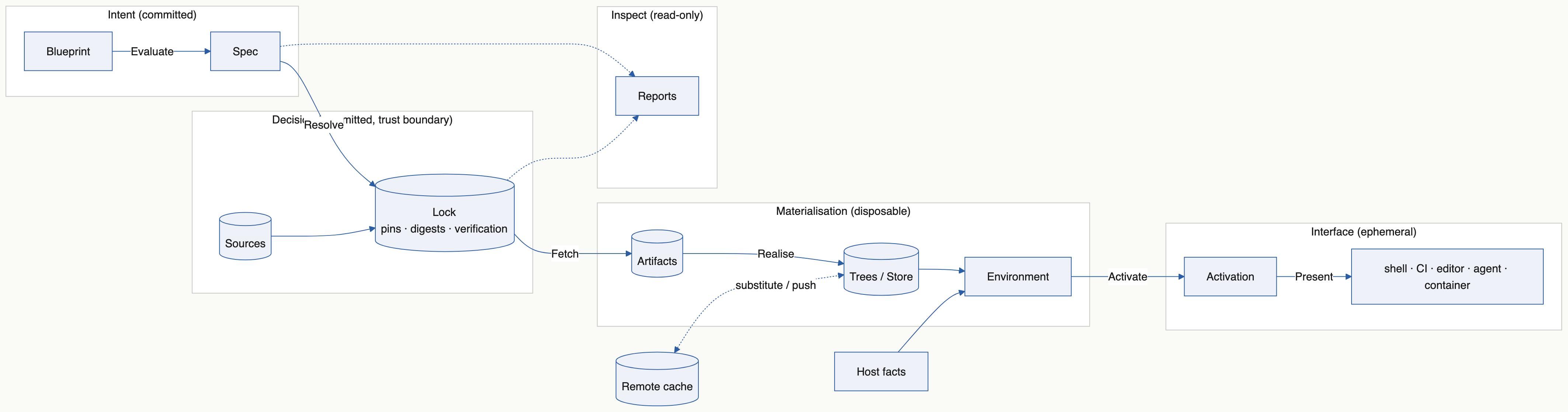
10.5.1. Build and workflow execution§
A request validates structure and capabilities before effects. A workflow then executes in order and stops on failure. Each build captures its inputs when it is reached, after earlier tasks may have changed files. A repeated build step prepares again; the provider may reuse identical results through its cache. Blueprint never reuses a result by build name across intervening tasks.
Selected files and dependency identities let changes flow through the declared graph. Explanations distinguish changed declarations, changed build identities and measured output changes. A script that reads undeclared ambient inputs receives no guarantee beyond the executor’s enforced contract.
10.5.2. Commands use the same model§
Tasks use the common runner. Builds, preparation and explanations use the same request and prepared-build objects. JSON is presentation, not the architecture’s integration mechanism. Explanation compares a request with recorded evidence: the last successful local build, or any record explicitly supplied for comparison.
10.6. Invariants§
10.6.1. Invariant 1: The core is provider neutral§
A shared capability has one meaning. The Spec, the Lock and the core carry no provider concept outside namespaced hints and opaque provider-validated text: a reference, a package name and an executor’s settings are the owning provider’s to read. Explicit source ownership and executor selection determine routing; nothing ambient selects a provider.
10.6.2. Invariant 2: Every stage after Resolve is a pure function of named upstream facts§
Only Resolve chooses pins. Every later stage is a function of the Spec, the Lock, the execution system, the declared host facts and the captured project inputs, and of nothing else: no environment variable, installed tool or file that is not one of those. Two machines with the same upstream facts plan the same steps, prepare the same build and produce the same activation.
10.6.3. Invariant 3: Authority and evidence are separate§
Pins and their verification decisions belong in the reviewed Lock. Captured build inputs, results and measured outputs are execution evidence. Neither silently expands or rewrites the other.
10.6.4. Invariant 4: Pinned content is verified before every use§
Fetched bytes are checked against the Lock, and a tree unpacked from them is checked against its recorded digest, on every use. A damaged tree is rebuilt from its verified archive without a network request. Nothing in the store is exposed through a hard link, so no consumer can write into it. Native build caches use the provider’s own integrity contract.
10.6.5. Invariant 5: Materialization is disposable§
A cache may be deleted without losing committed authority. The Lock, the configuration and the captured project inputs together rebuild everything.
10.6.6. Invariant 6: Host dependence is explicit§
Expected tools are checked, not pinned. Tasks and configuration evaluation are not sandboxed. An isolation or reproducibility claim names the capability an executor enforces.
10.6.7. Invariant 7: Planning is pure and effects are constrained§
Providers return typed plans. Hosts execute only granted operations. Unsupported capabilities and invalid selected relationships fail before effects.
10.6.8. Invariant 8: Activation is data, and rendering happens at the edge§
An entered environment is an Activation value: search-path directories and variables, each naming what supplies it. The core produces it for what it realises, a provider for what it realises, and only a presenter turns it into shell syntax, CI files or JSON. Presenters own escaping. Machine and human presentations share one typed result; native process output is decoded first.
10.6.9. Invariant 9: Inspection declares what it reads§
Lock inspection reads committed authority without a Store or project evaluation. Build explanation reads committed authority and the execution evidence it is given. Missing coverage is explicit; an inspector never invents a complete graph from reports.
10.6.10. Invariant 10: One authoritative codec; JSON is interchange§
The Spec, the Lock, build records and every other authoritative or locally kept record are S-expressions with their own major and minor versions. JSON is for interchange and presentation only: reports a program reads, the output of a native tool the host decodes, and files written for another tool to consume. Nothing authoritative is read from JSON. A package version, a wire format and a compiler version are distinct. A format a consumer does not read is refused by name, never converted at runtime.
10.7. The coupling test§
An ecosystem implementing an existing capability needs an adapter, not a new shared meaning. A consumer uses typed plans, results and their renderings, not dependencies reconstructed from unrelated reports. A new capability may require versioned semantics or a constrained host effect; one provider’s syntax alone is not a reason for either.
Review a change by asking whether repository logic remains in scripts, source ownership is explicit, execution guarantees are accurate, identity comparisons are well-defined, and a provider could implement the capability without another provider’s native data.
10.8. What ships today§
Nix is the only complete provider: resolver, realiser, executor and inspector. Its managed builds run sandboxed on x86_64 Linux.
A Guix package source is accepted as intent and refused by every request until a Guix provider exists.
Core-managed downloads, Roc packages, expected host tools, tasks and workflows of tasks run on every supported system, including Windows, without any provider.
blueprint envrenders an environment’s Activation for a shell, for GitHub Actions or as JSON. No other presenter ships.Blueprint’s own store holds verified downloads; it is not yet an executor.
Remote execution and comparison against arbitrary historical records are not implemented.
11. The Spec, the Lock and providers§
This chapter is for someone reading or producing a Spec, writing a provider,
or changing how blueprint plans its work.
The architecture chapter defines the terms.
11.1. What the Spec holds§
roc Blueprint.roc prints the Spec as an S-expression: records are
((field value) ...), lists (a b), tags Tag or (Tag payload ...), and
; starts a comment. blueprint-core/Spec.roc documents every field.
In outline:
format—((major 3) (minor 0)); see Compatibility of the formats.name,systems(strings such as"x86_64-linux").sources— package sources with explicit versioned provider declarations{ name, version, ref }. Every source a tool names is declared; validation inserts no package source. Checked authoring shorthands such asFrom(NixPackages(...))produce these declarations.resolvers—{ provider, inputs }, explicit provider ownership of non-package source and input names. The platform writes the Nix entries forInput,Overlay,Sourceand Roc bundle sources itself; validation refuses an input with no owner or with two.executors—{ name, provider, source }: a named executor, its provider and its bootstrap package source, empty for an executor that needs none.build_executors— explicit executor selection for each Build.inputs—{ name, url }: inputs a resolver fetches. An environment that lists one inoverlaysapplies it to its package set as that provider defines; the Spec records no provider-specific kind.environments—{ name, parents, tools, overlays }; tools are{ source, name }, wheresourceis a declared source, and overlays are ordered input names. Validation resolves a single parent, deduplicates parent-first selections and clearsparents.system_tools— optional{ environment, system, tools }selections. They inherit parent first and only enter the environment on their named System.commands— optional{ environment, name, tool }launchers. Validation flattens inheritance; a child replaces a same-named inherited command.configured_tools— optional{ environment, tool, options }: a tool and the options its package is built with, anAttrsvalue. Validation flattens inheritance; a child replaces an inherited tool’s options, and a tool an environment also has plain is rejected.roc_packages— optional{ environment, name, source }: a Roc bundle’s content hash and thebuild_sourcesentry that names its URL. The platform derives both from the bundle URL (roc-<hash>,tarball+<url>); environments sharing a bundle share one source. Validation flattens inheritance, parent first. The Core fetches the bundles of a task or a shell itself. A provider resolves and locks such a source only when a build’s environment has the package (Project.resolved_build_sources), so Roc packages that tasks and shells alone use need no provider.programs— optional{ name, system, urls, unpack, path }: a program downloaded for one System, under the command namename.urlsis a nonempty list, the primary first and then alternates for the same bytes, each once.unpackisFile,TarGz,TarXzorZip;pathis the program inside the unpacked archive and empty for aFile. A program with no entry for a System is unavailable there. The Lock records the digest; the Spec never does.environment_programs— optional{ environment, programs }: the declared programs an environment has onPATH, by name.expects— optional{ environment, programs }: programs the machine must already have onPATH. They are checked for, never installed. Validation flattens the inheritance of both, parent first and each name once, and rejects a name an environment has from two of a program, an expected tool and a command.shells—{ name, environment }aliases.tasks—{ name, environment, run }, with nonempty executable argv.build_sources—{ name, ref }, locked non-flake sources, separate from package-providersources.build_files— optional{ build, paths }selections. Omission keeps a whole-project snapshot; an explicit empty list selects no project files. Requiresbuild-files.builds—{ name, environment, inputs, needs, run, output }; named source and build references, exact argv and contained relative file/directory output.workflows—{ name, steps }; typedRunTask(Str, List(Str)),BuildArtifact(Str)orRunWorkflow(Str)steps, with ordered bounded expansion.raw—{ backend, target, value }, passed through to one provider (the wire field keeps the namebackend).extensions—{ kind, name, value }, blocks a provider may understand.requires— features the config uses beyond the core ("raw","extensions","sources","builds","build-files","workflows","system-tools","commands","roc-packages","configured-tools","programs","expects"), so an olderblueprintcan say what’s missing. Required features are independent of the Spec major; unsupported required capabilities are rejected before effects.
Value is Str, Int, Bool, List or Attrs. Its S-expression encoder
and parser are hand-written to avoid recursive-codec derivation problems.
requires is reserved in Roc; the Roc field is requires_, and Sexpr drops
a trailing _ on the wire. There is no major-1 shell packages field.
Lower.lower checks authoring-setting cardinality, asks the recipe of each
Fetch in an environment’s Programs once for every declared System and
keeps its answers as programs (the function never reaches the Spec; a
program listed by several environments is there once, and two recipes under
one name that answer differently for the declared Systems are refused), then
calls Project.validate as a top-level constant. The CLI calls that same semantic validator after
Spec.parse and required-feature checks, so external Spec does not bypass reference
or graph rules. Spec.parse rejects other majors before decoding nested records;
parsing alone does not establish semantic validity.
Static checks cover generic references, duplicates, inheritance cycles, argv,
download URLs (https://<host>/<path> with no credentials, query or
fragment; http://127.0.0.1 is accepted so that a test can serve one)
and each source’s own grammar for the names of its tools. A tool that names
no declared source is refused with the sources that are declared. Package
existence and target availability are Nix runtime checks. Core validation never
probes the host or installs/fetches anything.
11.2. What the Lock holds§
Blueprint.lock is versioned S-expression dependency authority. Its intent
records resolution declarations, including explicit provider ownership.
Provider-namespaced hints preserve checked native authority, such as the Nix
lock graph.
Each sources entry is { name, provider, ref, rev, digest }, and digest is
sha256:<hex>. The Nix adapter converts a remote entry’s NAR hash to that
form; a local entry carries Blueprint’s own tree digest from core Tree; a
SourceFile entry has provider "file" and the flat SHA-256 of the unchanged
original bytes, not of an unpacked tree. These measure different things. The
public inspection contract exposes content_identity separately, with
explicit file, tree or unknown digest kind and inert namespaced metadata.
fetched holds one { name, system, urls, sha256, size, obtained } per
declared program and System: the URLs it was declared with, the SHA-256 in hex
and the length of the download, and in obtained whether the digest was
Computed from the downloaded bytes, Published by the release that serves
them, Both, or Unstated.
Only explicit update changes pins. Ordinary requests validate freshness and verify selected materialization without rewriting authority. Local sources use project-relative declarations and checked tree digests rather than checkout locations. A dirty locked source needs explicit update.
The Lock does not contain arbitrary selected project files, prepared build recipes, output hashes or successful execution records. These belong to their own declared evidence types. An SBOM describes artifact composition and is not a substitute for the build graph.
A lock is read only in the current format. blueprint update writes it, and
is the one command that accepts a lock it cannot read, by replacing it. Every
other command refuses such a lock and names that command. Reviewed immutable
source references in the configuration constrain what resolution selects.
11.3. Compatibility of the formats§
The decoder accepts the same
major, whatever theminor; consumers must still reject unsupported required features and semantically invalid data.Minor (compatible): a new optional top-level field (missing fields default to empty, unknown ones are ignored), or a new
requiresfeature.Major (breaking): anything else, such as a new required field, a new field inside a nested record, or a new
kindtag.
11.4. What a provider does§
The pure core validates declarations and plans requests. Providers are pure adapters that return constrained operations; the CLI or another host performs filesystem, network and process effects. Registering a provider grants no ambient ownership of shared sources.
A source names its resolver. Package sources carry versioned provider intent.
Other sources, inputs and overlays are assigned in resolvers: the platform
writes the Nix entries for Input, Overlay, Source and Roc bundle sources,
and an explicit Resolver(provider, names) assigns one of them to another
provider instead. Each build selects a named executor with Execute("native").
Executor("native", Nix("pkgs")) declares a Nix executor whose bootstrap
package source is pkgs; Adapter(provider, source) declares another
provider’s executor, whose source may be empty. Both write
{ name, provider, source }. A build never infers its executor from the first
package source.
Adapters validate their own native package/source grammar through the pure validation boundary used by both authoring and CLI ingestion. Core validation owns references, cycles, ownership and shared capabilities. Checked constructors must not expose unchecked provider JSON as configuration intent.
A provider may implement resolution, environment tools, managed execution or a subset. Capability checks follow the selected request closure. Unsupported mixed resolvers or executors fail before effects; general composition and a second production implementation remain follow-up work.
Shared request plans describe dependencies and preparation requirements. Prepared builds bind captured files, tools, pins and commands to a native build identity. Build execution uses that exact preparation; typed results decode provider output before human or JSON presentation. Providers own native caches and substitution, not Blueprint’s report layer.
gen, shell, run, build and workflow require existing matching authority. Only
explicit update resolves new pins and publishes authority; normal commands
stage derivatives and prohibit native lock updates. Named input declarations
remain stable across selected closures; selected overlays remain scoped and
ordered. Local authority contains relative identity and Blueprint tree digests
(core Tree, computed and verified by the CLI without Nix), not checkout
paths. Dirty local inputs fail until explicit update. Local verification, caller
observation and Nix’s filtered project copy repeat per explicit build, never reusing artifact results
by name across tasks.
A new feature usually means: a setting in the platform (Config.roc,
Lower.roc), then either an extensions kind or a new optional Spec field
(a minor bump), then support in a provider. Prototyping it as Raw or Custom
first needs no Spec change at all.
11.4.1. The provider contract§
blueprint-core/Provider.roc defines the contract as one record. The CLI uses
only this record: scripts/src/StaticChecks.roc fails if
blueprint-cli/main.roc reaches into a provider’s own modules.
| Field | Purpose |
|---|---|
name | Short provider name, such as "nix". Spec raw entries with this name are for this provider. |
features | The Spec requires features the provider implements. |
build_capabilities | The build operations it supports; see Capabilities and guarantees. |
build_guarantees | What a successful build by it establishes. Neither list is evidence that planning ran or checked a sandbox. |
realises | Whether it supplies the tools of a package source with a given provider intent. |
validate_source | Check a package source declaration against its native grammar. |
validate_tool | Check a tool name against its native grammar. |
validate_executor | Check an executor declaration it owns, such as a required bootstrap source. blueprint check, plan build and explain build without --prepare, and request planning call it. |
validate_reference | Check the reference of an input or build source its resolver owns against the provider’s grammar. The core requires only readable text. |
activation_argv | The argv that prints what the provider’s shell for a step would export, without entering it. |
activation | Decode that output into an Activation: search-path directories and exported variables, each marked as the provider’s. |
render | The files it would generate for the whole Spec, for inspection. |
inspect_lock | Project committed authority into per-source content identities and namespaced metadata, without a Spec, host or effects. |
preflight | Refuse a request it cannot realise, before any effect. |
realise | The ordered steps for one request, from the validated Spec and Lock. Never resolves or changes pins. |
build_prepare_argv | The argv that prepares a build step’s exact native recipe. |
build_prepared | Decode that output into a prepared build: its build identity and outputs. |
build_execute_argv | The argv that executes a prepared build, with options such as a checked rebuild. |
build_result | Decode the execution output into a build result with namespaced metadata. |
build_inputs | The locked inputs one build imports directly. |
build_sources | The lock entries the whole build closure uses, for provenance. |
build_exclusions | Project paths left out of a captured snapshot. |
build_local_inputs | Selected local pins with their paths and digests, for the host to verify. |
resolve | The programs to look for, files to stage and argv to run to produce a native lock, for every input or for named ones. |
lock_from_native | Convert that native lock into a Lock. |
Every adapter supplies every field, but only the roles it plays need
meaningful answers. The rest return empty lists, Ok({}), or an error that
refuses the request before effects.
An environment-only adapter supplies the tools of its package sources. It implements
name,realises,validate_source,validate_tool,preflightandrealise, and refuses other requests. The test inblueprint-core/Realise.rocheaded "An environment-only adapter owns its native grammar" is one, with no build support and no bootstrap source.A resolver-only adapter produces pins for what it owns. It implements
name,resolve,lock_from_nativeandinspect_lock, andvalidate_sourcewhen it owns package sources.An executor adapter runs builds. It implements
build_capabilities,build_guarantees,validate_executor,preflightandrealisefor build requests, the fourbuild_*preparation and result functions,build_inputs,build_sources,build_exclusionsandbuild_local_inputs.
blueprint-cli/ProviderContractTest.roc is an independent fixture that
resolves, enters environments and runs builds through the same record
without any Nix protocol.
11.4.2. The Nix adapter§
The Nix adapter uses locked package sources, ordered selected overlays and
explicit execution-system tool selections. Managed builds use a versioned
standalone runner, a copy of the selected project files the host makes,
read-only inputs and artifacts, exact argv and validated outputs. They receive
declared tools on PATH and package roots under BLUEPRINT_TOOLS; this does
not activate stdenv setup. Runtime namespace authorization witnesses stay
outside the derivation identity. Local x86_64 Linux is the verified isolation
implementation; remote builders are disabled for this contract.
Evaluation is pure: neither a build nor its preparation passes --impure.
Besides its locked flake inputs, everything the flake reads from outside its
own directory it reads as a builtins.fetchTree path locked by NAR hash:
each build’s project copy, the runner’s compiler archive and every original
file. A Measure step operation
has the host locate or make that content and hash it with nix hash path,
then stage a record of its path and hash beside the flake, which reads it from
there.
Nix preparation disables import-from-derivation and does not execute dependency builds. Execution and checked rebuild target the exact prepared derivation. Native details stay namespaced in metadata; the derivation path is the Nix build identity. See Build artifacts and run workflows for planning, results and local evidence.
The generated flake declares a nixpkgs input that follows the first package
source it renders, whatever that source is called, because nix develop takes
the bash it runs from the input of that name. A project that declares its own
input named nixpkgs gets no alias. The Lock’s native graph must carry that
root edge exactly as the declarations determine it; decoding refuses a lock
whose edge differs.
An environment with no tool of its own, such as the sandbox of a build whose
environment is empty, is rendered with the bootstrap source of the Nix
executor the project’s builds select, and with the first Nix source declared
when no build selects one. A Nix executor needs a bootstrap source:
Nix(source) always names one, and validate_executor refuses an empty one
however the Spec was written.
12. Contribute§
Use issues for bugs and design discussion, and pull requests for changes. Report a suspected vulnerability privately, as SECURITY.md describes.
12.1. Find your way around§
blueprint-platform/   the roc-blueprint platform that Blueprint.roc apps use
  *.roc                  setting types, checked values, lowering to the Spec
  host/, build.zig       Zig host, built into targets/<target>/libhost.a
  targets/               linker inputs, none committed: libhost.a is built, the rest fetched (see its README)
blueprint-core/          roc-blueprint-core: Spec, Provider contract, validation, Steps, Value, codec
  Project.roc            pure normalization, references and provider capability checks
  Realise.roc            pure planning of a request: what the Core supplies, and what it asks of a provider
  Sbom.roc               pure SBOM inventory; writes SPDX 3.0.1, SPDX 2.3 and CycloneDX 1.7, reads SPDX 3.0.1, 2.3 and 2.2 and its own CycloneDX
  Spdx3.roc, Spdx2.roc   the SPDX 3.0.1 and 2.x rules, held to the schemas pinned in tests/sbom/schema/
  CycloneDx.roc          the CycloneDX 1.7 rules, held to the schema pinned in tests/sbom/schema/
  fuzz/                  roc-fuzz targets: spec-parse, spec-round-trip, project-validate,
                         lock-parse, lock-snapshot-parse, lock-snapshot-round-trip,
                         lock-snapshot-project, sbom-render, sbom-read, build-record-parse,
                         build-model-compare, nix-native-decode, nix-lock-decode
blueprint-nix/           importable pure Nix provider (depends only on blueprint-core)
  NixProvider.roc        shared pure request planning and flake rendering
  Locks.roc              Nix pins <-> the Lock: Sources plus a "nix" hint
  tests/                 Spec fixtures and golden flakes
blueprint-cli/           the blueprint CLI (basic-cli + weaver), which executes provider plans
  Store.roc, Download.roc  the per-user store of downloads and the HTTPS client that fills it
  StoreRecord.roc        the record the store keeps beside a tree, read and written without effects
  Bootstrap.roc          identity of the compiler archive embedded in each CLI
  compilers.roc          Bootstrap and StoreRecord as a package for build tooling and tests
  Published.roc          what a release publishes as the digest of an asset, asked by update
fixtures/consumer/       independent consumer of the Spec and Nix packages
fixtures/overlays/       overlay flakes for scripts/test_scenarios.roc
examples/all-settings/   environments, sources, scoped overlays, tasks and Raw
examples/composition/    imported pure modules: reusable task settings and a program's recipe
examples/artifacts/      runnable source/dependency/workflow example and its Roc scripts
examples/extensions/     Custom blocks; CI checks blueprint refuses them clearly
scripts/                 Roc scripts, run from the repository root; their modules are in scripts/src/
  test.roc               local CI test groups; runs the test_*.roc suites
  link_inputs.roc        fetch or check the platform's linker inputs
  bundle.roc             bundle core, the platform and the reporting app into dist/ and smoke-test them
  embed_compiler.roc     stage and verify one target's compiler archive for embedding
  test_bootstrap.roc     test embedded compiler installation, repair and concurrency
  build_release.roc      cross-build the CLI, the SBOM tool and the smoke-test program for each released system
  smoke_binary.roc       run a built CLI with no Roc and no Python of its own; with --no-nix, with no Nix either
  fuzz.roc               replay or fuzz the roc-fuzz targets
  release_notes.roc      render a release's notes from docs/releases/
  package_examples.roc   archive the examples with a release's platform URL
  package_sbom_fixtures.roc  archive the SBOM fixture set with its case contract
  test_release.roc       test that archive against the bundles, served from localhost
  docs_snippet.roc       write the part of the manual that names the latest release
  check_version.roc      check a release's version before building and against the public API after
  package_docs.roc       archive the rendered site
  release_assets.roc     gather a release's assets and check the names other repositories depend on
  test_lock_snapshot.roc  check the official lock snapshot consumer against the vendored schema and profile
  test_builds.roc, test_workflows.roc   real-Nix build and workflow suites on scripts/src/BuildHarness.roc
  reproducible_probe.roc  compare a producer on independent CI hosts and synthetic CLI patch builds
docs/                    the manual: index.adoc includes one chapter per top-level .adoc file
  releases/              each release's notes, included by releases.adoc
link-inputs.lock.json    the linker-input release the platform links, pinned by content
flake.nix                builds blueprint with the pinned Roc; the development shell; the release cross-compiler
The local platform and CLI share blueprint-core, including
Project.validate. The Spec wire format is major 3; older platform bundles are not compatible. The architecture, terminology (Spec,
Provider, Lock, stages) and invariants are defined in
the architecture chapter; keep it in sync with changes.
12.2. Keep capabilities provider neutral§
Provider neutrality is a lasting design constraint, including for a future executor developed within Blueprint. Review shared-contract changes against it:
Describe the capability and guarantee independently of the current Nix implementation. Keep native syntax, command lines and metadata in the provider; keep identity semantics explicit and provider-qualified.
Show how another deterministic system could fulfil the contract. A provider that cannot fulfil it must fail before effects, rather than silently weaken isolation or reproducibility.
Preserve the boundary between committed intent and pins, pure inspection, captured execution evidence, disposable materialization and the host’s constrained effect execution.
Exercise changed provider boundaries with an independent contract fixture using its own arguments, identities and metadata. Renaming a Nix fixture is not evidence of another implementation.
Document unsupported capabilities and remaining routing or registration constraints. Distinguish a reusable contract from an implemented backend.
Protocol changes need a shared semantic reason and the existing versioning rules. They must not make every provider adopt one ecosystem’s native format. Production support for a second provider and general resolver composition remain follow-up work tracked in the additional-provider follow-up.
Review changes against the ownership table in the architecture chapter. Scripts own build algorithms; the pure core owns validation and plans; the host owns effects; providers own native execution and caches. Identity fields must say whether they identify input content, a prepared build or measured output. Do not reconstruct a build graph from independent JSON reports when a shared plan/result type can serve the interface.
12.3. Set up§
Full development and CI require x86_64 Linux with Nix and flakes enabled.
nix develop
gives two Roc compilers from
roc-overlay, Zig 0.16 and the
programs the scripts start: coreutils, git, curl, tar, gzip, zip, unzip and gh.
On Linux it also supplies Bubblewrap, util-linux and Python for isolated
runner tests and a restrictive-umask launcher. Nothing else uses Python: the
product, the reporting app and every conformance check run in Roc.
roc is the product compiler, the nightly in
blueprint-cli/compiler-version: it builds and tests the CLI, the packages and
the platform, and a released blueprint embeds it. roc-stable is the
nightly rocStableTag names in flake.nix: the scripts in scripts/ start
with #!/usr/bin/env roc-stable and run on it, so they keep working while the
product moves to a newer nightly. The scripts reach the product compiler
through ROC, or roc on PATH. This shell is the one definition of the toolchain:
every CI job runs its scripts through nix develop -c, so what passes in the
shell is what CI runs. blueprint is not in the shell, so entering it never
compiles the CLI; build it as below, or use nix run ..
The shell stages this host’s pinned compiler archive as the ignored file
blueprint-cli/compiler-archive. Roc imports its bytes into the CLI at build
time. Outside the shell, stage an archive first with
scripts/embed_compiler.roc <system>; the script checks its size and digest
against Bootstrap.roc. Keep the complete archive: macOS Roc needs the
darwin/ sysroot beside its executable.
blueprint-cli/main.roc uses the released basic-cli platform by URL. Roc
downloads it on first use outside Nix; the Nix blueprint package fetches the same
archive by hash, so its sandboxed build needs no network.
12.4. Build and test§
scripts/link_inputs.roc fetch             # the musl runtime files the platform links
(cd blueprint-platform && zig build)      # libhost.a or host.lib for all five hosts
roc test blueprint-core/main.roc      # Spec round trips and format tests
roc test --opt=interpreter blueprint-cli/main.roc # CLI, provider and core expects
roc build blueprint-cli/main.roc --output=./blueprint
(cd examples/all-settings && ../../blueprint run --help) # try the CLI
scripts/test.roc                            # all local CI test groups
scripts/test.roc unit cli                   # or only some groups: static, unit,
                                            # cli, scenarios, builds, package, glue, fuzz
scripts/fuzz.roc 300                        # fuzz each target for 5 minutes
The CLI unit tests use interpreter mode because the pinned compiler’s native test backend crashes on the large embedded byte constant. Integration tests run the compiled executable.
The .roc files in scripts/ are Roc programs; they start other programs by
argument list, not through a shell. Run one from the repository root with the
pinned roc on PATH, or as "$ROC" scripts/test.roc.
The platform’s linker inputs are not committed. scripts/link_inputs.roc fetch
downloads the release pinned in link-inputs.lock.json into .cache/link-inputs/,
verifies it and installs the files beside libhost.a; nothing that evaluates a
Blueprint.roc against the local platform links without them.
scripts/link_inputs.roc check verifies what is installed without the network.
See
blueprint-platform/targets/README.md.
scripts/test.roc runs the repository’s CI test groups. Its groups are static
(formatting; no tracked object file, archive or import library; the CLI’s use of
the Provider contract; the compiler downloads Bootstrap.roc records, one
for each system the CLI runs on; each workflow’s
permissions and checkouts; the release notes chapter against the notes files;
the flake’s list of core modules and its version), unit (the platform’s, the scripts', the CLI’s
and the consumer’s expects, the configuration fixtures and the Roc the
manual shows), cli,
scenarios (test_scenarios.roc, test_roc_packages.roc and the golden
flakes parsed by Nix), builds (test_builds.roc and test_workflows.roc),
package (the flake’s package and development shell, the packaged CLI building
an artifact with only Nix on PATH, and a dry run of what a release ships:
core and the platform bundled and smoke-tested, the examples archived and the
archive tested; see The two bundles),
glue (scripts/check_glue.roc: the host’s committed
roc_platform_abi.zig is what roc glue writes for the platform with the
product compiler; scripts/check_glue.roc --update rewrites it)
and fuzz (each target’s committed corpus, replayed, which
takes seconds; .github/workflows/fuzz.yml fuzzes each target for five minutes
every week, starting from the inputs earlier runs found, which it keeps in the
Actions cache through FUZZ_CORPUS, and uploads any crashing input). scenarios and builds are the
real-Nix suites, split into two groups of about the same length so that CI runs
them as two jobs at the same time.
Two additional CI jobs run scripts/reproducible_probe.roc on independent
Ubuntu 24.04 and 22.04 hosts. One uses the release binary; the other compiles
a synthetic next-patch CLI with the same runner pins. Each builds and
rebuilds the same selected-input producer. A dependent job compares their
actual derivation, outputs and locked-source provenance.
scripts/test_config.roc runs the compiler on generated Blueprint.roc
fixtures: the platform’s own rules, which only a compiler run can show (a
setting given twice or not at all, in Lower.roc, and each checked name’s
from_quote), a few core rules and bounds as witnesses that shared validation
surfaces at compile time, and that settings composed from an imported module
emit the same Spec as inline ones. Every other rule of Project.validate has an
expect in blueprint-core/Project.roc. The bundle gate repeats a few of the
fixtures against the served platform, plus the all-settings example.
It then compiles the manual’s Roc (scripts/src/DocSnippets.roc): every
[source,roc] block of docs/ and docs/releases/, and the first program of
the Get started chapter, against the platform in the working tree; see
Write the manual.
scripts/test_cli.roc exercises the built CLI with and without a
configuration, checks validation and help/version handling, and records Nix
argv to verify shell selection and task arguments without entering a shell.
It holds what only a run can show: the order of checks before any effect, how
often the configuration is evaluated, exact provider argv and error text. Rules
that a pure expect in blueprint-core or blueprint-nix already holds are
not repeated there.
The all-settings integration tests separately run tasks through real Nix.
scripts/test_scenarios.roc writes projects and runs them through the real
CLI and real Nix: the all-settings and extensions examples, noncommutative
overlays in both orders with inheritance, an unselected overlay’s native
missing-package failure and a declared overlay that throws if evaluated,
system-scoped tools on Linux and macOS with the package-target rejection of an
unscoped one, renamed commands, and a task that names a script by path, as
scripts/check_all.roc, which starts by its roc-stable shebang on a platform
RocPackages supplies and imports a module beside it, and zig-overlay and
rust-overlay as overlays, each supplying an exact release named in a quoted
attribute, and configured tools: a fixture overlay’s package says which
options it was built with, and rust-overlay evaluates a toolchain with two
targets and a component. It also runs nix develop --debug on a
staged flake and requires Nix’s own report that its bash comes from the locked
package source, with no registry lookup,. A project it writes pins its inputs to the
revisions in fixtures/consumer/inputs.lock and flake.lock, and its
Blueprint.lock is read-only and compared after every step.
fixtures/consumer/main.roc holds the staged bytes and supplied-lock
preservation as expects. Parse fuzzing also checks successful semantic
normalization for idempotence.
SBOMs are SPDX 3.0.1 JSON-LD, with SPDX 2.3 and CycloneDX 1.7 renderings of
the same inventory for consumers that read only those, and conformance is
checked in Roc, with no other validator. blueprint-core/Spdx3.roc,
Spdx2.roc and CycloneDx.roc hold the classes or objects, members,
enumerations and prose rules of each format, and scripts/src/SbomTest.roc
holds them to the digest-pinned schemas in tests/sbom/schema/ (the published
SPDX 3.0.1 JSON schema, the SPDX 2.3 schema and the CycloneDX 1.7 schema):
every class, member and enumeration the validators accept is the schema’s own.
The same expects require that each committed fixture in tests/sbom/fixtures/
is what the renderers write now (regenerate them with
scripts/test_sbom.roc fixtures tests/sbom/fixtures), that all three
renderings of a fixture read back to one package graph, and that the
standalone tool’s committed inputs (input/, source-import/), the case
contract (CONTRACT.md) and the file list of the release asset
(scripts/src/SbomFixtures.roc) are what the suite states (regenerate the
first three with scripts/test_sbom.roc inputs, source-import and
contract). scripts/test_sbom.roc binding
then runs the built scripts/sbom.roc against read-only inputs: the native
case, and the source supplier import’s accepted targets, bound renderings
and refusals as source-import/expected.json states them. The
sbom-render fuzz target generates inventories with arbitrary text and
graphs: each must render to valid, canonical SPDX 3.0.1, SPDX 2.3 and
CycloneDX 1.7, read back from each to exactly its own packages and
relationships, with CycloneDX’s standard fields (dependencies, scopes, hashes,
purls, licenses, suppliers) derived from the inventory, and the validators
must reject a rendering once one of a list of SPDX 3.0.1 or CycloneDX rule
violations is injected into it. It also strips Blueprint’s properties from
the CycloneDX rendering, which must then import as plain CycloneDX to a
projection of the inventory, and adds files to the SPDX renderings, which
must read to the same package graph with the files counted as gaps.
sbom-read mutates the fixtures of every format, including what Syft and
Trivy write (tests/sbom/fixtures/upstream/): reading must never crash, what
it accepts must be a sound package graph, and it must import as an upstream
SBOM unless the import is refused for a developer path, a credential, its
size or a subject digest that is not a SHA-256.
scripts/test_builds.roc runs real sandboxed builds of artifacts,
dependencies and sources, including host-file and TCP isolation with positive
host controls, fail-closed runner checks, exact argv, immutable locks,
freshness and relocation. It also checks what Nix copies from the project
(bytes, the owner’s execute bit, raw names, exclusions, refused symlinks and
special files) and that an undeclared tool is not found. The exact standalone
runner’s argv, input and output checks run in an isolated Linux test harness;
an unisolated invocation must refuse execution before user code runs. Runtime
namespace witnesses are private to each invocation and do not enter the
derivation. Stubbed CLI tests verify their contents, cleanup and separation
from stable recipe bytes.
scripts/test_workflows.roc runs real ordered task/build workflows, nested
repetitions, failure stops, snapshot/dependency freshness, repeated
locked-source verification, whole-closure preflight and immutable authority,
including out-of-tree layouts, and then a temporary copy of the complete
artifacts example. Both are Roc scripts on the harness in
scripts/src/BuildHarness.roc, and the tasks and builds of their fixtures are
Roc scripts run as roc-stable through RocPackages. Their inputs are pinned
in fixtures/consumer/inputs.lock and fixtures/roc-inputs.lock.json; one
first step fetches them and every later Nix call is recorded and run with
--offline. See fixtures/builds/README.md.
scripts/test_update.roc checks local-source preflight, authority observation,
concurrent publication, named updates and what an unsupported lock is told. scripts/test_isolation.roc checks what a build stages
about its caller: the namespace identities, the CLI’s own path as the runner,
and the refusals when either cannot be used. Both put a failing
python3 on PATH: the CLI itself must not use a host Python.
scripts/test_programs.roc runs projects whose environments fetch programs
and expect tools of the machine. Nothing selects how they run but their own
Blueprint.roc: one with no Nix tool must never start the nix stub. The
downloads come from a server the script runs on the loopback address, the
store is a directory of the test’s own, and the lock entries are written by
the test. It checks what is kept in the store and under which names, that a
second run makes no request, that a stored artifact with other bytes is
removed with its tree and fetched again, two runs at once from an empty store,
every refusal (a missing expected program, a program the lock does not hold or
holds under other URLs, another length or digest, each URL’s failure, an
archive with a link out of its tree), the caller’s own shell, and parity: the
same task with one Nix tool added prints the same from the same store file,
and only then starts Nix. Its last cases let blueprint update write the
lock: with no nix on PATH for a project that only fetches, with nothing
asked when nothing changed, for a named program alone, after a URL list
changed, and for release assets. A download URL must be https://, with one
exception made for these tests: http://127.0.0.1:<port>/, which no other
machine can serve. A loopback URL of the shape
/<owner>/<repo>/releases/download/<tag>/<asset> is a release asset, and the
same server describes its release at /repos/<owner>/<repo>/releases/tags/<tag>,
as GitHub’s API does for a GitHub URL. That is the whole seam: no variable
or flag redirects the question. Through it a digest computed here is compared
with a published one, another system’s is recorded unfetched, a published
digest that differs stops the update, a question that is refused or answered
with something else leaves every digest computed and says so once, and a
download missing for one system says how to declare that.
It ends with blueprint requirements, asked with no nix, no lock, an empty
store and no server: the report is the same, a declared and unused Nix source
requires no provider, and nothing is written.
These are Roc scripts, run from the repository root with ./blueprint
built; ROC names the compiler. They replace every tool the CLI runs with one
program, scripts/stubs/tool.roc, which each test builds once and installs
under several names (roc-record, roc-wire, roc-probe, nix, guix,
python3, readlink). A copy decides what to be from its own file name and
how to behave from STUB_* variables, and records each invocation as a file
holding one line of JSON in <name>-calls/ under its working directory. Its
header lists what each name does. scripts/src/CliHarness.roc holds what the
three tests share.
scripts/test_roc_packages.roc is a Roc script, like link_inputs.roc. It
runs the real CLI and Nix with a Roc package cache of its own in a temporary
directory, and refuses to run if that directory lies inside ~/.cache. A
task’s bundles are downloaded by blueprint itself from the releases their
URLs name. It checks publication into an empty cache, that a second run
writes nothing, that an existing package is left alone and an incomplete one
replaced, that failures leave nothing behind, that a project with no build
locks no bundle and its task still downloads them, and that a sandboxed build
resolves its bundles from the lock with no network while the same build
without one of them does not.
Normal execution tests explicitly initialize authority with update first.
The complete artifacts example is executed in a temporary copy by
the workflow suite (scripts/test_workflows.roc).
12.4.1. Keep fuzz coverage with the code§
Every reader of bytes that Blueprint did not write in the same process has a
fuzz target in blueprint-core/fuzz/: committed authority (the Spec:
spec-parse, spec-round-trip and project-validate; the Lock:
lock-parse), reports it reads back (the lock snapshot: lock-snapshot-parse,
lock-snapshot-round-trip and lock-snapshot-project; SBOMs: sbom-read and
sbom-render), native tool output a provider decodes (Nix derivation, build
and dev-shell JSON: nix-native-decode; the native lock graph and the Nix
pins in the Lock: nix-lock-decode) and local records (build records:
build-record-parse and build-model-compare).
A reader has a mutation target with a seeded corpus and a dictionary. A value with a generator also has a generation target for its round-trip and idempotence properties.
A pull request that adds or changes such a reader adds or extends its target in the same change. The
staticgroup keeps the target matrix of.github/workflows/fuzz.ymlequal to the directories ofblueprint-core/fuzz/, so CI cannot forget a new target. Reviewers ask of every new parser what reads it, and which target covers it.A corpus holds one valid document per schema version, one seed per refusal the parser names, and every crashing input ever found, committed under
corpus/with a name that says what it found. The replay on every commit then guards it for good.CI replays the corpora on every commit, which takes seconds. The weekly workflow fuzzes each target for 300 seconds in parallel jobs and keeps what it finds in the Actions cache, so each week starts where the last ended.
scripts/fuzz.roc SECONDS [TARGET...]runs a longer campaign on request. The weekly budget is set infuzz.yml, and changing it is a deliberate decision recorded there.Only pure code is fuzzable: a reader that lives in the CLI app moves to a pure module in
blueprint-coreor an adapter before it can have a target.
12.5. The job with no Nix§
Every suite above runs where Nix is installed, and replaces it with a stub
where it must not be started. One job of .github/workflows/ci.yml runs on
machines that have no Nix at all: no-nix, on ubuntu-latest,
ubuntu-24.04-arm, macos-latest, macos-15-intel and windows-latest, with the binaries and platform hosts
the build job produced and no step that installs anything. It runs
dist/smoke-<system> --no-nix dist/blueprint-<system>, the NoNix mode of
scripts/src/SmokeBinary.roc, which:
refuses to start when
nixis onPATH, and leaves norocthere;writes a project whose compiler is
Programs([Fetch("roc-stable", Recipes.roc_nightly(...))])of the nightly inblueprint-cli/compiler-version, withExpect(["git"])and the Roc packages of a basic-cli script, against this checkout’s platform;gives the binary a store and a Roc package cache of its own, empty;
runs
blueprint updateand requires that the embedded compiler was installed exactly once, for readingBlueprint.rocand asroc-stabletogether;runs the shared compiler as
roc-stable versionand requires its actual response to matchblueprint compiler-version;requires that
blueprint requirements --jsonnames no provider;runs the script as a task, which the embedded compiler builds, links and runs. On macOS that is the test that
rocfinds thedarwindirectory of its archive through the link it is started by;runs the task again and requires that nothing is downloaded, and that no flake was generated.
The same job then runs the cross-built SBOM tool of its system,
dist/blueprint-sbom-<system>, over tests/sbom/fixtures/input
(.github/actions/sbom-tool): inspect must reproduce the committed
inventory, bind writes the sample artifact’s sidecars and check holds
them, all with no Roc on the machine.
It reaches GitHub for the nightly and the Roc packages, and asks GitHub’s API
once for the nightly’s published digests; a refusal there is a notice, not a
failure. To run it on a machine that has Nix, hide Nix from PATH:
roc build scripts/smoke_binary.roc --output=/tmp/smoke
env PATH=/usr/bin:/bin /tmp/smoke --no-nix ./blueprint
12.6. Write the manual§
The manual is the AsciiDoc in docs/. index.adoc is a book that includes
one chapter per top-level .adoc file; .github/workflows/docs.yml renders
it as a site and a PDF with the shared
build-docs
action, on every pull request, and deploys the site from main. The action is pinned to a reviewed roc-automation main revision; the renderer
is released as tools-0.6.0. flake.nix checks the released
renderer binary’s SHA-256 for each supported host. Rendering uses the native
Roc utility. API generation uses this repository’s pinned Roc compiler.
To render the same outputs locally, inside nix develop:
scripts/docs_snippet.roc    # docs/generated/, from the latest release; needs a logged-in gh
renderer=$(nix build .#roc-docs --no-link --print-out-paths)/bin/roc-docs
"$renderer" build --workspace "$PWD" --pdf-filename roc-blueprint.pdf \
  --pdf-image-dpi 240 --site-url https://lukewilliamboswell.github.io/roc-blueprint/ \
  --docs-version main --api-entrypoint blueprint-platform/main.roc \
  --roc-command "$(command -v roc)"
The site is .docs-out/site/ and the PDF .docs-out/roc-blueprint.pdf;
neither is committed. Both workflows use 240 DPI for PDF image preparation
so the architecture diagram retains detail when zoomed. Publication links use explicit URLs; this action and
renderer pair uses site-url for publication links and Markdown discovery.
Keep PSV table cells on complete physical lines. HTML honours the declared column proportions; this renderer release’s PDF sizes earlier columns to their content and gives the last column the remaining space. Keep long explanations together: the overview combines each source and its version pin, and the configuration checks use labelled paragraphs. Stage responsibilities use separate input/output, execution and invariant tables. Review both outputs after changing a table; column proportions alone do not establish that its PDF is readable.
Stable explicit anchors preserve links when a heading’s wording changes.
Invariant headings use words before their numbers because numeric-leading
headings exceed this release’s native inline profile. The historical
use-this-release-2 release anchor remains explicit. Prepared figures replace
render-time Mermaid and JPEG conversion, with their source and asset digests
recorded below. These are authoring changes, rather than renderer patches.
Native images are non-interlaced RGB/RGBA PNGs. The manual’s illustration is
converted from the original JPEG; its source hash and conversion command are
in docs/images/blueprint-illustration.provenance.json. The architecture flow
uses the checked-in published SVG and its prepared PNG, with provenance in
docs/images/blueprint-flow.provenance.json. Its Mermaid source stays in
architecture.adoc; docs/prepared-diagrams.json binds its exact source and
PNG hashes. Update the figure and registration together when editing the
Mermaid block. These prepared assets let ordinary documentation builds run
without a browser, image converter or diagram tool.
The manual describes the tool as it is: one recommended way to do each thing, in the present tense. What changed between versions belongs in the release notes, and what is unfinished in an issue.
The Roc in the manual is compiled by scripts/test.roc unit, so a block must
be one of five things:
a whole
Blueprint.roc, startingapp [, whose platform is written as a placeholder;settings as they stand inside
config, complete enough to check by themselves: an environment a task uses is in the block. A tool of the sourcenixmay be written without thePackages("nix", ...)line;[source,roc,snippet=core-module], pure imports and declarations checked inside a package against the repository’s core modules;[source,roc,snippet=refused], settings the compiler must refuse, for a mistake the text explains;[source,roc,snippet=unchecked], which is not compiled: use it only for a line of some other program or for settings that cannot stand alone.Each chapter opens with one
= Titleand is also rendered as a page of its own, so it cannot rely on attributes set inindex.adoc.Link to another chapter as
xref:chapter.adoc#section-id[text], always with a section’s ID and text. Section IDs come from headings, lowercase with hyphens.Give tables explicit column widths.
A release’s notes are
docs/releases/<version>.adoc, included fromreleases.adoc, newest first; see Release.
13. Maintain and release§
13.1. Move a compiler§
Nothing moves either compiler automatically. Each moves in one reviewed pull request, with whatever the new compiler breaks fixed in the same request.
To move the product compiler:
Put the nightly’s tag in
blueprint-cli/compiler-version.Replace the entries of
compilersinblueprint-cli/Bootstrap.roc(see The bootstrap table) with the nightly’s.If the locked roc-overlay predates that nightly, run
nix flake update roc-overlay. UpdatecompilerArchivesin the flake from the official release metadata even if the overlay has not indexed it yet.Set the overlay and a compiler it actually inventories in
fixtures/roc-inputs.lock.json. This Nix-fixture compiler is independent of the product compiler when the overlay inventory lags the official nightly.Move the basic-cli release in
blueprint-cli/main.roc, the fixtures, the examples,scripts/src/SmokeBinary.rocandrocPackagesinflake.nixif the nightly needs a newer one.Move the nightly the manual’s examples and
Published.snippetfetch asroc-stable, so that a reader’s first project downloads one archive for both the compilerblueprintuses and the one its scripts run on.Set the hash of
rocGlueSpecinflake.nixto that of the nightly’s source archive, whichnix build .#roc-glue-specreports, and runscripts/check_glue.roc --update. Commit the bindings it changes together with whatever the host needs to build against them.
13.1.1. The bootstrap table§
A project has no lock until its Blueprint.roc has been read, so the digest
of the compiler that reads it cannot come from one. blueprint carries it:
compilers in blueprint-cli/Bootstrap.roc holds, for the nightly in
blueprint-cli/compiler-version and each system blueprint runs on, the
URL of the compiler archive in roc-lang/nightlies, its SHA-256, its size, its
format and the path of roc inside it.
| System | Archive of the nightly |
|---|---|
x86_64-linux | roc_nightly-linux_x86_64-<date>-<commit>.tar.gz |
aarch64-linux | roc_nightly-linux_arm64-<date>-<commit>.tar.gz |
aarch64-darwin | roc_nightly-macos_apple_silicon-<date>-<commit>.tar.gz |
x86_64-darwin | roc_nightly-macos_x86_64-<date>-<commit>.tar.gz |
x86_64-windows | roc_nightly-windows_x86_64-<date>-<commit>.zip |
gh release view <tag> --repo roc-lang/nightlies --json assets reports each
asset’s digest and size. The entries are data and nothing else: no rule
derives a URL. scripts/test.roc static fails until every system blueprint
runs on has an entry of the nightly in compiler-version.
With ROC unset and no matching roc on PATH, blueprint installs its
system’s embedded archive into the per-user store and checks it against the
entry before using it; it starts no provider to read a Blueprint.roc. The entry
names the same download as Recipes.roc_nightly of that tag, so a project
that fetches that nightly as roc-stable holds it once, and
blueprint update records its digest from the store without a second
download.
To move the scripts' compiler, change rocStableTag in flake.nix and the
roc: "<tag>" field in the header of each scripts/*.roc to the same tag;
scripts/test.roc static names any script that differs. Move the basic-cli
release in those headers too if the nightly needs a newer one. A compiler
other than the one a header names refuses the script, and roc fmt rewrites
the field to the nightly that runs it, so the scripts are formatted with
roc-stable fmt scripts.
scripts/smoke_binary.roc and scripts/stubs/tool.roc are the exceptions:
the product compiler builds them, so their headers must suit both compilers
and carry no roc field.
The required checks are listed under Repository settings the workflows rely on. Keep their names aligned with the workflows when changing CI.
basic-cli 0.26.0-rc2 requires the October 12 nightly or later. This repository
pins nightly-2026-10-28-bad769b for the product and
nightly-2026-10-13-b17d287 for maintenance scripts, with roc-fuzz 0.4.3.
The complete suite requires x86_64 Linux and a running Nix daemon; the
development shell supplies the rest. zig build builds the platform host for
all five targets, so on Apple Silicon macOS the CLI’s tests, the native CLI and
the evaluation of a Blueprint.roc work too. Sandboxed builds, and so the
scenarios, builds and package groups, remain x86_64 Linux only.
13.2. Release§
One release holds the platform bundle, the roc-blueprint-core bundle it
depends on, the standalone Roc SBOM reporting app as a source bundle and as
a blueprint-sbom-<system> binary per system, the blueprint binaries, the
checksums of both kinds of binary, the examples archive, the documentation
archive and the manual. Each executable and Roc source bundle has
artifact-bound SBOM sidecars: SPDX 3.0.1 (.spdx.json), SPDX 2.3
(.spdx-2.3.json) and CycloneDX 1.7 (.cdx.json). It is made by
.github/workflows/release.yml, run by hand from main with a version. Every
pull request runs the same workflow as a dry run, under the version
0.0.1-dry-run, which is never published.
In one pull request, move the product compiler to the latest official Roc nightly using the steps above. Resolve any compatibility failures and run the complete suite, including native and Nix-free checks on all five released systems. Set
versioninblueprint-cli/main.rocandflake.nixto the release, and write its notes (see Write the release notes). Merge it.Run the Release workflow from
mainwith that version, for example0.5.0, or0.5.0-rc1for a release candidate. A version with a-in it is published as a pre-release.Approve the
releaseenvironment if it asks.
A release candidate reports its own version, so version must be set to
X.Y.Z-rc1 for it and to X.Y.Z for the final release: the two are different
commits. Both use the notes in docs/releases/X.Y.Z.adoc.
13.2.1. What the workflow does§
- validate
Requires the default branch, then
scripts/check_version.roc requestrequires a well-formed version, its notes, that no tag or release of it exists, that it is the version the CLI and the flake report, and that the product compiler pin names the latest official nightly.- build
Cross-builds the CLI and SBOM tool binaries (
scripts/build_release.roc), runs the whole test suite on them, bundles the core, platform and reporting app for the version (scripts/bundle.roc), checks the version against the public API (scripts/check_version.roc bump), archives the examples (scripts/package_examples.roc) and the SBOM fixture set with its case contract (scripts/package_sbom_fixtures.roc), renders the manual with the release’s platform URL and archives the site (scripts/docs_snippet.roc,scripts/package_docs.roc), renders the notes (scripts/release_notes.roc), generates artifact-bound SPDX and CycloneDX sidecars (scripts/release_sbom.roc), independently validates their schemas, subjects, known inputs and agreement on one package graph, and gathers the assets (scripts/release_assets.roc). On a pull request the test suite is left toci.yml.- test
Runs each binary on its own kind of machine: the CLI through the smoke program, and the SBOM tool over the committed fixtures (
.github/actions/sbom-tool:inspect,bindandcheck, with no Roc on the machine).scripts/test_release.roctests the examples archive there against the two bundles.- publish
The only job that may write to the repository. It checks out nothing and runs no script of the repository. It attests the tested assets and verifies the source and workflow identity of all five native binaries, retaining the attestation bundle as a release asset. It creates a draft release at the tested commit, uploads every asset, downloads each back and compares it with the tested file, and only then publishes. It rechecks the latest nightly before publication. If a newer nightly appeared during the build, the job fails and leaves the draft unpublished: update the compiler pin and repeat the tests before releasing. It does not run on a pull request.
- site
For a final release, rebuilds and deploys the manual, which then names the new release. A release candidate does not change the site.
The machines that run the arm64 Linux and macOS binaries have Nix and
deliberately no Roc, so build_release.roc also cross-builds
scripts/smoke_binary.roc for each system and they run that
(dist/smoke-<system> dist/blueprint-<system>).
The project the smoke test writes pins what it resolves: packages at the
nixpkgs revision in fixtures/consumer/inputs.lock, the overlay at the
roc-overlay revision in flake.lock and the compiler at the nightly in
blueprint-cli/compiler-version, all compiled into the smoke program. A
release therefore does not depend on what moved upstream that day.
.github/workflows/floating.yml runs the same test weekly with --floating,
which resolves what a new user’s project would: a branch of nixpkgs, the
overlay’s default branch and its newest nightly.
With --no-nix the same program writes a project that takes nothing from
Nix and requires a machine that has none; the no-nix job of ci.yml runs
it on all five released systems (see
The job with no Nix).
build_release.roc takes its compiler from the flake: nix build .#roc-cross
is the x86_64 Linux compiler archive of the nightly in
blueprint-cli/compiler-version with the
darwin/ sysroot of the Apple Silicon archive beside it, which Roc needs to
link macOS programs. Both are fetched by the URL and hash the locked
the flake records. The cross compiler is not in the development shell.
The CLI binaries are compiled sequentially. Before each compilation,
scripts/embed_compiler.roc <system> stages that target’s complete archive as
blueprint-cli/compiler-archive, after checking its size and digest against
Bootstrap.roc. Downloads are cached in .cache/compilers/; the staged
archive is ignored by Git. The local host’s archive is restored afterwards,
including when compilation fails. The SBOM tool embeds no compiler, so its
five binaries compile in parallel with the smoke programs.
Each binary embeds only its own system’s archive. On first use it installs that archive into the existing per-user store and verifies its recorded digest before extraction; see The bootstrap table. This removes the compiler download at runtime. Project packages and tools can still require the network. Release binaries grow by roughly 69–73 MB.
13.2.2. Write the release notes§
Write the release’s notes by hand in docs/releases/X.Y.Z.adoc and include
the file in docs/releases.adoc, newest first; scripts/test.roc static
fails when the two disagree. The notes say what changed for a user deciding
whether and how to upgrade: what a user can or must now do, the symptom each
fix removes, and before and after for anything breaking. They are not a list
of commits.
The file opens with = roc-blueprint X.Y.Z and names the bundles as
{platform-url} and {core-url}, because the URLs hold hashes that do not
exist until the release builds them. scripts/release_notes.roc X.Y.Z dist/notes.md renders the notes as the release body with the real URLs, and
adds what the release was built from: the Roc nightly and the Zig version, the
roc-overlay revision and the hashes of the two official compiler archives,
the flake’s nixpkgs revision, the core bundle, the standalone SBOM tool as
the blueprint-sbom-<system> binaries (the recommended way for CI to run
it) and as its app bundle URL, the Roc packages compiled into
the CLI as roc deps blueprint-cli/main.roc resolves them, and the
linker-input release with the SHA-256 of link-inputs.lock.json. It fails on
a placeholder that is unused or unknown. The committed file keeps its
placeholders and is not rewritten after the release. A dry run renders the
newest notes there are.
13.2.3. The two bundles§
During development the platform uses core: "../blueprint-core/main.roc". roc bundle
only packs files below the entry point’s directory, so scripts/bundle.roc [VERSION] bundles the core package first, then a staged copy of the platform
whose core: is the URL that core bundle will have in the release of
VERSION. With no version it is the dry run.
Roc identifies a package by its URL minus the version and hash, so two
archives named only by their hashes under one tag would look like one package
served with two hashes, and the compiler refuses that as conflicting package
contents. The core archive is therefore published as
roc-blueprint-core-<hash>.tar.zst: the prefix is part of its identity. The
platform’s archive keeps the name roc bundle gave it, <hash>.tar.zst.
The release does not exist while the bundles are tested, so the script serves
both itself, from a port the operating system assigns, at the paths the
release will give them. The compiler is told to load the core bundle from
there (--replace-dep) while it checks a few of the configuration fixtures
and runs examples/all-settings/Blueprint.roc. It gets an empty package cache
for this, so it must download both bundles. The modules and linker inputs
packed are those in the directories and in the targets: section of
blueprint-platform/main.roc.
Before bundling the platform, scripts/bundle.roc makes the check of
scripts/link_inputs.roc check, so only linker inputs matching
link-inputs.lock.json are packed. Their licences and dependency.json
inventory go into the bundle under linker-inputs/.
scripts/test.roc package runs the dry run on every commit, with the examples
archive and its test. A change that adds a Spec field needs nothing more: the
core bundle carrying the field is released with the platform that uses it.
13.2.4. The reporting tool: binaries and app bundle§
scripts/build_release.roc cross-builds scripts/sbom.roc as
blueprint-sbom-<system> for every released system, beside the CLI
binaries and in the same blueprint.sha256, after the CLI’s lines. The
product compiler builds it, so like the smoke program it names no roc
field in its header (product_built in scripts/src/StaticChecks.roc);
roc-stable builds the same file for the unit tests. Each binary is
smoke-tested on its own kind of machine (.github/actions/sbom-tool) and has
its own sidecars, which name the wrapper, the core and the basic-cli host
and record that no compiler archive is embedded. The release notes name the
binary as the recommended way for CI to run the tool.
The same bundling command stages scripts/sbom.roc and its filesystem helper
as a standalone app, using the released core URL and adding the product
compiler pin to its header.
Its archive is named roc-blueprint-sbom-<hash>.tar.zst, so it has a distinct
package identity. A separate smoke test downloads that app and exercises
inspect and bind in a directory with an invalid Blueprint.roc; neither
operation may evaluate the project. The release notes include its immutable
URL. See Artifact-bound software bills of materials
for its supported inputs and coverage contract.
13.2.5. The version check§
scripts/check_version.roc bump runs roc bump for both packages against the
latest release, and a release fails unless its version bumps at least as far
as the public API changed. The core package is compared from the working
tree. The platform is compared as bundled: in the working tree it names the
core package by path, which roc bump refuses in a public type, so the script
unpacks the platform bundle and puts the unpacked core bundle in a package
cache of its own, where the compiler finds it by hash although its URL does
not exist yet. A dry run reports the required bump and expects nothing.
The platform exposes a type of the core package, and a package’s URL is part of that type’s identity, so the two versions move together.
13.2.6. Asset names other repositories depend on§
The names of the binaries and of their checksum file are a contract.
roc-automation’s
setup-blueprint
action downloads blueprint-x86_64-linux, blueprint-aarch64-linux,
blueprint-aarch64-darwin, blueprint-x86_64-darwin and
blueprint-x86_64-windows.exe from the release a caller names, exactly as
published. Callers copy the SHA-256 values from blueprint.sha256.
Renaming an asset, archiving the binaries or changing the checksum file breaks
every caller. scripts/release_assets.roc fails the build unless exactly
those six names and the five blueprint-sbom-<system> binaries are
present, and the publish job checks again before it uploads. A binary for
another system is an addition; it does not change these.
blueprint.sha256 lists the five CLI binaries first, then the five SBOM
tool binaries. The setup action never reads the file: it admits
blueprint-<system> by a digest reviewed into its own releases.json, so
the lines that follow the CLI’s are safe for it, and a maintainer copying
digests takes the line of the binary’s name. The CLI’s lines keep their
order and place.
The platform bundle is the one .tar.zst asset named by its hash alone, and
the core bundle the one that starts roc-blueprint-core-. The manual and the
version check find the previous release’s bundles that way.
roc-blueprint-sbom-fixtures-<version>.zip is the SBOM fixture set of
tests/sbom/fixtures/ with its CONTRACT.md, which states what each case
proves and the exact refusal each tampered input earns. roc-automation tests
its SBOM actions against it with the release’s standalone tool
(roc-blueprint-sbom-<hash>.tar.zst), so a case may be added but not
renamed or removed without a note in the release’s notes.
scripts/package_sbom_fixtures.roc fails unless the archive holds exactly
the files the SBOM suite asserts, and the suite fails when the contract,
the committed inputs or the asset’s file list drift from the cases. See
Exercise the stable consumer contract.
13.2.7. Verify release provenance§
New releases attach roc-blueprint-provenance.sigstore.json and publish
GitHub attestations for the exact tested artifacts. The signer is this
repository’s release workflow, running from main on GitHub-hosted runners.
The attestation describes the build in that workflow run; it does not claim
a SLSA assurance level or reproducible builds.
For example, after downloading a release’s binary and checksum file:
sha256sum --ignore-missing -c blueprint.sha256
gh attestation verify ./blueprint-aarch64-darwin \
  --repo lukewilliamboswell/roc-blueprint \
  --signer-workflow lukewilliamboswell/roc-blueprint/.github/workflows/release.yml \
  --source-ref refs/heads/main \
  --source-digest <release-commit> \
  --signer-digest <release-commit> \
  --deny-self-hosted-runners
Replace <release-commit> with the full source commit of the immutable
release. The verification checks that the subject digest matches the file
you downloaded. Review the source revision and producing workflow before
committing the binary’s SHA-256 and URL in a downstream lock or registry.
To verify using retained evidence, add
--bundle roc-blueprint-provenance.sigstore.json to that command. An
air-gapped verifier also needs a previously retained trusted root, supplied
through --custom-trusted-root; see gh attestation verify --help.
Verification belongs to release publication and deliberate adoption.
Routine builds rehash their downloaded and cached files against the
reviewed pin locally. They need no attestation lookup. Existing releases,
including 0.6.0-rc1, are unchanged and gain no retrospective provenance.
13.2.8. Repository settings the workflows rely on§
These are set by hand in the repository’s settings.
A
releaseenvironment, restricted tomain. The publish job names it.GitHub Pages with GitHub Actions as its source, and the
github-pagesenvironment restricted tomain.docs.ymldeploys to it.Immutable releases, and a tag ruleset under which a version tag cannot be moved or deleted.
The
mainruleset requires a pull request, signed commits, and these checks with the branch up to date:test(the aggregate job ofci.yml),Release dry run(that ofrelease.yml) andBuild the manual and site(docs.yml).The default workflow token is read-only, and GitHub Actions may not create or approve pull requests.
Private vulnerability reporting is enabled;
SECURITY.mdlinks to it.
Every workflow sets permissions: {} and states permissions per job, every
checkout sets persist-credentials: false, and every action is pinned to a
full commit; scripts/test.roc static checks the first two.
To adopt a newer basic-cli release, change the URL in blueprint-cli/main.roc
and fixtures/consumer/main.roc, then update the matching entry in rocPackages
in flake.nix with the new URL and hash (nix store prefetch-file <url>). Add
any new transitive dependency to the same list. Rerun scripts/test.roc.
If you change the weaver URL, update rocPackages in flake.nix to match.
13.3. What remains for Windows§
Issue #40 asks
for blueprint run on Windows. What needs nothing from upstream is in place:
a task whose environment has no Nix tool runs with no provider, from fetched
programs, expected tools and Roc packages, and the planner, the store’s
location and Recipes.roc_nightly have their Windows forms. The Windows
target and release binary are built in CI; the Nix-free smoke test runs on
Linux, macOS and Windows.
The upstream prerequisites are now released: basic-cli 0.26.0-rc2 supplies its Windows MSVC host and runtime, the pinned Roc nightly links from listed inputs, and the locked roc-platform-template-zig release supplies this platform’s startup and import libraries.
zig build builds targets/x64win/host.lib; the platform bundle carries it
and the verified Windows linker inputs. scripts/build_release.roc builds
blueprint-x86_64-windows.exe and its smoke program. The no-nix CI job runs
that program on windows-latest, fetching the compiler, updating a lock,
reporting requirements and building and running a basic-cli program twice.
Windows skips chmod and exposes fetched programs as copies, since a
symbolic link needs a privilege there and a hard link would let a consumer
write into the store. Archives use the machine’s bsdtar.
The full Nix suites remain Linux-only. Windows 10 and 11 desktop execution
has not been verified here; the CI runner checks Windows Server. Tasks must
invoke their interpreter explicitly, for example Run(["roc-stable", "hello.roc"]).
13.4. Upstream workarounds still in place§
Compile-time configuration lowering is restored with Roc
nightly-2026-09-23-c7852fd: roc check Blueprint.roc now rejects whole-config
errors, including a missing Name or duplicate shells. Older compilers
crashed while bundling a top-level constant dependent on the app’s config;
the local-Spec and released-Spec bundle tests guard against that regression.
blueprint check retains a compiler check for diagnostics and reuses the Spec
already loaded for CLI parsing, rather than running the configuration again.
The loaded Spec is still needed for shared semantic validation and provider
compatibility checks. Runtime validation also protects consumers from external
Spec; it does not make major-1 platforms compatible with the current CLI. Loading the
Spec still executes Roc, so retain embedded compiler bootstrap and support
for the ROC override. The Nix wrapper supplies the archive tools bootstrap
needs, including on a machine whose PATH holds only Nix.
These remaining dependencies and workarounds still apply:
Pinned Roc.
blueprint-cli/compiler-versionselects the compiler, and the basic-cli release inblueprint-cli/main.rocmust be compatible with it.roc bundle --output-dirmust be on the same filesystem as the working directory. Otherwise the bundler fails withCrossDevice.Error unions in
blueprint-core/Sexpr.rocuse a named extension (..others). These preserve open error types without the compiler warning about a redundant bare...
14. Release notes§
Each release has its notes in docs/releases/, newest first. Releases before
0.5.0 have theirs on the
releases page.
14.1. roc-blueprint 0.11.0§
Unix environments that take tools from Nix can now share a project and lock with provider-free Windows tasks. This fixes #76.
14.1.1. Use 0.11.0§
app [config] { pf: platform "{platform-url}" }
The importable core package is {core-url}. The five CLI and five SBOM tool
binaries retain their existing names, checksums and release provenance.
The configuration API, Spec major 3 and Lock 2 are unchanged.
14.1.2. Mixed systems§
Systems remains the authoritative list for fetched programs. Nix shell
outputs cover supported Unix systems; Windows is accepted when its applicable
environments need no Nix tools. Use ToolsFor for Unix tools, including in
inherited environments. Unscoped Tools, commands and configured tools apply
to every system and are refused when they require Nix on Windows.
Selected tasks and shells validate their requested system and environment closure. An unrelated system cannot prevent a supported Unix task from running. Full rendering still validates the whole project structure and refuses Nix tools that actually apply to an unsupported system.
Sandboxed build outputs are emitted only for Linux x64, the existing supported executor target. An explicit build on another system fails before provisioning or execution. This release does not add Windows Nix support or cross builds.
Create and update a mixed project’s Nix lock on a supported Unix host, then commit that one lock for Windows to consume. Windows can execute provider-free tasks from it without Nix; updates requiring Nix resolution remain unsupported. CI verifies a Linux Nix task and a Windows portable task using the same Linux-produced project and lock, with native pre-effect refusal tests.
The embedded compiler remains nightly-2026-10-28-bad769b.
14.2. roc-blueprint 0.10.0§
This release adds a blueprint binary for Intel macOS. A project’s tasks run
there without Nix, as they do on Windows, so CI on macos-15-intel runners and
maintainers on Intel Macs use the same Blueprint.roc as everyone else.
14.2.1. Use 0.10.0§
app [config] { pf: platform "{platform-url}" }
The importable core package is {core-url}. The blueprint and
blueprint-sbom binaries ship for x86_64 Linux, arm64 Linux, Apple Silicon
and Intel macOS, and x86_64 Windows, with SHA-256 sums in blueprint.sha256.
Spec major 3 and Lock 2 are unchanged.
14.2.2. Intel macOS§
blueprint-x86_64-darwin and blueprint-sbom-x86_64-darwin are new release
assets. Before this release, blueprint stopped on an Intel Mac with a message
naming the supported systems; it now runs there. Current nixpkgs no longer
builds for Intel macOS, so tasks there take nothing from a provider: they use
fetched programs, expected tools and Roc packages, and Recipes.roc_nightly
selects the nightly’s macos_x86_64 archive. Tools from Nix and sandboxed
builds remain unavailable there. See Intel macOS.
x86_64-darwin was already in the default Systems, so a project that does
not list its systems already locks fetched programs for it.
The checksum file lists five CLI binaries and then five SBOM tool binaries. The existing asset names are unchanged; the Intel binaries are additions.
14.2.3. Compiler§
The embedded compiler that reads Blueprint.roc moves to
nightly-2026-10-28-bad769b. A project that fetches that nightly as
roc-stable holds one download for both.
14.3. roc-blueprint 0.9.0§
This release improves what standard SBOM consumers can recover from a Blueprint inventory. Containment, dependency completeness, reviewed artifact metadata and source references are represented in the formats' standard fields. These changes address issues #68, #69, #70 and #71.
14.3.1. Use 0.9.0§
app [config] { pf: platform "{platform-url}" }
The importable core package is {core-url}. The blueprint and
blueprint-sbom binaries ship for x86_64 Linux, arm64 Linux, Apple Silicon
macOS and x86_64 Windows, with SHA-256 sums in blueprint.sha256.
Spec major 3 and Lock 2 are unchanged.
14.3.2. Containment and dependencies§
CycloneDX nests contained components through standard components fields.
An archive containing a library containing source files therefore exposes
that hierarchy to a reader that ignores Blueprint properties. Only actual
dependsOn relationships become dependency edges. A compiler used to build
the archive remains a build dependency with component scope excluded.
Shared containment that cannot be represented as a tree is diagnosed instead
of duplicating identifiers or manufacturing dependencies. Blueprint’s platform
inventory records a distinct runtime occurrence for each delivered linker
member, connected to its reviewed source by hasVariant. Each occurrence
keeps the source metadata; only the containing file carries the measured
member hash, since that hash does not identify the runtime-only bytes.
14.3.3. State what dependency coverage establishes§
Coverage declarations can address a component and distinguish assembly membership from dependency closure. CycloneDX compositions carry those completeness claims. A reviewed empty dependency closure is distinct from an unknown closure: absence of a known edge is not proof of completeness. Reasons and contacts remain available in the evidence carried by each format. Completeness of a source archive’s assembly does not establish completeness of its compiler’s dependencies. Missing supplier documentation remains an evidence gap and does not override the producer’s reviewed closure assessment, including an explicitly unknown or verified-empty locked compiler.
14.3.4. Carry reviewed metadata and source references§
Components can state their artifact kind, copyright and attribution. Source members can be files, a compiler an application and a package a library. Subject supplier and declared license are supplied explicitly; Blueprint does not infer them from a child, and a declared license does not establish a concluded license.
A package URL and typed source or VCS references can travel together. The release version, package identity, immutable source reference and archive SHA-256 remain separate facts. Opaque tree or content identities remain identities; they are not converted into package URLs or delivered file hashes. Rendering performs no registry lookup.
See the SBOM reference for the input contract, format mappings, compatibility rules and the consumer fixture contract. Producers own the reviewed facts; Blueprint validates and translates them. Downstream adoption remains coordinated through roc-automation#66.
14.3.5. Migrate SBOM producers§
The inventory profile is blueprint-spdx-3.0-v2. The standalone tool and
Sbom.from_spec normalize earlier JSON inputs; callers decoding JSON into
core types directly should call Sbom.normalize_input first. Missing
reviewed metadata remains unknown, and legacy coverage without component
and aspect references remains evidence only. It does not become a standard
completeness claim by interpreting its prose. Programs constructing Roc
records directly must supply the new fields.
Previously emitted CycloneDX documents remain readable under an explicit
legacy path: they have flat components and the old containment/dependency
union. They do not acquire corrected standard semantics merely by being
read. Reinspect the reviewed composition and bind the artifact again to
publish corrected sidecars. New documents identify their mapping with
blueprint:cyclonedx-profile standard-containment-v1; the reader checks
standard nesting, dependency entries and compositions against the reviewed
graph. Legacy documents cannot carry compositions or addressed coverage.
The consumer fixture asset retains the existing case names and adds
mixed-coverage, reviewed-source and a legacy CycloneDX example. The
reviewed source example separates an archive, a library, a source file and
a build compiler, with reviewed attribution and independent package/source
identifiers. The fixture contract describes each case and its exact input
and output expectations.
Existing v1 evidence manifests remain readable and are checked against their original subject, inventory and sidecar digests. New bindings write v2 manifests. Native SPDX file imports keep copyright, attribution and exact hashes; observed or concluded file licenses are reported as import gaps rather than promoted into a declared license.
14.3.6. Published-release compatibility§
A daily shared nightly checks all four release targets against the latest Roc.
The examples ZIP now keeps projects under examples/ and includes a root
spec.json with reviewed expected outputs. This replaces expected/*.spec.scm;
users extracting a project should open examples/<project>/.
Every release checks and builds these applications and compares native execution
with the same manifest before publication, including Windows without Nix.
The documentation action and verified renderer advance to tools-0.6.0.
14.4. roc-blueprint 0.8.0§
An executable’s SBOM can now chain into the SBOM of a Roc package bundle it
was built from. The standalone SBOM tool ships as a native binary for each
released system, so CI runs it with no Roc compiler and compiles nothing. A
source bundle is inventoried from the archive roc bundle produced, member
by member. bind writes an evidence manifest beside its sidecars, and
check holds that manifest to the files it names. The fixture set the test
suite asserts is a release asset, with a contract stating what each case
proves. Together these are what the downstream automation in
roc-automation#66
needs from Blueprint’s side; they close issues #61, #63, #64, #65 and #66.
Nothing changes for a project: the Spec, the Lock and every blueprint
command are as in 0.7.0.
14.4.1. Use 0.8.0§
app [config] { pf: platform "{platform-url}" }
blueprint and blueprint-sbom binaries are attached for x86_64 Linux,
arm64 Linux, Apple Silicon macOS and x86_64 Windows, with SHA-256 sums in
blueprint.sha256: the four blueprint lines first, then the four
blueprint-sbom lines. Use this release’s binary with its platform URL. The
importable core package is {core-url}.
Spec major 3 and Lock 2 are unchanged, so a Blueprint.roc and
Blueprint.lock written for 0.7.0 are read as they are, and no CLI command
changes. The bundled compiler is unchanged too: blueprint compiler-version
reports nightly-2026-10-21-5349569, as 0.7.0 did.
14.4.2. Run the SBOM tool without Roc§
blueprint-sbom-<system> is the standalone reporting tool, cross-built
beside the CLI for the same four systems: blueprint-sbom-x86_64-linux,
blueprint-sbom-aarch64-linux, blueprint-sbom-aarch64-darwin and
blueprint-sbom-x86_64-windows.exe. It is the recommended way for CI to
run the tool. The core and the native platform host are compiled in, it
embeds no compiler archive, and it fetches nothing at run time. A
downstream project measured the app bundle’s cold compile at 88 seconds and
about 2.1 GiB of memory on every fresh runner; the binary removes that
stage.
curl -fsSLO https://github.com/lukewilliamboswell/roc-blueprint/releases/download/<version>/blueprint-sbom-x86_64-linux
curl -fsSLO https://github.com/lukewilliamboswell/roc-blueprint/releases/download/<version>/blueprint.sha256
sha256sum --ignore-missing -c blueprint.sha256
chmod +x blueprint-sbom-x86_64-linux
./blueprint-sbom-x86_64-linux inspect Spec Blueprint.lock composition.json x86_64-linux inventory.json
Each binary is smoke-tested on its own kind of machine with no Roc on it:
inspect must reproduce the committed inventory from the fixture Spec and
Lock, bind writes the sample artifact’s sidecars and check holds them.
Each has its own SBOM sidecars, which name the wrapper, the core modules and
the basic-cli host compiled in and record that no compiler archive is
embedded, and the release attestation covers it. Pin the release and the
reviewed digest in automation, as roc-automation’s setup-blueprint does
for the CLI. That action never parses blueprint.sha256; it admits
blueprint-<system> by its own releases.json, so the lines added after
the CLI’s do not affect it.
The app bundle, roc-blueprint-sbom-<hash>.tar.zst, remains for a machine
that has the matching compiler and wants the tool as source. The published
release notes link its immutable URL, and roc run <url> -- <command> takes
the same arguments as the binary. Its prefixed file name is one
roc unbundle refuses, so RocPackages cannot prefetch it, as #65 reports.
14.4.3. Chain a package’s SBOM into the executables built from it§
A Roc package is distributed as the .tar.zst that roc bundle wrote, and
each consumer’s compiler builds it for the consumer’s own target, so its
SBOM describes a subject of target source. In 0.7.0 that SBOM could not
be imported into an x86_64-linux inventory: inspect refused with
SBOM: Invalid("import target differs from subject"), and relabelling the
import as native contradicted the supplier’s document and failed the
supplier metadata check instead.
One rule, Sbom.admits_target, now decides which target may enter an
inventory, at the component gate, the import gate, the binding of the final
subject and the readback of a sidecar. An unstated target claims nothing.
source is architecture-independent and belongs in an inventory of any
target. A native target must be the inventory’s own, so an aarch64-linux
library still cannot enter an x86_64-linux inventory. A source
inventory, such as a platform bundle carrying a linker member for each of
its targets, admits either. The supplier’s document digest, the bound
archive’s SHA-256, its version and the target the document states for its
own subject must still match exactly. The package keeps its source
identity in the executable’s inventory and is never relabelled as native
code.
In composition.json, the component with origin source:dep and the
imported_documents entry bound to it both take "target": "source", and
the dependsOn relationship from the subject takes "scope": "build". A
build-scoped dependency on a source archive states that the archive went
into compilation, not that its files, which may include the fonts, data and
notices its modules import, ship unchanged in the executable; and importing
a source SBOM does not establish the executable’s native closure. State
what remains unknown in coverage. A document with other bytes, another
archive digest, another version, a source document imported as native, a
native component for a source supplier and a native target that is not
the consumer’s are each still refused, with the exact messages the fixture
contract below lists. See
Import inert verified upstream graphs.
14.4.4. Inventory a source bundle from its archive§
roc bundle packs the files a module imports as Str or List(U8), a
font, a lookup table or a licence notice, whether or not they were named on
its command line. The archive, not the argument list, is the authority on
what a source bundle holds, and the tool now reads it:
./blueprint-sbom-x86_64-linux members dist/<hash>.tar.zst members.json
./blueprint-sbom-x86_64-linux inspect Spec Lock composition.json source inventory.json --members members.json
members ARCHIVE OUTPUT runs the system tar, which must read zstd, lists
the archive, refuses a member that is a symbolic or hard link, a device or
a fifo, or whose name has an empty, . or .. part or a leading /, and
only then extracts the members into a fresh private temporary directory,
hashes each one and deletes the directory. Nothing from the archive is
executed. The listing names the archive, its SHA-256, and each member’s
name, size and SHA-256 in archive order. It needs no Nix and no Blueprint
project.
inspect SPEC LOCK COMPOSITION TARGET OUTPUT --members LISTING is for a
source target; a native target with a listing is refused. With a listing,
inspect refuses a composition that does not account for every member:
each must be stated by a component whose sha256 is the member’s, or by an
input disposition archive-member:NAME:SHA256 with a reason. The refusal
names every member that has neither. The usual way is one component per
member and a contains relationship from the bundle’s component to each,
as Sbom.archive_members in the core generates them: the member’s name,
sha256-<digest> as its version,
urn:blueprint:archive-member:<name>:<digest> as its identity, and
NOASSERTION for the supplier, download and licence until a reviewer
replaces the component with a fuller one that states the same SHA-256.
Without --members, nothing checks the archive against the composition.
Blueprint’s own release inventories its core, platform and tool bundles this
way: each bundle’s sidecars state every archive member by digest, contained
by the bundle’s source component, and scripts/check_sbom.roc --release-root refuses a bundle sidecar that omits a member. See
Inventory a source bundle from its archive.
14.4.5. An evidence manifest beside the sidecars§
A publisher that rehashes every asset before signing needs, per file, the
subject’s SHA-256, size, version and target, each sidecar’s name, SHA-256
and size, and the digest of the inventory they came from. In 0.7.0 bind
had all of these and printed only the output paths, so the mapping was
reconstructed by hand and nothing tied the sidecars to their inventory.
bind without an output path now writes ARTIFACT.sbom-manifest.json
beside ARTIFACT.spdx.json and ARTIFACT.cdx.json, and renders all three
before writing any. With an output path, --manifest MANIFEST writes the
manifest of that one sidecar, which must sit beside it. The manifest is one
line of JSON in a fixed key order, from the new core module Manifest: the
profile, the subject’s filename, version, target, SHA-256 and size,
inventory_sha256, the context’s namespace, revision, creation time and
generator, and the sidecars by name with their format (spdx-3.0.1,
spdx-2.3 or cyclonedx-1.7), SHA-256 and size. It is evidence about
files, not a fourth rendering: it holds no package, names files by name
alone and never by path, and bind refuses to write one that would hold a
developer path or a credential.
./blueprint-sbom-x86_64-linux check --manifest dist/my-binary.sbom-manifest.json --artifacts dist --inventory inventory.json
check --manifest holds the manifest to the files before reading any
document, then checks the sidecars it lists, so no document need be named.
It rehashes the subject in --artifacts or beside the manifest, each
listed sidecar beside the manifest, and the inventory, and refuses a
manifest of another profile, a subject whose digest or size differs, a
sidecar that differs or is absent, an inventory digest that differs from
--inventory, or a file named with a path separator. Each listed sidecar
must describe the manifest’s subject in the listed format. Without
--inventory the inventory digest is recorded but not measured. See
The evidence manifest.
Every release asset that has sidecars, the eight binaries and the three
source bundles, now has its .sbom-manifest.json beside them, checked by
scripts/check_sbom.roc against the subject, the sidecars and the inventory
it was bound from, and covered by the release attestation.
14.4.6. Test against the fixture set§
roc-blueprint-sbom-fixtures-<version>.zip is tests/sbom/fixtures/ as a
release asset, so automation can test its SBOM actions against the cases
the test suite asserts, with the released tool and no checkout. It unpacks
to one directory, roc-blueprint-sbom-fixtures-<version>, holding:
CONTRACT.md, which states for every case its inputs, its expected outputs or exact refusal, and what it proves.The seven rendered cases, each as
.spdx.json,.spdx-2.3.jsonand.cdx.json:native-linux,native-arm64,source-bundle,verified-import,verified-empty,unknown-closureand the newnative-source-import, thesource-bundledocument imported into anx86_64-linuxconsumer.input/, the standalone tool’s inputs for thenative-linuxcase.source-import/, the inputs of the source supplier import: Spec, Lock, composition, subject, context and artifact; the inventoryinspectmust write byte for byte for each of thesource,x86_64-linuxandaarch64-linuxconsumer targets; six tampered compositions with the message each is refused with; andexpected.json, which states all of it for automation.upstream/, what Syft and Trivy wrote for one Cargo project.
unzip -q roc-blueprint-sbom-fixtures-<version>.zip
cd roc-blueprint-sbom-fixtures-<version>
blueprint-sbom-x86_64-linux inspect source-import/Spec source-import/Lock source-import/composition.json x86_64-linux out.json
cmp out.json source-import/inventory-x86_64-linux.json
blueprint-sbom-x86_64-linux inspect source-import/Spec source-import/Lock source-import/tamper-subject-digest.json x86_64-linux refused.json
The last command exits 1 and prints
SBOM: Invalid("import subject filename/version/SHA256 mismatch"). The
suite writes the inputs, the contract and the asset’s file list from the
same values it asserts and fails when a committed file differs, so none can
drift from the cases. The set is a contract: a case may be added, but not
renamed or removed without a note in that release’s notes. The asset is
covered by the release attestation. See
Exercise the stable consumer contract.
14.4.7. For programs that import the core package§
core: "{core-url}"
Manifestis a new public module:render,read,checkanddescribesfor the evidence manifest, withsuffix,formatsand the file-name helpersbeside,file_name_ofanddirectory_of.Sbomgainsadmits_target, the one target rule;inspect_archive, which isinspectfor asourcesubject with its archive’s member listing; theMemberandListingtypes;archive_members, which turns a listing into components andcontainsedges;members_accounted, the checkinspect_archiveapplies; andmember_identityandmember_input.Sidecar.checkreads back a document whose packages state targetsourcein a native inventory, by the same rule.
14.4.8. Breaking changes§
blueprint.sha256has eight lines. The fourblueprint-sbom-<system>lines follow the fourblueprint-<system>lines, which keep their order and place. A consumer that read the file as exactly four lines must take the line of the binary’s name instead.Every binary and source bundle has a fourth file beside it,
<asset>.sbom-manifest.json. A consumer that collected an asset’s sidecars by name prefix now sees the manifest among them; it is not an SBOM, andcheckreads it only through--manifest.bindwithout an output path writes three files and prints three paths, the manifest after the two sidecars, and refuses an existingARTIFACT.sbom-manifest.jsonas it refuses an existing sidecar.The source bundle sidecars of Blueprint’s own release state one component per archive member, contained by the bundle’s component; the platform’s linker members are the same components the archive listing yields. A consumer reading those graphs sees the new components.
14.4.9. Known limits§
membersneeds atarthat reads zstd onPATH. Without--members,inspectdoes not check an archive against its composition.A member component that
archive_membersgenerates statesNOASSERTIONfor its supplier, download and licence until a reviewer replaces it.The app bundle cannot be prefetched through
RocPackages; run it withroc run <url>, or use the binary.
14.5. roc-blueprint 0.7.0§
Blueprint now carries the Roc compiler it needs inside each released binary.
The first command that reads Blueprint.roc installs that compiler from the
binary into Blueprint’s store, instead of downloading it from GitHub. A fresh
machine can bootstrap the compiler even when GitHub is unavailable.
The new blueprint compiler-version command exposes the exact bundled Roc
release tag, so downstream projects can check that their automation compiler
pin matches Blueprint’s.
14.5.1. Use 0.7.0§
app [config] { pf: platform "{platform-url}" }
Binaries are attached for x86_64 Linux, arm64 Linux, Apple Silicon macOS and
x86_64 Windows, with SHA-256 sums in blueprint.sha256. Use this release’s
binary with its platform URL. The importable core package is {core-url}.
This is an intentionally breaking pre-1.0 release: Spec major 3, Lock 2, lock
report format 2 and build result schema 2 replace their predecessors without
aliases or conversion. Upgrade the CLI, the platform, imported packages and
report consumers together.
14.5.2. Adopt 0.7.0§
Change the configuration, then let one update replace the lock:
Declare each build’s executor and select it:
Executor("native", Nix("pkgs"))names the package source the executor bootstraps from, and everyBuildgetsExecute("native"). A Nix executor without a package source is refused byblueprint check. The executor no longer follows whichever package source was declared first.Declare every flake input with
Input(name, ref);Overlay(name, ref)is gone. An environment that lists an input inOverlaysapplies it as an overlay, and that use gives the input its role.Drop
Resolver(...)lines that only name Nix-typed inputs, overlays, sources or Roc bundles: those belong to Nix without one. Keep aResolveronly to assign such a name to another provider.Run
blueprint check, then a fullblueprint update. Every other command refuses a lock in an earlier format; the full update replaces it in place. Keep the old lock in history to diff its pins against the new ones, and review the result as a dependency change. A named update,blueprint update NAME, needs a current lock first.Remove the project’s generated
.blueprint/state. The next successful build starts a freshexplainbaseline.Consumers of reports read
content_identityin lock reports andbuild_identityin build results;LockSnapshot.source_content_identityreplacessource_identity, andlock-snapshot-v2.schema.jsonvalidates the report.
Two changes to existing behavior are easy to miss. blueprint update refuses
a project that declares a package source for a provider this CLI does not
register, such as a Guix source, instead of resolving around it. An
environment with no tools of its own takes its bootstrap package set from a
Nix executor a build selects, when one does, and otherwise from the first
declared Nix source.
14.5.3. Compiler available on first use§
Each binary embeds only its own system’s complete compiler archive, including the supporting files Roc needs to link programs. The archive adds roughly 69–73 MB to the binary. It is installed into the existing content-addressed store, checked against its recorded SHA-256 before extraction, and reused on later runs. A damaged cached archive is restored from the embedded copy.
An explicit compatible ROC override still takes precedence, followed by a
compatible roc on PATH. Project packages and tools can still require
network downloads. Nix is required for tools from Nix package sources and
for sandboxed builds.
14.5.4. Check an automation compiler pin§
blueprint compiler-version
This release reports nightly-2026-10-21-5349569, followed by a newline. The
output has no label or colour and always describes the bundled compiler,
regardless of ROC or PATH. The command works in any directory, offline,
without evaluating a project, installing Roc or writing a cache. Native smoke
tests check the reported tag against the actual bundled roc version on
each released system.
A CI check or commit hook can compare the installed automation compiler:
test "$(roc-stable version)" = \
  "Roc compiler version $(blueprint compiler-version)"
Consumers can also compare a committed compiler pin against that tag before installing tools. Keep pin updates explicit so automation scripts can be tested before adopting a new Roc release.
A project that declares the matching nightly through Recipes.roc_nightly
can reuse the archive Blueprint installed in its store for roc-stable.
An independently installed compiler, including one supplied by Nix, uses its
own installation; matching the version alone does not share that executable.
14.5.5. Read committed pins from external tools§
blueprint lock show --json [NAME...] exposes the entries in Blueprint.lock
without evaluating Blueprint.roc, starting a provider, accessing the network
or creating cache state. Its documented JSON format 2 includes exact remote
Nix fetchTree attributes and per-entry content identities, so external
scripts can use the locked revision and narHash without parsing the lock’s
internal representation or maintaining a second pin.
Provider-specific details are namespaced, such as
metadata.nix.fetchTree; the common report does not require every provider
to use Nix retrieval recipes or tree identities.
Pure Roc consumers can import LockSnapshot from the existing core bundle:
its bounded typed decoder, pure projection and encoder share the CLI’s report
model. It preserves unknown provider metadata, null and exact numeric lexemes.
The bundle includes the versioned JSON Schema; the published consumer example
is tested with both this release’s compiler and the script compiler. See
the library contract.
An entry’s identity stays the same when an unrelated source, fetched program
or task changes. Relative local sources retain their tree identity and have
no portable fetchTree recipe. Fetched-program identities remain distinct
from unpacked-tree identities. See
Inspect committed pins
for the output schema and compatibility rule.
14.5.6. Reproducible build recipes§
Sandboxed builds compile a standalone runner from pinned shared Roc source and a fixed compiler. The derivation no longer includes the Blueprint executable or caller namespace identities. Runtime namespace observations are passed separately and still refuse execution when isolation cannot be verified.
Files([...]) selects a build’s project files and directory trees; unrelated
application edits do not change that recipe’s input tree. Omit it for the
existing whole-project snapshot. Files([]) selects an empty project tree.
Separate builds can share a recipe while declaring their own single output.
SourceFile(name, url, sha256) declares an unchanged upstream file using its
published SHA-256. A recipe receives that file through Inputs, without
unpacking an archive or translating its digest into a tree hash. Its pin
lives in Blueprint.lock, and its verified bytes are reused from the store.
See Original file sources.
blueprint build NAME --rebuild checks an existing output by rebuilding the
same derivation and failing when the bytes differ. --json reports versioned
provenance with the provider, opaque build_identity, outputs, locked
sources used by the build and the digest of its captured input snapshot. Nix
uses the actual derivation path as its build identity and exposes it in
metadata.nix.derivation too. Other providers can
describe their own build identities and native metadata without imitating
Nix. BLUEPRINT_TOOLS exposes full roots of declared packages, so recipes
can reach libraries and loaders as well as executables. See
Build checks and provenance.
The platform writes Spec major 3. Sources have explicit resolver ownership and
builds select named executors. Executor("native", Nix("pkgs")) declares a
Nix executor and its bootstrap package source. The platform assigns Input,
Overlay, Source and Roc bundle sources to Nix, so Resolver is needed only
to assign one to another provider. This breaks older configuration and core
APIs; there are no deprecated identity-field aliases. Package versions, Spec/Lock
formats and report versions are separate compatibility contracts.
14.5.7. Integrated build planning and explanations§
Tasks remain common command runners. Optional Builds declare artifact inputs, dependencies, execution capabilities and output while retaining repository-owned compilation and packaging scripts. Providers own native caches; Blueprint tracks and explains the declared execution relationships.
blueprint plan build NAME inspects the request. --prepare obtains the exact
build identity, allowing pinned fetches and cache writes but executing no builds.
blueprint explain build NAME compares against the last successful local build;
--prepare additionally compares exact build identities. Both support optional
JSON from shared typed objects. A failed build never replaces the successful
baseline. Portable arbitrary historical comparison remains deferred.
blueprint check validates executor declarations through their provider and
refuses a Nix executor without a bootstrap package source.
Public lock reports call pinned input content content_identity; build results
call fully prepared requests build_identity.
Two behaviors change. blueprint update refuses a project that declares a
package source for a provider this CLI does not register, such as a Guix
source, with no registered resolver for guix. An environment with no tools
takes its bootstrap package set from the source of a Nix executor that a Build
selects, when any Build selects one, and otherwise from the first declared Nix
source.
14.5.8. Enter an environment from anywhere§
blueprint env NAME prints what entering the shell NAME would export,
without entering it: eval "$(blueprint env dev)" in a shell, --github-path
and --github-env for a GitHub Actions step, --json for an editor or agent.
The core describes the programs it fetched itself; a provider is asked for
its shell as data, which Nix answers with nix print-dev-env. An entered
environment is a value of the core’s Activation type; only a presenter
turns it into shell syntax.
14.5.9. A neutral core, a verified store and a fuller trust record§
The Spec carries no provider-specific input kind: Input(name, ref) declares
every flake input, and an environment’s Overlays gives one its role. A
reference’s grammar is checked by the resolver that owns it, through the
provider contract, not by the core.
Every tree the store unpacks is recorded with its digest and verified against
it on each use, and rebuilt from its verified archive when it differs, without
a download. Programs are exposed through symbolic links, or copies on Windows;
there are no hard links into the store. blueprint store verify [--repair] [--json] goes further on request: it re-hashes every archive, unpacks each
one again and compares the fresh tree with its record and with the tree in
use, so a tree and record rewritten together are found; --repair replaces
such a tree from its archive. It needs no project and no network.
Nix evaluation is pure. The host measures the selected project files and
every original file with nix hash path, and the generated flake takes them
through a locked builtins.fetchTree, so --impure is gone from every
command Blueprint runs; a build identity is a function of the Spec, the Lock
and the captured files alone.
Each fetched entry of the lock records the hosts that served its bytes after redirects and the address a published digest was read from. A host the lock did not name before is reported before the lock is written, and the report says whether the host was declared or reached by a redirect.
14.5.10. Describe your software’s supply chain with SBOMs§
The new public core.Sbom API turns resolved Lock identities and a reviewed
composition into a software bill of materials for each delivered file. One
inventory renders as SPDX 3.0.1 JSON-LD, CycloneDX 1.7 and SPDX 2.3, for tools
that read only SPDX 2. Binding a final file writes its SPDX 3.0.1 and
CycloneDX sidecars beside it in one step. An SBOM distinguishes build tools
from contained code and records incomplete or unknown coverage explicitly.
Inspection runs offline without evaluating a project or starting a provider,
and binding the inventory to the final file’s SHA-256 is a separate step.
Conformance is checked in Roc against the published SPDX 3.0.1, SPDX 2.3 and
CycloneDX 1.7 schemas, vendored and pinned by SHA-256.
A standalone Roc app bundle provides inspect, bind and check without a
Blueprint project. check confirms that sidecars are valid, describe the
actual file, match their inventory and state one package graph. The
published release notes link the bundle’s immutable URL; it uses the same
pinned compiler as Blueprint.
SBOMs chain across dependencies. Import a supplier’s SBOM, in SPDX 3.0.1, 2.3
or 2.2 or in CycloneDX 1.4 to 1.7, after verifying its document digest and
identity, and bind it to the dependency file you locked by its SHA-256, such
as a SourceFile or a fetched program. Your SBOM then includes the supplier’s
components and relationships. What Syft and Trivy publish imports as it is:
files, vulnerabilities and other parts the package graph cannot carry are
counted in the import’s coverage rather than refused or dropped. Every locked
dependency needs a bound supplier SBOM, or an unavailable_sboms entry that
states why there is none; each such entry becomes a visible coverage gap.
Release executables and Roc source bundles have their own .spdx.json
(SPDX 3.0.1), .cdx.json (CycloneDX 1.7) and .spdx-2.3.json sidecars, each
checked against its version of the specification and the actual artifact
bytes, all stating one package graph, and covered by the release attestation.
They include reviewed native and transitive inputs and explicit coverage
gaps. These documents describe composition; they do not establish build
provenance or a vulnerability verdict. See
Describe a delivered artifact with an SBOM
for what an SBOM is, which format to send, the quality checklist, chaining
across dependencies, and the API and tool reference.
14.5.11. Native documentation builds§
The website and PDF manual now use the shared native roc-docs renderer
from roc-automation tools-0.1.0-rc.1, with reviewed executable checksums.
Documentation and release jobs use the matching shared action revision and
retain the generated API reference, PDF download and documentation archive.
Rendering no longer starts a Docker container.
The illustration and architecture diagram have prepared PNG assets. The
manual keeps its explicit section anchors and uses narrower responsibility
tables so their full contents fit the PDF. The API reference link uses its
published absolute URL; publication does not depend on --site-url support.
14.6. roc-blueprint 0.6.0§
This release makes Nix one source among several. A Blueprint.roc now says
where each thing comes from: a program downloaded from a URL and checked
against a digest in Blueprint.lock, a tool the machine already has, or a
tool from a Nix package source the project declares. blueprint starts Nix
only for an environment that has a tool from a Nix source, and for a build.
A project that fetches its compiler and expects git runs its tasks with no
Nix installed.
That matters most in CI. A job that ran one Roc script through blueprint
spent about 40 seconds on Nix before the script started. The same task in a
project with no Nix source takes 3 to 7 seconds on an empty cache and under a
second after that, measured on x86_64 Linux.
Every Blueprint.roc written for 0.5 must be edited, and its lock resolved
again. "If you used 0.5", below, has the steps.
14.6.1. Use this release§
app [config] { pf: platform "{platform-url}" }
The blueprint binary is attached for x86_64 Linux, arm64 Linux, Apple
Silicon macOS and x86_64 Windows, with SHA-256 sums in blueprint.sha256. It needs no Roc: it
downloads the compiler that reads Blueprint.roc into its own store and
checks it against a digest it records. It needs Nix only for what a project
takes from Nix. Use this release’s binary with this release’s platform URL.
14.6.2. Compiler and build provenance§
This release builds and evaluates projects with Roc
nightly-2026-10-18-1df370f. A release requires the latest official nightly
and passing tests on every supported system. The release workflow checks
the compiler pin before building and again before publishing; an upstream
nightly change requires another compiler update and test run.
Release artifacts now have signed SLSA build-provenance attestations that
identify the source commit and release workflow. The attached
roc-blueprint-provenance.sigstore.json retains the verification evidence.
Before adopting a binary, verify its SHA-256 and attestation as described in
Verify release provenance.
Normal CI continues checking the checksum pinned by its project, without
querying attestations on every run.
On Windows, declare the system and fetch roc-stable with
Recipes.roc_nightly. Name the interpreter in each script task, for example
Run(["roc-stable", "scripts/check_all.roc"]). The binary is
blueprint-x86_64-windows.exe; the shared setup action currently installs
only the Linux and macOS binaries. See Windows
for the supported behavior and limits.
14.6.3. Fetch a program§
Fetch inside Programs puts a downloaded program on an environment’s
PATH. A recipe, a function from the system to a download, says where it
comes from; Blueprint.lock holds its SHA-256 and length for every declared
system.
app [config] { pf: platform "{platform-url}" }

import pf.Recipes

config = [
	Name("my-package"),
	Environment("dev", [
		Programs([
			Fetch("roc-stable", Recipes.roc_nightly("nightly-2026-10-18-1df370f")),
			Fetch("blueprint-0-5", Recipes.file("https://github.com/lukewilliamboswell/roc-blueprint/releases/download/0.5.0/blueprint-{system}")),
		]),
	]),
	Task("check", [Use("dev"), Run(["roc-stable", "check", "main.roc"])]),
]
Recipes.roc_nightly(tag)is the Roc compiler of one release of roc-lang/nightlies. When the tag is the nightlyblueprintitself runs on, one download serves both.Recipes.file(template)is a program that is one file, at a URL in which{system},{arch}and{os}stand for the system.A recipe of your own is an ordinary function,
System -> Config.Download, that answersFile(url),Archive(url, TarGz | TarXz | Zip, path),Mirrored(download, alternate_urls)orUnavailable.A URL, the path inside an archive, a system and a nightly tag are each checked where they are written, by
roc check.
A download is kept in a per-user store, blueprint/ under XDG_CACHE_HOME or
~/.cache, and hashed again before every use. An archive is unpacked whole
and the command is a link into it.
14.6.4. Expect a tool on the machine§
Expect names programs the machine must already have. blueprint looks for
them on PATH before it downloads or runs anything, names every one that is
missing in one message, and installs nothing.
Environment("dev", [
	Expect(["git", "gh"]),
]),
14.6.5. Name the source of every tool§
A tool from a package source is written "<source>#<name>", and the source is
declared. There is no default source:
Packages("nix", From(NixPackages("github:NixOS/nixpkgs/nixos-unstable"))),
Environment("host", [Tools(["nix#zig", "nix#pkg-config"])]),
Only an environment with such a tool starts Nix. Other tasks of the same project run without it.
14.6.6. Update without Nix§
blueprint update starts Nix only when Blueprint.roc declares something Nix
resolves: a Nix package source, an input, an overlay or a build source. A
project that declares none is updated on a machine with no Nix.
For each fetched program it downloads and hashes this machine’s file. When the URL is a GitHub release asset it also asks the release, once and with no token, what digest it publishes. The two must agree, and the published digest is recorded for the other systems without downloading them. The lock says how each digest was obtained:
Computed,PublishedorBoth.When GitHub cannot be asked, which its limit of 60 requests an hour from one address makes common on shared CI runners, the update says so and downloads and hashes the file for every system instead.
blueprint update PROGRAMresolves one fetched program again and nothing else, and never needs Nix.After writing the lock it prints every download host the new lock names and the old one did not.
14.6.7. Ask what tasks need§
blueprint requirements [--json] [TASK...] reads Blueprint.roc alone and
says, for each task, whether it needs Nix, which programs it fetches and
which it expects of the machine. A CI job can install Nix exactly when it is
needed:
blueprint requirements --json check | jq -e '.providers | index("nix")'
blueprint shell works without Nix too: for an environment with no Nix tool
it starts your own $SHELL with the fetched programs on PATH.
14.6.8. If you used 0.5§
Replace the platform URL in the
appheader with this release’s, and use this release’sblueprintbinary.Declare a package source, and write its name before every tool:
"git"becomes"nix#git", inTools,ToolsFor,CommandandToolWith. A 0.5 project that declared no source usedgithub:NixOS/nixpkgs/nixos-unstable; declare that to keep the same packages. RemovePackages(name, Auto).Or take the tool off Nix: move a program that is published as a download to
Programs([Fetch(...)]), and a tool every machine has toExpect.roc check Blueprint.rocreports each remaining tool with no source and shows both ways out.Run
blueprint updateand commit the newBlueprint.lock. A 0.5 lock is refused until then. Read the diff: it gains afetchedentry for each program and system.In CI, install Nix only where
blueprint requirementssays a task needs it, and cache thev1/artifactsdirectory of the store, keyed onBlueprint.lock.
14.6.8.1. A pure package§
Before, for 0.5:
config = [
	Name("my-package"),
	Overlay("roc", "github:roc-lang/roc-overlay"),
	Environment("dev", [
		Overlays(["roc"]),
		Command("roc-stable", "rocpkgs.nightly-2026-10-13-b17d287"),
		Tools(["git", "gh"]),
		RocPackages([
			"https://github.com/roc-lang/basic-cli/releases/download/0.26.0-rc2/Gj3zVDr3qrQa6aTh7Z1zgUfe9NeBE6R76T5ho3xrc8af.tar.zst",
			"https://github.com/roc-lang/http/releases/download/1.0.0/6ZUwqYhCS8PU9Mo6MF7oV82ET2o7KYb57CLKDq4cq4sS.tar.zst",
		]),
	]),
	Task("check", [Use("dev"), Run(["scripts/check_all.roc"])]),
]
After. Nothing in it is Nix’s, so no command starts Nix:
app [config] { pf: platform "{platform-url}" }

import pf.Recipes

config = [
	Name("my-package"),
	Environment("dev", [
		Programs([Fetch("roc-stable", Recipes.roc_nightly("nightly-2026-10-18-1df370f"))]),
		Expect(["git", "gh"]),
		RocPackages([
			"https://github.com/roc-lang/basic-cli/releases/download/0.26.0-rc2/Gj3zVDr3qrQa6aTh7Z1zgUfe9NeBE6R76T5ho3xrc8af.tar.zst",
			"https://github.com/roc-lang/http/releases/download/1.0.0/6ZUwqYhCS8PU9Mo6MF7oV82ET2o7KYb57CLKDq4cq4sS.tar.zst",
		]),
	]),
	Task("check", [Use("dev"), Run(["scripts/check_all.roc"])]),
]
14.6.8.2. A platform with a Zig toolchain from Nix§
Before, for 0.5:
config = [
	Name("my-platform"),
	Overlay("roc", "github:roc-lang/roc-overlay"),
	Overlay("zig", "github:mitchellh/zig-overlay"),
	Environment("dev", [
		Overlays(["roc", "zig"]),
		Command("roc-stable", "rocpkgs.nightly-2026-10-13-b17d287"),
		Tools(["git", "zigpkgs.\"0.16.0\""]),
	]),
	Task("check", [Use("dev"), Run(["scripts/check_all.roc"])]),
	Task("build-host", [Use("dev"), Run(["zig", "build"])]),
]
After. The scripts' environment needs no Nix; the environment that builds the host extends it and takes Zig from a declared source:
app [config] { pf: platform "{platform-url}" }

import pf.Recipes

config = [
	Name("my-platform"),
	Packages("nix", From(NixPackages("github:NixOS/nixpkgs/nixos-unstable"))),
	Overlay("zig", "github:mitchellh/zig-overlay"),
	Environment("dev", [
		Programs([Fetch("roc-stable", Recipes.roc_nightly("nightly-2026-10-18-1df370f"))]),
		Expect(["git"]),
	]),
	Environment("host", [
		Extend("dev"),
		Overlays(["zig"]),
		Tools(["nix#zigpkgs.\"0.16.0\""]),
	]),
	Task("check", [Use("dev"), Run(["scripts/check_all.roc"])]),
	Task("build-host", [Use("host"), Run(["zig", "build"])]),
]
blueprint update needs Nix in this project, because it declares a Nix
source. After it, blueprint run check starts no Nix and
blueprint run build-host does.
14.6.9. Breaking changes§
Every tool names its source. A tool is
"<source>#<name>"inTools,ToolsFor,CommandandToolWith."git"alone is an error at the literal, with both fixes in the message.No default source and no
Auto.Packages(name, Auto)is refused, and a project that declares no source has none. A project with no tool from a package source declares none.The first declared Nix source has the roles
defaulthad. An environment Nix must build although it has no tool of its own, such as the sandbox of a build with an empty environment, uses the first Nix source in the order ofBlueprint.roc. So does thenixpkgsinput the generated flake givesnix developfor its bash. A source calleddefaultis no longer preferred for either.Systemsaccepts known systems only. Each is<arch>-<os>ofx86_64,aarch64,riscv64,i686,armv7lorpowerpc64leandlinux,darwin,windowsorfreebsd. Another name is an error where it is written.The lock is format 1.1 and a 0.5 lock is refused. It gains
fetched, the digest of each program on each system with how it wasobtained. Runblueprint update.Roc packages that only tasks and shells use leave the lock.
blueprintdownloads them itself, and the compiler refuses bytes that are not those the URL’s hash names. A bundle stays in the lock when a build’s environment has it, since Nix fetches it for the sandbox.BLUEPRINT_PROVIDERis gone, with the host provider it selected.Blueprint.rocalone decides whether a request needs Nix. The fixed table that mapped Nix tool names to programs of the machine, and its exact-version check of Zig and Rust, went with it: writeExpect, which asks no version.GH_TOKENandGITHUB_TOKENare not read. No request carries a token. Onlyblueprint updateasks GitHub anything, and it falls back to downloading when refused.A build cannot use fetched programs or expected tools. An environment that a build uses takes everything from its package sources.
The generated flake has no
blueprintRocPackagesoutput, and it leaves out every shell and task environment that has no tool from a Nix source. A project with no Nix source has no flake at all:blueprint genwrites none andblueprint flakeprints nothing.The "no input named X" message of
blueprint update NAMEnow readsno input or program named Xand lists both.
14.6.10. When versions are mixed§
The Spec is format 2.7 and always requires the feature explicit-sources.
A 0.5
blueprintgiven a 0.6Blueprint.rocsaysBlueprint.roc needs features: explicit-sources; upgrade blueprint.A 0.6
blueprintgiven aBlueprint.rocon an older platform saysBlueprint.roc uses a roc-blueprint platform older than 0.6.0; update the platform URL in its app header and see docs/releases/0.6.0.A 0.6
blueprintgiven a 0.5 lock saysBlueprint.lock was written by blueprint 0.5 or older, which gave every project a package source it did not declare; run blueprint update to resolve it again with this blueprint, and review what changes.
14.6.11. For programs that import the core package§
core: "{core-url}"
Providergainsrealises, which says which package sources a provider supplies, and losescompilerand theCompilertype: the Core fetches its own compiler.Provider.Resolutiongainspresent, the programs the machine must have for an update.The new module
Realiseplans a request (plan,preflight,requirements,resolvers). A consumer that called a provider’splandirectly should callRealise.plan, which asks the provider only for environments that need it.Steps.OperationlosesRocPackages,Fetch,SearchandRequireand gainsPresentandPrograms;RocBundlesis a list of names and URLs.Steps.Programis new.Specgainsprograms,environment_programsandexpects, andLockgainsfetched.Project.toolaccepts only<source>#<name>, andTool.to_stralways writes the source.
14.6.12. Known limits§
The Nix-free path is run in CI on x86_64 Linux, arm64 Linux and Apple Silicon macOS. It was developed and measured on x86_64 Linux.
Windows x86_64 has a binary and platform target. The Nix-free CI smoke test fetches Roc, updates a lock and runs a basic-cli program. Invoke script interpreters explicitly. With the October 18 nightly, pass
--no-cacheto Roc to avoid duplicate symbols when linking Windows cached objects; the Windows CI smoke test uses this workaround. Nix tools and builds remain unavailable.tar,lnandchmodmust be onPATHto unpack and link a fetched program. AZiparchive unpacks only wheretaris bsdtar.A
Fetchgives one command. An archive that holds several programs needs aFetchfor each.An expected tool is not version-checked.
blueprint requirementsreports tasks. It does not say that a build, a workflow with a build, orblueprint updateneeds Nix.Recipes.fileanswers for every declared system. Where a release has no file for one of them,blueprint updatefails on it and says to list the supported systems inSystemsor to write a recipe that answersUnavailable.Adding the first Nix source to a project makes its lock stale for every task until someone with Nix runs
blueprint update.The digests in the lock are those
blueprint updatesaw. Review a lock change as you review code.
14.7. roc-blueprint 0.5.0§
This release puts everything a project needs in one place: the platform, the
core package it depends on and the blueprint binaries are now published
together under one version. It is also the first release with a manual and an
archive of the examples.
A Blueprint.roc written for 0.4 needs only the new platform URL.
14.7.1. Use this release§
app [config] { pf: platform "{platform-url}" }
The blueprint binary is attached for x86_64 Linux, arm64 Linux and Apple
Silicon macOS, with SHA-256 sums in blueprint.sha256. It needs Nix, and
fetches its own Roc compiler through Nix. Use this release’s binary with this
release’s platform URL.
14.7.2. The core package moves into this release§
roc-blueprint-core, the package that defines the Spec and its S-expression
format, used to have releases of its own under core-X.Y.Z tags. It is now an
asset of each roc-blueprint release:
core: "{core-url}"
A program that imports the core package must change its URL to this form. Roc
identifies a package by its URL, so this is a different package from the one
under the core- tags, and the two cannot be mixed in one program. There will
be no further core-X.Y.Z releases.
14.7.3. Configure a tool§
ToolWith adds a tool built with options its package takes. A platform host
that cross-compiles Rust can now declare its toolchain’s targets and
components:
Overlay("rust", "github:oxalica/rust-overlay"),
Environment("host", [
	Overlays(["rust"]),
	ToolWith("rust-bin.stable.\"1.95.0\".default", [
		("targets", List([Str("x86_64-unknown-linux-musl"), Str("aarch64-unknown-linux-musl")])),
		("extensions", List([Str("rust-src")])),
	]),
]),
The options are data passed to the package’s override, never an
expression. The Spec is now format 2.6, and a configuration that uses
ToolWith requires the feature configured-tools, which a blueprint older
than this release refuses by name.
14.7.4. Changes to the tool§
blueprintwrites a.gitignoreinto the directory it generates (.blueprint/unless you moved it), so generated state stays out of a commit even when the repository’s own.gitignoredoes not list it. A directory that is already tracked stays tracked until you rungit rm -r --cached .blueprint.On Intel macOS
blueprintnow stops with a message that names the supported systems, where it used to fail inside Nix.x86_64-darwinremains a system a configuration may list.nix run github:lukewilliamboswell/roc-blueprint/0.5.0works on arm64 Linux.The code that will run tasks on Windows without Nix is included, but this release has no Windows binary and its platform has no Windows target, so Windows cannot use it yet.
14.7.5. Documentation and examples§
The project has a manual, published as a site and attached to this release as
roc-blueprint-0.5.0.pdf. The reference that was in the README is now there.roc-blueprint-examples-0.5.0.zipholds the example projects with their platform set to this release, and the Spec each one printed when the release was made.roc-blueprint-docs-0.5.0.zipholds the rendered manual.